

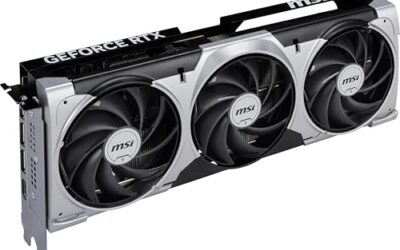
The MSI GeForce RTX 5060 Ti 8G Shadow 2X OC Plus is our first pick for a Ryzen 5 5600X owner who wants a faster 1080p gaming PC with DLSS. It was within a few dollars of a plain RTX 5060 in our price check, and its short cooler gives it a good chance of fitting an older case. If your monitor is 1440p and you’re buying for demanding single-player games, start with the XFX Swift Radeon RX 9060 XT 16GB instead.
These picks also apply to the Ryzen 5 5600. Both are six-core, 12-thread Zen 3 processors, and both need a discrete graphics card. The buying decision comes down to the games you play, the resolution you use and whether your case and power supply can take the card. If you already hit your frame-rate target in the games you care about, keep the card you have.


Pros
- Single 8-pin power and 550W PSU recommendation pairs easily with existing budget builds
- PCIe 4.0 x8 interface and HDMI 2.1 VR support current high-refresh 1080p and 1440p displays
- 0dB Silent mode stops fans under low load for quiet idle and light desktop use
Cons
- Limited owner fedback at time of writing makes long-term reliability hard to verify
- 8GB VRAM on a 128-bit bus can bottleneck 1440p ultra textures and heavy ray tracing workloads
- PCIe 4.0 x8 link reduces effective bandwidth on older PCIe 3.0 boards, costing measurable FPS
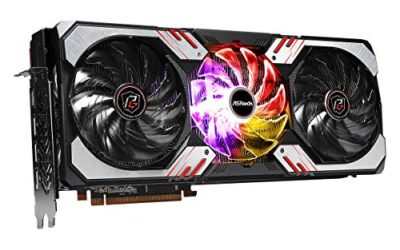
The ASRock RX 7600 Challenger 8GB OC is a budget RDNA 3 GPU aimed at 1080p gamers upgrading from RX 500, GTX 1060, or GTX 1660 classards. With 32 CUs, 2048 stream processors, and a 2695MHz boost clock, it slots into the mainstream tier for esports and 60to 120 FPS AA play.
The defining feature here is the pairing of a factory OC with a compact 2-slot, 269.2mm chassis and single 8-pin power. That combination targets high-refresh 1080p, where cards in this class typically deliver playable frame rates in modern raster titles with FSR enabled. Hardware ray tracing works but should be treated as situational at this tier.
Trade-offs are typical for the segment. 8GB of GDDR6 on a 128-bit bus at 18 Gbps limits headroom for 1440p ultra textures and future titles pushing larger VRAM budgets. The PCIe 4.0 x8 link also gives up measurable bandwidth on older PCIe 3.0 systems, which is worth checking against your motherboard generation before buying.
Buy this if you want a quiet, compact 1080p card with a single 8-pin and modest 550W PSU recommendation for an SF or budget mATX build. Skip this if you game at 1440p ultra, need heavy ray tracing, or plan to run VRAM-hungry productivity workloads.
Power and PSU pairing: ASRock recommends a 550W PSU with a single 8-pin PCIe connector. That sizing matches the RX 7600 class and leaves headroom for a Ryzen 5 or Core i5 CPU. No 12VHPWR adapter is need, which simplifies cable routing in budget builds.
Resolution and VRAM fit: 8GB GDDR6 on a 128-bit bus at 18 Gbps is sized for 1080p in current AA titles and 1440p in esports. Owner reports on RX 7600 class cards typically flag VRAM pressure once 1440p ultra textures and ray tracing are stacked together.
Clocks and architecture: Factory bost hits 2695MHz with a 2280MHz game clock on the RDNA 3 RX 7600 die. Real-world uplift over reference clocks is usually a few percent, and gains scale further with FSR 2 or FSR 3 frame generation in supported titles.
Build clearance and display output: Dimensions are 269.2 x 131.8 x 40.3mm, a 2-slot card that fits most mATX and mid-tower cases. Outputs cover 3x DisplayPort 1.4a with DSC and 1x HDMI 2.1 VRR, driving up to four displays and high-refresh 1440p or 4K panels.


Five GPUs for the Ryzen 5 5600X at a glance
| Pick | Graphics card | Video memory | Power connector | Main trade-off |
|---|---|---|---|---|
| Best for most 1080p upgrades | MSI RTX 5060 Ti Shadow 2X OC Plus | 8GB GDDR7 | 1 × 8-pin | Less room for heavy texture packs |
| Lowest-cost pick | ASRock RX 7600 Challenger OC | 8GB GDDR6 | 1 × 8-pin | Best suited to modest 1080p settings |
| Affordable 10GB alternative | Sparkle Arc B570 Guardian OC | 10GB GDDR6 | 1 × 8-pin | Confirm Resizable BAR first |
| Best fit for most 1440p upgrades | XFX Swift RX 9060 XT OC | 16GB GDDR6 | 1 × 8-pin | Costs more than the 1080p picks |
| Higher graphics settings at 1440p | XFX Swift RX 9070 OC | 16GB GDDR6 | 2 × 8-pin | Higher cost and a larger power supply |
MSI GeForce RTX 5060 Ti Shadow 2X OC Plus 8GB
Best for most 1080p upgrades. This is the card to consider if you play a mix of competitive games and newer single-player releases and want DLSS in the titles that offer it. The Shadow 2X is 226 mm long and 41 mm thick, with one eight-pin power input. MSI recommends a 600W system power supply for this model. Those measurements are useful if your AM4 build has a drive cage or front-mounted radiator eating into the space behind the GPU.
The important distinction is the 8GB of GDDR7. You’re buying the Ti chip, but you’ll still need to be selective about texture quality and ray tracing in some games. If you mostly play at 1080p, a high texture setting often makes more sense than turning every option up to its highest preset. For large texture mods or a move to 1440p, the 16GB Radeon is the better starting point.
The Ti makes particular sense when it’s priced close to a regular RTX 5060. If that gap widens and you mostly play lighter games, reconsider either the regular 5060 for DLSS or the cheaper RX 7600 for conventional rendering. If both GeForce cards cost substantially more than you have budgeted, there’s little reason to stretch just for a feature your games may never use.
ASRock Radeon RX 7600 Challenger 8GB OC
The lowest-cost pick here. Choose this dual-fan board when you want to get an older 1080p system back to enjoyable settings and put as little as possible into the upgrade. It has 8GB of GDDR6, measures about 269 mm long and takes one eight-pin PCIe power plug. ASRock recommends a 550W power supply. Despite its lower price, it’s longer than the MSI card, so measure before assuming it’ll fit.
The RX 7600 makes the most sense if you’re happy to dial back expensive effects. For a standard 1080p monitor and a library of multiplayer or older games, savings you can keep are worth more than unused graphics features. If your next purchase is a 1440p display or you want to keep big texture packs enabled, set some of that budget aside for a 16GB card instead.
The Challenger runs over a PCIe 4.0 x8 link. Older boards such as B450 can run the card at PCIe 3.0 speeds, so the slot may offer less bandwidth even though the card fits. That’s a reason to check results for your specific games if you’re shopping between two similarly priced options, especially if you already own a reasonable 8GB card.
Sparkle Intel Arc B570 Guardian OC 10GB
More memory near the lower end. The B570 is worth a look if you want more room for textures than an 8GB card provides and your AM4 motherboard supports Resizable BAR. This Sparkle board has 10GB of GDDR6, measures 242 mm long and uses a single eight-pin connection. Sparkle calls for a 600W or greater PSU, despite the card’s relatively short body.
The pre-purchase check matters more here than with the other cards. Intel lists Ryzen 5000 with an AMD 500-series motherboard and Smart Access Memory enabled among its supported configurations. Confirm the exact board and firmware. If you’re on a B450 or another older board, check its support page and BIOS options before treating the Arc as a candidate. If you can’t confirm ReBAR, the Radeon RX 7600 is a simpler choice.
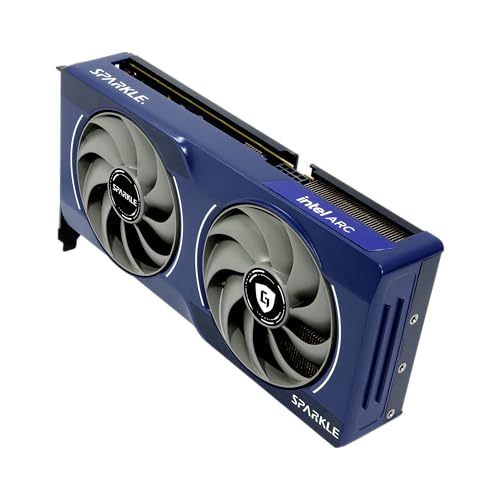
The B570 also supports AV1 hardware encoding and Intel XeSS upscaling where games include it. Those features can matter for recording and the titles you actually play. If your library leans on specific older games or mods, look up those games on Arc before buying. An extra 2GB of memory alone can’t tell you how a particular game will run.
XFX Swift Radeon RX 9060 XT OC 16GB
Our starting point for 1440p. The 16GB Swift is the step up when you want room for higher-quality textures but want to keep a modest power supply. The XFX board is 290 mm long, has a single eight-pin input and carries a 450W minimum PSU requirement. Its lower PSU requirement is one reason to favor it over the more expensive RX 9070 if replacing the power supply would turn a one-part upgrade into two.
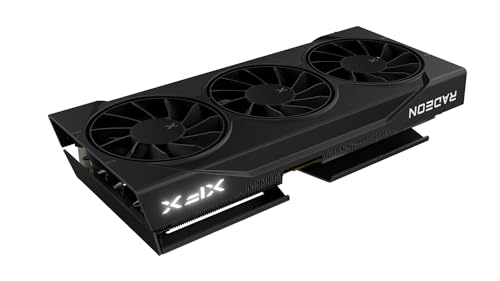
Double the memory of the 8GB picks gives bigger texture sets more breathing room. The benefit depends on the game and settings. A game that fits comfortably in 8GB won’t run twice as fast because you’ve doubled the memory. Look at the exact listing, too. Retailers sell both 8GB and 16GB RX 9060 XT cards, and the GPU name may appear before the memory amount.
We’d aim for this class of card if we wanted to move an existing 5600X system to 1440p without changing the rest of the build. If the price approaches that of an RX 9070, count the PSU cost first and then decide which board fits. If your play time mostly goes to competitive 1080p with settings turned down, the cheaper cards are a better use of the money.
XFX Swift Radeon RX 9070 OC 16GB
For demanding 1440p games. The RX 9070 has the same 16GB capacity as the 9060 XT and a wider 256-bit memory bus. XFX’s chosen model uses two eight-pin power connections and lists an 800W minimum PSU. It’s 290 mm long like the 9060 XT, but measures 150 mm high and 59 mm thick. Check the gap to the case panel and any card or bracket directly below it.
This is the pick for someone who spends most of their time in graphics-heavy games and wants more room for visual settings at 1440p. The price is harder to justify for low-settings competitive gaming. A faster GPU can render the requested frame sooner, but an already busy 5600X still needs time to update the game. If you’re chasing the best frame times in a crowded multiplayer match, leave room in your budget for a future CPU or platform upgrade.
Compare the total cost with the 9060 XT, including a power supply and case clearance. If the RX 9070 fits the system you already have and you’ll use the extra graphics performance, it’s the more ambitious pairing. If it forces a bigger rebuild, the 9060 XT makes it easier to keep AM4 economical.
How We Evaluated These GPUs
We compared desktop cards by intended resolution, memory capacity, case fit, board-specific power requirements and game features. We used AMD’s processor specifications, the board makers’ published dimensions and power figures, and Intel’s setup guidance for Arc. Our rankings reflect those trade-offs. They’re recommendations for an upgrade, so there’s no promised frame rate for a particular game.
In our November 25, 2026 U.S. retail check, the RX 7600 and B570 were below the MSI GeForce, and the two 16GB Radeons cost more. Treat that order as a snapshot. If a price jumps, compare the next tier and consider waiting. A card can be the best fit for your system at one price and poor value at another. Check what the upgrade would cost with tax, shipping and any extra hardware before treating it as a cheaper way to keep your AM4 system. These five listings were for new cards. With a used card, check the return terms and ask for evidence that it works before deciding how much the savings are worth.
How to choose a GPU for your Ryzen 5 5600X
What resolution and frame rate do you want?
Start with the games you play and the display you intend to keep. A 1080p monitor running at 60Hz and a 1440p monitor running at 165Hz call for different budgets. At the same aspect ratio, 1440p has about 78% more pixels to draw than 1080p. That raises the graphics workload even if the CPU is still tracking the same objects and players. If you’re choosing the display at the same time, see our 1080p and 1440p gaming comparison.
Is the graphics card holding you back?
Run a repeatable stretch of a game and compare it with a lower render resolution. Turn off frame generation and remove any frame cap for the comparison. If frame rates rise materially, the graphics card was likely doing a lot of the limiting. If frame rates stay similar and GPU utilization has room to spare, investigate the processor, engine limits and background activity before you spend. Look at frame times as well as averages. A busy scene that keeps hitching can spoil the experience even when the average looks fine. Our explanation of CPU limits in gaming covers the signs in more detail.
What does the existing system support?
Use the motherboard’s primary graphics slot and check its manual for link speed and lane sharing. AMD lists PCIe 4.0 graphics support for B550 and X570 with a compatible processor, while B450 and A520 are PCIe 3.0 platforms. Measure from the rear expansion slots to the nearest obstruction with your front fans or radiator in place. Then check the space alongside the card for the power lead and between expansion cards. Room for the plug and its bend, too.
Read the specific board maker’s PSU recommendation and count the connectors on the power supply you actually own. The wattage figure covers the system and varies by board. GPU power cables from modular PSUs should be the ones supplied with or approved for that exact power supply. If you need to replace it, compare the total cost including a compatible gaming PC power supply.
Frequently asked questions
Does the Ryzen 5 5600X have integrated graphics?
No. The Ryzen 5 5600X and plain Ryzen 5 5600 both require a discrete graphics card. The HDMI or DisplayPort on the motherboard won’t give you a picture with either CPU. After installing the GPU, connect the display cable to the graphics card’s outputs on the back of the PC.
Will a Ryzen 5 5600X bottleneck a modern GPU?
It can, especially at high frame rates in games with lots of simulation or player activity. The limit can move from the CPU to the GPU as resolution and effects go up. Frame generation can make motion look smoother in supported games by inserting frames, while the game’s simulation still updates at its own rate. A good reason to judge how the game feels before relying on the bigger frame-rate number.
Can I use the same GPU with the Ryzen 5 5600?
Yes. AMD rates the 5600 for up to 4.4 GHz boost and the 5600X for up to 4.6 GHz. Both share the same basic desktop platform and work with these picks given a compatible motherboard, case and power supply. A 5600 owner can follow the same shortlist and make the same resolution and budget decisions.
Bottom Line
For an existing 5600X gaming PC at 1080p, start with the MSI RTX 5060 Ti while it’s close to regular RTX 5060 pricing. If you’d rather save money, the ASRock RX 7600 is the cheaper route. The Sparkle B570 is worth comparing if you’ve confirmed ReBAR and want 10GB of memory. At 1440p, prioritize the RX 9060 XT 16GB, and step up to the RX 9070 if the games you play are graphics-heavy and the rest of the PC already supports it.
























Write Your Review
No reviews yet. Be the first to share your experience!