

Cutting the cord on a gaming headset used to mean laggy audio and constant recharging. Not anymore. Modern wireless gaming headsets run on low-latency 2.4GHz connections that feel as instant as a cable, with batteries that last dozens of hours. So the real question isn’t whether wireless can keep up, it’s whether the freedom is worth the price premium over a wired set. We researched what you gain, what you give up, and when the trade pays off.
For most players who value a clean desk and freedom to move, a good wireless headset is worth it, especially now that budget models nail the basics. Our roundups of the best wireless gaming headsets and the best gaming headsets overall dig deeper. Here’s the plain-English breakdown of whether wireless earns its keep.
The short answer
Yes, a wireless gaming headset is worth it for most players, thanks to low-latency 2.4GHz connections that eliminate the lag that plagued early wireless gear. You get freedom of movement, a tidy desk, and audio that keeps pace with fast games. The tradeoffs are a higher price and the need to recharge, but modern battery life makes the second one minor.
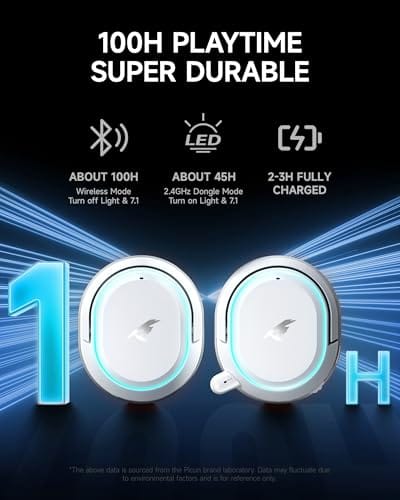
Budget models prove the point. The Picun G2 at $59.99 (4.5 stars) offers 2.4GHz and Bluetooth 5.4, a claimed 5ms ultra-low latency, 7.1 virtual surround, and a stated 100-hour battery, showing that low-lag wireless no longer costs a fortune.


Pros
- Three connection modes on a single headset: 2.4GHz dongle, Bluetooth 5.4, and 3.5mm wired fallback.
- Vendor-rated 5ms 2.4GHz latency keps audio synced in competitive shooter scenarios.
- Long rated runtime, up to 100 hours in Bluetooth with RGB disabled for travel use.
- RetractableENC microphone tucks away, useful when switching between gaming and general listening.
Cons
- Limited owner feedback at time of writing, real-world reliability and QC signal is unverified.
- 7.1 surround is virtual DSP, not true multi-driver, so positional accuracy varies by title andear.
- RGB lighting materially cuts battery life, cited100-hour figure requires lighting turned off.
The Picun G2 is a budget-tier wireless gaming headset built around 40mm drivers, virtual 7.1 surround, and tri-mode connectivity across2.4GHz, Bluetooth 5.4, and 3.5m wired. Target buyer is a multi-platform player rotating between PC, PS5, PS4, and Switch who wants low-latency wireless without moving up to established brand pricing.
The defining feature is the tri-mode radio stack. The 2.4GHz USB-A or Type-C dongle is rated at 5ms latency, which is competitive for the tier and adequate for most FPS titles, while Bluetooth 5.4 handles phones and tablets. Headsets in this class typically deliver serviceable rather than reference-grade imaging, and virtual 7.1 leans on DSP rather than discrete drivers.
Trade-offs are typical at this tier. Battery figures are optimistic: 100 hours assumes Bluetooth with RGB off, and 2.4GHz drops the number to 42 to 45 hours. Driver material, impedance, frequency response, clamp force, and weight are not specified, so tonal balance and long-session comfort cannot be verified from source data alone.
Buy this if you want one headset that jumps between a PS5, a Switch dock, and a work laptop over Bluetooth, and you accept spec-sheet-only marketing. Skip this if you rely on measured frequency response, discrete suround, or detachable bom mics with broadcast-grade pickup for streaming.
Drivers and tuning: Picun specifies 40mm dynamic drivers paired with virtual 7.1 surround processing. Impedance, sensitivity, and frequency response are not specified, so bass extension and treble air cannot be quantified from source. Virtual 7.1 is DSP-based positional widening, useful for FPS cues but not equivalent to true multi-driver surround.
Connectivity and latency: Three modes are covered: 2.4GHz via USB-A or USB-C dongle, Bluetooth 5.4, and 3.5mm analog. The 2.4GHz link is rated at 5ms latency. Bluetooth codec support (SBC, AAC, aptX) is not specified, which maters for wireless music quality on phones and tablets.
Battery and power: Rated up to 100 hours on Bluetooth with RGB off, and 42 to 45 hours on 2.4GHz wireless. Play-while-charging is supported, so a USB cable can extend sessions past the rated ceiling. Charge time and battery capacity in mAh are not specified.
Microphone: Retractable omnidirectional bom with ENC noise reduction. Sample rate, bit depth, and pickup pattern beyond omni are not specified.ENC filtering targets background noise on the transmit side, adequate for party chat but below dedicated USB mic quality.
The longer explanation
The word “wireless” hides two very different technologies, and the difference matters for gaming. A 2.4GHz connection using a USB dongle is built for low latency, so audio arrives fast enough that footsteps and gunfire line up with what’s on screen. Bluetooth, by contrast, adds more delay and suits phones and casual listening, not competitive play. The good headsets give you both and let you pick.
The Picun G2 illustrates this well, pairing a 2.4GHz mode with a claimed 5ms latency for gaming and Bluetooth 5.4 for phone use, plus a wired option as a fallback. That flexibility means one headset covers PC gaming, console play, and a mobile call without compromise. Its 7.1 virtual surround aims to place sounds around you, and an ENC noise-canceling mic keeps your voice clear on chat. For $59.99, that’s a lot of connectivity.
How it works
A 2.4GHz wireless headset ships with a small USB dongle that creates a dedicated radio link between the headset and your PC or console. Because that link is reserved for the headset, it dodges the congestion and pairing overhead that slows Bluetooth, delivering the near-instant audio competitive gaming needs. You plug the dongle in, power the headset on, and it connects, no app juggling required.
Battery is the other half of the equation. The headset runs off a rechargeable cell, and figures like the Picun’s stated 100 hours mean you charge it about once a week under normal use. Most modern sets also let you keep playing while charging over USB, so a low battery never ends your session. The mic uses ENC, environmental noise cancellation, to strip background sound from your voice before it reaches teammates.
Why it works this way
Gaming demands tight audio sync because you react to sound, a footstep behind you, a reload to your left. A dedicated 2.4GHz link exists precisely to keep that delay low, which is why serious wireless headsets use a dongle instead of relying on Bluetooth alone. The physics favor a reserved channel over a shared one, so the dongle wins for latency every time.
Battery-powered freedom is the reason wireless costs more than wired. You’re paying for the radio hardware, the battery, and the engineering to keep latency low, none of which a simple cable needs. That premium is the core of the “worth it” question, and for players who hate cable snag and want to lean back or step away, the answer is usually an easy yes.
Audio quality itself is largely decoupled from the wireless part, which trips people up. The drivers, the ear-cup design, and the tuning shape how a headset sounds, and a good wireless set can match a wired one at the same price bracket. What you’re really trading in going wireless is a little money and the small chore of charging, not sound fidelity. Once you accept that framing, the decision comes down to how much you value moving freely versus saving twenty or thirty dollars, and for a lot of players the freedom wins without much debate.
When you’d want a wireless gaming headset
Go wireless if you value a clean desk, freedom to move around the room, or a single headset that hops between PC, console, and phone. It’s ideal for living-room setups where you sit back from the screen, and for anyone tired of a cable dragging across the desk or catching on the chair. The convenience compounds the more you play.
Comfort and brand features factor in at the higher end. The Logitech G733 Lightspeed at $124.92 (4.0 stars) leans into a suspension headband for long sessions, Lightsync RGB, PRO-G audio drivers, and a Blue VO!CE mic for cleaner voice capture. It’s a lifestyle-and-comfort pick as much as a performance one, so if all-day wear and a polished mic matter to you, the step up from a budget set buys real refinement.

Pros
- Lightspeed wireless with 20 meter range handles typical living room and desk distances
- Up to 29 hours battery life covers multi-day use between charges
- Blue VO!CE mic processing in G HUB improves clarity for Discord and streaming
- Suspension headband and low mass design reduce clamp fatigue during long sessions
- Dual-zone Lightsync RGB with 16.8M colors is customizable through G HUB
Cons
- PS4 output limited to stereo, no suround on older PlayStation hardware
- Driver size, frequency response, and mic pattern not specified in source data
The Logitech G733 is a mid-tier wireless gaming headset targeting PC, PS5, PS4, and Nintendo Switch users who want a lightweight all-day fit. It leans on Lightspeed 2.4GHz wireless, PRO-G drivers, Blue VO!CE mic processing, and a reversible suspension headband, aimed at multi-hour gamers and streamers.
The defining feature is the combination of Lightspeed wireless with a quoted 20 meter range and up to 29 hours of battery. In practice this covers full workdays plus evening sessions without a charge cycle. PRO-G drivers, per Logitech, reduce distortion, and headsets in this tier typically deliver a mildly V-shaped tuning suited to positional FPS cues.
Trade-offs are typical at this price point. PS4 users are locked to stereo output with no virtual surround. Driver diameter, impedance, and frequency response are not published in the source data, so absolute output quality is hard to benchmark against wired competitors. There is no Bluetooth fallback listed, so mobile pairing is not supported.
Buy this if you want a light, long-battery 2.4GHz wireless headset for PC or PS5 with a usable broadcast-style mic. Skip this if you need wired low-latency USB, Bluetooth multipoint, or vendor-published driver and frequency response specs before purchase.
Drivers and tuning: Logitech lists PRO-G drivers tuned for reduced distortion, though exact driver diameter and frequency response are not specified in the source. Headsets in this tier typically ship with 40 to 50mm dynamic drivers and a mildly V-shaped response suited to explosions and footstep cues in FPS gameplay.
Connection and latency: Lightspeed 2.4GHz wireless with a stated 20 meter range covers desk and living room use. Compatibility is confirmed for PC, PS5, PS4 (stereo only), and Nintendo Switch. Bluetooth and wired 3.5mm fallback are not listed in the source, so single-dongle 2.4GHz is the only documented path.
Battery life: Rated up to 29 hours per charge, enough for roughly three to four full evening sessions before recharging. Exact charge time and USB-C versus micro-USB charging port are not specified in the source data.
Microphone: Detachable mic with Blue VO!CE filters configured in G HUB, providing EQ, noise reduction, and de-eser presets useful for Discord and Twitch chat. Mic polar pattern, sensitivity, and frequency range are not disclosed in the source specifications.
What to look for in a wireless gaming headset
Prioritize the connection type. A 2.4GHz dongle is what makes wireless viable for gaming, so make sure the headset has one, and treat Bluetooth as a bonus for phone use rather than the main mode. Then weigh battery life, since a set rated for 40-plus hours means less charging anxiety, and mic quality, where ENC or a branded mic like Blue VO!CE keeps your chat clear.
Comfort and compatibility round it out. A suspension or well-padded headband matters for long sessions, and you’ll want confirmed support for your platforms, PC, PS5, PS4, Switch. Virtual surround like 7.1 can help with directional audio, though a good stereo image often matters more than the surround label. Match the features to how you actually play.
Common misconceptions
The oldest myth is that wireless headsets lag too much for competitive gaming. That was true years ago, but a modern 2.4GHz link runs low enough that most players can’t tell it from wired. Another misconception is that Bluetooth and 2.4GHz are the same, when Bluetooth adds noticeable delay and 2.4GHz is the one built for gaming. Confusing the two leads to disappointment.
People also overestimate the charging hassle. With batteries rated for 40 to 100 hours and charge-while-playing support, a dead headset mid-match is rare if you charge occasionally. And pricier doesn’t always mean better audio, sometimes you’re paying for RGB and brand polish, so match the spend to the features you’ll actually use rather than the flashiest listing.
One more myth is that you need the dongle plugged into a rear port or a specific spot for it to work. In practice any free USB port does the job, and a short extension can move the dongle closer if walls or a metal desk weaken the signal. People also assume wireless means worse mic quality, when a dedicated gaming headset’s mic runs over the same low-latency link as the audio and features like ENC or Blue VO!CE keep your voice clean. The wireless part rarely compromises the microphone the way old Bluetooth headsets did.
Frequently asked
Do wireless gaming headsets have lag?
Over a 2.4GHz dongle, the lag is minimal, often around 5ms as claimed on sets like the Picun G2, low enough that most players can’t distinguish it from wired. Bluetooth is a different story and does add noticeable delay, which is why it’s meant for phone use rather than competitive gaming.
How long do the batteries last?
It varies widely by model, from around 20 hours on some sets to a stated 100 hours on the Picun G2. Many headsets also let you play while charging over USB, so even a low battery doesn’t force you to stop. Charging once a week is typical for heavy use.
Is 2.4GHz better than Bluetooth for gaming?
Yes. A 2.4GHz dongle creates a dedicated low-latency link built for gaming, while Bluetooth adds delay that can throw off audio timing in fast games. The best headsets offer both, using 2.4GHz for gaming and Bluetooth for phone calls or casual listening. Prioritize a set with the dongle.
Are wireless headsets worth the higher price?
For players who value freedom of movement and a clean desk, yes. You pay a premium for the radio hardware and battery, but budget models like the $59.99 Picun G2 have narrowed the gap. If you never move from your desk and want to save money, a wired set still delivers great audio for less.
Can one headset work on PC and console?
Many do. Sets like the Picun G2 and Logitech G733 list support for PC, PS5, PS4, and Switch, usually through the 2.4GHz dongle. Check the compatibility list before buying, since some features or the dongle connection may differ by platform, but multi-device support is common in current headsets.

































Write Your Review
No reviews yet. Be the first to share your experience!