

A budget gaming headset can be perfectly good, or it can make every teammate sound like they’re calling from a cereal box. The hard part is knowing where cheap becomes too cheap. For most PC and console players, the useful budget range starts around $50 and stretches to about $125, because that’s where wireless stability, mic quality, comfort, and battery life stop feeling compromised. If you’re comparing actual picks, our guide to the best budget gaming headsets of 2026 is the broader roundup, while competitive players should also read the best budget gaming headsets for competitive gaming.
The goal isn’t to buy the most expensive headset you can justify. It’s to avoid paying for features you won’t use while still getting the basics right: low latency, a mic that doesn’t wreck voice chat, enough comfort for two-hour sessions, and battery life that won’t quit mid-match. We researched two real examples, the $59.99 Picun G2 and the $124.92 Logitech G733 Lightspeed, to show what extra money buys.
The short answer
Most gamers need a budget headset in the $60 to $125 range. Below that, you usually give up wireless reliability, mic clarity, or build quality. Above that, the gains are smaller unless you care about premium software, stronger tuning, or a lighter suspension design. A $60 headset can absolutely be enough if it gets latency and comfort right.
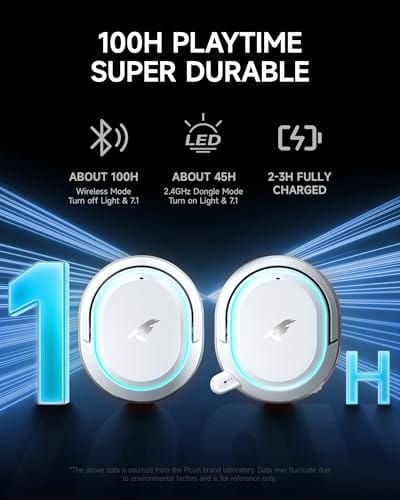
The Picun G2 below is a good example of why the lower end has improved. At $59.99 with a 4.5 rating, it offers 2.4GHz wireless, Bluetooth 5.4, wired mode, 5ms advertised latency, 100-hour battery life, 7.1 virtual surround, an ENC noise-canceling mic, and PC, PS5, PS4, and Switch support. That’s a lot of actual utility for the money, not just RGB pasted onto cheap plastic.

Pros
- Three connection modes on a single headset: 2.4GHz dongle, Bluetooth 5.4, and 3.5mm wired fallback.
- Vendor-rated 5ms 2.4GHz latency keps audio synced in competitive shooter scenarios.
- Long rated runtime, up to 100 hours in Bluetooth with RGB disabled for travel use.
- RetractableENC microphone tucks away, useful when switching between gaming and general listening.
Cons
- Limited owner feedback at time of writing, real-world reliability and QC signal is unverified.
- 7.1 surround is virtual DSP, not true multi-driver, so positional accuracy varies by title andear.
- RGB lighting materially cuts battery life, cited100-hour figure requires lighting turned off.
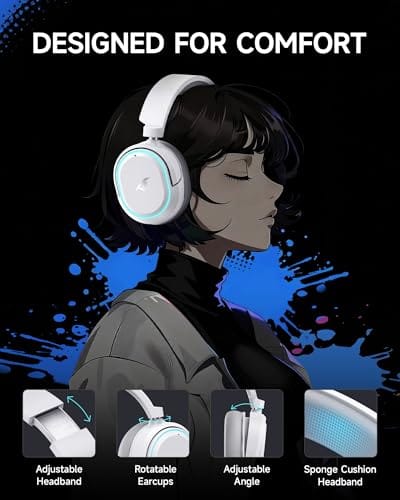
The Picun G2 is a budget-tier wireless gaming headset built around 40mm drivers, virtual 7.1 surround, and tri-mode connectivity across2.4GHz, Bluetooth 5.4, and 3.5m wired. Target buyer is a multi-platform player rotating between PC, PS5, PS4, and Switch who wants low-latency wireless without moving up to established brand pricing.
The defining feature is the tri-mode radio stack. The 2.4GHz USB-A or Type-C dongle is rated at 5ms latency, which is competitive for the tier and adequate for most FPS titles, while Bluetooth 5.4 handles phones and tablets. Headsets in this class typically deliver serviceable rather than reference-grade imaging, and virtual 7.1 leans on DSP rather than discrete drivers.
Trade-offs are typical at this tier. Battery figures are optimistic: 100 hours assumes Bluetooth with RGB off, and 2.4GHz drops the number to 42 to 45 hours. Driver material, impedance, frequency response, clamp force, and weight are not specified, so tonal balance and long-session comfort cannot be verified from source data alone.
Buy this if you want one headset that jumps between a PS5, a Switch dock, and a work laptop over Bluetooth, and you accept spec-sheet-only marketing. Skip this if you rely on measured frequency response, discrete suround, or detachable bom mics with broadcast-grade pickup for streaming.
Drivers and tuning: Picun specifies 40mm dynamic drivers paired with virtual 7.1 surround processing. Impedance, sensitivity, and frequency response are not specified, so bass extension and treble air cannot be quantified from source. Virtual 7.1 is DSP-based positional widening, useful for FPS cues but not equivalent to true multi-driver surround.
Connectivity and latency: Three modes are covered: 2.4GHz via USB-A or USB-C dongle, Bluetooth 5.4, and 3.5mm analog. The 2.4GHz link is rated at 5ms latency. Bluetooth codec support (SBC, AAC, aptX) is not specified, which maters for wireless music quality on phones and tablets.
Battery and power: Rated up to 100 hours on Bluetooth with RGB off, and 42 to 45 hours on 2.4GHz wireless. Play-while-charging is supported, so a USB cable can extend sessions past the rated ceiling. Charge time and battery capacity in mAh are not specified.
Microphone: Retractable omnidirectional bom with ENC noise reduction. Sample rate, bit depth, and pickup pattern beyond omni are not specified.ENC filtering targets background noise on the transmit side, adequate for party chat but below dedicated USB mic quality.
The longer explanation
A gaming headset is really three devices strapped together: headphones, microphone, and wireless adapter. Saving money on one can wreck the whole experience. If the drivers sound muddy, footsteps blur. If the mic clips or hisses, your squad complains. If the wireless link has delay, shooters feel disconnected. That’s why specs like 2.4GHz wireless and low latency matter more than a giant “surround” logo on the box.
Comfort matters just as much because headsets fail slowly. A headset can sound fine for 20 minutes and become unbearable by hour two if the clamp force is too high or the headband creates a hot spot. Suspension headbands, lighter frames, and breathable pads aren’t luxuries if you play often. They’re the reason you keep wearing the thing. Small pressure points become big annoyances fast.
Then there’s the software layer people forget to price in. A cheaper headset might sound rough out of the box but improve dramatically with an EQ preset, mic gate, or sidetone toggle in its companion app. A pricier model like the G733 leans on Logitech’s software for Blue VO!CE mic shaping and surround tuning, which adds real value if you actually open the app and dial things in. If you’re the type who never touches settings, some of that premium goes unused, and a well-tuned budget headset closes the gap. Know your own habits before you pay for features you’ll ignore.
History / how we got here
Budget gaming audio used to mean wired plastic headsets with scratchy mics and bloated bass. Wireless was expensive, latency was obvious, and cross-platform support was messy. Over the last few years, cheap 2.4GHz dongles and better Bluetooth chips changed that. Now a $60 headset can ship with low-latency wireless and a claimed 100-hour battery, which would have sounded premium not long ago.
At the same time, established brands like Logitech G moved premium comfort features downmarket. The G733 Lightspeed isn’t the cheapest option at $124.92, but it brings a suspension headband, Lightspeed wireless, Lightsync RGB, Blue VO!CE mic processing, and PRO-G audio in a headset that works with PC, PS5, PS4, and Switch. That’s the upper-budget tier: more polish, better software, and a lighter feel.
Why it works this way
The biggest divider is wireless technology. Bluetooth is fine for music and phone calls, but standard Bluetooth can add enough delay to feel off in games. A 2.4GHz dongle lowers latency and keeps the headset synced to the action. That’s why many gaming headsets include both: 2.4GHz for play, Bluetooth for casual use, and wired mode as a fallback. Flexibility matters when you jump between PC, PS5, and Switch.
Microphone processing is the second divider. ENC noise cancellation reduces background keyboard taps and fan noise before your voice reaches chat, while software like Logitech’s Blue VO!CE gives more control over tone and filtering. You don’t need studio quality for Discord, but you do need speech that stays intelligible during a firefight. Clear comms win rounds. Fancy bass does not.
When you’d want this
A budget headset makes sense if you play online regularly, share a room, or switch between PC and console. Speakers are fun, but a headset gives positional cues and a private mic channel without waking the house. For casual gamers, the Picun G2’s 100-hour battery and triple connection modes make it easy to recommend: charge rarely, connect almost anywhere, and keep latency low with the 2.4GHz link.
You’d spend more within the budget tier if comfort and mic polish are priorities. The Logitech G733 Lightspeed at $124.92 with a 4.0 rating adds the suspension headband, Lightspeed wireless, Lightsync RGB, Blue VO!CE mic features, and PRO-G audio. It’s not a pure bargain next to the Picun, but if you wear a headset every night, the lighter-feeling headband and software mic control can be worth the jump.

Pros
- Lightspeed wireless with 20 meter range handles typical living room and desk distances
- Up to 29 hours battery life covers multi-day use between charges
- Blue VO!CE mic processing in G HUB improves clarity for Discord and streaming
- Suspension headband and low mass design reduce clamp fatigue during long sessions
- Dual-zone Lightsync RGB with 16.8M colors is customizable through G HUB
Cons
- PS4 output limited to stereo, no suround on older PlayStation hardware
- Driver size, frequency response, and mic pattern not specified in source data
The Logitech G733 is a mid-tier wireless gaming headset targeting PC, PS5, PS4, and Nintendo Switch users who want a lightweight all-day fit. It leans on Lightspeed 2.4GHz wireless, PRO-G drivers, Blue VO!CE mic processing, and a reversible suspension headband, aimed at multi-hour gamers and streamers.
The defining feature is the combination of Lightspeed wireless with a quoted 20 meter range and up to 29 hours of battery. In practice this covers full workdays plus evening sessions without a charge cycle. PRO-G drivers, per Logitech, reduce distortion, and headsets in this tier typically deliver a mildly V-shaped tuning suited to positional FPS cues.
Trade-offs are typical at this price point. PS4 users are locked to stereo output with no virtual surround. Driver diameter, impedance, and frequency response are not published in the source data, so absolute output quality is hard to benchmark against wired competitors. There is no Bluetooth fallback listed, so mobile pairing is not supported.
Buy this if you want a light, long-battery 2.4GHz wireless headset for PC or PS5 with a usable broadcast-style mic. Skip this if you need wired low-latency USB, Bluetooth multipoint, or vendor-published driver and frequency response specs before purchase.
Drivers and tuning: Logitech lists PRO-G drivers tuned for reduced distortion, though exact driver diameter and frequency response are not specified in the source. Headsets in this tier typically ship with 40 to 50mm dynamic drivers and a mildly V-shaped response suited to explosions and footstep cues in FPS gameplay.
Connection and latency: Lightspeed 2.4GHz wireless with a stated 20 meter range covers desk and living room use. Compatibility is confirmed for PC, PS5, PS4 (stereo only), and Nintendo Switch. Bluetooth and wired 3.5mm fallback are not listed in the source, so single-dongle 2.4GHz is the only documented path.
Battery life: Rated up to 29 hours per charge, enough for roughly three to four full evening sessions before recharging. Exact charge time and USB-C versus micro-USB charging port are not specified in the source data.
Microphone: Detachable mic with Blue VO!CE filters configured in G HUB, providing EQ, noise reduction, and de-eser presets useful for Discord and Twitch chat. Mic polar pattern, sensitivity, and frequency range are not disclosed in the source specifications.
What to look for in a budget gaming headset
Prioritize low-latency 2.4GHz wireless, not just Bluetooth. If a headset offers both, better. Check claimed battery life, but treat it as a rough guide since RGB and volume level change real runtime. The Picun’s 100-hour claim is unusually high for the price, while the Logitech focuses more on software and comfort. Either way, a headset that dies after one evening is annoying, so battery life matters.
Next, look at mic features and platform support. ENC noise cancellation, removable or flip-to-mute mics, and software presets all help. Make sure the headset supports your actual platforms, because USB dongles don’t always work equally across PC, PlayStation, Switch, and Xbox. And don’t ignore weight and headband style. A suspension band usually spreads pressure better than a rigid padded strip. Your scalp will notice.
Common misconceptions
The first myth is that 7.1 virtual surround automatically makes you better. It doesn’t. Virtual surround can widen the soundstage, but poor tuning can smear positional audio. Good stereo with clear imaging often beats messy surround. Use the mode that helps you locate footsteps accurately, not the one with the loudest marketing label.
The second myth is that wireless is always laggy. Old Bluetooth headsets were, but modern 2.4GHz gaming links are fast enough for shooters. The Picun’s advertised 5ms latency is the kind of spec budget buyers should look for, while Logitech’s Lightspeed brand is built around low-latency wireless. Wired still removes battery concerns, but it’s no longer the only serious option.
A third misconception is that expensive drivers automatically sound better. Driver size and material get marketed hard, but tuning matters more than raw specs. A well-tuned 40mm driver in a budget headset can sound clearer than a poorly voiced 50mm driver in a pricier one. That’s why owner ratings and reviews beat spec-sheet numbers when judging audio. Trust how a headset actually sounds to real users over the size printed on the box.
Frequently asked
Is a $60 gaming headset enough?
Yes, if it has low-latency 2.4GHz wireless, decent mic processing, and comfort that works for your head. The Picun G2 shows how much you can get at $59.99: 2.4GHz, Bluetooth 5.4, wired mode, 100-hour battery, and ENC mic support. You won’t get the polish of pricier models, but for casual and mainstream gaming, it’s enough.
Why pay more for the Logitech G733?
You pay for comfort, software, and brand ecosystem. The G733 adds a suspension headband, Lightspeed wireless, Lightsync RGB, Blue VO!CE mic controls, and PRO-G audio. Those features matter if you wear a headset for long sessions or stream regularly. If you just need basic chat and game audio, the cheaper Picun may be the better value.
Do I need Bluetooth on a gaming headset?
Bluetooth is useful, but not essential for gaming. Use 2.4GHz wireless for low-latency play and Bluetooth for phones, tablets, or casual Switch use. A headset with both gives you flexibility. If you only play on PC at a desk, a USB dongle is the more important connection.
Is a noise-canceling mic worth it?
Yes, especially if you use a mechanical keyboard, sit near a fan, or share a room. ENC noise cancellation helps remove background sound before it reaches voice chat. It won’t turn a budget mic into a studio mic, but it keeps teammates from hearing every click and hum. For online games, that’s a meaningful quality upgrade.
Should I buy a headset or separate headphones and mic?
Separate headphones and a mic can sound better, but they cost more and add desk clutter. A budget headset is simpler, portable, and works across PC and consoles with fewer cables. If you stream or record often, separates may be worth it. For most players, a good budget headset is the cleaner choice.

































Write Your Review
No reviews yet. Be the first to share your experience!