

A headset stand is one of those accessories people can’t decide is essential or pointless. It’s a small post or hook that holds your headset when you’re not wearing it, usually parked on your desk. Twenty-ish dollars for a thing that does, on paper, what the edge of your monitor already does for free. So the fair question is what it actually buys you.
Short version: it’s a modest quality-of-life upgrade that protects a pricey headset and tidies your desk, and for some setups it does a bit more. Let’s walk through what it does, when it’s worth it, and when you can skip it. If you’re shopping the gear itself, our picks for the best headset stands of 2026 and the best gaming headsets pair well with this explainer.
The short answer
A headset stand is worth it if you own a headset you care about and want it off your desk surface, off the floor, and in a consistent spot. It protects the headband and ear cushions from getting crushed or knocked around, keeps cables from tangling, and frees up desk space. For a $60 to $130 headset, a $20 stand is cheap insurance and a real tidiness win.
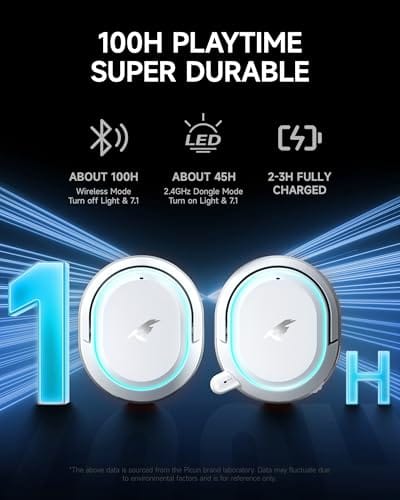
It’s not a performance upgrade, though. A basic stand won’t change how your headset sounds. Some do add features like a USB hub or RGB, but the core value is protection and organization. If you own something like the Picun G2 Wireless Gaming Headset, a $59.99 over-ear model with 7.1 virtual surround and a 100-hour battery, a stand gives that headset a proper home so the headband and mic stay in shape between sessions.


Pros
- Three connection modes on a single headset: 2.4GHz dongle, Bluetooth 5.4, and 3.5mm wired fallback.
- Vendor-rated 5ms 2.4GHz latency keps audio synced in competitive shooter scenarios.
- Long rated runtime, up to 100 hours in Bluetooth with RGB disabled for travel use.
- RetractableENC microphone tucks away, useful when switching between gaming and general listening.
Cons
- Limited owner feedback at time of writing, real-world reliability and QC signal is unverified.
- 7.1 surround is virtual DSP, not true multi-driver, so positional accuracy varies by title andear.
- RGB lighting materially cuts battery life, cited100-hour figure requires lighting turned off.
The Picun G2 is a budget-tier wireless gaming headset built around 40mm drivers, virtual 7.1 surround, and tri-mode connectivity across2.4GHz, Bluetooth 5.4, and 3.5m wired. Target buyer is a multi-platform player rotating between PC, PS5, PS4, and Switch who wants low-latency wireless without moving up to established brand pricing.
The defining feature is the tri-mode radio stack. The 2.4GHz USB-A or Type-C dongle is rated at 5ms latency, which is competitive for the tier and adequate for most FPS titles, while Bluetooth 5.4 handles phones and tablets. Headsets in this class typically deliver serviceable rather than reference-grade imaging, and virtual 7.1 leans on DSP rather than discrete drivers.
Trade-offs are typical at this tier. Battery figures are optimistic: 100 hours assumes Bluetooth with RGB off, and 2.4GHz drops the number to 42 to 45 hours. Driver material, impedance, frequency response, clamp force, and weight are not specified, so tonal balance and long-session comfort cannot be verified from source data alone.
Buy this if you want one headset that jumps between a PS5, a Switch dock, and a work laptop over Bluetooth, and you accept spec-sheet-only marketing. Skip this if you rely on measured frequency response, discrete suround, or detachable bom mics with broadcast-grade pickup for streaming.
Drivers and tuning: Picun specifies 40mm dynamic drivers paired with virtual 7.1 surround processing. Impedance, sensitivity, and frequency response are not specified, so bass extension and treble air cannot be quantified from source. Virtual 7.1 is DSP-based positional widening, useful for FPS cues but not equivalent to true multi-driver surround.
Connectivity and latency: Three modes are covered: 2.4GHz via USB-A or USB-C dongle, Bluetooth 5.4, and 3.5mm analog. The 2.4GHz link is rated at 5ms latency. Bluetooth codec support (SBC, AAC, aptX) is not specified, which maters for wireless music quality on phones and tablets.
Battery and power: Rated up to 100 hours on Bluetooth with RGB off, and 42 to 45 hours on 2.4GHz wireless. Play-while-charging is supported, so a USB cable can extend sessions past the rated ceiling. Charge time and battery capacity in mAh are not specified.
Microphone: Retractable omnidirectional bom with ENC noise reduction. Sample rate, bit depth, and pickup pattern beyond omni are not specified.ENC filtering targets background noise on the transmit side, adequate for party chat but below dedicated USB mic quality.
The longer explanation
The case for a stand comes down to how headsets fail over time. Draping a headset over a monitor corner or hook stresses one point on the headband and can warp the padding. Leaving it flat on the desk exposes the cushions to spills, crumbs, and the odd elbow. Over months, that adds up to a squashed headband, cracked foam, or a bent mic boom. A stand spreads the weight across a curved cradle shaped for the headband, which is gentler on the exact parts that wear first.
There’s a workflow benefit too. When your headset always lives in the same place, you’re not hunting for it or untangling a cable every session. For wireless models you can route the charging cable to the stand so it’s ready to grab. Small things, but they’re the kind of friction that a $20 accessory quietly removes. That’s really the pitch: not a dramatic upgrade, just fewer daily annoyances and a headset that ages better.
Desk space is the underrated part. A headset laid flat eats a surprising footprint, and it’s always in the way of your mouse or your coffee. Lifting it onto a vertical stand reclaims that area and gives the desk a cleaner look, which matters more than it sounds if you work or stream on camera. For anyone with a tight setup, that reclaimed real estate alone can justify the small cost, before you even count the protection.
How it works
Most stands are dead simple. A weighted base keeps them from tipping, a vertical post rises off it, and a curved yoke at the top cradles the headband. The curve matters, since a wide, smooth arc distributes the headset’s weight instead of concentrating it on one spot the way a thin hook does. That’s the whole mechanical trick, and it’s why even a cheap stand beats a monitor corner for storage.
Fancier stands layer features on top of that base. Some build in a powered USB hub so you can plug in a wireless dongle or charge devices. Others add RGB lighting to match a build, or a metal frame for stability with heavier headsets. None of that changes the core job. The stand holds the headset gently and keeps it in reach. Everything else is a bonus you pay extra for.
Why it works this way
Headsets are built to sit on a curved surface, your head, so a curved cradle mirrors that shape and avoids new stress points. Hang one on a narrow hook and all the weight pulls down through a single contact patch on the headband, which is exactly where foam and plastic give out first. The stand’s wide arc is a deliberate answer to that failure mode.
The weighted base exists for a related reason. Headsets aren’t heavy, but their cables and your accidental nudges create sideways force, and a light stand would topple. Adding mass down low keeps the whole thing planted. It’s basic physics applied to a small problem, and once you see why the shape is what it is, the design stops looking like overkill for holding a headset.
When you’d want this
You’d want a stand if your headset cost real money, if your desk is cluttered, or if you switch between headphones and a headset and need somewhere to park the one you’re not using. Streamers and people on a lot of calls benefit most, since the headset comes on and off constantly and a fixed home saves fumbling. If you’ve got RGB in your setup, a lit stand also pulls double duty as decor. Even for a single daily-driver headset, having one consistent spot to hang it means it’s never buried under papers or knocked to the floor.
You’d want one even more with a premium wireless model, because those carry a charging cable that begs to be routed neatly and a mic that’s easy to bend if the headset gets tossed on the desk. Take the Logitech G733 Lightspeed Wireless Gaming Headset at $124.92, a suspension-headband model with Lightsync RGB and a Blue VO!CE mic. That’s exactly the kind of headset a stand protects best, keeping the flexible headband and boom mic in shape while giving the whole thing a tidy resting spot.

Pros
- Lightspeed wireless with 20 meter range handles typical living room and desk distances
- Up to 29 hours battery life covers multi-day use between charges
- Blue VO!CE mic processing in G HUB improves clarity for Discord and streaming
- Suspension headband and low mass design reduce clamp fatigue during long sessions
- Dual-zone Lightsync RGB with 16.8M colors is customizable through G HUB
Cons
- PS4 output limited to stereo, no suround on older PlayStation hardware
- Driver size, frequency response, and mic pattern not specified in source data
The Logitech G733 is a mid-tier wireless gaming headset targeting PC, PS5, PS4, and Nintendo Switch users who want a lightweight all-day fit. It leans on Lightspeed 2.4GHz wireless, PRO-G drivers, Blue VO!CE mic processing, and a reversible suspension headband, aimed at multi-hour gamers and streamers.
The defining feature is the combination of Lightspeed wireless with a quoted 20 meter range and up to 29 hours of battery. In practice this covers full workdays plus evening sessions without a charge cycle. PRO-G drivers, per Logitech, reduce distortion, and headsets in this tier typically deliver a mildly V-shaped tuning suited to positional FPS cues.
Trade-offs are typical at this price point. PS4 users are locked to stereo output with no virtual surround. Driver diameter, impedance, and frequency response are not published in the source data, so absolute output quality is hard to benchmark against wired competitors. There is no Bluetooth fallback listed, so mobile pairing is not supported.
Buy this if you want a light, long-battery 2.4GHz wireless headset for PC or PS5 with a usable broadcast-style mic. Skip this if you need wired low-latency USB, Bluetooth multipoint, or vendor-published driver and frequency response specs before purchase.
Drivers and tuning: Logitech lists PRO-G drivers tuned for reduced distortion, though exact driver diameter and frequency response are not specified in the source. Headsets in this tier typically ship with 40 to 50mm dynamic drivers and a mildly V-shaped response suited to explosions and footstep cues in FPS gameplay.
Connection and latency: Lightspeed 2.4GHz wireless with a stated 20 meter range covers desk and living room use. Compatibility is confirmed for PC, PS5, PS4 (stereo only), and Nintendo Switch. Bluetooth and wired 3.5mm fallback are not listed in the source, so single-dongle 2.4GHz is the only documented path.
Battery life: Rated up to 29 hours per charge, enough for roughly three to four full evening sessions before recharging. Exact charge time and USB-C versus micro-USB charging port are not specified in the source data.
Microphone: Detachable mic with Blue VO!CE filters configured in G HUB, providing EQ, noise reduction, and de-eser presets useful for Discord and Twitch chat. Mic polar pattern, sensitivity, and frequency range are not disclosed in the source specifications.
What to look for in a headset stand
Start with the base. It should be heavy or wide enough that a tug on the cable won’t tip it, and the footprint should fit the desk space you’ve got. A rubberized bottom keeps it from sliding. Then check the cradle width. A broad, smooth curve is kinder to the headband than a narrow arm, so avoid stands that look like a coat hook.
Decide which extras you actually need. A powered USB hub is genuinely useful if you run a wireless dongle or charge phones at your desk, but it costs more and needs its own power. RGB is pure preference. Material matters for heavier headsets, where a metal frame stays stable where plastic might flex. Match the stand’s features to your headset’s weight and your desk, and don’t overpay for lighting you won’t care about.
Common misconceptions
The biggest myth is that a stand improves sound or performance. It doesn’t. It’s a storage accessory, and any listing implying otherwise is stretching. Your audio comes from the headset and its software, not from where it rests between sessions. Buy a stand for protection and tidiness, not frames or bass.
Another misconception is that stands with a USB passthrough boost your connection or charge faster than a wall plug. A passthrough hub is a convenience, routing the same power and data your motherboard already provides, not an upgrade to either. And the idea that any hook does the same job ignores the headband-warping problem. A shaped cradle really is gentler on the parts that wear, even if a hook technically holds the weight.
Frequently asked
Does a headset stand improve sound quality?
No. A stand only stores your headset. Sound comes from the drivers, the tuning, and any software EQ, none of which a stand touches. Its value is protecting the headband and cushions and keeping your desk tidy, not changing audio.
Is a stand necessary for a cheap headset?
Necessary, no. Nice, maybe. On a $30 headset the protection matters less, so a stand is more about desk tidiness than saving the gear. On a $60-plus model like the Picun G2, the case for guarding the padding and mic gets stronger.
Do I need a stand with a USB hub?
Only if you’ll use the ports. A powered hub is handy for a wireless dongle or charging devices, but it adds cost and needs a power connection. If you don’t need extra USB at your desk, a simpler stand does the core job for less.
Will a stand fix a headband that’s already stretched?
No, it’s preventive, not corrective. A stand keeps a healthy headband from warping by cradling it evenly. Once foam is cracked or the band is permanently bent, a stand can’t reverse it, though it’ll keep the damage from getting worse.
Can I just use a hook instead?
You can, and it holds the weight, but a thin hook concentrates stress on one spot of the headband where padding fails first. A shaped cradle spreads that load. If you care about a pricey headset lasting, the stand’s curve is the safer choice.

































Write Your Review
No reviews yet. Be the first to share your experience!