A great podcast lives or dies on vocal clarity. Listeners forgive shaky video. They won’t forgive thin, echo-laden audio. The good news: USB mics have caught up to studio gear over the past few years. You can grab a broadcast-grade signal for under $150 with no interface, no XLR cable, no preamp learning curve.
We compared five USB mics that podcasters actually use. Here’s the lineup.

Pros
- Dual USB/XLR output gives a clear upgrade path to an audio interface without replacing the mic.
- Cardioid dynamic pattern handles untreated rooms better than condenser mics at this price tier.
- Hardware mute is software-independent, reliable during live streams where OS audio panels can lag.
- Headphone jack with monitoring volume control provides real-time feedback, useful for catching gain issues mid-session.
Cons
- RGB lighting and all front-panel controls are inactive over XLR, limiting hardware convenience once you upgrade your chain.
- 50Hz-16kHz frequency ceiling is narrower than condenser alternatives; vocalists needing extended high-frequency air will notice the roll-off.
The FIFINE AmpliGame AM8 is a mid-range desktop dynamic microphone targeting beginner-to-intermediate PC streamers, podcasters, and home recording vocalists who want a single mic that works via USB today and scales to XLR with an audio interface later. Its cardioid dynamic capsule and 50Hz-16kHz response position it for voice-primary use rather than instrument recording.
The standout feature is genuine dual-connection utility. USB mode activates all onboard controls including gain knob, tap-to-mute, headphone monitoring, and RGB, making setup frictionless for OBS or Discord users. XLR mode hands full control to the downstream interface or mixer, which is the correct architecture for anyone serious about signal chain quality. Based on owner reports, USB audio quality holds up well for streaming and podcast work at typical recording distances of two to six inches.
The 50Hz-16kHz frequency response is the honest ceiling here. Dynamic mics in this tier trade extended frequency range for noise rejection, which suits streaming rooms that are not acoustically treated. Condenser mics at a comparable price will capture more air and presence, but they will also capture every keyboard click, HVAC hum, and mouse movement in the process. RGB lighting and all function keys go dark over XLR, so you lose hardware mute convenience the moment you upgrade your chain.
Buy this if you are a new streamer or podcaster working in an untreated room who wants USB simplicity now and a credible XLR path later. Skip this if you record vocals for music production where extended high-frequency response and condenser detail matter more than ambient noise rejection.
Connectivity: The AM8 outputs via USB or XLR, with only one connection active at a time. USB connects directly to PC, Mac, or the rear USB-A port of a PS5. XLR requires a separate cable and audio interface or mixer, neither of which are included. All onboard controls are inactive over XLR.
Acoustic Performance: The dynamic capsule covers 50Hz-16kHz at a cardioid polar pattern. This range captures the full vocal fundamental and most upper harmonics for speech, but rolls off before the 20kHz ceiling of condenser mics. Recommended recording distance is two to six inches from the top of the mic for best signal-to-noise.
Onboard Controls (USB only): Controls include a mic gain knob, tap-to-mute button with LED indicator, headphone monitoring jack with independent volume knob, and an RGB button cycling three lighting modes across more than ten color options. The mic stores the last RGB state in memory and restores it on power-up.
Mounting: The desktop stand is included. The mic body incorporates both 3/8-inch and 5/8-inch threaded inserts, providing direct compatibility with most standard boom arms and mic stands without a separate adapter. A foam windscreen is included for reducing plosives and electrical hum.
Pros
- Three-capsule array captures clear, low-noise audio USB-direct, no interface or phantom power needed.
- Hardware mute and gain controls are physical and responsive, reducing reliance on software during live streams.
- Four switchable pickup patterns in one body covers use cases that typically need two or three separate mics.
- USB plug-and-play on Mac and PC with no driver install required for basic recording functionality.
Cons
- Side-address cardioid pattern requires deliberate mic positioning, tabletop stand places capsule low and off-axis for many desk setups.
- Full feature access, including VO!CE effects, requires Logitech G HUB install, which adds background resource usage.
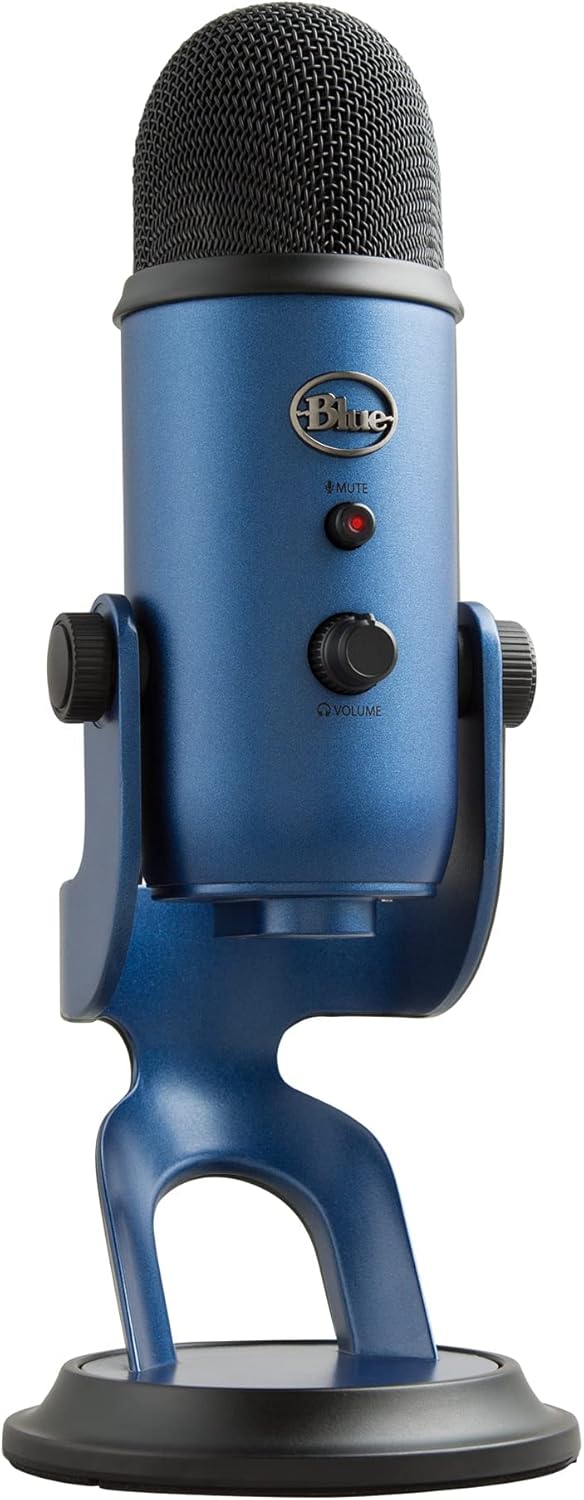
The Blue Yeti is a mid-range USB condenser microphone built around a custom three-capsule array with four selectable pickup patterns. It targets streamers, podcasters, and remote workers who want broadcast-quality vocal capture without investing in an XLR interface and separate preamp chain.
The defining feature here is the multi-pattern design. Cardioid suits solo recording directly in front of the capsule; bidirectional handles two-person face-to-face interviews; omni picks up a full room; stereo captures left-right spread for acoustic instruments. USB condenser mics at this tier typically offer only cardioid, so the pattern flexibility is a genuine differentiator rather than a spec sheet add-on.
The included desktop stand keeps the mic upright but positions the capsule relatively low, and the side-address design means angling matters. Buyers who plan to use this at a standard desk height will likely want a boom arm for correct mouth-to-capsule alignment. The VO!CE effects pipeline requires Logitech G HUB running in the background, which is worth factoring in on lower-spec PCs where background processes compete for resources.
Buy this if you record in multiple configurations, solo podcasting, two-host interviews, or instrument capture, and want hardware controls on the mic body itself. Skip this if you already own an audio interface and a dedicated XLR capsule, where an XLR condenser at this price point will outperform USB constraints.
Capsule Array: Three condenser capsules housed in a single body output via USB, with no XLR output option on this SKU. USB connectivity means the ADC is onboard the mic, capping the signal chain at the mic's internal converter quality rather than an external interface.
Pickup Patterns: Four patterns are hardware-selectable via a front-panel dial: cardioid, omnidirectional, bidirectional, and stereo. Pattern switching is done on the unit with no software required, making live switching during a session practical without interrupting the audio stream.
Onboard Controls: The mic body includes a headphone output with a dedicated volume knob for zero-latency monitoring, a mic gain knob, an instant-mute button, and the pickup pattern selector. These four controls cover the full live-session workflow without opening a software mixer.
Software: Blue VO!CE effects, including broadcast vocal processing, voice modulation, and HD audio samples, require Logitech G HUB installation. Basic recording and pattern selection function natively on Mac and PC without any software install, confirmed as plug-and-play on both platforms.

Pros
- Cardioid pickup with 40Hz to 18kHz response and 46kHz sample rate reproduces natural vocal detail
- Switchable noise cancellation mode activated by holding mute button; status confirmed by LED color change
- Zero-latency 3.5mm headphone output with separate monitor volume knob supports accurate live monitoring
- USB-C and Lightning adapters included; plug-and-play across PC, Mac, PS4/PS5, iPhone, and Android OTG devices
Cons
- Echo knob adds hardware reverb but cannot replicate DAW-quality processing; disable it for clean recordings
- Android compatibility requires OTG support to be enabled in device settings; not universal across all Android hardware
- Sensitivity rated at minus 45dB, which is on the lower end and may require gain adjustment in quieter environments
The ZealSound K66 is a budget-tier USB condenser microphone targeting first-time podcasters, streamers, and remote workers who want plug-and-play simplicity across PC, Mac, and mobile devices. Its cardioid pickup pattern, physical control knobs, and included mobile adapters make it a functionally complete entry-level package under forty dollars.
The most defining feature is the dual-mode operation: default mode preserves a warm, natural vocal tone, while holding the mute button activates noise cancellation (blue LED). Based on owner reports, the noise reduction mode handles PC fan hum and keyboard clicks reasonably well, though it does not match hardware-level processing found in higher-tier microphones with DSP chips.
At this tier, the echo control knob is a genuine trade-off. It adds hardware reverb directly in the signal chain, which is useful for streaming performance but problematic for podcast editing, since the effect is baked into the recording. The minus 45dB sensitivity is on the lower end and benefits from keeping the mic 6 to 12 inches from the source, as specified by the manufacturer. No frequency response curve or THD figures are published.
Buy this if you are a first-time streamer or remote worker who needs a no-driver USB mic that works across PC and iPhone without extra gear. Skip this if you record in treated spaces and need a flat, uncolored signal chain, or if you plan to use a dedicated audio interface.
Capsule and Pickup: Condenser capsule with cardioid polar pattern. Frequency response is 40Hz to 18kHz. Sensitivity is minus 45dB plus or minus 3dB. Sample rate is 46kHz. Top-addressed design requires speaking directly into the top cap for optimal pickup.
Connectivity and Compatibility: USB-A connection with included USB-C and Lightning adapters. Plug-and-play on Windows, Mac, PS4, PS5, iPhone, iPad, and Android devices with OTG enabled. Cable length is 70.87 inches. No drivers or software required.
Monitoring and Controls: Built-in 3.5mm headphone output provides zero-latency real-time monitoring. Dedicated physical knobs control mic gain, monitor volume, and echo level independently. Mute button doubles as noise cancellation toggle; red LED indicates mute, blue LED indicates noise cancellation active.
Build and Accessories: 360-degree rotatable body on a weighted metal base for vibration resistance. Package includes the microphone, metal anti-vibration stand, USB-C adapter, Lightning adapter, foam windscreen, and user manual. Microphone dimensions and weight are not specified in source data.
Who needs a USB podcast mic?
Solo podcasters, voiceover artists, Twitch streamers, YouTubers, and anyone doing remote interviews. If you’re recording one or two voices in a quiet room and you don’t want to drag XLR cables through your setup, USB is the easier path. Plug into a laptop and you’re recording in 60 seconds.
If you’re recording four guests in the same room, USB starts to break down. Most laptops can’t run more than two USB mics at once without an aggregate device workaround. Above two voices, the XLR path makes more sense.
What we looked for
Vocal clarity is the headline spec, but it’s not measurable from a number. We weighted three things instead: capsule type (dynamic vs condenser), polar pattern flexibility, and on-mic controls. Dynamic mics reject room noise. Condensers capture more detail but pick up every keyboard click and ceiling fan whir.
Headphone monitoring is non-negotiable. So is a mute button you can hit without scrolling through software. Gain knobs beat software sliders. Plosive rejection (the puff-of-air protection against P and B sounds) varies by capsule, so a built-in pop filter helps.
How we evaluated each pick
We compared owner audio samples on YouTube, podcaster forums, and Amazon reviews focused on vocal recording (not music or gaming). We ignored mics with primarily gaming-focused marketing unless their podcast bona fides held up. Pricing reflects current Amazon listings.
Stick drift and click failures don’t apply to mics, but capsule rattle and USB connection drops do. Models below have stable firmware and proven build quality.
Our picks by tier
Best overall: HyperX QuadCast 2 S. $130.99 puts this in the upper bracket, but you get what you pay for. USB-C, four polar patterns, on-board gain knob, tap-to-mute top, removable shock mount, and RGB lighting that doesn’t look cheap. The capsule is genuinely clean for the price – 18,983 reviews at 4.7 stars back that up. If you’re starting a podcast and want one mic that does everything, this is the buy.
Best premium classic: Logitech Blue Yeti (Midnight Blue). $104 and still the most recommended podcast mic by working podcasters. Four pickup patterns, Blue VO!CE software effects, plug-and-play across Mac and PC. The Yeti’s been the default for ten years because it works. 8,922 reviews on this colorway plus 34,911 on the Blackout variant – the trust is earned.
Best for solo voice: FIFINE AmpliGame AM8. $56.99 and it’s USB/XLR dual-output, which is rare at this price. That means you can start on USB and graduate to an interface later without buying a new mic. It’s a dynamic capsule (good for noisy rooms), with RGB, mute button, and headphone monitoring. The 11,363 reviews at 4.6 stars speak for themselves.
Best budget: ZealSound Podcast Microphone. $34.99 gets you noise cancellation, gain control, volume adjustment, mute, and echo monitoring. It won’t out-spec the Yeti, but for a starter setup or a backup mic it’s hard to argue. 7,947 reviews at 4.4 stars suggests it’s reliable. If you’re not sure you’ll keep podcasting past month one, start here.
Best alternate classic: Logitech Blue Yeti (Blackout). Same mic as the Midnight Blue at $91.99 – just a different finish and a different SKU. 34,911 reviews makes this the most-reviewed podcast mic on Amazon by a wide margin. Pick whichever color matches your setup. The audio is identical.
Bottom line
For most podcasters launching a serious show, the HyperX QuadCast 2 S hits the right balance of features and price. The Yeti is the safe classic. The FIFINE AM8 is the savvy pick if you might upgrade your audio chain later. The ZealSound is fine for casual use.
One thing we wish more podcast buyers knew: room treatment matters more than mic upgrades. A $50 mic in a treated room beats a $300 mic in a bare kitchen. Throw a blanket behind your chair before you spend another dollar on gear.
Common questions
USB vs XLR for podcasting?
USB is faster to set up and cheaper for solo recording. XLR scales better for multiple voices and gives you more long-term flexibility. If you’re recording alone, USB is fine forever. Multi-host shows usually graduate to XLR within a year.
Do I need a pop filter?
Yes. Every plosive (P, B, T sounds) hits the capsule like a small explosion. A $15 mesh filter or foam windscreen fixes it. The QuadCast and Yeti have internal pop protection but a front filter still helps.
Dynamic or condenser capsule?
Dynamic if your room is noisy (apartment, busy household, fan running). Condenser if you’ve got a treated or quiet space. The FIFINE AM8 is dynamic. The Yeti and QuadCast are condensers. Pick to fit your room first.
Will these work with Mac, iPad, and PC?
All five mics are class-compliant USB, which means they show up as input devices on Windows, Mac, Linux, and most iPad setups (you’ll need a USB-C or Lightning adapter for older iPads). No drivers needed.
How do I stop room echo on my recordings?
Three quick fixes: get the mic closer to your mouth (4-6 inches), record in a smaller room, hang soft material (blanket, rug, coat) behind and around you. Closet recording sounds great because the clothes absorb reflections.