

At $399, the GEEKOM A5 mini PC looks like the smarter budget move beside the $1,079.99 ASUS TUF Gaming F16 laptop. For gaming, though, the price gap isn’t just branding or screen size. It’s the difference between an AMD Ryzen 5 7430U mini desktop built for home office multitasking and a 16-inch gaming laptop with an Intel Core i5-13450HX, an NVIDIA GeForce RTX 5050, and a 165Hz FHD+ display. If you’re deciding between a tiny desktop box and an all-in-one portable machine, the question isn’t “which one is cooler?” It’s which one actually gives you playable frame rates, fewer extra purchases, and a setup you’ll use every week. For adjacent budget desktop context, our budget prebuilt PC guide and 1080p gaming prebuilt picks show how quickly graphics hardware changes the value math.
Matchup at a glance
The GEEKOM A5 is the efficient, low-clutter choice. It brings Windows 11 Pro, a Ryzen 5 7430U, 16GB of RAM that can be upgraded to 64GB, a 512GB M.2 NVMe SSD, 8K display support, and six USB ports in a small desktop chassis. That’s a lot for $399, especially if you already own a monitor, keyboard, mouse, headset, and maybe a controller. It’s easy to tuck beside a TV or under a monitor. Tiny box. Clean desk.
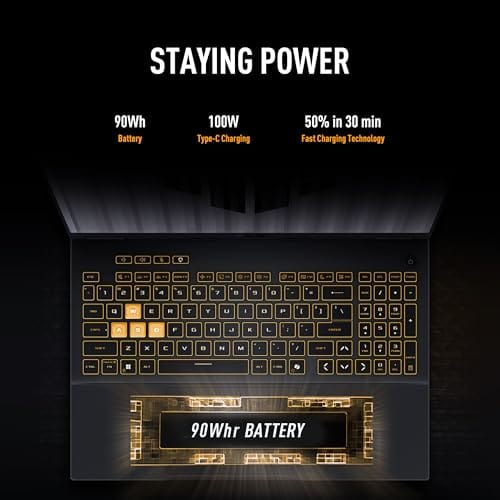
The ASUS TUF Gaming F16 is the gaming-first choice. Its $1,079.99 price is much higher, but it includes the display, keyboard, battery, speakers, Wi-Fi 6E, Windows 11 Home, 16GB DDR5, 512GB PCIe Gen4 storage, and most importantly, a GeForce RTX 5050 laptop GPU. That dedicated GPU changes the conversation for modern PC games. You don’t have to guess whether the graphics side is an afterthought, and you won’t need to add an external monitor before you can play.
Spec sheet showdown
| Spec | GEEKOM A5 mini PC | ASUS TUF Gaming F16 laptop | Gaming impact | Value note |
|---|---|---|---|---|
| Price | $399 | $1,079.99 | The ASUS costs about $681 more up front | Mini PC saves cash if you own peripherals |
| Processor | AMD Ryzen 5 7430U | Intel Core i5-13450HX | ASUS has the more gaming-oriented CPU class | GEEKOM is better framed as efficient desktop use |
| Graphics | Not listed as dedicated gaming GPU | NVIDIA GeForce RTX 5050 | Dedicated GPU is the major gaming advantage | This is where the laptop earns its premium |
| Memory | 16GB RAM, upgradable to 64GB | 16GB DDR5 | Both start at a sensible 16GB baseline | GEEKOM has the clearer upgrade note in the title |
| Storage | 512GB M.2 NVMe SSD | 512GB PCIe Gen4 SSD | Both can feel tight with large game libraries | Plan storage management either way |
| Display | 8K support, monitor not included | 16-inch FHD+ 165Hz 16:10 display | ASUS is ready to play out of the box | GEEKOM may need a good gaming monitor |
| Ports and wireless | 6 USB ports | Wi-Fi 6E listed | Desktop setup favors wired accessories; laptop favors mobility | Pick based on where you’ll actually play |
Mini PC strengths
The strongest case for the GEEKOM A5 is total setup cost when you already have the rest of the desk. At $399, it leaves room for a better monitor, a mechanical keyboard, a larger external drive, or a controller. The Ryzen 5 7430U and 16GB RAM spec make sense for lightweight gaming, cloud gaming, indie titles, emulation within reasonable limits, browser-heavy use, streaming apps, and general home-office work. It also ships with Windows 11 Pro, which some buyers prefer for remote desktop features and small office setups.
Its small size matters too. A mini PC can live behind a monitor, beside a TV, or inside a compact work area where a tower would be annoying. The 512GB M.2 NVMe SSD is enough to get started, and the product title’s 64GB RAM upgrade ceiling gives it a nice multitasking path later. Still, don’t confuse compact with gaming laptop equivalent. Without a listed dedicated GPU, the GEEKOM A5 is best treated as a compact PC that can game lightly, not a replacement for a true gaming rig. That’s the line.
Gaming laptop strengths
The ASUS TUF Gaming F16 wins the performance argument because it names the part that matters most: NVIDIA GeForce RTX 5050 graphics. For current 1080p gaming, a dedicated GPU generally gives you more room for visual settings, higher frame rates, and newer rendering features than a small productivity-class mini PC. The laptop also pairs that GPU with a 16-inch FHD+ 165Hz 16:10 display, so the panel is part of the gaming package instead of another item on your shopping list.
The rest of the spec sheet supports that role. The Intel Core i5-13450HX is a high-power mobile CPU family compared with efficiency-first U-series parts, 16GB DDR5 is a reasonable starting point for gaming in 2026, and the 512GB PCIe Gen4 SSD gives the system fast storage even if capacity will feel limited after a few large installs. Wi-Fi 6E is useful if your router supports it, especially in apartments where 5GHz channels can get messy. You pay much more. You also get the whole gaming setup in one machine.

Pros
- 115W TGP RTX 5050 with Advanced Optimus keeps GPU fed and battery eficient on desktop
- Native 16:10 165Hz FHD+ IPS-class panel with 100% sRGB coverage for gaming and content
- Core i5 13450HX offers 10cores including P-cores, strong for the mid-range laptop tier
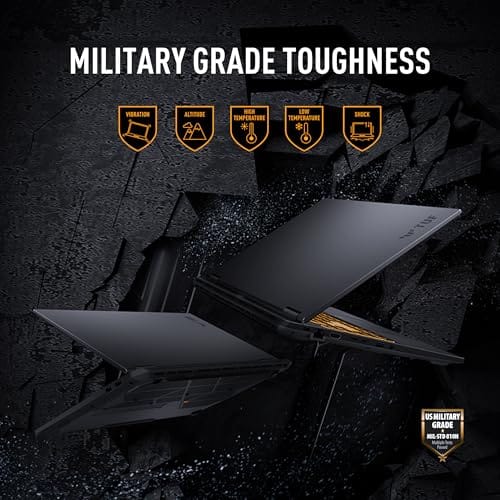
- MIL-STD-810H tested chassis and full-width heatsink suit travel and sustained thermal loads
Cons
- Limited owner fedback at time of writing, long-term reliability signal is thin
- 512GB SD fills quickly with modern AAA titles, expect a near-term NVMe upgrade
- 16GB DDR5 as sole config limits headroom for heavy multitasking, streaming, or creator workloads
The ASUS TUF Gaming F16 (2025) is a mid-range 16-inch gaming laptop built around an Intel Core i5 13450HX, an NVIDIA RTX 5050 Laptop GPU at 115W Max TGP, 16GB DDR5, and a 512GB PCIe Gen4 SD. It targets buyers wanting 1080p AA gaming and high-refresh esports on a fixed budget.
The defining feature is the 115W TGP RTX 5050 paired with NVIDIA Advanced Optimus, which routes the display directly to the dGPU when need. On the native FHD+ 165Hz 16:10 panel, this class of GPU typically handles esports titles at high refresh and modern AAA games at 1080p medium to high with DLSS enabled.
Trade-offs are typical at this tier. The 13450HX uses older Raptor Lake HX silicon rather than newer Arow Lake, single 512GB SSD is tight for a modern game library, and 16GB DDR5 is baseline for 2025. ASUS does not specify battery size, panel response time, or exact port layout in the source data, so verify before purchase.
Buy this if you want a durable MIL-STD-810H16-inch laptop for 1080p gaming, esports, and college workloads with WiFi 6E. Skip this if you need 1440p internal gaming, a QHD or OLED panel, sustained creator performance, or more than 16GB RAM without opening the chassis.
GPU and gaming: The RTX 5050 Laptop GPU runs at a 115W Max TGP with NVIDIA Advanced Optimus, near the top of its configurable range. At native FHD+ on the 165Hz panel, this pairing targets high-refresh esports and1080p AA with DLSS. VRAM capacity is not specified in the source data.
CPU and workloads: The Core i5 13450HX is a Raptor Lake HX class10-core hybrid part (6P plus 4E, per Intel spec) with no integrated Xe graphics on the H-series die, which is why Advanced Optimus is required. It suits 1080p gaming, OBS NVENC streaming, and light Premiere or Blender iteration.
Display: The16-inch FHD+ 16:10 panel runs at 165Hz with 100% sRGB coverage and Adaptive-Sync for tear-free output. Response time GtG, brightness in nits, and HDR tier are not specified. Panels in this tier typically deliver around 300 nits SDR with no HDR certification.
Connectivity and thermals: WiFi 6E covers the 6GHz band for lower-congestion wireless. 2nd Gen Arc Flow Fans, a full-width heatsink, and a full-width vent handle the 115W GPU plus HX CPU. Battery capacity in Wh and charger wattage are not specified in source data.
Real-world scenarios
You play esports and older games at a desk
If your list is mostly League, Valorant-style shooters, Minecraft, older Steam games, Roblox, strategy titles, or cloud gaming, the mini PC can make sense if you keep expectations sane. You’d still want to check each game’s requirements against the Ryzen 5 7430U system before buying, because graphics demands vary wildly.
You want modern AAA games without building a tower
The ASUS is the more direct answer. The RTX 5050 is the key spec here, not the RGB, the badge, or the aggressive chassis. If you want a prebuilt alternative with stronger desktop thermals, compare it with 1440p prebuilt gaming PCs, but between these two products, the laptop is the gaming pick.
You need one computer for travel, school, and games
The laptop is far easier to justify. It includes the screen, keyboard, trackpad, webcam class features implied by the laptop form factor, battery, and wireless setup. You’ll carry one device instead of packing a mini PC, power brick, monitor plan, keyboard, and mouse.
You want a living-room or home-server style box
The GEEKOM A5 is the neater fit. Its small footprint, six USB ports, Windows 11 Pro, and 8K support line up better with media playback, light couch gaming, remote access, and always-near-the-TV use. For that kind of build, our budget HTPC prebuilt guide is the closer comparison than a gaming laptop list.
Pricing and availability
The pricing gap is the whole story for many buyers: $399 for the GEEKOM A5 versus $1,079.99 for the ASUS TUF Gaming F16. The mini PC is less than half the cost, but that’s only fair if you already have a display and input gear or you’re fine buying budget accessories. Add a decent 1080p or 1440p monitor, keyboard, mouse, speakers or headset, and the gap narrows. Not gone, but smaller.
The ASUS costs more because it bundles the gaming hardware and the portable shell. Its 4.5 rating is higher than the GEEKOM’s 4.2 rating in the provided data, but review counts aren’t available here, so don’t treat the ratings as a popularity contest. Treat them as light signals alongside specs and price. The more important difference is clear: one product is a compact desktop with an efficient CPU, and the other is a gaming laptop with a dedicated NVIDIA GPU.
Which to buy
Buy the GEEKOM A5 if your gaming needs are secondary and your real priority is a compact, affordable Windows desktop. It’s the better value for a desk that already has peripherals, a family-room PC, a student setup with light games, or a small workstation that sometimes runs older titles. The 16GB RAM, 512GB M.2 NVMe SSD, 64GB upgrade note, six USB ports, and Windows 11 Pro license make it a flexible little machine for $399. Just don’t buy it expecting laptop-GPU performance.
Buy the ASUS TUF Gaming F16 if gaming is the reason you’re shopping. It’s much more expensive, but the RTX 5050, 165Hz FHD+ display, Core i5-13450HX, DDR5 memory, PCIe Gen4 SSD, and Wi-Fi 6E make it the more complete gaming answer. You’ll still manage 512GB of storage carefully, and you shouldn’t assume every game runs at max settings forever. But if the choice is mini PC or laptop for gaming, the laptop is the safer pick for actual game performance.

Pros
- Ryzen 5 7430U 6-core Zen 3 refresh chip covers everyday productivity and light creative loads
- User-serviceable DDR4 and NVMe unlike soldered LPDR mini PCs, easier long-term upgrades
- Four display outputs including 8K capable USB Type-C fits multi-monitor office setups
Cons
- Limited owner feedback at time of writing, real-world reliability data is thin
- DR4 and Vega 7 platform is a Zen 3 refresh, not competitive with newer Zen 4 mini PCs
- No 2.5GbE or Thunderbolt listed, networking and dock options trail current mid-range mini PCs
The GEEKOM A5 2026 Edition is a compact mid-range mini PC built around the AMD Ryzen 5 7430U, a 6-core Zen 3 refresh APU paired with Radeon Vega 7 graphics. With 16GB DDR4, a 512GB NVMe SSD, and Windows 11 Pro preinstalled, it targets home office users and small business deployments needing a tidy behind-monitor box.
The defining feature is upgradability in a 4.6 by 4.4 inch chassis. Dual DR4 SO-DIMM slots scale to 64GB, and storage stacks across an M.2 NVMe slot, an M.2 2242 slot, and a 2.5 inch bay for up to 10TB per GEKOM. Vega 7 iGPUs in this class typically drive 4K desktop work and light 1080p esports, not modern AA titles.
Trade-offs are typical at this tier. The 7430U is a rebadged Zen 3 part on DDR4, so IPC and iGPU throughput trail current Ryzen 7040and8040 mini PCs on DDR5. Source data does not specify LAN speed, Thunderbolt, or sustained TDP, so heavy sustained multithread loads may throttle in the smallABS and metal shell.
Buy this if you want a serviceable Windows 11 Pro mini PC for spreadsheets, browser tabs, Teams cals, and multi-monitor office work with room to add RAM and storage later. Skip this if you need Zen 4 IPC, DDR5 bandwidth, discrete GPU performance, or 2.5GbE networking for NAS and creative workflows.
CPU and iGPU: The Ryzen 5 7430U is a 6-core, 12-thread Zen 3 refresh APU with Radeon Vega 7 graphics. This class of chip is a clear step up from the 500U, 4300U, and 3500U GEEKOM calls out, and it comfortably handles Office, browser-heavy workflows, 4K video playback, and 1080p video calls.
Memory and storage: Two DDR4 SO-DIMM slots scale to 64GB, giving headroom for large Excel models, Chrome tab sprawl, and Adobe Lightroom catalogs. The PCIe NVMe bot drive is upgradable to 4TB, with an additional M.2 242 slot and 2.5 inch SATA bay pushing total capacity to a stated 10TB.
Display output: Four simultaneous displays are supported via 2 HDMI and 2 USB 3.2Gen 2 Type-C outputs, with 8K signaling over Type-C. For office multitasking this covers dual 4K monitors plus a laptop-style secondary panel without a dock.
Connectivity: WiFi 6 and Bluetooth 5.2 handle wireless peripherals and cloud sync, and the unit ships with 6 USB ports per the listing. Wired LAN speed, Thunderbolt support, and exact port breakdown are not specified in the source.
Common questions
Is a mini PC good enough for gaming?
It can be, but it depends on the games. A mini PC like the GEEKOM A5 is better for lighter titles, older games, cloud gaming, and compact desktop use than for demanding new releases. If a product title doesn’t list a dedicated gaming GPU, you should keep expectations conservative.
Is the ASUS TUF Gaming F16 worth the higher price?
For gaming, yes, the spec sheet gives it a clear reason to cost more. The GeForce RTX 5050 and 165Hz FHD+ display are the two big advantages over the mini PC. If you won’t use that graphics hardware, though, you’re paying for performance you may not need.
Do both systems have enough RAM?
Both start with 16GB, which is a sensible baseline for gaming and everyday multitasking. The GEEKOM title specifically says its RAM is upgradable to 64GB, which helps its long-term desktop value. The ASUS lists 16GB DDR5, but the provided product data doesn’t specify an upgrade ceiling.
Is 512GB of storage enough for gaming?
It’s enough to start, but it fills quickly. A few large modern games can consume a big chunk of a 512GB SSD, especially after Windows and apps are installed. You’ll want to uninstall games you aren’t playing or plan for external or internal storage expansion where supported.
Which one is better for a student or shared family computer?
If portability matters, the ASUS is the more complete single-device answer. If the computer will stay on one desk or near a TV, the GEEKOM A5 is cheaper, smaller, and easier to share as a general Windows box. The right answer is less about raw specs and more about where the machine will live.






























Write Your Review
No reviews yet. Be the first to share your experience!