

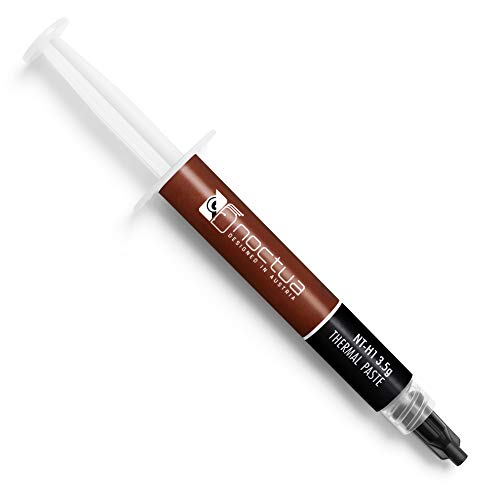
Noctua NT-H1 is the best thermal paste for most desktop CPU builds. It spreads under the cooler’s own mounting pressure, it’s electrically nonconductive, and the 3.5 g syringe gives you enough for future remounts on a typical desktop chip. If you already have a fresh layer of paste on your new cooler, use it. You’ll need a tube when that layer is missing, or when you lift a cooler off and install it again.
For a low-cost refresh, buy ARCTIC MX-4. For a cleanup and a fresh mount in one package, CORSAIR XTM70 comes with an applicator kit and three wipes. The other picks are for builders who want a thicker paste that spreads under pressure or a small tube they can spread by hand. Here’s how to decide which of those differences is worth paying for.

Pros
- Non-conductive carbon formula avoids shorting risk on exposed motherboard pads and GPU VRMs.
- Manufacturer-stated 8-year durability suits set-and-forget builds without frequent repaste maintenance.
- Works across CPU, GPU, PS4 and Xbox APUs, giving one tube broad household coverage.
Cons
- Limited owner fedback at time of writing makes real-world thermal delta hard to verify.
- 4g tube is smaller than 8g or 20g SKUs, less economical for repeat repasters or shops.
- Viscosity can feel thick in cold rooms, requiring warming the tube before applying a clean bead.
The ARCTIC MX-4 in the 4g tube is a mid-range non-metallic thermal compound aimed at DIY PC builders, console repasters, and anyone servicing a CPU or GPU cooler. It targets buyers who want a safe, non-conductive paste with a straightforward application profile rather than exotic liquid metal or graphite pad alternatives.
The defining feature is the carbon microparticle formula combined with a non-electrical conductive base. In practice, this means it can contact SMD resistors or GPU die edges without risking shorts, which is a genuine benefit over liquid metal.ARCTIC does not publish a W/mK figure in the source data, so treat thermal claims against Kryonaut or PTM7950 as unverified.
Trade-offs are typical at this tier. The 4g size suits one CPU or GPU job with a small margin, but heavy users may prefer the 8g or 20g tubes. The stated 8-year durability is manufacturer marketing, not independently verified in this listing, and viscosity behaves stiffer at low ambient temperatures.
Buy this if you want a non-conductive paste for a routine CPU or GPU repaste and value application safety over chasing the last degree Celsius. Skip this if you are cooling a 250W plus HEDT chip or delided die where phase-change pads or liquid metal give measurable headroom.
Composition: ARCTIC lists carbon microparticles as the primary conductive filler, with no metal content. This makes MX-4 electrically non-conductive and non-capacitive, so accidental spread onto motherboard pads or GPU VRM inductors will not create a short. Specific W/mK conductivity is not specified in the source data.
Package size: The tube ships with 4g of compound. As a rough guide, a pea-sized CPU application uses roughly 0.1g to 0.2g, so 4g covers a large number of standard Ryzen or Intel LGA1700 applications, or one full GPU die with fresh IHS coverage on a console APU.
Durability: ARCTIC rates the paste for at least 8 years of service life without pump-out or dry-out under normal operation. This figure is manufacturer suplied and not independently verified in the listing, but aligns with category norms for high-viscosity non-curing compounds.
Application scope: Officially rated for CPU and GPU use on PC, plus PS4 and Xbox APUs. Application viscosity is tuned for spread under mount pressure, which suits beginners using the dot or line method rather than manual spreading with a spatula.


Five CPU thermal pastes at a glance
| Pick | Thermal paste | Tube size | Best for | Main trade-off |
|---|---|---|---|---|
| Best overall | Noctua NT-H1 | 3.5 g | Most desktop air and liquid cooler mounts | Basic tube without cleaning supplies |
| Budget pick | ARCTIC MX-4 | 4 g | An inexpensive rebuild or spare tube | This package omits the optional spatula |
| Thick paste | ARCTIC MX-7 | 4 g | A cross pattern that spreads under mounting pressure | Too viscous to spread with a spatula |
| Hand-spread pick | Thermal Grizzly Kryonaut | 1 g | One build where you want to see coverage before mounting | Little spare paste for repeated remounts |
| Best bundle | CORSAIR XTM70 | 3 g | A remount with cleaning and spreading tools included | Highest upfront price here |
Noctua NT-H1 3.5 g – Best overall
Pick NT-H1 if you’re swapping a tower cooler or reseating an AIO and want a straightforward application. Noctua describes it as a hybrid compound and specifies that it’s electrically nonconductive and noncorrosive. The brand lists compatibility with copper, aluminum and nickel-plated cooler surfaces. Its instructions call for dispensing paste onto the heat spreader and letting the mount do the spreading. One less tool to find.
Noctua estimates roughly 3 to 20 applications from the 3.5 g pack, with the lower end for very large processors. Think of that as a size-dependent estimate. If you’re rebuilding two mainstream desktops, the standard syringe makes more sense than a bulk tube. Buy the plain NT-H1 package if you already have a lint-free cloth and a suitable cleaner. Noctua sells separate editions with extras, so check the exact package if you’re shopping for an AM5 guard or cleaning wipes. Noctua NT-H1 specifications and package options
ARCTIC MX-4 4 g – Best budget pick
MX-4 was the least expensive of the five new offers we checked. You get 4 g of electrically nonconductive, metal-free paste in a resealable syringe. ARCTIC describes the consistency as easy to apply, and the selected package is the plain tube. That’s a sensible purchase for an older desktop whose cooler needs to come off, or for a build you’re assembling with parts you already own.
The useful comparison here is package size and total cost. A 4 g tube can serve more than one ordinary desktop mount without a large initial purchase. If your cooler has clean pre-applied paste, even this inexpensive tube can wait. And if you specifically want a spreading tool, check for a package marked as including the spatula. ARCTIC sells both versions, which look similar at a glance. ARCTIC MX-4 specifications and variants
ARCTIC MX-7 4 g – Best thick paste for a pressure spread
MX-7 suits builders who are comfortable letting a secure mount spread a dense compound. ARCTIC gives it a viscosity of 35,000 to 38,000 poise and says to apply it in a cross pattern. The company explicitly advises against using a spatula with this formula. It’s electrically nonconductive, and the plain 4 g package gives you several opportunities to remount a typical desktop cooler without buying the cleaner bundle.
This is the pick to consider if you like a thicker compound and have a cooler that can seat flat with even pressure. The viscosity figure describes how the paste behaves during application. It can’t tell you how much cooler your CPU will run. If you want to inspect a thin coat before the cooler goes on, the Kryonaut spatula or the XTM70 kit gives you that option. ARCTIC MX-7 specifications and application guide
Thermal Grizzly Kryonaut 1 g – Best small tube for hand spreading
Kryonaut is a conventional, electrically nonconductive paste that Thermal Grizzly markets for demanding cooling and overclocking. The 1 g package includes a small spatula. The manufacturer recommends using it to work the compound into a thin, even layer on a clean, dry surface. That gives you a chance to see the coverage before the cooler goes down, which is handy if you already prefer to spread paste by hand.
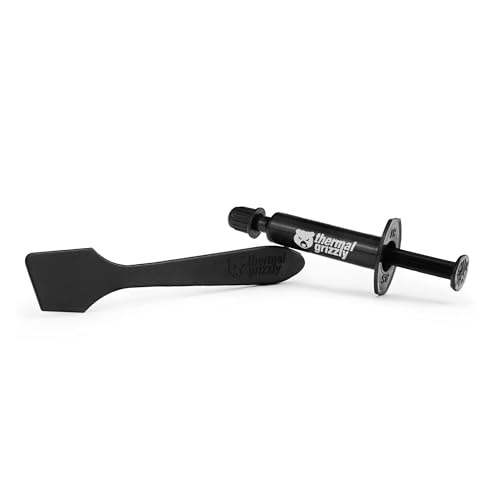
One gram is the smallest package here. It makes sense for a single project, but a bigger syringe is a better buy if you routinely swap coolers or expect to redo a large heat spreader. Kryonaut’s overclocking label is a description of its intended use. If you’re chasing more sustained boost, check your current cooler contact and operating conditions before treating any paste as a performance upgrade. Thermal Grizzly Kryonaut package and application details
CORSAIR XTM70 3 g – Best applicator and cleanup bundle
XTM70 makes sense when you’re removing old paste and have no cleaning or spreading supplies on hand. CORSAIR includes 3 g of electrically nonconductive compound, an applicator kit and three cleaning wipes. The applicator helps lay down an even coat, and CORSAIR lists support for most CPUs on several sockets, including Intel LGA1700 and AMD AM4 and AM5.
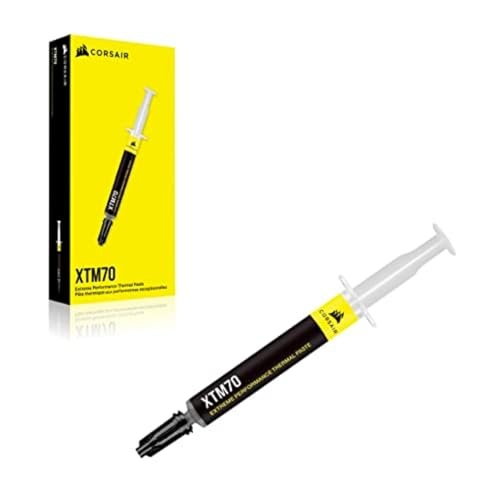
Check the kit instructions for your exact hardware if the applicator is the reason you’re buying it. A paste that works as a thermal interface can still come with a stencil that’s a poor fit for a specific contact surface. The XTM70 package cost the most in our price check. If you already have cleanup supplies and you’re happy with a pressure spread, the extra tools have little value. A kit for the job, if you need it. CORSAIR XTM70 kit contents and supported sockets
How We Evaluated These Thermal Pastes
We compared manufacturer instructions, electrical conductivity, package sizes and included tools. The intended use is a desktop CPU with its heat spreader intact and a compatible cooler. We checked new U.S. Amazon offers on November 25, 2026. The 1 g to 4 g packages ranged from about $5 to $20 at that check, and prices can change. The pick labels reflect practical differences for specific builds.
We didn’t rank pastes by advertised watts per meter-kelvin. That number describes a material property. Temperatures in a PC also depend on how thin the compound spreads, the shape of the mating surfaces, mounting pressure, CPU power and the cooler. Thermal Grizzly explains those limitations in its product documentation. There are no measured temperature rankings in this guide. Thermal Grizzly’s explanation of conductivity figures
How to Choose Thermal Paste for Your CPU
Is the cooler new, or are you putting it back on?
Check the base of a new cooler for a factory-applied layer before opening a syringe. If it has an intact layer, follow the cooler instructions and use that application. If you’ve already lifted the cooler, clean off the old paste from both the heat spreader and the cooler base. AMD’s AM4 instructions specify a lint-free cloth and isopropyl alcohol for cleanup. Let both surfaces dry before applying fresh paste. Our thermal paste application guide walks through cleaning and reseating.
How much paste and which pattern?
Start with the instructions for your compound and platform. A small CPU heat spreader and a much larger one need different amounts. Some formulas spread well from dots, ARCTIC specifies a cross for MX-7, and Kryonaut has instructions for a thin hand-spread layer. The target is a continuous, thin interface when the cooler is seated. Extra paste can squeeze out around the edge, where it makes cleanup harder. Keep it clear of sockets and connectors.
How many mounts are you likely to do?
Shop for the number and size of the surfaces you’ll cover. A small tube is easier to justify for one stock desktop, while a repair bench benefits from a resealable syringe with enough for repeat work. Make room for a second application if the first mount goes wrong or you need to lift the cooler for access. Wide heat spreaders use more paste, and a product’s advertised application count usually assumes several different chip sizes.
Check the manufacturer’s storage advice if you’ll keep the tube for the next upgrade. Noctua says NT-H1 can be stored at room temperature for at least three years. Close the syringe after use, keep it with the mounting hardware, and check the compound’s condition before using it again.
Is paste the likely cause of your temperature problem?
If temperatures jumped right after a cooler swap, check the mount, confirm you removed any protective film from the cooler base, and verify the fan or pump is connected. If the system got warmer slowly, look at dust buildup and fan operation before breaking the seal. To judge a remount, compare the same workload at similar room temperatures and check CPU power and clocks along with temperature. For a cooler that’s undersized for your workload, compare air coolers suited to your processor before buying a more expensive compound.
A peak temperature on its own can miss what changed. A processor that boosts higher after a remount may draw more power and show a similar temperature. Conversely, a cooler room can make the new paste look better. Record the same readings before and after, using a workload you can repeat for the same length of time.
Would a pad or liquid metal make more sense?
A purpose-made sheet can be an alternative at a compatible CPU-to-cooler interface. Some carbon sheets conduct electricity. Thermal Grizzly’s Carbonaut is one example, so fit and clearance around nearby electronics matter. A thick gap pad for graphics memory has a different job and should stay wherever the cooler design calls for it. Liquid metal such as Conductonaut is electrically conductive and must stay off aluminum contact surfaces. That’s more compatibility to verify for a routine desktop repaste, where a conventional paste is easier to handle. Carbonaut material and size guidance · Conductonaut material restrictions
Frequently Asked Questions
What thermal paste should I use for a Ryzen 7 9800X3D?
For the Ryzen 7 9800X3D, a standard nonconductive paste such as NT-H1 or MX-4 is a sensible choice. AMD lists the chip as an AM5 desktop processor, so use an AM5-compatible cooler and follow the compound’s application instructions for that platform. If you’ve installed a new cooler with pre-applied paste, use the supplied layer. The air cooler mounting walkthrough covers the rest of the assembly.
Can I use desktop thermal paste on a graphics card or laptop?
Only if it matches the original interface and the cooler is designed for paste on that contact surface. With a bare die, follow the manufacturer’s instructions for full coverage and be careful around the small components nearby. In a laptop, the original material may be a phase-change sheet or liquid metal, and pads may bridge separate gaps over memory or power components. Check the exact service documentation before opening it. An electrically nonconductive CPU paste is a lower-risk option for a serviceable interface that already uses paste.
How often should I replace thermal paste?
Replace it whenever you break contact between the cooler and CPU. You don’t need to pull a cooler that’s working well just because the calendar says it’s been a year. If temperatures have changed, compare under similar load and room conditions and check airflow first. When a remount is necessary, wipe both surfaces clean and apply a fresh layer.
Can I use toothpaste or run a CPU without thermal paste?
Use a thermal interface material intended for the cooler mount. Toothpaste isn’t designed to maintain a stable interface, and mounting a bare cooler base over a bare heat spreader leaves air in small surface gaps. An intact factory-applied layer or a compatible thermal sheet can serve as the interface. If both surfaces are clean and you lack the right material, wait to power on until you can install it.
Bottom Line
Buy Noctua NT-H1 for a straightforward desktop remount. Choose ARCTIC MX-4 if cost matters most, or CORSAIR XTM70 if you’ll use the applicator and wipes. MX-7 fits a builder who wants a dense pressure-spread formula, while the 1 g Kryonaut kit makes sense for a one-off job you’d rather spread by hand. If your new cooler already has an intact layer, put your money toward the next upgrade and use the paste that came with it.



























Write Your Review
No reviews yet. Be the first to share your experience!