

You put on a headset, a footstep pans from behind your left shoulder to your right, and somehow you know exactly where the enemy is before you see them. That sense of space, of sound existing in a room around your head rather than pressed flat against your ears, is soundstage. It’s one of the most talked-about qualities in gaming and music audio, and also one of the most misunderstood. People throw the word around like it’s a spec on a box. It isn’t.
This guide breaks down what soundstage actually is, why some headphones have it and others don’t, and how much it matters for your PC setup. If you’re already shopping, our gaming headset roundup and our computer speaker picks for 2026 put these ideas into practice.
The short answer
Soundstage is the perceived size and shape of the space that sound seems to come from. A wide soundstage makes audio feel like it’s happening around you, with instruments and effects spread across a believable area. A narrow one makes everything feel like it’s coming from inside your head, close and congested. It’s about the illusion of physical space, and your brain builds that illusion from timing, reflections, and how a headphone’s drivers are angled and enclosed.
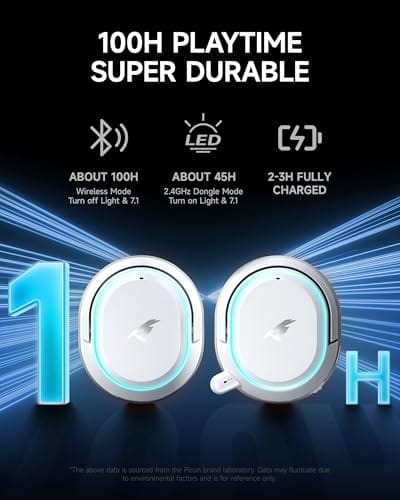
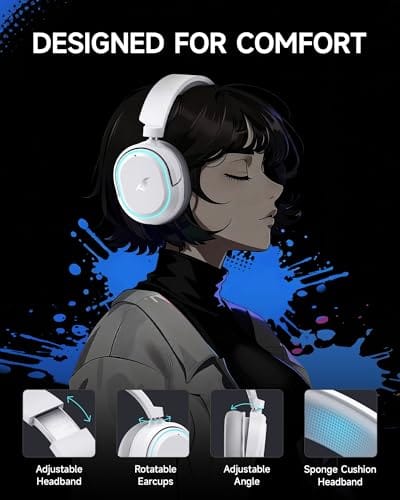
For gaming, a good soundstage helps you place footsteps, gunfire, and voices in a scene. That positional awareness is why competitive players obsess over it. A capable, budget-friendly option here is the Picun G2 Wireless Gaming Headset, an over-ear design with 7.1 virtual surround, 2.4GHz and Bluetooth 5.4 connections, and 5ms latency, at $59.99 with a 4.5 rating. Virtual surround like that is one common way headsets try to widen the sense of space.

Pros
- Three connection modes on a single headset: 2.4GHz dongle, Bluetooth 5.4, and 3.5mm wired fallback.
- Vendor-rated 5ms 2.4GHz latency keps audio synced in competitive shooter scenarios.
- Long rated runtime, up to 100 hours in Bluetooth with RGB disabled for travel use.
- RetractableENC microphone tucks away, useful when switching between gaming and general listening.
Cons
- Limited owner feedback at time of writing, real-world reliability and QC signal is unverified.
- 7.1 surround is virtual DSP, not true multi-driver, so positional accuracy varies by title andear.
- RGB lighting materially cuts battery life, cited100-hour figure requires lighting turned off.
The Picun G2 is a budget-tier wireless gaming headset built around 40mm drivers, virtual 7.1 surround, and tri-mode connectivity across2.4GHz, Bluetooth 5.4, and 3.5m wired. Target buyer is a multi-platform player rotating between PC, PS5, PS4, and Switch who wants low-latency wireless without moving up to established brand pricing.
The defining feature is the tri-mode radio stack. The 2.4GHz USB-A or Type-C dongle is rated at 5ms latency, which is competitive for the tier and adequate for most FPS titles, while Bluetooth 5.4 handles phones and tablets. Headsets in this class typically deliver serviceable rather than reference-grade imaging, and virtual 7.1 leans on DSP rather than discrete drivers.
Trade-offs are typical at this tier. Battery figures are optimistic: 100 hours assumes Bluetooth with RGB off, and 2.4GHz drops the number to 42 to 45 hours. Driver material, impedance, frequency response, clamp force, and weight are not specified, so tonal balance and long-session comfort cannot be verified from source data alone.
Buy this if you want one headset that jumps between a PS5, a Switch dock, and a work laptop over Bluetooth, and you accept spec-sheet-only marketing. Skip this if you rely on measured frequency response, discrete suround, or detachable bom mics with broadcast-grade pickup for streaming.
Drivers and tuning: Picun specifies 40mm dynamic drivers paired with virtual 7.1 surround processing. Impedance, sensitivity, and frequency response are not specified, so bass extension and treble air cannot be quantified from source. Virtual 7.1 is DSP-based positional widening, useful for FPS cues but not equivalent to true multi-driver surround.
Connectivity and latency: Three modes are covered: 2.4GHz via USB-A or USB-C dongle, Bluetooth 5.4, and 3.5mm analog. The 2.4GHz link is rated at 5ms latency. Bluetooth codec support (SBC, AAC, aptX) is not specified, which maters for wireless music quality on phones and tablets.
Battery and power: Rated up to 100 hours on Bluetooth with RGB off, and 42 to 45 hours on 2.4GHz wireless. Play-while-charging is supported, so a USB cable can extend sessions past the rated ceiling. Charge time and battery capacity in mAh are not specified.
Microphone: Retractable omnidirectional bom with ENC noise reduction. Sample rate, bit depth, and pickup pattern beyond omni are not specified.ENC filtering targets background noise on the transmit side, adequate for party chat but below dedicated USB mic quality.
The longer explanation
Your ears figure out where a sound comes from using tiny cues. The time difference between when a sound hits your left ear versus your right, the slight volume difference, and the way your outer ear filters frequencies from different directions. In the real world, these cues arrive naturally. Headphones sit right against your ears, so they have to recreate those cues artificially, and how well they do it determines the soundstage.
Open-back headphones, the kind with perforated or grilled ear cups, tend to have the widest soundstage. Sound escapes and air moves freely, so reflections behave more like they would in a room. Closed-back designs seal everything in for isolation and bass punch, which usually narrows the stage. Neither is wrong. They’re built for different priorities, and that’s the honest tradeoff at the center of this topic.
Two related terms get folded into soundstage discussions, and they’re worth separating. Width is how far left and right the sound seems to extend. Imaging is how precisely you can pinpoint a single source within that space. A headset can have a broad stage but fuzzy imaging, which feels spacious yet vague, or a modest stage with razor-sharp imaging, which feels smaller but very precise. Competitive players usually care about imaging most, since knowing an enemy is at your two o’clock beats a vaguely large soundscape. Both come from the same design factors, so a well-tuned pair tends to deliver them together.
How it works
Two things drive soundstage: physical design and signal processing. On the physical side, driver angle matters. Angling the driver so it fires toward the front of your ear rather than straight in mimics how speakers sit in front of you, which the brain reads as a more forward, spacious presentation. Ear cup depth and how much air sits between driver and ear play a role too.
On the processing side, virtual surround formats simulate multiple speaker positions using head-related transfer functions, which are mathematical models of how sound bends around a human head. That’s what 7.1 virtual surround is doing. It’s not real surround, but done well it can widen the perceived field and sharpen directional cues, which is exactly what a competitive player wants from a wireless headset.
Why it works this way
Soundstage exists because your brain is a spatial-processing machine that never turns off. It’s constantly trying to build a map of the space around you from whatever audio cues it gets. When a headphone feeds it clean timing and frequency information, it constructs a convincing room. When those cues are muddy or collapsed, everything piles up in the center of your skull.
This is also why the same headset sounds different from person to person. Ear shape varies, and generic surround models can’t match everyone perfectly. That’s the honest limitation. Soundstage is partly a property of the hardware and partly a product of your own anatomy, which is why one person raves about a headset’s spaciousness while another shrugs.
Room and source play a part too, even with headphones. A noisy background eats into the quiet details that define the edges of a soundstage, so the same pair feels wider in a silent room than on a busy commute. And the audio itself sets a ceiling. A well-mixed game or a properly recorded track carries spatial cues that a compressed, mono-heavy source simply doesn’t have. You can’t hear a stage the recording never captured, so great headphones and poor source material still fall flat.
When you’d want this
A wide soundstage pays off most in two places: competitive gaming and immersive listening. In shooters and battle royales, knowing which direction a sound came from is a genuine advantage, and a headset that widens the stage helps you react faster. For movies and open-world games, a big soundstage makes the world feel larger and more enveloping. If you mostly listen to podcasts or take calls, it matters far less.
If you want a refined take on spatial audio, the Logitech G733 Lightspeed Wireless leans on PRO-G audio drivers and Lightspeed wireless, adds a Blue VO!CE mic and a suspension headband, and runs $124.92 at a 4 rating. It’s a step up in build and mic quality over entry kits, and the kind of headset people pair with a dedicated stand. Our headset stand guide for 2026 covers keeping a piece like that off your desk and in good shape.

Pros
- Lightspeed wireless with 20 meter range handles typical living room and desk distances
- Up to 29 hours battery life covers multi-day use between charges
- Blue VO!CE mic processing in G HUB improves clarity for Discord and streaming
- Suspension headband and low mass design reduce clamp fatigue during long sessions
- Dual-zone Lightsync RGB with 16.8M colors is customizable through G HUB
Cons
- PS4 output limited to stereo, no suround on older PlayStation hardware
- Driver size, frequency response, and mic pattern not specified in source data
The Logitech G733 is a mid-tier wireless gaming headset targeting PC, PS5, PS4, and Nintendo Switch users who want a lightweight all-day fit. It leans on Lightspeed 2.4GHz wireless, PRO-G drivers, Blue VO!CE mic processing, and a reversible suspension headband, aimed at multi-hour gamers and streamers.
The defining feature is the combination of Lightspeed wireless with a quoted 20 meter range and up to 29 hours of battery. In practice this covers full workdays plus evening sessions without a charge cycle. PRO-G drivers, per Logitech, reduce distortion, and headsets in this tier typically deliver a mildly V-shaped tuning suited to positional FPS cues.
Trade-offs are typical at this price point. PS4 users are locked to stereo output with no virtual surround. Driver diameter, impedance, and frequency response are not published in the source data, so absolute output quality is hard to benchmark against wired competitors. There is no Bluetooth fallback listed, so mobile pairing is not supported.
Buy this if you want a light, long-battery 2.4GHz wireless headset for PC or PS5 with a usable broadcast-style mic. Skip this if you need wired low-latency USB, Bluetooth multipoint, or vendor-published driver and frequency response specs before purchase.
Drivers and tuning: Logitech lists PRO-G drivers tuned for reduced distortion, though exact driver diameter and frequency response are not specified in the source. Headsets in this tier typically ship with 40 to 50mm dynamic drivers and a mildly V-shaped response suited to explosions and footstep cues in FPS gameplay.
Connection and latency: Lightspeed 2.4GHz wireless with a stated 20 meter range covers desk and living room use. Compatibility is confirmed for PC, PS5, PS4 (stereo only), and Nintendo Switch. Bluetooth and wired 3.5mm fallback are not listed in the source, so single-dongle 2.4GHz is the only documented path.
Battery life: Rated up to 29 hours per charge, enough for roughly three to four full evening sessions before recharging. Exact charge time and USB-C versus micro-USB charging port are not specified in the source data.
Microphone: Detachable mic with Blue VO!CE filters configured in G HUB, providing EQ, noise reduction, and de-eser presets useful for Discord and Twitch chat. Mic polar pattern, sensitivity, and frequency range are not disclosed in the source specifications.
What to look for in a headset with good soundstage
Start with the enclosure. Open-back or semi-open designs almost always sound wider than fully sealed cans, so if spaciousness is your goal and you don’t need heavy isolation, lean that way. Then check whether the headset offers virtual surround like 7.1, since a well-implemented version can meaningfully sharpen directional cues on PC. Driver quality underpins all of it, because a spacious presentation still needs clean detail to be useful.
Don’t ignore the practical stuff either. Wireless latency matters for gaming, and figures like 5ms keep audio in sync with the action. Comfort determines how long you’ll actually wear the thing, and battery life decides how often you’re tethered to a cable. A wide stage means little if the headset is uncomfortable after an hour.
Software helps too, and it’s often free. Many headsets ship with a companion app that lets you tune the surround profile or adjust EQ, and a slightly brighter treble can open up the perceived space without new hardware. On PC, Windows Spatial Sound and game-specific 3D audio settings are worth a look as well. Just change one thing at a time so you can actually hear what each adjustment does.
Common misconceptions
The biggest myth is that soundstage and surround sound are the same thing. They’re related but distinct. Surround is a channel format, soundstage is a perceived quality, and a headset can have virtual surround while still sounding narrow if the drivers and tuning don’t support it. Another myth is that louder equals wider. Volume doesn’t create space, and cranking the gain just fatigues your ears faster.
People also assume closed-back headsets can’t have any soundstage. That’s too absolute. Good closed designs with angled drivers can present a respectable stage, just usually not as open as a comparable open-back model. And finally, more expensive doesn’t automatically mean wider. Tuning and design choices matter more than the price on the box.
One last one: many people think enabling every spatial-audio option at once gives the best result. It usually doesn’t. Stacking a headset’s built-in virtual surround on top of Windows Spatial Sound or a game’s own 3D audio can smear the cues instead of sharpening them. Pick one processing layer, learn how it sounds, and leave the rest off. Cleaner input almost always beats more processing.
Frequently asked
Does soundstage matter for competitive gaming?
Yes, quite a bit. Placing footsteps and gunfire accurately gives you real information about enemy positions. A headset with a wider stage and solid virtual surround helps you react to threats you can’t see yet, which is a practical edge in shooters.
Is open-back or closed-back better for soundstage?
Open-back typically wins on width because sound and air move more freely. The catch is that open-back leaks noise both ways, so it’s poor for noisy rooms or shared spaces. Closed-back trades some stage for isolation and stronger bass.
Can virtual 7.1 surround create real soundstage?
It can widen the perceived field and sharpen direction, yes. It’s a simulation using head-related transfer functions rather than physical speakers, so results vary by person and implementation. Done well, it’s genuinely useful for positional awareness on PC.
Will a better sound card improve soundstage?
A cleaner source and good processing can help, but the headphone’s design sets the ceiling. If the drivers and enclosure collapse the stage, no amount of upstream gear fully fixes it. Spend on the headset first, then the source.
Do I need expensive headphones for good soundstage?
No. Tuning and enclosure design matter more than price, and plenty of affordable headsets present a respectable stage. A $59.99 set with 7.1 virtual surround can serve casual and competitive players well, so buy on design and reviews rather than sticker price alone.































Write Your Review
No reviews yet. Be the first to share your experience!