

Desktop audio is the upgrade most people skip, and it’s usually the one they notice fastest. A pair of laptop drivers or a cheap monitor’s built-in speakers can push sound, sure, but they flatten music, muddy voice chat, and turn a good pair of game footsteps into vague noise. A dedicated set of PC speakers fixes that for less money than most keyboards cost, which is why they keep showing up on desk-setup lists year after year.
We researched five real PC speakers that sit between $20 and $60, spanning tiny USB-powered bars and a 40W soundbar with its own EQ software. The goal was simple: find honest value at each price, not chase overpriced audiophile gear. If you’re also weighing personal-audio options, our picks for the best gaming headset 2026 and a look at what a DAC actually does pair nicely with anything below. Prefer to talk instead of type? A quality USB microphone rounds out the same desk. Here’s how the five speakers stack up.

Pros
- Dual passive bass radiators add low-end weight without needing a separate subwoofer box.
- Digital USB audio path bypasses noisy onboard 3.5mm DACs on cheaper motherboards.
- Screen color sync and 12 RGB modes cover most desk lighting preferences out of box.
- External power brick maintains output at higher volumes without USB current sag.
Cons
- Limited owner feedback at time of writing, long-term reliability data is thin.
- No 3.5mm AUX input, older consoles and DAP sources are locked out entirely.
- EQ and RGB software is Windows only, macOS and Linux users get defaults only.
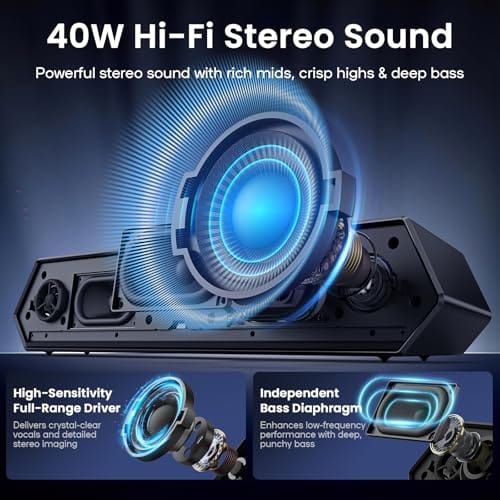
The Deeyaple 40W soundbar is a budget desktop audio unit aimed at PC gamers and work-from-home users who want louder, cleaner sound than laptop or monitor speakers without stacking bookshelf boxes on a desk. At 13.5 inches wide and 3.34 inches tall, it slots under most24to 27 inch monitors.
The defining feature is the pure digital USB-C path paired with Bluetooth 5.3. Skipping the 3.5mm jack sidesteps ground loop hiss common on cheaper motherboard audio, and USB audio class is plug-and-play on Windows, macOS, PS4, and PS5. Soundbars in this tier typically deliver usable stereo imaging but limited low-end below 80Hz.
Trade-offs are typical at this price. There is no AUX input, so legacy sources and TVs without Bluetooth or USB audio are locked out. The EQ and RGB software is Windows only, and 40W peak power is a marketing figure, expect lower sustained RMS output in practice. Passive radiators help bass presence but cannot replace a dedicated sub.
Buy this if you want a single-cable USB soundbar with RGB sync for a Windows gaming desk under a monitor. Skip this if you need AUX input, macOS software control, or a soundbar with proven long-term owner feedback and repair support.
Drivers and output: Dual full-range drivers with dual passive bass radiators, rated at 40W peak power. Driver size, frequency response range, and sensitivity are not specified. Soundbars of this 13.5 inch footprint typically hit 8 to 15W RMS per channel in sustained use.
Connectivity: USB-A to USB-C digital audio for PC and consoles, plus Bluetooth 5.3 for phones and tablets. No 3.5mm AUX and no optical input. USB audio class compatibility covers Windows, macOS, PS4, and PS5 as system stereo output.
Software and EQ: Downloadable Windows utility handles custom EQ curves across bass, mid, and treble bands, plus 12 RGB modes with screen color sync and music-reactive lighting. No account signup required. macOS and Linux users are limited to system-level EQ.
Power and dimensions: External DC adapter rather than USB bus power, keeping output stable at higher volumes. Cabinet measures 13.5 x 2.5 x 3.34 inches, low enough to sit in front of most 24 to 27 inch monitor stands without blocking the screen.

Pros
- USB power removes the need for a wall wart on tight desks
- 3.5mm analog input works with consoles, monitors, and phones without drivers
- Fixed 30-degree tilt aims sound at ear height in nearfield use
Cons
- Limited owner feedback at time of writing makes long-term reliability hard to judge
- 14W total output is nearfield only, not suitable for room-filling or bass-heavy playback
- USB provides power only, no USB DAC path, so audio quality depends on the source 3.5mm output
The FUNLOGY 14W Stereo PC Speakers are a budget, USB-powered desktop stereo set aimed at buyers who want a step up from built-in monitor or laptop speakers without ading a powered2.1 rig. The compact footprint, fixed 30-degree upward tilt, and analog 3.5mm input target shallow desks and console-plus-PC setups.
The defining feature is the driver layout: dual 48mm full-range units paired with passive radiators, rated at 14W total. Compact USB-powered speakers in this tier typically produce clear midrange for voice and casual music at nearfield distance, with limited low-end extension. Bass claims from the listing should be judged against that category norm rather than taken at face value.
Trade-offs are typical at this tier. USB caries power only, so audio still relies on the host device's 3.5mm output quality, and total output is well below what you would want for room-filling playback or competitive gaming with heavy low-end effects. Owner-side data is sparse at time of writing, so long-term driver and cable reliability are unproven in the public record.
Buy this if you want a plug-and-play nearfield speaker for a monitor, laptop, or console setup where desk space and cable clutter matter more than reference audio. Skip this if you need USB DAC input, deper bass for music production, or a set that can fill a room beyond arm's reach.
Drivers and output: Dual 48mm full-range drivers with passive radiators, rated 14W total system output. That power figure is consistent with nearfield desktop use at roughly arm's length, and sits below typical 2.0 bookshelf sets that draw from a wall adapter rather than USB bus power.
Inputs and power: USB provides bus power only, and audio arives through a 3.5mm analog cable, both included. The listing cals out a gold-plated AUX connector intended to reduce contact resistance and line noise, which matters most on longer analog runs to a rear monitor or console jack.
Placement and ergonomics: The cabinets use a fixed 30-degree upward tilt, aiming drivers toward seated ear height instead of firing straight across the desk. Palm-sized dimensions and a front-mounted volume dial suit crowded desks, but exact width, height, and weight are not specified in the source data.
Compatibility: Any device with a USB-A port for power and a 3.5mm headphone output will drive these, including desktop PC, laptop, external monitor with audio out, smartphone with adapter, and current gaming consoles. Microphone functionality is not listed, so treat these as playback-only speakers.

Pros
- USB power removes the need for a separate wall adapter or PSU outlet
- Dual diaphragm layout with bosters aims for clearer mids than single-driver soundbars
- 3.5mm AUX plus Bluetooth covers PCs, laptops, phones, and tablets without dongles
- 30 degree upward tilt aims audio at ear level when placed under a monitor
Cons
- Limited owner feedback at time of writing, so long-term reliability signal is thin
- No published driver size, wattage, frequency response, or SNR figures from the brand
- Bluetooth codec support (SBC, AAC, aptX) is not specified, so latency for gaming is unclear
The SOULION R50 is a budget USB-powered PC soundbar aimed at desktop users who want a step up from tiny monitor speakers without running a dedicated 2.1 setup. It targets students, work-from-home users, and casual gamers with a single monitor who need Bluetooth, 3.5mm AUX, and simple RGB in one compact bar.
The defining feature is input flexibility: USB provides power while audio routes through either 3.5mm AUX or Bluetooth, toggled by the M button. Bluetooth range is rated at 10 meters (33 feet) line of sight, which is typical at this tier. SOULION cites dual independent diaphragms with boosters, though driver size and wattage are not specified.
Trade-offs are what you would expect at this price. There is no published frequency response, SNR, or Bluetooth codec list, so low-end extension and gaming latency are unknown. USB-only power caps total output versus AC-powered bars, and the fabric grille plus plastic shell prioritize cost over rigidity. Owner feedback is thin, so build consistency is hard to verify.
Buy this if you want a slim under-monitor bar with Bluetooth and RGB for general desktop audio and light gaming. Skip this if you need documented wattage, low-latency codecs like aptX Low Latency, or bass output for music production or competitive FPS positional cues.
Drivers and tuning: SOULION lists two independent diaphragms paired with internal boosters, but does not publish driver diameter, RMS wattage, or frequency response. Expect a mid-forward tuning typical of sub-25dollar USB bars, with limited sub-100Hz output and no dedicated subwoofer channel.
Connectivity: Three modes are supported. USB provides 5V power only, with audio delivered via a 3.5mm AUX cable in AUX mode or wirelessly in Bluetooth mode with a rated 10 meter (33 fot) range. The M key cycles inputs, and holding the light key for three seconds clears Bluetooth pairing memory.
Controls and lighting: A physical volume knob handles level, while a dedicated light button toggles four RGB modes: gradient, breathing, rhythm, and monochrome fixed. The light can be switched off entirely, which is useful for work cals or dark rooms.
Placement: The chassis uses a 30 degree upward tilt with a fabric grille to angle sound toward seated ear height and reduce dust ingress. Exact length, height, and weight are not specified, so verify clearance under low-profile monitor stands before ordering.

Pros
- USB-C plus USB-A adapter covers current MacBooks, iPads, and legacy desktop PC ports.
- Rotary encoder knob syncs to OS volume for finer step control than resistive dials.
- RGB logo can be fully disabled with one press for work or night use.
Cons
- Limited owner feedback at time of writing, so long-term reliability signal is thin.
- Dual 2-inch drivers and bass ports will not replace a dedicated 2.1 setup for bass-heavy genres.
- USB-only input means no 3.5mm AUX fallback for consoles, TVs, or non-USB audio sources.
The XKX soundbar is a budget-tier USB-powered desktop speaker built around dual 2-inch full-range drivers in a 15-inch bar chassis. It targets desk users on laptops, Mac minis, iMacs, or small-form-factor PCs who want a single-cable upgrade over built-in laptop speakers without ading a subwoofer or amplifier.
The defining feature is the USB-C plug with a bundled USB-A adapter, which handles power and audio over one cable. Combined with a rotary encoder knob that mirrors system volume, it behaves like a class-compliant USB DAC on Windows, macOS, ChromeOS, and Linux, based on the compatibility list provided by the brand.
Trade-offs are typical at this tier. Two 2-inch drivers with passive bass ports will roll off below roughly 100Hz, so movie explosions and bass-heavy tracks will sound thiner than a 2.1 kit. USB-only input also means no AUX, Bluetooth, or optical fallback, and owner feedback is currently thin, so long-term durability is unverified.
Buy this if you want a tidy one-cable soundbar for a laptop, Mac mini, or office PC where speech clarity and moderate music playback matter more than dep bass. Skip this if you play bass-heavy genres, need console or TV input, or already own a discrete 2.1 or studio monitor setup.
Drivers and tuning: Two 2-inch full-range drivers sit in a 15-inch bar with dual rear or side bass reflex ports. Expect usable output from roughly 100Hz upward based on typical 2-inch driver behavior, with midrange focus that suits dialogue, YouTube, and video cals more than bass-forward music.
Connectivity: Native USB-C plug caries both power and digital audio, with an included USB-A to USB-C adapter for legacy desktops. The brand lists compatibility with Windows PCs, Mac mini, iMac, MacBook, iPad, ChromeOS, Android, and Linux. No 3.5mm AUX, Bluetooth, or optical input is specified.
Controls: A rotary encoder replaces the resistive potentiometer common on cheap AUX speakers. It provides stepped tactile feedback and syncs directly with the host OS volume slider, which avoids the dead-zone and channel-imbalance issues typical of analog pots at low volume.
Lighting and microphone: An RGB accent inside the front logo offers a music-reactive pulse mode, a 256-color auto cycle, and one-press off. No onboard microphone is specified in the source data, so this is a playback-only device, not a headset or conference speakerphone replacement.

Pros
- USB plug-and-play across Windows, macOS, ChromeOS, and Linux with no driver install
- Bundled USB-C adapter extends compatibility to MacBook, iPad, and Android tablets
- Clip-on clamp mounts to monitor edges or sits flat on desk
Cons
- Limited owner feedback at time of writing, long-term reliability is unverified
- Not compatible with monitor USB passthrough, TVs, or projectors per manufacturer notice
- No specified driver size, wattage, or frequency response to benchmark against alternatives
The XKX is a budget USB-powered clip-on computer soundbar aimed at desktop and laptop users who want to reclaim desk space without running a dedicated 2.0 speaker set. It targets office, video call, and casual media buyers on Windows, macOS, ChromeOS, or Linux rather than critical listeners or gamers chasing positional audio.
The defining feature is the G-sensor adaptive channel switching, which flips left and right when the bar is clamped under a monitor instead of on top. Compact clip-on bars in this class typically use small full-range drivers with passive radiators, so expect midrange-forward output with modest low-end reach rather than true dep bass despite the marketing.
Trade-offs are typical at this tier. There is no published driver size, wattage, frequency response, or SPL figure, so outputceiling and tonal balance are unverified. The unit draws power and audio over single USB-A cable, which rules out use with monitors that only offer USB passthrough, TVs, and projectors per the manufacturer notice.
Buy this if you want a plug-and-play USB soundbar that clips to a monitor for cals, YouTube, and light music on a tight footprint. Skip this if you need documented specs, gaming-grade stereo separation, or subwoofer-level bass from a standalone desktop speaker.
Drivers and tuning: XKX lists dual ultra-magnetic drivers paired with dual passive radiators in a single clip-on bar. Exact driver diameter, wattage, and frequency response are not specified, so treat the dep bass claim as tuning intent rather than a measured low-frequency extension figure.
Connection and compatibility: The bar runs over USB-A for both power and audio, with a bundled USB-C to USB-A adapter for MacBook, Mac mini, iMac, iPad, and Android devices. It is explicitly not compatible with monitor USB audio passthrough, TVs, or projectors per the manufacturer notice.
Mounting and controls: The patented clamp fits the top, side, or bottom edge of a monitor and can also rest flat on a desk. Three front-mounted touch buttons handle mute, volume up, and volume down, with a G-sensor auto-swapping stereo channels when the bar is inverted.
Microphone: No built-in microphone is listed in the source data, so users on video calls will still need a separate headset, webcam mic, or standalone USB mic for input.
Who this guide is for
This roundup is for anyone running a single monitor or laptop who wants better sound without building a full home-theater rig. Students, remote workers, casual gamers, and people who just want music that doesn’t sound like it’s coming from inside a tin can. If your budget tops out around $60 and you’d rather spend it once and forget about it, you’re in the right place.
It’s not a guide for studio mixing or 5.1 surround setups. None of these are reference monitors, and we won’t pretend they are. If you need calibrated flat response for audio production, or room-filling bass for a living room, look at powered bookshelf monitors or a proper subwoofer system instead. Everything here is desk-scale, plug-and-play, and priced for the person who wants a clear upgrade over stock audio.

What to look for in a PC speaker
Power rating tells you part of the story. A 14W set like the FUNLOGY is plenty loud for a quiet home office, while the 40W Deeyaple has real headroom for music and games. Watts aren’t everything, though. Driver size and tuning matter more for how full the sound feels, and cheap bars often lean bright to seem louder than they are.
Connection type is the other big fork. USB-powered bars pull audio and power from one cable, which keeps the desk clean but ties you to a computer. Bluetooth models like the Deeyaple and SOULION R50 let you stream from a phone too. A 3.5mm jack, which the R50 also carries, keeps things universal for older gear. Then there’s the fluff you can weigh personally: RGB lighting, volume knobs versus dials, and tilt or clip mounts that aim sound at your ears instead of your chin. Don’t overpay for lights. Do pay attention to controls you’ll touch daily.
How we evaluated
We researched these five speakers across published specs, listed features, and aggregated owner feedback rather than claiming any hands-on session in a lab. Ratings here range from 4.0 to 4.7 stars, and we weighed those alongside price, power, connectivity, and the small design choices that make a speaker easy or annoying to live with. Review counts weren’t available for these listings, so we leaned on the specs and star ratings that were.
Value drove the ranking. A $21.99 bar that hits 4.6 stars earns more of our attention than a pricier one that merely matches it, because at this tier every dollar counts. We also checked that features actually serve a purpose: Bluetooth version, EQ software, USB-C adapters, tilt angles, and mounting options only score points when they solve a real desk problem. Marketing words like “surround sound” got discounted unless the hardware backed them up.
Our top picks
Best Overall: Deeyaple 40W Computer Speakers
At $59.99, the Deeyaple is the priciest pick here, and it earns the spot by doing more than any other. It’s a 40W HiFi stereo soundbar with Bluetooth 5.3, USB audio, and custom EQ software that lets you shape the sound to taste instead of living with a fixed tuning. The 4.2-star rating sits a touch below the budget bars, but that’s the tradeoff you accept for real power and flexibility. For music and games alike, that 40W headroom is the difference between “loud enough” and “actually satisfying.”
The dynamic RGB lighting is the usual desk-flair bonus, and it works with laptops, PS4, and PS5 as well as a desktop, so it’s not locked to one machine. Where it asks for patience: the EQ software is a small learning curve, and a 40W bar takes more desk real estate than the compact options below. If you want one speaker that grows with your setup and you don’t mind spending three times the budget-bar price, this is the one to buy. It’s the most complete package on the list.
Best Budget: FUNLOGY 14W Compact Speaker
The FUNLOGY costs $21.99 and holds a 4.3-star rating, and it’s the pick for anyone who wants clean stereo sound without any fuss. It’s a 14W USB-powered set, so one cable handles both audio and power. No wall adapter, no clutter. The compact footprint fits a cramped dorm desk or a second workspace where a full soundbar would just be in the way.
Two design touches push it past generic rivals. A 30-degree tilt aims the drivers up toward your ears rather than firing flat into the desk edge, and a physical volume dial means you adjust sound by feel instead of digging through software. At 14W it won’t fill a large room or thump with deep bass, and that’s fine. It’s built to be a tidy, reliable everyday speaker, and for a little over twenty bucks it nails that brief. Buy it if you value simplicity and space over raw volume.
Best Wireless Value: SOULION R50 Bluetooth Soundbar
The SOULION R50 also lands at $21.99 and carries a 4.0-star rating, the lowest here, but it packs the most connection flexibility for the money. You get Bluetooth for wireless streaming, a 3.5mm jack for anything with a headphone port, and USB power to run it all. That trio makes it a genuine do-anything bar: hook it to a PC today, pair a phone tomorrow, plug into an old console next week. Colorful LED lights with a dedicated switch button let you kill the glow when you want to focus.
The 4.0-star average is the honest asterisk. Owner feedback at this price tends to reward simplicity, and a bar juggling three connection types has more that can feel inconsistent than a single-input model. Its “surround sound” branding is marketing, not true multi-channel audio, so set expectations there. Still, if you want wireless freedom and a headphone-jack fallback for the same money as a basic wired bar, the R50 is the flexible choice. That switchable lighting is a nicer touch than it sounds.
Best RGB Value: XKX RGB Gaming Soundbar
This XKX bar is the value standout at $21.99 with a strong 4.6-star rating, the second-highest on the list. It’s a USB plug-in, wired soundbar built for desktops, laptops, and Macs, and it ships with a USB-C adapter so it drops onto modern machines without a hunt for the right port. The pitch is HD stereo with loud output and punchy bass, plus RGB lighting for the gamers who want their audio gear to match the rest of the rig.
A physical volume knob keeps control quick and tactile, which is exactly what you want on a bar you’ll nudge a dozen times a day. Being wired and USB-powered means no Bluetooth here, so phone streaming isn’t on the menu, and the “punchy bass” claim is relative to a slim bar, not a subwoofer. For a desk gamer who wants clean sound, working RGB, and painless plug-in setup at rock-bottom cost, this XKX is hard to argue against. That 4.6-star average does a lot of talking.
Best for Monitor Setups: XKX Clip-On Computer Soundbar
The second XKX earns the highest rating on the list at 4.7 stars, priced at $23.99, and its trick is the mount. It’s designed to clip directly onto a monitor, which frees up desk space and lines the drivers up with your face for cleaner dialogue and game audio. Like its sibling it’s USB plug-in and wired, ships with a USB-C adapter, and promises loud sound with deep bass tuned for a close-range desk listener.
The headline feature is adaptive channel switching, which adjusts how the audio is handled on the fly, a small nicety you don’t often see at this price. Because it clips on, it works best with a standard monitor bezel; an ultra-thin or curved panel may need a trial fit. There’s no Bluetooth, so it’s a wired-desk speaker through and through. For anyone tight on desk space who wants their audio mounted, aimed, and out of the way, this is the smartest layout of the five. The 4.7-star rating suggests owners agree.
Buying mistakes to avoid
The biggest one is chasing wattage numbers in isolation. A 40W bar isn’t automatically twice as good as a 20W set; tuning, driver quality, and how loud you actually listen matter far more. Plenty of people buy the beefiest option, run it at 20 percent volume forever, and never touch the headroom they paid for. Match the power to your room and habits, not to the spec sheet.
The second trap is paying for features you won’t use. RGB lighting looks great in photos and does nothing for sound, so don’t let it inflate your budget. Same goes for “surround sound” labels on a single stereo bar, which describe a processing effect, not true multi-channel hardware. And check your ports before you buy: a USB-powered bar needs a free USB slot, and a clip-on model needs a compatible monitor bezel. A five-minute check saves a return.
Bottom line
If you want one speaker that covers every base, the Deeyaple 40W at $59.99 is the pick, with real power, Bluetooth 5.3, and EQ software that grows with you. It costs more, and it’s worth it for anyone who cares about music as much as games. For most people watching their wallet, though, the sub-$25 bars punch well above their price.
On a tight budget, choose by your desk. The FUNLOGY 14W at $21.99 is the tidy, tilt-and-dial everyday choice. The SOULION R50 adds Bluetooth and a 3.5mm jack for the same money if you want wireless freedom. The 4.6-star XKX RGB bar is the value gamer’s bet, and the 4.7-star clip-on XKX is the answer for a cramped desk. Pick the one whose layout fits your space, and you’ll be happy at any of these prices.
Common questions
Are USB-powered PC speakers loud enough for gaming?
For a single-person desk, yes. A 14W to 40W USB bar easily fills the space right in front of you, which is where you sit for gaming. The 40W Deeyaple has the most headroom if you like it loud, while the 14W FUNLOGY suits quieter rooms. You won’t shake the walls, but that’s not what desk speakers are for. If you want isolation and directional footstep cues, a headset is the better tool.
Do I need Bluetooth or is wired fine?
Wired is perfectly fine, and it’s usually simpler and more reliable for a PC that stays put. USB or 3.5mm connections just work, with no pairing or battery drift. Bluetooth earns its keep only if you also want to stream from a phone or tablet without replugging. The Deeyaple and SOULION R50 both offer it; the two XKX bars are wired-only and lose nothing in day-to-day desktop use.
What does the EQ software on the Deeyaple actually do?
Custom EQ lets you adjust the balance of bass, mids, and treble to your taste instead of accepting a fixed factory tuning. Want more thump for games or a flatter response for podcasts? You dial it in. It’s a genuine advantage over the budget bars, which sound however the maker tuned them and offer no adjustment. There’s a small learning curve, but it pays off once you set a profile you like.
Will a clip-on soundbar fit any monitor?
Most standard flat monitors with a normal bezel, yes. The XKX clip-on is built to grip the top edge of a typical panel. Very thin bezels, unusually thick frames, or sharply curved screens can make the clip fit awkwardly, so check your monitor’s edge before ordering. When it fits, it’s the cleanest layout here, aiming sound at your face and clearing desk space at the same time.
Is RGB lighting worth paying extra for?
Only if you personally love the look. Lighting has zero effect on audio quality, so it shouldn’t drive your budget. The good news is that at this tier RGB barely adds cost; the XKX RGB bar and SOULION R50 both include lights at $21.99. If you’d rather skip the glow, the SOULION even has a switch to turn it off. Treat lighting as a free bonus, not a reason to spend more.
































Write Your Review
No reviews yet. Be the first to share your experience!