

A USB microphone is the fastest way to sound like you know what you’re doing on a stream, a podcast, or a Discord call, because it skips the audio interface, the XLR cable, and the phantom power that a studio setup demands. You plug it into a spare port, pick it in your software, and you’re recording. The catch is that “USB mic” covers everything from a $90 plug-and-play condenser to a $170 broadcast-grade unit with onboard DSP, and the price gap doesn’t always tell you which one fits your desk and your voice. So the specs, the pickup patterns, and the onboard controls matter more than the sticker.
We researched five popular USB mics across a wide price band, from an $89.99 entry point up to a $169.99 pro option, and sorted them by who each one actually suits. If you’re building out a full streaming rig, our guide to the best headset for streaming pairs naturally with any of these, and if you also game with voice chat, the best gaming headset roundup covers the other half of your audio chain. Curious why some mics need extra hardware and these don’t? Our primer on what a DAC is explains the digital-to-analog side in plain language. Pickup pattern is where most first-time buyers guess wrong.

Pros
- Four selectable polar patterns handle solo, duo, and room recording without a second mic
- USB-C plug and play works on PC and Mac without extra drivers
- Tap-to-mute sensor eliminates the thump artifact of hardware mute switches
Cons
- Limited owner fedback at time of writing, so long-term reliability signal is thin
- USB condenser design picks up keyboard and room noise more than dynamic broadcast mics
- NGENUITY software required for full RGB and tuning control, ading another background app
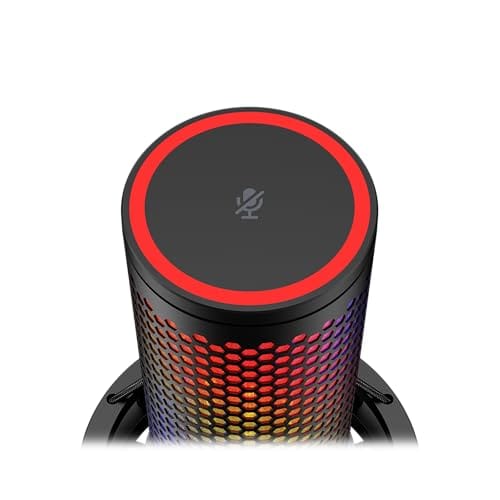
The HyperX QuadCast 2 S is a mid-range USB-C condenser microphone aimed at streamers, podcasters, and content creators who want a plug and play setup with on-board controls. It targets buyers upgrading from a headset mic who want four polar patterns and aRGB accents without stepping up to an XLR interface chain.
The defining feature is the multifunction knob paired with the tap-to-mute sensor. Rotating the knob cycles gain, headphone volume, monitor mix, and polar pattern, with LED indicators showing the active mode. Condenser mics in this tier typically deliver a warm cardioid pickup suited to voice at roughly 15 to 20 cm mouth distance.
Trade-offs are typical of USB condensers. It captures side and room noise more readily than a broadcast dynamic like an SM7B, so treated rooms or aggressive noise suppression help. The aRGB layer and NGENUITY software add polish but require a background app on Windows, and specific frequency response and sensitivity figures are not specified in the source data.
Buy this if you want a single-cable streaming mic with four polar patterns, USB-C, and physical controls for gain and monitor mix. Skip this if you record in an untreated room, need XLR routing, or prefer a dynamic capsule that rejects keyboard and fan noise.
Polar patterns: Four selectable patterns (cardioid, omnidirectional, bi-directional, stereo) are chosen via the multifunction knob with LED indicators. Cardioid suits solo streaming, bi-directional handles two-person interviews one mic, omni captures roomambience, and stereo covers instrument orASMR capture.
Controls and monitoring: On-board multifunction knob adjusts microphone gain, headphone volume, monitor mix, and polar pattern without leaving the game or DAW. An LED VU meter provides real-time level feedback, and the tap-to-mute sensor on top mutes without the mechanical click of a switch.
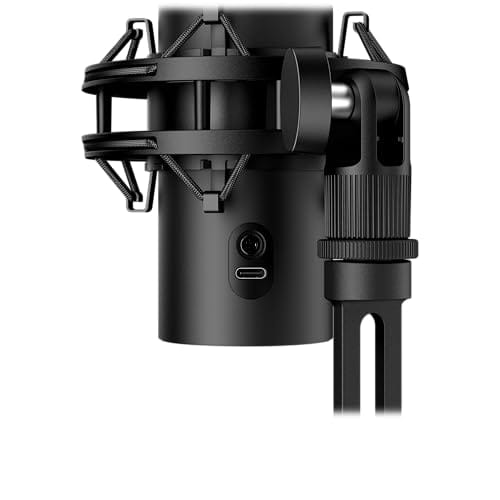
Connectivity and mounting: USB-C connection targets PC and Mac with no dedicated driver install required. The redesigned shock mount uses spring-loaded pins for tool free removal and includes both 3/8 inch and 5/8 inch threading, matching most bom arm standards including Rode PSA1 and similar.
Software and lighting: HyperX NGENUITY software controls over 100 individually addressable aRGB LEDs with 16 million color options and exposes microphone tuning. Full recording resolution and sample rate figures are not specified in the source data, so verify suported bit depth against your DAW project settings.

Pros
- Clipguard 2.0 auto-limits transients so screams and laughter avoid digital clipping without manual gain riding.
- Onboard Wave FX Processor hosts VST plugins directly, keeping OBS and DAW CPU load lower.
- USB-C plug-and-play on PC or Mac with tap-to-mute, LED meter, and headphone jack on body.
Cons
- Limited owner feedback at time of writing makes long-term reliability and self-noise claims hard to verify.
- USB-only design blocks XLR upgrade path and offers no phantom power for a second capsule.
- Frequency response, sample rate, bit depth, and SPL specs are not listed in provided source data.
The Elgato Wave:3 MK.2 is a USB-C cardioid condenser microphone aimed at streamers, podcasters, and remote workers already invested in the Elgato ecosystem. It positions above entry USB mics with onboard DSP, Clipguard 2.0 protection, Auto Gain calibration, and Wave Link routing, targeting creators who want plug-and-play capture without an XLR interface.
The defining feature is the Wave FX Processor, which chains built-in voice enhancer, compressor, and EQ with VST plugins on the microphone side. Elgato claims Clipguard 2.0 uses multi-stage safety to prevent hard clipping on loud transients. Real-world capture quality on cardioid USB condensers in this tier typically matches broadcast-ready dialogue when treated rooms are used.
Trade-offs are typical of the USB condenser class. Cardioid capsules pick up keyboard clatter and room reflections without acoustic treatment, and USB-only means no phantom power, no channel expansion, and no XLR upgrade path. Specifications for frequency response, sample rate, bit depth, and self-noise are not specified in the source data provided.
Buy this if you stream or podcast on a desktop and want tap-to-mute, direct headphone monitoring, and DSP baked into the mic without touching OBS filters. Skip this if you already own an XLR interface, need an omnidirectional or multi-pattern capsule, or plan to run more than one caster on the same rig.
Capsule and pattern: Elgato specifies a single cardioid condenser capsule tuned for focused vocal pickup, rejecting off-axis room noise from the sides and rear. Sample rate, bit depth, capsule diameter, frequency response range, and maximum SPL are not published in the provided source data, which limits direct comparison to Shure MV7+ or Rode NT-USB+.
Connectivity and monitoring: Connection runs over USB-C to PC or Mac with zero-latency direct monitoring through the integrated 3.5mm headphone jack on the microphone body. A multifunction dial handles gain, headphone volume, and monitoring mix, while tap-to-mute triggers a visible LED indicator. Included cable length, bom arm compatibility, and thread size are not specified.
DSP and software: Onboard DSP includes voice enhancer, compressor, and EQ processed by the Wave FX Processor, which can host VST plugins in a single signal chain. Clipguard 2.0 applies multi-stage limiting to prevent clipping on sudden peaks, and Auto Gain sets input levels automatically. Wave Link handles routing, submixes, and effects on host software.

Pros
- Three-capsule condenser array delivers usable broadcast tone without an XLR interface chain.
- Four switchable polar patterns cover solo, duet, room, and stereo instrument capture.
- Onboard gain, mute, and headphone monitoring shorten OBS troubleshooting lops mid-stream.
- Blue VO!CE processing in G HUB adds noise reduction, de-esser, and EQ presets.
Cons
- Side-address condenser picks up des thumps and keyboard clater without a shock mount.
- Included desktop stand transmits vibration; a boom arm and pop filter are near-mandatory upgrades.
The Blue Yeti is a mid-range USB condenser microphone aimed at streamers, podcasters, and remote workers who want broadcast-tier vocals without buying an XLR interface. The three-capsule array and four selectable pickup patterns place it above single-pattern USB mics like the Yeti Nano, while keping setup to a single cable on Mac or PC.
The defining feature is pattern flexibility. Cardioid handles solo streaming and voiceover, bidirectional captures a two-person interview across the desk, omni suits roomambience, and stereo works for acoustic instruments. Combined with Blue VO!CE processing inside Logitech G HUB, owners can dial in noise reduction, high-pass filtering, de-essing, and EQ presets that would otherwise live in an OBS plugin chain.
Trade-offs are typical for a side-address condenser on a desktop stand. It hears the room, keyboard, and every knuckle tap on the desk, so a bom arm with shock mount and a pop filter are effectively required for clean streams. Sensitivity is high, meaning gain management via the onboard dial matters more than on dynamic USB alternatives.
Buy this if you want one USB mic that covers solo streaming, in-person podcast guests, and occasional instrument capture on a treated or quiet desk. Skip this if your room is echoey or your setup is loud, where a dynamic USB mic like a broadcast-style cardioid handles rejection better.
Capsule and paterns: Custom three-capsule condenser array with four onboard pickup patterns, cardioid, omni, bidirectional, and stereo, selected via a rear dial. Detailed frequency response, sample rate, and bit depth are not specified in the listing data provided here.
Onboard controls: Front-panel headphone volume, instant mute button, and rear mic gain knob allow live level adjustment without alt-tabbing. A 3.5mm headphone output on the mic body provides zero-latency direct monitoring, useful for catching plosives before they hit the recording.
Software processing: Blue VO!CE inside Logitech G HUB adds vocal effects, advanced modulation, HD audio samples, and preset broadcast chains. This offloads noise gate, EQ, and de-esser duties from OBS or Audacity, at the cost of running the G HUB service in the background on host PC.
Mounting and connectivity: USB connection with plug and play on Mac and PC, no driver install required for basic capture. The included adjustable desktop stand pivots for angle tuning, and the mic body detaches for standard bom arm or mic stand mounting.

Pros
- Dual condenser capsules capture vocal detail consistent with the wider Yeti product line
- Cardioid and omni patterns handle solo streaming plus roundtable capture from one mic
- Zero-latency headphone jack with onboard mute and pattern controls avoids OBS routing delays
Cons
- Limited owner fedback at time of writing, verdict rests largely on spec sheet and Yeti lineage
- Only cardioid and omni paterns, no bidirectional or stereo modes like the full-size Yeti
- USB-only interface with no XLR path, so it cannot grow into a future audio interface chain
The Blue Yeti Nano is a compact USB condenser microphone from Logitech G, positioned as an entry-level broadcast mic for streamers, podcasters, and remote workers. It uses two custom condenser capsules and targets creators who want Yeti sound quality without the desktop footprint of the standard Yeti.
The defining feature is dual pickup patterns, cardioid for solo voice work and omni for small group capture around the desk. Blue VO!CE software layers broadcast vocal effects, modulation, and HD samples on top. USB condensers in this tier typically deliver clean 24-bit vocal capture, sufficient for Twitch, Discord, and YouTube dialogue.
Trade-offs are typical for compact USB mics. No XLR output means no growth path into an audio interface later, and the pattern selection drops bidirectional and stereo modes found on the full-size Yeti. Condenser capsules also pick up keyboard clatter and room reflections, so a treated space or bom arm helps.
Buy this if you need a plug and play broadcast mic for solo streaming, podcasting, or Zoom on a small desk without touching XLR gear. Skip this if you plan roundtable interviews needing bidirectional patterns, or expect to move into an XLR chain within a year.
Capsule and Patterns: Two custom condenser capsules feed selectable cardioid and omni pickup patterns via a front-panel switch. Cardioid rejects rear noise for solo voice capture, while omni captures a full 360-degree field for group audio around a laptop. No bidirectional or stereo modes ship on this model.
Monitoring and Controls: A 3.5mm headphone output on the base enables zero-latency monitoring with a dedicated volume dial, and a top-mounted button toggles mic mute and pattern selection. Onboard monitoring at this level removes the need for a separate audio interface for casual streaming and Discord calls.
Software and Effects: Blue VO!CE inside G HUB layers broadcast vocal processing, noise reduction, de-esser, and HD sample playback. Sample rate and bit depth are not specified in source data, though condenser USB mics at this tier typically run 24-bit at 48kHz, standard for streaming and podcast workflows.
Connectivity and Compatibility: The mic connects via USB and works plug and play on Mac and PC without driver installation. Exact cable length, thread size, and stand dimensions are not specified in source data. Third-party bom arms with common 5/8-inch to 3/8-inch adapters typically fit Yeti-family mounts.

Pros
- Four selectable patterns replace multiple mics for solo, duet, and roundtable recording
- Onboard mute, gain, and pattern dial reduce reliance on software mixers mid-stream
- Zero-latency headphone jack lets you monitor takes without buffer configuration
- Blue VO!CE presets in G HUB add usable de-esser, noise gate, and EQ chains
Cons
- Condenser capsule picks up keyboard clater and room echo without acoustic treatment
- Included desktop stand transmits desk vibration, most owners upgrade to a boom arm
- USB-only output means no path to XLR interfaces if you outgrow the mic later
The Blue Yeti Blackout is a mid-range USB condenser microphone aimed at streamers, podcasters, and remote workers who want studio-adjacent vocal capture without buying an XLR interface. The three-capsule array and four pickup patterns target creators recording solo voiceovers, two-person interviews, orambient room audio from one desktop unit.
The standout feature is pattern flexibility. Cardioid handles single-voice streaming and podcast tracking, bidirectional covers face-to-face interviews, omni captures group discussions, and stereo suits acoustic instruments or ASMR content. Blue VO!CE inside G HUB layers a de-esser, noise reduction, and vocal presets on top, giving broadcast-style processing without a separate DAW chain.
Trade-offs are typical for large-diaphragm condensers on a desk. The capsule is sensitive to keyboard noise, HVAC hum, and untreated room reflections, so cardioid mode plus a boom arm and pop filter is close to mandatory. The included tripod stand couples mechanical vibration into the capsule, and USB-only output means no upgrade path to an XLR interface later.
Buy this if you stream, podcast, or record voiceovers on a treated desk and want onboard controls with Blue VO!CE processing. Skip this if you record in a reflective, noisy room, or if you plan to move to an XLR signal chain within a year.
Capsule and paterns: Custom three-capsule condenser array with four switchable polar patterns (cardioid, omnidirectional, bidirectional, stereo) selected via a rear dial. Exact capsule size, frequency response, sample rate, and bit depth are not specified in the source listing.
Onboard controls: Front-panel headphone volume, instant mute button, and rear mic gain knob plus pattern selector. Controls sit on the mic body, so gain and mute adjustments do not require pulling focus from OBS, Streamlabs, or Zoom during a live session.
Monitoring and software: Built-in 3.5mm headphone output provides zero-latency direct monitoring of the capsule signal. Blue VO!CE processing runs through Logitech G HUB on Mac or PC and includes vocal effects, modulation, and HD audio samples for stream stingers.
Connectivity and mounting: USB plug and play on Mac and PC with the included pivoting desktop stand. The body detaches from the stand to mount on a standard mic stand or boom arm, which is the recommended path toduce desk-borne vibration into the capsule.
Who this guide is for
This guide is for streamers, podcasters, remote workers, and gamers who want clear voice pickup without wiring up a full audio interface. Maybe you’re starting a Twitch channel and your headset mic sounds thin. Maybe you record a podcast at your desk and want something that looks the part on camera. Every pick here plugs straight into a USB port on PC or Mac and works with no driver hassle, so you can be recording within a minute of unboxing.
It’s not the guide for you if you’re outfitting a treated studio and already own an interface, since XLR mics give you more room to grow at the high end. It also won’t help much if you need a tiny clip-on lav for run-and-gun video. These are desk condensers built for a seated creator talking into a mic a few inches away. If that’s you, one of these five will cover it, and we’ll flag which suits streaming, which suits a tight budget, and which travels light.
What to look for in a USB microphone
Pickup pattern is the first thing to check. A cardioid pattern hears mostly what’s in front of it and rejects room noise, which is what you want for solo streaming and podcasting. Mics like the Blue Yeti add omnidirectional, bidirectional, and stereo patterns on top, so one unit can handle an interview across the desk or a two-person podcast. If you only ever talk into the mic alone, single-pattern cardioid units like the Elgato Wave:3 MK.2 keep things simpler and often sound cleaner because there’s less going on.
After the pattern, look at onboard controls and processing. A physical gain knob, a mute button you can hit fast, and a headphone jack for zero-latency monitoring save you from digging through software mid-stream. Some mics go further: the Elgato Wave:3 MK.2 bakes DSP effects into the hardware, and the Blue Yeti models include Blue VO!CE software effects for real-time voice shaping. RGB lighting, like the HyperX QuadCast 2 S offers, is cosmetic but reads well on camera. And a removable shock mount cuts down on desk thumps, which matters if you type while you talk.
How we evaluated
We researched these five mics using manufacturer specs, listed pickup patterns, onboard control layouts, connection types, and aggregated owner ratings rather than any hands-on bench work. Our weighting leaned toward value and versatility, so a mic with four pickup patterns and a strong rating scored well against a pricier single-pattern unit unless that unit added real broadcast features. We cross-checked what each mic actually does against its price so nobody overpays for a feature they’ll never use.
Ratings here run from 4.0 up to 4.8 out of five. Review counts weren’t available for these specific listings, so we leaned on the star ratings and the concrete specs instead of volume claims. Price, pickup flexibility, onboard controls, and processing features like DSP and Blue VO!CE drove the final order. Three of these five are Blue Yeti variants, so we paid close attention to what separates them, since the color name on the box hides real differences in tier.
Our top picks
Best for Streaming: HyperX QuadCast 2 S
At $116.26 the HyperX QuadCast 2 S is built for people who stream on camera and want the mic to be part of the look. It carries a 4.0 rating, and its headline features are the RGB lighting, the onboard controls, and a removable shock mount that isolates the capsule from desk vibration. The USB-C connection is a nice modern touch, and the LED lighting doubles as a mute indicator so you can see at a glance if you’re live. For a Twitch or YouTube setup where the mic sits in frame, it’s the natural fit.
The tradeoff shows up in that 4.0 rating, the lowest of the group, so it’s worth reading recent owner feedback before you commit. It’s also the priciest option after the Elgato, and a chunk of that cost goes to the RGB and styling rather than raw audio flexibility. If lighting and on-camera presence don’t matter to you, a plainer mic gets you similar sound for less. But for streamers who want onboard controls, a shock mount, and a mic that glows to match the rig, the QuadCast 2 S earns its spot at $116.26.
Best Overall: Elgato Wave:3 MK.2
The Elgato Wave:3 MK.2 is the most capable mic here at $169.99, and it backs that price with a 4.7 rating. It’s a USB condenser with onboard DSP effects, meaning the processing runs on the hardware rather than leaning on your CPU, and Elgato’s Wave Link software lets you mix mic and system audio like a small broadcast console. That’s the feature streamers and podcasters actually reach for once they get serious. The clean cardioid pickup keeps room noise low, and the whole thing is tuned for voice work first.
The catch is that it’s the most expensive pick, and its single cardioid pattern means it won’t do the across-the-desk interview trick that a multi-pattern Blue Yeti can. You’re paying for depth in one direction rather than breadth. For a solo creator who wants the cleanest voice chain, hardware DSP, and software mixing without stepping up to an XLR interface, though, it’s the standout. At $169.99 with a 4.7 rating, it’s the mic to buy if you want room to grow.
Best Budget: Blue Yeti Midnight Blue
The Blue Yeti in Midnight Blue is the cheapest way into this list at $89.99, and it still carries a 4.4 rating along with the full Yeti feature set. You get four pickup patterns, Blue VO!CE effects for real-time voice shaping, and true plug-and-play setup on PC or Mac. That four-pattern flexibility is the reason the Yeti has stayed a default recommendation for years: one mic covers solo streaming, a two-person podcast, and a round-table chat. For under $90, that’s a lot of range.
You do give up a couple of things at this price and this tier. The Yeti is a large, heavy desk mic, so it takes up real space and can pick up keyboard noise if you’re not careful with placement and gain. It’s also the same core mic as the pricier Blackout version below, just in a different finish at a lower rating. If you want the classic four-pattern Yeti and don’t care about color, though, the Midnight Blue at $89.99 is the value entry point.
Best Compact: Blue Yeti Nano Blackout
The Blue Yeti Nano in Blackout costs $99, holds a 4.5 rating, and shrinks the Yeti formula into a smaller, lighter body built for tighter desks. It’s aimed squarely at streaming, gaming, Twitch, YouTube, and Discord use, and it keeps the plug-and-play setup that makes the line so easy to recommend. If the full-size Yeti looks too bulky for your space, the Nano gives you most of the sound quality in a footprint that won’t dominate the desk or block your webcam.
The compromise is pattern count. The Nano drops from the full Yeti’s four patterns down to a smaller selection, so it’s built for solo and simple two-person use rather than complex multi-mic scenarios. It sits at $99, a hair above the entry Yeti, so you’re paying a small premium for the smaller size rather than for more features. For a creator who wants a clean, compact mic that handles the everyday streaming and call workload, the Nano is the easy pick.
Best Value: Blue Yeti Blackout
This full-size Blue Yeti in Blackout runs $109.99 and carries the highest rating in the entire guide at 4.8 out of five. It’s the same four-pattern powerhouse as the Midnight Blue version, with Blue VO!CE effects and plug-and-play setup, but the Blackout finish and the stronger owner rating make it the one most people gravitate toward. Four pickup patterns mean it flexes from a tight solo cardioid to omni for group recording, and the studio-grade condenser capsule gives voices a full, broadcast-ready body.
At $109.99 it’s $20 more than the Midnight Blue Yeti for what is functionally the same mic in a different color, so the choice comes down to one thing: are the higher rating and the stealthier look worth the difference? It’s still a big, heavy unit that rewards careful placement. But if you want the most trusted all-rounder here, with four patterns, Blue VO!CE, and a 4.8 rating, this is the Yeti to get. It’s the best balance of price, flexibility, and reputation in the group.
Buying mistakes to avoid
The biggest mistake is overbuying pickup patterns you’ll never use. If you only ever stream or record solo, a single cardioid mic like the Elgato Wave:3 MK.2 does everything you need, and the four-pattern Yeti’s extra modes just sit unused. Flip it around, though: if you record two-person podcasts or interviews, don’t buy a single-pattern mic and then wish you had bidirectional or omni. Match the pattern count to how you actually record, not to what sounds impressive on the box.
The other common slip is ignoring placement and desk noise. These are sensitive condensers, so they pick up keyboard clatter, mouse clicks, and room echo if you set the gain too high or park them too far away. A shock mount, like the removable one on the HyperX QuadCast 2 S, helps with thumps, but nothing beats getting the mic close and dialing gain back. Don’t blame the mic for noise that better positioning would fix. And confirm you’ve got a free USB port before you order.
Bottom line
For the best overall mic, the $169.99 Elgato Wave:3 MK.2 with onboard DSP and Wave Link mixing is the one to beat, especially for a solo creator who wants room to grow toward a broadcast setup. If you want the most trusted all-rounder, the $109.99 Blue Yeti Blackout with four pickup patterns and a 4.8 rating is the safe pick that handles almost any recording scenario. And on a tight budget, the $89.99 Midnight Blue Yeti gives you that same four-pattern flexibility for the least money.
Quick decision guide: pick the Elgato for the cleanest solo voice chain, the Blackout Yeti for versatile four-pattern recording, the Midnight Blue Yeti to save cash, the Yeti Nano for a compact desk, and the HyperX QuadCast 2 S if RGB and on-camera looks matter for your stream. Match the pickup pattern to how you record, mind your placement, and any of these five will make you sound sharper than a headset mic ever could.
Common questions
What’s the difference between a USB and an XLR microphone?
A USB mic has the audio converter built in, so it plugs straight into your computer and works with no extra hardware. An XLR mic needs an audio interface or mixer to convert its analog signal and supply power, which adds cost and complexity but gives you more room to upgrade. For streaming, podcasting, and calls, USB is simpler and every mic in this guide is USB. XLR makes more sense once you’re running multiple mics or a treated studio.
Do I need four pickup patterns or is cardioid enough?
Cardioid, which hears what’s in front and rejects the sides and rear, covers most solo streaming and podcasting. If that’s all you do, a single-pattern mic like the Elgato Wave:3 MK.2 is plenty. The four patterns on the Blue Yeti add value only if you record interviews across a desk, do two-person podcasts, or capture a group. Buy the extra patterns if you’ll use them, and don’t pay for them if you won’t.
Why do these mics pick up my keyboard and mouse?
Condenser mics are sensitive by design, so they hear everything nearby, including clicks and clatter, especially when the gain is set high or the mic sits far from your mouth. The fix is placement: get the mic within a few inches of your face and turn the gain down until only your voice registers cleanly. A shock mount, like the one on the QuadCast 2 S, reduces desk-transmitted thumps. Good positioning solves most noise complaints.
Is a full-size Blue Yeti or the Nano better for me?
The full-size Yeti gives you four pickup patterns and a larger capsule, so it’s the pick if you want maximum flexibility for group recording or the fullest voice body. The Nano trims the pattern count and the physical size, making it the better fit for a tight desk or a setup where the mic can’t block your webcam. If space is your constraint, go Nano at $99. If versatility is, the $109.99 full-size Yeti wins.
Will these work on both PC and Mac?
Yes, all five are plug-and-play on PC and Mac, so you connect them over USB and select them as your input with no drivers to install. The Blue Yeti models and the Elgato both add companion software, Blue VO!CE and Wave Link respectively, for voice effects and mixing, and those run on both platforms too. The HyperX uses USB-C, so check that you have a matching port or adapter. Otherwise, setup is the same simple process across systems.
































Write Your Review
No reviews yet. Be the first to share your experience!