

Ask ten PC audio enthusiasts which headphone design is better and you’ll get ten different answers, usually loud ones. Open-back versus closed-back is one of those debates that sounds technical but really boils down to a single physical choice: does the back of each ear cup let air through, or does it seal shut? That one decision shapes how wide the soundstage feels, how much noise leaks in and out, and whether your late-night gaming session annoys everyone in the house.
If you’re building or upgrading a desktop setup and staring at spec sheets, this is the fork in the road worth understanding before you spend a cent. We researched how both designs behave for gaming, music, and voice chat, and we pulled real specs from a couple of popular headsets to keep things concrete. For a deeper dive into pure gaming cans, our roundup of the best open-back headphones for gaming pairs well with what’s below.
The short answer
Open-back headphones have perforated or vented ear cups that let air and sound pass freely through the back. That openness creates a wider, more natural soundstage, so footsteps and gunfire in a shooter feel like they’re coming from a real space around you. The tradeoff? They leak sound both ways. People near you hear your audio, and you hear the room. Closed-back headphones seal the back of each cup, trapping sound inside. You get stronger bass, better isolation, and privacy, at the cost of a slightly more “in your head” presentation.
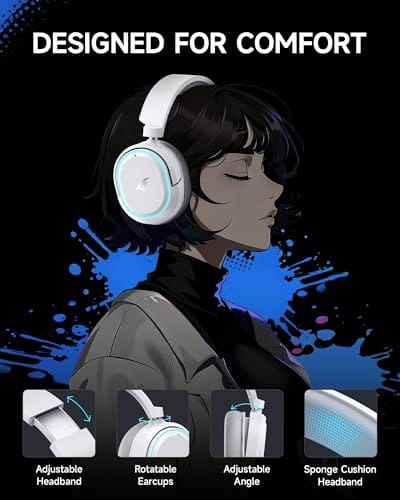
Neither is objectively superior. It’s about your room, your priorities, and whether you share space with other people. A closed-back wireless set like the Picun G2, at $59.99 with a 4.5 rating, leans on sealed cups plus 7.1 virtual surround to fake spatial width. That’s the modern budget approach in a nutshell.

Pros
- Three connection modes on a single headset: 2.4GHz dongle, Bluetooth 5.4, and 3.5mm wired fallback.
- Vendor-rated 5ms 2.4GHz latency keps audio synced in competitive shooter scenarios.
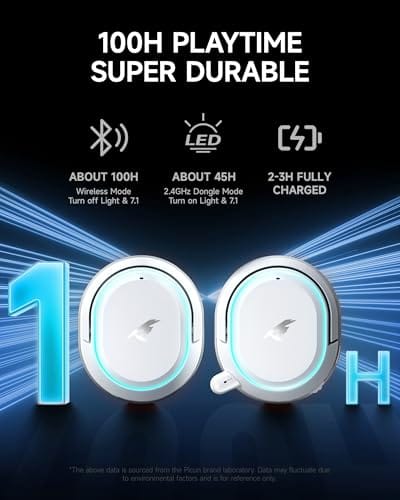
- Long rated runtime, up to 100 hours in Bluetooth with RGB disabled for travel use.
- RetractableENC microphone tucks away, useful when switching between gaming and general listening.
Cons
- Limited owner feedback at time of writing, real-world reliability and QC signal is unverified.
- 7.1 surround is virtual DSP, not true multi-driver, so positional accuracy varies by title andear.
- RGB lighting materially cuts battery life, cited100-hour figure requires lighting turned off.
The Picun G2 is a budget-tier wireless gaming headset built around 40mm drivers, virtual 7.1 surround, and tri-mode connectivity across2.4GHz, Bluetooth 5.4, and 3.5m wired. Target buyer is a multi-platform player rotating between PC, PS5, PS4, and Switch who wants low-latency wireless without moving up to established brand pricing.
The defining feature is the tri-mode radio stack. The 2.4GHz USB-A or Type-C dongle is rated at 5ms latency, which is competitive for the tier and adequate for most FPS titles, while Bluetooth 5.4 handles phones and tablets. Headsets in this class typically deliver serviceable rather than reference-grade imaging, and virtual 7.1 leans on DSP rather than discrete drivers.
Trade-offs are typical at this tier. Battery figures are optimistic: 100 hours assumes Bluetooth with RGB off, and 2.4GHz drops the number to 42 to 45 hours. Driver material, impedance, frequency response, clamp force, and weight are not specified, so tonal balance and long-session comfort cannot be verified from source data alone.
Buy this if you want one headset that jumps between a PS5, a Switch dock, and a work laptop over Bluetooth, and you accept spec-sheet-only marketing. Skip this if you rely on measured frequency response, discrete suround, or detachable bom mics with broadcast-grade pickup for streaming.
Drivers and tuning: Picun specifies 40mm dynamic drivers paired with virtual 7.1 surround processing. Impedance, sensitivity, and frequency response are not specified, so bass extension and treble air cannot be quantified from source. Virtual 7.1 is DSP-based positional widening, useful for FPS cues but not equivalent to true multi-driver surround.
Connectivity and latency: Three modes are covered: 2.4GHz via USB-A or USB-C dongle, Bluetooth 5.4, and 3.5mm analog. The 2.4GHz link is rated at 5ms latency. Bluetooth codec support (SBC, AAC, aptX) is not specified, which maters for wireless music quality on phones and tablets.
Battery and power: Rated up to 100 hours on Bluetooth with RGB off, and 42 to 45 hours on 2.4GHz wireless. Play-while-charging is supported, so a USB cable can extend sessions past the rated ceiling. Charge time and battery capacity in mAh are not specified.
Microphone: Retractable omnidirectional bom with ENC noise reduction. Sample rate, bit depth, and pickup pattern beyond omni are not specified.ENC filtering targets background noise on the transmit side, adequate for party chat but below dedicated USB mic quality.
The longer explanation
Think of an open-back cup as a window and a closed-back cup as a wall. With the window open, the driver’s rear wave escapes instead of bouncing around inside a sealed chamber. Less internal reflection means less resonance, and that’s why open designs are prized for their airy, spacious sound. Instruments have room to breathe. Positional cues in games feel less compressed. Many audiophiles reach for open-back when accuracy matters more than boom.
Closed-back cups do the opposite on purpose. By sealing that rear wave inside, they reinforce low frequencies and block outside noise. Bass hits harder. A busy office or a rumbling PC fan fades into the background. The downside is that trapped energy can create a slightly boxed-in feeling, and some closed models get warm on the ears during long sessions. That’s the physics. Everything else is tuning and material choices layered on top.
There’s a middle ground worth knowing about too. Semi-open designs vent the cups partially, chasing some of the openness without fully sacrificing isolation. They rarely satisfy purists on either side, but for a shared home office they can be a reasonable compromise. The point is that “open” and “closed” mark the ends of a spectrum, not two rigid boxes, and manufacturers tune within that range constantly.
How we got here
Closed-back came first for practical reasons. Early headphones needed to isolate the listener, whether that was a radio operator, a recording engineer tracking vocals, or a commuter on a train. Sealed cups were the obvious answer. For decades, closed was simply what a headphone was.
Open-back grew out of the hi-fi and studio-mixing world, where engineers wanted to hear a recording as neutrally as possible without cup reflections coloring the sound. As PC gaming matured and players started chasing every competitive edge, that spacious open presentation crossed over. Suddenly a design born in mixing rooms became a favorite for esports. Today most gaming headsets you’ll find, including wireless ones, are closed-back with surround processing bolted on, while a smaller enthusiast segment swears by open cans.
Why it works this way
The behavior comes down to how a driver moves air. A speaker cone pushes forward and pulls backward at the same time, creating a wave off the front and an equal, opposite wave off the back. In a sealed cup, that rear wave has nowhere to go, so it builds pressure and interacts with the front wave. Engineers can tune that trapped energy into satisfying bass, but they can’t fully eliminate the reflections that narrow the stage.
Open the back and the rear wave dissipates into the room. No pressure buildup, no boxy reflections, just a cleaner front wave reaching your ear. That’s the whole trick. It also explains the isolation gap. A wall blocks sound in both directions. A window doesn’t. There’s no free lunch here, only a choice about which compromise you’d rather live with.
Comfort ties into the same physics in a way people overlook. Open cups let heat and pressure escape along with the sound, so they tend to feel lighter and cooler over a three-hour session. Sealed cups trap a little warmth against your ears, which is fine in winter and less fun in a hot room in July. If you wear glasses, the seal on closed cups can break anyway, letting bass leak out. Small details, but they add up over a long day at the desk.
When you’d want this
Pick open-back if you game or mix in a quiet room by yourself and you care most about pinpoint positional audio and a natural, fatigue-free sound over long stretches. Competitive players who want to hear exactly where a reload is happening often lean this way. Just don’t expect them to hide your audio from a roommate, and don’t expect them to save you in a noisy space.
Pick closed-back if you share a room, record voice or stream, commute, or simply love deep bass and quiet. A set like the Logitech G733 Lightspeed, $124.92 with PRO-G drivers, a suspension headband, and the Blue VO!CE mic, is built for streamers who need isolation and a clean vocal chain. It’s wireless across PC, PS5, PS4, and Switch, which is exactly the flexibility a mixed-use desk wants. If you’re weighing a full sealed gaming rig, our guide to the best gaming headset options goes broader.

Pros
- Lightspeed wireless with 20 meter range handles typical living room and desk distances
- Up to 29 hours battery life covers multi-day use between charges
- Blue VO!CE mic processing in G HUB improves clarity for Discord and streaming
- Suspension headband and low mass design reduce clamp fatigue during long sessions
- Dual-zone Lightsync RGB with 16.8M colors is customizable through G HUB
Cons
- PS4 output limited to stereo, no suround on older PlayStation hardware
- Driver size, frequency response, and mic pattern not specified in source data
The Logitech G733 is a mid-tier wireless gaming headset targeting PC, PS5, PS4, and Nintendo Switch users who want a lightweight all-day fit. It leans on Lightspeed 2.4GHz wireless, PRO-G drivers, Blue VO!CE mic processing, and a reversible suspension headband, aimed at multi-hour gamers and streamers.
The defining feature is the combination of Lightspeed wireless with a quoted 20 meter range and up to 29 hours of battery. In practice this covers full workdays plus evening sessions without a charge cycle. PRO-G drivers, per Logitech, reduce distortion, and headsets in this tier typically deliver a mildly V-shaped tuning suited to positional FPS cues.
Trade-offs are typical at this price point. PS4 users are locked to stereo output with no virtual surround. Driver diameter, impedance, and frequency response are not published in the source data, so absolute output quality is hard to benchmark against wired competitors. There is no Bluetooth fallback listed, so mobile pairing is not supported.
Buy this if you want a light, long-battery 2.4GHz wireless headset for PC or PS5 with a usable broadcast-style mic. Skip this if you need wired low-latency USB, Bluetooth multipoint, or vendor-published driver and frequency response specs before purchase.
Drivers and tuning: Logitech lists PRO-G drivers tuned for reduced distortion, though exact driver diameter and frequency response are not specified in the source. Headsets in this tier typically ship with 40 to 50mm dynamic drivers and a mildly V-shaped response suited to explosions and footstep cues in FPS gameplay.
Connection and latency: Lightspeed 2.4GHz wireless with a stated 20 meter range covers desk and living room use. Compatibility is confirmed for PC, PS5, PS4 (stereo only), and Nintendo Switch. Bluetooth and wired 3.5mm fallback are not listed in the source, so single-dongle 2.4GHz is the only documented path.
Battery life: Rated up to 29 hours per charge, enough for roughly three to four full evening sessions before recharging. Exact charge time and USB-C versus micro-USB charging port are not specified in the source data.
Microphone: Detachable mic with Blue VO!CE filters configured in G HUB, providing EQ, noise reduction, and de-eser presets useful for Discord and Twitch chat. Mic polar pattern, sensitivity, and frequency range are not disclosed in the source specifications.
What to look for in a headphone design
Start with your environment, because it overrides almost everything else. Noisy room or shared space? Closed-back, full stop. Silent solo battle station? Open-back becomes viable. Next, weigh your priorities: isolation and bass push you closed, soundstage and long-wear comfort push you open. Then check the practical stuff. Clamp force and ear-cup depth affect comfort more than marketing wants you to believe, and a good detachable or boom mic matters if you talk as much as you listen.
Wireless muddies the water a bit. Truly open wireless headsets are rare, so most convenient 2.4GHz or Bluetooth options you’ll shop are closed with virtual surround, like that 7.1 mode on the Picun G2. Treat virtual surround as a helpful bonus, not a replacement for genuine open-back width. If audio quality is central to a streaming rig, pairing the right cans with the best audio interface for streaming will do more for clarity than chasing a spec on a box.
Common misconceptions
The biggest myth is that open-back always sounds better. It doesn’t. In the wrong room, an open set bleeds noise in and frustrates you within minutes. Another myth: closed-back can’t do soundstage. Good closed designs and modern surround processing get impressively close for gaming, even if a purist can still hear the difference.
People also assume open-back means fragile or expensive. Plenty of open cans are affordable and durable, and plenty of closed ones cost a fortune. Price tracks driver quality, tuning, and build, not the vent choice. And no, open-back headphones won’t magically make you win more matches. They give you cleaner information. What you do with it is on you.
One more mix-up worth clearing: noise cancellation is not the same as closed-back design. Active noise cancellation uses microphones and electronics to counter outside sound, and it’s almost always paired with closed cups, but the sealed design alone provides passive isolation without any battery involved. So a closed headset without ANC still blocks plenty of ambient noise just from its physical build. Don’t assume you need the fancy processing to get quiet.
Frequently asked
Are open-back headphones better for competitive gaming?
They can be, thanks to a wider soundstage that makes directional cues easier to place. But that advantage only holds in a quiet room, since open cups let outside noise straight in. In a noisy setup, a closed-back set with solid surround often serves you better.
Do closed-back headphones have worse sound quality?
Not at all. They just sound different. Closed cups deliver stronger bass and isolation, while trading a little of the airy openness that open designs are known for. A well-tuned closed set can sound fantastic for gaming, music, and voice work.
Can other people hear my open-back headphones?
Yes, and more than you’d expect. Open cups leak sound outward, so anyone sitting near you will catch your audio at moderate volume. If privacy or a shared room matters, closed-back is the safer call.
Is virtual 7.1 surround the same as open-back soundstage?
No. Virtual surround, like the 7.1 mode on the $59.99 Picun G2, uses processing to simulate spatial width inside closed cups. It helps, and it’s genuinely useful for gaming, but it doesn’t replicate the natural openness of a true open-back design.
Which should I buy if I stream?
Go closed-back. Streaming demands isolation so your mic doesn’t pick up headphone bleed, plus privacy from background chatter. Something like the Logitech G733 with its Blue VO!CE mic covers both needs while staying wireless across PC and console.































Write Your Review
No reviews yet. Be the first to share your experience!