

You plug a decent pair of headphones into your PC, crank the volume, and the sound still feels thin, quiet, or just a little lifeless. Before you blame the headphones, there’s a small box worth knowing about: the headphone amp. It’s one of the most misunderstood pieces of a good audio chain, partly because a lot of gear you already own has one baked in. This guide breaks down what a headphone amp actually does, when it earns a spot on your desk, and when it’s money you don’t need to spend. If you’re building out a wider audio setup, our DAC and amp picks for 2026 and gaming headset guide pair naturally with what follows.
The short answer
A headphone amp is a device that boosts a weak audio signal to a level strong enough to drive your headphones properly. Your phone, laptop, or motherboard already has a tiny amp built in, but it’s often underpowered, especially for higher-impedance headphones. An external amp delivers more clean voltage and current, so the drivers move with authority. The result is louder, tighter, more dynamic sound without distortion creeping in near the top of the volume dial. That’s the whole job in one sentence: it makes weak outputs strong enough to control demanding headphones.
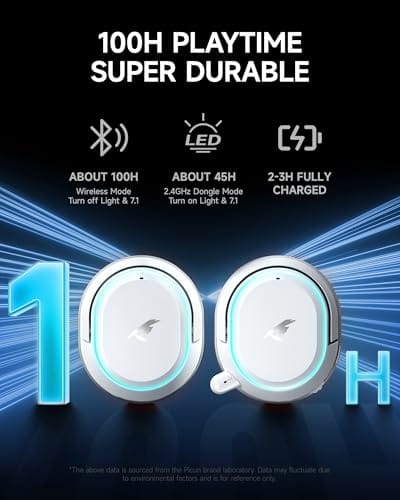
Not every headphone needs one. Easy-to-drive wireless sets handle their own amplification internally, which is why a self-powered option like the Picun G2 wireless headset at $59.99 sidesteps the question entirely. It runs 2.4GHz, Bluetooth 5.4, or wired, carries a 100-hour battery, and its 4.5 rating reflects how little fuss it asks of your source. For plug-and-play users, that built-in path is often all you’ll ever need.


Pros
- Three connection modes on a single headset: 2.4GHz dongle, Bluetooth 5.4, and 3.5mm wired fallback.
- Vendor-rated 5ms 2.4GHz latency keps audio synced in competitive shooter scenarios.
- Long rated runtime, up to 100 hours in Bluetooth with RGB disabled for travel use.
- RetractableENC microphone tucks away, useful when switching between gaming and general listening.
Cons
- Limited owner feedback at time of writing, real-world reliability and QC signal is unverified.
- 7.1 surround is virtual DSP, not true multi-driver, so positional accuracy varies by title andear.
- RGB lighting materially cuts battery life, cited100-hour figure requires lighting turned off.
The Picun G2 is a budget-tier wireless gaming headset built around 40mm drivers, virtual 7.1 surround, and tri-mode connectivity across2.4GHz, Bluetooth 5.4, and 3.5m wired. Target buyer is a multi-platform player rotating between PC, PS5, PS4, and Switch who wants low-latency wireless without moving up to established brand pricing.
The defining feature is the tri-mode radio stack. The 2.4GHz USB-A or Type-C dongle is rated at 5ms latency, which is competitive for the tier and adequate for most FPS titles, while Bluetooth 5.4 handles phones and tablets. Headsets in this class typically deliver serviceable rather than reference-grade imaging, and virtual 7.1 leans on DSP rather than discrete drivers.
Trade-offs are typical at this tier. Battery figures are optimistic: 100 hours assumes Bluetooth with RGB off, and 2.4GHz drops the number to 42 to 45 hours. Driver material, impedance, frequency response, clamp force, and weight are not specified, so tonal balance and long-session comfort cannot be verified from source data alone.
Buy this if you want one headset that jumps between a PS5, a Switch dock, and a work laptop over Bluetooth, and you accept spec-sheet-only marketing. Skip this if you rely on measured frequency response, discrete suround, or detachable bom mics with broadcast-grade pickup for streaming.
Drivers and tuning: Picun specifies 40mm dynamic drivers paired with virtual 7.1 surround processing. Impedance, sensitivity, and frequency response are not specified, so bass extension and treble air cannot be quantified from source. Virtual 7.1 is DSP-based positional widening, useful for FPS cues but not equivalent to true multi-driver surround.
Connectivity and latency: Three modes are covered: 2.4GHz via USB-A or USB-C dongle, Bluetooth 5.4, and 3.5mm analog. The 2.4GHz link is rated at 5ms latency. Bluetooth codec support (SBC, AAC, aptX) is not specified, which maters for wireless music quality on phones and tablets.
Battery and power: Rated up to 100 hours on Bluetooth with RGB off, and 42 to 45 hours on 2.4GHz wireless. Play-while-charging is supported, so a USB cable can extend sessions past the rated ceiling. Charge time and battery capacity in mAh are not specified.
Microphone: Retractable omnidirectional bom with ENC noise reduction. Sample rate, bit depth, and pickup pattern beyond omni are not specified.ENC filtering targets background noise on the transmit side, adequate for party chat but below dedicated USB mic quality.
The longer explanation
Audio starts as a tiny electrical signal. Your headphones turn that signal into sound by pushing a driver back and forth, and pushing that driver takes power. Two specs decide how much: impedance, measured in ohms, and sensitivity, measured in decibels per milliwatt. High-impedance headphones, say 250 or 600 ohms, resist the current and need more voltage to reach full volume. Low-sensitivity headphones need more power to hit the same loudness. When your source can’t supply enough, you get quiet, flat audio and you run out of usable volume long before the driver is working its best.
A dedicated amp fixes the mismatch. It takes the line-level signal and adds gain, supplying the voltage swing and current those hungry drivers demand. Done right, that’s not just louder, it’s cleaner. The bass tightens because the amp keeps firm control over the driver, transients hit harder, and the soundstage opens up. Push a weak onboard output too hard and it clips, adding harshness and strain. A capable amp gives you headroom, meaning you’re using a comfortable slice of its power rather than maxing out a struggling one.
How it works
Inside the box, the amp takes your low-level input and runs it through a gain stage that multiplies the voltage while a power section supplies the current. Many desktop units include a gain switch, low and high, so you can match the output to your headphones instead of overpowering sensitive in-ears or starving big planar cans. That flexibility is the practical heart of a good amp.
It helps to separate two jobs that often share one chassis. A DAC, or digital-to-analog converter, turns the digital file into an analog signal. The amp then strengthens that analog signal to drive headphones. Plenty of products combine both into a single DAC/amp unit, which is why the two terms get blurred. They’re distinct roles, though: one translates, the other pushes. Understanding the split makes it far easier to figure out which piece your setup is actually missing.
The class of amplifier matters less than most buyers fear. Solid-state designs dominate desktop gear because they’re clean, efficient, and cheap to build well. Tube amps exist for people chasing a warmer character, but that’s a flavor choice, not a power one. What you should care about is the honest power figure into your headphone’s impedance and how quiet the amp stays with nothing playing. A low noise floor means dead silence between tracks, and that black background is often the first thing owners notice after upgrading from onboard audio.
Why it works this way
Onboard audio lives in a hostile place. A motherboard is packed with components throwing off electrical noise, and the headphone circuit gets squeezed into whatever space and power budget is left. Manufacturers size that built-in amp for common earbuds and easy headsets, not for demanding audiophile cans. It’s a cost and space decision, not an oversight. That’s why a laptop can sound fine with cheap earbuds and disappointing with a serious pair.
Moving amplification into its own enclosure solves several problems at once. It gets a cleaner power supply, dedicated circuitry, and physical distance from the noisy guts of the computer. Free from those constraints, a standalone amp delivers more power with less interference. The tradeoff is another box, another cable, and another purchase, so the payoff only shows up when your headphones are genuinely held back by a weak source.
When you’d want this
The clearest case is high-impedance or low-sensitivity headphones. If your cans are rated at 250 ohms or climb toward 600, or if the volume never quite gets loud enough on your PC, an amp is the fix. Audiophiles chasing every bit of detail want the cleaner power and tighter control too. So do people bothered by faint hiss or interference from onboard audio, since a good external unit sidesteps the noisy motherboard entirely.
You probably don’t need one for easy-to-drive gear. Most wireless gaming headsets amplify themselves, and a set like the Logitech G733 Lightspeed at $124.92 runs its own PRO-G drivers over a wireless connection, with a 4 rating and features like Blue VO!CE mic processing and Lightsync RGB. Nothing to plug an amp into there. The same goes for efficient in-ears and typical earbuds. Match the tool to the headphone, and for lightweight or self-powered sets, save the money for something you’ll actually hear.

Pros
- Lightspeed wireless with 20 meter range handles typical living room and desk distances
- Up to 29 hours battery life covers multi-day use between charges
- Blue VO!CE mic processing in G HUB improves clarity for Discord and streaming
- Suspension headband and low mass design reduce clamp fatigue during long sessions
- Dual-zone Lightsync RGB with 16.8M colors is customizable through G HUB
Cons
- PS4 output limited to stereo, no suround on older PlayStation hardware
- Driver size, frequency response, and mic pattern not specified in source data
The Logitech G733 is a mid-tier wireless gaming headset targeting PC, PS5, PS4, and Nintendo Switch users who want a lightweight all-day fit. It leans on Lightspeed 2.4GHz wireless, PRO-G drivers, Blue VO!CE mic processing, and a reversible suspension headband, aimed at multi-hour gamers and streamers.
The defining feature is the combination of Lightspeed wireless with a quoted 20 meter range and up to 29 hours of battery. In practice this covers full workdays plus evening sessions without a charge cycle. PRO-G drivers, per Logitech, reduce distortion, and headsets in this tier typically deliver a mildly V-shaped tuning suited to positional FPS cues.
Trade-offs are typical at this price point. PS4 users are locked to stereo output with no virtual surround. Driver diameter, impedance, and frequency response are not published in the source data, so absolute output quality is hard to benchmark against wired competitors. There is no Bluetooth fallback listed, so mobile pairing is not supported.
Buy this if you want a light, long-battery 2.4GHz wireless headset for PC or PS5 with a usable broadcast-style mic. Skip this if you need wired low-latency USB, Bluetooth multipoint, or vendor-published driver and frequency response specs before purchase.
Drivers and tuning: Logitech lists PRO-G drivers tuned for reduced distortion, though exact driver diameter and frequency response are not specified in the source. Headsets in this tier typically ship with 40 to 50mm dynamic drivers and a mildly V-shaped response suited to explosions and footstep cues in FPS gameplay.
Connection and latency: Lightspeed 2.4GHz wireless with a stated 20 meter range covers desk and living room use. Compatibility is confirmed for PC, PS5, PS4 (stereo only), and Nintendo Switch. Bluetooth and wired 3.5mm fallback are not listed in the source, so single-dongle 2.4GHz is the only documented path.
Battery life: Rated up to 29 hours per charge, enough for roughly three to four full evening sessions before recharging. Exact charge time and USB-C versus micro-USB charging port are not specified in the source data.
Microphone: Detachable mic with Blue VO!CE filters configured in G HUB, providing EQ, noise reduction, and de-eser presets useful for Discord and Twitch chat. Mic polar pattern, sensitivity, and frequency range are not disclosed in the source specifications.
What to look for in a headphone amp
Start with power output relative to impedance. A good amp lists how many milliwatts it delivers into common loads like 32, 250, and 600 ohms, and you want comfortable headroom for your specific headphones rather than a spec that barely clears them. A gain switch is genuinely useful, letting one unit serve sensitive earphones and power-hungry planars without drama. Check the output impedance too; a low figure, under a couple of ohms, keeps the frequency response consistent across different headphones.
Then decide on form and features. A combined DAC/amp is the tidiest choice if you’re feeding it from a computer over USB, cutting cables and matching the two stages for you. Connectivity matters as well, from a standard 3.5mm and 6.35mm jack to a balanced output if your headphones support it. If you want the full breakdown of integrated options, our DAC/amp roundup covers where the value lands. Skip the marketing gloss and focus on power, output impedance, and the connections you’ll really use.
Common misconceptions
The biggest myth is that an amp makes everything sound better. It doesn’t. If your headphones are already easy to drive and hitting full volume, adding an amp changes little you can hear, and a pricier one won’t magically add detail that isn’t there. Amps solve a power problem; they aren’t a universal upgrade. Another common mix-up is treating a DAC and an amp as the same thing. They handle different jobs, and buying one when you needed the other is a frequent, avoidable mistake.
People also assume louder always means better, but a clean signal at a moderate level beats a distorted one turned up. And plenty of folks with gaming headsets or wireless earbuds go shopping for an amp they’ll never connect to anything, since those devices amplify themselves. Figure out your headphones’ actual needs first. Once you know the impedance and how your current source handles them, the decision usually makes itself.
Frequently asked
Do I really need a headphone amp for my PC?
Only if your headphones are hard to drive or your onboard audio can’t get loud and clean enough. High-impedance headphones around 250 ohms or more benefit clearly. Easy-to-drive earbuds, most gaming headsets, and wireless sets don’t need one, since they either sip little power or amplify themselves. Check your headphone’s impedance rating first.
What’s the difference between a DAC and a headphone amp?
A DAC converts the digital audio file into an analog signal. An amp then boosts that analog signal to drive your headphones. They’re separate jobs, though many products combine both into one DAC/amp unit. If your sound is quiet or weak, you likely need amplification; if it sounds noisy or harsh from digital sources, the DAC stage may be the weak link.
Will a headphone amp make my headphones louder?
Yes, if your current source was running out of power. An amp supplies the extra voltage and current demanding headphones need, so you get more usable volume without distortion. If your headphones already reach full, clean volume on your PC, an amp won’t add meaningful loudness, it’ll just give you unused headroom.
Can a headphone amp damage my headphones?
It’s unlikely with normal use, but pushing extreme volume for long stretches can stress any driver. The bigger risk is your own hearing. Use the gain setting that suits your headphones, low gain for sensitive models, and raise the volume gradually. Treated sensibly, an amp is safe and actually reduces the distortion that comes from overdriving a weak output.
Does a gaming headset need a separate amp?
Almost never. Wired and wireless gaming headsets are built to run straight off a PC, console, or their own USB receiver, and their drivers are tuned for easy amplification. Adding an external amp usually gives you nothing, and wireless models have no jack to connect one to anyway. Save that budget for a better headset or a proper open-back pair if you want an audio step up.































Write Your Review
No reviews yet. Be the first to share your experience!