One side of your headphones going dead is annoying in a very specific way. Music still plays, the video still runs, but the sound sits lopsided in your head and that tiny imbalance becomes impossible to ignore. The good news is that the fix is often boring, which is exactly what you want. A bent plug, a flaky cable, a balance slider, or one tired earcup can all create the same symptom.
If you want more context while you work through the checks, a few related guides can help you rule out the rest of the audio chain, like headset mic not working fix, audio crackling fix, and speakers no sound fix. This guide stays focused on the one-side issue, and we’re going to keep it simple, practical, and a little ruthless about what’s actually worth repairing.
Related buying guides: gaming headset guide, wireless headset picks, headphone amplifier guide, audio interface picks, and computer speaker guide.
First check the obvious (the 30-second check)
Before you open Device Manager or start blaming drivers, do the fast stuff. Swap the headphones into another phone, laptop, controller, or audio jack. If the silent side moves with the headset, the problem is inside the headset or cable. If the silent side stays on the same computer or device, you’re probably dealing with a software setting, a port issue, or a bad output path.
Check the plug too. A partially seated 3.5mm connector can make one channel vanish, especially on laptops with a tight jack or a case that blocks full insertion. Wiggle the plug gently at the port, then at the split, then near the earcup. If the sound pops in and out, that’s a giant clue. Not subtle. Not mysterious.
For Bluetooth gear, pause the music, disconnect the device, and reconnect it cleanly. If the headset is paired to two devices, make sure the wrong device isn’t stealing the output or forcing a weird profile. Also check the source balance first, because a single slider can make a perfectly healthy headset seem broken.
Cause #1: cable or jack damage
This is the most common real failure, and it shows up in a few predictable ways. A frayed cable near the plug, a twisted wire near the Y-split, or a worn 3.5mm plug can break one audio channel while the other still works. That’s why headphones can sound fine for months, then fail only when the cable bends a certain way. The signal path for left and right channels is separate, so if one conductor opens up, one side drops out fast.
If you hear the missing side briefly return when you twist the plug, the jack or cable is almost certainly the problem. On some sets, the fault is right at the plug itself. On others, the wire inside the insulation has broken where it flexes every day in a pocket, backpack, or desk drawer. That kind of damage often looks invisible from the outside. The cable can look clean and still be finished.
When the connector is the weak point, a replacement plug can make sense if you’re comfortable with basic soldering and you want to repair a headset you already like. A budget repair part such as the Trinkrittey 6 Pcs 3.5mm Replacement Jack, priced at $5.59 with a 4.5 rating from 2 reviews, is the kind of part people buy for that sort of fix. The cleaner option is often to replace the whole headset if the cable is molded or the headset is already inexpensive.
For a ready-made single-ear replacement, the EXMAX 3.5mm Single Side Earphone Earbud comes in at $9.99, with a 4.1 rating from 99 reviews. It’s a simple mono earbud for one-ear listening, and that matters if your current headset is for calls, monitoring, or a work setup where you only need one channel anyway. If you only need a cheap stopgap, the Single Side Earphone in-Ear Mono Earbuds are listed at $6.99 with a 4.2 rating from 1,057 reviews, which tells you a lot of people have already used them as a no-fuss replacement path.

Pros
- Six-piece count gives spares for practice solder joints and future cable repairs.
- Gold-plated tip and ring contacts help maintain signal integrity across repeated insertions.
- Coper shell provides shielding ground path suitable for unbalanced stereo audio runs.
- Screw-on housing simplifies strain relief without needing separate bots or shrink tubing.
Cons
- Limited owner fedback at time of writing makes long-term durability hard to verify.
- TRS 3-pole only, so it will not cary mic signals for TRS headset repairs.
- Solder skills required; not suited for users expecting screw-terminal or crimp assembly.
This is a budget DIY audio repair kit containing six 3.5mm TRS 3-pole solder-type plugs from Trinkrittey. It targets hobbyists, headphone moders, and technicians who cut off frayed jacks and resolder new ends onto stereo headphone, earbud, or aux cables rather than replacing the entire cable assembly.
The defining trait is the standard 1/8 inch TRS 3-pole geometry paired with gold-plated contacts and a copper shell. That combination is typical at this tier and should deliver clean unbalanced stereo signal for headphones, line-level aux runs, and dynamic microphones wired to TS or TRS pinouts, based on the vendor description rather than measured data.
Trade-offs are honest for the price bracket. Three-pole wiring cannot pass a separate microphone conductor, so TRRS gaming headsets and smartphone in-line mic cables are out of scope. Owner feedback is limited at time of writing, solder joint reliability, thread tolerance on the housing, and long-term strain relief remain unverified beyond the listing claims.
Buy this if you already own a soldering iron and need spare 3.5mm stereo plugs for repairing headphones, IEM cables, or aux leads. Skip this if you need TRRS mic support, a solderless screw-terminal design, or a validated brand with measured contact resistance figures.
Connector format: 3.5mm (1/8 inch) TRS 3-pole plug, solder type, sold in a6-pack. Wiring suports tip (left), ring (right), and sleeve (ground) for standard unbalanced stereo audio, which fits most consumer headphones, earbuds, and aux cables.
Materials: Coper shell with gold-plated contacts per the vendor description. Gold plating targets corosion resistance and stable contact resistance across repeated insertions; exact plating thickness in microns is not specified in the source.
Assembly: Strip cable, insert conductors into marked solder cups, aply iron and solder, then rotate the housing to lock the strain relief. No crimp tool required. Users without soldering experience should expect a learning curve on the first one or two plugs.
Compatibility scope: Suitable for headphone, headset, earphone, microphone, and generic audio cable repair per the listing. Cable outer diameter range, contact resistance value, and insulation resistance figures are not specified in the source data.
If you are repairing a cable, keep expectations realistic. A clean repair can bring both channels back, but only if the break is in the plug or a reachable section of wire. If the problem lives inside a sealed earcup or a molded strain relief, repair gets messy fast. At that point, replacement is usually the smarter move.
Cause #2: Windows balance or mono setting
A weird settings change can mimic a dead earcup more convincingly than people expect. In Windows, open the sound device properties and look for the left-right balance. If one slider got nudged to zero, you’ll get exactly the symptom you’re describing, and nothing in the headset itself is actually broken. Accessibility settings can also force mono audio, which usually makes both sides play the same thing, but depending on the app or device chain, it can still make people think one side is missing.
Don’t skip the app layer. Some players, meeting apps, browsers, and games have their own audio routing or spatial sound controls. A headset can be fine in YouTube and wrong in Discord, or fine in Spotify and wrong in a game. That is why it helps to check the same headset on a second source before you blame hardware. Software can be annoyingly specific.
If you are on a desktop or laptop with multiple outputs, make sure the system is actually sending sound to the device you think it is. USB headsets, Bluetooth headsets, and analog jacks can all coexist, and Windows likes to remember the wrong one. Balance settings, enhancements, and spatial audio are tiny toggles, but they can create a very loud-looking problem.
A quick way to narrow it down is this: if the same left or right channel disappears across multiple headphones on the same machine, the headset is probably fine and the setting or port is guilty. If only one headset does it everywhere, that headset is the problem. Short, clean, and a lot less frustrating than guessing.
Cause #3: driver or failed earcup
If the cable is fine and the balance is normal, the next layer is the device driver or the speaker driver inside the earcup. Driver issues are more common with USB and wireless headsets, because they depend on firmware, host software, and a stable handshake with the operating system. A bad driver install can make one channel vanish, distort the mix, or route audio to the wrong output profile.
For wireless gear, reconnecting is worth doing the clean way, not just toggling Bluetooth off and on. Remove the device, pair it again, and check whether the headset is using the correct stereo profile. Some headsets switch into a low-quality call mode when an app grabs the mic, and that can make the audio feel broken even when the hardware is okay. If the headset uses software from the brand, reinstall that too.
A failed earcup driver is the harder case. Small headphone drivers can wear out, especially if the headset has been dropped, exposed to moisture, or played too loud for too long. When the earcup itself fails, you may hear crackles, very low volume, or a side that cuts in and out with bass hits. That is not a cable problem anymore. It is a hardware fault inside the cup.
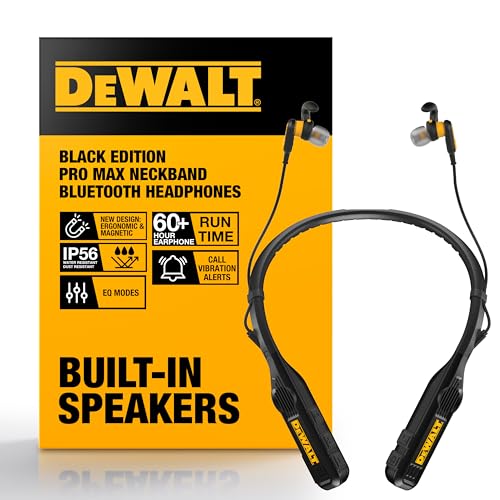
If you need something sturdier for rough use, the DEWALT Heavy Duty Black Edition 2-in-1 Neckband Bluetooth Headphones are priced at $84.99 with a 4.4 rating from 2,530 reviews. Specs from the title show 60+ hours of hands-free music and calls, built-in speakers, and a neckband design, which makes it a different class of product from a simple wired repair part. If your old headset keeps failing because of worn cables or damaged earcups, stepping up to a sturdier wireless option can save time later.
Pros
- Two audio modes in one device replace separate jobsite speaker and headset purchases
- IP56 rating covers heavy sweat, dust, and directional water spray exposure
- 60+ hour earbud runtime clears a full work week on a single charge
- Vibration call alerts and magnetic earbuds address loud, hands-busy work scenarios
Cons
- Limited owner feedback at time of writing, so long-term durability is unverified
- Driver size, codec support, and Bluetooth version are not specified in the listing
- Speaker mode runtime of 7.5+ hours is well below the earbud figure, limiting all-day loudspeaker use
The DEWALT Black Edition is a rugged 2-in-1 Bluetooth neckband that combines retractable earbuds with upward-firing speakers built into the collar. It targets tradespeople, warehouse staff, and DIY users who need to switch between private listening and shared jobsite audio without carying two separate devices.
The defining feature is the dual audio path: earbuds for focused cals or music, speakers for open playback while keeping ears free for surounding hazards. DEWALT rates earbud runtime at 60+ hours and speaker runtime at 7.5+ hours, though driver size, Bluetooth version, and codec support are not specified, so audio fidelity claims should be treated cautiously.
Trade-offs are typical for jobsite wearables. IP56 covers dust and directional water but is not full submersion rated, and the sharp gap between earbud and speaker runtime means loudspeaker-heavy users will charge far more often. With very limited public owner feedback, comfort under a hard hat and long-term hinge durability remain unverified in real-world use.
Buy this if you work on active sites, split time between hands-free calls and shared music, and want one device that survives sweat and light rain. Skip this if you want audiophile tuning, ANC, or verified codec support like aptX or LDAC, since none of that is documented.
Drivers and tuning: DEWALT does not specify driver diameter or frequency response. Four onboard EQ modes cover music, movies, podcasts, and super bass, leting users bias output without a companion app. Speakers are positioned to project upward toward the ears rather than outward.
Battery and runtime: Rated at 60+ hours in earbud mode and 7.5+ hours in speaker mode. That gap reflects the higher power draw of open-air speakers. Charging port type, charge time, and quick-charge behavior are not specified in the listing.
Microphone and calls: Suports hands-free calls with a vibration alert on incoming calls, useful when speaker volume is drowned out by tools. Microphone count, placement, noise suppression algorithm, and Bluetooth version are not documented, so call clarity in loud environments cannot be quantified from source data.
Durability and fit: IP56 rating seals against dust ingress and high-pressure water jets from any direction. Built-in magnets secure the earbuds together at the chest when stowed. Unit weight is listed at roughly 0.21 pounds, and a carry pouch is included for transport.
If the earcup is dead only on one side, and you’ve already ruled out the cable and software, replacement usually beats repair. Headphone drivers are small, sealed, and not always meant for easy service. You can sometimes open them, but the time cost starts to look silly unless the headset is expensive or sentimental.
Preventive maintenance
A little care goes a long way here. Don’t yank the cable out by the wire, because that puts stress right on the plug and the internal conductors. Grip the connector body instead. If you use wired headphones daily, let the cable rest without sharp bends near the jack or the earcup. That one habit alone prevents a lot of one-side failures.
Keep the plug clean too. Pocket lint, dust, and skin oil build up on the metal contacts and can make one channel behave badly before it fully fails. A dry microfiber cloth is enough for routine cleaning. For portable gear, a pouch or case helps even more, because crushed plugs and twisted cables are a big part of the problem. Boring advice. Still true.
On the software side, keep your audio driver stack calm. If everything is working, there is no reason to keep toggling enhancements on and off just to see what happens. Save a known-good balance profile, especially if multiple people use the same PC. And if you move between Bluetooth, USB, and analog often, take a second to confirm the active output before blaming the headphones.
For mono or single-ear use, the low-cost options in the data are actually useful because they fit the job. The Single Side Earphone in-Ear Mono Earbuds at $6.99 and the EXMAX 3.5mm Single Side Earphone Earbud at $9.99 both make sense when you do not need a full stereo headset. That is not glamorous, but it is practical. And cheap enough to keep as a backup.
When it’s not fixable – what to replace
If the silent side comes and goes with cable movement, the plug or wire is the likely culprit. If you can swap the cable, repair the plug, or replace a detachable lead, do that first. If the headset is molded shut, the cable damage is deep inside, or the driver in the earcup is dead, replacement is usually the better use of your time. A headset that’s already cheap, old, or physically abused rarely deserves a full teardown.
If your use case only needs one ear, replace it with a mono earbud instead of buying a bigger headset than you need. The EXMAX 3.5mm Single Side Earphone Earbud gives you a tidy one-ear option at $9.99, while the Single Side Earphone in-Ear Mono Earbuds land even lower at $6.99. Both are simple replacements when the original headset has become more trouble than it’s worth.
If you want a more durable wireless setup, the DEWALT Heavy Duty Black Edition 2-in-1 Neckband Bluetooth Headphones bring a different kind of resilience, with the title calling out built-in speakers, a neckband form factor, and 60+ hours of music and calls. That is a lot of runtime, and for people who burn through cheap wired sets, runtime plus a sturdier body can be the better long-term answer. Still, no headset is immortal. They just age in different ways.
A replacement part can make sense if you like repairing things and the failure is local. A whole replacement makes sense when the problem is buried, the headset is disposable, or the repair would cost more in time than a new unit costs in money. That’s the real line to draw.
Tools and parts needed
You do not need a giant bench setup for most of this. For cable-side repair, a replacement 3.5mm jack, a soldering iron, solder, wire cutters, heat-shrink tubing, and a steady hand cover most cases. For software-side checks, you only need access to the device settings and the patience to look at balance controls before panicking. For a clean replacement, a mono earbud or a new headset is often all you need.
If the issue is clearly hardware, the parts in the data are useful because they match the common failure points. The jack replacement is the repair part, while the single-side earbuds are the stopgap or replacement. The DEWALT neckband sits in a different lane, but it is relevant if you want to move away from fragile wired gear altogether.
A few more questions
Why does one side cut out when I move the cable?
That usually points to a broken conductor or a cracked joint near the plug, Y-split, or earcup entry point. When the cable moves, the break opens and closes, so the sound follows the bend. If it happens only at a certain angle, you’ve found a hardware fault, not a setting.
Can Windows really make one ear silent?
Yes, it can. A balance slider set all the way to one side will mute the other channel completely, and app-specific audio settings can do the same thing in a narrower way. That is why checking the system mix is one of the fastest ways to save yourself a long repair rabbit hole.
Should I repair a cheap headset or replace it?
If the headset is low-cost, molded shut, or already physically worn out, replacement is usually smarter. If the issue is only a jack or a cable and the headset is otherwise solid, a small repair can be worth it. The price of the headset, the type of failure, and how much time you want to spend should decide it, not hope.