

You update Windows, reboot, and suddenly Task Manager says your RAM is running at 2133MHz or 4800MHz when you paid for 3600 or 5200. It’s a common gut-punch. The good news: your memory almost certainly isn’t broken, and the fix is usually a setting, not a new kit. RAM defaults to a slow JEDEC speed until you enable an overclock profile, and a Windows update or a BIOS reset can quietly switch that profile back off. We researched the usual causes and the reliable fixes, and if you’re shopping too, our roundups of the best DDR5 for the 9800X3D and best budget RAM for 2026 can help you plan an upgrade rather than a panic-buy.
First check the obvious
Before you touch anything, confirm what your RAM is actually rated for. Open Task Manager, go to the Performance tab, click Memory, and note the “Speed” figure. Now compare it to the kit’s rated speed printed on the sticker or the product page. If your DDR4 kit is rated 3600MT/s but Windows shows 2133MHz, that’s the classic sign the memory overclock profile isn’t active. Not a defect. A disabled profile.
Here’s the 30-second gut check: reported speeds like 2133, 2400, or 4800 are JEDEC defaults, the safe fallback speed every kit boots at before XMP or EXPO kicks in. If your number matches one of those and not your rated spec, the culprit is almost always a profile that got turned off. Cross-check in CPU-Z’s Memory tab too, since Task Manager occasionally misreports the effective rate. Confirm the number first, then fix the cause.

One quick note on how the numbers are shown, because it trips people up. DDR memory transfers data twice per clock cycle, so a kit rated 3600MT/s runs at an actual 1800MHz clock. Some tools show the 1800 figure and some show 3600, and CPU-Z helpfully labels its number as the DRAM frequency, which you double to get the rated MT/s. So if CPU-Z reads 1800MHz, your 3600 kit is running correctly. Knowing this saves a false panic when a monitoring tool reports the clock rather than the transfer rate.
Cause #1: XMP or EXPO profile got disabled
This is the number-one reason by a mile. RAM ships rated for high speeds, but it only reaches them when you enable its overclock profile in BIOS: XMP on Intel-leaning kits, EXPO on AMD. A BIOS update bundled with, or triggered around, a Windows update can reset firmware settings to default, which switches that profile off. Your DDR4 kit falls back to 2133MHz, your DDR5 to 4800MHz, and Windows dutifully reports the slower number.
The fix is to reboot into BIOS (usually Delete or F2 at startup), find the XMP or EXPO toggle, and re-enable your rated profile. On a G.SKILL RipjawsV DDR4 kit rated 3600MT/s at CL18-22-22-42 and 1.35V, for example, you’d select the XMP profile that sets exactly those timings and that 1.35V voltage. Save, exit, reboot, and recheck Task Manager. If you’re on a kit with published EXPO and XMP 3.0 support like the Corsair Vengeance DDR5 rated up to 5200MHz at CL40, the same logic applies. Re-arm the profile and your speed returns.
If you can’t find the toggle, it’s usually under an overclocking or “extreme tweaker” menu rather than the main page, and boards label it differently: Intel platforms call it XMP, AMD boards call it EXPO or sometimes D.O.C.P on older units. Enable it, and if the board offers two profiles, pick the one matching your kit’s advertised speed. After you save and reboot, verify the change stuck by checking CPU-Z again. A profile that shows enabled in BIOS but reverts in Windows points to a deeper stability issue, which the next sections cover. Most of the time, though, one toggle fixes it and you’re done.

Pros
- DDR4-3600 XMP at 1.35V is the Ryzen AM4 sweet spot, aligning FCLK 1:1 at 1800MHz for best latency.
- Matched 2x16GB kit is factory-tested as a pair, reducing dual-channel instability compared to mixing sticks.
- Compatible with both Intel XMP and AMD DOCP/A-XMP BIOS profiles without manual sub-timing adjustments.
- Ships with JEDEC SPD fallback so the system always boots safe at default clocks before XMP is enabled.
Cons
- CL18 primary latency is mid-range; DDR4-3600 CL16 kits exist for buyers prioritizing tighter timings.
- No ECC support, so workstation or Threadripper ECC builds need a different kit entirely.
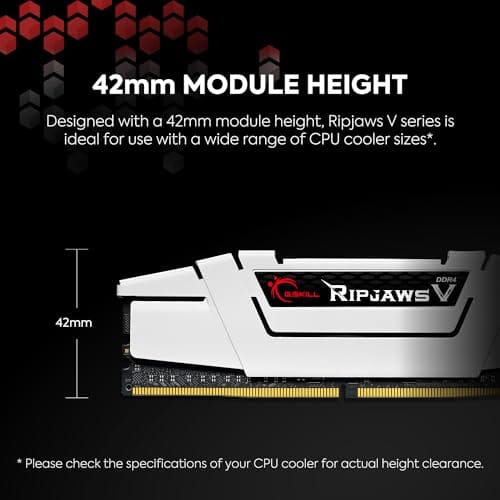
The G.SKILL RipjawsV F4-3600C18D-32GVK is a mid-range DDR4 desktop kit targeting Intel and AMD mainstream platform builders who want 32GB capacity at DDR4-3600 without overpaying for CL14 or CL16 enthusiast kits. It ships as a matched 2x16GB dual-channel pair in the standard 288-pin U-DIMM form factor.
The defining spec here is the XMP profile: DDR4-3600 at CL18-22-22-42, 1.35V. On AMD AM4 Ryzen systems, 3600MHz is the well-documented sweet spot for achieving a 1:1 FCLK ratio at 1800MHz, which keeps infinity fabric latency in check and translates to measurable gains in lightly-threaded workloads and gaming frame times compared to DDR4-3200 or lower.
CL18 is a genuine trade-off at this speed. Competing DDR4-3600 kits with CL16 or CL14 exist and offer lower absolute latency, though they typically carry a price premium. Owners report stable XMP operation across a wide range of B450, X570, and Z490/Z590 boards, but reaching rated speed on some budget AM4 boards may require manual sub-timing adjustments or AGESA microcode updates.
Buy this if you are building or upgrading an AM4 Ryzen or Intel LGA1700 desktop and want reliable 32GB DDR4-3600 dual-channel performance without tuning. Skip this if you need CL16 or tighter for competitive latency, or if your board has a limited QVL and you have not verified compatibility via G.SKILL's configurator tool first.
Platform Support: This kit uses 288-pin DDR4 U-DIMM and is compatible with Intel LGA1700 (Z690/Z790) and AMD AM4 (B450/X470/B550/X570) platforms. AM5 uses DDR5 exclusively, so this kit is not compatible with Ryzen 7000/9000 series builds on AM5 boards.
XMP and DOCP Activation: Rated speed of DDR4-3600 CL18-22-22-42 at 1.35V requires enabling XMP (Intel) or DOCP/A-XMP (AMD) in BIOS. Default JEDEC SPD boots at DDR4-2133 or DDR4-2400. On AM4, DDR4-3600 aligns FCLK at 1800MHz for a 1:1 ratio, which is the recommended operating point for Ryzen 3000 and 5000 series CPUs.
Slot Population and Mixing: Install both sticks in the recommended dual-channel slots per your motherboard manual, typically A2 and B2 in a 4-slot board. G.SKILL explicitly warns against mixing this kit with other modules; doing so voids the matched-pair guarantee and risks instability at XMP speeds.
Cooler Clearance: Exact heatspreader height is not specified in the source data, but RipjawsV modules are noted for a lower profile than Trident Z or RGB variants, reducing conflicts with wide tower coolers. Verify clearance if using a low-clearance cooler on a tight ITX board.
Cause #2: BIOS reset itself, or a CMOS clear happened
Sometimes the profile didn’t just toggle off, the whole BIOS reverted. This happens when a firmware flash completes, when a dying CMOS battery loses charge, or when an unstable overclock triggers the board’s automatic recovery, which dumps every setting back to default. A Windows update that prompts a UEFI firmware update through Windows Update can be the trigger that kicks all of this off. After that, not just memory speed but boot order and fan curves may look wrong too.
Walk through BIOS and restore your settings as a group: enable XMP or EXPO, confirm the DRAM voltage matches the kit’s spec (1.35V is standard for that G.SKILL DDR4), and check that the memory frequency reads your rated MT/s. If the profile keeps dropping after every reboot, suspect the CMOS battery, a cheap CR2032 that’s easy to swap. A board that can’t hold settings will lose your RAM speed again and again until that battery is replaced. It’s a five-dollar part with an outsized effect.
A quick way to confirm the battery theory: if the system clock resets to a wrong date and time after being unplugged, that’s the CMOS battery failing, and your memory profile is dropping for the same reason. Fixing one fixes both. Swap the battery, re-enable your profile, and the settings should finally stick across reboots and power cycles.
Cause #3: Instability forcing a fallback, or a kit that won’t hold its rating
Occasionally the profile is enabled but the system won’t run stable at the rated speed, so the board silently backs the memory down to a safe frequency on the next boot. This shows up more with four DIMMs populated, with mixed kits, or on a memory controller that struggles at higher speeds. DDR5 in particular can be picky about running its full rated rate with four modules installed. The result looks identical to a disabled profile, but the cause is stability, not a toggle.
If re-enabling XMP or EXPO doesn’t stick, or the PC won’t boot at rated speed, the honest fix is sometimes a memory kit better matched to your platform. A modern DDR5 set with validated EXPO and XMP 3.0, like the Corsair Vengeance DDR5 rated up to 5200MHz at CL40, is designed to hit its numbers on current AMD and Intel boards without drama. Two matched sticks running a validated profile beat a hodgepodge of mixed modules every time. If you’ve been mixing kits, that’s likely your instability. Standardize on one validated set.
You can also try a small step-down before replacing anything. If a 3600MT/s DDR4 profile won’t hold, manually set 3466 or 3200 with the same safe voltage and see if the board becomes stable. For DDR5, dropping one or two speed bins can rescue a difficult memory controller while still running far faster than default. This is especially useful with four sticks, where the controller works harder than it does with two. It’s not the full advertised rate, but it’s a stable middle path while you decide whether a matched two-stick kit is worth buying. Run a quick memory diagnostic after any change to confirm the new setting is genuinely stable, not just booting. A profile that posts but throws errors under load is worse than a slightly slower one that’s rock solid, so verify before you call it fixed.

Pros
- AMD EXPO profile activates 5200MHz CL40-40-40-77 with a single BIOS toggle on Ryzen 7000 boards.
- Low 35mm module height clears virtually any AM5 or LGA1700 tower cooler without physical conflict.
- 1.25V operating voltage sits within DDR5 spec, reducing thermal stress on integrated PMIC under sustained load.
- Aluminum heatspreader aids passive heat dissipation in open-air cases without requiring active cooling.
Cons
- 16GB total capacity is increasingly marginal for content creation workflows and modern open-world titles running texture packs.
- 5200MHz CL40 offers modest latency compared to DDR5-6000 CL30 kits that hit the Ryzen 7000 FCLK 1:1 ratio sweet spot.
The CORSAIR Vengeance DDR5 16GB 2x8GB is a mid-range DDR5 kit targeting AMD Ryzen 7000 series and Intel 12th-generation-or-newer desktop builds. It ships with both AMD EXPO and Intel XMP 3.0 profiles, making it broadly compatible across AM5 and LGA1700 or LGA1851 platforms without manual timing configuration.
The standout feature is dual-profile support at a frequency that loads with a single BIOS toggle. At 5200MHz CL40-40-40-77 and 1.25V, it sits within DDR5 JEDEC specification territory, and onboard voltage regulation on the module itself reduces dependency on motherboard power delivery for the memory rail, which matters on budget AM5 boards with fewer VRM phases dedicated to DRAM.
The honest trade-off at this tier is frequency positioning. Ryzen 7000 performs best at DDR5-6000 with CL30 timings, where FCLK and memory controller run at a clean 1:1 ratio. This kit at 5200MHz places it below that threshold, meaning buyers on AM5 leave some CPU bandwidth on the table. The 16GB total capacity is also worth scrutinizing for any workload beyond gaming or light productivity.
Buy this if you are building a budget-to-mid AM5 or Intel DDR5 system and need reliable plug-and-play EXPO or XMP activation without manual overclocking. Skip this if your platform is AM5 and you plan to run a Ryzen 7000 CPU near its performance ceiling, where DDR5-6000 CL30 kits deliver measurably better throughput and latency at comparable pricing.
Platform Requirements: DDR5 requires AMD 600-series or newer motherboards paired with Ryzen 7000 series or newer CPUs, or Intel 600-series or 700-series boards with 12th-generation Core or newer. DDR5 is not backward compatible with DDR4 slots. Verify your motherboard QVL lists this kit before purchasing.
EXPO and XMP Activation: The rated 5200MHz speed requires enabling AMD EXPO or Intel XMP 3.0 in BIOS. Without activation, the kit defaults to DDR5-4800 JEDEC. On Ryzen 7000, DDR5-6000 is the accepted 1:1 FCLK sweet spot; this kit at 5200MHz runs below that threshold, which carries a small but measurable bandwidth and latency penalty versus a tuned DDR5-6000 kit.
Physical Clearance: Module height is 35mm, which clears nearly all air coolers without conflict. The 1.25V operating voltage and onboard PMIC mean power comes from the module itself rather than solely from the motherboard, reducing stress on budget boards with lighter DRAM power stages.
Capacity and Channel Config: The 2x8GB configuration fills two slots in dual-channel. CORSAIR explicitly advises against mixing kits, so expansion to 32GB requires replacing both modules with a validated 2x16GB kit rather than adding a second 2x8GB pair.
Preventive maintenance
A few habits keep this from recurring. After any BIOS update, immediately re-enable XMP or EXPO and jot down your working settings so you can restore them fast. Some boards let you save a settings profile to a USB stick, which turns a ten-minute reconfiguration into a thirty-second reload. Replace the CMOS battery every few years, especially on an older board, so it never silently drops your config. And when you buy memory, stick to one validated kit rather than mixing sticks over time.
It also pays to pause Windows Update’s automatic firmware delivery if your board is prone to losing settings, or at least to check your memory speed after every major update rolls through. A two-second glance at Task Manager’s memory speed becomes a habit that catches a reset the day it happens rather than weeks later. If you overclock memory manually instead of using a profile, keep a written record of every timing and voltage, because a CMOS reset wipes all of it and rebuilding a manual tune from memory is painful.
When it’s not fixable: what to replace
If you’ve re-enabled the profile, confirmed voltage, swapped the CMOS battery, and the RAM still refuses to hold its rated speed, the issue is usually a mismatch between the kit and your platform rather than a dead stick. That’s when replacement makes sense. For a DDR4 build, a single matched G.SKILL RipjawsV 32GB kit rated 3600MT/s at CL18 gives your board one clean profile to lock onto instead of fighting mixed modules. For DDR5, a validated Corsair Vengeance set keeps things simple.
Genuinely dead RAM is rare and behaves differently: failure to boot, memory errors, or crashes under load, not just a wrong speed reading. If you’re seeing corruption or blue screens, run a memory diagnostic before spending. If it’s only the speed number that’s off, you almost never need new hardware, just the right profile. Save the money for an upgrade you actually want, like one from our 32GB kit picks for 2026.
Tools and parts needed
You need almost nothing here. Access to your BIOS, a couple of minutes, and CPU-Z or Task Manager to verify. For the CMOS-battery angle, a fresh CR2032 and a moment to swap it. If you conclude the kit itself is the problem, a single validated memory set, DDR4 or DDR5 depending on your board, is the only real purchase. No special tools, no soldering, no drama.
A few more questions
Why does my RAM show 2133MHz when it’s rated 3600?
Because 2133MHz is the JEDEC default your DDR4 boots at before the XMP profile is enabled. Your kit’s 3600MT/s rating is an overclock that only activates when you turn XMP on in BIOS. A firmware reset around a Windows update commonly switches it back off. Re-enable XMP and the rated speed returns.
Did the Windows update actually slow my RAM down?
Not directly. Windows can’t change your memory frequency; that lives in BIOS. What happens is the update process, or a UEFI firmware update delivered alongside it, resets BIOS to defaults, which disables your XMP or EXPO profile. The slowdown is a side effect of the reset, not the update touching your RAM. The fix is in BIOS, not Windows.
Is it safe to just leave RAM at the slower default speed?
It’s perfectly safe, just slower. Running at 2133 or 4800MHz won’t harm anything, but you’re leaving performance on the table you already paid for, and some CPUs, especially Ryzen, lose noticeable frame rates with slow memory. Re-enabling your rated profile is the whole reason you bought a faster kit. Turn it back on.






























Write Your Review
No reviews yet. Be the first to share your experience!