

The Corsair K70 CORE with palm rest is the best Corsair keyboard for most PC gamers who want a number pad. At $69.99 when we checked, it pairs linear mechanical switches with a volume dial and a detachable palm rest. If your mouse keeps hitting the side of your keyboard, the K65 PLUS WIRELESS frees up desk space while keeping the arrow keys and function row.
The other three picks solve more specific problems. The K70 PRO TKL gives you adjustable actuation and Rapid Trigger for shooters. The VANGUARD 96 keeps a number pad and adds dedicated shortcut keys for streaming or editing. And if you just want an affordable full-size board with media controls, get the K55 CORE.


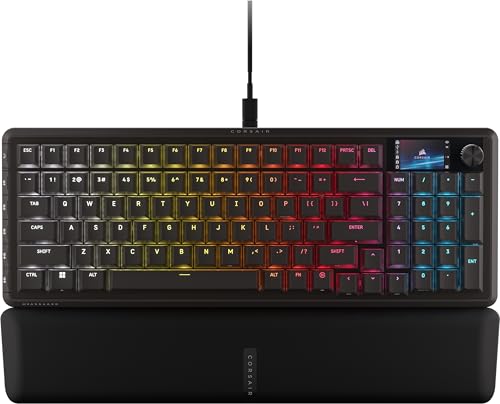

Corsair gaming keyboards at a glance
| Pick | Keyboard | Defining spec | Best for | Main trade-off |
|---|---|---|---|---|
| Best for most | K70 CORE with palm rest | Full-size, wired, MLX Red linear | Gaming and everyday number-pad use | Takes up more mouse space |
| Best wireless | K65 PLUS WIRELESS | 75%, 2.4 GHz, Bluetooth or USB | Small desks and multiple devices | No number pad |
| Best for competitive FPS | K70 PRO TKL | Wired TKL, Hall effect and Rapid Trigger | Tuning movement keys | Extra setup to get value from its settings |
| Best for streaming shortcuts | VANGUARD 96 | Wired 96%, tactile MLX Fusion, six G-keys | Keeping a number pad and dedicated shortcuts | Crowded key layout |
| Best budget | K55 CORE | Full-size wired membrane, ten-zone RGB | Basic controls on a tight budget | Lighting adjusts by zone |
Best for most gamers — Corsair K70 CORE with palm rest
Get the K70 CORE if you switch between games and work that makes use of the number pad. The 104-key layout leaves the navigation cluster in its usual spot, so you can jump to Home or End without looking up a shortcut. The black US version here includes the magnetic palm rest. If you need more front-to-back room for a drawing tablet or a notebook, pull it off. Corsair also sells a black K70 CORE without the rest, so look for the bundle in the name and the photos if that accessory matters to you.
Corsair fits this board with pre-lubricated MLX Red linear switches, double-shot ABS keycaps and a media dial. A linear switch travels without a deliberate tactile bump. That makes sense if you want an even press for movement and repeated inputs. If you prefer a physical cue under your fingers while typing, the tactile VANGUARD 96 is the better fit. Corsair also lets you remap keys and customize per-key lighting in iCUE. Useful if you want to highlight a handful of game bindings.
The main cost is width. Compare where the right edge of a full-size board will land with where you lift and reset your mouse in a shooter. If you naturally place the keyboard straight ahead and sweep your mouse inward, the number pad may be the first thing you hit. In that case, skip the K70 CORE and buy one of the two smaller picks below. For a desk with room, the $69.99 offer is a good balance between the simpler K55 CORE and the more specialized boards.
Best wireless — Corsair K65 PLUS WIRELESS
The K65 PLUS WIRELESS is a 75% board with dedicated arrows and a function row. You still have F-keys for game bindings and arrows for moving through text, with less keyboard extending into the mouse area. What you give up is the number pad and the spaced-out navigation cluster of a full-size board. See our guide to 75% keyboard layouts if you’re deciding whether your usual shortcuts will fit.
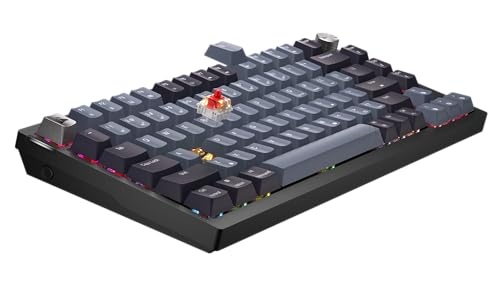
This black-and-gray version has MLX Red linear switches and dye-sublimated PBT keycaps. Its hot-swappable sockets are the reason to pick it over a compact board you can’t easily change. If you like linear movement keys but want a tactile switch under the space bar or Enter, you can swap compatible switches without soldering. Before ordering extras, read our guide to hot-swappable keyboards and check the switch and socket type.
Use the 2.4 GHz receiver on your gaming PC, Bluetooth for a second device, or USB when you want a wired connection. The programmable dial is handy when the keyboard moves between roles. Set it to volume on a gaming desk, or assign it to scrolling in iCUE if you keep the board beside a laptop for reading and writing. Corsair rates it for up to 266 hours on 2.4 GHz with the lighting off. Plan to recharge sooner if you keep RGB on. At $99.99, the K65 PLUS is the pick if compactness and a cable-free desk matter every day. If you only clear your desk of cables once in a while, the receiver and charging routine may be more hassle than a wired board.
Best for competitive FPS — Corsair K70 PRO TKL
The K70 PRO TKL is the $129.99 choice for players who know which keys they’d like to tune. Its tenkeyless layout leaves the arrows and navigation keys in familiar positions with room on the right for a mouse. The US ANSI model puts adjustable MGX Hyperdrive magnetic switches under 61 keys and standard MLX Plasma linear switches under the other 23. Corsair lists a 0.1–4.0 mm actuation range for the magnetic keys and recommends 0.3–3.6 mm for consistency. The Plasma switches actuate at a fixed 2.0 mm. See the Corsair K70 PRO TKL manual for the layout and adjustment controls.
Rapid Trigger makes the reset point follow key movement. Lift the key slightly and it can reset for the next press without returning to a fixed position. That gives you a way to tune repeated taps on movement keys. Start with the movement bindings you care about. Keep deeper settings on keys you tend to graze while reaching, such as reload or an ability. A light touch helps only if you can still press the intended key consistently.
The included cushioned magnetic palm rest and detachable USB cable are practical if you move the board between stations. The headline 8,000 Hz report rate tells you how often the keyboard can send reports under that setting. The game, PC and display also affect how quickly a press shows up on screen. Choose this board for adjustable actuation and reset behavior. If you’re happy with standard switches, the K70 CORE gives you a much cheaper route into Corsair mechanical boards, and the K65 offers compactness with wireless.
Best for streaming shortcuts — Corsair VANGUARD 96
The wired VANGUARD 96 makes sense when you need a number pad and a few controls that stay out of your everyday typing shortcuts. The 96% layout packs the number pad and arrows close to the main key area. You still get a rotary dial, an integrated LCD and six programmable G-keys. This $119.99 version uses tactile MLX Fusion switches. The bump during the press is a reason to pick it over the linear version if you prefer to feel each keystroke.
Map a G-key to an editing shortcut you use all day, or pair the keyboard with Elgato’s Stream Deck software for controls such as switching an OBS scene or muting an audio source. Corsair Web Hub handles keyboard settings such as button remapping. You still need the Stream Deck app for the on-screen Virtual Stream Deck. The mechanical switches are hot-swappable, so you can also change the feel later with compatible three- or five-pin switches.
The trade-off is that you get fewer visual and physical gaps between groups of keys. If you find Delete or the arrows by touch on a traditional full-size board, check the layout in the product photos before ordering. The column of G-keys on the left also changes where your hand meets the outside edge. If you won’t use the extra shortcuts, the cheaper K70 CORE has the more familiar arrangement. The VANGUARD earns its spot when the extra controls save you from reaching for another device or switching windows.
Best budget — Corsair K55 CORE
The $34.99 K55 CORE is the right pick when you want a number pad and quick access to media controls at the lowest price in this guide. It has membrane keys, four dedicated media buttons and ten-zone RGB. A zone can take its own color, so you can light the left and right sides differently. If you want to give WASD a color distinct from the surrounding keys, step up to the K70 CORE’s per-key lighting.
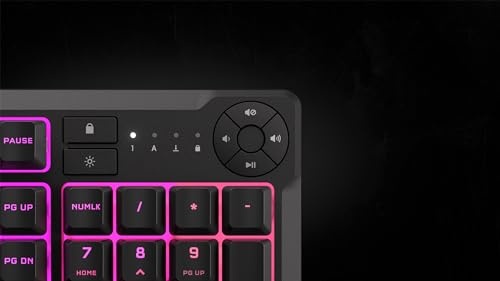
The membrane changes the feel as well as the price. If your reference point is a mechanical board with a crisp bump or an even linear stroke, expect a different sensation as the keys compress. Corsair specifies selective 12-key rollover. That gives you room for multiple simultaneous inputs, though anyone with unusual key combinations or two players sharing one keyboard should pay attention to the K70 CORE’s full-key rollover.
The size is the other consideration. The K55 CORE saves money, but it won’t open up extra room beside your mouse. Buy it for an inexpensive all-in-one desk board you can plug in and use for everyday typing and games. Spend the extra $35 on the K70 CORE if you know you’ll appreciate the mechanical switch feel, palm rest or per-key lighting every day.
How we evaluated these Corsair keyboards
We compared Corsair’s specifications for each US configuration and checked new US Amazon offers on November 25, 2026. The prices quoted above are that day’s snapshot. We chose the picks by layout, switch type, connectivity and controls you can use without leaving what you’re doing. For battery life and polling rate, we used Corsair’s published figures with the relevant conditions. Sound, switch feel and comfort vary with the person and the setup, so the recommendations focus on features you can verify before buying.
How to choose a Corsair keyboard
Which keys do you actually reach for?
Look at what you use away from the letter keys. Lots of spreadsheet entry or number-pad shortcuts? Keep a full-size layout or choose the VANGUARD 96. If you need a separate navigation block and don’t use a number pad, a TKL layout is an easy transition. A 75% board keeps the F-row and arrows in a tighter space. Our TKL versus full-size comparison explains what stays and what moves.
What’s worth paying for in the switches?
Choose linear if you want an even stroke, or tactile if you want to feel a bump under your fingers. If you like to change your setup, prioritize a hot-swappable board and verify socket compatibility before ordering switches. Pay for Hall effect if you can name a setting you’ll use, such as a deeper threshold on an easy-to-hit ability key or a shorter reset on movement keys. For occasional gaming, membrane can make sense if the layout and price suit you.
How often will you use wireless?
A wired board makes sense if it always stays at the same computer and you have a free port within easy reach. Wireless earns its keep when you put the keyboard aside for other work, switch to another device or need to route fewer cables across the desk. Decide where you’ll keep the 2.4 GHz receiver and how you’ll recharge before you buy. Our wired and wireless keyboard comparison goes into the day-to-day trade-offs.
Frequently asked questions
Are Corsair keyboards good for gaming?
Yes, if you choose one that fits your desk and habits. The K55 CORE covers basic wired gaming cheaply, the K65 PLUS frees up mouse space, and the K70 PRO TKL gives you movement-key settings that a conventional board doesn’t offer. Start with the layout and switch feel you want. RGB and extra controls are easier to evaluate once you’ve covered those basics.
Is Rapid Trigger the same thing as FlashTap?
Rapid Trigger changes how an individual key resets as it moves. FlashTap decides what happens when opposing movement keys are pressed together. On the K70 PRO TKL, FlashTap ships disabled. Check the input rules for your game or event before enabling it.
Is the K65 PLUS WIRELESS a 65% keyboard?
It’s a 75% keyboard. The K65 name covers different layouts, so look for the full model name and check the product image for the F-row. If a listing says K65 PRO MINI or shows a different layout, you’re looking at a different keyboard.
Bottom line
Buy the K70 CORE with palm rest if your desk has room for a number pad and you want a straightforward wired mechanical keyboard. The K65 PLUS WIRELESS is the better fit for a smaller or shared setup. If your budget is the deciding factor, the K55 CORE gives you the essentials for about half the price. Step up to the K70 PRO TKL or VANGUARD 96 when you already know which settings or shortcuts you’ll put to work.





























Write Your Review
No reviews yet. Be the first to share your experience!