

The Logitech G515 LIGHTSPEED TKL is our pick for most PC gamers shopping for a Logitech keyboard. Its slim frame gives your mouse more room, and you can use the same keyboard over Logitech’s wireless receiver, Bluetooth, or a USB cable. The black linear version in this guide is a good fit if you like a smooth keypress and rarely reach for a number pad.
A keyboard that fits your desk can still be wrong for the games you play. A tactical shooter player might get more use out of adjustable actuation on the PRO X TKL RAPID. Someone who binds commands to the number pad or spends the day in spreadsheets should start with a full-size board. At the lower end of the price range, the choice comes down to tactile mechanical switches on the G413 SE or dedicated media buttons and an integrated palm rest on the G213 Prodigy.


Pros
- Aluminum-magnesium alloy top case keps the deck rigid versus all-plastic budget boards.
- PBT keycaps resist shine and heat wear longer than ABS typically found at this price tier.
- Tactile switches with 6-key rollover cover WASD clusters and modifier combos without ghosting.
Cons
- Limited owner feedback at time of writing makes long-term reliability and QC consistency hard to verify.
- White LED backlighting only, no per-key RGB or lighting effect customization via software.
- 6-key rollover trails full NKRO found on mid-tier boards, and no hot-swap PCB is specified.
The Logitech G413 SE is a full-size wired mechanical gaming keyboard sitting at the budget end of the G-series lineup. It ships with tactile mechanical switches, PBT keycaps, and a brushed aluminum-magnesium top plate. Target buyer: first-time mechanical adopters or gamers moving up from a rubber-dome board on a tight budget.
The defining spec is the PBT keycap set, uncommon at this price tier where ABS dominates and starts shining within months. Combined with tactile switches, typing feel should hold up over long sessions. Based on category norms at this tier, expect a clear step above rubber dome without matching mid-tier custom builds.
Trade-offs are typical for entry-level gear: white-only backlighting, no per-key RGB, no G HUB software profiles, and 6-key rollover instead of full NKRO. Hot-swap sockets and dedicated media keys are absent, with media control layered on FN. Owner feedback at time of writing is too thin for confident reliability claims.
Buy this if you want a durable-feling entry mechanical keyboard for Windows or macOS with PBT keycaps under a rigid aluminum top plate. Skip this if you need per-key RGB, hot-swap switches, full NKRO, dedicated macro keys, or wireless connectivity for a cleaner desk layout.
Switches: Tactile mechanical switches, with actuation force and travel distance not specified for the SE model. Feel sits between linear reds and clicky blues, offering a mid-way bump without an audible click. Reasonable for mixed typing and gaming workloads at this tier.
Layout and rollover: Full-size 104-key layout including dedicated numpad and function row, with 6-key rollover anti-ghosting. Full NKRO is not specified. For WASD, Shift, Ctrl, and Space combinations common in FPS and MOBA titles, 6KRO covers the standard input load without dropped keys.
Build and keycaps: Brushed aluminum-magnesium alloy top case sits over the switch plate for minimal deck flex during aggressive input. Keycaps are PBT, more heat and wear resistant than the ABS used on most budget boards. Legends are shine-through, paired with white LED backlighting.
Connectivity and controls: Wired USB with Windows and macOS compatibility, no Bluetooth or 2.4GHz wireless option. Twelve FN-layer shortcuts cover volume, play and pause, skip, mute, backlight toggle, and Windows key lock. No dedicated macro row, rotary knob, or G HUB software profile support is called out in source data.

Best Logitech gaming keyboards at a glance
| Pick | Keyboard | Defining feature | Best for | Main trade-off |
|---|---|---|---|---|
| Best overall and wireless | G515 LIGHTSPEED TKL | 22 mm profile and three connection modes | Gaming on a shared or narrow desk | No number pad |
| Best for adjustable actuation | PRO X TKL RAPID | Magnetic switches with rapid trigger | Players who want to tune movement keys | Wired only |
| Best premium full-size | G915 X Wired | Nine dedicated G-keys and a volume roller | Gaming, streaming, and number entry on one board | Wide footprint, wired only |
| Best mechanical value | G413 SE | Full-size tactile mechanical layout | Shoppers who want switches and a number pad at a lower price | White lighting only |
| Best budget membrane | G213 Prodigy | Integrated palm rest and media controls | Budget setups that need quick access to volume | The palm rest takes up desk depth |
Logitech G515 LIGHTSPEED TKL: Best overall and best wireless
Start here if your mouse keeps bumping into the side of a full-size board or you move between a desktop and a laptop. The G515 keeps the function row, arrow keys, and navigation cluster in their usual places and drops the number pad. You can slide the keyboard left or center it without reserving extra width for a block of keys you seldom use. Especially handy on a small desk.
Logitech lists a height of 22 mm and a 1.3 mm actuation point for the low-profile GL mechanical switches. The version here is the black linear model. A linear switch travels without a tactile bump, which suits players who like a consistent feel as they hold or repeat a key. If you prefer feeling a bump during a press, look for the explicitly labeled tactile version. The product family also includes a wired G515 and the separate G515 RAPID, so check for both LIGHTSPEED and your preferred switch when you order. Logitech G515 LIGHTSPEED TKL specifications.
In a two-computer setup, you can leave the LIGHTSPEED receiver in your gaming PC and pair Bluetooth with your laptop. The USB cable is a third way to send input. For a one-PC setup that already has a convenient cable run, the cheaper G413 SE may make more sense if you have room for it. The G515 earns its price when you’ll use the extra mouse space, the slim profile, or the connection options regularly.
Logitech PRO X TKL RAPID: Best for adjustable actuation
Pick the PRO X TKL RAPID if you can name the keys you’d like to feel more or less sensitive. Its magnetic switches let you set the actuation depth for individual keys. Rapid trigger can also reset a key as you lift it so that a subsequent press can register without returning to a fixed reset point. That gives you two settings to consider for movement keys in a shooter: how far down a press has to go and how far back up you lift before another input can register. Logitech PRO X TKL RAPID specifications.
For example, if you often tap left and right in short bursts, start by adjusting those movement keys and leave the rest of the layout familiar. You can give the space bar and interaction keys a deeper actuation point if you tend to rest your fingers on them. A shallow setting across the whole board can make incidental presses easier to register, including when you switch from a game to typing a message.
A wired desk setup and a little patience for tuning. That’s where this board makes sense. The name is close to the PRO X TKL LIGHTSPEED, but the RAPID in this guide is the wired magnetic-switch model. If you want a receiver and conventional mechanical switches, buy the G515 LIGHTSPEED TKL. If you play a mix of games and rarely touch key sensitivity settings, put the money toward the layout and connection you’ll use every day.
Logitech G915 X Wired: Best premium full-size keyboard
The G915 X Wired is for a desk that earns its extra keyboard width. It keeps a number pad on the right, adds nine dedicated G-keys on the left, and has media controls and a volume roller up top. That layout is useful if you want a mute key for voice chat, a shortcut you can find while streaming, or a volume control you can reach without bringing a player window forward.
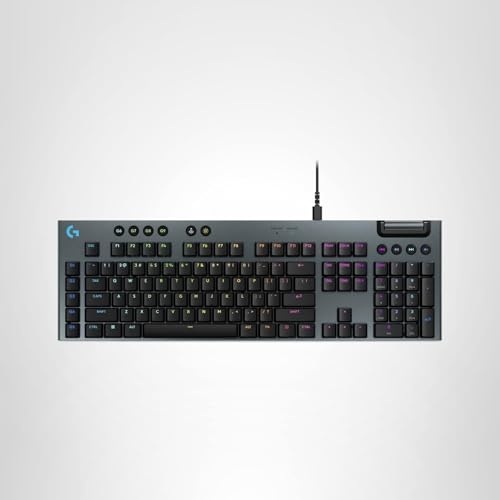
The selected black model uses linear low-profile GL switches. Logitech lists a 1.3 mm mechanical actuation point, a 23 mm overall height, and double-shot PBT keycaps. KEYCONTROL lets you assign additional functions. Compared with the G515, the money buys more physical controls and a full-size layout while keeping a similarly low profile. Be sure to check the exact name at checkout. The G915 X Wired, G915 X LIGHTSPEED, and G915 X LIGHTSPEED TKL are separate products. Logitech G915 X Wired specifications.
Give the left column some thought before buying. If you’re accustomed to finding Escape or the left modifier keys by reaching for the edge of your board, the extra column changes your reference point. And if your desk is already crowded, measure the width with your mouse pad in place. The G413 SE handles number entry at a lower price if you can get by without the extra controls. The G915 X makes more sense when you can assign those keys to things you do during most sessions.
Logitech G413 SE: Best value for a mechanical keyboard
The full-size G413 SE is the sensible choice if you want tactile mechanical switches, the usual navigation keys, and a number pad. It’s a good fit for a home PC that handles both work and gaming, especially if you use the number pad for budgeting, unit counts, or game bindings. Check for full-size in the listing because Logitech sells a G413 TKL SE under a nearly identical name.
Logitech lists PBT keycaps, white LED backlighting, and six-key rollover with anti-ghosting. The white lights make the legends visible without adding a color configuration decision. If your games involve pressing several keys at once, six-key rollover is a more useful spec to read than a broad anti-ghosting label by itself. Think about the largest combination you actually hold, including modifiers and movement keys. Logitech G413 SE specifications.
Choose it over the G213 if you value a tactile mechanical switch more than a built-in palm rest or dedicated media buttons. It’s also worth checking our guide to budget mechanical keyboards under $50 if you’re open to other brands or want a different layout for around the same money. If you need both the number pad and a shorter reach to your mouse, measure first. A full-size keyboard can still put your mouse farther right than you’d like even when the keyboard itself fits.
Logitech G213 Prodigy: Best budget membrane keyboard
The G213 Prodigy makes sense if you want a full-size board with lights, volume buttons, and a place to rest your palms at a lower price. The integrated rest extends toward you, which can be welcome on a deep desk. On a narrow pull-out tray, that same piece reduces the room you have to slide the keyboard forward or back. Measure the available depth before you buy, especially if the tray sits under a desk lip.
Logitech uses full-height Mech-Dome membrane keys with a listed 4 mm of travel. The backlighting has five customizable zones, so you can set colors across groups of keys. There are dedicated buttons for playback and volume, and the feet offer two angle settings. That combination is useful on a shared PC where several people want straightforward controls. Logitech G213 Prodigy specifications.
Between the G213 and G413 SE, decide by the controls you’d miss. If you change volume whenever you join a call or switch games, the G213’s media keys may matter more than individual mechanical switches. If you already own a separate palm rest and prefer a tactile mechanical press, the G413 SE is worth the step up. The price gap was about $10 in our retail check, so either way you’re buying a different set of features for roughly the same part of your budget.
How We Evaluated These Logitech Keyboards
We compared Logitech’s published specifications for layout, switch design, connection modes, and physical controls. We then matched those details to the exact new U.S. retail listings, including switch and color, and checked price and availability on November 25, 2026. The five selected offers ranged from about $40 to $150 at that check. Prices and inventory can change.
We prioritized features a shopper can use or verify before ordering: desk fit, whether a receiver is useful, how keys register, and which controls have their own buttons. Manufacturer actuation measurements describe how far a key travels before registering. They don’t tell you the total time between pressing a key and seeing a response on screen. Our picks reflect the documented features and their trade-offs at the checked prices.
How to choose a Logitech gaming keyboard
How often do you reach for the number pad?
Think through a typical evening and a typical workday. If you use the pad for a simulator, a spreadsheet, or calculations, keep it. If it mostly collects dust, a tenkeyless board lets you bring your mouse closer while keeping the arrow keys and function row. Our tenkeyless versus full-size keyboard guide explains what moves and what stays in the same place.
What should a key feel like as it goes down?
Choose linear if you like an uninterrupted press and tactile if you want a bump under your fingers. If you’re unsure, think about whether your current keyboard makes you press all the way down just to feel confident that the key registered. A tactile bump gives you another cue. The feel of an individual switch comes from its design as well as its height. There’s more detail in our guide to linear, tactile, and clicky switches.
Where will the keyboard connect?
A fixed desktop within easy cable reach is a good candidate for USB. If you clear your desk each evening or want to switch the keyboard between a laptop and desktop, the G515’s Bluetooth and receiver modes give you two ways to set that up. Check that you have a usable port for the receiver or cable. This is easy to overlook on a laptop dock with just one open USB port.
Which settings will you actually change?
Logitech G HUB is available for Windows and macOS, with controls that vary by model. If you only need volume and play or pause, start with physical media keys. If you want different assignments for several games, look for the documented options on the model you’re buying and confirm you can install the software on your PC. On a work-managed computer, that can matter as much as the price. Logitech G HUB software.
Frequently asked questions
Are Logitech keyboards good for gaming?
Yes. Logitech’s range includes inexpensive full-size boards, compact wireless models, and magnetic-switch boards with adjustable actuation. For occasional gaming, the G413 SE or G213 covers the essentials. The G515 is a better fit if mouse space or two-device use is what prompted you to replace your current keyboard.
Is rapid trigger worth paying for?
It’s worth considering if you want to tune how movement keys reset and repeatedly tap those keys in the games you play. You’ll get more value from it if you’re willing to adjust a few keys and learn how the settings feel. If you’re choosing for general use, mechanical switch feel and a layout you like are easier priorities to get right.
Bottom Line
Buy the G515 LIGHTSPEED TKL if you want a slim Logitech keyboard with room for mouse movement and three connection options. Step up to the PRO X TKL RAPID for adjustable actuation or the G915 X Wired for a number pad and dedicated shortcuts. If you’re keeping the spend near $50, the G413 SE is the mechanical pick and the G213 Prodigy is the one to buy for a built-in palm rest and media controls.





























Write Your Review
No reviews yet. Be the first to share your experience!