

If you’ve ever swapped keyboards and felt like your fingers landed in the wrong place, the culprit probably wasn’t the switches. It was the keycap profile. A profile is the shape and height a set of keycaps uses across the board, and it changes how a keyboard feels far more than most people expect. Two boards with identical switches can type completely differently once the caps change.
This guide breaks down what keycap profiles actually are, why they matter, and how to pick one without overthinking it. If you’re already shopping, our roundups of the best mechanical gaming keyboard options and the best mechanical keyboard for programmers both note profile in the specs, so you’ll know what you’re getting before it ships.
The short answer
A keycap profile is the standardized shape, height, and sculpt of a keycap set. It covers how tall each row sits, whether the top surface is flat or curved, and whether rows are angled toward your fingers or left uniform. Common families include Cherry, OEM, SA, DSA, and XDA. Cherry and OEM are sculpted and slightly angled per row. SA is tall and rounded. DSA and XDA are flat and uniform, meaning every row is the same height.
The profile is separate from the switch underneath and separate from the keycap material. You can put the same profile on a $20 board or a $200 board. That’s why it’s worth understanding on its own. Many prebuilt keyboards ship with OEM caps out of the box because that shape suits the widest range of hands.

Pros
- Hot-swap sockets allow switch experimentation without soldering tools or PCB risk
- Metal top plate delivers firmer typing feel than plastic budget boards at this tier
- Full-key rollover and linear red switches handle rapid inputs for casual gaming
Cons
- Limited owner feedback at time of writing, so long-term reliability is unproven
- RGB is restricted to side lighting only, per-key backlight is fixed rainbow patterns
- ABS keycaps typical at this tier tend to shine and wear faster than PBT
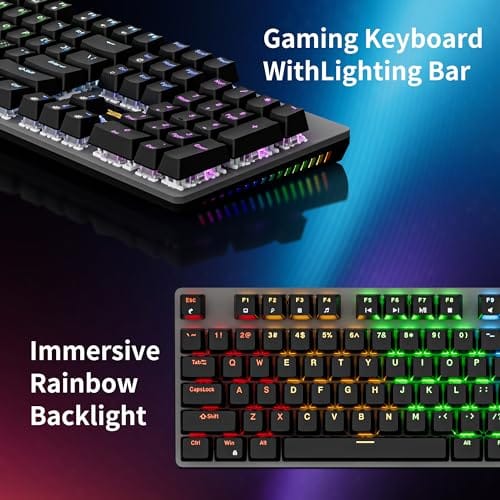
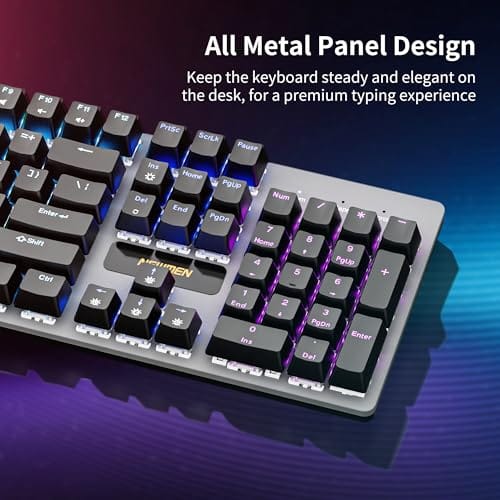
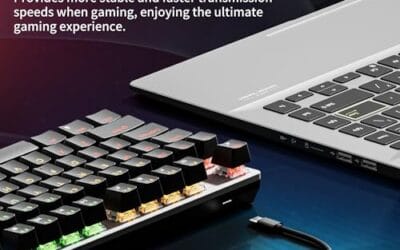
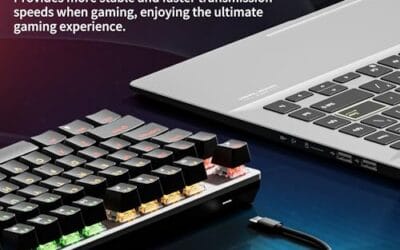
The Newmen GM325Pro is a budget full-size 104-key wired mechanical keyboard aimed at first-time mechanical buyers and casual gamers who want a hot-swap PCB without moving up to enthusiast pricing. It ships with linear red switches, a metal top plate, ABS keycaps, and side-edge RGB lighting.
The defining feature here is the hot-swap socket combined with linear red switches. That gives new users a low-friction path to swap inactile or silent switches later without soldering. Typing fel on metal-plate boards at this tier is usually firmer and less hollow than all-plastic budget pers, based on category norms.
Trade-offs are typical for the price class. Per-key RGB is not suported, only side lighting is true RGB while the top backlight runs 13 preset rainbow effects. ABS keycaps tend to develop shine within months of heavy use, and Newmen does not publish switch lifecycle, polling rate, or NKRO wired specs in the source data.
Buy this if you want a cheap full-size hot-swap platform to learn on and plan to upgrade switches or keycaps later. Skip this if you need per-key RGB, PBT caps, a documented polling rate, or a keyboard with a dep owner review history to validate QC.
Switches and layout: Linear red switches on a full 104-key ANSI layout, with full-key rollover claimed by the manufacturer. Actuation force, travel, and switch brand are not specified in the source. Linear reds typically sit near 45g actuation and 4m total travel in this category.
Hot-swap PCB: Sockets accept standard MX-style switches, so tactile, clicky, or silent linear options from third parties drop in without soldering. Pin compatibility (3-pin vs 5-pin) is not specified, buyers should confirm before ordering replacement switches.
Build and lighting: Metal top plate over ABS black keycaps. RGB is limited to the side edge, while the top backlight cycles through 13 preset rainbow patterns rather than per-key addressable RGB. Case material below the plate is not specified.
Connectivity and software: Wired only via a detachable 1.8m USB cable. FN combos cover F1 to F11 media and calculator shortcuts. Customization software suports key remap, macro recording, and lighting tweaks, though poling rate and software platform support are not specified.
The longer explanation
Think of a profile as the geography of the board. On a sculpted profile like Cherry or OEM, the number row sits lower and tilts toward you, the home row sits at a comfortable middle height, and the bottom row angles back. Your fingers travel less because each row is pre-aimed. On a uniform profile like DSA or XDA, every key is the same height and the same flat or gently dished top. Nothing is angled, so the board looks clean and symmetrical, but your fingers do a bit more of the aiming.
Height matters too. A tall profile like SA raises your fingers well above the case, which some typists love for the deep, typewriter-style motion. A short profile keeps your hands closer to the desk, which can reduce wrist extension over long sessions. The Newmen GM325Pro, for example, uses ABS keycaps in a fairly standard sculpted layout, so it feels familiar the moment you start typing on it, and at around $20.89 with a 4.8 rating it’s an easy entry point. That familiarity is exactly what a mainstream profile is designed to deliver.
There’s also the sculpt of the top surface to consider. Some caps are cylindrical, meaning the top dips in a shallow front-to-back curve that cradles your fingertip. Others are spherical, with a rounded bowl that scoops in from all sides. Cylindrical is the default on Cherry and OEM, while spherical shows up on SA and DSA. It’s a subtle thing you don’t notice until you switch, and then suddenly your fingers feel like they’re sliding differently. This is why two boards that look nearly identical in photos can feel worlds apart in person. Small geometry, big effect.
History and how we got here
Keycap profiles didn’t appear overnight. Early computer keyboards borrowed heavily from typewriters, which is why tall, sculpted shapes came first. IBM and other early makers used stepped, angled rows because typists were used to that feel. As boards got cheaper to mass-produce, OEM and Cherry profiles took over because they balanced comfort with easy manufacturing. Injection-molded ABS in these shapes could be cranked out by the millions.
The enthusiast community pushed things further. Flat uniform profiles like DSA and XDA grew popular with people who wanted custom sets, since a single mold could cover almost every key. SA saw a revival among hobbyists chasing that retro look and sound. Today you’ll find all of them, and the choice comes down to feel rather than any strict standard. Nobody profile won. They just serve different tastes.
Why it works this way
The reason sculpted profiles feel effortless is simple ergonomics. Your fingers naturally curl and reach at different angles depending on the row, so a cap that’s already tilted meets your fingertip halfway. Uniform profiles trade that away for visual consistency and easier customization. Neither is wrong. It’s a preference, not a performance metric.
Material interacts with profile too. ABS plastic is common, lighter, and often cheaper, but it can develop a shine over time. PBT is denser and keeps its texture longer. A tall PBT set in SA sounds and feels dramatically different from a short ABS set in DSA, even on the same switches. So when someone says a board “feels premium,” they’re often reacting to profile and material working together, not the switch alone.
Legend printing plays into the picture as well. Doubleshot caps mold the letter as a separate piece of plastic, so it never wears off no matter how many hours you log. Dye-sublimated legends soak the dye into the cap surface for a smooth finish. Cheaper pad-printed legends sit on top and eventually rub away. None of this changes the profile itself, but it changes how long your caps look sharp, and it’s part of why a well-made set in a common profile can outlast a flashy set that fades in a year. Worth checking before you buy.
When you’d want a specific profile
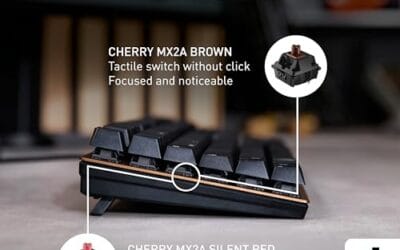
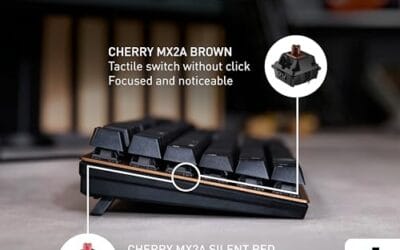
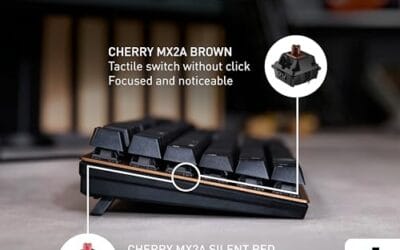
If you type all day and value comfort, a sculpted profile like Cherry or OEM is the safe pick. It’s what most fingers already know, and it minimizes the adjustment period. Programmers and writers who spend hours on the keys tend to stay here because the reduced finger travel adds up. The Cherry KC 200 MX leans into this with its office-focused layout and MX2A Silent Red switches, priced around $56.31 with a 4.0 rating. It’s a straightforward board for someone who wants a familiar feel without a learning curve.
If you care about looks, custom keycap sets, or a distinctive sound, a uniform or tall profile can be worth the tradeoff. DSA and XDA make gorgeous, symmetrical builds. SA gives you that deep vintage clack. Just know you’ll spend a few days retraining your fingers. For gamers, profile matters less than switch feel, but a lower profile can help you find WASD by touch faster. If you’re weighing several boards, our list of the best mechanical keyboard deals flags profile alongside price so you can match feel to budget.

Pros
- MX2A Silent Red linears actuate quietly, good fit for open-plan offices
- Metal plate frame keeps chassis stiff and reduces caseping under typing
- Cherry Gold-Crosspoint contacts rated for 50 million keystrokes on this variant
- Full-size layout with dedicated numpad suits data entry and spreadshet work
Cons
- Renewed unit with no owner fedback loged yet, cosmetic and wear condition varies
- Silent Red linears lack tactile bump, typists who prefer fedback should pick Brown
- Source data omits connectivity, cable type, polling rate, and dimensions
The Cherry KC 200 MX is a full-size office-focused mechanical keyboard sold here as a Renewed unit in Bronze with MX2A Silent Red linear switches. It targets office typists, developers, and finance or admin users who want Cherry switch fel and a metal plate frame without the RGB and gamer styling of enthusiast boards.
The defining feature is the MX2A Silent Red switch, Cherry's updated linear with dampened stems aimed at reducing bottom-out and return noise. Cherry rates this variant for 50 million keystrokes. Based on the linear profile, expect smooth actuation with no tactile bump, which suits fast touch typists and users on frequent video calls.
Trade-offs are typical at this tier and Renewed status. Silent Red linears are polarizing, users coming from Browns or Blues will miss the tactile feedback, and the source does not specify polling rate, connection type, cable, keycap material, or dimensions. As a Renewed listing, cosmetic condition and remaining switch life depend on the refurbisher rather than a factory-fresh baseline.
Buy this if you want a quiet full-size Cherry mechanical for office or shared-space use and value the metal plate build over RGB features. Skip this if you prefer tactile or clicky switches, need confirmed wireless or USB-C connectivity, or want a waranty profile equivalent to new stock.
Switches: Cherry MX2A Silent Red, linear with integrated dampeners, made in Germany with Gold-Crosspoint contacts. Rated for 50 million keystrokes on this variant, versus 100 million on MX2A Brown. Linear travel with no tactile bump favors light, fast keypresses over deliberate typing fedback.
Build: Metal plate frame under the switches, which stiffens the deck and cuts flex compared with plastic-only office boards. Cherry positions the KC 200 MX as a slim modern design, though exact case height, weight, and keycap material are not specified in the source data.
Layout and indicators: Full-size layout retains the dedicated numpad and function row, which maters for spreadsheet,ERP, and accounting workflows. White LED status indicators are built into Caps Lock, Scroll Lock, and Num Lock keys, avoiding a separate indicator strip and keeping the top edge clean.
Gaming fit: Silent Red linears work for casual gaming and MMO or productivity crossover use given their light linear fel, but the source does not list polling rate, N-key rollover, or onboard profiles, so competitive esports buyers should confirm specs before committing.
What to look for in a keycap profile
Start with row structure. Sculpted means angled per-row comfort; uniform means visual cleanliness and easier custom sets. Next, check height. Tall profiles feel dramatic but can strain wrists without a palm rest, while short profiles keep your hands relaxed. Then look at material, since ABS and PBT age differently. Finally, confirm compatibility. Non-standard bottom rows on some compact boards limit which custom sets will fit, so a 65 percent or ergonomic layout may need a specific set. If a compact board interests you, the best 65 percent keyboard 2026 picks call out layout quirks that affect keycap fit.
One more thing that trips people up is the difference between a keycap set’s advertised profile and the actual kit contents. A set might be sold as Cherry profile but ship without the extra keys a nonstandard board needs, leaving you with a gap on the bottom row. Read the kit list before you buy. Count your modifier keys, check your spacebar size, and make sure the set includes the odd widths your layout uses. A gorgeous profile does you no good if three keys arrive bare. It’s the least glamorous part of shopping for caps, and the one that saves the most frustration.
Common misconceptions
The biggest myth is that a taller profile automatically types faster. It doesn’t. Speed comes from familiarity and switch response, not cap height. Another myth is that profile and switch are the same thing. They’re independent. You can pair any profile with any compatible switch. People also assume expensive keycaps always mean PBT, but plenty of pricey sets are ABS with premium legends. And a flat uniform profile isn’t “worse” ergonomically for everyone; some typists genuinely prefer it. Feel is personal, so borrow before you commit if you can.
Frequently asked
Do keycap profiles affect typing speed?
Only indirectly. A profile you’re used to lets you type at full speed, while an unfamiliar one slows you down for a few days. Once your muscle memory adapts, the raw speed difference between profiles is negligible. Comfort over a long session is the bigger real gain.
Can I swap keycap profiles on any keyboard?
Usually, as long as the switches use the common MX-style stem and the layout is standard. The catch is the bottom row and compact boards, which sometimes use nonstandard key sizes. Check your board’s layout against the keycap set before buying so every key has a matching cap.
Is Cherry profile the same as Cherry switches?
No. Cherry the profile refers to a specific sculpted keycap shape that many brands use. Cherry the switch is a separate mechanical component. A board can have Cherry profile caps on entirely different switches, and Cherry-brand boards don’t always ship with Cherry profile caps.
Which profile is best for gaming?
Any of them work, but many gamers like a lower sculpted profile because it helps them find WASD and the surrounding keys by feel. Profile matters far less than switch choice and actuation for gaming. Pick the shape that keeps your hand relaxed during long play.
Does profile change the sound of a keyboard?
Yes, quite a bit. Taller and thicker caps like SA tend to sound deeper and fuller, while thin flat caps sound sharper and higher. Material plays a role too, so PBT and ABS in the same profile won’t sound identical. If sound matters to you, factor profile and material together.



























Write Your Review
No reviews yet. Be the first to share your experience!