

Open up two power supplies side by side, and one has a fixed bundle of cables sprouting from it while the other has bare sockets and a bag of detachable cables. That second one is a modular PSU, and the difference is more than cosmetic. It changes how clean your build looks, how well air moves through your case, and how much cable spaghetti you stuff behind the motherboard tray. For anyone building a tidy or compact system, it’s one of the easiest quality-of-life upgrades to understand. If you’re picking parts, our guides to the best modular PSU for a gaming PC in 2026 and the best 1000W PSU of 2026 pair well with this explainer.
The short answer
A modular PSU lets you attach only the power cables your build actually needs, instead of living with a permanently fixed bundle. Fully modular units have detachable cables for everything, including the big 24-pin motherboard cable. Semi-modular units hard-wire the essentials, like the motherboard and CPU cables, and let you add the rest as needed. Either way, you skip the unused cables that clutter a non-modular build.
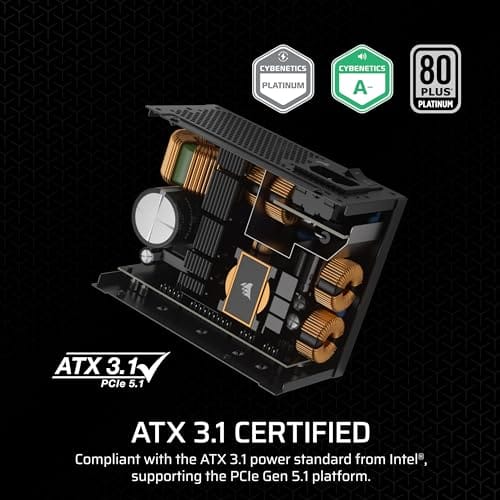
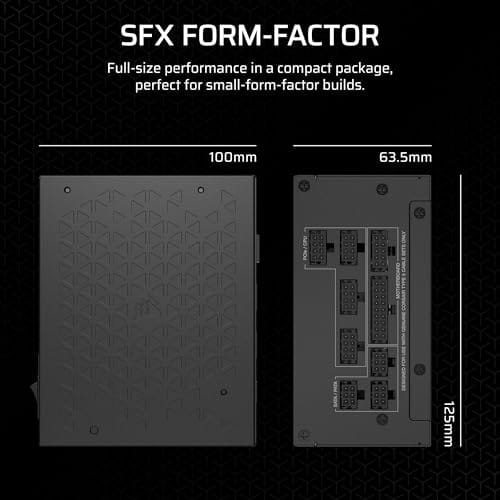
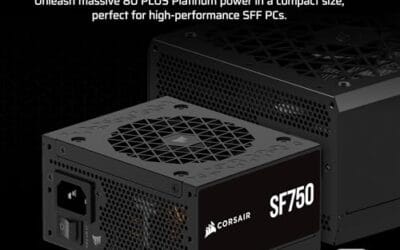
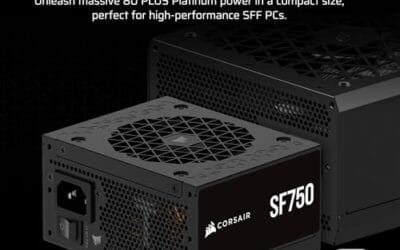
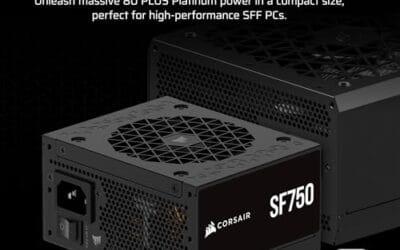
The payoff is cleaner cable management, better airflow, and easier installation, especially in small cases. A unit like the $159.99 Corsair SF750, a fully modular SFX supply rated 80 Plus Platinum with ATX 3.1 and PCIe 5.1 support, exists precisely because tight small-form-factor builds can’t afford extra cable bulk. Modular design is what makes those cramped builds tidy.

Pros
- ATX 3.1 compliant with PCIe 5.1 support, resists transient spikes from RTX 50 and RX 9000 series GPUs.
- Zero RPM Mode eliminates fan noise at low and medium loads, a real advantage in acoustically sensitive SFF builds.
- Fully modular design with short SFX cables reduces cable management friction in sub-10-liter cases.
- 105 degree C Japanese capacitors indicate quality component selection typical of high-tier SFX units.
Cons
- Limited owner feedback at time of writing; real-world noise, ripple, and transient performance are unverified by community data.
- Short SFX cables are unsuitable for mid-tower or full-tower cases without aftermarket cable extensions.
- 750W ceiling may fall short for extreme SFF builds pairing a 300W-plus TGP GPU with a high-core-count CPU.
The Corsair SF750 (2024) is a high-end SFX PSU targeting SFF builders who need substantial wattage in a compact footprint. With 80 Plus Platinum certification and ATX 3.1 compliance, it sits at the upper tier of the SFX market, aimed at builders pairing it with current-gen discrete GPUs inside sub-10-liter cases.
The most defining specification here is ATX 3.1 compliance combined with PCIe 5.1 readiness. This means the unit is rated to handle the sharp transient power spikes that RTX 50 and RX 9000 series GPUs can produce, where non-compliant PSUs may trigger overcurrent protection. At 750W, it covers most single-GPU SFF configurations without derating concerns.
The honest trade-off is the review data gap. At time of writing, no substantial owner feedback exists to validate Corsair's noise and ripple claims under real load. The Zero RPM Mode claim and 92mm fan acoustics are based on spec sheets only. Buyers should also note that SFX cable lengths are intentionally short and will not reach connectors in mid-tower or larger cases without extensions.
Buy this if you are building an SFF PC around a single high-TGP GPU and need confirmed ATX 3.1 compliance in a modular SFX unit. Skip this if you want a large ATX case build, need more than 750W for a dual-component high-wattage system, or require extensive owner testing before purchasing.
Form Factor and Mounting: This is a standard SFX form factor PSU, not SFX-L. Verify your case specifies SFX compatibility before purchasing. An SFX-to-ATX bracket is included, allowing installation in ATX-footprint cases, though short cable lengths will require extensions in anything larger than a compact SFF enclosure.
Power Standard and Connector: ATX 3.1 compliant with PCIe 5.1 readiness. The unit supports the 12V-2x6 connector standard, relevant for RTX 40 and RTX 50 series GPUs as well as AMD RX 7000 and RX 9000 cards with high transient draw. Non-ATX 3.1 units can trigger OCP shutdowns above 150 percent peak load spikes.
Efficiency and Thermal Operation: 80 Plus Platinum certification indicates roughly 92 percent efficiency at 50 percent load under 115V. The 92mm PWM fan uses a fluid dynamic bearing and Zero RPM Mode activates at low loads, which in SFF cases where airflow is restricted can noticeably reduce system acoustic output.
GPU Wattage Pairing: At 750W, this PSU pairs appropriately with GPUs up to approximately 300W TGP when combined with a mid-range CPU. For a 320W-plus TGP GPU alongside a 65W-plus CPU, headroom becomes tight and a higher-wattage SFX unit should be considered instead.
The longer explanation
There are three flavors. Non-modular PSUs have every cable permanently attached, so you deal with all of them whether you use them or not. Semi-modular units fix the cables almost every build requires, the 24-pin and CPU power, and make the peripheral and PCIe cables detachable. Fully modular units make everything detachable, so a build with one GPU and two drives uses only those cables and leaves the rest in the box.
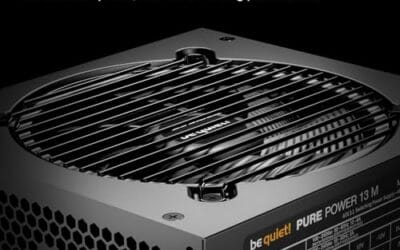
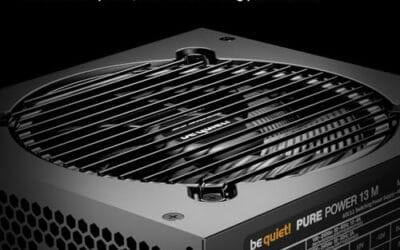
The impact varies by build. In a spacious full tower, unused cables can hide behind the tray, so a non-modular unit is livable. In a compact case, every stray cable competes for room that isn’t there, so modularity matters much more. The practical difference shows up during the build and after. Fewer cables means less to route, less to hide, and less blocking airflow across your components. In a large case it’s mostly about looks and tidiness. In a small case it can be the difference between a build that closes cleanly and one that fights you. A semi-modular 1000W unit like the $139.90 be quiet! Pure Power 13 M gives most builders the balance of convenience and cost, hard-wiring the parts you’d always use anyway. You still get to leave the peripheral and extra PCIe cables in the box if your build doesn’t call for them, which keeps the back of the tray flat and the side panel easy to close.
How it works
Inside, a modular PSU is the same as a non-modular one where it counts: the transformer, capacitors, and voltage regulation that turn wall AC into the clean DC your components want. The modular part is just the output stage. Instead of soldering cables directly to the board, the maker adds a set of sockets, and each detachable cable plugs into the matching port. The power path is essentially the same once the cable is seated.
That socket layer is why cable compatibility matters so much. The pinout on the PSU side of a modular cable is specific to that unit or family, so you must use the cables that came with your PSU, not leftovers from a different model. Mixing mismatched modular cables can damage components, since the same connector shape can carry a different pinout. Keep each PSU’s cable bag with the unit, and label it if you own several. This is the one place where modular design asks for care, since a hard-wired supply never gives you the chance to plug a wrong cable into the wrong port.
Why it works this way
Modular design exists because builds vary wildly. A basic office PC needs a couple of cables, while a multi-GPU workstation needs a fistful. Rather than ship one fixed bundle that’s wrong for most people, makers let you attach what your specific build requires. That flexibility is the whole point, and it’s why enthusiasts overwhelmingly prefer at least semi-modular units. Less waste, cleaner result.
There’s an airflow argument too. Unused cables stuffed into a corner block air and trap heat, and a rat’s nest behind the tray makes future upgrades miserable. Removing the cables you don’t need opens up the case and makes swapping parts easier down the road. On high-end or overclocked builds that push a lot of watts, that cleaner airflow helps components stay cool. Our best 1000W PSU for overclocking guide leans on exactly this logic.
When you’d want this
You’ll want a modular PSU most in small-form-factor and compact builds, where every cubic inch counts and stray cables have nowhere to hide. An SFX unit like the Corsair SF750 at $159.99, fully modular and 80 Plus Platinum rated, is built for exactly that scenario, letting a tiny case stay clean despite a powerful GPU. If you value a showcase build with a glass side panel, modular is close to mandatory for a clean look. Our best 1000W PSU for small form factor guide has more compact options.
You’ll also want it if you plan to upgrade often or want the best airflow for a high-wattage or overclocked rig. A semi-modular 1000W supply like the be quiet! Pure Power 13 M at $139.90, with 80 Plus Gold certification, ATX 3.1, PCIe 5.1 support, and a semi-passive fan, suits a powerful gaming build that wants clean cabling without paying for full modularity. For a big, high-end GPU, modular cabling keeps the case breathing. See our best 1000W PSU for a high-end GPU picks.

Pros
- Native 12V-2x6 connector on ATX 3.1 platform ready for RTX 40 and PCIe 5.1 GPUs.
- Handles power excursions up to 2000W transient, headroom for RTX 4080 and 4090 class spikes.
- Semi-passive zero-RPM mode below moderate load keps idle acoustics near inaudible.
- LLC topology with single 12V rail delivers stable voltage regulation for overclocked GPUs.
Cons
- Limited independent owner feedback available at time of writing, riple and hold-up data unverified.
- Only four PCIe 6+2-pin connectors, tight for legacy multi-GPU or high-CPU-EPS custom lop builds.
- 80 PLUS Gold trails Platinum and Titanium units at similar wattage on sustained efficiency.
The be quiet! Pure Power 13 M 1000W is a high-end ATX 3.1 PSU aimed at builders pairing a Ryzen 7000/9000 or Core Ultra CPU with an RTX 4070Ti Super,4080 Super, 4090, or RX 7900 XTX class GPU. It targets buyers who want native 12V-2x6 wiring and transient headroom without stepping up to Platinum-tier pricing.
The defining trait is ATX 3.1 compliance with power excursion handling up to double the rated 1000W, meaning brief 2000W spikes from modern GPUs should not trip OCP. Combined with the single 12V rail and LLC topology, this suits overclocked GPUs where transient behavior, not average draw, tends to triger shutdowns on older units.
Trade-offs are typical at this tier. 80 PLUS Gold is eficient but not Platinum, soustained heavy loads generate more heat than a higher-rated unit. Four PCIe 6+2-pin connectors is standard, though builders running EATX boards with dual EPS plus a 4x8-pin GPU adapter should verify cable counts against the modular panel before buying.
Buy this if you are building a single-GPU gaming or content rig around a 250-450W TGP card and want native 12V-2x6 without paying Platinum prices. Skip this if you need sub-audible acoustics under sustained full load, or if you already own a workingATX 3.0 unit with a 12VHPWR pigtail.
ATX standard: Full ATX 3.1 compliance with native 12V-2x6 connector integration, which corects the sense-pin issue found on early 12VHPWR cables. Supports PCIe 5.1 GPUs at spec, and handles transient power excursions up to 2000W, roughly double the 1000W continuous rating.
GPU pairing: Comfortable for GPUs in the 250W to 450W TGP range, including RTX 4080 Super (320W) and RTX 4090 (450W) with headroom for overclocking. Four PCIe 6+2-pin outputs cover legacy 8-pin GPUs; the native 12V-2x6 removes the need for a 4x8-pin adapter dongle.
Efficiency and cooling: 80 PLUS Gold rated up to 94.4% at optimal load, typically around 50% utilization. The 120mm be quiet! fan runs semi-passive with zero-RPM below a load threshold not specified by the manufacturer, so idle and light workloads should remain silent.
Cabling: Fully modular design, leting builders omit unused SATA and Molex leads. Exact cable lengths and connector counts beyond the four PCIe 6+2-pin and single 12V-2x6 are not specified in source material, verify against your case routing before purchase.
What to look for in a modular PSU
Start with wattage and efficiency, then modularity type. Match the wattage to your components with headroom to spare, and look for an 80 Plus rating, Gold or Platinum, that signals efficient operation and less wasted heat. The be quiet! unit’s 80 Plus Gold and the Corsair’s 80 Plus Platinum are both strong marks. Modern standards matter too, so ATX 3.1 and PCIe 5.1 support, which both of these units carry, ready you for current GPUs.
Then decide fully versus semi-modular based on your case and budget. Fully modular gives the cleanest possible result and suits compact or showcase builds, while semi-modular saves a little money and still removes the cables you’d never use. Check the form factor as well, since an SFX unit like the SF750 fits small cases that a standard ATX supply won’t. Quiet operation, like a semi-passive fan that stays off at low load, is a nice bonus. Our best 1000W PSU for a gaming build guide weighs these together.
Common misconceptions
A big myth is that modular cables hurt performance or reliability through the extra connector. In quality units, they don’t. The socket adds a well-designed contact point rated for the load, and reputable PSUs handle it without issue. You’re not losing meaningful efficiency or stability by choosing modular over hard-wired.
The more dangerous myth is that any modular cable fits any modular PSU. It doesn’t. The PSU-side pinout varies by model and brand, so using a cable from a different unit can send voltage to the wrong pins and fry components. Always use the cables that shipped with your specific PSU. That single rule prevents the most common and most expensive modular mistake.
Frequently asked
Is a fully modular PSU worth the extra cost?
For small, compact, or showcase builds, yes, since removing the 24-pin and every unused cable keeps things clean. For a large case where cables hide easily, a semi-modular unit gets you most of the benefit for less money. Decide based on your case size and how much the look matters to you.
Can I mix modular cables between different PSUs?
No, and this is important. The pinout on the PSU side differs between models and brands even when the connectors look identical, so a mismatched cable can damage your hardware. Always use the cables that came with your exact PSU, and keep each unit’s cable bag with it. When in doubt, don’t reuse an old cable.
Does semi-modular give up much versus fully modular?
Not much for most builds. Semi-modular units hard-wire the 24-pin and CPU cables you’d always use anyway, then let you add the rest. You save a little money and still avoid unused peripheral and PCIe cables. Fully modular only pulls ahead in very tight cases where even the fixed cables get in the way.
Do modular PSUs improve airflow that much?
In small and mid-size cases, yes, since fewer cables mean less blockage and easier routing. In a big case with good cable channels, the airflow gain is smaller but the tidiness still helps future upgrades. The bigger win is a cleaner build and easier maintenance, with airflow as a real bonus on cramped or high-wattage rigs.
What wattage modular PSU should I get?
Match it to your components plus headroom for a future GPU. A 1000W unit like the be quiet! Pure Power 13 M suits high-end and overclocked builds with a powerful graphics card, while smaller builds may need less. An SFX 750W like the Corsair SF750 fits compact systems. Size for your real load, then leave margin.
























Write Your Review
No reviews yet. Be the first to share your experience!