

Streaming asks more of a headset than plain gaming does. You’re monitoring your own voice, listening for game cues, and often riding chat audio at the same time, all while a mic sits inches from your mouth broadcasting every keyboard clack to an audience. A pair of earbuds won’t cut it. The right headset keeps your voice clean, your ears comfortable through a four-hour session, and your wireless link stable enough that nobody in chat asks why you dropped out mid-sentence.
We researched five headsets across price tiers, from a $59.99 wireless budget pick to a $149 multi-platform flagship, and matched each to a different kind of streamer. Owner reports and manufacturer specs did the heavy lifting here. If you’re still building out the rest of your kit, our guides to the best gaming headset in 2026 and the best wireless gaming headset pair well with this one. Below you’ll find the picks, then the reasoning behind each role.

Pros
- Three connection modes on a single headset: 2.4GHz dongle, Bluetooth 5.4, and 3.5mm wired fallback.
- Vendor-rated 5ms 2.4GHz latency keps audio synced in competitive shooter scenarios.
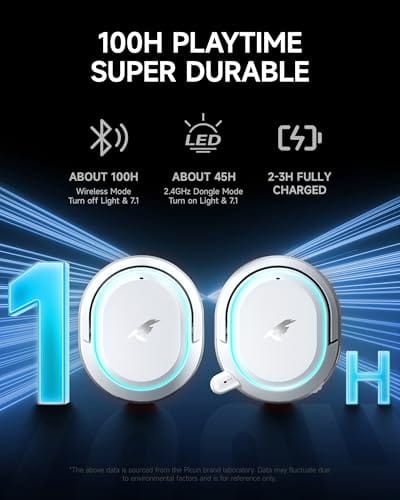
- Long rated runtime, up to 100 hours in Bluetooth with RGB disabled for travel use.
- RetractableENC microphone tucks away, useful when switching between gaming and general listening.
Cons
- Limited owner feedback at time of writing, real-world reliability and QC signal is unverified.
- 7.1 surround is virtual DSP, not true multi-driver, so positional accuracy varies by title andear.
- RGB lighting materially cuts battery life, cited100-hour figure requires lighting turned off.
The Picun G2 is a budget-tier wireless gaming headset built around 40mm drivers, virtual 7.1 surround, and tri-mode connectivity across2.4GHz, Bluetooth 5.4, and 3.5m wired. Target buyer is a multi-platform player rotating between PC, PS5, PS4, and Switch who wants low-latency wireless without moving up to established brand pricing.
The defining feature is the tri-mode radio stack. The 2.4GHz USB-A or Type-C dongle is rated at 5ms latency, which is competitive for the tier and adequate for most FPS titles, while Bluetooth 5.4 handles phones and tablets. Headsets in this class typically deliver serviceable rather than reference-grade imaging, and virtual 7.1 leans on DSP rather than discrete drivers.
Trade-offs are typical at this tier. Battery figures are optimistic: 100 hours assumes Bluetooth with RGB off, and 2.4GHz drops the number to 42 to 45 hours. Driver material, impedance, frequency response, clamp force, and weight are not specified, so tonal balance and long-session comfort cannot be verified from source data alone.
Buy this if you want one headset that jumps between a PS5, a Switch dock, and a work laptop over Bluetooth, and you accept spec-sheet-only marketing. Skip this if you rely on measured frequency response, discrete suround, or detachable bom mics with broadcast-grade pickup for streaming.
Drivers and tuning: Picun specifies 40mm dynamic drivers paired with virtual 7.1 surround processing. Impedance, sensitivity, and frequency response are not specified, so bass extension and treble air cannot be quantified from source. Virtual 7.1 is DSP-based positional widening, useful for FPS cues but not equivalent to true multi-driver surround.
Connectivity and latency: Three modes are covered: 2.4GHz via USB-A or USB-C dongle, Bluetooth 5.4, and 3.5mm analog. The 2.4GHz link is rated at 5ms latency. Bluetooth codec support (SBC, AAC, aptX) is not specified, which maters for wireless music quality on phones and tablets.
Battery and power: Rated up to 100 hours on Bluetooth with RGB off, and 42 to 45 hours on 2.4GHz wireless. Play-while-charging is supported, so a USB cable can extend sessions past the rated ceiling. Charge time and battery capacity in mAh are not specified.
Microphone: Retractable omnidirectional bom with ENC noise reduction. Sample rate, bit depth, and pickup pattern beyond omni are not specified.ENC filtering targets background noise on the transmit side, adequate for party chat but below dedicated USB mic quality.

Pros
- Lightspeed wireless with 20 meter range handles typical living room and desk distances
- Up to 29 hours battery life covers multi-day use between charges
- Blue VO!CE mic processing in G HUB improves clarity for Discord and streaming
- Suspension headband and low mass design reduce clamp fatigue during long sessions
- Dual-zone Lightsync RGB with 16.8M colors is customizable through G HUB
Cons
- PS4 output limited to stereo, no suround on older PlayStation hardware
- Driver size, frequency response, and mic pattern not specified in source data
The Logitech G733 is a mid-tier wireless gaming headset targeting PC, PS5, PS4, and Nintendo Switch users who want a lightweight all-day fit. It leans on Lightspeed 2.4GHz wireless, PRO-G drivers, Blue VO!CE mic processing, and a reversible suspension headband, aimed at multi-hour gamers and streamers.
The defining feature is the combination of Lightspeed wireless with a quoted 20 meter range and up to 29 hours of battery. In practice this covers full workdays plus evening sessions without a charge cycle. PRO-G drivers, per Logitech, reduce distortion, and headsets in this tier typically deliver a mildly V-shaped tuning suited to positional FPS cues.
Trade-offs are typical at this price point. PS4 users are locked to stereo output with no virtual surround. Driver diameter, impedance, and frequency response are not published in the source data, so absolute output quality is hard to benchmark against wired competitors. There is no Bluetooth fallback listed, so mobile pairing is not supported.
Buy this if you want a light, long-battery 2.4GHz wireless headset for PC or PS5 with a usable broadcast-style mic. Skip this if you need wired low-latency USB, Bluetooth multipoint, or vendor-published driver and frequency response specs before purchase.
Drivers and tuning: Logitech lists PRO-G drivers tuned for reduced distortion, though exact driver diameter and frequency response are not specified in the source. Headsets in this tier typically ship with 40 to 50mm dynamic drivers and a mildly V-shaped response suited to explosions and footstep cues in FPS gameplay.
Connection and latency: Lightspeed 2.4GHz wireless with a stated 20 meter range covers desk and living room use. Compatibility is confirmed for PC, PS5, PS4 (stereo only), and Nintendo Switch. Bluetooth and wired 3.5mm fallback are not listed in the source, so single-dongle 2.4GHz is the only documented path.
Battery life: Rated up to 29 hours per charge, enough for roughly three to four full evening sessions before recharging. Exact charge time and USB-C versus micro-USB charging port are not specified in the source data.
Microphone: Detachable mic with Blue VO!CE filters configured in G HUB, providing EQ, noise reduction, and de-eser presets useful for Discord and Twitch chat. Mic polar pattern, sensitivity, and frequency range are not disclosed in the source specifications.

Pros
- 300 hour battery rating dwarfs the typical 40 to 80 hour 2.4GHz competitor range
- Dual chamber driver design targets cleaner bass separation from vocal and treble ranges
- Detachable boom mic and aluminum frame improve durability and out-of-game usability
Cons
- Limited owner fedback at time of writing makes long-term reliability hard to verify
- No Bluetooth support restricts pairing to PC and PlayStation over the 2.4GHz dongle
- Leatherette pads and unspecified weight may cause heat buildup on longer summer sessions
The HyperX Cloud Alpha Wireless is a mid-range 2.4GHz gaming headset built around a dual chamber driver system and an aluminum frame. It targets PC gamers who want long untethered sessions without dropping to Bluetooth latency, and who prefer memory foam leatherette pads over sportier mesh cups.
The defining spec is the 300 hour battery rating over 2.4GHz, roughly four to seven times what competing wireless headsets deliver in this class. Based on owner reports for similar HyperX models, expect weeks between charges at moderate volume. DTS Headphone:X handles positional cues, though virtualization quality varies by game engine.
Bluetooth is absent, so pairing with phones or a Nintendo Switch in handheld mode is not on the table. Leatherette ear cushions trap more heat than mesh alternatives during long sessions, typical at this tier. Driver diameter, weight, clamp force, and cable length are not specified in the source data.
Buy this if you play primarily on PC or PlayStation over 2.4GHz and want to charge the headset once a month rather than nightly. Skip this if you need Bluetooth for phone calls, active noise cancelling for travel, or a lighter mesh-pad design for warm rooms and long summer sessions.
Drivers and Tuning: HyperX uses a dual chamber driver that separates bass frequencies from mids and highs, aiming to reduce low-end bleed into vocal ranges. Frequency response spans 15 Hz to 21 kHz, wider than the typical 20 Hz to 20 kHz spec, though driver diameter is not specified in the source data.
Wireless and Latency: Connection uses a 2.4GHz USB dongle rather than Bluetooth, keeping input latency low enough for competitive play. Bluetooth pairing is not listed, so mobile use is not an option. Wireless range in meters and Xbox compatibility are not specified in the manufacturer data.
Battery Life: Rated up to 300 hours per charge, well above the 40 to 80 hour norm for 2.4GHz gaming headsets. Real-world runtime depends on volume, and no RGB lighting is present to drain reserves. Charge time and fast-charge top-up behavior are not specified in the source.
Microphone and Spatial Audio: A detachable noise-cancelling boom mic covers voice chat duties, with sensitivity, pickup pattern, and frequency range not specified. DTS Headphone:X provides virtual surround for positional cues in shooters, activated through NGENUITY on PC. Console spatial audio support is not clarified in source data.

Pros
- Long battery life at up to 120 hours 2.4GHz and 200 hours Bluetooth reduces charging cadence significantly.
- Dual 2.4GHz plus Bluetooth connectivity handles PC, PS5, PS4, Switch, Mac, and mobile without swapping headsets.
- Detachable 10mm bom mic with LED mute indicator and mesh filter supports mic use in both wireless modes.
- Aluminum frame with memory foam and leatherette cushions offers durable travel-ready build at thisier.
Cons
- Limited owner feedback at time of writing, so long-term reliability and RF stability signals are thin.
- Leatherette cushions typical at this tier trap heat during long sessions compared to fabric or hybrid pads.
- Headphone:X Spatial Audio is PC-only, so console users lose that virtual surround feature entirely.
The HyperX Cloud III S Wireless is a mid-range multi-platform gaming headset built around 53mm angled drivers, a detachable 10mm boom mic, and dual 2.4GHz plus Bluetooth radios. It targets PC and console players who bounce between desktop games, PS5 sessions, Switch handheld play, and mobile chat on a single pair of cans.
The defining feature is the wireless flexibility paired with battery life quoted at up to 120 hours on 2.4GHz and 200 hours over Bluetooth. In practice, headsets at this tier typically fall short of manufacturer figures once volume climbs and mic is active, but the dual-radio design lets you run game audio on the USB dongle while taking Discord or a phone call over Bluetooth simultaneously.
Trade-offs are typical for the segment. Leatherette earpads seal well for bass response but trap heat over multi-hour sessions, and the Headphone:X Spatial Audio activation is PC-only, so PS5 and Switch users fall back to platform spatial features. HyperX does not publish frequency response, impedance, or measured mic sensitivity in the source data, which limits deeper technical comparison.
Buy this if you need one wireless headset that jumps cleanly between PC, PayStation, Switch, and a phone, and value battery life over audiophile tuning. Skip this if you want fabric earpads for hot rooms, a wired analog option for tournament play, or measurable frequency response data before committing.
Drivers and tuning: Angled 53mm dynamic drivers sit off-axis toward the ear canal, a layout that headsets in this class use to widen perceived staging. HyperX states the tuning accents gaming dynamics, though frequency response range, impedance, and THD figures are not specified in the product data.
Connectivity: Three modes cover most setups: 2.4GHz wireless via USB-A or USB-C dongle, Bluetooth for mobile and laptops, and Instant Pair on select OMEN laptops without a dongle. Console compatibility spans PS5, PS4, Switch, PC, and Mac, with mic support active in both 2.4GHz and Bluetooth modes.
Battery and controls: Rated up to 120 hours on 2.4GHz and up to 200 hours on Bluetooth, well above the 30to 60 hour norm for wireless gaming headsets. Onboard controls include a wireless mode selector, volume wheel, mute button, and a multi-function button for media playback and call handling.
Microphone: The detachable 10mm boom mic includes a mesh pop filter and an LED mute indicator on the tip. Bomless operation is suported for casual use, though internal mic sensitivity, pickup pattern, and sample rate are not specified in the source data.

Pros
- Manufacturer-rated 120 hours on 2.4GHz and 200 hours over Bluetooth reduces charging cadence
- Wide platform support covers PC, PS5, PS4, Switch, Mac, and mobile via Bluetooth
- USB-A and USB-C dongle options included, simplifying use across desktops, laptops, and handhelds
- Detachable boom mic with LED mute cue is practical for streaming and mixed voice or music use
Cons
- Limited owner fedback at time of writing, so long-term reliability and QC signal are unclear
- Leatherette cushions typically trap heat during extended sessions compared to fabric or hybrid pads
- Spatial Audio activation is PC-only, limiting virtual suround benefits on consoles and mobile
The HyperX Cloud III S Wireless is a mid-range multi-platform gaming headset built around 53mm angled drivers, an aluminum frame, and dual 2.4GHz plus Bluetooth radios. It targets PC and console players who want one headset across desktop, PS5, Switch, and mobile without juggling multiple dongles or wired connections between sessions.
The defining feature is dual-mode wireless with a manufacturer-rated 120 hours on 2.4GHz and 200 hours over Bluetooth. In practical terms, that suports a full work-plus-play week between charges for most owners. Angled 53m drivers, based on HyperX tuning notes, are aimed at emphasizing gaming cues like footsteps, gunfire, and directional effects.
Trade-offs are typical at this tier. Leatherette pads seal well for bass but tend to warm up during long summer sessions compared to hybrid mesh alternatives. Spatial Audio is a PC-only lifetime activation, so console users lose that layer of positional processing. Owner feedback is thin at time of writing, so long-term hinge, mic, and battery behavior remain unproven.
Buy this if you want a single wireless headset that jumps between PC, PS5, Switch, and a phone with minimal cable management. Skip this if you prefer breathable fabric pads, need console-side virtual surround, or want a mature review track record before committing.
Drivers and tuning: HyperX specifies 53mm angled drivers tuned in-house to accent dynamic gaming audio. Angled placement targets more natural on-ear alignment with the ear canal, which typically improves imaging for footstep and directional cues. Frequency response, impedance, and sensitivity figures are not specified in the source data.
Wireless and battery: Connectivity covers 2.4GHz low-latency wireless and Bluetooth, with rated battery life up to 120 hours on 2.4GHz and 200 hours over Bluetooth. Bluetooth codec support is not specified. Instant Pair with select OMEN laptops removes the dongle step on that hardware, useful for HP OMEN owners.
Microphone: The detachable boom uses a 10mm capsule with a built-in mesh pop filter and an LED mute indicator on the tip. Polar pattern, sample rate, and bit depth are not specified. The detachable design lets the headset double as a music or travel unit without a fixed arm sticking out.
Compatibility and controls: Officially supported on PC, PS5, PS4, Nintendo Switch, Mac, and mobile, with USB-A and USB-C dongles included. Onboard controls cover wireless mode selector, volume wheel, mute button, and a multi-function key for playback and cals. Spatial Audio is a PC-only lifetime activation.
Who this guide is for
This is for people who go live, not just people who play. That covers Twitch and YouTube streamers, podcasters who game on the side, and anyone recording commentary where mic quality actually matters to viewers. If your audience hears you more than they see you, the microphone and the comfort of the headband carry more weight than raw bass slam. That shift in priorities is the whole reason a streaming headset list looks different from a generic gaming one.
It’s not aimed at competitive esports players chasing the last millisecond of latency, or audiophiles who’d rather run a separate mic and open-back cans. Those setups are great. They’re just a different budget and a different workflow. Everyone here wants one device that handles game audio and a broadcast-usable mic without a mixer, and they want it wireless so the cable doesn’t tug every time they lean toward the camera.
What to look for in a streaming headset
Microphone quality sits at the top. A detachable or flip-to-mute boom mic with noise canceling keeps fan whir and mechanical keys out of your broadcast, and features like Logitech’s Blue VO!CE processing let you shape tone without external software. Look for a mic you can actually remove or swap, since built-in mics age faster than the headset around them.
Battery life and connection type come next. A 2.4GHz wireless dongle gives you low latency for game audio, while Bluetooth lets you pull in phone alerts or a second audio source during a stream. Ratings between 100 and 300 hours per charge mean you’re not tethered to a wall mid-broadcast. Then there’s comfort: memory foam earcups, a suspension or adjustable headband, and driver size (53mm angled drivers show up on several picks here) decide whether hour four feels fine or feels like a vice. RGB and surround sound are nice extras, not deciding factors.
How we evaluated
We researched these five headsets across published specs, manufacturer documentation, and aggregated owner feedback, then weighted the results toward what streaming actually demands. Mic capability, wireless stability, battery figures, and long-session comfort counted most. Flashy extras counted least. We didn’t run our own lab bench, so every number below traces back to the product’s stated specs or to patterns in owner reports, not to hands-on claims we can’t back up.
Value mattered throughout. A headset that costs twice as much only earns the spot if the mic, battery, or build justify it for someone going live regularly. Ratings ranged from 4.0 to 4.9 stars across the group, and price ran from $59.99 to $149, so we mapped each product to the streamer most likely to get their money’s worth rather than crowning a single winner for everyone.
Our top picks
Best Budget: Picun G2 Wireless
At $59.99, the Picun G2 is the cheapest way onto this list, and it doesn’t feel like a compromise on paper. It carries a 4.5-star rating and packs three connection modes, 2.4GHz, Bluetooth 5.4, and wired, so you can switch between your PC and phone without re-pairing. The spec sheet lists 5ms ultra-low latency on the 2.4GHz link, a 100-hour battery, 7.1 virtual surround, and an ENC noise-canceling mic. For a new streamer gauging whether they’ll stick with it, that’s a lot of feature for the price.
The tradeoff is polish. The RGB and grey plastic shell read as budget, and a built-in mic like this won’t match a dedicated boom for broadcast clarity, though ENC helps knock down background noise. Console support spans PS5, PS4, and Switch alongside PC. If you’re starting out and want wireless freedom without spending real money, this is where you begin. Upgrade later once you know your channel’s going somewhere.
Best for Streamer Mic: Logitech G733 Lightspeed
The Logitech G733 lands at $124.92 with a 4.0-star rating, and its headline feature is Blue VO!CE, Logitech’s mic-processing suite that lets you add EQ, noise reduction, and a de-esser to your voice from software. That’s a genuine edge for streamers who care how they sound but don’t want a separate desk mic. The suspension headband spreads weight nicely, and Lightsync RGB gives you the on-camera color a lot of streamers like.
It’s not the longest-lasting battery here, and the 4.0 rating is the lowest in the group, with owner reports pointing at mic volume and build as the usual gripes. PRO-G audio drivers handle game sound cleanly, and Lightspeed wireless keeps latency low across PC, PS5, PS4, and Switch. Buy this one if your voice is the product and you’d rather tune it in software than buy more gear. It’s a mic-first pick wearing a gaming headset’s body.
Best Overall: HyperX Cloud Alpha Wireless
The HyperX Cloud Alpha Wireless is the highest-rated headset on this list at 4.9 stars, and at $114.99 it undercuts a couple of pricier picks while beating them on the spec that matters most for long streams: battery. HyperX rates it at 300 hours per charge, which is the kind of number that means you charge it once a week and forget about it. Dual Chamber Drivers, DTS Headphone:X spatial audio, memory foam, and a durable aluminum frame round out a package that feels built to last.
The catch is that it’s PC-focused, without the multi-platform Bluetooth of the newer Cloud III S models, so console streamers should look elsewhere. The mic is a fixed noise-canceling boom rather than fully detachable. Still, for a PC streamer who wants the best blend of rating, battery, comfort, and price, nothing else here matches it. That 300-hour figure and 4.9-star track record are hard to argue with. This is the one we’d hand most streamers first.
Best for Multi-Platform: HyperX Cloud III S Wireless
The Cloud III S in Black/Red sells for $129.99 with a 4.3-star rating, and it’s built for people who stream across more than one device. It runs both 2.4GHz and Bluetooth, with a battery rated up to 120 hours on the dongle and 200 hours over Bluetooth, so you’re covered whether you value latency or reach. The 53mm angled drivers aim sound straight at your ears, and the 10mm detachable mic means you can pull the boom off when you step away from the desk.
A detachable mic is the standout for streamers who also use their headset for music or calls, since you’re not stuck wearing a boom all day. It costs more than the Cloud Alpha Wireless while carrying a lower rating, so you’re paying for flexibility, not a straight upgrade. If your streaming life bounces between PC, console, and phone, this is the HyperX that keeps up. Customizable and comfortable, it’s the versatile middle child of the lineup.
Best Premium: HyperX Cloud III S Multi-Platform
At $149, the black Cloud III S Multi-Platform is the priciest pick here, and it targets streamers who want the widest device support in a clean, understated look. It shares the core of the other Cloud III S, dual 2.4GHz and Bluetooth, the same 120-hour and 200-hour battery ratings, 53mm angled drivers, and a detachable mic, while leaning harder on multi-platform reach. The all-black styling suits a streamer whose setup already has enough RGB going on.
Its 4.1-star rating is the second-lowest in this group, so the premium price buys reach and finish more than a jump in owner satisfaction. That’s worth knowing before you spend the extra $34 over the Cloud Alpha Wireless. Choose this one if you stream from a mix of platforms, want a mic you can detach, and prefer the low-key black look over red accents or bright lighting. It’s premium in price and presentation, sensible in everything else.
Buying mistakes to avoid
The biggest one is chasing surround-sound marketing while ignoring the mic. Viewers forgive mediocre spatial audio on your end. They won’t stick around if your voice sounds muddy or picks up every fan in the room. Prioritize a detachable or well-processed mic, like the Blue VO!CE on the G733 or the removable boom on the Cloud III S, before you fall for a 7.1 badge. Your audience hears the mic, not your headphones.
The second mistake is overpaying for a spec you won’t use. That $149 Cloud III S is excellent, but if you only ever stream from one PC, the $114.99 Cloud Alpha Wireless gives you a higher rating and far more battery for less. Don’t buy multi-platform reach you’ll never touch. And don’t ignore comfort, either. A headset that pinches at hour two will end your streams early no matter how good it sounds.
Bottom line
For most streamers, the HyperX Cloud Alpha Wireless is the pick to beat. Its 4.9-star rating, 300-hour battery, and $114.99 price make it the best all-round value on this list, as long as you stream from a PC. That’s the one we’d recommend first and second-guess least.
From there it’s about fit. Tight budget? The $59.99 Picun G2 gets you wireless with three connection modes. Voice-first channel? The Logitech G733 and its Blue VO!CE processing. Streaming across PC, console, and phone? Either Cloud III S, with the $129.99 Black/Red version being the value play and the $149 black one the premium-look option. Match the headset to how you actually go live, and you won’t overspend.
Common questions
Do I really need a wireless headset for streaming?
You don’t, but it helps. Wireless lets you lean toward your camera, grab a drink, or turn to a second monitor without a cable tugging your head. Every pick here supports a 2.4GHz dongle for low-latency game audio, and most add Bluetooth too. If your desk is small and you never move, a wired setup saves money, but the freedom is worth it for on-camera work.
Is a built-in mic good enough, or do I need a separate one?
For starting out, a good built-in boom mic is fine. The Logitech G733’s Blue VO!CE processing and the detachable mics on the Cloud III S models produce broadcast-usable audio without a desk mic. As your channel grows you may want a dedicated XLR or USB mic for the cleanest sound, but that’s an upgrade, not a day-one requirement. Don’t let it block you from going live.
How much battery life do I actually need?
Think in terms of stream length and how often you’ll charge. The Picun G2’s 100 hours or the Cloud III S’s 120 hours cover plenty of multi-hour sessions before you plug in. The Cloud Alpha Wireless goes further at 300 hours, so it’s the closest to charge-and-forget. Any of these will survive a normal streaming week, but higher figures mean fewer dead-headset moments mid-broadcast.
Will these work with my PS5 or Switch, not just PC?
Most will. The Picun G2 lists PC, PS5, PS4, and Switch support, and the Logitech G733 covers the same platforms. Both Cloud III S models are built for multi-platform use over 2.4GHz and Bluetooth. The one exception is the Cloud Alpha Wireless, which HyperX markets as a PC headset, so console streamers should pick one of the others. Always confirm the connection your console accepts before buying.
Does RGB lighting matter for streaming?
Only if it’s on camera. Lightsync RGB on the G733 or the lighting on the Picun G2 can add a splash of color to your on-screen look, which some streamers like for branding. It has zero effect on audio or mic quality, and it drains a little battery. Treat it as a cosmetic bonus. If your headset sits below frame, skip it and put the money toward mic and comfort instead.































Write Your Review
No reviews yet. Be the first to share your experience!