

The best time to buy computer parts is when a compatible part reaches your target price and you can use it soon. Black Friday, Cyber Monday and Prime Day are worth watching for a flexible build. For a CPU or GPU, a confirmed launch in your price range can matter more than the next sale.
Start with an all-in budget and the date you want the PC running. If you’re replacing a failed component, shop for an in-stock replacement that fits and ships in time. Especially if the PC earns your living. If your current machine works and you’re planning an upgrade, you have room to compare prices and wait.
| Your situation | When to shop | What decides it |
|---|---|---|
| Your PC is down | Today | Compatibility, delivery date and return terms |
| You have a flexible build date | Holiday sales, Prime Day or an ordinary deal | The delivered cost of the complete build |
| A replacement CPU or GPU is about to ship | After it’s available at retail | The cost of both generations and reviews for your workload |
| A standalone upgrade hits your target | When you can install it | The exact model, condition and final price |
Black Friday, Cyber Monday, Prime Day and everyday deals
Use the late-November sales as a period to check your shortlist. In the U.S., Amazon scheduled its 2026 Black Friday Week and Cyber Monday sale for November 19–30, with limited-time offers changing during the event. A price you’d be happy to pay can show up before the named shopping day. Get your shortlist ready beforehand so you have time to check the part and seller while the offer is available. Amazon’s 2026 holiday sale announcement.
Keep a short list of models that meet the same need. For a power supply, that might mean two units that fit your case and have the connectors your graphics card requires. For a case, check graphics-card clearance and radiator support in the layout you’ll actually use. A couple of compatible alternatives give you more chances to hit your budget when a retailer discounts only one configuration.
Which parts are worth tracking during a sale?
SSDs, memory kits and some peripherals are easy places to start because you can make a shortlist to a fixed specification. For memory, compare kits by capacity, number of sticks, memory generation and rated speed. A 32 GB kit with two modules is a different purchase from a single 32 GB module, even when both listings show the same total capacity.
For a graphics card, write down the GPU and exact card model. Look at dimensions, power connections and the seller’s return terms. A discount loses its appeal if accommodating a longer card means replacing your case. If those changes were already in your plan, add them to the budget and compare the two build totals.
Is Prime Day worth waiting for?
If your build is flexible and the next Prime Day is close, it’s worth one round of comparison. The date can move. Amazon’s U.S. event in 2026 was June 23–26, and the event deals were exclusive to Prime members. If you’d join just to buy one part, include the membership cost in your comparison. Check the delivered price at other stores, too. Amazon’s Prime Day event details.
How to spot a good deal on an ordinary day
Pick an exact model, write down the cash price you’d pay and set an alert for that model. Compare the offer with its recent prices and with another store’s offer on the same version. Include shipping, tax and any coupon you’re eligible to use. Compare new with new, or compare open-box offers separately after reading what’s included.
For example, track the 2 TB WD_BLACK SN850X by its model number, WDS200T2X0E, if you want the M.2 2280 version without a heatsink. A price alert for “2 TB NVMe” could turn up another drive altogether. Same capacity, different model. Check your motherboard’s slot and cooling arrangement first, then track the version that fits. See our guide to 2 TB gaming SSDs for comparable options. Sandisk’s SN850X model and fit specifications.

Here’s the arithmetic with hypothetical prices. If the drive usually costs $130 delivered and a seller offers it for $115 plus $12 shipping, you’re saving $3 before any difference in tax. A $120 delivered offer would save $10. If both sellers offer similar delivery and returns, the cheaper sticker price still leaves you paying more at checkout.
When you read a price chart, look at what buyers could actually order over the last month or two. A brief sellout can leave expensive marketplace offers on the chart. Likewise, one short-lived low can be a poor target if the product rarely returns to it. Use the price you’ve seen more than once as a baseline, then decide how much lower the offer would have to go to justify moving your build forward.
Treat a mail-in rebate or store gift card separately from an instant discount. A $20 rebate on a $150 part still means paying $150 at checkout and following the claim instructions. A $20 gift card helps if you already meant to buy something from that store. Keep track of the money you’ll pay today and any benefit you can realistically use later.
Should you wait for a new CPU or GPU?
Wait for retail availability if a manufacturer has confirmed a release close to your buying deadline and the product fits your budget. Check the date for the specific model. NVIDIA scheduled the first desktop RTX 50-series cards, the RTX 5090 and 5080, for January 30, 2025. Its initial announcement put the RTX 5070 models on a later schedule. That distinction matters if you’re shopping at the lower price tier. NVIDIA’s RTX 50-series launch announcement.
Compare cards after your intended model reaches stores and independent reviews cover the games or applications you care about. Look at the price of a card you can actually order, then include any case or power supply changes it requires. If a new model regularly sells above your limit, a previous-generation card that meets your needs may be the better purchase. Clearance can also leave you with fewer options, so set a price at which you’d buy the old card.
The best time to buy a CPU depends on what you can reuse
For a drop-in CPU upgrade, check the motherboard’s support list and required BIOS version for the exact processor. Find out whether you can update the BIOS with your current CPU installed. If you can reuse the board, memory and cooler, your decision may come down to the price of the chip and the improvement it offers in your own workload.
For a platform upgrade, price the CPU, motherboard, memory and any cooler or mounting hardware together. Suppose one chip is $30 cheaper but its board and memory add $65 compared with the other configuration. You’d pay $35 more for that build. If you’re still choosing a processor, use our gaming CPU guide to identify options before comparing full platform costs.
On a full build, keep a single cart or spreadsheet with a row for every required part. Update the complete total when a sale starts. If a CPU falls by $25 and your chosen motherboard rises by $35, buying that combination now costs $10 more. A compatible board from another retailer can change the result, especially if you can collect it locally and avoid shipping.
How long should you wait for a lower price?
Work backward from the day you want a usable PC. Allow time for the last delivery, assembly and the chance of an exchange. If you need the PC in three weeks, a launch a month away can’t help this build. If it’s a hobby upgrade and every current offer is above your limit, you can leave the alert on and keep using what you have.
Try to buy the CPU, board and memory close enough together that you can assemble them while all three are still returnable. Check each seller’s window and when it starts. If you buy a motherboard six weeks before the processor arrives, you may have fewer options if the two don’t work together. A standalone drive is easier to buy early if your current computer has a compatible slot and you can use the drive right away.
If a bundle saves money, check every model in it and read the terms for returning a single item. Compare it with the parts you were going to buy separately. A bundle that adds a memory kit you already own can raise your total. For a first build, review the steps in our gaming PC assembly guide before setting your delivery deadline.
Give a failing drive or an unstable power supply a different deadline from a cosmetic upgrade. For a replacement you need this week, compare available options on delivery and compatibility today. For an upgrade you can postpone, set a target and an end date together. If the offer misses both, keep the money for the next upgrade or choose a less expensive compatible part.
When to buy your PC parts
Buy when your shortlist has a compatible option within your delivered budget and you can install it within the return window. Wait if your current setup works, you’re above budget and there’s a specific sale or release worth checking before your deadline. Set a reminder for that date so you can make the decision with the offers available then.
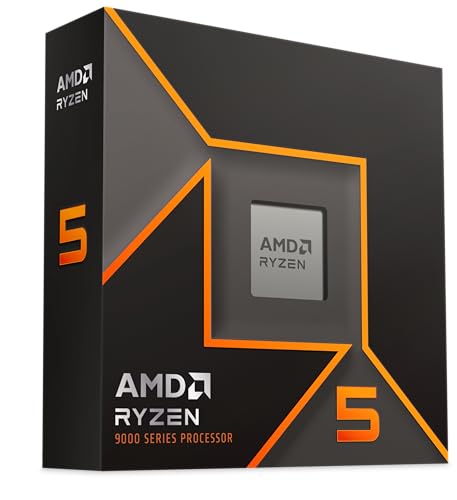
For one last example, the boxed AMD Ryzen 5 9600X uses socket AM5 and DDR5 memory. AMD lists the boxed version without a cooler. If you’re pricing it for an existing AM5 system, check board support and whether your cooler fits. If you’re coming from an older platform, add the motherboard, DDR5 kit and any cooler you need before you decide what CPU price makes the upgrade worthwhile. AMD’s Ryzen 5 9600X specifications.

Pros
- Zen 5 architecture delivers measurable IPC gains over Zen 4 in both gaming and lightly threaded tasks.
- 5.4 GHz single-core boost is competitive with Intel mid-range offerings without requiring LGA1700 migration.
- Unlocked multiplier and PBO support give overclocking flexibility on any X670 or B650 board.
- 38 MB cache and DDR5-5600 support keep memory latency in check for esports and mainstream creative workflows.
Cons
- Cooler not included; plan for at least a 120mm AIO or quality tower cooler to handle sustained boost clocks.
- DDR5-only AM5 platform means no reuse of existing DDR4 kits, adding cost for first-time AM5 adopters.
The AMD Ryzen 5 9600X is a mid-range AM5 desktop CPU built on the Zen 5 architecture. With six cores, twelve threads, and a 5.4 GHz max boost clock, it targets mainstream gamers and light creators who want Zen 5 IPC without paying flagship prices. It replaces the 7600X in AMD's stack on the same AM5 socket.
The single defining feature here is the Zen 5 IPC uplift. In CPU-bound scenarios at 1080p and 1440p, Zen 5 pulls ahead of equivalent Zen 4 parts by a measurable margin. The 38 MB cache and DDR5-5600 native support work together to reduce frame time variance in competitive titles. Owner reports consistently note smooth performance in popular esports and mid-weight open-world games.
Trade-offs are real. Six cores are sufficient for gaming but can become a bottleneck in heavily threaded workloads like Blender or h.265 encoding compared to eight-core alternatives at similar price points. No cooler is included, which is standard at this tier but still a line-item cost. AM5 DDR5-only requirement also rules out budget DDR4 reuse, and PCIe 5.0 NVMe speeds require a compatible motherboard with proper M.2 thermal solutions.
Buy this if you are building or upgrading an AM5 gaming rig and want Zen 5 IPC at a mid-range entry point, particularly for 1080p and 1440p titles. Skip this if your workloads are heavily threaded or if you need more than six cores for sustained production tasks such as video rendering or large Blender scenes.
Socket and Platform: The 9600X uses Socket AM5, compatible with X670, X670E, B650, and B650E motherboards. PCIe 5.0 GPU and NVMe slots are available on select boards. Upgrading from AM4 requires a new motherboard and DDR5 RAM; there is no AM4 backward compatibility.
Memory and Frequency: Native DDR5-5600 support means the FCLK runs at 1:1 ratio at that speed on validated kits. Pushing beyond DDR5-6000 typically requires EXPO or manual tuning and a quality B-die kit; results vary by board AGESA version. Staying at DDR5-5600 to DDR5-6000 is the practical sweet spot for stability and latency.
Boost and TDP: The 5.4 GHz max boost operates under AMD's PBO envelope. The processor's base TDP is 65W with a configurable boost TDP up to 88W on most boards. A cooler rated for at least 100W TDP is recommended to sustain peak boost clocks under extended gaming or lightly threaded workloads without thermal throttling.
Overclocking: The unlocked multiplier supports manual all-core and per-core overclocking alongside AMD's Curve Optimizer for per-core voltage offsets. Effective tuning typically requires a B650 or X670 board with robust VRM and a BIOS updated to a recent AGESA revision for Ryzen 9000 series compatibility.

























Write Your Review
No reviews yet. Be the first to share your experience!