

A $600 prebuilt gaming PC is a choice between compromises. A tower may give you a dedicated graphics card but hide the exact processor. A mini PC can name its CPU, memory, and ports clearly while relying on integrated graphics. The right choice depends on your games, your desk, and whether you plan to upgrade.
These five new-item offers were below $600 when checked through Amazon Creators API on November 25, 2026. They range from a $399.99 entry tower to a $599.99 machine with a GTX 1070. All are older or limited in some way. Check the final seller, condition, price, and warranty before paying. A cent below $600 before tax won’t keep the total below $600 at checkout.
Our first pick is the Volt X3 because both its Ryzen 5 2600 and GTX 1070 are identified. The DeXwtzfn offers a GTX 1660 Super for less money but leaves its Core i7 model vague. If both feel too risky, our prebuilt PCs under $1,000 show what a higher budget changes.


Pros
- Dual Xeon CPU config gives more threads than typical entry prebuilts in this price band.
- RX 580 with 8GB VRAM avoids texture stutter at 1080p in modern AAA titles.
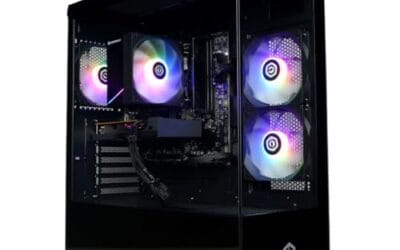
- WiFi 6, Bluetooth 5.0, and four RGB fans included without aftermarket parts.
Cons
- No verified owner feedback at time of writing, so long-term reliability is unknown.
- Xeon E5 is older server-class silicon with weaker per-core IPC and narow upgrade path.
- PSU wattage, case model, RAM speed, and motherboard are not specified by the seller.
This is a budget prebuilt gaming desktop pairing dual Xeon E5 CPUs with an RX 580 8GB GPU, 16GB DDR4, and a 512GB SSD on Windows 11 Pro. It targets entry-level 1080p gamers and casual users who want a cheap turnkey box without sourcing parts.
The defining pitch is the dual Xeon E5 CPU layout, aimed at multi-threaded workloads like OBS streaming, virtualization, or light rendering. The label 'Dual Intel i7 Xeon E5' is misleading though: Xeon E5 chips are server-class Sandy, Ivy, or Haswell-EP era parts, not Core i7, and per-core IPC lags any modern desktop CPU.
The RX 580 8GB handles 1080p esports and older AAA titles at medium settings, but lacks DLSS and modern frame generation, with FSR2 as the ceiling. DDR4-only memory, unspecified PSU wattage, and Xeon E5 platforms typically running LGA2011-3 mean the upgrade path is narrow at this tier.
Buy this if you want a cheap plug-and-play 1080p esports rig with extra CPU threads for streaming or VMs, and accept older-generation silicon. Skip this if you plan 1440p AAA gaming, want hardware ray tracing, or need a clear upgrade path to newer CPU sockets.
GPU class: Radeon RX 580 8GB GDDR5 sits in the entry tier. Expect 60+ FPS at 1080p medium in Fortnite, Valorant, CSGO, and Rocket League. AAA titles like Elden Ring or Hogwarts Legacy typically need low to medium at 1080p. No hardware ray tracing, FSR2 upscaling only.
CPU threading: Dual Xeon E5 up to 3.7GHz provides high thread count for OBS x264 medium streaming and background workloads. Per-core IPC trails modern Ryzen or Core i5, so CPU-bound esports titles above 200 FPS may bottleneck. Better suited to 1080p60 competitive and multitasking.
Memory and storage: 16GB DR4 covers current game requirements; speed and channel configuration are not specified. The 512GB SSD holds Windows plus a few AAA titles, since Call of Duty and GTA V alone can eat 150GB combined. Plan external storage for larger libraries.
Connectivity: HDMI, DisplayPort, and DVI outputs on the RX 580 support triple-monitor setups. WiFi 6, Bluetooth 5.0, one RJ-45, and a serial port are included. PSU wattage, case model, and cooling specifics are not specified, which limits future GPU upgrade planing.
Quick Look: Best Prebuilt Gaming PCs Under $600
| Pick | Desktop | Graphics | Good fit | Watch out for |
|---|---|---|---|---|
| Best named tower parts | Volt X3 V1.2 | GeForce GTX 1070 8GB | Older 1080p games with a known CPU and GPU | Old Ryzen and Pascal platforms; price at the cap |
| Best lower-cost GTX tower | DeXwtzfn gaming desktop | GeForce GTX 1660 Super 6GB | Buyers who can confirm the CPU before ordering | Exact processor is unspecified |
| Best compact PC | BOSGAME P6 Neo | Radeon 680M integrated | Small spaces, everyday work, and lighter games | No normal desktop GPU upgrade |
| Least expensive tower | Qehi white desktop | Radeon RX 560 4GB | A basic tower for modest older games | Vague CPU and 256GB SSD |
| Older 8GB graphics option | STGAubron dual Xeon desktop | Radeon RX 580 8GB | Someone who can verify an unusual parts list | Old server processors and unclear configuration |
1. Volt X3 V1.2: Best Named Tower Parts
Volt names a Ryzen 5 2600 processor, GTX 1070 8GB graphics card, 16GB DDR4 memory, and 512GB NVMe SSD. That’s a useful degree of clarity for this price class. The new-item offer was $599.99, so it qualifies for a sub-$600 comparison before tax and shipping. It has almost no headroom if you have a strict all-in budget. A small price rise would take it out of this category.
The CPU is a six-core, twelve-thread AM4 chip according to AMD’s Ryzen 5 2600 specification. Its age matters: this isn’t a modern high-refresh-rate foundation simply because the product name says “gaming.” The GTX 1070 also comes from an older Nvidia generation. Eight gigabytes of video memory is welcome, but it doesn’t erase differences in architecture or supported features. Look up results for the games you actually play.
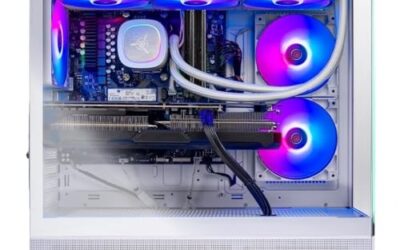
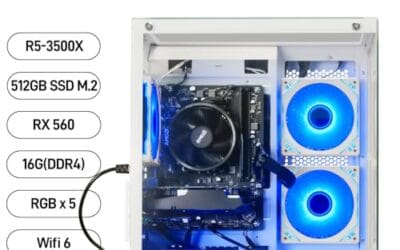
Why choose it over a vague Core i7 tower? You can research the pairing before purchase, and the listing has enough memory for a more practical starting point than an 8GB machine. The white case and visible internals may also make component inspection easier after delivery. Neither the photo nor the “New” condition confirms when the GPU or CPU was manufactured. Ask Volt what the warranty covers and whether older parts are unused inventory or previously used components.
Check motherboard model, BIOS support, power supply make and connectors, and physical GPU clearance if upgrades matter. AM4 has several processor generations, but a socket name alone doesn’t guarantee an upgrade will work. If a seller can’t supply those details, don’t count on a cheap future CPU swap. Choose this Volt for a known starter configuration and an established game library, not as a promise of cutting-edge performance.
2. DeXwtzfn GTX 1660 Super: Best Lower-Cost GTX Tower
At $569.99 during verification, the DeXwtzfn tower leaves about $30 below a $600 pre-tax cap. It lists a GTX 1660 Super 6GB, 16GB RAM, and 512GB SSD. On paper, that’s a reasonable basis for older or lighter 1080p games. It also advertises Wi-Fi 6 and several RGB fans, though the case lighting should be the last reason you choose a gaming desktop.
The catch is the processor description: “i7 CPU up to 4.0GHz.” Intel has sold Core i7 models for many years, and a clock number doesn’t tell you which one is inside. Ask the seller for the exact model, motherboard, and RAM configuration. A CPU from an old platform can set a lower ceiling for minimum frame rates and upgrades than the GPU name suggests. Don’t rely on a marketing graphic to resolve the ambiguity; get the actual part number.
The GTX 1660 Super is also an older card. It can be useful when the price is right, but buyers should compare game requirements and independent performance reports rather than assume every 1080p title will feel the same. If your monitor is a high-refresh-rate model, consider whether the CPU and GPU together suit your favorite competitive games. We haven’t run this assembled system or measured frame rates.
This is a plausible alternative to the Volt if the seller identifies the i7 and the warranty is clear. Without those answers, the $30 saving isn’t enough to justify a mystery processor. Ask for the PSU brand and rating too. A “550W” number says little about quality, connectors, or upgrade support.
3. BOSGAME P6 Neo: Best Compact PC
The P6 Neo takes a different route. BOSGAME lists a Ryzen 7 6800H, Radeon 680M integrated graphics, 24GB LPDDR5 memory, and a 512GB NVMe SSD. Its new-item offer was $439.99. A small case, named processor, and generous system memory make it attractive for a mixed-use desk where games are only part of the workload. BOSGAME’s product page corroborates the 6800H and 680M pairing.
Integrated graphics borrow system memory. The Radeon 680M is not a separate desktop GPU, so don’t read this mini PC as a direct substitute for the Volt or DeXwtzfn towers in demanding graphics workloads. It makes more sense for lighter games, emulation where legal and appropriate, media, school work, or a compact living-room setup. Check the specific games and settings you expect before buying. The word “gaming” in the title covers a wide range of experiences.
Ports may be a selling point. The listing mentions HDMI, DisplayPort, USB4, dual LAN, and wireless connectivity. Confirm the exact model and the number of usable displays if that matters to you. Mini PC specifications can differ by configuration. Also confirm whether the 24GB LPDDR5 is soldered and what storage expansion is supported. Don’t purchase it with the expectation that you can install a full-size desktop graphics card inside later.
Choose this BOSGAME when space, quiet desk setup, and everyday responsiveness matter as much as gaming. Its $440 price leaves room for peripherals and storage. If your only aim is the strongest 1080p graphics within $600, a verified tower with a discrete card may be the better fit. That’s the central tradeoff here: clarity and compactness versus GPU headroom.
4. Qehi White Desktop: Least Expensive Tower
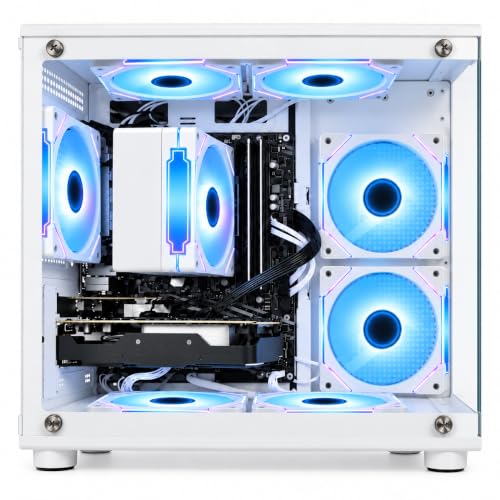
Qehi’s white tower was $399.99 during the current offer check. It advertises an RX 560 4GB, 16GB RAM, and a 256GB SSD. The case is larger than a mini PC and appears to have room for conventional desktop components. Those points make the low sticker price tempting. But the RX 560 is an old entry-level graphics card, and the listing’s “Core i5” description omits a processor generation.
Ask which i5 model ships, what motherboard it uses, and whether memory arrives as one or two sticks. The gallery can suggest a configuration without guaranteeing the exact part in your unit. A tiny 256GB drive is another limitation. Windows and a few game installs can use it quickly, so include an SSD upgrade in the real budget. Check that an extra SATA connector or M.2 slot is available before ordering a drive.
Four-gigabyte RX 560 graphics belong to a lighter-game plan. If you hope to play current demanding games at high settings, this is the wrong starting point regardless of how much RGB lighting the case has. The tower may fit someone who needs a low-cost general computer that can also play older games. It may also fit a buyer who already owns a better GPU, provided the PSU and case can support it. Verify those details rather than assuming a graphics swap will be simple.
5. STGAubron Dual Xeon RX 580: Older 8GB Graphics Option
The STGAubron listing combines an RX 580 8GB, 16GB DDR4, a 512GB SSD, and what it calls “Dual Intel i7 Xeon E5 up to 3.7GHz.” The new-item offer was $559.99. The title itself is a reason to slow down. “Core i7” and “Xeon E5” are different Intel product lines, and the listing does not give exact Xeon model numbers. Two older CPUs can be a poor fit for games that depend on fast per-core performance.
The RX 580 has served budget 1080p systems for years, but an 8GB label doesn’t make it a recent card. Check independent results for your game list and ask whether the card is new, refurbished, or used inside the advertised new system. The answer affects the value and the warranty you should expect. A tower full of old components can still be useful if the price, condition, and support are honest. Vague naming makes that harder to judge.
Ask STGAubron for both CPU model numbers, the motherboard and RAM arrangement, graphics card manufacturer, power supply brand, and a clear warranty statement. If a seller cannot provide those, skip this pick. The machine is in this comparison because a verified new-item offer exists under $600, not because every buyer should choose it. Its strength is the listed 8GB RX 580. Its weakness is the amount of hardware you must confirm to know what you are buying.
How We Evaluated the Sub-$600 Options
We checked Amazon Creators API offers on November 25, 2026 for five scraped products marked in stock and sold as New below $600. We used the product titles and images to compare named parts, memory, storage, form factor, and upgrade uncertainties. AMD’s published Ryzen 5 2600 specification and BOSGAME’s product page supplied manufacturer context for the two named processors. Tech Guided’s sub-$600 guide informed this quick-look layout; our copy and choices are independent.
We didn’t claim hands-on time with these complete PCs. We have no measured game frame rates, noise levels, or long-term failure data for them. We give more weight to exact component names than to unverified performance slogans. A listing’s “New” condition should still prompt questions about older GPUs and processors inside the computer. Prices and seller terms can change between this check and checkout.
At $599.99, the Volt sits right at the pre-tax boundary. Qehi costs much less but brings weaker graphics and less storage. The BOSGAME mini PC can’t accept a conventional desktop GPU, while the other towers leave open questions about the CPU or power supply. That’s why these are different use-case picks, rather than a single ranking based on one specification.
How to Choose at This Price
Decide whether graphics or versatility matters more
A separate GPU generally gives you a clearer upgrade path in a normal tower, but only if the case and power supply can support the replacement. An integrated mini PC saves space and can be excellent for everyday work, yet its graphics ceiling is built in. The best choice for someone playing older esports titles may be different from the best choice for someone editing video and occasionally gaming. Start with your workload, monitor, and room for a case.
Make the seller identify every important part
Ask for exact CPU and GPU models, memory layout, motherboard, storage type, and power supply. A broad family name such as “Core i7” is not enough. Confirm whether the warranty covers each component and what the return period allows you to inspect. Save written answers. When the PC arrives, compare the shipped parts with the offer while you can still return it. Our graphics card guide helps compare potential upgrades once the case, PSU, and CPU are known.
Calculate the entire setup
Include tax, shipping, a monitor if you need one, and upgrades likely in the first month. A 256GB SSD almost invites a second drive. An unknown PSU can add unexpected cost to a GPU replacement. Memory upgrades may be easy or difficult depending on available slots. If the complete plan exceeds your cap, a higher-priced but better documented desktop could be the cheaper route over two years. No shortcut in the math.
Frequently Asked Questions
Is a $600 prebuilt enough for 1080p gaming?
It can be enough for selected games with appropriate settings, especially older or less demanding titles. Performance depends on the exact CPU, GPU, memory layout, and game. Check publisher requirements and independent results for the named parts. Don’t expect one blanket answer for every current release.
Should I choose the mini PC or a tower?
Choose the BOSGAME-style mini PC if compact size and general use are priorities and your games are light enough for integrated graphics. Choose a tower if you need a dedicated GPU or expect a conventional GPU upgrade, after verifying its PSU and case. The same $450 can buy very different capabilities.
Does “New” mean every component is recently made?
No. “New” describes the offer condition; it does not tell you the manufacturing year of each installed part. Ask whether an older GPU or CPU is unused inventory or previously used, and confirm how the seller’s warranty handles it. For an unclear listing, use the return policy as part of your decision.
Bottom Line
The Volt X3 is the easiest tower here to research because its CPU and GPU are both named, although the aging parts and $599.99 price require a careful final check. DeXwtzfn can make sense if the seller reveals its exact i7. BOSGAME suits a compact mixed-use desk. Qehi is a low-cost doorway to older games, and the dual Xeon STGAubron is only for a buyer willing to verify a complicated parts list.
Clear parts win. If a seller won’t identify the components behind an attractive case, keep your $600 and look elsewhere.

























Write Your Review
No reviews yet. Be the first to share your experience!