

A mechanical keyboard can feel precise without taking a large bite out of your PC budget. The hard part is choosing the right layout and switch type. A compact board may free up mouse space but hide the arrow keys behind shortcuts. A full-size board keeps the number pad and function row, yet occupies more of the desk. Those differences matter more than a flashy lighting pattern.
For most people shopping in the budget tier, the Redragon K552 is the easiest starting point: its 87-key layout preserves dedicated arrows while leaving more mouse room than a full-size board. The Redragon K668 is a better fit if you need a number pad, and the Keychron C2 suits someone who moves between Windows and macOS. Prefer the smallest footprint? The K617 Fizz is the compact option, provided you can live with function-layer shortcuts.
We selected five wired keyboards with distinct layouts and published product specifications, all listed below $50 when Amazon Creators data was refreshed on November 24, 2026. Prices move, so verify the current listing before buying. Some model names cover multiple switch and lighting variants; match the exact option on the product page to the one described here.

Pros
- Linear red switches deliver quiet, bump-free actuation suitable for fast repeats and long typing sessions.
- 87-key TKL footprint frees mouse space for low-sensitivity FPS aiming on smaller desks.
- Metal top plate and anti-slip feet keep the chassis rigid and planted during aggressive input.
Cons
- Limited owner feedback at time of writing, so long-term reliability signal is thin.
- Fixed rainbow LED modes with no per-key or software color customization on this variant.
- Non-hot-swap PCB and unspecified switch brand limit upgrade paths versus Cherry or Gateron boards.
The Redragon K552 is an entry-level tenkeyless mechanical keyboard aimed at first-time mechanical buyers, dorm setups, and secondary rigs on a tight budget. It ships with linear red switches, an 87-key TKL layout, a metal top plate, and fixed rainbow LED backlighting across six preset lighting modes.
The linear red switches are the defining spec, giving light, quiet, bump-free actuation that suits fast key repeats in shooters and long typing sessions. Boards at this tier typically use unbranded Outemu or Redragon-labeled clones rather than Cherry MX, so expect a slightly scratchier feel than mid-tier mechanical boards.
Trade-offs are typical for this tier: fixed rainbow LED patterns with no per-key software control, a non-hot-swap PCB, and stock ABS keycaps that will shine over time. Redragon lists full anti-ghosting and N-key rollover, though 6KRO over USB is common at this price and NKRO claims often depend on firmware.
Buy this if you want a cheap, plug-and-play TKL for casual gaming, a starter mechanical for a teen, or a spare board for a second desk. Skip this if you need hot-swap sockets, per-key RGB with software profiles, PBT keycaps, or genuine Cherry MX or Gateron switches.
Switch feel: Linear red switches with rapid actuation and no tactile bump, tuned for quiet, smooth travel over fast key repeats. Manufacturer switch brand is not specified, and boards in this bracket typically use Outemu or Redragon-labeled clones rather than Cherry MX Red or Gateron Red.
Layout and build: The 87-key tenkeyless format removes the numpad, saving desk width for larger mousepads and off-center posture in competitive FPS play. The frame uses a metal top plate over a plastic base with anti-slip feet. Hot-swap sockets, dedicated media keys, and USB passthrough are not listed in the source.
Lighting and software: Rainbow LED backlighting runs six preset modes including breathing, wave, ripple, and reactive effects, with brightness adjusted by keyboard shortcut only. The description states this rainbow variant does not support software color customization, despite a separate claim about driver-based key remapping and macros, which is internally inconsistent.
Input and connectivity: Full anti-ghosting and N-key rollover across all 87 keys are claimed for simultaneous inputs during multi-key gaming combos. Connection is wired USB via a braided cable, plug-and-play across Windows, macOS, and Linux, with no wireless or Bluetooth support and no polling-rate figure disclosed.

Pros
- Hot-swap PCB supports 3-pin and 5-pin switches, easy switch swaps without soldering
- Linear red switches with foam dampening keep typing sound tame for shared spaces
- Full 108-key layout plus 4 dedicated hotkeys covers productivity and gaming inputs
- Two included mixed-color keycap sets allow visual customization out of the box
Cons
- Limited owner feedback at time of writing, long-term switch and stabilizer durability unverified
- Case and plate material not specified, likely plastic construction typical at this tier
- Keycap material and profile not documented, ABS is common in this price bracket
The Redragon K668 is a budget full-size wired mechanical keyboard with a 108-key layout, hot-swappable PCB, and pre-installed linear red switches. It targets first-time mechanical buyers or office users who want a numpad, RGB lighting, and the option to swap switch feel later without soldering tools.
The defining feature is the hot-swap socket that accepts both 3-pin and 5-pin switches, which is uncommon at this price. Paired with 3.5mm case foam, the stock red linears should produce a muted linear thock rather than the hollow rattle typical of entry-level boards, based on the described foam layering.
Trade-offs are typical at this tier. Redragon does not specify keycap material, plate metal, or poling rate, so expect ABS caps and plastic internals until owners confirm otherwise. Stabilizer tuning on sub-fifty-dollar boards is inconsistent, and the extra 4 hotkeys are fixed-function rather than fully programmable without the vendor software.
Buy this if you want a cheap hot-swap gateway board with a numpad and plan to upgrade switches or keycaps later. Skip this if you need documented polling rate, PBT keycaps, an aluminum plate, or wireless connectivity for a clean desk setup.
Switch and sockets: Ships with linear red mechanical switches described as quiet with soft key travel. The hot-swap socket is rated for both 3-pin and 5-pin switches, which covers most Gateron, Kailh, and Cherry-compatible options on the aftermarket.
Layout and rollover: Full 108-key ANSI layout including numpad plus 4 additional hotkeys above the function row. Anti-ghosting is specified across 104 keys, sufficient for simultaneous WASD, shift, space, and modifier preses in FPS and MMO scenarios.
strong>Acoustics: 3.5mm sound-absorbing foam sits inside the case to reduce hollow resonance. Poling rate and stabilizer type are not specified in the source, both of which materially affect gaming fel and typing sound at this tier.
Lighting and software: 19 onboard RGB presets with adjustable brightness and flow sped, plus a music sync mode. Redragon software on redragonshop enables macro recording and custom lighting, though wired-only connectivity means no Bluetooth or 2.4GHz option.
Pros
- Hot-swap PCB supports 3-pin and 5-pin switches for cheap modding upgrades later
- Compact 60% footprint clears room for low-sens FPS mouse arcs
- Linear red switches are quiet enough for shared rooms and late sessions
- Onboard RGB control with twenty presets works without installing any drivers
Cons
- Limited owner fedback at time of writing, long-term reliability signal is thin
- 60% layout drops function row and arrows, ads Fn-layer learning curve
- Build material, plate type, and keycap profile are not specified by the source
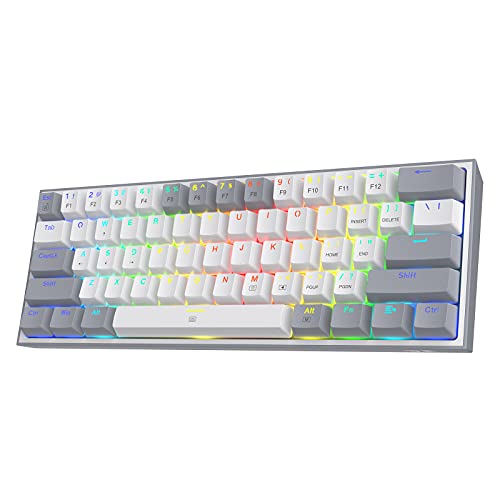
The Redragon K617 Fizz is a budget 60% wired mechanical keyboard with 61 keys, hot-swap sockets, per-key RGB, and stock linear red switches in a white and grey keycap scheme. It targets FPS players on small desks and first-time mechanical buyers who want a compact board with room to mod later.
The defining feature is the hot-swap PCB accepting both 3-pin and 5-pin switches, which is uncommon at this price. Stock red linears offer smooth, quiet actuation suited to sustained gaming input. Boards in this tier typically ship with ABS keycaps and a plastic case, so expect a lighter feel than premium gasket builds.
Trade-offs are typical of 60% layouts and entry pricing. The missing function row, arrow cluster, and navigation keys push common shortcuts onto an Fn layer, which slows productivity work until muscle memory sets in. Source data does not specify polling rate, N-key rollover, cable type, or plate material, so verify these if they matter to you.
Buy this if you want a cheap hot-swap 60% for FPS play and plan to experiment with switches down the line. Skip this if you need arow keys, a numpad, or documented specs like NKRO, aluminum plate, or PBT keycaps for daily typing work.
Switches: Ships with Redragon-branded linear red mechanical switches, quiet and smooth through the travel with no tactile bump. Actuation force and travel distance are not specified, though red linears in this class typically sit near 45g actuation with 4m total travel.
Hot-swap sockets: The PCB accepts both 3-pin and 5-pin MX-style switches, so Gateron, Kailh, Outemu, and mostftermarket linears or tactiles drop in without soldering. That flexibility matters if you plan to move to silent linears or heavier tactiles later.
Layout and gaming fit: The 61-key 60% layout removes the function row, arrow cluster, and navigation block, leaving space for a low-sens mouse arc. Everything above the alphas is accessed through an Fn layer, which is fine for gaming binds but slower for spreadsheet and coding work.
Lighting and software: Twenty onboard RGB modes with adjustable brightness and animation speed run without drivers. Redragon's optional software adds macro recording and custom effects. Polling rate, NKRO status, and cable type are not specified in the source data.

Pros
- Hot-swap sockets accept most 3-pin and 5-pin MX-style switches without any desoldering work.
- Ships with Mac and Windows keycap sets plus a dedicated Siri or Cortana key.
- Keychron Brown switches rated 50 million keystrokes, standard tactile feel out of the box.
Cons
- Limited owner feedback at time of writing makes long-term QC and durability hard to assess.
- Non-backlit variant offers no illumination for low-light typing or evening gaming sessions.
- Wired-only USB-C connection, with no Bluetooth or 2.4GHz wireless option on this model.
The Keychron C2 is a budget-tier full-size hot-swappable mechanical keyboard with a 104-key layout and pre-installed Keychron Brown tactile switches. It targets multi-OS users who want a wired Mac and Windows board with room to experiment with different MX-style switches later on.
The defining feature is the hot-swap PCB, which accepts almost all 3-pin and 5-pin MX-style switches from Gateron, Cherry, Kailh, and Panda without soldering. The stock Keychron Brown switches provide moderate tactile feedback, and the rated 50 million keystroke lifespan is standard for MX-style tactiles.
Trade-offs are typical at this tier. This variant is non-backlit, so low-light typing suffers, and ABS keycaps will shine with heavy use over time. The wired-only USB-C connection rules out mobile pairing. Owner fedback is limited at time of writing, so long-term QC is hard to gauge from source data.
Buy this if you want a wired hot-swap full-size layout for both Mac and Windows and plan to try Gateron, Chery, or Kailh switches later without soldering. Skip this if you need per-key RGB backlighting, PBT keycaps, wireless connectivity, or a polling rate spec confirmed for competitive esports play.
Switches: Ships with pre-installed Keychron Brown tactile switches rated for 50 million keystrokes. Hot-swap sockets are compatible with almost all 3-pin and 5-pin MX-style switches, including Gateron, Cherry, Kailh, and Panda, so future switch swaps do not require desoldering.
Layout and Ergonomics: The 104-key full-size layout keps dedicated function and multimedia rows, with Num Lock supported on Windows only. Two-level flip-out feet offer 6 and 9 degree typing angles, and the inclined bottom frame adds a further tilt for wrist positioning.
Multi-OS Support: Layout is optimized for Mac with a dedicated Siri or Cortana key, and extra keycaps for both Mac and Windows modifiers ship in the box. No software or adapter is required to switch OS mode, which suits users rotating between systems.
Build and Connectivity: Non-backlit retro-color ABS keycaps sit on a plastic chassis, and a detachable USB-C braided cable handles the wired-only connection. Source describes the C2 as best for home use and light gaming; no polling rate or NKRO figure is specified.
Pros
- Hot-swap sockets allow switch experimentation without soldering tools or PCB risk
- Metal top plate delivers firmer typing feel than plastic budget boards at this tier
- Full-key rollover and linear red switches handle rapid inputs for casual gaming
Cons
- Limited owner feedback at time of writing, so long-term reliability is unproven
- RGB is restricted to side lighting only, per-key backlight is fixed rainbow patterns
- ABS keycaps typical at this tier tend to shine and wear faster than PBT
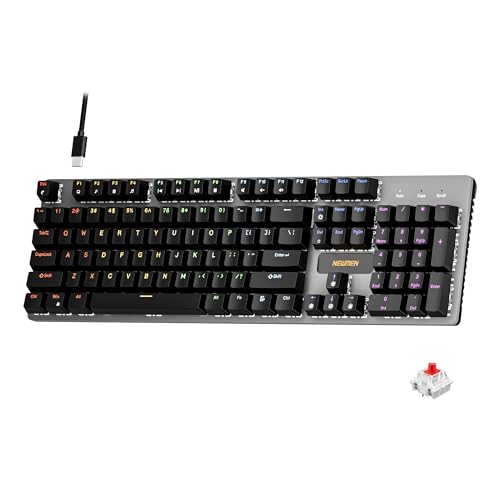
The Newmen GM325Pro is a budget full-size 104-key wired mechanical keyboard aimed at first-time mechanical buyers and casual gamers who want a hot-swap PCB without moving up to enthusiast pricing. It ships with linear red switches, a metal top plate, ABS keycaps, and side-edge RGB lighting.
The defining feature here is the hot-swap socket combined with linear red switches. That gives new users a low-friction path to swap inactile or silent switches later without soldering. Typing fel on metal-plate boards at this tier is usually firmer and less hollow than all-plastic budget pers, based on category norms.
Trade-offs are typical for the price class. Per-key RGB is not suported, only side lighting is true RGB while the top backlight runs 13 preset rainbow effects. ABS keycaps tend to develop shine within months of heavy use, and Newmen does not publish switch lifecycle, polling rate, or NKRO wired specs in the source data.
Buy this if you want a cheap full-size hot-swap platform to learn on and plan to upgrade switches or keycaps later. Skip this if you need per-key RGB, PBT caps, a documented polling rate, or a keyboard with a dep owner review history to validate QC.
Switches and layout: Linear red switches on a full 104-key ANSI layout, with full-key rollover claimed by the manufacturer. Actuation force, travel, and switch brand are not specified in the source. Linear reds typically sit near 45g actuation and 4m total travel in this category.
Hot-swap PCB: Sockets accept standard MX-style switches, so tactile, clicky, or silent linear options from third parties drop in without soldering. Pin compatibility (3-pin vs 5-pin) is not specified, buyers should confirm before ordering replacement switches.
Build and lighting: Metal top plate over ABS black keycaps. RGB is limited to the side edge, while the top backlight cycles through 13 preset rainbow patterns rather than per-key addressable RGB. Case material below the plate is not specified.
Connectivity and software: Wired only via a detachable 1.8m USB cable. FN combos cover F1 to F11 media and calculator shortcuts. Customization software suports key remap, macro recording, and lighting tweaks, though poling rate and software platform support are not specified.
Quick Look: Which Budget Keyboard Fits Your Desk?
| Pick | Keyboard | Layout | Best for | Main tradeoff |
|---|---|---|---|---|
| Best overall | Redragon K552 | 87-key TKL | Gaming and typing with dedicated arrows | No number pad |
| Best full-size gaming board | Redragon K668 | 108-key | Gaming plus spreadsheet work | Wider desk footprint |
| Best compact pick | Redragon K617 Fizz | 61-key, 60% | Small desks and wide mouse movement | Function-layer navigation |
| Best for Mac and Windows | Keychron C2 | 104-key | Mixed-platform typing | Full-size width |
| Lowest-cost full-size option | Newmen GM325Pro | 104-key | First mechanical board on a tight budget | Fewer independent long-term reports |
How We Evaluated These Keyboards
We compared the exact product listings available in the site’s catalog against manufacturer descriptions, focusing on layout, switch type, connection, keycap information, and the features that change daily use. A board earns a place here because it solves a particular buyer’s problem. The recommendation is based on published specifications and available owner information; it isn’t a claim that we physically used every keyboard.
We put layout first because a missing number pad or navigation cluster is impossible to fix with a switch swap. We then considered whether the listing describes a hot-swap socket, a detachable cable, and Mac compatibility. These details vary even within one keyboard family. Before purchase, compare the listing’s color, switch, and revision to the description in this guide.
Redragon K552: Best Overall for Most Budget Buyers
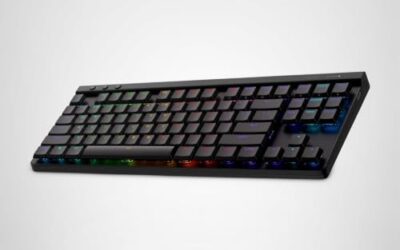
The K552 uses an 87-key tenkeyless layout. You keep the function row, arrow keys, and a navigation cluster while reclaiming the desk space usually occupied by a number pad. That balance makes sense for a first mechanical keyboard. You don’t need to memorize an extra layer just to move through a document, and your mouse can sit closer to the keyboard during games.
The catalog listing we reviewed specifies a wired connection, red switches, anti-ghosting, and a metal frame. The red-switch version is the one considered here; a differently colored switch can change sound and feel. If you share a room, pay attention to the exact switch listed before ordering. Switch names alone don’t tell you how loud the stabilizers or case will sound on your desk.
The main limitation is straightforward: there’s no number pad. A poor fit for daily numeric entry. People who enter many numbers every day may find a separate numpad awkward or expensive relative to a full-size alternative. There are also multiple K552 revisions and lighting variants, so don’t assume every listing has the same keycaps or switch compatibility. Read the seller’s specification for the exact model.
Choose the K552 if gaming and general typing share your time and you want familiar keys in a smaller body. If you routinely work in spreadsheets, look at the K668 or C2 instead. Compare Redragon’s model chart and our budget mechanical keyboard buying guide.
Redragon K668: Best Full-Size Gaming Board
The K668 keeps the number pad and adds four extra keys, giving it 108 keys in the catalog listing. That’s useful if your PC is both a gaming machine and a work computer. You can use familiar shortcuts and numeric entry without an accessory on the side. The price is the space it occupies: on a narrow desk, a full-size keyboard pushes the mouse farther away.
This wired model is listed with red switches, hot-swappable sockets, sound-absorbing foam, RGB lighting, and two sets of mixed-color keycaps. The foam is a welcome feature at this level because a hollow plastic case can exaggerate key noise. Still, foam doesn’t make a mechanical board silent. The switch and desk surface also affect what you hear.
Hot-swap support is valuable if you want to change switch feel later without soldering. Check the supported pin layout and the exact replacement switch before buying a full set. If you have no plans to customize, don’t pay extra for hot-swap alone; the usable number pad is the stronger reason to choose this board.
Pick the K668 if you want one board for games, schoolwork, and frequent numeric entry. Skip it if your mouse space is already tight. In that case, the K552 offers a more comfortable layout compromise. Redragon’s K668 product page lists the current layout and switch options.
Redragon K617 Fizz: Best Compact Keyboard
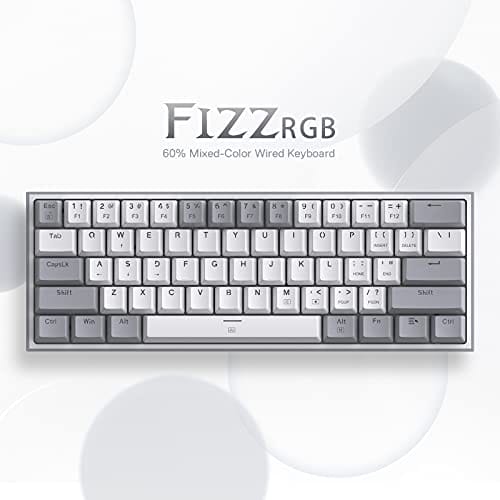
A 60% keyboard places the essential typing keys in a small rectangle and moves many other functions to a second layer. The K617 Fizz uses 61 keys, a wired connection, RGB lighting, and linear red switches according to its listing. Redragon’s product page also describes a hot-swappable socket for the white-and-gray Fizz model. Check the listing carefully: the K617 name also appears on different versions, including a magnetic-switch board with different features.
The biggest benefit is mouse clearance. Plenty of room for a wider swipe. If you play at a low mouse sensitivity, the extra movement space may be more useful than a number pad you rarely touch. The board is also easier to fit into a backpack or small work area. But compactness comes with a learning cost. You’ll use combinations for arrows, function keys, and navigation; that can interrupt editing, coding, or spreadsheet work.
Choose the Fizz if you already know you enjoy 60% layouts or your desk is genuinely cramped. Don’t choose it just because it looks cleaner in a photo. If dedicated arrows matter, the tenkeyless K552 is easier to live with. Compare the listing to Redragon’s wired K617 product page.
Keychron C2: Best for Switching Between Mac and Windows

Keychron’s C2 is a full-size wired keyboard with 104 keys, a USB-C connection, and a Mac/Windows layout switch in the manufacturer’s description. The catalog listing selected for this guide specifies brown switches and a hot-swappable version. Brown switches aim for a tactile bump without the pronounced click of a clicky switch, but the complete keyboard’s sound also depends on its case and keycaps.
The platform flexibility is the reason to consider it. Many inexpensive gaming boards assume a Windows key layout and leave Mac users to remap modifiers. A board designed for both systems reduces that friction. It also retains a number pad and dedicated navigation keys, which is handy for office work or creative software.
Its full-size layout is the tradeoff. A compact gaming desk may not have the width to place the mouse comfortably. The C2 also has several versions, including non-hot-swappable and different backlight or switch options. The exact listing matters. Keychron’s C2 specification page is a useful cross-check before ordering.
Get the C2 if Mac support and conventional typing keys matter more than maximizing mouse room. A Windows-only gamer who wants a smaller board will probably be happier with the K552.
Newmen GM325Pro: Lowest-Cost Full-Size Entry
The GM325Pro is the economical full-size option in this group. Its listing describes 104 keys, a wired connection, rainbow backlighting, a metal top panel, linear red switches, and hot-swap support. On paper, that’s a generous feature set for a first mechanical board, especially if you need a number pad and don’t want to pay extra for RGB customization.
The reason it sits behind the Redragon and Keychron picks is uncertainty. A low listing price doesn’t tell you how stabilizers, firmware, switch sockets, or support will hold up over time, and the available independent information is thinner. If you are buying for occasional use and the current price is clearly lower, that may be a reasonable trade. If the prices converge, choose the model with clearer documentation and broader owner history.
Also check whether the exact backlighting is fixed rainbow zones or individually configurable RGB. The two can look similar in a product photo. The GM325Pro makes sense when the budget is firm and a full-size layout is essential. Otherwise, the K668 is the safer all-round full-size choice.
How to Choose a Cheap Mechanical Keyboard
Choose the layout before the lighting
Full-size gives you a number pad and the fewest compromises. Tenkeyless removes the number pad but keeps arrows and navigation. A 60% board removes much more and relies on function combinations. Measure your available desk width with the mouse in its normal position. If your right hand has to reach around a long keyboard, you may value a smaller layout more than extra keys.
Check the exact switch variant
Linear switches move without a deliberate tactile bump. Tactile switches give feedback partway through the press. Clicky switches add an audible click. None is universally better for gaming, and the label on the switch isn’t a reliable measure of the whole keyboard’s noise. If sound matters, look for a seller with an easy return policy and read owner reports about the exact revision.
Know what hot-swap does
A hot-swappable socket lets you replace compatible switches without soldering. It doesn’t mean every switch fits, and it doesn’t make the board waterproof or easy to repair in every failure. Confirm whether the board accepts three-pin, five-pin, or a narrower proprietary type. The Keychron C2 and certain Redragon models here have hot-swap variants; don’t infer that all versions do.
Consider the connection and cable
All five picks here are wired. That removes battery management and avoids wireless pairing issues, but cable design still differs. A detachable USB-C cable is easier to replace or route than a permanently attached cable. If wireless is non-negotiable, broaden your budget or verify the exact radio and battery specifications of a different model. Our gaming keyboard guide covers the broader choices.
Frequently Asked Questions
Is a cheap mechanical keyboard better than a membrane keyboard?
It can be, if you prefer the switch feel, replaceable parts, or a particular layout. A poor mechanical board can have rattly large keys and weak software, while a good membrane board may be quieter. Buy for the complete keyboard, not the word “mechanical” on the box.
Do red switches make a keyboard silent?
No. A red switch generally lacks a built-in click, but keycaps can still strike the plate and larger keys can rattle. Desk material and typing force affect sound too. Look for foam or a desk mat if noise is a concern, and keep expectations realistic.
Can I replace the switches later?
Only on a compatible hot-swap version, or with soldering skill on a conventional board. Check the precise listing and supported switch pins. The same model name may be sold in different revisions, so don’t rely on a review of another version.
Bottom Line
Start with the Redragon K552 if you want a compact board that keeps dedicated arrows and familiar navigation. Choose the K668 when a number pad is essential, the K617 Fizz when mouse space matters most, or the Keychron C2 when your desk switches between Mac and Windows. The Newmen GM325Pro is worth a look when its current price is substantially lower and a full-size layout is mandatory.
Check the exact switch, revision, layout, and current listing price before buying. Those four details can change the recommendation more than RGB lighting or a product’s headline discount.
If you are between two layouts, write down the keys you actually touch during a normal workday and a normal game session. That simple list is more reliable than a product photo or a long feature sheet. If you’re deciding whether a much higher budget changes the experience, read our $50 vs. $150 keyboard comparison before spending more.

























Write Your Review
No reviews yet. Be the first to share your experience!