

Your router probably has a sticker on the box bragging about WiFi 6E, and your new laptop or motherboard might list it in the spec sheet too. So what does the extra “E” actually buy you? In plain English, WiFi 6E takes the WiFi 6 standard and hands it a brand-new stretch of radio spectrum, the 6 GHz band, that older devices simply can’t touch. That empty lane is the whole point.
If you’ve been shopping for a WiFi 6 router or weighing a mesh system for a bigger home, understanding 6E helps you avoid overpaying for a feature you can’t use yet, or underbuying and regretting it in two years. This guide explains what WiFi 6E does, why the 6 GHz band matters, and when it’s actually worth chasing. We also researched real gear along the way, including options for apartment-sized spaces, so the theory connects to hardware you can actually buy.
The short answer
WiFi 6E is WiFi 6 plus access to the 6 GHz frequency band. Regular WiFi 6 works on the crowded 2.4 GHz and 5 GHz bands that every router, phone, and smart bulb has fought over for years. The “E” stands for Extended, and it opens up 6 GHz, a much wider, much emptier chunk of airwaves. Same speed ceiling as WiFi 6, same efficiency features, but with far more room and far less interference. That’s it in a nutshell.
Now, a quick honesty note. Plenty of routers on sale right now are WiFi 6, not 6E, and for many homes that’s still the right call. The Linksys Hydra Pro 6 is a WiFi 6 mesh router rated to cover around 2,700 square feet and connect 30-plus devices, priced near $199.99 with a 4.4 rating. It doesn’t have the 6 GHz band, but it shows the kind of coverage and device count that matters more than the badge for most people.

Pros
- AX5400 class dual-band throughput up to 574 plus 4804 Mbps on 5 GHz
- Six spatial streams with OFDMA reduce congestion for 30+ device homes
- Intelligent Mesh compatibility allows scaling coverage beyond the 2,700 sq ft rating
Cons
- Limited owner feedback at time of writing, so real-world reliability data is thin
- Dual-band only, no dedicated 6 GHz or wireless backhaul band at this tier
- Detailed specifications, WAN port sped, and waranty not specified in source listing
The Linksys Hydra Pro 6 (MR5500-AMZ) is a mid-range dual-band WiFi 6 mesh router aimed at households upgrading from an older AC1900 or extender-based setup. Linksys rates it for 2,700 sq ft and 30 plus devices, targeting medium apartments, condos, and small two-story homes with mixed smart home and streaming traffic.
The defining feature is six-stream AX5400 class WiFi 6 with quoted rates of 574 Mbps on 2.4 GHz and 4804 Mbps on 5 GHz. OFDMA and MU-MIMO help when many low-bandwidth clients share airtime, which is where WiFi 5 routers typically stall. Real-world 5 GHz throughput at range appears to land in the mid-hundreds of Mbps based on category norms.
Trade-offs are typical at this tier. It is dual-band, so there is no dedicated 6 GHz radio and no separate backhaul channel when you add mesh nodes, meaning throughput can halve on satellite hops. Linksys does not specify WAN port speed, USB, or processor details in the listing, so multi-gig ISP users should verify before buying.
Buy this if you want a single WiFi 6 router that can grow into a Linksys Intelligent Mesh system for a 2,000 to 3,000 sq ft home with 30 plus clients. Skip this if you need WiFi 6E, 2.5 GbE WAN, or a dedicated backhaul band for a large multi-story house.
Wireless class: AX5400 class dual-band WiFi 6 with quoted PHY rates of 574 Mbps on the 2.4 GHz band and 4804 Mbps on the 5 GHz band, totaling roughly 5378 Mbps aggregate across six spatial streams. No 6 GHz radio is listed, so WiFi 6E clients fall back to 5 GHz.
Coverage and capacity: Linksys rates the MR5500 for 2,700 sq ft and 30 plus simultaneous devices. OFDMA, MU-MIMO, and 1024-QAM are standard at this WiFi 6 tier and help maintain throughput as client count scales, though actual coverage depends heavily on wall material and node placement.
Mesh behavior: Intelligent Mesh lets you pair the MR5500 with other Linksys nodes to extend coverage. Because it is dual-band, backhaul shares the 5 GHz client band, so expect throughput to roughly halve one hop from the root node. A wired Ethernet backhaul between nodes avoids this penalty.
Not specified: WAN and LAN port speeds, USB ports, processor and RAM, warranty length, and physical dimensions are not disclosed in the source listing. Buyers pairing this with multi-gig fber or DOCSIS 3.1 plans above 1 Gbps should confirm port specs before purchase.
The longer explanation
To get why 6E is a big deal, picture WiFi bands as highways. The 2.4 GHz band is an old two-lane road that reaches far but crawls, and it’s packed with microwaves, baby monitors, and every cheap smart device you own. The 5 GHz band added more lanes and higher speed, but it fills up fast in dense neighborhoods where a dozen routers all shout over each other. Both bands are shared with older WiFi generations, so congestion is baked in.
WiFi 6E adds a brand-new superhighway: 6 GHz. This band offers up to 1,200 MHz of spectrum, roughly the width of all the older bands combined, and here’s the key part. Only WiFi 6E and newer devices are even allowed on it. That means no legacy traffic clogging things up, wider channels for full-speed connections, and dramatically lower latency in busy areas. Your data gets an empty road built just for it.
History: how we got here
WiFi has run on 2.4 GHz and 5 GHz for two decades. Every generation from WiFi 4 through WiFi 6 squeezed more cleverness out of those same two bands, but you can only subdivide crowded spectrum so many times before everyone’s stepping on each other. By the late 2010s, dense apartments and offices were hitting a wall of interference that no amount of protocol tuning could fully fix.
The fix came from regulators, not engineers. In 2020, the FCC opened the 6 GHz band for unlicensed WiFi use, and similar rulings followed in other countries. That decision instantly created the room the standard needed, and WiFi 6E, the “Extended” version of WiFi 6, was the first generation allowed to use it. WiFi 7 later built on the same 6 GHz foundation, so 6E was really the doorway to everything modern that followed.
Why it works this way
The advantage of 6E comes down to space and exclusivity. Wider channels mean more data moves at once, so a 6 GHz connection can hit its rated speed instead of choking on a narrow, shared lane. And because only recent devices can join the 6 GHz band, there’s no old, slow traffic dragging everyone down. Fewer neighbors on your frequency means lower latency, which gamers and video callers feel immediately.
There’s a tradeoff built into the physics, though. Higher frequencies don’t travel as far or punch through walls as well as lower ones. So 6 GHz gives you blazing speed in the same room or one wall over, but it fades faster across a large house. That’s exactly why mesh systems pair so well with 6E, since extra nodes carry the fast-but-short-range signal into rooms a single router couldn’t reach cleanly.
When you’d want this
You’ll benefit from WiFi 6E if you live somewhere dense, run a gigabit-plus internet plan, or move a lot of data wirelessly. Apartment dwellers surrounded by dozens of competing networks get the biggest immediate win, because the clean 6 GHz band skips the congestion entirely. Same for anyone who games competitively, streams high-bitrate 4K, or moves huge files between machines on the local network. If your devices already support 6E, you’ll feel the difference.
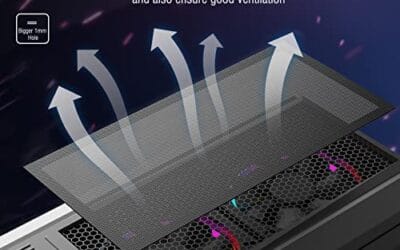
Here’s the catch: both ends need to support it. Your router and your laptop, phone, or WiFi card all have to be 6E-capable, or you’re just running plain WiFi 6. And a fast connection means little if your desktop build overheats and throttles under load, which is why airflow hygiene matters for the whole system. Something as simple as the MoKo magnetic PC dust filter, a $12.99 two-pack of 400x300mm PVC mesh with a 4.9 rating, keeps case intakes clear so your components stay cool while that 6 GHz link is saturated. It’s a small, cheap piece of good build hygiene.

Pros
- Large 400x300mm sheets cover full-tower top or side panels after trimming.
- Magnetic strip and adhesive combo works on any ferrous steel case panel.
- 1mm mesh openings pass more air than tight foam filters at similar coverage.
- Two-pack plus eight strips gives enough material for multiple vents in one build.
Cons
- Limited owner feedback at time of writing, real-world durability is unverified.
- Requires ferrous steel panels, will not stick to aluminum or tempered glass cases.
- PVC and 3M adhesive strips can lose grip over time in warm, high-airflow builds.
This is a budget DIY dust filter kit, not a pre-cut case-specific filter. The package includes two 400x300mm PVC mesh sheets with a 1mm hole pattern plus eight 400mm magnetic frame strips. It targets builders with non-standard vents, modded cases, HTPC chassis, or console dust covers who want to fabricate their own filters.
The defining feature is the trim-to-fit format. You measure the vent, cut the PVC sheet with scissors, then frame the edges using the adhesive-backed magnetic strips so the assembly clamps to steel panels. The 1mm aperture is coarser than typical foam filters, which favors airflow over fine-dust capture, a reasonable trade for intake or exhaust with strong static pressure fans.
Trade-offs are typical at this tier. PVC is not as tear-resistant as nylon or stainless mesh, and 3M adhesive can soften near warm PSU or GPU exhaust zones. The magnetic attachment only works on ferrous steel, so tempered glass side panels or aluminum shells need alternative mounting. With no verified owner data yet, longevity and mesh consistency are unproven.
Buy this if you need to filter oddly shaped vents or console intakes and are comfortable cutting and framing your own mesh. Skip this if your case already ships with pre-fit magnetic filters, or if the panels are aluminum or glass where the magnets will not hold.
Sheet dimensions: Each sheet measures 400x300mm (15.75 x 11.81 inches) with a stated thickness of 0.01 inches. Two sheets ship per pack, enough surface area to cover a full-tower top vent plus a PSU shroud intake, or several smaller vents across a mid-tower build.
Mesh and material: PVC construction with a 1mm hole pattern. The 1mm aperture is coarser than fine foam or stainless woven filters, which prioritizes airflow over sub-micron dust capture. Expect it to catch pet hair, lint, and coarse household dust rather than fine particulates.
Mounting hardware: Eight 400mm magnetic strips are included, framed with 3M adhesive backing. Peel-and-stick application to the trimmed PVC edge lets the assembly clamp to any ferrous steel case panel. No screws or drilling needed, and the filter lifts off for shake-out or rinse cleaning.
Compatibility notes: Total kit weight is around 0.5 pounds. Magnetic mounting requires steel panels, it will not attach to aluminum shells, tempered glass, or plastic vents without a separate ferrous shim. Best suited to standard steel PC cases, older server chassis, HTPC builds, and console dust covers.
What to look for in a WiFi 6E setup
First, confirm tri-band support. A true 6E router broadcasts on 2.4 GHz, 5 GHz, and 6 GHz at once, so older gadgets keep working while your newer devices grab the clean band. Next, match coverage to your home. A single router handles an apartment fine, but a house over 2,000 square feet usually wants a mesh setup, like the coverage class the 2,700-square-foot Linksys Hydra Pro 6 targets. Count your devices too, since a busy smart home can easily pass 30 connections.
Then check the client side. Your PC’s WiFi card, your phone, and your laptop all need 6E radios to actually use 6 GHz, so verify before you pay a premium. Look at the WAN and LAN port speeds if you have fast internet, and consider WiFi 7 if you’re buying new anyway, since it uses the same 6 GHz band and prices have fallen. Don’t chase the newest badge blindly. Buy for your space, your speed, and the devices you already own.
Common misconceptions
The biggest one: people think WiFi 6E is faster than WiFi 6. It isn’t, not on paper. The top speed is the same. What 6E delivers is a cleaner, less crowded band, so you’re more likely to actually reach that speed in a busy environment. Another myth is that buying a 6E router upgrades your old phone. It doesn’t. Devices without 6E radios simply connect on the older bands as usual.
Folks also assume 6 GHz reaches farther because the number is bigger. The opposite is true, since higher frequencies fade faster through walls. And plenty of shoppers think 6E is already mandatory. It’s not. A solid WiFi 6 router still covers most households beautifully, and you shouldn’t feel pressured to pay extra for a band your gear can’t join yet.
Frequently asked
Is WiFi 6E worth it over regular WiFi 6?
It’s worth it if you live somewhere with heavy network congestion and own devices that support 6 GHz. In a quiet suburban house, plain WiFi 6 often performs just as well for less money. Match the purchase to your environment and your existing hardware rather than the badge on the box.
Do I need new devices to use WiFi 6E?
Yes. Both the router and each connected device need 6E-capable radios to use the 6 GHz band. An older laptop or phone will still connect through the 2.4 and 5 GHz bands, just without the clean 6 GHz lane. Check the spec sheets before buying.
Does the 6 GHz band reach as far as 5 GHz?
No, it doesn’t. Higher frequencies carry less distance and struggle more with walls, so 6 GHz shines in the same room and fades across a large home. Pairing 6E with a mesh system, adding nodes closer to your devices, is the usual way to solve that range limit.
Is WiFi 6E the same as WiFi 7?
No. WiFi 7 is the newer standard, but it builds on the same 6 GHz band that 6E introduced. WiFi 7 adds features like wider channels and multi-link operation for even more throughput. If you’re buying new gear now, it’s worth comparing the two on price.
Will WiFi 6E improve my internet speed?
Only up to what your internet plan already provides. WiFi 6E can’t make a 100 Mbps plan faster than 100 Mbps. What it can do is deliver your existing speed more reliably in congested areas by moving you onto the empty 6 GHz band. The gain is consistency, not a higher ceiling.

































Write Your Review
No reviews yet. Be the first to share your experience!