

Your internet plan can be blazing fast on paper and still crawl the second three people start streaming while you’re mid-match. Nine times out of ten the bottleneck isn’t your provider. It’s the little box the provider handed you for free. A proper WiFi 6 router changes how a house feels online, spreading a steady signal into the far bedroom, holding dozens of smart devices without choking, and keeping latency low when the network is busy. That’s the whole point of the standard.
We researched five routers and mesh systems that land at very different prices, from a $99.97 tri-band unit to a $199.99 gaming powerhouse, so you can match hardware to the size of your home and the way you actually use it. If you’re still weighing the newer standard against this one, our breakdown of WiFi 6 versus WiFi 6E for gaming is worth a read first, and if you can’t decide between a single router and a multi-node kit, the guide on mesh versus a router and extender clears that up fast. For anyone chasing the lowest possible ping, don’t skip our take on Ethernet versus WiFi for gaming, because wiring still wins where it counts.

Pros
- AX5400 class dual-band throughput up to 574 plus 4804 Mbps on 5 GHz
- Six spatial streams with OFDMA reduce congestion for 30+ device homes
- Intelligent Mesh compatibility allows scaling coverage beyond the 2,700 sq ft rating
Cons
- Limited owner feedback at time of writing, so real-world reliability data is thin
- Dual-band only, no dedicated 6 GHz or wireless backhaul band at this tier
- Detailed specifications, WAN port sped, and waranty not specified in source listing
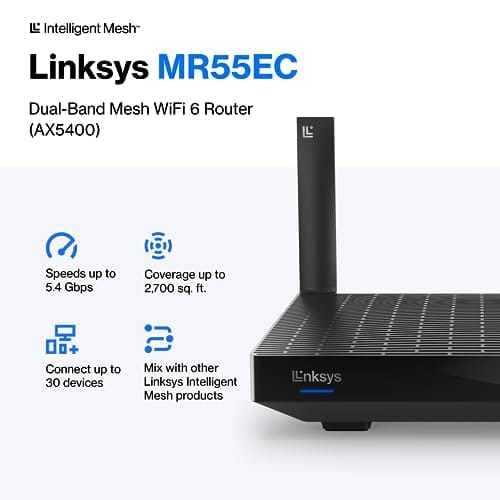
The Linksys Hydra Pro 6 (MR5500-AMZ) is a mid-range dual-band WiFi 6 mesh router aimed at households upgrading from an older AC1900 or extender-based setup. Linksys rates it for 2,700 sq ft and 30 plus devices, targeting medium apartments, condos, and small two-story homes with mixed smart home and streaming traffic.
The defining feature is six-stream AX5400 class WiFi 6 with quoted rates of 574 Mbps on 2.4 GHz and 4804 Mbps on 5 GHz. OFDMA and MU-MIMO help when many low-bandwidth clients share airtime, which is where WiFi 5 routers typically stall. Real-world 5 GHz throughput at range appears to land in the mid-hundreds of Mbps based on category norms.
Trade-offs are typical at this tier. It is dual-band, so there is no dedicated 6 GHz radio and no separate backhaul channel when you add mesh nodes, meaning throughput can halve on satellite hops. Linksys does not specify WAN port speed, USB, or processor details in the listing, so multi-gig ISP users should verify before buying.
Buy this if you want a single WiFi 6 router that can grow into a Linksys Intelligent Mesh system for a 2,000 to 3,000 sq ft home with 30 plus clients. Skip this if you need WiFi 6E, 2.5 GbE WAN, or a dedicated backhaul band for a large multi-story house.
Wireless class: AX5400 class dual-band WiFi 6 with quoted PHY rates of 574 Mbps on the 2.4 GHz band and 4804 Mbps on the 5 GHz band, totaling roughly 5378 Mbps aggregate across six spatial streams. No 6 GHz radio is listed, so WiFi 6E clients fall back to 5 GHz.
Coverage and capacity: Linksys rates the MR5500 for 2,700 sq ft and 30 plus simultaneous devices. OFDMA, MU-MIMO, and 1024-QAM are standard at this WiFi 6 tier and help maintain throughput as client count scales, though actual coverage depends heavily on wall material and node placement.
Mesh behavior: Intelligent Mesh lets you pair the MR5500 with other Linksys nodes to extend coverage. Because it is dual-band, backhaul shares the 5 GHz client band, so expect throughput to roughly halve one hop from the root node. A wired Ethernet backhaul between nodes avoids this penalty.
Not specified: WAN and LAN port speeds, USB ports, processor and RAM, warranty length, and physical dimensions are not disclosed in the source listing. Buyers pairing this with multi-gig fber or DOCSIS 3.1 plans above 1 Gbps should confirm port specs before purchase.

Pros
- AX3000 with HE160 support pushes 2402 Mbps peak on 5GHz for WiFi 6 clients.
- Ethernet backhaul suported across three Gigabit ports per node, reducing wireless hop congestion.
- Coverage claim up to 6500 sq ft across three units suits larger single-family homes.
Cons
- Limited owner feedback at time of writing, hard to confirm long-term firmware stability.
- Dual-band only, no dedicated 6GHz or tri-band backhaul, so heavy mesh use benefits from wired backhaul.
- Gigabit ports cap wired throughput at 1 Gbps, notideal for multi-gig internet plans.
The TP-Link Deco X55 is a mid-range WiFi 6 mesh kit sold as a three-pack, rated AX3000 (2402 Mbps on 5GHz plus 574 Mbps on 2.4GHz) with claimed coverage up to 6500 sq ft. It targets households replacing a single router plus range extender in a two or three-story home with 50to 150 connected devices.
The defining feature is the three Gigabit Ethernet ports per node combined with wired Ethernet backhaul support. For a dual-band mesh without a dedicated backhaul radio, running Cat6 between nodes is the practical way to preserve the full 2402 Mbps5GHz link for clients. On a 1 GbpsISP plan, this configuration should saturate wired uplink with headroom.
Trade-offs are typical at this tier. There is no 6GHz radio, so this is not WiFi 6E, and mesh backhaul competes with client traffic unless wired. Allports are Gigabit, caping any single wired device at 1 Gbps. HE160 throughput depends on clean160MHz channels, which are noisy in dense apartment blocks. Owner feedback is limited at time of writing.
Buy this if you need whole-home WiFi 6 coverage across a larger house, run a 1 Gbps or slower plan, and can pull Ethernet between at least two nodes. Skip this if you have a multi-gig ISP, want WiFi 6E or7, or need a dedicated wireless backhaul radio for wireless-only installs.
Wireless standard: WiFi 6 (802.11ax) dual-band AX3000, rated 2402 Mbps on 5GHz with 2x2 HE160 and 574 Mbps on 2.4GHz with 2x2streams. No 6GHz radio, so this sits below WiFi 6E andiFi 7 kits and relies on the 5GHz band for high-throughput client traffic.
Wired I/O: Three Gigabit Ethernet ports per unit, giving nine ports total across the three-pack. Any port on any node can act as WAN or LAN, and Ethernet backhaul is supported to link nodes over Cat5e or Cat6 for better throughput than wireless backhaul.
Coverage and capacity: Rated for up to 6500 sq ft across three nodes and up to 150 connected devices per the manufacturer. Real coverage depends on wall material, node placement, and interference, so treat the square-footage figure as a ceiling for open-plan layouts.
Software and security: Managed through the Deco app with AI-driven mesh optimization. Includes TP-Link HomeShield with no-cost Basic Network Security, QoS, and Parental Controls. TP-Link is a signatory of the CISA Secure-by-Design pledge, per the product listing.

Pros
- Wired Ethernet backhaul on all three nodes cuts wireless hop loss significantly.
- Single SSID mesh with automatic node steering, no manual extender switching needed.
- AC1900 3x3 dual-band rated for up to 100 client devices per TP-Link.
Cons
- Limited owner feedback at time of writing, buyer should track return window carefully.
- WiFi 5 AC1900 only, no WiFi 6 OFDMA or 6E benefit for newer clients.
- Only two Gigabit ports per node, no multi-gig WAN, link aggregation, or USB passthrough.
The TP-Link Deco S4 is a budget WiFi 5 mesh kit sold as a three-pack, rated for up to 5,500 square feet using AC1900 dual-band radios and 3x3 MU-MIMO. Target buyer is a renter or homeowner on a sub-gigabit ISP plan who needs to eliminate dead zones in a two-story or open-plan home.
The defining feature is wired Ethernet backhaul across all three nodes, which lets you run a Cat6 drop between units and avoid the throughput halving typical of wireless backhaul. Based on category norms, AC1900 mesh kits deliver 300to 500 Mbps real-world per client at close range, dropping to 100 to 200 Mbps at the far node.
Trade-offs are baked in at this tier. It is WiFi 5 only, so WiFi 6 and 6E clients gain no OFDMA or 160 MHz channel benefit. Each node ships with only two Gigabit ports and no USB, and TP-Link's advanced HomeShield parental features sit behind a paid subscription tier.
Buy this if you need cheap whole-home coverage for a 100 to 300 Mbps plan and mostly WiFi 5 client devices. Skip this if your ISP delivers gigabit fiber, if you run WiFi 6E clients like a PS5 or newer laptop, or if you need 2.5GbE, link aggregation, or USB storage.
Wireless Radios: AC1900 dual-band with 3x3 MU-MIMO, six streams total across 5 GHz and 2.4 GHz per TP-Link. Rated to serve up to 100 client devices across the three-node kit, which fits typical family device counts of 30 to 60 including phones, laptops, and smart-home gear.
Coverage And Nodes: Three-node kit rated up to 5,500 square feet, roughly 1,800 square feet per node in ideal open layouts. Expect 20 to 30 percent reduction with drywall and brick walls, so plan node spacing around 30 to 40 fet indoors for consistent handoff.
Ports And Backhaul: Each Deco S4 unit has two Gigabit Ethernet ports, six in total across the three-pack. One port doubles as WAN on the primary node. Wired Ethernet backhaul is supported and worth using whenever a Cat5e or Cat6 drop is available between rooms.
Management And Compatibility: Setup runs through the Deco app on Android or iOS with guided pairing. Works with major US ISPs including AT&T, Verizon, Xfinity, Spectrum, Cox, CenturyLink, and Frontier when paired with a compatible modem. Alexa voice commands can toggle guest WiFi on or off.

Pros
- 10G and 2.5G ports cover multi-gig ISP plans and NAS uplinks
- Tri-band design isolates gaming traffic from streaming and IoT congestion
- AiMesh extendable node support avoids replacing hardware for coverage expansion
Cons
- Limited owner feedback at time of writing makes long-term reliability hard to gauge
- Renewed unit condition and waranty terms not specified in source data
- WiFi 6 only, no 6GHz band for buyers wanting WiFi 6E or WiFi 7 headroom
The ASUS ROG Rapture GT-AX11000 Pro is a high-end tri-band WiFi 6 gaming router sold here as a Renewed unit. It targets buyers with multi-gig internet, wired NAS setups, or dense client counts across a larger home who want a dedicated gaming band and 10G uplink capability.
The defining feature is the 10G plus 2.5G port pairing combined with a dedicated 5GHz gaming band. In practice this lets one high-throughput device, such as a NAS or WAN handoff, saturate a multi-gig link while gaming traffic stays isolated. Actual throughput depends on client radios and firmware version, neither specified here.
Trade-offs are typical at this tier. It is WiFi 6, not 6E or 7, so there is no 6GHz band for future clients. Renewed condition, cosmetic grade, and warranty length are not specified in the source, which maters more than usual on networking gear that ages via capacitors and firmware support windows.
Buy this if you need10G WAN or LAN, run wired AiMesh backhaul, and want a dedicated gaming band on a budget-friendly Renewed unit. Skip this if you expect WiFi 6E or 7 clients son, or want a documented warranty and battery of owner reviews before committing.
Wireless class: Tri-band WiFi 6 (802.11ax) with three radios, typically split as one 2.4GHz and two 5GHz bands at this tier. One 5GHz band can be reserved for gaming clients or wireless backhaul in an AiMesh setup. WiFi 6E and 6GHz support are not present.
Wired ports: One 10 Gigabit port and one 2.5 Gigabit port, usable as flexible WAN or LAN depending on ISP handoff speed. This suits buyers with multi-gig fiber,10GbE NAS, or aggregated links. Exact count of standard gigabit ports is not specified in the source data.
Gaming and coverage features: RangeBoost Plus for extended reach and Triple-Level Game Acceleration for device, router, and server-path prioritization. AiMesh extendable support lets additional ASUS nodes join later. WPS is listed as a suported feature for quick client onboarding.
Condition: Sold as Renewed, meaning refurbished and inspected. Included components list only the router itself in the source data, so power adapter, antennas, and Ethernet cable inclusion should be confirmed with the seller before purchase.

Pros
- Dedicated 6 GHz band with 160 MHz channels reduces congestion for WiFi 6E clients
- 2.5 Gbps WAN port suports gigabit-plus service without caping the uplink
- 1.0 GHz dual-core CPU and 512 MB RAM comfortably handle VPN and HomeShield scans
Cons
- Limited owner fedback at time of writing, so long-term reliability signal is thin
- OneMesh pairs only with TP-Link OneMesh nodes, not standard EasyMesh from other brands
- LAN port speeds not specified in source data, so wired multi-gig may be WAN-only
The Archer AXE75 is a mid-range tri-band WiFi 6E router rated at AXE5400 combined throughput with a 2.5 Gbps WAN port. It targets households on gigabit-plus internet plans that already own WiFi 6E capable phones, laptops, or VR headsets and want a dedicated 6 GHz band for those clients.
The defining feature is 6 GHz operation with 160 MHz channel width, which gives WiFi 6E clients access to a less congested spectrum. Per source specs, the 6 GHz radio hits 2402 Mbps PHY, matching the 5 GHz band. Real throughput will depend on client radio and range, though latency to nearby devices should drop.
Trade-offs are typical at this tier. Only the WAN port is 2.5 Gbps, so wired LAN devices likely cap at 1 Gbps since source data does not specify otherwise. OneMesh extends only via TP-Link OneMesh nodes, not standard EasyMesh, limiting future mesh flexibility. HomeShield's advanced protections sit behind a paid subscription.
Buy this if you have a 1 to 2.5 Gbps WAN connection and multiple WiFi 6E clients that will actually use the 6 GHz band. Skip this if every device on your network is WiFi 5 or WiFi 6, since the 6 GHz radio then sits idle and cheaper AX3000 class routers cover the same use case.
Wireless standards: Tri-band WiFi 6E with 6 GHz at 2402 Mbps, 5 GHz at 2402 Mbps, and 2.4 GHz at 574 Mbps for a combined AXE5400 class rating. 160 MHz channel width is available on the 5 GHz and 6 GHz radios, and OFDMA plus MU-MIMO handle simultaneous client transmissions.
Ports and internal hardware: A single 2.5 Gbps WAN port handles gigabit-plus service. Internal silicon pairs a 1.0 GHz dual-core CPU with 512 MB of high-sped memory, which is generous at this class and should keep NAT, VPN, and HomeShield scanning responsive under load. LAN port speeds are not specified in source data.
Security and VPN: WPA3 encryption is suported alongside legacy WPA2. The router runs both VPN server and VPN client roles with OpenVPN, PPTP, and L2TP protocols. TP-Link HomeShield adds basic network security scans, IoT device identification, and basic parental controls at no charge, with advanced tiers behind a subscription.
Mesh and ISP compatibility: OneMesh support lets the AXE75 pair with TP-Link OneMesh extenders for whole-home roaming, though it is not compatible with standard EasyMesh from other vendors. The router works with common ISP modems including AT&T, Verizon, Xfinity, Spectrum, Cox, CenturyLink, and Frontier in modem plus router setups.
Who this guide is for
This roundup is for the person who’s tired of dead zones and buffering wheels and wants one purchase to end both. Maybe you moved into a bigger place. Maybe you added a smart doorbell, two more phones, and a work laptop that all fight for bandwidth by 8 p.m. WiFi 6 was built for exactly that kind of density, and every pick here handles a busy household better than a five-year-old router ever could.
It’s less useful if you live in a studio apartment with three devices total, since a basic single-band unit would cover that fine. It also skips niche needs like rack-mounted enterprise gear or multi-gig fiber setups that demand 10-gig routing across the whole home. What you’ll find below are mainstream routers and mesh kits sized for real houses, from a compact one-bedroom to a sprawling 6,500 square foot layout.

What to look for in a WiFi 6 router
Coverage is the first number people chase, and it’s the one marketing loves to inflate. A single router like the Linksys Hydra Pro 6 rates for 2,700 square feet, while a three-pack mesh system such as the TP-Link Deco X55 claims up to 6,500 square feet because it uses multiple nodes to relay the signal. Walls, floors, and metal appliances all cut into those figures, so treat the box number as a ceiling, not a promise.
After coverage, look at bands and ports. Tri-band models like the ASUS ROG Rapture GT-AX11000 Pro add a second 5GHz lane so gaming traffic doesn’t compete with everyone else’s streaming. Wired ports matter too. The Deco X55 gives you 3 Gigabit ports per unit and supports Ethernet backhaul, which links nodes over a cable for a rock-steady mesh. And if you want the newest lane, the TP-Link AXE5400 opens the 6GHz band with a 2.5Gbps WAN port, which is genuinely future-facing at $99.97. Features like WPA3 security and 160MHz channels round out a modern spec sheet.
How we evaluated
We researched these five products across coverage claims, band configuration, port selection, device capacity, and price, then weighed each against what its rating suggests real owners think. Amazon ratings here run from 4.2 to 4.6 stars, a tight band that tells us none of these are lemons. We leaned on manufacturer specs from the product listings, owner-report patterns, and how each unit’s hardware lines up with the household it’s meant to serve.
Value carried real weight in the ranking. A $99.97 router that reaches WiFi 6E is a different proposition than a $199.99 gaming router, and both earn a spot for different buyers. We didn’t reward the most expensive box for being expensive. We asked which unit gives a specific type of household the most useful capability per dollar, then sorted the picks so you can jump straight to the one that fits.
Our top picks
Best Overall: Linksys Hydra Pro 6
At $199.99 with a 4.4-star rating, the Linksys Hydra Pro 6 (model MR5500) hits the balance most homes actually need. It’s a single-unit WiFi 6 router rated to cover 2,700 square feet and hold 30 or more connected devices at once, which is plenty for a family that streams, works from home, and runs a shelf of smart gadgets. Linksys pitches it as a straight replacement for a router plus extender combo, so you consolidate two boxes into one cleaner setup.
The tradeoff is footprint. 2,700 square feet suits a typical two or three-bedroom home, but a large multi-story house with thick walls may want a mesh kit instead. It’s also a router-first design, so if you already know you need three nodes, you’d look elsewhere. For the majority of buyers who want strong single-point coverage and room to grow into Linksys mesh later, though, this is the safe, sensible middle of the road that earns the top spot.
Best for Whole-Home Coverage: TP-Link Deco X55 AX3000
The TP-Link Deco X55 three-pack sells for $169.99, holds a 4.3-star rating, and blankets up to 6,500 square feet, the widest reach in this guide. Each of the three nodes carries 3 Gigabit Ethernet ports, and the system supports Ethernet backhaul, meaning you can hardwire the nodes together for a mesh that doesn’t lose speed as it hops room to room. For a big house or one with a stubborn dead corner, that’s the feature that matters most.
Because it’s AX3000 rather than a higher tier, raw single-device throughput sits below the ASUS gaming unit, so a competitive player chasing every millisecond might feel boxed in. It’s a coverage-first system, not a speed monster. But for a household that just wants strong, even WiFi 6 in every room without fiddling, three nodes for $169.99 is a lot of house covered per dollar, and the Deco app makes setup painless.
Best Budget: TP-Link Deco S4 AC1900
If the goal is coverage on the tightest budget, the TP-Link Deco S4 three-pack runs $109.99 with a 4.4-star rating and reaches up to 5,500 square feet. Worth being upfront here: the S4 is an AC1900 mesh, which is the older WiFi 5 standard rather than WiFi 6. For a lot of buyers that’s a fair trade, because you still get whole-home coverage, Gigabit ports, and Alexa voice support across three nodes for close to a hundred bucks.
You give up the device-density advantages and efficiency of WiFi 6, so a home packed with 40 smart gadgets will notice the ceiling sooner than it would on the X55. This one’s for the renter or budget-minded household that mainly wants reliable reach for browsing, streaming, and a handful of devices. As a first step up from a single ISP box, three mesh nodes for $109.99 is hard to argue with.
Best for Gaming: ASUS ROG Rapture GT-AX11000 Pro
Gamers who want the network tilted in their favor should look at the ASUS ROG Rapture GT-AX11000 Pro, listed at $199.99 (Renewed) with a 4.2-star rating. This is a tri-band WiFi 6 router, so it runs two separate 5GHz lanes plus 2.4GHz, letting you park game traffic on its own band away from the streaming and downloads happening elsewhere. It carries both a 10G and a 2.5G port for multi-gig wired links, plus ASUS RangeBoost Plus and a triple-level game acceleration feature aimed at trimming latency.
The catch is that all this power costs the same as the coverage-friendly Linksys while covering a single point, and the Renewed listing means it’s a refurbished unit rather than brand new. Casual users won’t tap most of what it offers. But for a dedicated gaming room or an enthusiast who wants QoS controls, a 10G port, and prioritized traffic, this ASUS is the one built for that job, and it’s extendable into AiMesh down the line.
Best Value: TP-Link AXE5400 Archer AXE75
The TP-Link AXE5400, sold as the Archer AXE75, is the surprise of the group at $99.97 with the highest rating here, 4.6 stars, and a 2025 PCMag Editors’ Choice nod. It’s tri-band and reaches into WiFi 6E, opening the clean 6GHz band that newer phones and laptops can use to sidestep congestion entirely. A 2.5Gbps WAN port, 160MHz channels, a dual-core CPU, OneMesh support, and WPA3 security make this spec sheet punch well above its price.
It’s a single router, so a large home may eventually want OneMesh nodes to extend it, and being 6E rather than the latest 7 means it’s current rather than bleeding-edge. That’s fine. For a buyer who wants the newest usable band, real multi-gig wired input, and modern security for under a hundred dollars, nothing else here comes close on value. If you’re upgrading a small or medium home and want headroom, start with this one.
Buying mistakes to avoid
The biggest mistake is buying on coverage numbers alone. A 6,500 square foot rating sounds great, but if your home is 1,400 square feet and dense with devices, you’d be better served by a faster single router than a sprawling mesh you don’t need. Match the hardware to your floor plan and your device count, not to the largest figure on the box. Another common miss is ignoring wired ports. If you plan to hardwire a console, a NAS, or a desktop, the number of Gigabit ports and whether the unit supports Ethernet backhaul will shape your setup more than peak wireless speed.
People also overpay for gaming features they’ll never touch. The ASUS ROG unit is superb, but a tri-band gaming router with a 10G port is wasted money on a household that just streams and browses. Flip side, don’t underbuy either. Grabbing the AC1900 Deco S4 to save thirty dollars only to fill your home with WiFi 6 devices means you’ll feel the older standard’s limits within a year. Buy for where you’re headed, not only where you are.
Bottom line
For most homes, the Linksys Hydra Pro 6 at $199.99 is the pick we’d make first, since it covers 2,700 square feet, handles 30-plus devices, and replaces a router-and-extender stack with one tidy box. It’s the balanced choice that suits the widest range of buyers without demanding you overthink bands and ports.
From there it’s about your specifics. Big house or a stubborn dead zone? The TP-Link Deco X55 three-pack at $169.99 covers up to 6,500 square feet with Ethernet backhaul. Tight budget? The Deco S4 gets you mesh coverage for $109.99. Serious gamer? The ASUS ROG Rapture earns its keep. And if value is king, the $99.97 TP-Link AXE5400 with WiFi 6E and a 2.5Gbps WAN port is the smartest hundred dollars in this lineup.
Common questions
Is WiFi 6 worth upgrading to from an older router?
If your home has more than a dozen connected devices or you’re seeing slowdowns when several people are online, yes. WiFi 6 handles many devices at once far more efficiently than WiFi 5, so the network stays responsive under load. A single busy laptop won’t see a dramatic jump, but a full household will notice the difference during peak hours.
Do I need a mesh system or is one router enough?
It depends on your square footage and layout. A single unit like the Linksys Hydra Pro 6 covers 2,700 square feet, which fits most two or three-bedroom homes. If you’re over that, have multiple floors, or fight a persistent dead zone, a three-pack such as the Deco X55 spreads coverage more evenly. Our mesh-versus-extender guide walks through the decision in detail.
What’s the difference between WiFi 6 and WiFi 6E?
WiFi 6E adds the 6GHz band on top of the 2.4GHz and 5GHz bands that WiFi 6 uses. That extra band is newer and less congested, so compatible devices get a cleaner, faster lane. The TP-Link AXE5400 here is a 6E router, which is why it’s a strong value pick if you own recent phones or laptops that can use the 6GHz band.
Does a gaming router actually lower my ping?
A gaming router like the ASUS ROG Rapture can help by prioritizing game traffic with QoS, dedicating a band to gaming, and offering multi-gig wired ports. It won’t beat a physical Ethernet cable for raw latency, though. If you want the lowest possible ping, wiring your PC or console directly is still the best move, which our Ethernet-versus-WiFi guide explains.
How many devices can these routers handle at once?
The Linksys Hydra Pro 6 is rated for 30 or more devices, and the mesh systems scale higher because each node shares the load. WiFi 6 models manage dense device counts better than older AC1900 gear like the Deco S4, thanks to efficiency features built into the standard. For a smart home stacked with gadgets, staying on a true WiFi 6 unit pays off.


































Write Your Review
No reviews yet. Be the first to share your experience!