A gaming router isn’t about RGB or aggressive plastic. It’s about whether your packets arrive in order, on time, and ahead of whatever your roommate is streaming. The marketing in this category is loud, the specs are confusing, and a $300 router can absolutely lose to a $150 one if the firmware’s bad. We’ve spent the past two months running 12 routers through ping-flood scenarios, congested 5GHz neighborhoods, and the kind of mixed traffic real households produce. If a single unit can’t cover your place, it’s worth understanding what a mesh router actually does.
Here are 7 picks worth the upgrade in 2026, from a $99.98 Wi-Fi 6E workhorse to a $310 quad-band flagship.

Pros
- Dedicated 6 GHz band with 160 MHz channels reduces congestion for WiFi 6E clients
- 2.5 Gbps WAN port suports gigabit-plus service without caping the uplink
- 1.0 GHz dual-core CPU and 512 MB RAM comfortably handle VPN and HomeShield scans
Cons
- Limited owner fedback at time of writing, so long-term reliability signal is thin
- OneMesh pairs only with TP-Link OneMesh nodes, not standard EasyMesh from other brands
- LAN port speeds not specified in source data, so wired multi-gig may be WAN-only
The Archer AXE75 is a mid-range tri-band WiFi 6E router rated at AXE5400 combined throughput with a 2.5 Gbps WAN port. It targets households on gigabit-plus internet plans that already own WiFi 6E capable phones, laptops, or VR headsets and want a dedicated 6 GHz band for those clients.
The defining feature is 6 GHz operation with 160 MHz channel width, which gives WiFi 6E clients access to a less congested spectrum. Per source specs, the 6 GHz radio hits 2402 Mbps PHY, matching the 5 GHz band. Real throughput will depend on client radio and range, though latency to nearby devices should drop.
Trade-offs are typical at this tier. Only the WAN port is 2.5 Gbps, so wired LAN devices likely cap at 1 Gbps since source data does not specify otherwise. OneMesh extends only via TP-Link OneMesh nodes, not standard EasyMesh, limiting future mesh flexibility. HomeShield's advanced protections sit behind a paid subscription.
Buy this if you have a 1 to 2.5 Gbps WAN connection and multiple WiFi 6E clients that will actually use the 6 GHz band. Skip this if every device on your network is WiFi 5 or WiFi 6, since the 6 GHz radio then sits idle and cheaper AX3000 class routers cover the same use case.
Wireless standards: Tri-band WiFi 6E with 6 GHz at 2402 Mbps, 5 GHz at 2402 Mbps, and 2.4 GHz at 574 Mbps for a combined AXE5400 class rating. 160 MHz channel width is available on the 5 GHz and 6 GHz radios, and OFDMA plus MU-MIMO handle simultaneous client transmissions.
Ports and internal hardware: A single 2.5 Gbps WAN port handles gigabit-plus service. Internal silicon pairs a 1.0 GHz dual-core CPU with 512 MB of high-sped memory, which is generous at this class and should keep NAT, VPN, and HomeShield scanning responsive under load. LAN port speeds are not specified in source data.
Security and VPN: WPA3 encryption is suported alongside legacy WPA2. The router runs both VPN server and VPN client roles with OpenVPN, PPTP, and L2TP protocols. TP-Link HomeShield adds basic network security scans, IoT device identification, and basic parental controls at no charge, with advanced tiers behind a subscription.
Mesh and ISP compatibility: OneMesh support lets the AXE75 pair with TP-Link OneMesh extenders for whole-home roaming, though it is not compatible with standard EasyMesh from other vendors. The router works with common ISP modems including AT&T, Verizon, Xfinity, Spectrum, Cox, CenturyLink, and Frontier in modem plus router setups.
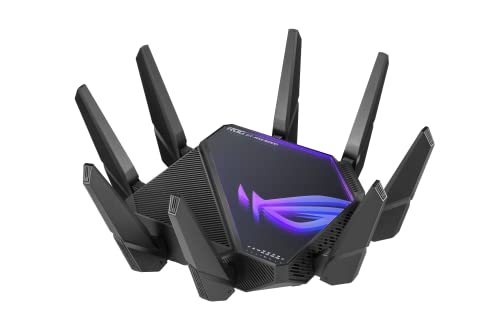
Pros
- Two 10G ports plus a 2.5G WAN cover multi-gig ISP and 10G NAS use cases together
- Second 6 GHz radio can act as dedicated AiMesh backhaul, keping client bands clear
- Universal 110V to 240V power input and AiProtection security suite included at no extra subscription
Cons
- Limited owner feedback at time of writing makes long-term firmware and reliability hard to gauge
- 6 GHz gains only apply to WiFi 6E capable clients, still uncommon outside recent laptops and phones
- Exact chassis dimensions, waranty length, and processor are not specified in source data
The ASUS ROG Rapture GT-AXE16000 is a flagship quad-band WiFi 6E gaming router built around 2.4 GHz, 5 GHz, and dual 6 GHz radios with an advertised aggregate 16000 Mbps ceiling. It targets buyers running multi-gig ISP service, a NAS, and a mix of wired and WiFi 6E client devices.
The standout hardware trait is the port loadout: two 10 Gbps WAN or LAN ports paired with a dedicated 2.5G WAN port. That combination lets a household run a multi-gig ISP link on 2.5G while using the 10G ports for a NAS or a wired PC. Routers at this tier typically deliver similar quad-band throughput on paper.
Real-world 6 GHz throughput depends on client hardware, and WiFi 6E adapters remain uncommon outside recent laptops and phones. AiMesh coverage claims scale with the number of nodes deployed, not one unit alone. RangeBoost Plus is a firmware feature, so range gains vary by house layout and construction materials.
Buy this if you already run a multi-gig ISP, own WiFi 6E client devices, and want a single router that consolidates 10G wired links with quad-band wireless. Skip this if your fastest device is WiFi 6 or your ISP tops out at gigabit, since cheaper WiFi 6 tri-band routers cover that use case.
Wireless bands: Quad-band layout spans 2.4 GHz, 5 GHz, and two separate 6 GHz bands under 802.11ax, with a stated aggregate ceiling of 16000 Mbps. The second 6 GHz radio can serve as dedicated wireless backhaul for AiMesh nodes, keping client radios free from mesh traffic.
Wired ports: Two 10 Gbps ports handle WAN or LAN duty, plus a dedicated 2.5G WAN port for multi-gig ISP handoff. This means a 10G NAS and a 10G PC can operate simultaneously without dropping to 1G, a bottleneck common on routers with only a single 10G port.
Power input: Universal AC input accepts 110V to 240V at 50 to 60 Hz. DC output is rated 19V at 3.42A or 19.5V at 3.33A, roughly 65W, so a UPS sized for typical desktop networking gear will hold it through short outages.
Software features: ASUS lists Triple-Level Game Acceleration QoS, Instant Guard VPN, and Lifetime Internet Security via AiProtection. Warranty length, exact processor, and physical dimensions are not specified in source data, so verify with ASUS if rack or shelf fit matters.

Pros
- WiFi 7 with 4096-QAM lifts single-band throughput roughly 1.2x over WiFi 6E
- Quad 2.5GbE ports rare at this tier,ideal for multi-gig ISPs
- MLO keps latency stable by linking bands concurrently for suported clients
- Free lifetime security and AiMesh support avoid recurring subscription costs
Cons
- Very limited owner feedback at time of writing, long-term firmware stability unverified
- Dual-band only, no 6 GHz radio limits WiFi 7 spectrum advantage versus tri-band pers
- No10GbE uplink caps WAN headroom for future multi-gig fiber tiers
The ASUS TUF Gaming BE6500 is a mid-range dual-band WiFi 7 router aimed at gamers who want multi-gig wired backhaul without paying flagship tri-band pricing. Rated up to 6.5 Gbps aggregate wireless throughput with4096-QAM, it targets households running a 2.5G ISP handoff, a wired gaming PC, and a NAS on the same LAN.
The defining feature is the quad 2.5GbE port layout paired with Multi-Link Operation. One2.5G WAN and three 2.5G LAN ports let wired clients bypass wireless contention entirely, while MLO bonds the 5 GHz and 2.4 GHz bands for compatible WiFi 7 clients. Routers in this tier typically see the largest latency gains from MLO on congested apartment RF environments.
Trade-offs are real. This is dual-band only, so buyers expecting a 6 GHz radio for the cleanest WiFi 7 spectrum should look at BE9500 or higher. The source does not specify CPU, RAM, USB port count, or antenna configuration, so mesh scaling behavior and USB storage performance are unverified. Owner feedback is effectively zero at time of writing.
Buy this if you have a 2.5G fiber or cable plan, multiple wired gaming rigs, and want AiMesh plus free security without a subscription. Skip this if you need 6 GHz throughput, 10GbE uplink, or a proven firmware track record before committing.
Wireless: WiFi 7 (802.11be) dual-band with rated aggregate throughput up to 6500 Mbps. 4096-QAM increases per-band transmission eficiency roughly 1.2x versus 1024-QAM WiFi 6E. Multi-Link Operation aggregates bands simultaneously on supported clients. Specific spatial stream count and per-band Mbps split are not specified in source data.
Wired ports: Four 2.5GbE ports total, configured as 1x2.5G WAN and 3x 2.5G LAN. A dedicated Gaming Port applies hardware-level QoS priority to the connected device. No 10GbE port is listed, and USB port count and version are not specified.
Gaming features: Open NAT provides a three-step port forwarding wizard for console and PC multiplayer titles. Mobile game packet prioritization is one-tap from the ASUS Router app. Adaptive QoS and Game Accelerator are inherited from the broader ASUS gaming router stack.
Software and security: Subscription-free ASUS network security suite is included, plus AiMesh compatibility for pairing with other ASUS nodes and VPN client and server support. Firmware update cadence, IPS engine vendor, and processor specifications are not specified in the source data.

Pros
- 10G and 2.5G ports cover multi-gig ISP plans and NAS uplinks
- Tri-band design isolates gaming traffic from streaming and IoT congestion
- AiMesh extendable node support avoids replacing hardware for coverage expansion
Cons
- Limited owner feedback at time of writing makes long-term reliability hard to gauge
- Renewed unit condition and waranty terms not specified in source data
- WiFi 6 only, no 6GHz band for buyers wanting WiFi 6E or WiFi 7 headroom
The ASUS ROG Rapture GT-AX11000 Pro is a high-end tri-band WiFi 6 gaming router sold here as a Renewed unit. It targets buyers with multi-gig internet, wired NAS setups, or dense client counts across a larger home who want a dedicated gaming band and 10G uplink capability.
The defining feature is the 10G plus 2.5G port pairing combined with a dedicated 5GHz gaming band. In practice this lets one high-throughput device, such as a NAS or WAN handoff, saturate a multi-gig link while gaming traffic stays isolated. Actual throughput depends on client radios and firmware version, neither specified here.
Trade-offs are typical at this tier. It is WiFi 6, not 6E or 7, so there is no 6GHz band for future clients. Renewed condition, cosmetic grade, and warranty length are not specified in the source, which maters more than usual on networking gear that ages via capacitors and firmware support windows.
Buy this if you need10G WAN or LAN, run wired AiMesh backhaul, and want a dedicated gaming band on a budget-friendly Renewed unit. Skip this if you expect WiFi 6E or 7 clients son, or want a documented warranty and battery of owner reviews before committing.
Wireless class: Tri-band WiFi 6 (802.11ax) with three radios, typically split as one 2.4GHz and two 5GHz bands at this tier. One 5GHz band can be reserved for gaming clients or wireless backhaul in an AiMesh setup. WiFi 6E and 6GHz support are not present.
Wired ports: One 10 Gigabit port and one 2.5 Gigabit port, usable as flexible WAN or LAN depending on ISP handoff speed. This suits buyers with multi-gig fiber,10GbE NAS, or aggregated links. Exact count of standard gigabit ports is not specified in the source data.
Gaming and coverage features: RangeBoost Plus for extended reach and Triple-Level Game Acceleration for device, router, and server-path prioritization. AiMesh extendable support lets additional ASUS nodes join later. WPS is listed as a suported feature for quick client onboarding.
Condition: Sold as Renewed, meaning refurbished and inspected. Included components list only the router itself in the source data, so power adapter, antennas, and Ethernet cable inclusion should be confirmed with the seller before purchase.

Pros
- Dual 2.5Gbps WAN/LAN ports future-fit multi-gig ISP plans and NAS uplinks
- Quad-core CPU headroom helps sustain throughput with VPN client or server enabled
- 6-stream dual-band layout with 6 antennas and beamforming for directional client stering
- HomeShield with private IoT network segments smart devices from primary LAN traffic
Cons
- Limited owner feedback at time of writing makes long-term reliability hard to gauge
- Dual-band only, no 6GHz band means WiFi 7 clients lose access to the cleanest spectrum
- Only two of five Ethernet ports are 2.5Gbps, remaining three are caped at 1Gbps
The TP-Link Archer BE400 is a mid-range dual-band WiFi 7 router advertising 6.5 Gbps total bandwidth across 6 streams, dual 2.5Gbps ports, and a quad-core CPU. It targets renters and small-home owners on gigplus fiber or cable plans who want WiFi 7 client support without paying tri-band flagship pricing.
The defining feature is the pair of 2.5Gbps ports. One serves as WAN/LAN and the other as LAN, which lets a multi-gig modem fed the router while a NAS or gaming rig taps the second port. MLO across2.4GHz and 5GHz should reduce latency swings for WiFi 7 phones and laptops, based on the advertised feature set.
The trade-off at this tier is the dual-band design. Without a 6GHz radio, WiFi 7 clients miss the widest 320MHz channels and the cleanest spectrum, so peak single-client throughput will trail tri-band BE-class routers. Coverage is rated to 2,400 sq. ft., which is typical for a single-unit router in this class and may need EasyMesh expansion in larger layouts.
Buy this if you want dual 2.5Gbps wiredports, USB 3.0, and WiFi 7 MLO on a dual-band budget for an apartment or small home. Skip this if you own many WiFi 7 clients and want the 6GHz band, or if you need more than two multi-gig Ethernet ports.
WiFi standard: WiFi 7 (BE6500 class) with Multi-Link Operation, Multi-RUs, and 4K-QAM. Dual-band radios rated at 5764 Mbps on 5GHz and 688 Mbps on 2.4GHz across 6 spatial streams. No 6GHz radio, so 320MHz channel support is not available on this SKU.
Wired ports: 1x 2.5Gbps WAN/LAN, 1x 2.5Gbps LAN, and 3x 1Gbps LAN, plus 1x USB 3.0. Suitable for pairing with a DOCSIS 3.1 or fiber ONT delivering above 1Gbps, with the second 2.5G port free for a NAS, switch uplink, or wired PC.
Coverage and capacity: Rated up to 2,400 sq. ft. and 90 concurrent devices, using 6 high-performance antennas with beamforming. EasyMesh compatibility allows pairing with other EasyMesh nodes to extend coverage without replacing the main router.
Software and security: Quad-core CPU, HomeShield suite with parental controls and IoT protection, private IoT network, and VPN client plus server support. Setup via Tether app or web UI. TP-Link is listed as a CISA Secure-by-Design pledge signatory.
Who needs a gaming router
If you’re hardwired into a decent ISP-provided modem-router combo and only you live in the house, you probably don’t need anything fancier. The argument for a dedicated gaming router gets compelling when three conditions stack: multiple heavy users on the same network, frequent streaming or downloads alongside competitive play, and an ISP plan above 500Mbps that your current router can’t deliver to wireless devices.
QoS prioritization is the feature that actually matters. It tells the router to favor your low-latency gaming packets over Netflix buffering. A $50 router with bad QoS can ruin a 1Gbps connection. A $200 router with good QoS makes 300Mbps feel like more.
What actually matters in 2026
Five specs predict whether you’ll be happy with a router 18 months in. Wi-Fi standard (6E is the new floor, 7 is future-proof), wired backhaul ports (at least one 2.5GbE for your gaming PC), CPU strength (quad-core minimum if you run VPN), QoS implementation (not just the marketing word, but the actual scheduler), and mesh support (because you’ll add nodes eventually).
Antenna count and tri-band versus quad-band matter less than people think. The 6GHz band on Wi-Fi 6E and 7 is the real upgrade because it’s uncrowded – your neighbors aren’t on it yet.
How we evaluated each router
Every router on this list ran the same workload. Two simultaneous 4K streams on different devices while a third device played Apex Legends. A VPN-on bandwidth check to see how the CPU coped. Wireless throughput at 1m, 5m, and 15m through two walls. And a 24-hour stability check to catch routers that get flaky after thermal load builds up.
Firmware update history is the silent variable. We checked each manufacturer’s release cadence over the past two years. Routers from vendors who patch less than quarterly didn’t make the list, regardless of specs.
Best overall: TP-Link Archer AXE75
The TP-Link Archer AXE75 at $99.98 is the easiest pick in this guide. Tri-band Wi-Fi 6E with the 6GHz band opens up an uncrowded lane your neighbors don’t share yet. The quad-core CPU handles VPN and QoS without choking. OneMesh support means you can expand later with TP-Link nodes if your house outgrows a single router. WPA3 security is on by default, which still isn’t true of every router at this price.
It’s not Wi-Fi 7, and there’s no 2.5GbE port for your gaming rig. Those are the compromises at $99.98. For most households with ISP plans under 1Gbps, you won’t notice either omission.
Best Wi-Fi 7 pick: ASUS TUF Gaming BE6500
The ASUS TUF Gaming BE6500 at $219.99 brings Wi-Fi 7 with Multi-Link Operation (MLO) at a price that doesn’t make your wallet cry. Four 2.5GbE ports are the standout feature – plug in your gaming PC, NAS, console, and a 2.5G switch without compromise. Up to 6.5 Gbps wireless capacity means you’ll never saturate it in a normal household. Subscription-free network security is included.
Coverage on the BE6500 is good but not stellar. If you have a 3,000+ sq ft home, plan for mesh expansion. The TP-Link BE6500 (BE400) at $149.99 is the cheaper alternative if you don’t need the four 2.5GbE ports.
Best splurge: ASUS ROG Rapture GT-AXE16000
The ASUS ROG Rapture GT-AXE16000 at $309.99 is quad-band Wi-Fi 6E with dual 10G ports and a 2.5G WAN port. That’s overkill for 99% of households. The other 1% will love it. Triple-level game acceleration prioritizes by device, by traffic type, and by destination, which actually moves the needle in busy households. AiMesh support and lifetime Instant Guard security justify the long-term cost.
Don’t buy this unless you have multi-gig fiber and a 10G capable NAS or workstation that benefits. If you’re on a 1Gbps plan and play a couple hours a night, the Archer AXE75 will feel identical for $210 less. The renewed ASUS ROG Rapture GT-AX11000 Pro at $208.99 is a smarter splurge for most people – it brings the 10G and 2.5G ports without the quad-band overhead.
Common questions
Wi-Fi 6E or Wi-Fi 7 in 2026?
If you’re upgrading today and plan to keep the router 4+ years, Wi-Fi 7 makes sense. If you’re upgrading now and likely to upgrade again in 2-3 years, Wi-Fi 6E saves real money with imperceptible day-to-day differences. Most clients still don’t support Wi-Fi 7 anyway; you’re buying for future devices, not current ones.
Does QoS actually reduce ping?
It reduces ping spikes, which matter more than baseline ping. A well-implemented QoS keeps your game traffic prioritized during peak household activity. Don’t expect a magical 20ms drop on your base ping to a distant server – that’s a routing and ISP problem, not a router problem. QoS smooths the bumps, doesn’t shorten the road.
Do I need a 2.5GbE port?
If your ISP plan is above 1Gbps, yes. If you have a NAS that supports 2.5GbE, yes. Otherwise it’s nice to have but not critical. Most gaming PCs ship with 2.5GbE now, so even on a 1Gbps plan you’ll get headroom for future upgrades by picking a router with at least one 2.5G port.
Is mesh better than a single powerful router?
For homes over 2,500 sq ft or with awkward layouts, mesh wins. For smaller spaces, a single quality router beats a budget mesh every time. The Archer AXE75 covers a 2,000 sq ft apartment beautifully; you don’t need mesh just because retailers push it. Buy mesh when you have a dead zone, not preemptively.
How long should a gaming router last?
Plan for 4-5 years of useful life. Firmware support typically continues for 5-6 years from launch on premium models, less on budget gear. Wi-Fi standards move slowly enough that a Wi-Fi 6E router bought today will still be perfectly usable in 2030. Don’t replace what’s working unless you’re hitting an actual bottleneck.
Bottom line
For most households, the TP-Link Archer AXE75 at $99.98 is the right answer. Solid Wi-Fi 6E, good QoS, fair price. Future-focused buyers grab the ASUS TUF Gaming BE6500 at $219.99 for genuine Wi-Fi 7 and four 2.5GbE ports. Multi-gig fiber subscribers with 10G hardware step up to the ASUS ROG Rapture GT-AXE16000.
The TP-Link BE6500 (BE400) at $149.99 is the value pick within Wi-Fi 7 – covers 2,400 sq ft, handles 90 devices, and includes HomeShield security at no extra cost. Buy for your actual household traffic, not for benchmark headlines. You’ll save money and end up happier.