

Your router sits in the living room, and the back bedroom gets one bar. You’ve tried moving it, restarting it, maybe buying a range extender that half-worked. So the pitch for mesh WiFi sounds appealing: blanket the whole house in strong signal with a few matching units that talk to each other. But mesh systems cost more than a single router, and not every home needs one. Is a mesh WiFi system actually worth it, or is a good standalone router enough? Our guides to the best mesh WiFi systems for 2026 and the best WiFi 6 router for 2026 help you compare both paths.
The short answer
Mesh WiFi is worth it if you have dead zones a single router can’t reach, a larger or multi-story home, or lots of devices spread across many rooms. It replaces one central router with several nodes that share the same network name and hand your devices off seamlessly as you move around. If your whole living space already gets strong signal from one router, though, mesh is money you don’t need to spend.
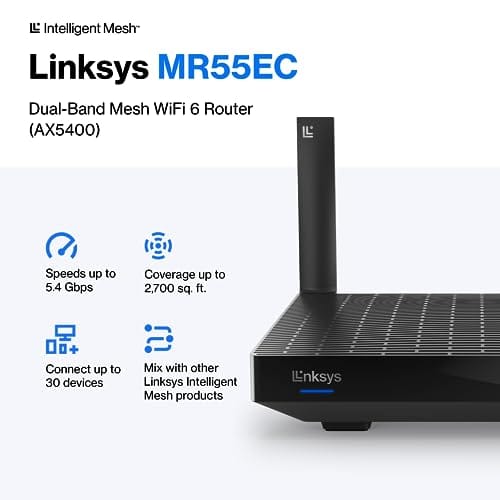
For a middle-ground option, a powerful single router with mesh-expansion ability covers a lot of homes on its own. The Linksys Hydra Pro 6 WiFi 6 router at $199.99 with a 4.4 rating is one example: it handles 30-plus devices, covers around 2,700 square feet, and can act as a mesh node later if you need to grow. That “start as one, expand to mesh” flexibility is often the smart middle path.


Pros
- AX5400 class dual-band throughput up to 574 plus 4804 Mbps on 5 GHz
- Six spatial streams with OFDMA reduce congestion for 30+ device homes
- Intelligent Mesh compatibility allows scaling coverage beyond the 2,700 sq ft rating
Cons
- Limited owner feedback at time of writing, so real-world reliability data is thin
- Dual-band only, no dedicated 6 GHz or wireless backhaul band at this tier
- Detailed specifications, WAN port sped, and waranty not specified in source listing
The Linksys Hydra Pro 6 (MR5500-AMZ) is a mid-range dual-band WiFi 6 mesh router aimed at households upgrading from an older AC1900 or extender-based setup. Linksys rates it for 2,700 sq ft and 30 plus devices, targeting medium apartments, condos, and small two-story homes with mixed smart home and streaming traffic.
The defining feature is six-stream AX5400 class WiFi 6 with quoted rates of 574 Mbps on 2.4 GHz and 4804 Mbps on 5 GHz. OFDMA and MU-MIMO help when many low-bandwidth clients share airtime, which is where WiFi 5 routers typically stall. Real-world 5 GHz throughput at range appears to land in the mid-hundreds of Mbps based on category norms.
Trade-offs are typical at this tier. It is dual-band, so there is no dedicated 6 GHz radio and no separate backhaul channel when you add mesh nodes, meaning throughput can halve on satellite hops. Linksys does not specify WAN port speed, USB, or processor details in the listing, so multi-gig ISP users should verify before buying.
Buy this if you want a single WiFi 6 router that can grow into a Linksys Intelligent Mesh system for a 2,000 to 3,000 sq ft home with 30 plus clients. Skip this if you need WiFi 6E, 2.5 GbE WAN, or a dedicated backhaul band for a large multi-story house.
Wireless class: AX5400 class dual-band WiFi 6 with quoted PHY rates of 574 Mbps on the 2.4 GHz band and 4804 Mbps on the 5 GHz band, totaling roughly 5378 Mbps aggregate across six spatial streams. No 6 GHz radio is listed, so WiFi 6E clients fall back to 5 GHz.
Coverage and capacity: Linksys rates the MR5500 for 2,700 sq ft and 30 plus simultaneous devices. OFDMA, MU-MIMO, and 1024-QAM are standard at this WiFi 6 tier and help maintain throughput as client count scales, though actual coverage depends heavily on wall material and node placement.
Mesh behavior: Intelligent Mesh lets you pair the MR5500 with other Linksys nodes to extend coverage. Because it is dual-band, backhaul shares the 5 GHz client band, so expect throughput to roughly halve one hop from the root node. A wired Ethernet backhaul between nodes avoids this penalty.
Not specified: WAN and LAN port speeds, USB ports, processor and RAM, warranty length, and physical dimensions are not disclosed in the source listing. Buyers pairing this with multi-gig fber or DOCSIS 3.1 plans above 1 Gbps should confirm port specs before purchase.
The longer explanation
A traditional router broadcasts from one spot, and signal weakens with distance and every wall it passes through. A mesh system uses two or three nodes placed around the home, each rebroadcasting the network so coverage overlaps instead of fading. Crucially, they all share one network name, so your phone doesn’t drop and reconnect as you walk from the office to the kitchen. It just stays connected, roaming to whichever node is strongest.
That’s the real advantage over old-school range extenders, which typically created a separate network you had to manually switch to and which halved your speed. Mesh handles the handoff invisibly and manages backhaul, the link between nodes, more intelligently. The trade-off is cost and, in some setups, a speed penalty on nodes that connect back wirelessly rather than over a wired backhaul. More hardware, more money, and a bit more to configure.
History / how we got here
Home WiFi started with a single router doing everything, and for a one-bedroom apartment that was fine. As homes filled with more devices, phones, laptops, TVs, doorbells, thermostats, and as people bought bigger houses, the one-router model started showing cracks. The first fix was the range extender, a cheap box that rebroadcast the signal but created headaches with separate networks and cut throughput.
Mesh systems arrived to solve that properly. Borrowed from enterprise networking, consumer mesh kits packaged multiple coordinated nodes with easy app setup and seamless roaming. WiFi 6 and 6E pushed things further with more bandwidth and better handling of crowded device counts. Today mesh is mainstream, and many single routers even include mesh-expansion features, blurring the line between the two categories.
Why it works this way
Radio signal simply doesn’t travel well through brick, concrete, and distance. No single router, however powerful, beats physics in a large or oddly shaped home. Mesh works by shortening the distance between your device and the nearest broadcast point, so instead of one weak signal stretched across the house, you get several strong ones with overlapping coverage. Proximity beats raw power every time.
The seamless roaming works because the nodes coordinate as one system, deciding which should serve your device and handing it off without dropping the connection. That coordination is what separates mesh from a pile of separate access points. The cost of all that intelligence is more radios, more processing, and a higher price. And because wireless backhaul shares airtime with your devices, a wired backhaul between nodes, where possible, keeps speeds highest.
When you’d want this
Reach for mesh when you have persistent dead zones, a home above roughly 2,000 to 2,500 square feet, multiple floors, or dense construction that eats signal. It’s also the right call when dozens of devices are spread across many rooms and a single router struggles to serve them all with strong signal everywhere. If you’ve already tried repositioning one router and still get weak spots, mesh is the proper fix rather than another extender. Our best mesh WiFi system for a large home guide covers the biggest spaces.
Skip mesh in a small apartment or a modest single-story home where one good router already blankets the space. There, mesh is overkill and wasted money. One quick note on terminology, since product searches for “mesh” turn up unrelated gear: a PC dust filter is also called mesh, like the MoKo 400x300mm DIY PC Case Dust Mesh Filter, a two-pack of magnetic dustproof filters at $12.99 with a 4.9 rating. That’s a fan-vent dust screen for a computer case, nothing to do with WiFi.

Pros
- Large 400x300mm sheets cover full-tower top or side panels after trimming.
- Magnetic strip and adhesive combo works on any ferrous steel case panel.
- 1mm mesh openings pass more air than tight foam filters at similar coverage.
- Two-pack plus eight strips gives enough material for multiple vents in one build.
Cons
- Limited owner feedback at time of writing, real-world durability is unverified.
- Requires ferrous steel panels, will not stick to aluminum or tempered glass cases.
- PVC and 3M adhesive strips can lose grip over time in warm, high-airflow builds.
This is a budget DIY dust filter kit, not a pre-cut case-specific filter. The package includes two 400x300mm PVC mesh sheets with a 1mm hole pattern plus eight 400mm magnetic frame strips. It targets builders with non-standard vents, modded cases, HTPC chassis, or console dust covers who want to fabricate their own filters.
The defining feature is the trim-to-fit format. You measure the vent, cut the PVC sheet with scissors, then frame the edges using the adhesive-backed magnetic strips so the assembly clamps to steel panels. The 1mm aperture is coarser than typical foam filters, which favors airflow over fine-dust capture, a reasonable trade for intake or exhaust with strong static pressure fans.
Trade-offs are typical at this tier. PVC is not as tear-resistant as nylon or stainless mesh, and 3M adhesive can soften near warm PSU or GPU exhaust zones. The magnetic attachment only works on ferrous steel, so tempered glass side panels or aluminum shells need alternative mounting. With no verified owner data yet, longevity and mesh consistency are unproven.
Buy this if you need to filter oddly shaped vents or console intakes and are comfortable cutting and framing your own mesh. Skip this if your case already ships with pre-fit magnetic filters, or if the panels are aluminum or glass where the magnets will not hold.
Sheet dimensions: Each sheet measures 400x300mm (15.75 x 11.81 inches) with a stated thickness of 0.01 inches. Two sheets ship per pack, enough surface area to cover a full-tower top vent plus a PSU shroud intake, or several smaller vents across a mid-tower build.
Mesh and material: PVC construction with a 1mm hole pattern. The 1mm aperture is coarser than fine foam or stainless woven filters, which prioritizes airflow over sub-micron dust capture. Expect it to catch pet hair, lint, and coarse household dust rather than fine particulates.
Mounting hardware: Eight 400mm magnetic strips are included, framed with 3M adhesive backing. Peel-and-stick application to the trimmed PVC edge lets the assembly clamp to any ferrous steel case panel. No screws or drilling needed, and the filter lifts off for shake-out or rinse cleaning.
Compatibility notes: Total kit weight is around 0.5 pounds. Magnetic mounting requires steel panels, it will not attach to aluminum shells, tempered glass, or plastic vents without a separate ferrous shim. Best suited to standard steel PC cases, older server chassis, HTPC builds, and console dust covers.
We flag it only so the word “mesh” doesn’t confuse your shopping. If you want whole-home WiFi coverage, you want a networking mesh system or router like the Linksys above. If you want to keep dust out of your PC’s fans, that MoKo magnetic filter is the completely different product you’d buy.
What to look for in a mesh system
Match the number of nodes to your square footage; two nodes suit most medium homes, three for larger or multi-story layouts. Check the WiFi standard, with WiFi 6 or 6E preferred for device density and throughput, and look for a dedicated backhaul band or wired backhaul support so node-to-node traffic doesn’t eat into your usable speed. Ethernet ports on the nodes are a real plus for wiring in a TV, console, or desktop.
Also weigh device capacity against your household. A system rated for 30-plus connections, like the Linksys Hydra Pro 6, matters in a smart home full of gadgets. Easy app-based setup, solid security updates, and the option to expand later all count. If you’re not sure you need full mesh yet, a strong single router that supports mesh expansion lets you start small and add nodes only if dead zones appear.
Common misconceptions
The most common myth is that mesh makes your internet faster. It doesn’t raise the speed your provider delivers; it spreads existing bandwidth more evenly so weak areas get usable signal. If your plan is 300 Mbps, mesh won’t make it 500. Another misconception is that more nodes are always better. Too many nodes on wireless backhaul can actually add overhead and congestion.
People also assume mesh and range extenders are the same thing. They’re not. Extenders create a separate network and typically cut throughput; mesh keeps one seamless network with coordinated roaming. And some think mesh is only for huge houses. It’s really about coverage problems, so a small but signal-hostile home with thick walls can benefit while a large open one might not.
Frequently asked
Does mesh WiFi increase my internet speed?
Not the speed from your provider. Mesh spreads your existing bandwidth more evenly so previously weak areas get strong, usable signal. In a dead zone that felt slow, it’ll feel much faster, but your plan’s top speed is unchanged. Mesh fixes coverage, not the pipe coming into your home.
How many nodes do I need?
Most medium homes are well served by two nodes, while larger or multi-story houses benefit from three. Adding nodes past what you need can create wireless backhaul overhead rather than helping. Match node count to square footage and layout, and place them where coverage overlaps rather than at the far edges.
Is mesh better than a range extender?
Generally yes. Extenders create a separate network you switch to manually and usually cut speed, while mesh keeps one seamless network and hands your devices off automatically. For a clean whole-home experience, mesh is the better approach. Extenders can still work as a cheap patch for a single stubborn dead spot.
Can a single router replace mesh?
In small or medium homes with good layout, a powerful single router like the Linksys Hydra Pro 6 covers plenty of space and many devices on its own. If you have dead zones, multiple floors, or a large footprint, mesh does what one router can’t. Many routers also expand into mesh later if needed.
Do I need WiFi 6 for mesh?
You don’t strictly need it, but WiFi 6 handles crowded device counts and throughput better than older standards, which matters in a busy smart home. If you’re buying new, a WiFi 6 or 6E mesh system is the sensible choice for longevity. Older WiFi 5 mesh kits still work but are worth skipping now. The price gap between WiFi 5 and WiFi 6 has shrunk enough that there’s little reason to save on the older standard, especially since your device count only grows over time.


































Write Your Review
No reviews yet. Be the first to share your experience!