A soundcard is the piece of computer hardware that converts digital audio data into the analog electrical signal your headphones, speakers, or amplifier need to actually make sound. Every PC has one. Even cheap motherboards include an integrated audio chip (usually a Realtek ALC897 or ALC1220) soldered next to the rear I/O panel. That’s technically a soundcard. It’s just not a very good one. Our speakers no sound breakdown goes further on where the money actually goes.
Dedicated soundcards, either internal PCIe cards or external USB DAC/amp combos, do the same job with cleaner power, better DACs (digital-to-analog converters), and amplification capable of driving demanding headphones. The difference between integrated audio and a good external DAC is genuinely audible: lower noise floor, more headroom, cleaner detail in quiet passages. Whether that’s worth $30, $100, or $500 depends on what you’re plugging in and what you’re listening for. We’ll break down what soundcards actually do, why integrated audio sometimes isn’t enough, and when an upgrade matters.
The short answer
A soundcard handles three jobs: digital-to-analog conversion (DAC), amplification, and routing of audio between the operating system and your headphones, speakers, or microphone. The DAC turns the digital bitstream (PCM samples at 16-bit or 24-bit depth, 44.1 kHz to 384 kHz sample rates) into a continuous analog voltage that headphones or speakers can play. The amplifier boosts that analog signal to a level loud enough to actually drive the transducers.
Soundcards come in three flavors. Integrated audio is the codec chip on your motherboard, fine for casual listening on cheap headphones. Internal soundcards (PCIe cards like the Creative Sound Blaster AE-9) plug into a motherboard slot and offer better DACs in a sealed RF-shielded enclosure. External soundcards (USB DAC/amp combos like the FiiO K7 or Fosi Audio K5 Pro) plug into USB and avoid PC electrical noise entirely. For most upgraders, external is the obvious pick.

Pros
- TRRS combo jack handles both headset mic input and stereo audio output
- CTIA and OMTP compatibility covers most existing gaming and mobile headsets
- Driverless install on Windows, macOS, Linux, Chromebook and PS4/PS5
- Aluminum housing with braided 20cm cable holds up better than PVC alternatives
Cons
- Limited owner feedback at time of writing, so long-term reliability data is thin
- 16-bit/48kHz output caps ceiling below hi-res audio and audiophile use cases
- 3.5mm port rejects TS and TRS mic-only plugs, blocking older standalone microphones
The MOSWAG USB to 3.5mm Audio Adapter is a budget external sound card built around a single TRRS combo jack and a 20cm nylon braided cable. Target buyer is a laptop, Chromebook, or PS4/PS5 owner who needs to attach a gaming headset with an inline mic to a machine that only exposes USB Type-A ports.
The defining feature is the integrated DAC rated at 16-bit/48kHz with both CTIA and OMTP pinout support. That resolution ceiling is standard CD quality, sufficient for Discord voice, Zoom cals, and casual music, but it will not extend hi-res files. Owner reports and category norms suggest sub-second detection on Windows and macOS with no driver install.
Trade-offs are typical at this tier. There is no volume wheel, no mute button, and no headphone amp stage rated for high-impedance cans, so 250ohm studio headphones will run quiet. The combo jack rejects TS or TRS mic-only plugs, which rules out older standalone condenser or dynamic microphones. Public feedback is also thin, so long-term durability is unproven.
Buy this if you want a cheap, driverless way to plug a TRRS gaming headset into a USB port on a PS5, laptop, or Raspberry Pi. Skip this if you need dual 3.5mm jacks, hi-res audio above 48kHz, or hardware volume and mute controls on the cable.
DAC output: The built-in chip is rated for 16-bit/48kHz stereo output, matching standard CD quality and the sample rate PS4, PS5, and Discord default to. Dynamic range and THD figures are not specified, and there is no listed headphone impedance rating for driving 150 to 300 ohm headphones.
Microphone input: The 3.5mm port is TRRS only and accepts both CTIA and OMTP pinouts, covering most gaming headsets and phone earbuds with inline mics. TS and TRS mic-only connectors are explicitly unsupported, so standalone lavalier or dynamic mics with3-pole plugs will not work.
Connectivity and OS support: USB Type-A host side, plug and play on Windows 10 down through XP, Linux, macOS, Chromebook, Raspberry Pi, PS4, PS5, and Surface 3. No driver package or companion app is listed, so EQ and mic gain rely on OS-level controls.
Build and cable: The housing is aluminum with a nylon braided 20cm (0.65ft) cable, short enough to dangle from a laptop USB port without slack. Overall unit dimensions are listed at roughly 2.76 x 1.97 x 0.39 inches. Weight is not specified.
The longer explanation
Inside any soundcard, the signal chain looks roughly the same. Digital audio comes in from the operating system as PCM samples at a given sample rate and bit depth. A common spec is 24-bit/96 kHz, meaning each second of audio is broken into 96,000 samples per channel, with each sample described by a 24-bit integer (16.7 million possible amplitude values). High-end soundcards handle 32-bit/384 kHz or DSD256 native.
The DAC chip is the heart of the soundcard. Common chips include the ESS Sabre ES9038Q2M (used in mid-range desktop DACs), the Cirrus Logic CS43198 (popular in portable DACs and Apple devices), and the AKM AK4499 (premium audiophile gear). Each has slightly different sonic characteristics, but on a measurement scale, modern DACs are well past audibly transparent. The differences come from implementation: the analog output stage, power supply quality, and clock jitter.
After the DAC produces an analog voltage, the headphone amplifier section boosts it. Headphone amplifiers are spec’d by output voltage, output impedance, and power output into different load impedances. A high-impedance headphone like the Sennheiser HD 650 (300 ohms) needs about 1 V RMS to hit comfortable listening volume, which is more than most laptop headphone jacks can produce. Easy-to-drive IEMs and gaming headsets (16-32 ohms) need only a fraction of that, but they reveal noise more easily because they’re so sensitive.
Output impedance is the often-overlooked spec. A good headphone amp has output impedance under 1 ohm. Cheap integrated audio can have output impedance of 10-50 ohms, which causes frequency response variations in headphones with non-flat impedance curves (most planar magnetics and many dynamic drivers). Result? Bass gets boomy, treble gets uneven, and the headphone sounds nothing like it should.
For microphone input, soundcards include an ADC (analog-to-digital converter) and usually a mic preamp. Pro audio interfaces (Focusrite Scarlett, Universal Audio Volt) put XLR combo jacks with phantom power on the front for condenser mics. Gaming-focused soundcards typically only do 3.5 mm mic inputs with basic preamps.
External USB soundcards have one big inherent advantage. They’re physically separated from the PC’s electrically noisy interior. PC power supplies inject high-frequency noise into the chassis. CPU and GPU voltage regulators add coil whine. Bus traffic on the motherboard couples electromagnetically into nearby circuits. An internal soundcard, even one with shielding, picks up some of this. A USB DAC sitting on your desk gets a clean +5 V from the USB port and runs its own internal regulation, mostly avoiding the mess. Worth reading alongside this: our guide to the best smart plug for PC in 2026.
History / how we got here
The original IBM PC didn’t have audio at all beyond a beeper speaker. The first real soundcard was the AdLib in 1987, which used an FM synthesis chip to produce game music. Creative Labs’ Sound Blaster (1989) added digital audio sample playback and quickly became the de facto standard for DOS gaming.
Through the 1990s, sound cards were essential add-ins. PCs didn’t come with built-in audio, and Sound Blaster compatibility was the difference between hearing your game and hearing nothing. AC’97 (1997) and HD Audio (2004) changed that. Intel pushed motherboard makers to integrate audio codecs directly onto every motherboard, and the dedicated soundcard market started shrinking.
By the mid-2000s, integrated audio was “good enough” for most users. Sound cards survived in two niches: hardcore gaming (Creative’s X-Fi line with EAX environmental effects, hardware audio processing) and audiophile/pro audio (M-Audio, RME, Lynx). The gaming side faded as Windows Vista’s audio stack ditched hardware acceleration. The audiophile side migrated to USB DACs once USB Audio Class 2 (2010) added support for high-resolution audio.
Today, the “soundcard” you’d actually buy is almost always external USB. Internal PCIe soundcards still exist (Creative Sound Blaster AE-9, Asus Strix Soar) but they’re a shrinking niche. USB DAC/amp combos from Fosi Audio, FiiO, Schiit, JDS Labs, and Topping dominate the modern upgrade market. Pricing runs from $40 entry-level (Fosi Audio Q4) to $500+ for premium gear.
Why it works this way
Integrated audio gets a bad reputation for one reason: it shares circuit board space and power rails with everything else in the PC. The codec chip is millimeters away from the GPU, CPU, voltage regulators, and PCIe lanes that all generate electromagnetic interference. Even with careful board layout, noise leaks into the analog audio path. You’ll hear it as faint hiss, intermittent crackles when the CPU spikes, or coil whine bleeding into the headphone output during heavy GPU load.
External USB DACs sidestep most of that. They take a 5 V USB power feed, run it through internal regulation, and produce a clean analog output. The DAC chip and amplifier sit inside their own enclosure with proper grounding and shielding. The result is a noticeably lower noise floor, especially audible on sensitive in-ear monitors where integrated audio’s noise becomes a constant background hiss.
The amplification ceiling is the other big differentiator. Motherboard headphone outputs are designed for typical 32-ohm gaming headsets and don’t have the voltage swing to drive high-impedance studio headphones. A 300-ohm Sennheiser HD 650 plugged into integrated audio sounds quiet and weak. The same headphone on a $100 Fosi Audio K5 Pro or Schiit Magni delivers full dynamics and bass slam.
One thing modern soundcards don’t really do anymore is hardware audio processing. Old EAX and 3D positional audio shifted to software with Windows Vista and never came back as hardware features. Modern “gaming DACs” with surround virtualization (Sound Blaster X4, Creative G6) do their processing on a built-in DSP, but the end result is mostly software-style virtualization sitting on top of a DAC.
When you’d want a dedicated soundcard
You own high-impedance studio or audiophile headphones. Anything above 80 ohms generally benefits from a real amp. Sennheiser HD 600/650/660S, Beyerdynamic DT 770/880/990 at 250 ohms, AKG K702 at 62 ohms, and most planar magnetics need more current and voltage than motherboard audio provides.
You hear noise from your integrated audio. If you can hear coil whine, mouse clicks, or GPU activity bleeding into your headphones, you’ve got electrical interference that an external DAC will eliminate. This is especially common on Intel and AMD reference motherboards where the codec sits near the GPU slot.
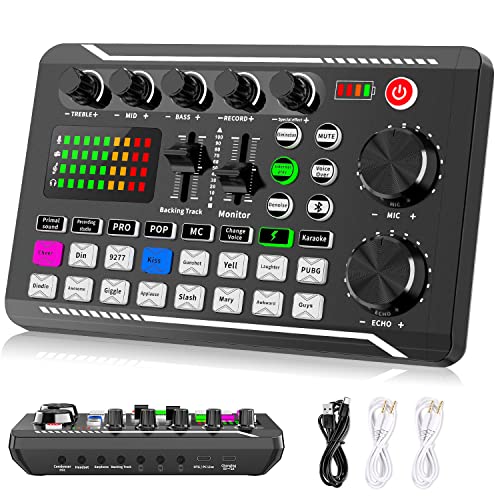
Pros
- Nine total mix controls give more routing flexibility than typical entry-tier live sound cards.
- DSP chip handles noise reduction with no reported input latency in source description.
- Portable 1200 mAh battery lets creators record on location without a wall outlet.
- Supports up to two people and three devices simultaneously for co-host podcast setups.
Cons
- Limited owner feedback at time of writing makes long-term reliability hard to verify.
- No published specs for sample rate, bit depth, preamp gain, or phantom power.
- Sixteen caned effects and DSP chain will not satisfy users needing true studio processing.
The Facmogu F998 is an entry-level USB live sound card and audio mixer aimed at beginner podcasters, karaoke hobyists, and TikTok or YouTube streamers. It bundles seven volume knobs, two faders, 16 sound effects, and a 1200 mAh internal battery into a compact plug and play unit at a budget price point.
The defining feature is routing breadth at this tier. Nine physical mix controls covering bass, alto, treble, backing track, and monitoring is unusually generous for a pocket mixer. Owners in this tier typically report the DSP effects and voice changer as the main draw, with Bluetooth accompaniment leting a solo host pipe in music without a second interface.
Trade-offs are typical at this price. The source lists no sample rate, bit depth, preamp gain, or phantom power spec, so condenser microphone compatibility is uncertain despite the marketing claim. The 16 effects are canned DSP presets, not a plugin chain, and verified owner feedback is essentially absent, so build quality and driver stability remain unproven.
Buy this if you want a cheap, battery-powered mixer for phone-based karaoke, TikTok live, or a first podcast on PS4 or PS5. Skip this if you plan to run a phantom-powered condenser, record multitrack, or need documented preamp and converter specs for serious content work.
Mix controls: The panel exposes 7 independent volume knobs plus 2 fader buttons, routing bass, alto, treble, backing track, and monitor levels separately. A synchronized breathing light tracks volume level, useful as a visual cue during live streams where headphone monitoring is inconsistent.
DSP and effects: A digital DSP chip handles processing with 16 preset sound effects and a voice changer. Facmogu claims intelligent noise reduction with no delay, though sample rate, bit depth, and latency figures are not specified, which is typical at this tier.
Connectivity: USB audio class connection covers iOS, Android, iPad, Mac OS, Windows, and PS4 or PS5. An independent Bluetooth switch enables wireless accompaniment input, and the unit can bridge up to 2 hosts across 3 devices simultaneously for co-streamed sessions.
Power and portability: A built-in 1200 mAh battery removes the need for constant USB power, and the compact chassis is designed to travel. Included in the box are the mixer board, USB data cable, 2 audio cables, and an instruction manual.
You’re streaming or recording with an XLR microphone. Integrated audio doesn’t have XLR inputs. A USB audio interface (Focusrite Scarlett Solo, Universal Audio Volt 2) provides clean preamps, phantom power for condensers, and low-latency monitoring that integrated audio can’t.
You want a one-cable desk setup. A desktop DAC/amp with a built-in volume knob, hardware mute, and front headphone jack is more ergonomic than reaching behind the case for the rear audio panel. It’s a quality-of-life upgrade as much as an audio upgrade.
What to look for in a soundcard
Match the amp output to your headphones. Check your headphones’ impedance and recommended power. For under-50-ohm cans, almost any DAC/amp works. For 80-250 ohms, look for amps with at least 250 mW per channel into 32 ohms. For 300+ ohms, you want 1 W or more, or a dedicated tube amp.
Output impedance under 1 ohm. Critical for sensitive IEMs and multi-driver headphones. Cheap DACs with 5+ ohm output impedance will change the frequency response of anything connected.
USB DAC vs internal PCIe. External wins almost always now. Better noise isolation, easier upgrades, portability between devices. The only reason to go internal is if your case is already cluttered and you have a free PCIe slot.
Inputs and outputs matching your gear. If you’ve got powered studio monitors, look for balanced TRS or XLR outputs. If you’ve got passive speakers, you’ll need a separate amp anyway. If you only use headphones, a 3.5 mm or 6.35 mm output is fine.
Microphone input handling. For gaming headsets with a 3.5 mm mic, look for a combined input. For XLR mics, you need a full audio interface, not just a DAC. Don’t conflate the two categories.
Sample rates you’ll actually use. 24-bit/96 kHz covers everything Spotify, YouTube, Apple Music, and Tidal stream. 32-bit/384 kHz and DSD support are marketing fluff for most users.
Common misconceptions
“My motherboard says it has audiophile-grade audio. I don’t need a DAC.” Maybe. Premium motherboard audio (Realtek ALC4082, ESS DAC chips on some Asus boards) is genuinely better than entry-level codecs. But it still shares the PC’s noisy electrical environment. A $100 external DAC almost always beats it on noise floor and headphone amp power.
“Higher bit depth and sample rate sounds better.” Only for production. For listening, 16-bit/44.1 kHz (CD quality) is already past the threshold of audibility for typical music. The benefit of 24-bit/96 kHz is for production headroom, not playback fidelity.
“All DACs sound the same.” Past about $80, measured differences between competent DACs are inaudible in blind listening. Implementation matters more than the DAC chip’s spec sheet. A well-designed $100 DAC will outperform a poorly designed $500 one.
“I need a soundcard for surround sound in games.” No. Modern surround virtualization (Windows Sonic, Dolby Atmos for Headphones, DTS Headphone:X) is software. It runs on whatever audio device you have. A soundcard might add specific surround features, but the technology itself is built into the OS.
Frequently asked
Do I need a soundcard if I already have a good gaming headset?
Probably not. Wireless gaming headsets (Razer BlackShark, SteelSeries Arctis, Astro A50) have their own internal DACs and amps. The base station that comes in the box is the soundcard. USB wired headsets are the same. Adding an external DAC to a USB headset does nothing.
What’s the difference between a DAC and a soundcard?
A DAC is the digital-to-analog converter chip itself. A soundcard is the full audio device that includes a DAC, an amplifier, input/output jacks, and a USB or PCIe interface. In modern usage, “DAC” usually means a standalone digital-to-analog device intended for line-level output to a separate amp. “DAC/amp” includes a built-in headphone amplifier. “Soundcard” is the umbrella term. For a closer look, see our guide on the best headphone amplifier for gaming 2026.
Will a soundcard improve my microphone quality?
Only if it’s a real audio interface with a quality preamp and you’re using an XLR or condenser mic that benefits from it. Adding a DAC to your existing USB mic does nothing because USB mics include their own ADC. For 3.5 mm headset mics, soundcards can improve clarity slightly but the mic capsule itself is the limit.
Is the DAC in my smartphone better than my PC’s?
Often yes. iPhones (with the Lightning-to-3.5 mm adapter) and modern Samsung phones use surprisingly clean DAC implementations because they’re designed around battery power, which is electrically quiet. Many smartphones output cleaner audio than typical motherboard codecs.
How much should I spend on my first DAC?
For most users, $80 to $150 covers the sweet zone. Fosi Audio K5 Pro, FiiO K3, and JDS Labs Atom DAC all sit here and deliver audibly cleaner sound than integrated audio for nearly any headphone. Spending more than $300 only makes sense if you’ve got high-end headphones that genuinely benefit. Anything under $40 is usually integrated-audio quality in a separate box.