

Keyboard double typing is the moment one press turns into two letters, three spaces, or a password that suddenly won’t work. It can come from a dirty switch, worn mechanical contacts, aggressive firmware debounce, a flaky USB path, or software repeat settings. Annoying. Fixable, sometimes. If you’re comparing a fresh board from our mechanical keyboard for typing guide or trying to save a favorite daily driver, work through the cheap checks before you replace anything. We’ve researched the most common failure patterns on office boards, gaming boards, and hot-swap mechanical keyboards so you can separate a quick cleanup from a switch or keyboard replacement.
First check the obvious (the 30-second check)
Start by confirming the problem happens in more than one app. Open a plain text editor, press the same key 20 times slowly, then try another USB port. If only one program doubles letters, the keyboard may be fine and the app may be catching repeated input. If the same key double types everywhere, focus on hardware or firmware.

Next, check operating-system repeat settings. In Windows, keyboard repeat delay and repeat rate can make a sensitive board feel worse, especially if a key is held a fraction too long. Also unplug USB hubs, KVM switches, and front-panel ports for this check. Direct rear motherboard USB is the clean baseline. No hub. No guessing.
Cause #1: dirt or debris is making the switch chatter
Dust, crumbs, pet hair, and skin oil can make a switch bounce between contact states. Mechanical switches are small parts with tight tolerances, and even a tiny bit of debris around the stem can turn one clean press into a flicker of repeated signals. This is especially common on boards used at a desk where snacks, coffee, and compressed-air cleanups all happen in the same week.
Power the keyboard off or unplug it, pull the keycap, and inspect the switch area with a bright light. Use a soft brush and short bursts of air from an upright can, not a wet blast of cleaner. If the board uses hot-swap sockets, you can remove the switch and check the pins, socket, and plate opening. Don’t soak the board. Don’t pry against the PCB. If cleaning fixes one or two keys, you probably don’t need a new keyboard.

Pros
- Hot-swap sockets allow switch experimentation without soldering tools or PCB risk
- Metal top plate delivers firmer typing feel than plastic budget boards at this tier
- Full-key rollover and linear red switches handle rapid inputs for casual gaming
Cons
- Limited owner feedback at time of writing, so long-term reliability is unproven
- RGB is restricted to side lighting only, per-key backlight is fixed rainbow patterns
- ABS keycaps typical at this tier tend to shine and wear faster than PBT
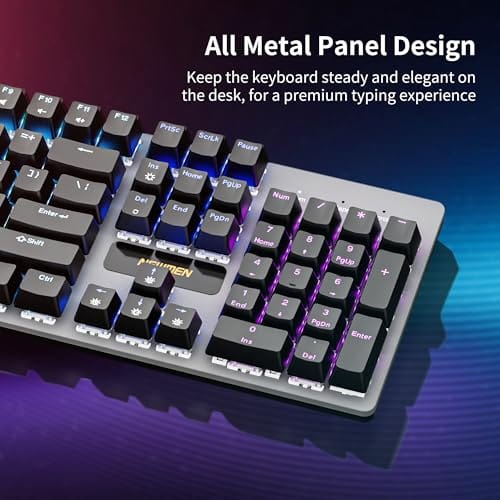
The Newmen GM325Pro is a budget full-size 104-key wired mechanical keyboard aimed at first-time mechanical buyers and casual gamers who want a hot-swap PCB without moving up to enthusiast pricing. It ships with linear red switches, a metal top plate, ABS keycaps, and side-edge RGB lighting.
The defining feature here is the hot-swap socket combined with linear red switches. That gives new users a low-friction path to swap inactile or silent switches later without soldering. Typing fel on metal-plate boards at this tier is usually firmer and less hollow than all-plastic budget pers, based on category norms.
Trade-offs are typical for the price class. Per-key RGB is not suported, only side lighting is true RGB while the top backlight runs 13 preset rainbow effects. ABS keycaps tend to develop shine within months of heavy use, and Newmen does not publish switch lifecycle, polling rate, or NKRO wired specs in the source data.
Buy this if you want a cheap full-size hot-swap platform to learn on and plan to upgrade switches or keycaps later. Skip this if you need per-key RGB, PBT caps, a documented polling rate, or a keyboard with a dep owner review history to validate QC.
Switches and layout: Linear red switches on a full 104-key ANSI layout, with full-key rollover claimed by the manufacturer. Actuation force, travel, and switch brand are not specified in the source. Linear reds typically sit near 45g actuation and 4m total travel in this category.
Hot-swap PCB: Sockets accept standard MX-style switches, so tactile, clicky, or silent linear options from third parties drop in without soldering. Pin compatibility (3-pin vs 5-pin) is not specified, buyers should confirm before ordering replacement switches.
Build and lighting: Metal top plate over ABS black keycaps. RGB is limited to the side edge, while the top backlight cycles through 13 preset rainbow patterns rather than per-key addressable RGB. Case material below the plate is not specified.
Connectivity and software: Wired only via a detachable 1.8m USB cable. FN combos cover F1 to F11 media and calculator shortcuts. Customization software suports key remap, macro recording, and lighting tweaks, though poling rate and software platform support are not specified.
Cause #2: switch contacts are worn or the debounce setting is too low
Every mechanical switch has contact bounce. Good keyboard firmware filters that bounce with debounce timing, usually measured in milliseconds. If the timing is too aggressive, or if an older switch has worn contacts, the keyboard may register two actuations from one press. That’s why double typing often starts with a few high-use keys: E, A, spacebar, backspace, or a gaming movement key.
If your keyboard software has a debounce option, raise it slightly and save the profile to onboard memory. If it doesn’t, look for a firmware update from the manufacturer. Hot-swap boards have the easiest hardware fix because you can replace only the bad switch. Soldered boards are more work, and they’re not worth desoldering unless the keyboard is valuable, rare, or very comfortable. For a budget board, replacement can be the saner call.
Cause #3: USB, wireless, or firmware glitches are duplicating input
A bad cable or unstable receiver can mimic switch chatter. Wired keyboards should be checked with a known-good cable if the cable is removable. Wireless boards need a fresh charge, a close receiver position, and less 2.4GHz interference. A receiver hidden behind a steel PC case can create odd lag and duplicate input, especially on a desk with Wi-Fi, Bluetooth, and several dongles nearby.
Firmware can also be the culprit. Some gaming boards store macros, repeat actions, or per-key settings in onboard memory, and a misconfigured profile can look like a broken switch. Reset the keyboard using the manual’s key combo, clear macros, and update the companion app only from the maker’s site. If you’re shopping instead of repairing, the Cherry KC 200 MX at $56.31 uses new MX2A Silent Red switches, a metal plate frame, and carries a 4.0 rating, which makes it a sensible office-style replacement to compare with boards from our budget mechanical keyboard for typing list.

Pros
- MX2A Silent Red linears actuate quietly, good fit for open-plan offices
- Metal plate frame keeps chassis stiff and reduces caseping under typing
- Cherry Gold-Crosspoint contacts rated for 50 million keystrokes on this variant
- Full-size layout with dedicated numpad suits data entry and spreadshet work
Cons
- Renewed unit with no owner fedback loged yet, cosmetic and wear condition varies
- Silent Red linears lack tactile bump, typists who prefer fedback should pick Brown
- Source data omits connectivity, cable type, polling rate, and dimensions
The Cherry KC 200 MX is a full-size office-focused mechanical keyboard sold here as a Renewed unit in Bronze with MX2A Silent Red linear switches. It targets office typists, developers, and finance or admin users who want Cherry switch fel and a metal plate frame without the RGB and gamer styling of enthusiast boards.
The defining feature is the MX2A Silent Red switch, Cherry's updated linear with dampened stems aimed at reducing bottom-out and return noise. Cherry rates this variant for 50 million keystrokes. Based on the linear profile, expect smooth actuation with no tactile bump, which suits fast touch typists and users on frequent video calls.
Trade-offs are typical at this tier and Renewed status. Silent Red linears are polarizing, users coming from Browns or Blues will miss the tactile feedback, and the source does not specify polling rate, connection type, cable, keycap material, or dimensions. As a Renewed listing, cosmetic condition and remaining switch life depend on the refurbisher rather than a factory-fresh baseline.
Buy this if you want a quiet full-size Cherry mechanical for office or shared-space use and value the metal plate build over RGB features. Skip this if you prefer tactile or clicky switches, need confirmed wireless or USB-C connectivity, or want a waranty profile equivalent to new stock.
Switches: Cherry MX2A Silent Red, linear with integrated dampeners, made in Germany with Gold-Crosspoint contacts. Rated for 50 million keystrokes on this variant, versus 100 million on MX2A Brown. Linear travel with no tactile bump favors light, fast keypresses over deliberate typing fedback.
Build: Metal plate frame under the switches, which stiffens the deck and cuts flex compared with plastic-only office boards. Cherry positions the KC 200 MX as a slim modern design, though exact case height, weight, and keycap material are not specified in the source data.
Layout and indicators: Full-size layout retains the dedicated numpad and function row, which maters for spreadsheet,ERP, and accounting workflows. White LED status indicators are built into Caps Lock, Scroll Lock, and Num Lock keys, avoiding a separate indicator strip and keeping the top edge clean.
Gaming fit: Silent Red linears work for casual gaming and MMO or productivity crossover use given their light linear fel, but the source does not list polling rate, N-key rollover, or onboard profiles, so competitive esports buyers should confirm specs before committing.
How to narrow it down before buying parts
Use a simple isolation path. First, try the keyboard on a second computer without installing the maker’s software. Second, try a different cable or receiver position. Third, check the same problem key with slow presses, fast presses, and angled presses. A switch that only misbehaves when pressed off-center may have stem wobble, stabilizer interference, or contact wear rather than a system setting problem.
For hot-swap boards, moving one suspect switch to another socket is the most useful step. If the double typing moves with the switch, replace the switch. If it stays with the socket, look at the socket contacts or PCB. For non-hot-swap boards, you can still compare behavior across devices, but the repair path gets harder. Simple, but revealing.
Preventive maintenance
Keep liquids away from the board, pull keycaps for a dry clean every few months, and cover the keyboard if the room gets dusty. For mechanical boards, avoid spraying cleaner directly into the switch. If a key starts to feel gritty, deal with it early instead of hammering it harder. That harder press can bend stabilizers, loosen keycaps, or make a weak switch fail sooner.
A weekly thirty-second habit helps: flip the keyboard over, tap lightly, brush the rows, and check the cable strain point. If you use a full-size board for work, the spacebar and backspace take a lot of abuse. Stabilized keys can feel like switch chatter when the wire is dry, bent, or rubbing, so listen for rattles and uneven return before blaming the PCB.
When it’s not fixable: what to replace
Replace the switch if the board is hot-swap and the issue is isolated to one or two keys. Replace the keyboard if multiple unrelated keys are double typing, the PCB has liquid damage, the firmware reset doesn’t stick, or the repair costs more than a clean replacement. The Newmen GM325Pro costs $20.89, has 104 keys, hot-swap support, linear red switches, a metal panel, ABS black keycaps, and a 4.8 rating. It’s not fancy, but hot-swap is useful for learning repairs.
For a quieter office layout, the renewed Cherry KC 200 MX costs $56.31 and uses MX2A Silent Red switches with a metal plate frame. That makes it more appealing if you type all day and don’t want rainbow lighting or a gaming look. If ergonomics is the reason you’re replacing the board, compare layouts in our ergonomic keyboard guide before buying another straight full-size model.
Tools and parts needed
For a basic repair attempt, you’ll want a keycap puller, a soft brush, clean compressed air, a known-good USB cable, and the keyboard’s firmware utility. For hot-swap boards, add a switch puller and a few compatible spare switches. For soldered boards, you’ll need soldering gear and enough experience to avoid lifting pads from the PCB. If that sentence makes you nervous, replacement is probably safer.
You don’t need exotic gear for the first pass. A clean table, a small container for keycaps, and ten minutes of patience are enough to find many problems. Take a phone photo before removing large stabilized keys, because putting the wire back in the wrong orientation can create a new rattle or a sluggish return.
What not to do while diagnosing it
Don’t flood the switch with alcohol, WD-40, or contact cleaner unless the keyboard maker specifically says it’s safe. Liquids can carry grime deeper into the switch, stain keycaps, or leave residue around LEDs. Also avoid smashing the bad key to prove the fault. Harder presses may make a worn switch behave for a few minutes, but they don’t solve bounce.
Don’t ignore warranty coverage either. If a newer board starts double typing within a few months, document the key, the apps affected, the firmware version, and the cable or receiver used. A clear support note is more convincing than a vague complaint, and it may get you a replacement before you spend money on switches or tools.
How to decide between repair and replacement
The repair math depends on the board’s value and layout. A $20.89 hot-swap Newmen GM325Pro is cheap enough that you’d replace switches for practice, not because the board demands a delicate rescue. A nicer typing board with a familiar layout, quiet switches, and comfortable key spacing deserves more patience. If it saves your wrist and your muscle memory, one bad key shouldn’t send it to the closet.
Time matters too. Cleaning one switch takes minutes, swapping a hot-swap switch takes a little longer, and diagnosing a soldered board can turn into an evening. If the keyboard is your work tool, don’t let a repair rabbit hole break a deadline. Keep a spare wired board in a drawer, even a plain office model, so you can troubleshoot calmly instead of typing passwords through repeated characters.
Signs the PCB or controller may be at fault
A switch problem usually stays local. A controller or PCB problem looks broader: rows drop out, several keys repeat together, lighting flickers with input, or the board disconnects and reconnects in Windows. Liquid damage can create the same pattern after the keyboard seems dry. Corrosion often hides under switches, stabilizers, or the USB daughterboard, so a quick top-down glance may miss it.
If the board repeats on two computers, with a different cable, after a reset, and across unrelated keys, stop chasing individual switches. At that point, you’re likely dealing with PCB damage, firmware that won’t store clean settings, or a failing controller. For most mainstream keyboards, replacement is cheaper and more reliable than board-level repair.
A few more questions
Why does only one key double type?
One-key failure usually points to debris, a worn switch, a bent hot-swap pin, or a local socket issue. Start with cleaning, then swap the switch with a rarely used key if the board supports hot-swap. If the problem follows the switch, the switch is bad.
Can software cause keyboard double typing?
Yes. Repeat-rate settings, macros, accessibility features, and keyboard companion apps can all create duplicate input. That’s why a plain text editor, a second computer, and a keyboard reset are useful early checks. They separate board failure from software weirdness.
Is double typing a sign my keyboard is dying?
Sometimes, but not always. A dirty switch or bad cable can be fixed in minutes, while widespread chatter across many keys points to deeper wear or PCB damage. If the board is cheap and several keys misbehave, replacing it is usually the cleanest answer.
If the board has onboard profiles, save a clean profile after the fix. That way a future software update or macro experiment does not silently bring the same double-fire behavior back.






























Write Your Review
No reviews yet. Be the first to share your experience!