

Impedance is the electrical resistance a pair of headphones presents to the device driving them, measured in ohms. It sounds like an obscure spec buried in a product sheet, but it quietly decides whether your headphones sound loud and full straight from your phone, or thin and quiet until you add an amplifier. If you’ve ever wondered why one headset blasts off a laptop while another barely whispers, impedance is a big part of the answer.
For gamers and PC users, this matters when pairing headphones with a motherboard jack, a controller, or a dedicated amp. Our roundups of the best open-back headphones for gaming in 2026 and the best gaming headset touch on this whenever a high-impedance pair needs more power. Here’s what impedance actually does, how it works, and when it should shape your buying decision.
The short answer
Impedance measures how much a headphone resists the electrical signal feeding it. Low-impedance headphones, roughly 16 to 32 ohms, are easy to drive and get loud from phones, laptops, and consoles. High-impedance models, 80 ohms and up, need more voltage and often benefit from a dedicated amplifier to reach full volume and control.
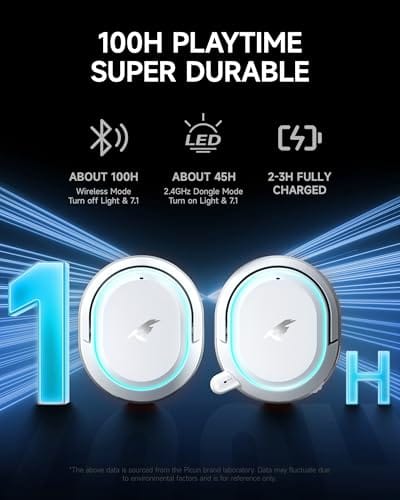
Most gaming headsets are low-impedance by design so they work off any device. A wireless set like the Picun G2 gaming headset at $59.99 with a 4.5-star rating connects over 2.4GHz, Bluetooth 5.4, or wired, and its built-in amplification means you never think about ohms at all. That plug-and-play simplicity is exactly why low-impedance dominates the gaming space.


Pros
- Three connection modes on a single headset: 2.4GHz dongle, Bluetooth 5.4, and 3.5mm wired fallback.
- Vendor-rated 5ms 2.4GHz latency keps audio synced in competitive shooter scenarios.
- Long rated runtime, up to 100 hours in Bluetooth with RGB disabled for travel use.
- RetractableENC microphone tucks away, useful when switching between gaming and general listening.
Cons
- Limited owner feedback at time of writing, real-world reliability and QC signal is unverified.
- 7.1 surround is virtual DSP, not true multi-driver, so positional accuracy varies by title andear.
- RGB lighting materially cuts battery life, cited100-hour figure requires lighting turned off.
The Picun G2 is a budget-tier wireless gaming headset built around 40mm drivers, virtual 7.1 surround, and tri-mode connectivity across2.4GHz, Bluetooth 5.4, and 3.5m wired. Target buyer is a multi-platform player rotating between PC, PS5, PS4, and Switch who wants low-latency wireless without moving up to established brand pricing.
The defining feature is the tri-mode radio stack. The 2.4GHz USB-A or Type-C dongle is rated at 5ms latency, which is competitive for the tier and adequate for most FPS titles, while Bluetooth 5.4 handles phones and tablets. Headsets in this class typically deliver serviceable rather than reference-grade imaging, and virtual 7.1 leans on DSP rather than discrete drivers.
Trade-offs are typical at this tier. Battery figures are optimistic: 100 hours assumes Bluetooth with RGB off, and 2.4GHz drops the number to 42 to 45 hours. Driver material, impedance, frequency response, clamp force, and weight are not specified, so tonal balance and long-session comfort cannot be verified from source data alone.
Buy this if you want one headset that jumps between a PS5, a Switch dock, and a work laptop over Bluetooth, and you accept spec-sheet-only marketing. Skip this if you rely on measured frequency response, discrete suround, or detachable bom mics with broadcast-grade pickup for streaming.
Drivers and tuning: Picun specifies 40mm dynamic drivers paired with virtual 7.1 surround processing. Impedance, sensitivity, and frequency response are not specified, so bass extension and treble air cannot be quantified from source. Virtual 7.1 is DSP-based positional widening, useful for FPS cues but not equivalent to true multi-driver surround.
Connectivity and latency: Three modes are covered: 2.4GHz via USB-A or USB-C dongle, Bluetooth 5.4, and 3.5mm analog. The 2.4GHz link is rated at 5ms latency. Bluetooth codec support (SBC, AAC, aptX) is not specified, which maters for wireless music quality on phones and tablets.
Battery and power: Rated up to 100 hours on Bluetooth with RGB off, and 42 to 45 hours on 2.4GHz wireless. Play-while-charging is supported, so a USB cable can extend sessions past the rated ceiling. Charge time and battery capacity in mAh are not specified.
Microphone: Retractable omnidirectional bom with ENC noise reduction. Sample rate, bit depth, and pickup pattern beyond omni are not specified.ENC filtering targets background noise on the transmit side, adequate for party chat but below dedicated USB mic quality.
The longer explanation
Impedance affects two things: how loud your headphones get from a given source, and how well that source controls the drivers. A low-impedance pair draws more current at lower voltage, so a small device like a phone can push it to comfortable volume. A high-impedance pair needs higher voltage to hit the same loudness, which weak sources struggle to supply, leaving the sound quiet and lifeless.
There’s a catch with very low impedance too. Some sources don’t pair cleanly with extremely low-ohm headphones and can introduce noise or uneven response. That’s why studio and audiophile headphones often sit at 250 ohms or higher, since they’re designed to be driven by proper amps that deliver clean, controlled power. For gaming and casual use, though, low impedance paired with a headset’s own amplification, like the Picun G2’s, keeps everything simple and loud.
Sensitivity is the other half of the story that impedance alone doesn’t tell. Two headphones with the same ohm rating can play at very different volumes because one converts power to sound more efficiently than the other. That’s why some low-impedance headphones still sound quiet, and some higher-impedance ones are surprisingly easy to drive. If you’re comparing spec sheets, look at both the ohm figure and the sensitivity rating in decibels before deciding whether you’ll need extra power.
How it works
Inside every headphone is a driver, a small speaker with a voice coil. The number of coil windings and the wire used set the impedance. More, finer windings raise impedance; fewer, thicker windings lower it. When you feed the driver an audio signal, that impedance determines how much current flows at a given voltage, following basic electrical rules. Higher impedance means less current for the same voltage, so you need more voltage to reach the same volume.
Your source device has its own output capability. A phone or laptop jack delivers modest voltage, plenty for 32-ohm cans but not enough to fully drive 250-ohm studio headphones. A dedicated headphone amp raises available voltage, letting high-impedance models sing. Wireless headsets sidestep the whole issue by putting a small amplifier inside, which is why the Picun G2 sounds full over Bluetooth or its 2.4GHz dongle without any external gear.
Why it works this way
The reason high-impedance headphones exist at all is control and clarity. A higher-impedance driver can be more precisely damped by a good amplifier, which tightens bass and reduces distortion at high volume. Studios and audiophiles accept the need for an amp because the payoff is cleaner, more controlled sound. It’s a deliberate design choice aimed at listeners who already own proper equipment.
Low-impedance headphones win on convenience. They’re tuned to work off whatever’s handy, which suits gaming, mobile, and everyday listening where nobody wants to carry an amp. A wireless gaming headset like the Logitech G733 Lightspeed at $124.92, with its own wireless amplification and PRO-G audio drivers, is built around that convenience, delivering consistent volume across PC, PS5, PS4, and Switch. The tradeoff is a ceiling on ultimate refinement that most gamers never notice or need.
When you’d want this
You’d want to think about impedance when you’re pairing wired headphones with a specific source. If you’re gaming off a console controller, a phone, or a basic motherboard jack, stick with low-impedance headphones so they get loud without extra hardware. That’s the safe default for the vast majority of PC and console players, and it’s why nearly every mainstream headset lands in the easy-to-drive range.
You’d consider high-impedance headphones only if you already own or plan to buy a dedicated amp or a capable audio interface, and you care about audiophile-grade control. For most people, a well-made wireless set removes the question entirely. The Logitech G733 with its Lightspeed wireless connection and Blue VO!CE mic delivers strong, consistent output on any platform, no amp math required. Buy for how you’ll actually connect, not for a spec you’ll never exploit.

Pros
- Lightspeed wireless with 20 meter range handles typical living room and desk distances
- Up to 29 hours battery life covers multi-day use between charges
- Blue VO!CE mic processing in G HUB improves clarity for Discord and streaming
- Suspension headband and low mass design reduce clamp fatigue during long sessions
- Dual-zone Lightsync RGB with 16.8M colors is customizable through G HUB
Cons
- PS4 output limited to stereo, no suround on older PlayStation hardware
- Driver size, frequency response, and mic pattern not specified in source data
The Logitech G733 is a mid-tier wireless gaming headset targeting PC, PS5, PS4, and Nintendo Switch users who want a lightweight all-day fit. It leans on Lightspeed 2.4GHz wireless, PRO-G drivers, Blue VO!CE mic processing, and a reversible suspension headband, aimed at multi-hour gamers and streamers.
The defining feature is the combination of Lightspeed wireless with a quoted 20 meter range and up to 29 hours of battery. In practice this covers full workdays plus evening sessions without a charge cycle. PRO-G drivers, per Logitech, reduce distortion, and headsets in this tier typically deliver a mildly V-shaped tuning suited to positional FPS cues.
Trade-offs are typical at this price point. PS4 users are locked to stereo output with no virtual surround. Driver diameter, impedance, and frequency response are not published in the source data, so absolute output quality is hard to benchmark against wired competitors. There is no Bluetooth fallback listed, so mobile pairing is not supported.
Buy this if you want a light, long-battery 2.4GHz wireless headset for PC or PS5 with a usable broadcast-style mic. Skip this if you need wired low-latency USB, Bluetooth multipoint, or vendor-published driver and frequency response specs before purchase.
Drivers and tuning: Logitech lists PRO-G drivers tuned for reduced distortion, though exact driver diameter and frequency response are not specified in the source. Headsets in this tier typically ship with 40 to 50mm dynamic drivers and a mildly V-shaped response suited to explosions and footstep cues in FPS gameplay.
Connection and latency: Lightspeed 2.4GHz wireless with a stated 20 meter range covers desk and living room use. Compatibility is confirmed for PC, PS5, PS4 (stereo only), and Nintendo Switch. Bluetooth and wired 3.5mm fallback are not listed in the source, so single-dongle 2.4GHz is the only documented path.
Battery life: Rated up to 29 hours per charge, enough for roughly three to four full evening sessions before recharging. Exact charge time and USB-C versus micro-USB charging port are not specified in the source data.
Microphone: Detachable mic with Blue VO!CE filters configured in G HUB, providing EQ, noise reduction, and de-eser presets useful for Discord and Twitch chat. Mic polar pattern, sensitivity, and frequency range are not disclosed in the source specifications.
What to look for in headphones
Check the impedance rating against your source first. For phones, consoles, and standard PC jacks, aim for headphones around 16 to 32 ohms so they play loud without an amp. If you’re eyeing a 250-ohm studio pair, budget for a headphone amp or audio interface to drive it properly, or you’ll be disappointed by weak volume. If you also stream, our guide to the best audio interface for streaming in 2026 covers gear that doubles as a headphone amp.
Beyond impedance, weigh connection type, mic quality, and comfort. Wireless sets like the Picun G2 and Logitech G733 include their own amplification, so impedance becomes a non-issue and you just enjoy plug-and-play sound across devices. Look at battery life, latency for gaming, and whether the mic suits voice chat, since features like the Picun’s low-latency 2.4GHz mode or the G733’s Blue VO!CE mic matter more day to day than the ohm rating for most buyers.
Common misconceptions
The biggest myth is that higher impedance always means better sound. It doesn’t. Impedance is a design parameter, not a quality score. A well-tuned 32-ohm headphone can easily outperform a poorly designed 250-ohm one. High impedance only helps when paired with an amp that can exploit it, and driven by a weak source it just sounds quiet. Judge headphones by their overall design and drivers, not by the ohm number alone.
Another misconception is that everyone needs a dedicated amp. Most people don’t. If you use low-impedance headphones or any wireless headset with built-in amplification, your phone, console, or PC drives them fine. Amps only earn their place with high-impedance audiophile gear. Buying one for a 32-ohm gaming headset wastes money on power the headphones can’t use, so match your gear to your actual needs.
Frequently asked
Do I need an amp for gaming headphones?
Almost never. Gaming headsets are designed as low-impedance, easy-to-drive gear, and wireless models like the Picun G2 and Logitech G733 include their own amplification. Off a controller, phone, or motherboard jack they get plenty loud on their own. You’d only want an amp if you switch to high-impedance studio or audiophile headphones rated 80 ohms or more, which are uncommon in the gaming world and aimed at a different listener.
What impedance is best for a PC?
For a standard motherboard headphone jack, low-impedance headphones around 16 to 32 ohms are the safe pick, since they reach full volume without extra hardware. If your PC has a dedicated sound card or you add an amp or audio interface, higher-impedance models become viable and can sound more controlled. Match the headphone to your PC’s audio output, and if you’re unsure, low impedance is the reliable default.
Does impedance affect sound quality directly?
Not by itself. Impedance affects how much power headphones need and how a source controls the drivers, but it isn’t a measure of sound quality. A properly driven high-impedance pair can sound wonderfully controlled, while an underpowered one sounds weak. Driver design, tuning, and build matter far more to how a headphone sounds. Think of impedance as a compatibility spec, not a quality rating you should chase.
Why are some headphones so quiet on my phone?
Usually because they’re high-impedance and your phone can’t supply enough voltage to drive them loud. Phones output modest power, fine for 32-ohm headphones but not for a 250-ohm studio pair. The fix is either lower-impedance headphones or a portable amp or dongle DAC that boosts output. For phone use, sticking with low-impedance or wireless headphones like the Picun G2 avoids the quiet-volume problem entirely.
Are wireless headsets affected by impedance?
Not from your perspective. Wireless headsets like the Logitech G733 and Picun G2 contain their own internal amplifier, so they manage the driver power themselves and deliver consistent volume regardless of the device sending audio. That’s a big reason wireless is so convenient: impedance matching stops being your problem. You just connect over the dongle or Bluetooth and get full sound, whether it’s a PC, PS5, Switch, or phone on the other end.
































Write Your Review
No reviews yet. Be the first to share your experience!