

Two names dominate the budget prebuilt aisle on Amazon and at big-box stores: Cyberpower and Skytech. Both push hundreds of thousands of units a year, both lean on last-generation parts to hit aggressive prices, and both get argued about endlessly on r/prebuilt. So which one stretches your dollar further, and where do the no-name budget towers undercut them both? We researched current configurations, owner reports, and the sub-$600 alternatives that keep crashing this party. If you’re shopping the low end, our roundup of the best budget prebuilt PC 2026 and our best AMD prebuilt gaming PC picks pair naturally with everything below.
Matchup at a glance
Cyberpower and Skytech aren’t really competing on hardware philosophy. They’re competing on which corners to cut. Cyberpower tends to spread its lineup wider, from $600 entry towers up past $2,500 flagships, and it mixes Intel and AMD freely. Skytech keeps a tighter catalog, leans AMD-heavy on the value tiers, and puts more of its budget into RGB and case airflow. Neither one builds mini PCs in the small-form-factor sense that Beelink or Minisforum do, so if you came here expecting a NUC-style box, that’s the first thing to reset.
Here’s the honest framing. At the same sticker price, a Cyberpower and a Skytech will hand you roughly the same GPU and CPU, because both buy from the same distributors during the same sales cycles. The real gap shows up in the stuff you can’t see on the spec sheet: power supply quality, RAM speed defaults, cable management, and how fast support answers when a fan rattles. That’s where owner reports start to diverge. And that’s also where a stripped-down $500 tower from a smaller seller can quietly win.
Spec sheet showdown
The table below lines up the two big brands against two concrete budget towers we researched, so you can see what roughly $500 to $600 buys across the whole segment. Specifics for the two example machines come straight from their listings.
| Spec | Cyberpower (entry tier) | Skytech (entry tier) | abytespark i7 Tower | WIWB Ryzen 5 Tower |
|---|---|---|---|---|
| Typical price | $600-$800 | $650-$850 | $499.99 | $569.99 |
| CPU | Intel or Ryzen, varies | Ryzen, mostly | Intel Core i7 | Ryzen 5, up to 4.1 GHz |
| GPU | Entry dGPU, varies | RTX or RX, varies | Integrated / office focus | RX 560 4GB |
| Memory + storage | 16GB / 500GB-1TB | 16GB / 1TB common | Not fully listed | 16GB DDR4 / 512GB SSD |
| Owner rating | Varies by SKU | Varies by SKU | 4.4 stars | 4.7 stars |
Notice the pattern. The brand-name entries carry a price premium for the logo, the warranty desk, and a marginally nicer case. The off-brand towers claw that back with a lower ticket. Neither approach is wrong. It depends on what you value.
Cyberpower strengths
Cyberpower’s biggest advantage is selection. Because the catalog runs so deep, you can almost always find a configuration that matches your exact budget instead of rounding up $150 to the next tier. Owner reports consistently praise the breadth, and the company’s been shipping desktops long enough that replacement parts and RMA paperwork are a known quantity. When a build ships DOA, most buyers say the return went smoothly. That reliability of process matters more than people expect on a first prebuilt.
The flip side is inconsistency. Because Cyberpower sources so widely, two identical model numbers can arrive with different RAM brands or a different power supply depending on stock that week. Owners who dig in sometimes find a value PSU where they’d hoped for a named unit. It’s rarely dangerous, but it’s the kind of substitution that annoys anyone who reads spec sheets closely. You’re buying a system, not a curated parts list, and the price reflects that.
Skytech strengths
Skytech wins on presentation and airflow. Its value builds ship in cases with genuine mesh fronts and multiple ARGB fans, which keeps thermals honest under a gaming load and looks the part on a desk. The AMD lean pays off too, since Ryzen chips at this price often deliver more multi-thread headroom for streaming or light editing than the Intel parts in the same bracket. Owner feedback skews positive on out-of-box cleanliness, with tidier cable runs than you’d expect at the price.
Where Skytech stumbles is the narrower ladder. Fewer SKUs means you sometimes pay for a GPU tier you didn’t need, or you settle for less storage than you wanted. And like every builder in this range, the RAM often defaults to a slower profile until you enable EXPO in the BIOS yourself. That’s a five-minute fix, but nobody tells the first-time buyer. If you’d rather sidestep the brand tax entirely, a Ryzen-based budget tower like the WIWB below covers the same casual-gaming brief for less.

Pros
- Ryzen 5 3500X 6-core CPU bosts to 4.1GHz for smooth 1080p esports CPU load.
- Discrete RX 560 4GB handles DirectX 12 and Vulkan esports titles better than integrated graphics.
- 512GB SSD as bot drive keps Windows load times and app launches snappy out of box.
Cons
- Limited owner feedback at time of writing, no verified reviews to validate build quality.
- RX 560 is a legacy entry-tier GPU, skip if you want modern AAA at 1080p high.
- Ryzen 5 3500X sits on aging AM4, upgrade path is caped at Zen 3 with a BIOS update.
The WIWB is a budget prebuilt tower built around a Ryzen 5 3500X, RX 560 4GB, 16GB DDR4, and a 512GB SSD. It targets students, home office users, and casual gamers who want a plug-and-play box for esports at 1080p rather than a rig for current AAA titles.
The defining pairing here is the 3500X and RX 560. The 6-core, 6-thread CPU bosting to 4.1GHz is still competent for League, CS2, Valorant, and Overwatch, and typically pushes well above 100FPS at 1080p low-to-medium when paired with this GPU class. The RX 560 4GB is the bottleneck for anything heavier.
Trade-offs are typical at this tier. The RX 560 predates FSR frame generation and struggles with modern UE5 titles even at 1080p low. AM4 with a 3500X caps future CPU upgrades at Zen 3, and the case, PSU wattage, VRM phases, and included cooler are not specified, so headroom for a stronger GPU later is unclear.
Buy this if you need a cheap, pre-assembled Windows tower for schoolwork, browsing, and light esports at 1080p. Skip this if you plan to play current AAA releases, stream at 1080p60, or want a platform with a real multi-year upgrade path.
CPU workload: The Ryzen 5 3500X is a 6-core, 6-thread Zen 2 part with a 3.6GHz base and 4.1GHz boost. It stays viable for 1080p esports and light productivity like image editing and IDE work, but lacks SMT, which hurts streaming and modern CPU-bound AA titles.
GPU class and resolution fit: The RX 560 4GB GDDR5 is an entry esports card. Expect high frame rates in CS2, League, and Overwatch at 1080p low-to-medium, and playable frame rates in older AAA titles at 1080p low. 1440p and modern AA at medium are outside its envelope.
Memory and storage: 16GB DDR4 is the current baseline for gaming and multitasking, and the 512GB SSD covers Windows plus roughly 3 to 5 modern game installs. Exact DDR4 speed, dual-channel status, and SSD interface (SATA vs NVMe) are not specified.
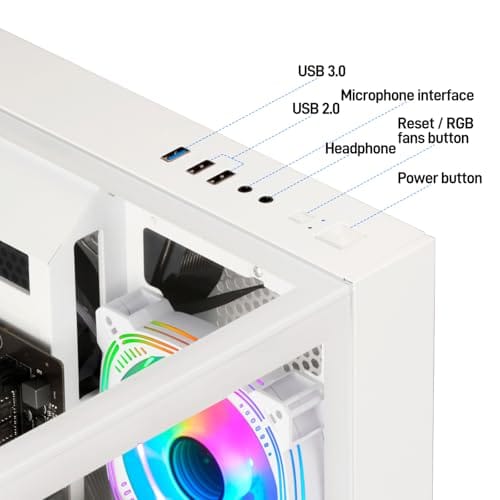
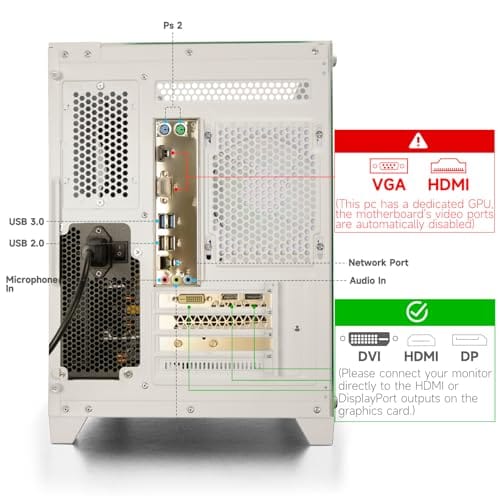
Connectivity and upgrade path: WiFi 6 is included, and the board exposes an M.2 slot plus spare DDR4 slots for later expansion. PSU wattage, connector layout, case clearance, and waranty length beyond the stated 1-year coverage are not specified, so plan GPU upgrades cautiously.
That WIWB machine pairs a Ryzen 5 clocking up to 4.1 GHz with an RX 560 4GB card, 16GB of DDR4, a 512GB SSD, and Wi-Fi 6, all for $569.99 at a 4.7-star owner rating. It won’t chase high refresh rates, but for 1080p esports and everyday work it’s a legitimate value play against either brand’s entry SKU.
Real-world scenarios
The first gaming PC under $700
If this is a starter rig for 1080p games, Skytech’s airflow-first entry builds edge ahead on cooling and looks, while Cyberpower gives you more price points to hit an exact number. Either brand works. Just confirm the GPU model before you click buy, because that single part decides your frame rates far more than the badge on the case.
A home-office and light-work box
For spreadsheets, browser tabs, and the occasional game, you don’t need either premium tier. An Intel Core i7 office tower like the $499.99 abytespark handles this without breaking a sweat, and our best budget prebuilt PC for home server guide covers the always-on variants if you want one running 24/7.
A quiet upgrade you’ll keep three years
Planning to hold the machine a while? Prioritize the power supply and case airflow over a slightly faster GPU. Skytech’s cases give you room to add drives and fans later. Cyberpower’s broader lineup lets you start one tier higher for the same money you’d have spent chasing accessories.
A dorm or small-desk build
Tight on space and noise budget? Neither brand builds a true small-form-factor box, so you’re choosing among mid-towers regardless. Look at physical dimensions and fan noise reports before the badge. A cooler-running WIWB or abytespark tower can sit quieter under a desk than a premium SKU crammed with high-RPM fans running loud out of the box.
Pricing and availability
Both brands float their sticker prices with the calendar. Prime Day, Black Friday, and back-to-school windows routinely knock $80 to $150 off the same SKU, so a Cyberpower that looks overpriced in March can be the deal of the season in July. Availability is broad for both, with Amazon and Best Buy carrying rotating stock. The budget no-name towers, by contrast, hold steadier prices but come and go faster, so grab one when it’s in stock rather than waiting for a sale that may not arrive.
One more pricing wrinkle worth knowing. The brand SKUs often bundle a keyboard and mouse, while the budget towers sometimes don’t. Factor that in. A $30 accessory bundle can erase a chunk of the price gap if you’d have bought those peripherals anyway. And check the warranty length, since a one-year versus two-year term is real money on a machine you plan to keep. If you’re weighing resolution against budget, our best budget prebuilt PC for 1440p gaming breakdown shows where the extra dollars actually land.
Which to buy
Pick Skytech if airflow, RGB, and an AMD-heavy build matter to you, and you’re comfortable enabling the memory profile yourself. Pick Cyberpower if you want the widest choice of price points and a support process that’s been battle-hardened by volume. Both are safe first prebuilts. Neither is the value champion, though, and that’s the quiet truth of this whole segment.
If your real goal is the most computer per dollar and you can live without a big-brand warranty desk, a lean Intel Core i7 tower like the abytespark undercuts both while still handling office work and casual play. At $499.99 with a 4.4-star rating, it’s the sort of machine that makes you question the brand premium entirely. For gaming-first buyers, cross-shop it against our best budget prebuilt PC for 1080p gaming shortlist before deciding.
Pros
- 512GB SSD bot drive avoids the HDD bottleneck common in budget prebuilts
- RX 590 8GB VRAM buffer handles 1080p textures better than 4GB budget cards
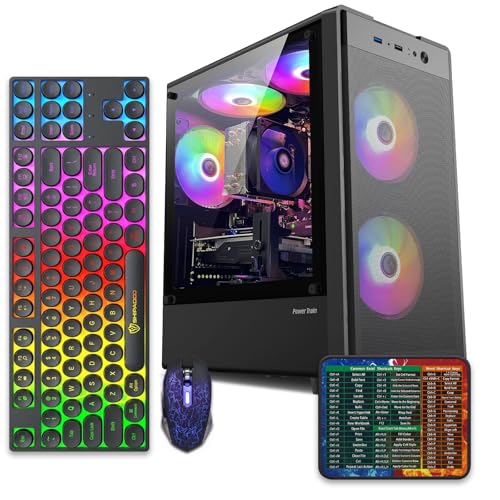
- Complete bundle with RGB peripherals means no extra spend to start using
- Genuine Windows 11 Home 64-bit preinstalled, no activation hassle out of box
Cons
- Limited owner feedback at time of writing, verify seller reputation before purchase
- Core i7-4770 is Haswell era LGA150, no upgrade path and weak IPC versus modern CPUs
- Windows 11 on 4th-gen Intel is unsupported by Microsoft and may miss feature updates
- No CD/DVD-ROM support and RAM/GPU generation limits future workload headroom
This is an entry-tier prebuilt tower built around an Intel Core i7-4770 Haswell CPU, 16GB RAM, a 512GB SSD, and an AMD Radeon RX 590 8GB GDDR5 GPU. It targets budget buyers who need a working office and light gaming PC with peripherals bundled, not enthusiasts chasing current-gen performance.
The defining feature is the RX 590 8GB paired with a 512GB SSD, an uncommon combo at this price band. Cards in this class typically handle 1080p esports titles at 60+ FPS on medium to high, matching the vendor claim for CS:GO, League of Legends, Apex, and Overwatch. Newer AA titles will need lowered settings.
Trade-offs are significant. The i7-4770 launched in 2013, so IPC, single-thread performance, and platform features like NVMe bot, PCIe Gen4, and modern USB are limited. Windows 11 runs here but sits outside Microsoft's official supported CPU list. There is no realistic CPU or socket upgrade path on LGA1150.
Buy this if you need a plug-and-play 1080p esports and office tower with keyboard, mouse, and RGB included at a low outlay. Skip this if you want current-gen platform support, sustained AA 1440p gaming, or a build with a meaningful upgrade runway.
GPU class: The AMD Radeon RX 590 8GB GDDR5 is a Polaris-refresh card roughly equivalent to a GTX 1060 6GB tier. Expect 1080p 60+ FPS in esports titles like CS:GO, Overwatch, Apex, League, and Fortnite on medium settings, matching the listing's claims.
AAA and modern titles: The vendor lists GTA V, Warzone, Hogwarts Legacy, and The Division 2. Realistically, these run at 1080p low to medium with FSR upscaling where suported.Ray tracing is unsupported on RX 590. No DLSS, no frame gen, no AV1 encode.
CPU bottleneck: The Core i7-4770 quad-core with 8threads at up to 3.9GHz will bottleneck the RX 590 in CPU-heavy titles like Warzone and Escape from Tarkov. Expect frame time inconsistency in large team fights even when average FPS looks aceptable.
Storage and RAM fit: 512GB SSD holds Windows plus 3 to 5 modern game installs before space pressure. 16GB DR3-era RAM is adequate for current esports but leaves no headroom for heavy streaming, browser tabs, and OBS NVENC alongside a game session.
Common questions
Is Cyberpower or Skytech better for gaming?
At the same price they land within a few frames of each other, since both ship comparable GPUs. Skytech’s mesh cases cool a little better under load, which helps sustained frame rates. Match the GPU model first, then let case airflow break the tie.
Do either of these brands make actual mini PCs?
Not in the small-form-factor sense. Both build standard mid-tower desktops. If you want a true palm-sized box, you’re looking at Beelink, Minisforum, or a NUC instead, and those serve a different use case entirely.
Why is a no-name tower sometimes cheaper than both?
Smaller sellers skip the marketing budget, the retail-shelf costs, and often the phone-support staff. You trade a recognizable warranty desk for a lower price. For a simple office or 1080p build, that trade often makes sense.
Should I upgrade the RAM speed after buying?
You usually don’t add RAM, you just enable the faster profile that’s already installed. Boot into the BIOS, turn on EXPO or XMP, save, and reboot. Ryzen builds in particular gain real performance from this two-minute step.
Which brand has better long-term support?
Cyberpower’s larger volume means a more established RMA process and easier parts sourcing. Skytech’s support is fine but leaner. For a machine you plan to keep and tinker with, that broader support network is a point in Cyberpower’s favor.


































Write Your Review
No reviews yet. Be the first to share your experience!