

The Corsair M75 Wired is the best Corsair gaming mouse for most players. Its 74-gram body makes sense for shooters and everyday desktop use, and its swappable side buttons give left-handed players the same thumb-button access as right-handed players. At about $40 in our price snapshot, it leaves room in the budget for a larger mousepad.
Buy for your grip and the controls you use every night. The Sabre v2 Pro Ultralight Wireless suits low-sensitivity shooter players who want a lighter mouse and a clear pad. The Scimitar Elite Wireless SE earns its space with a sliding MMO keypad. The Ironclaw Wireless SE gives larger right hands a wider shell to rest on, while the compact Katar Pro XT is the least expensive pick here.

CORSAIR M75 Wired RGB Lightweight FPS Gaming Mouse – Black | 26,000 DPI, Swappable Side Buttons, PC


The best Corsair gaming mice at a glance
| Pick | Mouse | Defining feature | Best for | Trade-off |
|---|---|---|---|---|
| Best overall | Corsair M75 Wired | 74 g with swappable side buttons | Mixed games and left-handed play | USB cable across the desk |
| Best for FPS | Corsair Sabre v2 Pro Ultralight Wireless | 36 g with 2.4 GHz wireless | Low-sensitivity aiming | Shorter battery life at 8,000 Hz |
| Best for MMO | Corsair Scimitar Elite Wireless SE | Sliding 12-button thumb grid | Ability and item bindings | 114 g and a denser layout |
| Best for large hands | Corsair Ironclaw Wireless SE | 80 mm wide with a palm-grip shell | Right-handed palm grip | 130 g |
| Best budget pick | Corsair Katar Pro XT | Compact 73 g wired body | Small hands and claw grip | Thumb buttons on the left side only |
Best overall Corsair mouse — M75 Wired
The M75 Wired is the one I’d start with if your week includes a shooter, a few co-op sessions and some desktop work. Its 74-gram body is light enough for broad sweeps, and it has the familiar controls most players need. Two useful thumb buttons. No charging routine. Corsair specifies a 26,000 DPI Marksman optical sensor, and iCUE lets you set the DPI presets and lighting.
What sets it apart is the hardware on the sides. The magnetic buttons can be swapped between raised, clickable pieces and smooth covers. If you hold the mouse in your left hand, you can put the active pair on the right and cover the opposite side so your fingers can rest there without triggering those buttons. That can make a big difference in a game where you use a thumb button for push-to-talk or a melee action. A symmetric shell alone can’t give you that access.
The 1.8-meter USB cable is the main reason to choose something else. If you play on a short desk with the computer off to one side, check whether the cable has enough slack for a full sweep. A mouse bungee can hold the slack above the pad if the cable keeps catching behind your keyboard. Choose the Sabre if you routinely sweep the full width of a large pad and want to keep that space clear. If your hand feels crowded on a narrow mouse, look at the Ironclaw before buying.
Best Corsair mouse for FPS — Sabre v2 Pro Ultralight Wireless
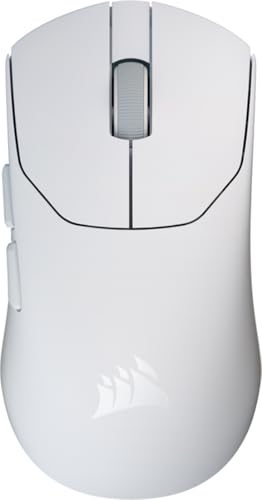
At 36 grams, the white Sabre v2 Pro Ultralight Wireless weighs less than half as much as the M75 Wired. That gap is the reason to consider it if you play at low sensitivity and lift the mouse often to recenter it. Less mass gives you less to move and stop when you change direction. If you’re coming from a heavier mouse, keep your regular sensitivity at first so you can judge the change in shell weight on its own.
It connects wirelessly through a 2.4 GHz USB receiver, and Corsair includes grip tape and spare skates. The Marksman S optical sensor is rated up to 33,000 DPI, and the mouse supports up to 8,000 Hz polling. For DPI changes and button mapping, use Corsair’s browser-based Web Hub. Budget for a free USB port for the receiver and keep the charging cable within reach.
Corsair rates the battery for up to 70 hours at 1,000 Hz and lists 16 hours at 8,000 Hz. Those figures make 1,000 Hz a sensible starting point if you play throughout the week and prefer to charge less often. If your main reason for buying wireless is switching between a gaming PC and a laptop, the Ironclaw’s separate Bluetooth mode is a better fit. For ultralight FPS use, the weight difference is the reason I’d pay the extra $10 over the M75 at the prices we found.
Best Corsair mouse for MMOs — Scimitar Elite Wireless SE
Pick the Scimitar if your left hand keeps leaving the movement keys to reach raid abilities or party shortcuts. Its standout feature is a grid of 12 thumb buttons that slides forward or backward. You can position it where your thumb lands naturally, then tighten it in place. There are 16 programmable buttons in total, so the other controls can handle a few frequently used actions too.
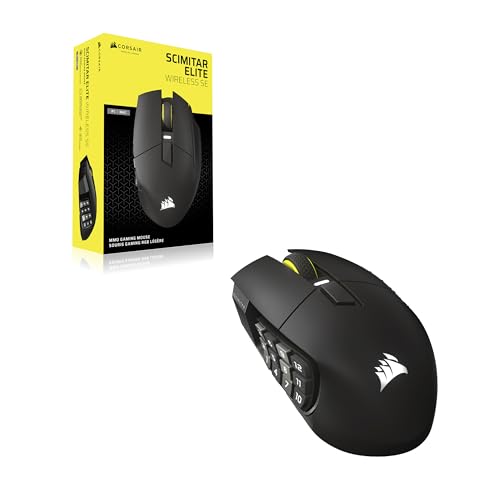
Start by mapping three or four reliable actions, such as an interrupt, a defensive ability and target selection. Leave some positions open while you get used to the grid. If your thumb needs to stretch for the far row, shift the panel before you assign more commands. Corsair’s iCUE software handles the bindings, and the mouse supports both 2.4 GHz wireless and Bluetooth. Corsair rates it for up to 150 hours over 2.4 GHz with RGB off.
The 114-gram body and dense side panel make more sense if you use those extra bindings every session. If you mainly want two easy-to-find controls for reload and voice chat, the M75’s simpler layout takes less getting used to. Check the Wireless SE label at checkout. Corsair also sells a wired Scimitar RGB Elite and a Scimitar Elite Wireless without the SE suffix. If the grid is your priority, our guide to the best MMO mice compares other ways to put more controls under your thumb.
Best Corsair mouse for large hands — Ironclaw Wireless SE
The Ironclaw Wireless SE is the Corsair mouse I’d choose if my palm hung off the back of compact mice. Corsair lists the shell at 130 mm long, 80 mm wide and 45 mm high, with a right-handed shape aimed at medium and large hands. Compare those dimensions with a mouse you’ve used comfortably. The width is especially worth checking if you currently pinch the sides of a small shell just to lift it.
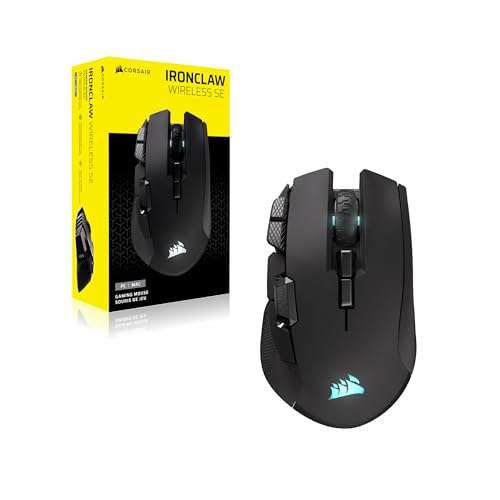
There are 10 programmable buttons, a 26,000 DPI optical sensor and three ways to connect. You can leave the 2.4 GHz receiver in your desktop, use Bluetooth on another computer or plug in over USB-C. That mix is appealing if the same mouse goes from daytime work to evening games. Try assigning grenades, map access or voice chat to the controls you can reach while keeping your grip steady.
At 130 grams, the Ironclaw is the heaviest mouse here. If you lift and reset often with fingertip grip or low sensitivity, that weight comes with you on every reset. This pick makes the most sense when you want to rest your whole palm on the shell and use the extra controls. The M75 is a lighter starting point for left-handed players, and the Katar is a better shape to consider if large mice make you reach for the wheel.
Best budget Corsair mouse — Katar Pro XT
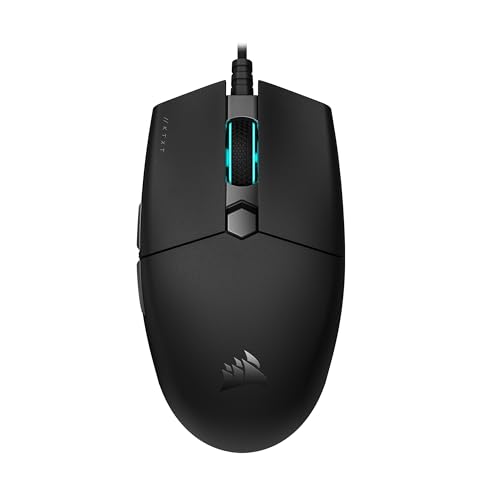
The Katar Pro XT is the pick for a small hand, a wired setup and a budget around $30. Corsair gives it a compact symmetric shell, a 73-gram body, an 18,000 DPI optical sensor and a flexible paracord cable. The short body is the appeal if you hold a mouse mainly with your fingertips or arch your fingers into a claw grip and want some clearance behind your palm.
The Katar and M75 weigh within a gram of each other on Corsair’s published figures, so choose between them by shape and controls. The Katar’s two thumb buttons sit on the left edge of the shell, where they’re easy to reach with your right thumb. If you use your left hand and rely on those buttons for abilities or voice chat, the M75’s right-side button option is worth the extra spend.
The Katar is also a sensible spare for a basic desktop and a good buy if you already know you prefer a compact mouse. If you have long fingers and a relaxed palm grip, you may find yourself curling your fingers to reach the main buttons comfortably. In that case, the larger Ironclaw is worth considering even if the Katar is cheaper. Check for the Pro XT suffix before you order. The Katar Pro Wireless is a separate model.
How We Evaluated
We compared Corsair’s documented shell shape, weight, button placement, connection modes and configuration options. We gave each mouse a role based on the controls you’d actually reach for in that kind of game. Published DPI and polling figures describe settings the hardware supports. Comfort depends on your hand and grip, and battery figures depend on the specified connection and settings.
All five picks had new, in-stock Amazon US offers when we checked on November 25, 2026. The listed prices ran from about $30 to $70. Those prices can change. If the M75 and Sabre move much farther apart, weigh how much you’d pay to lose the cable and cut 38 grams.
How to choose a Corsair gaming mouse
Where does your hand rest?
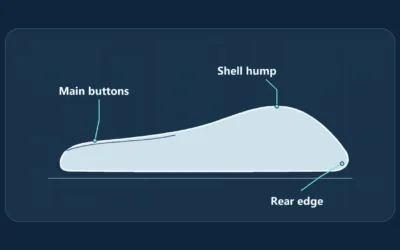
Place your hand on your current mouse as you would during a match. If most of your palm rests on the shell, you’ll probably care about how the back and sides fill your hand. If only your fingers and the heel of your hand touch, you might prefer room to curl your fingers and pull the mouse inward. Check how to choose a gaming mouse for more on matching your grip to a shell.
How many actions need a thumb button?
Write down the commands you’d move to the mouse. Two routine actions can fit on the M75 or Katar. If the list grows to include several cooldowns, items and targeting functions, the Scimitar gives those commands distinct places. The Ironclaw suits players who want more programmable controls while keeping an open side grip. Whichever one you pick, confirm you can reach the buttons you need without lifting your palm or squeezing the mouse tighter.
Will you notice the cable or the charging routine more often?
Wired makes sense when you have an open path from your mousepad to a USB port and want a mouse that’s always ready. A receiver is more appealing when the cable rubs your monitor stand or cuts across your pad. If the device also needs to work at a laptop that stays in your bag, Bluetooth on the Ironclaw or Scimitar can free a port. Compare the modes and shapes in our wireless gaming mouse guide if cable-free use is the deciding factor.
Frequently asked questions
Which Corsair mouse is best for left-handed gaming?
The M75 Wired is the strongest choice here because its shell and swappable side buttons both accommodate left-handed play. If you’re comparing other symmetric mice, check the listing photos for an actual clickable pair on the right flank. The Katar Pro XT has a symmetric outline with its thumb buttons on the left flank.
Do I need to use the highest DPI or polling rate?
Set DPI to a value that gives you the cursor speed and in-game range you want. If you’re moving from another mouse, use your old DPI and game sensitivity as a baseline. Polling rate controls how often the mouse sends updates. Start at 1,000 Hz on the Sabre, then try the higher setting if you’re curious and comfortable with charging it more often.
Which Corsair software configures these mice?
The Sabre v2 Pro Ultralight Wireless uses Corsair Web Hub for things like DPI and button mapping. The M75 Wired, Katar Pro XT, Scimitar Elite Wireless SE and Ironclaw Wireless SE use iCUE for customization. If you plan to set up the mouse on a shared PC, check whether you can install the software or access the browser tool you need.
Bottom Line
Get the Corsair M75 Wired if you want a single mouse for several kinds of games and you’ve got a clean route for a cable. The Sabre is the upgrade for low-weight wireless FPS play. Buy the Scimitar if you’d use the thumb grid, the Ironclaw if your right palm needs a wider shell, or the Katar if a compact wired shape is what you’re after.




























Write Your Review
No reviews yet. Be the first to share your experience!