

The 75% keyboard has become the darling of gaming setups, and plenty of players wonder if the compact layout actually helps their play or just clears desk space. The honest short answer: a 75% board doesn’t make you aim better or react faster on its own, but the layout it enables can genuinely improve comfort and mouse room, which matters more for gaming than most people expect. Let’s break down what a 75% keyboard really does, where it helps, and where the hype outpaces reality.
Keyboard size is one of those decisions that feels cosmetic until you live with it, and the compact trend has real reasoning behind it. If you’re weighing layouts, our guides to the best 65% keyboard for gaming and the best 65% keyboard for a compact desk cover the even smaller sibling. Here’s what the 75% format brings to a gaming rig, and whether it’s worth switching.
The short answer
A 75% keyboard keeps almost every key of a full board, including the function row and arrow keys, but drops the number pad and squeezes everything closer together. For gaming, the real payoff is mouse space. By shaving off the numpad, your mouse hand and keyboard hand sit closer to your body, which reduces shoulder strain during long sessions and gives low-sensitivity players more room for big sweeps. The keys themselves don’t perform any differently, so a 75% board won’t lower your reaction time. It just makes the ergonomics of gaming more comfortable.
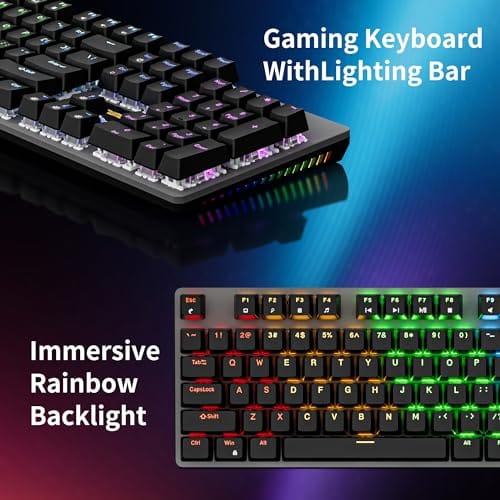
The switches under those keys matter far more to feel than the layout does. A hot-swappable gaming board like the Newmen GM325Pro, a $20.89 104-key mechanical keyboard rated 4.8 with linear red switches and rainbow LED backlighting, shows how much the switch type and build drive the experience regardless of size.

Pros
- Hot-swap sockets allow switch experimentation without soldering tools or PCB risk
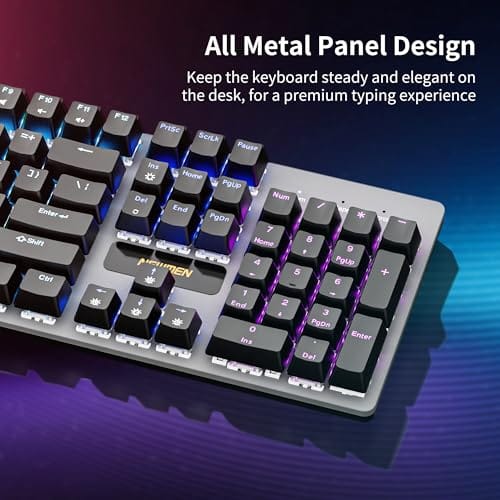
- Metal top plate delivers firmer typing feel than plastic budget boards at this tier
- Full-key rollover and linear red switches handle rapid inputs for casual gaming
Cons
- Limited owner feedback at time of writing, so long-term reliability is unproven
- RGB is restricted to side lighting only, per-key backlight is fixed rainbow patterns
- ABS keycaps typical at this tier tend to shine and wear faster than PBT
The Newmen GM325Pro is a budget full-size 104-key wired mechanical keyboard aimed at first-time mechanical buyers and casual gamers who want a hot-swap PCB without moving up to enthusiast pricing. It ships with linear red switches, a metal top plate, ABS keycaps, and side-edge RGB lighting.
The defining feature here is the hot-swap socket combined with linear red switches. That gives new users a low-friction path to swap inactile or silent switches later without soldering. Typing fel on metal-plate boards at this tier is usually firmer and less hollow than all-plastic budget pers, based on category norms.
Trade-offs are typical for the price class. Per-key RGB is not suported, only side lighting is true RGB while the top backlight runs 13 preset rainbow effects. ABS keycaps tend to develop shine within months of heavy use, and Newmen does not publish switch lifecycle, polling rate, or NKRO wired specs in the source data.
Buy this if you want a cheap full-size hot-swap platform to learn on and plan to upgrade switches or keycaps later. Skip this if you need per-key RGB, PBT caps, a documented polling rate, or a keyboard with a dep owner review history to validate QC.
Switches and layout: Linear red switches on a full 104-key ANSI layout, with full-key rollover claimed by the manufacturer. Actuation force, travel, and switch brand are not specified in the source. Linear reds typically sit near 45g actuation and 4m total travel in this category.
Hot-swap PCB: Sockets accept standard MX-style switches, so tactile, clicky, or silent linear options from third parties drop in without soldering. Pin compatibility (3-pin vs 5-pin) is not specified, buyers should confirm before ordering replacement switches.
Build and lighting: Metal top plate over ABS black keycaps. RGB is limited to the side edge, while the top backlight cycles through 13 preset rainbow patterns rather than per-key addressable RGB. Case material below the plate is not specified.
Connectivity and software: Wired only via a detachable 1.8m USB cable. FN combos cover F1 to F11 media and calculator shortcuts. Customization software suports key remap, macro recording, and lighting tweaks, though poling rate and software platform support are not specified.
The longer explanation
Gaming keyboards get judged on a handful of things: switch feel, response, build quality, and how they fit your desk and hands. Layout affects that last part, not the first three. A 75% board retains the function row (handy for in-game binds and shortcuts) and dedicated arrow keys (useful in plenty of titles), while cutting the numpad and the navigation cluster to save width. Compared to a tenkeyless board, it’s slightly more compact. Compared to a 65%, it keeps the function row a 65% drops.
That makes 75% a middle ground, and for a lot of gamers it’s the comfortable one. You keep the keys you actually use in games, lose the numpad you rarely touch mid-match, and gain mouse room. The catch is that the tighter spacing places keys closer together, so if you type spreadsheets or crunch numbers, the missing numpad and denser layout can slow you down. For gaming alone, that tradeoff usually lands in the 75% board’s favor.
It’s worth being specific about the mouse-room benefit, because it’s the part that gets hand-waved. Players who run low DPI, common in tactical shooters, move the mouse with big arm sweeps, and a full-size board pushes the mouse pad rightward until those sweeps run out of desk. Cutting the numpad reclaims a few inches, which sounds trivial until you notice your mouse no longer clips the keyboard edge mid-flick. It also lets you angle the keyboard slightly, keeping your wrists straighter. None of that shows up in a framerate graph, but over a three-hour session your body notices, and comfort keeps you playing at your best.
How it works
The 75% name refers to the board being roughly 75% the width of a full-size keyboard. Designers achieve it by removing the number pad entirely and collapsing the navigation keys (home, end, page up and down) into a tighter arrangement or onto secondary function-layer bindings. The function row and arrow keys stay physical, which is the whole point of choosing 75% over the smaller 65%. Everything sits closer together, so the board’s footprint shrinks without sacrificing the keys gamers reach for.
Underneath, a 75% board is mechanically identical to any other mechanical keyboard. The switches, keycaps, and hot-swap sockets work the same way. A board like the Newmen GM325Pro packs hot-swappable switches and a metal panel into a compact shell, letting you change switch feel without soldering. So the format is purely about key arrangement and size. The typing and gaming feel comes entirely from the switches and construction, not the layout percentage on the label.
Why it works this way
The layout exists because most gamers found the full-size numpad was pure dead weight during play. It pushes the mouse hand outward, widens the shoulders, and occupies desk space that a low-sensitivity player wants for mouse movement. Cutting it addresses a real ergonomic complaint. The reason 75% kept the function row, unlike the 65%, is that many games and productivity tasks lean on F-keys, so the format targets people who want compactness without losing those bindings.
It’s a compromise designed around how people actually use their keyboards while gaming. Keep what you press, drop what you don’t, tighten the rest. That philosophy is why 75% has become so popular. It hits the balance point between the space savings of a tiny board and the full feature set of a big one, without forcing you onto a function layer for the keys you use most.
There’s a practical wrinkle to the tight layout worth flagging. Because a 75% board packs keys close together, some models shift the delete, page up, or arrow cluster into positions that take a week or two of muscle memory to relearn. That’s not a flaw, just an adjustment, and different brands arrange those edge keys differently. If you rely on a specific key placement for in-game binds, check the layout photos before buying. Most players adapt quickly, and the payoff in desk space is usually worth the short retraining period.
When you’d want this
You’d want a 75% board if you game at low mouse sensitivity and need sweeping room, if your desk is cramped, or if long sessions leave your shoulders aching from a wide full-size layout. It’s also ideal for players who still want the function row and arrow keys for binds and don’t want to give those up to go smaller. If you travel with your setup or run a minimalist desk, the reduced footprint is a clear plus.
You’d skip it if you regularly enter numbers, since losing the numpad hurts, or if you simply prefer the spacing of a full board. Build quality still trumps layout, though. A well-made compact keyboard beats a flimsy full-size one for gaming feel. The Cherry KC 200 MX, a $56.31 renewed office board rated 4.0 with new MX2A silent red switches and a metal plate frame, shows how much the frame and switch choice shape the experience even in a larger form factor.

Pros
- MX2A Silent Red linears actuate quietly, good fit for open-plan offices
- Metal plate frame keeps chassis stiff and reduces caseping under typing
- Cherry Gold-Crosspoint contacts rated for 50 million keystrokes on this variant
- Full-size layout with dedicated numpad suits data entry and spreadshet work
Cons
- Renewed unit with no owner fedback loged yet, cosmetic and wear condition varies
- Silent Red linears lack tactile bump, typists who prefer fedback should pick Brown
- Source data omits connectivity, cable type, polling rate, and dimensions
The Cherry KC 200 MX is a full-size office-focused mechanical keyboard sold here as a Renewed unit in Bronze with MX2A Silent Red linear switches. It targets office typists, developers, and finance or admin users who want Cherry switch fel and a metal plate frame without the RGB and gamer styling of enthusiast boards.
The defining feature is the MX2A Silent Red switch, Cherry's updated linear with dampened stems aimed at reducing bottom-out and return noise. Cherry rates this variant for 50 million keystrokes. Based on the linear profile, expect smooth actuation with no tactile bump, which suits fast touch typists and users on frequent video calls.
Trade-offs are typical at this tier and Renewed status. Silent Red linears are polarizing, users coming from Browns or Blues will miss the tactile feedback, and the source does not specify polling rate, connection type, cable, keycap material, or dimensions. As a Renewed listing, cosmetic condition and remaining switch life depend on the refurbisher rather than a factory-fresh baseline.
Buy this if you want a quiet full-size Cherry mechanical for office or shared-space use and value the metal plate build over RGB features. Skip this if you prefer tactile or clicky switches, need confirmed wireless or USB-C connectivity, or want a waranty profile equivalent to new stock.
Switches: Cherry MX2A Silent Red, linear with integrated dampeners, made in Germany with Gold-Crosspoint contacts. Rated for 50 million keystrokes on this variant, versus 100 million on MX2A Brown. Linear travel with no tactile bump favors light, fast keypresses over deliberate typing fedback.
Build: Metal plate frame under the switches, which stiffens the deck and cuts flex compared with plastic-only office boards. Cherry positions the KC 200 MX as a slim modern design, though exact case height, weight, and keycap material are not specified in the source data.
Layout and indicators: Full-size layout retains the dedicated numpad and function row, which maters for spreadsheet,ERP, and accounting workflows. White LED status indicators are built into Caps Lock, Scroll Lock, and Num Lock keys, avoiding a separate indicator strip and keeping the top edge clean.
Gaming fit: Silent Red linears work for casual gaming and MMO or productivity crossover use given their light linear fel, but the source does not list polling rate, N-key rollover, or onboard profiles, so competitive esports buyers should confirm specs before committing.
What to look for in a gaming keyboard
Whatever size you choose, prioritize the switches first. Linear switches like the reds in the Newmen GM325Pro are popular for gaming because they actuate smoothly without a tactile bump, which many players prefer for fast repeated presses. Silent variants like the MX2A silent reds in the Cherry board cut noise if you share a space. Hot-swap sockets are a bonus, letting you change switch feel later without soldering, which the Newmen board supports.
Build quality is next. A metal plate or frame, like both boards here use, keeps the deck rigid so it doesn’t flex under heavy presses, which improves the typing and gaming feel more than any RGB feature. Then consider the layout to match your desk and play style. For pure gaming, a 75% or smaller board frees mouse room, while a full-size makes sense if you also crunch numbers. Match the switch to your preference, the build to your budget, and the size to your desk.
Common misconceptions
The biggest misconception is that a smaller keyboard makes you a better gamer. It doesn’t. A 75% board won’t lower your reaction time or improve your aim, since the keys perform identically to a full board. What it changes is comfort and mouse space, which help indirectly over long sessions but aren’t a skill boost. The second myth is that compact boards feel cheap or cramped. Feel comes from switches and build, not size. A well-built 75% board with quality switches feels just as good as any full-size unit, sometimes better.
Frequently asked
Does a 75% keyboard improve gaming performance?
Not directly. The layout doesn’t change how fast keys register or how quickly you react. Its benefit is ergonomic: dropping the numpad gives your mouse hand more room and reduces shoulder strain over long sessions. That comfort can help you play better for longer, but the board itself doesn’t make you faster or more accurate.
What’s the difference between 75% and 65% for gaming?
A 75% board keeps the function row and dedicated arrow keys, while a 65% drops the function row to shrink further. For gaming, choose 75% if you use F-key binds or want arrows without a function layer, and 65% if you want maximum mouse space and don’t mind reaching a secondary layer for those keys. Both cut the numpad.
Will I miss the numpad for gaming?
For gaming alone, almost certainly not, since games rarely use the numpad and its removal frees valuable mouse space. You’ll only miss it if you also enter a lot of numbers, do accounting, or use numpad-heavy shortcuts. If your PC doubles as a work machine with heavy number entry, weigh that before going compact.
Are hot-swappable switches worth it?
If you like tinkering or aren’t sure which switch feel you prefer, yes. Hot-swap sockets, like those on the Newmen GM325Pro, let you pull and replace switches without soldering, so you can try linear, tactile, or silent options and change your mind later. For someone who wants to set it and forget it, they matter less, but they add flexibility cheaply.
Do linear switches help in fast-paced games?
Many competitive players prefer linear switches like the reds in these boards because they actuate smoothly with no tactile bump, which can feel faster for rapid repeated presses. It’s largely down to personal preference, though. Some players game happily on tactile switches. Try both if you can, since feel is subjective and there’s no single correct choice for gaming.





























Write Your Review
No reviews yet. Be the first to share your experience!