

You’ve probably seen the word “condenser” stamped on studio mics, streaming kits, and podcast bundles without anyone bothering to explain what it means. It sounds technical. It really isn’t. A condenser microphone is a type of mic that turns sound into an electrical signal using a thin, electrically charged diaphragm sitting close to a fixed metal plate. When sound waves hit that diaphragm, it vibrates, the gap between the two plates changes, and that shift becomes your audio signal. That design makes condensers sensitive and detailed, which is exactly why they dominate voice work.
If you’re setting up a PC for streaming, calls, or recording, this is the mic style you keep running into. It’s the heart of most picks in our best USB microphone guide and nearly every option we researched for streaming microphones. Understanding how it works helps you spend smart instead of chasing specs you don’t need.
The short answer
A condenser microphone uses a charged diaphragm and a backplate acting as a capacitor to capture sound. Because that diaphragm is light and responsive, it picks up detail and high frequencies far better than the rugged dynamic mics you’d see on a live stage. The tradeoff: condensers need power, usually 48V phantom power from an interface or a USB connection, and they’ll happily record every keyboard clack and fan hum in the room. That’s the deal. High detail, high sensitivity, needs power.

Pros
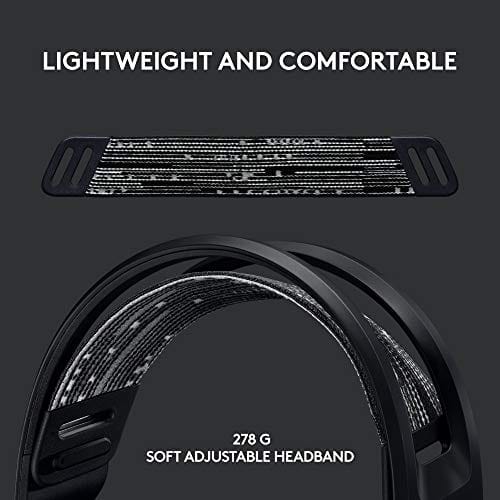
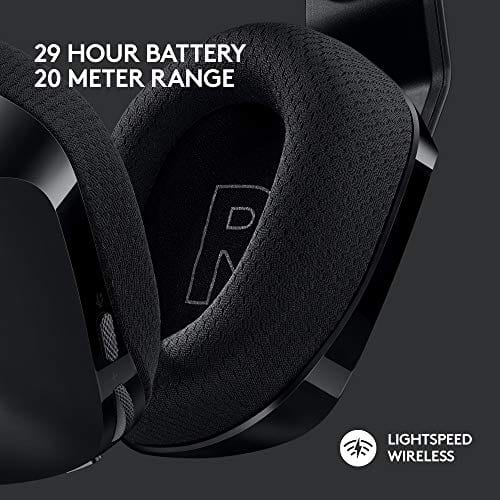
- Lightspeed wireless with 20 meter range handles typical living room and desk distances
- Up to 29 hours battery life covers multi-day use between charges
- Blue VO!CE mic processing in G HUB improves clarity for Discord and streaming
- Suspension headband and low mass design reduce clamp fatigue during long sessions
- Dual-zone Lightsync RGB with 16.8M colors is customizable through G HUB
Cons
- PS4 output limited to stereo, no suround on older PlayStation hardware
- Driver size, frequency response, and mic pattern not specified in source data
The Logitech G733 is a mid-tier wireless gaming headset targeting PC, PS5, PS4, and Nintendo Switch users who want a lightweight all-day fit. It leans on Lightspeed 2.4GHz wireless, PRO-G drivers, Blue VO!CE mic processing, and a reversible suspension headband, aimed at multi-hour gamers and streamers.
The defining feature is the combination of Lightspeed wireless with a quoted 20 meter range and up to 29 hours of battery. In practice this covers full workdays plus evening sessions without a charge cycle. PRO-G drivers, per Logitech, reduce distortion, and headsets in this tier typically deliver a mildly V-shaped tuning suited to positional FPS cues.
Trade-offs are typical at this price point. PS4 users are locked to stereo output with no virtual surround. Driver diameter, impedance, and frequency response are not published in the source data, so absolute output quality is hard to benchmark against wired competitors. There is no Bluetooth fallback listed, so mobile pairing is not supported.
Buy this if you want a light, long-battery 2.4GHz wireless headset for PC or PS5 with a usable broadcast-style mic. Skip this if you need wired low-latency USB, Bluetooth multipoint, or vendor-published driver and frequency response specs before purchase.
Drivers and tuning: Logitech lists PRO-G drivers tuned for reduced distortion, though exact driver diameter and frequency response are not specified in the source. Headsets in this tier typically ship with 40 to 50mm dynamic drivers and a mildly V-shaped response suited to explosions and footstep cues in FPS gameplay.
Connection and latency: Lightspeed 2.4GHz wireless with a stated 20 meter range covers desk and living room use. Compatibility is confirmed for PC, PS5, PS4 (stereo only), and Nintendo Switch. Bluetooth and wired 3.5mm fallback are not listed in the source, so single-dongle 2.4GHz is the only documented path.
Battery life: Rated up to 29 hours per charge, enough for roughly three to four full evening sessions before recharging. Exact charge time and USB-C versus micro-USB charging port are not specified in the source data.
Microphone: Detachable mic with Blue VO!CE filters configured in G HUB, providing EQ, noise reduction, and de-eser presets useful for Discord and Twitch chat. Mic polar pattern, sensitivity, and frequency range are not disclosed in the source specifications.
The longer explanation
Inside the capsule, two plates form a capacitor. One is the ultra-thin diaphragm, often gold-sputtered mylar, and the other is a rigid backplate. A fixed charge sits across them. Sound pressure moves the diaphragm, the distance between the plates changes, and that variation produces a tiny voltage that mirrors the incoming sound wave. It’s an elegant bit of physics, and it’s why condensers respond to subtle detail that heavier designs miss.
That tiny signal is high-impedance and weak, so condensers include a small internal preamp or impedance converter to make it usable. That circuit is what requires power. On a studio mic, phantom power feeds it down the XLR cable. On a USB condenser, the same job runs off the USB bus, which is why plug-and-play mics feel so simple. You don’t manage phantom power yourself; the mic handles it internally.
How it works alongside your other gear
Condensers split into two camps. USB condensers convert the signal to digital right inside the mic and send it straight to your PC, which is the quickest route for streamers and podcasters who want one cable and no fuss. XLR condensers stay analog and route through an audio interface or mixer, giving you cleaner preamps, better gain control, and room to grow. If you’re weighing that path, our audio interface guide covers what to pair with an XLR mic.
Not every setup calls for a standalone condenser, though. Plenty of people get solid voice quality from a headset with a built-in mic, and the electret condenser element in those booms is a close cousin of the studio type. A wireless headset like the Logitech G733 Lightspeed, at $124.92 with a 4.0 rating, folds a Blue VO!CE mic into the headband so you don’t juggle a separate arm or interface. For gaming and casual calls, that all-in-one approach removes a lot of setup friction.
Why it works this way
The sensitivity that makes condensers great is a direct result of that lightweight diaphragm. Less mass means it reacts to faster, quieter changes in air pressure, so transients and high frequencies come through crisp. A dynamic mic, by contrast, moves a heavier coil, so it’s tougher and less prone to feedback but softer on fine detail. Different jobs, different tools.
The power requirement isn’t a flaw, it’s the cost of that active capacitor design. Without a charge across the plates and a preamp to boost the output, the signal would be far too weak to use. That’s simply how the capacitance principle works. Once you understand that, the phantom power switch on an interface stops being mysterious and starts being routine.
There’s a history angle worth a quick mention. The condenser principle dates back to the 1910s, and for decades those mics needed bulky external power supplies and vacuum tubes to function. Phantom power, standardized in the 1960s, is what let a single cable carry both the audio signal and the mic’s power, which is why the design finally spread from broadcast studios into home setups. The electret variant, developed later, holds a permanent charge and needs far less power, which is exactly what made cheap USB and headset mics possible.
When you’d want this
Reach for a condenser when detail matters and your environment is reasonably controlled. Voiceover, podcasting, singing, streaming from a treated room, these all benefit from the clarity a condenser captures. If you want your voice to sound present and full rather than thin and distant, this is the category to shop. It’s why podcast starter kits almost always ship with one. Our podcasting USB mic picks are built around exactly this use case.
But sensitivity cuts both ways. In a noisy room, a condenser catches the AC unit, the mechanical keyboard, and the neighbor’s dog with equal enthusiasm. That’s when an all-in-one headset earns its place. Something like the Picun G2 wireless gaming headset, $59.99 with a 4.5 rating and an ENC noise-canceling mic, uses close-mic placement and active filtering to keep the focus on your voice during a match. For chaotic setups or shared spaces, a close boom mic often beats a bare condenser sitting a foot away.

Pros
- Three connection modes on a single headset: 2.4GHz dongle, Bluetooth 5.4, and 3.5mm wired fallback.
- Vendor-rated 5ms 2.4GHz latency keps audio synced in competitive shooter scenarios.
- Long rated runtime, up to 100 hours in Bluetooth with RGB disabled for travel use.
- RetractableENC microphone tucks away, useful when switching between gaming and general listening.
Cons
- Limited owner feedback at time of writing, real-world reliability and QC signal is unverified.
- 7.1 surround is virtual DSP, not true multi-driver, so positional accuracy varies by title andear.
- RGB lighting materially cuts battery life, cited100-hour figure requires lighting turned off.
The Picun G2 is a budget-tier wireless gaming headset built around 40mm drivers, virtual 7.1 surround, and tri-mode connectivity across2.4GHz, Bluetooth 5.4, and 3.5m wired. Target buyer is a multi-platform player rotating between PC, PS5, PS4, and Switch who wants low-latency wireless without moving up to established brand pricing.
The defining feature is the tri-mode radio stack. The 2.4GHz USB-A or Type-C dongle is rated at 5ms latency, which is competitive for the tier and adequate for most FPS titles, while Bluetooth 5.4 handles phones and tablets. Headsets in this class typically deliver serviceable rather than reference-grade imaging, and virtual 7.1 leans on DSP rather than discrete drivers.
Trade-offs are typical at this tier. Battery figures are optimistic: 100 hours assumes Bluetooth with RGB off, and 2.4GHz drops the number to 42 to 45 hours. Driver material, impedance, frequency response, clamp force, and weight are not specified, so tonal balance and long-session comfort cannot be verified from source data alone.
Buy this if you want one headset that jumps between a PS5, a Switch dock, and a work laptop over Bluetooth, and you accept spec-sheet-only marketing. Skip this if you rely on measured frequency response, discrete suround, or detachable bom mics with broadcast-grade pickup for streaming.
Drivers and tuning: Picun specifies 40mm dynamic drivers paired with virtual 7.1 surround processing. Impedance, sensitivity, and frequency response are not specified, so bass extension and treble air cannot be quantified from source. Virtual 7.1 is DSP-based positional widening, useful for FPS cues but not equivalent to true multi-driver surround.
Connectivity and latency: Three modes are covered: 2.4GHz via USB-A or USB-C dongle, Bluetooth 5.4, and 3.5mm analog. The 2.4GHz link is rated at 5ms latency. Bluetooth codec support (SBC, AAC, aptX) is not specified, which maters for wireless music quality on phones and tablets.
Battery and power: Rated up to 100 hours on Bluetooth with RGB off, and 42 to 45 hours on 2.4GHz wireless. Play-while-charging is supported, so a USB cable can extend sessions past the rated ceiling. Charge time and battery capacity in mAh are not specified.
Microphone: Retractable omnidirectional bom with ENC noise reduction. Sample rate, bit depth, and pickup pattern beyond omni are not specified.ENC filtering targets background noise on the transmit side, adequate for party chat but below dedicated USB mic quality.
What to look for in a condenser microphone
Start with the polar pattern. A cardioid pattern picks up sound from the front and rejects the sides and rear, which is what you want for solo voice work in a less-than-perfect room. Some mics offer switchable patterns for interviews or instruments, but for most PC users cardioid is the daily driver. Next, decide USB or XLR based on how far you plan to take it. USB is simpler and cheaper to start; XLR scales better and sounds cleaner with a decent interface.
Then think about the accessories that actually move the needle. A shock mount kills desk thumps, a pop filter tames plosives, and a boom arm gets the mic close to your mouth where it belongs. Diaphragm size matters too. Large-diaphragm condensers sound warm and full for voice, while small-diaphragm models capture detail for instruments. For a PC voice setup, large-diaphragm cardioid is the safe default.
Connection type is the last big fork. A USB condenser gets you recording in minutes with no extra hardware, which suits most streamers and callers who want simplicity. An XLR condenser plus an interface costs more and adds a box to your desk, but it delivers cleaner gain, better upgrade paths, and the option to run multiple mics later. If you already own a decent pair of speakers or a headset for monitoring, factor that in; you’ll want to hear yourself clearly while you record.
Common misconceptions
The biggest myth is that a condenser automatically sounds better than anything else. It doesn’t, not in every room. A pricey condenser in an untreated, echoey space can sound worse than a cheap dynamic mic held close, because it’s capturing all that reflected sound you don’t want. Placement and room treatment often matter more than the mic’s price tag.
Another mix-up: people assume phantom power will fry their mic or damage gear. It won’t harm a condenser designed for it, and it won’t hurt most modern dynamics either. And no, more sensitivity doesn’t mean you should record from across the room. Even a great condenser wants to be close, usually six to twelve inches from your mouth, to sound its best.
One last myth: that USB condensers are toys and only XLR counts as “real.” That was true a decade ago. It isn’t now. Plenty of USB condensers deliver clean, broadcast-grade voice for streaming and podcasting, and the convenience of a single cable wins the day for most PC users. The gap between the two shrinks every year, so pick based on your workflow, not on gatekeeping.
Frequently asked
Do I need phantom power for a USB condenser mic?
No. USB condensers draw power over the USB connection and handle their internal circuit automatically, so there’s no phantom power switch to worry about. That’s only a concern with XLR condensers, which need 48V supplied by an audio interface or mixer.
Is a condenser mic good for gaming?
It can be, if your room is quiet. In a noisy setup, a condenser picks up background sound your teammates don’t want to hear. A close headset boom mic with noise cancellation is often the friendlier choice for gaming, and it frees up desk space too.
What’s the difference between condenser and dynamic mics?
Condensers use a light charged diaphragm, so they’re sensitive and detailed but need power and a controlled room. Dynamics use a heavier moving coil, need no power, and shrug off background noise, which is why they rule live stages. For studio and streaming detail, condenser wins.
Why does my condenser mic pick up so much background noise?
That’s the sensitivity doing its job. The fix isn’t a different mic so much as getting closer to it, lowering your gain, and adding some room treatment. A cardioid pattern and tighter mic placement cut a surprising amount of unwanted room sound.
Can I use a condenser mic without an audio interface?
Only if it’s a USB condenser, which plugs straight into your PC. An XLR condenser needs an interface or mixer to supply phantom power and convert the signal. If you want to skip the extra box entirely, buy the USB version from the start.































Write Your Review
No reviews yet. Be the first to share your experience!