

If you’ve been staring at two graphics cards that share almost the same name, you’re not alone. The RTX 5070 and the RTX 5070 Ti sit one rung apart in Nvidia’s stack, and the “Ti” suffix hides a gap that’s bigger than a single letter suggests. One card targets smooth 1440p gaming on a reasonable budget. The other pushes toward 4K and heavier workloads, and it asks for more money to do it.
This guide breaks down what actually separates them, in plain English, with the real specs that matter and none of the marketing gloss. We’ll cover memory, core counts, price, and the kind of buyer each one suits. If you’re shopping full systems instead of loose cards, our roundups of the best RTX 5070 Ti prebuilt PC options and the best RTX 5080 prebuilt PC builds give you a sense of where these chips land in real machines. And if you’re hunting a bargain first, the current best GPU deals are worth a scan before you commit.
The short answer
The RTX 5070 Ti is the faster, roomier card. It carries 16GB of GDDR7 memory and a higher core count, which makes it the better pick for 4K gaming and memory-hungry creative work. The plain RTX 5070 ships with 12GB of GDDR7 and fewer cores, so it’s tuned for high-refresh 1440p and lands at a noticeably lower price. Both use the same Blackwell architecture and both support DLSS 4 with multi-frame generation, so the feature set is shared. The difference is muscle, not features.
Put simply: buy the 5070 if 1440p is your ceiling and value matters. Buy the 5070 Ti if you want 4K headroom and plan to keep the card for several years. That’s the whole decision in two sentences. Everything below explains why.

Pros
- GDDR7 memory on a 12GB frame suits 1440p high-refresh and early 4K workloads without hitting VRAM ceiling quickly.
- 0dB fan-stop below 50C keeps the card silent during desktop use, browsing, and light gaming sessions.
- Dual-ball bearing fans rated for roughly twice the lifespan of sleeve-bearing alternatives, reducing long-term maintenance concerns.
- NVIDIA DLSS 4 support enables frame generation and upscaling, recovering performance in ray-tracing-heavy titles.
Cons
- 3.125-slot footprint requires verifying case GPU clearance before ordering, particularly in mid-tower and mATX builds.
- TGP not explicitly listed in source data; pair with a PSU rated at least 150W above GPU draw for transient headroom, typical recommendation at this tier is 850W or above.
The ASUS TUF Gaming RTX 5070 OC is a high-end discrete GPU built on NVIDIA's Blackwell architecture. With 12GB GDDR7 memory and PCIe 5.0 interface, it targets enthusiast builders running 1440p high-refresh or early 4K setups who want a card that can sustain load without thermal throttling.
The standout feature is the thermal stack. ASUS combines a phase-change GPU thermal pad, MaxContact heat spreader with 5% increased surface area, and three Axial-tech fans spinning on dual-ball bearings. Based on the design specs, the phase-change pad should outperform traditional paste under extended gaming or GPU-compute sessions where die temperatures stabilize near TDP ceiling.
The 3.125-slot width is a real consideration, not a marketing point. Builders in tighter mATX or ITX cases need to confirm GPU slot clearance before purchasing. TGP figures are not listed in source data, but GPUs at this tier typically land between 200W and 250W, so a quality 850W PSU is the minimum sensible pairing. The conformal PCB coating and military-grade capacitors address durability concerns but do not offset the need for adequate airflow in the host case.
Buy this if you are building a dedicated 1440p or 4K gaming rig on PCIe 5.0 and want a card with above-average long-term component reliability. Skip this if your case has less than 3.125 slots of GPU clearance or your PSU is below 750W, as headroom for transient power spikes becomes a real stability risk.
VRAM and Resolution Fit: The 12GB GDDR7 frame is well-positioned for 1440p at maximum settings and 4K at medium-to-high presets in current titles. GDDR7 bandwidth reduces memory bottlenecks compared to GDDR6X at equivalent capacity, which matters in texture-heavy and ray-traced workloads.
Upscaling and Frame Generation: DLSS 4 support includes multi-frame generation, which is significant for GPU-limited scenarios at 4K with ray tracing enabled. Buyers targeting high-refresh 1440p esports titles will find DLSS 4 largely unnecessary at this GPU tier, but ray-tracing users benefit directly.
Slot and Clearance Requirements: The 3.125-slot design requires a minimum of four physical PCIe slot spaces free in the case. Card length is not specified in source data; confirm chassis GPU length clearance against ASUS product page measurements before purchasing.
Power and Connector: Connector type is not specified in source data. GPUs at this tier typically use a 16-pin 12VHPWR or 12V-2x6 connector. Verify PSU connector availability and target a PSU with at least 150W above measured GPU TGP for safe transient headroom.
The longer explanation
The headline gap is memory. The RTX 5070 gives you 12GB of GDDR7, while the 5070 Ti steps up to 16GB. That extra 4GB isn’t just a bigger number on the box. Modern games at 4K with high textures, plus ray tracing, can eat well past 12GB, and once you exceed the buffer you get stutter and frame drops that no amount of raw speed fixes. The Ti’s wider memory bus also feeds those cores faster, which is why the two cards spread apart the higher you push resolution.
Core count is the second piece. The 5070 Ti packs more CUDA cores, more RT cores for ray tracing, and more Tensor cores for DLSS work. In practice you’re looking at a meaningful performance lead for the Ti, larger at 4K than at 1080p because higher resolutions lean harder on the GPU. The take on the ASUS TUF Gaming RTX 5070, which runs about $749.99 with a 4.0 rating, is a well-built factory-overclocked board with military-grade components and a protective PCB coating. It’s a strong 12GB card. It just isn’t trying to be a 16GB card.
How we got here
Nvidia has used the “Ti” label for years to slot a beefed-up variant between two main tiers. The pattern repeats every generation. A base card launches, then a Ti version arrives with more cores and often more memory, sitting price-wise between the base model and the next class up. The 50-series follows the same script the 40-series did, and the 30-series before it.
What changed with Blackwell is the memory type. Both cards moved to GDDR7, faster than the GDDR6X of the previous generation, which helps bandwidth even on the 12GB model. DLSS 4 arrived alongside, adding multi-frame generation that can insert several AI-generated frames between rendered ones. That software layer does a lot of heavy lifting, and it’s identical on both cards, which is partly why the base 5070 feels so capable at 1440p despite its smaller buffer.
Why it works this way
Nvidia builds these tiers around resolution targets, not arbitrary lines. The 12GB 5070 is engineered so a 1440p gamer rarely touches the memory ceiling, which keeps the price down and the value high. The 16GB 5070 Ti exists because 4K and content creation genuinely need the headroom. Segmenting the lineup this way lets buyers pay for exactly the tier they’ll use.
There’s a pairing logic too. A mid-tier GPU wants a CPU that won’t hold it back. The 5070 slots nicely beside a strong gaming chip, and our guide to the best GPU for a 9800X3D shows how these cards pair with a top gaming processor. If streaming is part of your setup, the extra encode headroom matters, which is why the best GPU for gaming and streaming breakdown leans toward the roomier options.
When you’d want this
Reach for the RTX 5070 if your monitor is 1440p and you care about frames per dollar. It’ll drive high-refresh 1440p in nearly everything, and with DLSS 4 it can stretch into 4K in lighter titles. It’s the practical choice for a mainstream gaming rig where the budget has other mouths to feed. The Ti earns its price at 4K, in ray-traced showcases, and in workloads like video editing or 3D rendering where that 16GB buffer stops being optional.
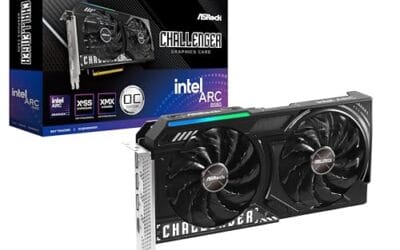
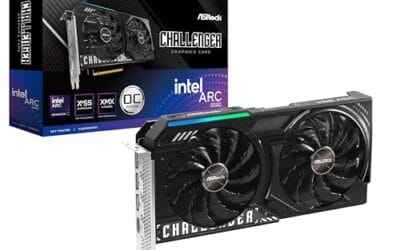
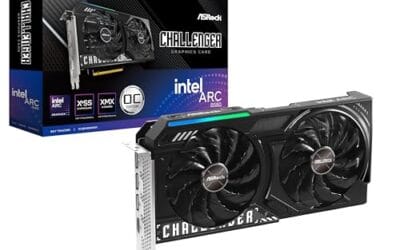
Not everyone needs either one, though. If your budget is tighter and 1080p or entry 1440p is fine, a card like the ASRock Intel Arc B580 Challenger deserves a look. At roughly $309.99 with a 4.3 rating, its 12GB of GDDR6 on a 192-bit bus, dual fans, and 0dB silent mode make it a genuine value play for a modest build. It won’t chase the 5070 in raw speed. For the money, it doesn’t have to.

Pros
- 12GB VRAM on 192-bit bus gives headroom over8GB rivals at 1440p.
- Single 8-pin connector and 650W PSU target means broad build compatibility.
- DisplayPort 2.1 with UHBR13.5 suports high-refresh QHD and 4K panels natively.
- 2-slot 249mm length fits compact ATX and many mATX chassis without clearance issues.
Cons
- Limited owner feedback at time of writing makes long-term reliability signals thin.
- PCIe 4.0 x8 interface can bottleneck slightly on older PCIe 3.0 platforms.
- Intel Arc driver maturity in older DX9/DX11 titles still trails NVIDIA and AMD.
The ASRock Arc B580 Challenger 12GB OC is a mid-range 1440p GPU built on Intel's Xe2-HPG architecture with 20 Xe cores, 160 XMX engines, and a 2740MHz boost clock. It targets QHD gamers and content creators who want more VRAM than 8GB competitors offer at this bracket, without moving up to a 200W-plus card.
The defining feature is the 12GB GDDR6 pool on a 192-bit bus running at 19 Gbps, which gives real texture and framebuffer headroom at1440p. Combined with XeSS 2 AI upscaling and DirectX 12 Ultimate support, Arc B580 cards in this tier typically handle modern raster titles at high settings QHD, based on Intel's reference silicon behavior.
Trade-offs are typical for Intel Arc at this stage. The PCIe 4.0 x8 interface can shave frames on PCIe 3.0 boards, and driver polish on legacy DX9/DX11 games still lags competing vendors. The card requires a single 8-pin, 650W recommended PSU, and 249mm length, so verify chassis clearance and rail headroom before pairing with older bronze-tier supplies.
Buy this if you want a 1440p card with 12GB VRAM, DP 2.1 outputs, and XeSS 2 support on a modern PCIe 4.0 platform. Skip this if your library leans heavily on older DirectX 9 or 11 titles, or your motherboard is PCIe 3.0.
Resolution target: With 12GB GDDR6 on a 192-bit bus at 19 Gbps, this card is positioned for 1440p high settings in modern raster titles, with XeSS 2 upscaling extending playable framerates in heavier ray-traced workloads. 1080p esports at high refresh is well within scope.
Power and PSU pairing: ASRock lists a 650W recommended PSU and a single 8-pin connector. GPUs in this class typically draw around 190W board power, so pair with a quality 650W to 750W unit to leave transient headroom on ATX 3.0 or olderATX 2.x rails.
Build clearance: The2-slot cooler measures 249mm long, 132mm wide, and 41mm high. That fits most mid-towers and many mATX cases, but confirm front-radiator or HDD-cage clearance in compact builds beforeordering, especially SFF chassis rated under 250mm GPU length.
Display outputs: Three DisplayPort 2.1 ports (one primary up to UHBR13.5) plus one HDMI 2.1a drive up to four displays with resolutions up to 8K. UHBR13.5 suports high-refresh 4K and 1440p panels natively without DSC compromises.
What to look for in a mid-range GPU
Start with memory, then resolution, then the rest. Match the VRAM to what you actually play: 12GB is comfortable at 1440p, 16GB buys 4K peace of mind. Check the cooler and slot size next. The ASUS TUF RTX 5070, for instance, is a 3.125-slot design with axial-tech fans, so measure your case before you buy. Power matters too, since Blackwell cards want a healthy PSU and the right connectors.
Warranty and build quality round it out. A 3-year warranty, like the one on that ASUS board, is worth something over a card’s life. And don’t overlook the tier above or below your target. Sometimes a 16GB step-up like the 5070 Ti or a cheaper card from our best GPU for 4K gaming list changes the math once you factor in the resolution you’ll really run.
Common misconceptions
The biggest myth is that “Ti” means a tiny bump. It doesn’t. The gap between the 5070 and 5070 Ti is real, driven by more cores and 33% more memory, and it widens at 4K. A second myth: more VRAM always means more speed. It doesn’t work like that either. Memory only helps once you’d otherwise run out, so a 16GB card and a 12GB card can perform identically at 1440p in titles that fit inside 12GB.
People also assume DLSS is the Ti’s advantage. It’s not. Both cards run DLSS 4 and multi-frame generation, so the feature checkbox is the same. Finally, don’t assume the pricier card is always the smart buy. If you’ll never leave 1440p, paying for 4K headroom you won’t use is money you could’ve spent elsewhere in the build.
Frequently asked
Is the RTX 5070 Ti worth the extra money over the 5070?
It’s worth it if you game at 4K, chase ray tracing, or do creative work that touches large memory buffers. The 16GB of VRAM and higher core count give real headroom there. If you’re a 1440p gamer, the standard 5070 delivers most of the experience for less, and that saved cash can go toward a better CPU or SSD.
Do both cards use the same memory type?
Yes. Both the RTX 5070 and 5070 Ti use GDDR7 on the Blackwell architecture. The difference is capacity, 12GB on the 5070 versus 16GB on the Ti, plus a wider bus on the Ti that raises bandwidth. So the memory tech is shared. The amount and the plumbing around it aren’t.
Can the RTX 5070 handle 4K gaming?
It can, with caveats. In many titles the 5070 hits playable 4K when you lean on DLSS 4 upscaling and frame generation. But in the heaviest ray-traced games, 12GB can become the limit and you’ll see stutter. For steady 4K with headroom, the 5070 Ti or higher is the safer bet.
What power supply do these cards need?
Plan for a quality PSU with enough wattage and the correct power connectors for your specific board. The Ti draws more than the base 5070, so give yourself margin rather than running a supply at its edge. Check the manufacturer’s recommendation for the exact model, since board partners like ASUS and others vary in their power delivery.
Should I consider a cheaper card instead?
If your budget is tight and you play at 1080p or entry 1440p, yes. A card like the ASRock Intel Arc B580 at around $309.99 covers those resolutions well and leaves cash for the rest of the build. Step up to the 5070 or 5070 Ti only when your monitor and games actually demand the extra grunt. Buy for the resolution you run, not the one on the box art.



























Write Your Review
No reviews yet. Be the first to share your experience!