

Buying a prebuilt in 2026 is a very different exercise than it was even two years ago. Component prices swing week to week, GPU stock is finally sane again, and the gap between a $500 office tower and a $3,000 flagship has never been easier to see on a spec sheet. The tricky part isn’t finding a machine. It’s figuring out which price tier actually matches what you plan to do, because a great value at $570 is a waste of money if you’re chasing 4K, and a $3,000 rig is overkill if you mostly browse and play the odd esports title.
We researched five in-stock prebuilts spread across the budget-to-premium range, from a sub-$500 Intel Core i7 tower to a ZOTAC MEK carrying an RTX 5080. Every pick here is a real, currently listed system with a real price and rating, and we’ve grouped them so you can jump straight to the tier that fits your wallet. If you want to go deeper on a specific budget, our breakdown of the best gaming PC under 1000 covers the sub-four-figure end, while the broader best prebuilt gaming PC 2026 guide runs through higher-end configurations. This one is the map across all of it.
Pros
- 512GB SSD bot drive avoids the HDD bottleneck common in budget prebuilts
- RX 590 8GB VRAM buffer handles 1080p textures better than 4GB budget cards
- Complete bundle with RGB peripherals means no extra spend to start using
- Genuine Windows 11 Home 64-bit preinstalled, no activation hassle out of box
Cons
- Limited owner feedback at time of writing, verify seller reputation before purchase
- Core i7-4770 is Haswell era LGA150, no upgrade path and weak IPC versus modern CPUs
- Windows 11 on 4th-gen Intel is unsupported by Microsoft and may miss feature updates
- No CD/DVD-ROM support and RAM/GPU generation limits future workload headroom
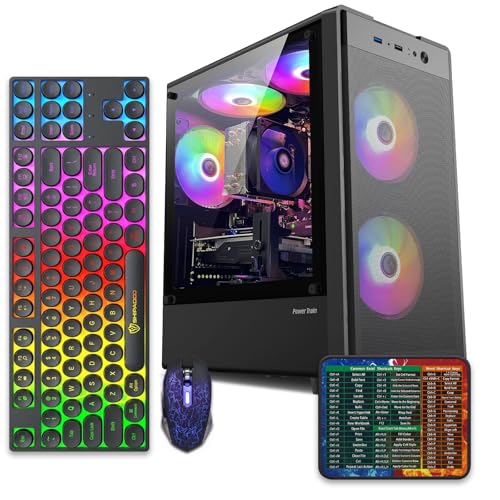
This is an entry-tier prebuilt tower built around an Intel Core i7-4770 Haswell CPU, 16GB RAM, a 512GB SSD, and an AMD Radeon RX 590 8GB GDDR5 GPU. It targets budget buyers who need a working office and light gaming PC with peripherals bundled, not enthusiasts chasing current-gen performance.
The defining feature is the RX 590 8GB paired with a 512GB SSD, an uncommon combo at this price band. Cards in this class typically handle 1080p esports titles at 60+ FPS on medium to high, matching the vendor claim for CS:GO, League of Legends, Apex, and Overwatch. Newer AA titles will need lowered settings.
Trade-offs are significant. The i7-4770 launched in 2013, so IPC, single-thread performance, and platform features like NVMe bot, PCIe Gen4, and modern USB are limited. Windows 11 runs here but sits outside Microsoft's official supported CPU list. There is no realistic CPU or socket upgrade path on LGA1150.
Buy this if you need a plug-and-play 1080p esports and office tower with keyboard, mouse, and RGB included at a low outlay. Skip this if you want current-gen platform support, sustained AA 1440p gaming, or a build with a meaningful upgrade runway.
GPU class: The AMD Radeon RX 590 8GB GDDR5 is a Polaris-refresh card roughly equivalent to a GTX 1060 6GB tier. Expect 1080p 60+ FPS in esports titles like CS:GO, Overwatch, Apex, League, and Fortnite on medium settings, matching the listing's claims.
AAA and modern titles: The vendor lists GTA V, Warzone, Hogwarts Legacy, and The Division 2. Realistically, these run at 1080p low to medium with FSR upscaling where suported.Ray tracing is unsupported on RX 590. No DLSS, no frame gen, no AV1 encode.
CPU bottleneck: The Core i7-4770 quad-core with 8threads at up to 3.9GHz will bottleneck the RX 590 in CPU-heavy titles like Warzone and Escape from Tarkov. Expect frame time inconsistency in large team fights even when average FPS looks aceptable.
Storage and RAM fit: 512GB SSD holds Windows plus 3 to 5 modern game installs before space pressure. 16GB DR3-era RAM is adequate for current esports but leaves no headroom for heavy streaming, browser tabs, and OBS NVENC alongside a game session.

Pros
- Ryzen 5 3500X 6-core CPU bosts to 4.1GHz for smooth 1080p esports CPU load.
- Discrete RX 560 4GB handles DirectX 12 and Vulkan esports titles better than integrated graphics.
- 512GB SSD as bot drive keps Windows load times and app launches snappy out of box.
Cons
- Limited owner feedback at time of writing, no verified reviews to validate build quality.
- RX 560 is a legacy entry-tier GPU, skip if you want modern AAA at 1080p high.
- Ryzen 5 3500X sits on aging AM4, upgrade path is caped at Zen 3 with a BIOS update.
The WIWB is a budget prebuilt tower built around a Ryzen 5 3500X, RX 560 4GB, 16GB DDR4, and a 512GB SSD. It targets students, home office users, and casual gamers who want a plug-and-play box for esports at 1080p rather than a rig for current AAA titles.
The defining pairing here is the 3500X and RX 560. The 6-core, 6-thread CPU bosting to 4.1GHz is still competent for League, CS2, Valorant, and Overwatch, and typically pushes well above 100FPS at 1080p low-to-medium when paired with this GPU class. The RX 560 4GB is the bottleneck for anything heavier.
Trade-offs are typical at this tier. The RX 560 predates FSR frame generation and struggles with modern UE5 titles even at 1080p low. AM4 with a 3500X caps future CPU upgrades at Zen 3, and the case, PSU wattage, VRM phases, and included cooler are not specified, so headroom for a stronger GPU later is unclear.
Buy this if you need a cheap, pre-assembled Windows tower for schoolwork, browsing, and light esports at 1080p. Skip this if you plan to play current AAA releases, stream at 1080p60, or want a platform with a real multi-year upgrade path.
CPU workload: The Ryzen 5 3500X is a 6-core, 6-thread Zen 2 part with a 3.6GHz base and 4.1GHz boost. It stays viable for 1080p esports and light productivity like image editing and IDE work, but lacks SMT, which hurts streaming and modern CPU-bound AA titles.
GPU class and resolution fit: The RX 560 4GB GDDR5 is an entry esports card. Expect high frame rates in CS2, League, and Overwatch at 1080p low-to-medium, and playable frame rates in older AAA titles at 1080p low. 1440p and modern AA at medium are outside its envelope.
Memory and storage: 16GB DDR4 is the current baseline for gaming and multitasking, and the 512GB SSD covers Windows plus roughly 3 to 5 modern game installs. Exact DDR4 speed, dual-channel status, and SSD interface (SATA vs NVMe) are not specified.
Connectivity and upgrade path: WiFi 6 is included, and the board exposes an M.2 slot plus spare DDR4 slots for later expansion. PSU wattage, connector layout, case clearance, and waranty length beyond the stated 1-year coverage are not specified, so plan GPU upgrades cautiously.

Pros
- 16GB GDDR7 VRAM on the 5060 Ti avoids texture pool limits at 1440p.
- 9700X on AM5 leaves a clear upgrade path to future Ryzen X3D chips.
- 360mm AIO is oversized for a 65W-class 9700X, giving quiet acoustic headroom.
- 850W 80+ Gold PSU hasample transient headroom above the GPU TGP class.
Cons
- Limited owner feedback at time of writing, real-world reliability data is thin.
- 1TB NVMe fills fast once two or three modern AA titles are installed.
- DR5-6000 is the AM5 sweet spot but no CL timing or QVL is specified.
The ZOTAC MEK is a mid-range AM5 prebuilt aimed at 1080p and 1440p gamers who want a turnkey box without sourcing parts. It pairs a Ryzen 7 9700X with an RTX 5060 Ti 16GB GDDR7, 32GB DDR5-6000, and a 1TB NVMe SSD inside a tempered glass chassis with a built-in system info display.
The defining feature is the 16GB VRAM buffer on the 5060 Ti. That extra headroom over 8GB variants maters for 1440p ray tracing and DLSS 4 Multi Frame Generation, where texture pools and frame buffers scale with resolution. Cards in this class typically land in the 1440p high toultra range on current AAA titles, with frame generation extending headroom in suported games.
Trade-offs are typical at this tier. The 1TB NVMe is tight for a modern game library, and the source does not specify RAM CL timings, motherboard chipset, or case GPU clearance, so upgrade planing requires opening the box first. The 360mm AIO is overspecified for a 9700X, which is welcome for noise but ads cost that could have gone to a 2TB drive.
Buy this if you want a plug and play AM5 system for 1440p gaming with an upgrade path to future Ryzen chips. Skip this if you need 4K native performance, high capacity storage out of the box, or documented component-level specifications before purchase.
GPU class and resolution fit: The RTX 5060 Ti 16GB GDDR7 sits in the 1080p high refresh and 1440p high tier. The 16GB VRAM buffer avoids the texture streaming issues seen on 8GB cards at1440p with ray tracing enabled, and DLSS 4 Multi Frame Generation extends headroom in suported titles.
CPU pairing: The Ryzen 7 9700X with 8 cores, 16 threads, 32MB L3 cache, and a 5.5GHz boost is well matched to the 5060 Ti. At 1440p the GPU is the bottleneck in most titles, so the 9700X has cycles left for OBS NVENC streaming or background workloads without frame time impact.
Memory and storage: 32GB DDR5-6000 is the AM5 sweet spot for FCLK 1:1 operation, though CL timings are not specified. The single 1TB NVMe M.2 SSD covers Windows 11 Home plus roughly three to five modern AAA installs before capacity becomes a constraint.
Thermals and power: A 360mm AIO with three 120mm fans is oversized for the 9700X 65W-class TDP, leaving quiet acoustic margin under sustained gaming loads. The 850W 80+ Gold PSU provides comfortable transient headroom above the 5060 Ti TGP class with room for GPU upgrades.

Pros
- RTX 5080 16GB GDDR7 delivers current-generation ray tracing and DLSS 4 support for 4K workloads.
- Clean Windows 11 Pro install with no bloatware and 360mm AIO cooling for sustained performance.
- Includes 1-Year system warranty and 3-Year GPU warranty with no registration required per the listing.
Cons
- Prebuilt configuration limits easy internal upgrades compared to custom builds.
- No user benchmarks or independent reviews available in the product data to verify real-world thermals or noise.
This is a high-end prebuilt gaming desktop from ZOTAC that combines an RTX 5080 16GB GDDR7 graphics card with an AMD Ryzen 7 9800X3D processor. It targets 4K gamers and creators who want a complete system ready for immediate use with Windows 11 Pro.
The RTX 5080 uses NVIDIA Blackwell architecture with DLSS 4 Multi Frame Generation and fourth-generation ray tracing cores. This tier typically targets high-refresh 4K gaming in current titles when paired with DLSS and frame generation features.
The chassis uses a vertical design with three tempered glass panels and includes a 360mm AIO liquid cooler plus three 120mm Infinity fans for airflow. Cable management and screwless filters aid maintenance and dust control.
At this price tier the fixed configuration means limited options for immediate customization and no independent thermal or acoustic test data is provided in the listing.
Buy this if you want a turnkey 4K-capable desktop with modern NVIDIA features. Skip this if you prefer building your own system or need verified performance numbers before purchase.
| Processor | AMD Ryzen 7 9800X3D up to 5.2GHz |
| Graphics | NVIDIA GeForce RTX 5080 16GB GDDR7 |
| Memory | 32GB DDR5-6000MHz |
| Storage | 2TB NVMe M.2 SSD |
| Power Supply | 850W 80+ Gold |
| Cooling | 360mm AIO liquid cooler with three 120mm Infinity fans |
| Networking | WiFi 6E, 5-Gigabit LAN, Bluetooth 5.3 |
| Ports | HDMI 2.1b, DisplayPort 2.1b, USB 3.2 Gen 2 |
| OS | Windows 11 Pro |

Pros
- Ryzen 7 9700X on AM5 gives a long upgrade runway through future Zen generations.
- 360mm AIO is oversized for the 9700X 65W TDP, keping fan noise low.
- DDR5-6000 matches the AMD-recommended 1:1 FCLK ratio for optimal latency.
- WiFi 7, Bluetooth 5.4, and PCIe 5.0 M.2 slot future-proof the storage and networking side.
Cons
- Limited owner feedback at time of writing makes long-term reliability hard to assess.
- RTX 5060 8GB VRAM is tight for 1440p ray tracing and heavy texture packs.
- 650W 80+ Gold PSU leaves modest headroom if you later upgrade to a higher-TGP GPU.
The KOTIN prebuilt is a mid-range AM5 gaming tower built around the Ryzen 7 9700X and an RTX 5060 8GB, backed by 16GB DDR5-6000, a 1TB PCIe 4.0 NVMe SSD, and a 360mm AIO. It targets 1080p high-refresh and entry 1440p gamers who want a plug-and-play Windows 11 system without sourcing parts.
The defining pairing is the 9700X, an 8-core Zen 5 CPU that rarely bottlenecks the RTX 5060 at these resolutions. Expect comfortable triple-digit FPS in esports titles and 60to 100 FPS in AAA games at 1080p high, with DLSS 4 Multi Frame Generation extending playability at 1440p in supported engines.
Trade-offs are typical at this tier. The RTX 5060 ships with 8GB GDDR7, which is fine for 1080p but strains at 1440p ultra with ray tracing and high-res texture packs. The 650W 80+ Gold PSU suits the current build but leaves limited transient headroom for a future200W-plus GPU swap. AIO longevity on prebuilt-grade pumps is worth watching past year two.
Buy this if you want a 1080p to 1440p RTX system with a strong CPU flor for streaming or light creator work, assembled and warantied in the US. Skip this if you plan to game at 1440p ultra ray tracing or drop in a flagship GPU inside two years.
Resolution target: RTX 5060 8GB is dialed in for 1080p high to ultra at high refresh, and 1440p high with DLSS Quality in most modern titles. The 9700X provides enough CPU headroom that competitive esports titles should sustain well above 240 FPS on a matching monitor.
GPU power and PSU pairing: The 650W 80+ Gold PSU is sized for the RTX 5060 class, which typically lands near 145W TGP. That gives roughly 400W of headroom above the GPU, comfortable for the 9700X 65W TDP but tight if you later upgrade to a 250W-plus GPU.
Memory and storage: 16GB DDR5-6000 hits the AM5 1:1 FCLK sweet spot, which is where Zen 5 sees best gaming latency. The 1TB PCIe 4.0 NVMe rated up to 6,000MB/s handles DirectStorage titles, and the PCIe 5.0 M.2 slot leaves room for a faster secondary drive.
Thermals and connectivity: A 360mm ARGB AIO is generous for a 65W CPU, so fan curves can stay quiet under sustained loads. WiFi 7 and Bluetooth 5.4 cover wireless peripherals and low-latency online play, and the 11.3-inch smart display surfaces live CPU and GPU telemetry.
Who this guide is for
This guide is for anyone who wants a working machine out of the box and doesn’t want to source a dozen parts, watch install videos, and pray the motherboard posts on first boot. Maybe you’re a student who needs a tower for coursework plus a bit of casual gaming. Maybe you’re upgrading from a five-year-old laptop and want real desktop performance. Or maybe you already know you want an RTX 5080 and you’d rather pay a builder to cable-manage it properly.
It skips a few things on purpose. We’re not covering DIY parts lists, and we’re not pretending every prebuilt is a bargain. Some carry a builder premium, and that’s fine if the warranty and support matter to you. What we care about here is value at each tier: are you getting sensible components for the money, and does the machine match a real use case? If you want the pure lowest-cost route, building your own will usually beat a prebuilt by a little. If you value time and a single warranty, read on.
What to look for in a budget prebuilt PC
Start with the GPU, because it’s the single component that decides your gaming ceiling. A card like the RX 560 handles 1080p esports and older titles at modest settings. An RTX 5060 or 5060 Ti opens up 1080p and 1440p at high settings in modern games. An RTX 5080 is a 4K card. Match that to your monitor before anything else, since a fast GPU behind a 1080p 60Hz panel leaves performance on the table.
After the GPU, check three things. RAM: 16GB DDR4 is the floor for gaming, 32GB DDR5 is comfortable headroom for streaming or editing. Storage: a 512GB SSD fills up fast, so 1TB NVMe is the practical starting point for a game library. And the power supply: an 850W 80+ Gold unit, like the one in both ZOTAC MEK systems here, leaves room for a future GPU upgrade. Also glance at connectivity. Wi-Fi 6 is standard now, Wi-Fi 6E and Wi-Fi 7 are nice future-proofing if your router supports them. Don’t overpay for a spec you’ll never use.
How we evaluated
We researched these five systems the way a careful buyer would: reading the full spec listing, comparing the GPU and CPU pairing against the asking price, and checking the star rating each carries on its product page. We did not benchmark them in a lab, and we won’t pretend otherwise. What we vetted is whether the parts make sense together and whether the price is defensible for the tier the machine sits in.
Value carried the most weight. A cheaper machine with a well-matched GPU and CPU beats a pricier one that’s bottlenecked or padded with a spec you don’t need. We also weighed the star rating as a rough owner-satisfaction signal, noting that review counts weren’t published for these listings, so we’re leaning on the rating itself rather than volume. Where a system leans toward office work over gaming, we’ve said so plainly instead of dressing it up as something it isn’t.
Our top picks
Best Budget: abytespark Intel Core i7 Tower
At $499.99, the abytespark tower is the cheapest way into a real desktop here, and it holds a 4.4 rating. It’s built around an Intel Core i7, and the listing frames it as a business and office machine first, gaming second. That framing is honest. For spreadsheets, browser tabs, video calls, light photo work, and older or lightweight games, an i7 tower at this price is a genuinely useful buy. You’re getting desktop-class CPU headroom that a similarly priced laptop can’t touch.
The tradeoff is graphics. There’s no discrete gaming GPU called out here, so this isn’t the machine for modern AAA titles at high settings. Think of it as a productivity workhorse that can moonlight for casual gaming, not a dedicated rig. If your day is mostly work and your gaming is light, this saves you hundreds. If you want to play current releases smoothly, step up a tier. Buy it for the office use it’s designed for, and treat any gaming as a bonus.
Best Entry Gaming Value: WIWB Ryzen 5 Desktop
The WIWB desktop is $569.99, holds an impressive 4.7 rating, and it’s the first machine on this list built to actually game. You get a Ryzen 5 CPU boosting up to 4.1GHz, an RX 560 4GB graphics card, 16GB of DDR4, a 512GB SSD, and Wi-Fi 6, all in a clean white tower. For under $600, that’s a coherent entry-level gaming spec. The RX 560 won’t chase 4K, but for 1080p esports, indie games, and older titles at sensible settings, it does the job.
Where it shows its price is the SSD and GPU ceiling. 512GB fills up after a handful of large installs, so you’ll want an extra drive before long. And the RX 560 is a modest card by 2026 standards, so demanding new releases will need dialed-back settings. Still, that 4.7 rating suggests owners are happy with what they got for the money. It’s a strong pick for a student, a first gaming desktop, or a second machine for the house.
Best 1440p Powerhouse: ZOTAC MEK RTX 5060 Ti
Jump to $1,799.99 and the ZOTAC MEK with an RTX 5060 Ti 16GB GDDR7 changes the conversation entirely. It pairs that card with a Ryzen 7 9700X boosting to 5.5GHz, 32GB of DDR5, a 1TB NVMe SSD, an 850W 80+ Gold PSU, Wi-Fi 6E, and Windows 11 Home. It carries a 4.6 rating. This is the machine for high-refresh 1440p gaming, and the 16GB of video memory gives it real staying power as game textures keep ballooning.
It’s not cheap, and that’s the honest catch. You’re paying a builder premium over a DIY equivalent, and the 5060 Ti is a strong 1440p card rather than a 4K one. But the balance here is excellent. Nothing is bottlenecked, the 850W supply leaves room for a future GPU swap, and 32GB of DDR5 means you can stream or edit alongside gaming. If 1440p high-refresh is your target and you want it assembled and warrantied, this is the pick to beat.
Best Premium: ZOTAC MEK RTX 5080
At $2,999.99, the range-topping ZOTAC MEK is the 4K flagship of this lineup. It runs an RTX 5080 16GB GDDR7 alongside a Ryzen 7 9800X3D boosting to 5.2GHz, 32GB of DDR5, a 2TB NVMe SSD, the same 850W 80+ Gold PSU, Wi-Fi 6E, and Windows 11 Pro. The 9800X3D is one of the strongest gaming CPUs you can buy right now, and pairing it with a 5080 makes this a legitimate 4K high-refresh machine. The 2TB drive means you’re not juggling installs.
Its 4.3 rating is the lowest here, and that’s worth noting even without published review counts. At three grand you’re paying flagship money, so expectations run high, and a builder premium is baked in. That said, the parts are top-tier and well-matched for 4K, and the Pro license is a nice touch for anyone who works on the same box. This is the buy for someone who wants 4K now, values the assembled-and-supported route, and won’t flinch at the price. Overkill for 1080p, right at home at 4K.
Best Overall: KOTIN Ryzen 7 9700X RTX 5060
The KOTIN prebuilt is our overall pick at $1,349.99, and it earns the highest rating in the group at 4.8. The spec reads like a value sheet: a Ryzen 7 9700X, an RTX 5060 16GB, DDR5 memory, a 1TB SSD, and Wi-Fi 7. That 16GB of VRAM on a card at this price is the standout, since it hands you more texture headroom than many pricier configs, and the Ryzen 7 9700X is a strong modern gaming chip. Wi-Fi 7 is genuine future-proofing too.
What holds it back from flagship status is the GPU tier. The RTX 5060 is a 1080p and entry-1440p card, so it’s not a 4K machine, and if you want maximum frames at 1440p the pricier 5060 Ti config pulls ahead. But that’s the point of an overall pick. For most buyers this hits the best blend of price, modern components, and that class-leading 4.8 rating. It’s the one we’d recommend first to someone who wants strong 1080p and capable 1440p gaming without paying flagship money.
Buying mistakes to avoid
The biggest mistake is buying more GPU than your monitor can use. An RTX 5080 behind a 1080p 60Hz panel is money set on fire, so upgrade the display in the same breath or buy a cheaper machine. The flip side is just as common: pairing a fast display with a weak card and wondering why frames won’t climb. Match the two.
The second trap is ignoring storage. A 512GB SSD sounds fine until three modern games and Windows eat most of it. Budget for a second drive if you pick an entry system. Third, don’t fixate on one headline spec while missing a bottleneck, a huge GPU paired with skimpy RAM or a weak CPU won’t deliver. And don’t dismiss a rating just because review counts aren’t listed. A 4.8 or 4.7 still tells you owners are happy, even without the volume figure.
Bottom line
If you want one answer, the KOTIN Ryzen 7 9700X with an RTX 5060 16GB at $1,349.99 is the pick we’d point most people to. It blends modern parts, that generous 16GB of VRAM, Wi-Fi 7, and the highest rating here at 4.8, all without flagship pricing. It’s the machine that gets the most people the most gaming for the money.
From there it’s about your tier. Tight budget and mostly office work? The $499.99 abytespark i7 tower. Under $600 and want to actually game? The WIWB Ryzen 5 at $569.99. Chasing high-refresh 1440p? The $1,799.99 ZOTAC MEK RTX 5060 Ti. Want no-compromise 4K and don’t mind paying for it? The $2,999.99 ZOTAC MEK RTX 5080. Pick the tier that matches your monitor and your use, and you won’t overspend.
Common questions
Is a budget prebuilt PC worth it in 2026?
Yes, for most buyers. A prebuilt saves you sourcing parts, assembly time, and troubleshooting, and it comes with a single warranty. You’ll usually pay a small premium over building your own, but if your time and peace of mind matter, that premium is easy to justify. The WIWB at $569.99 shows how much coherent gaming spec you can get under $600.
How much should I spend on a prebuilt for 1440p gaming?
Plan on somewhere around $1,300 to $1,800 for a strong 1440p machine in 2026. The KOTIN at $1,349.99 handles 1080p and entry 1440p well, while the $1,799.99 ZOTAC MEK RTX 5060 Ti is built for high-refresh 1440p with 16GB of VRAM and a Ryzen 7 9700X. Both leave you room to grow.
Do I need 32GB of RAM or is 16GB enough?
16GB is the floor and it’s fine for gaming alone, which is what you get in the WIWB entry machine. 32GB, as in both ZOTAC MEK systems, gives you comfortable headroom for streaming, multitasking, and content creation running alongside a game. If you only play, 16GB works. If you do more at once, step up to 32GB.
Can these prebuilts be upgraded later?
Generally yes. The two ZOTAC MEK systems ship with an 850W 80+ Gold PSU, which leaves real headroom for a future GPU upgrade, and desktop towers let you add storage or RAM easily. Entry machines like the WIWB have more limited ceilings, but adding a second SSD or more memory is still straightforward. Check the case and PSU wattage before planning a big GPU jump.
Which GPU here is best for 4K?
The RTX 5080 in the $2,999.99 ZOTAC MEK is the only true 4K card in this lineup, paired with the excellent Ryzen 7 9800X3D. The RTX 5060 Ti is a 1440p champion, the RTX 5060 targets 1080p and entry 1440p, and the RX 560 is a 1080p esports card. Buy the 5080 config if 4K is genuinely your goal, otherwise you’re paying for frames you can’t see.


































Write Your Review
No reviews yet. Be the first to share your experience!