

Small form factor builds get a lot of attention on hardware forums, and it’s easy to assume a tiny gaming rig is somehow better than a normal tower. It isn’t, at least not for framerate. A well-built SFF machine and a mid-tower with the same CPU and GPU push the same numbers in the same games. What changes is the size, the price, the thermals, and how much patience the build demands.
So does a small form factor build actually matter for gaming? For most people shopping a budget prebuilt PC, the honest answer is no. It matters if space is tight or you carry your machine to friends’ houses. If you’re eyeing a 1440p gaming rig and just want frames per dollar, a standard tower usually wins. Let’s break down why.
The short answer
SFF matters for gaming only when physical size is a real constraint. A compact case doesn’t add performance. It costs more to cool the same parts in less air, so builders pay a premium for the shrink. If your desk has room and you’re not hauling the PC around, a conventional tower gives you identical frames for less money and less fuss. Space savings are the payoff, not speed.
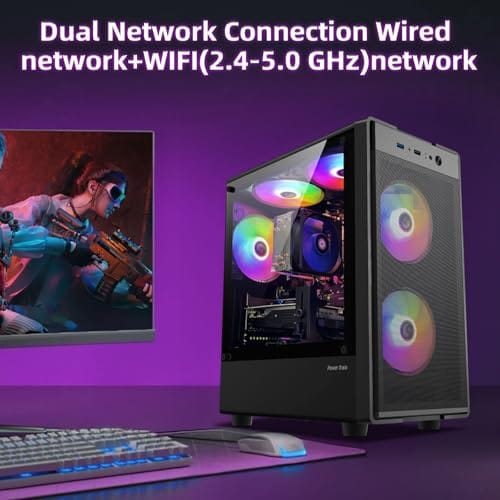
Plenty of buyers skip the SFF route entirely and grab a standard prebuilt tower instead. Something like the abytespark Intel Core i7 desktop at $499.99, rated 4.4, covers 1080p gaming without asking you to sweat clearance measurements or specialty coolers.
Pros
- 512GB SSD bot drive avoids the HDD bottleneck common in budget prebuilts
- RX 590 8GB VRAM buffer handles 1080p textures better than 4GB budget cards
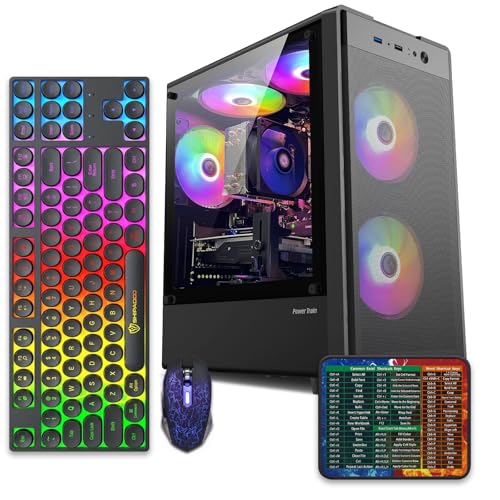
- Complete bundle with RGB peripherals means no extra spend to start using
- Genuine Windows 11 Home 64-bit preinstalled, no activation hassle out of box
Cons
- Limited owner feedback at time of writing, verify seller reputation before purchase
- Core i7-4770 is Haswell era LGA150, no upgrade path and weak IPC versus modern CPUs
- Windows 11 on 4th-gen Intel is unsupported by Microsoft and may miss feature updates
- No CD/DVD-ROM support and RAM/GPU generation limits future workload headroom
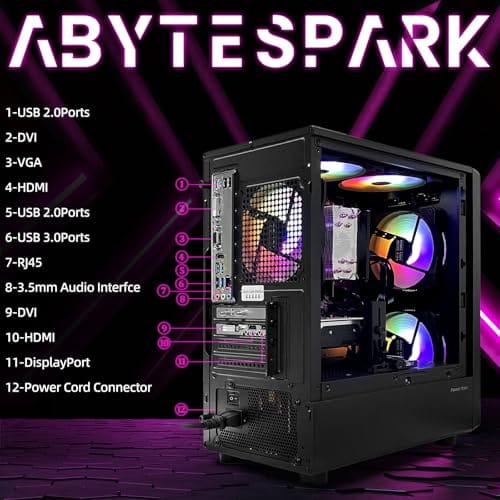
This is an entry-tier prebuilt tower built around an Intel Core i7-4770 Haswell CPU, 16GB RAM, a 512GB SSD, and an AMD Radeon RX 590 8GB GDDR5 GPU. It targets budget buyers who need a working office and light gaming PC with peripherals bundled, not enthusiasts chasing current-gen performance.
The defining feature is the RX 590 8GB paired with a 512GB SSD, an uncommon combo at this price band. Cards in this class typically handle 1080p esports titles at 60+ FPS on medium to high, matching the vendor claim for CS:GO, League of Legends, Apex, and Overwatch. Newer AA titles will need lowered settings.
Trade-offs are significant. The i7-4770 launched in 2013, so IPC, single-thread performance, and platform features like NVMe bot, PCIe Gen4, and modern USB are limited. Windows 11 runs here but sits outside Microsoft's official supported CPU list. There is no realistic CPU or socket upgrade path on LGA1150.
Buy this if you need a plug-and-play 1080p esports and office tower with keyboard, mouse, and RGB included at a low outlay. Skip this if you want current-gen platform support, sustained AA 1440p gaming, or a build with a meaningful upgrade runway.
GPU class: The AMD Radeon RX 590 8GB GDDR5 is a Polaris-refresh card roughly equivalent to a GTX 1060 6GB tier. Expect 1080p 60+ FPS in esports titles like CS:GO, Overwatch, Apex, League, and Fortnite on medium settings, matching the listing's claims.
AAA and modern titles: The vendor lists GTA V, Warzone, Hogwarts Legacy, and The Division 2. Realistically, these run at 1080p low to medium with FSR upscaling where suported.Ray tracing is unsupported on RX 590. No DLSS, no frame gen, no AV1 encode.
CPU bottleneck: The Core i7-4770 quad-core with 8threads at up to 3.9GHz will bottleneck the RX 590 in CPU-heavy titles like Warzone and Escape from Tarkov. Expect frame time inconsistency in large team fights even when average FPS looks aceptable.
Storage and RAM fit: 512GB SSD holds Windows plus 3 to 5 modern game installs before space pressure. 16GB DR3-era RAM is adequate for current esports but leaves no headroom for heavy streaming, browser tabs, and OBS NVENC alongside a game session.
The longer explanation
Frame rate comes from three things: the GPU, the CPU, and the memory feeding them. Case volume isn’t on that list. Drop an RX 560-class card and a modern desktop processor into a shoebox or a full tower and the silicon behaves the same, right up until heat gets in the way. That’s the catch with SFF. Less internal volume means less airflow, and less airflow means components hit their thermal limits sooner.
When a GPU or CPU gets too hot, it throttles. It quietly drops clock speed to protect itself, and your framerate dips with it. In a roomy mid-tower with two or three intake fans, that rarely happens. In a cramped ITX case with one slim fan, it can. So the performance gap people sometimes see isn’t the case making a PC faster or slower on paper. It’s thermals deciding whether the parts run at full speed or back off under load.
There is also a second layer: part selection. Small builds often steer you toward shorter graphics cards, lower-profile CPU coolers, and smaller power supplies. None of those parts are bad by default, but the shopping pool is narrower. A normal tower lets you buy the best-value GPU on sale, a tall air cooler, and a common ATX power supply. SFF asks you to shop by clearance first and value second. Tiny box, bigger checklist.
History: how we got here
SFF gaming used to be a compromise nobody enjoyed. A decade ago, small cases meant weak integrated graphics or a single half-height card, plus screaming fans. Mini-ITX motherboards were rare and pricey. Then two things shifted. Graphics cards got dramatically more efficient per watt, and case makers figured out clever layouts with vertical GPU mounts and mesh panels.
By the mid-2020s a 10-liter case could hold a full-length GPU and a capable CPU without cooking either one. That’s genuinely impressive engineering. But it also created a bit of a myth, that small equals premium equals faster. The compact builds you see winning praise online are winning on craftsmanship and looks, not on benchmark charts.
Prebuilts followed a slightly different path. Most low-cost gaming desktops stayed in micro-ATX or ATX towers because those cases are cheaper to assemble, easier to ship, and easier for support teams to service. That’s why many value-focused systems still look plain. They’re not chasing desk sculpture status. They’re chasing simple airflow, low assembly time, and parts that don’t need custom brackets.
Why it works this way
Physics doesn’t bend for aesthetics. A CPU pulling 120 watts dumps 120 watts of heat regardless of the box around it. A bigger case simply has more room for that heat to move and more surface for fans to pull fresh air across. Give the same parts more breathing room and they hold higher clocks longer, which is why a standard tower is the safer bet for sustained gaming sessions.
Small cases fight back with denser cooling, and it works, but it’s expensive. Low-profile coolers, custom cabling, and 120mm AIO radiators all cost more than the bulky, cheap parts that fit a normal tower. You’re paying for the shrink, not the speed. That’s the trade at the heart of every SFF decision.
When you’d want this
There are real reasons to go small, and they’re all about the space you live in. Studio apartments where the PC shares a desk with everything else. A living-room setup where a giant tower would look out of place next to the TV. LAN regulars who lug their rig across town and want something that fits in a backpack. In those cases the size premium buys real convenience, and it’s worth it.
If none of that describes you, a standard tower is the smarter spend. The WIWB Ryzen 5 desktop at $569.99, with an RX 560 4GB card, 16GB of DDR4, a 512GB SSD, and Wi-Fi 6, rated 4.7, is a plain white tower that games at 1080p and leaves cash for a better GPU down the road. That headroom is what you sacrifice when you shrink the build.

Pros
- Ryzen 5 3500X 6-core CPU bosts to 4.1GHz for smooth 1080p esports CPU load.
- Discrete RX 560 4GB handles DirectX 12 and Vulkan esports titles better than integrated graphics.
- 512GB SSD as bot drive keps Windows load times and app launches snappy out of box.
Cons
- Limited owner feedback at time of writing, no verified reviews to validate build quality.
- RX 560 is a legacy entry-tier GPU, skip if you want modern AAA at 1080p high.
- Ryzen 5 3500X sits on aging AM4, upgrade path is caped at Zen 3 with a BIOS update.
The WIWB is a budget prebuilt tower built around a Ryzen 5 3500X, RX 560 4GB, 16GB DDR4, and a 512GB SSD. It targets students, home office users, and casual gamers who want a plug-and-play box for esports at 1080p rather than a rig for current AAA titles.
The defining pairing here is the 3500X and RX 560. The 6-core, 6-thread CPU bosting to 4.1GHz is still competent for League, CS2, Valorant, and Overwatch, and typically pushes well above 100FPS at 1080p low-to-medium when paired with this GPU class. The RX 560 4GB is the bottleneck for anything heavier.
Trade-offs are typical at this tier. The RX 560 predates FSR frame generation and struggles with modern UE5 titles even at 1080p low. AM4 with a 3500X caps future CPU upgrades at Zen 3, and the case, PSU wattage, VRM phases, and included cooler are not specified, so headroom for a stronger GPU later is unclear.
Buy this if you need a cheap, pre-assembled Windows tower for schoolwork, browsing, and light esports at 1080p. Skip this if you plan to play current AAA releases, stream at 1080p60, or want a platform with a real multi-year upgrade path.
CPU workload: The Ryzen 5 3500X is a 6-core, 6-thread Zen 2 part with a 3.6GHz base and 4.1GHz boost. It stays viable for 1080p esports and light productivity like image editing and IDE work, but lacks SMT, which hurts streaming and modern CPU-bound AA titles.
GPU class and resolution fit: The RX 560 4GB GDDR5 is an entry esports card. Expect high frame rates in CS2, League, and Overwatch at 1080p low-to-medium, and playable frame rates in older AAA titles at 1080p low. 1440p and modern AA at medium are outside its envelope.
Memory and storage: 16GB DDR4 is the current baseline for gaming and multitasking, and the 512GB SSD covers Windows plus roughly 3 to 5 modern game installs. Exact DDR4 speed, dual-channel status, and SSD interface (SATA vs NVMe) are not specified.
Connectivity and upgrade path: WiFi 6 is included, and the board exposes an M.2 slot plus spare DDR4 slots for later expansion. PSU wattage, connector layout, case clearance, and waranty length beyond the stated 1-year coverage are not specified, so plan GPU upgrades cautiously.
What to look for in an SFF build
If you’ve decided small is the way to go, cooling is the number one thing to check. Look for cases with mesh front and side panels, since solid glass on a tiny box traps heat fast. Confirm the GPU clearance in millimeters against the exact card you want, because half a centimeter can mean the panel won’t close.
Power supply matters too. Many SFF cases need an SFX unit, which runs pricier than the standard ATX supply a normal tower uses. Check that a compatible cooler fits your CPU’s height limit. And be realistic about upgrades. Compact builds are harder to work inside, so plan the parts once and expect tight quarters if you ever swap a component.
For prebuilts, read the product page like a parts list, not a vibe check. A tower that mentions a Ryzen 5, RX 560 4GB graphics, 16GB of DDR4, 512GB SSD storage, and Wi-Fi 6 tells you more than a compact case photo ever will. You want the CPU class, GPU class, memory amount, storage size, and wireless spec in writing. If a listing hides those details behind broad gaming language, move on.
Common misconceptions
The biggest myth is that SFF is inherently faster. It isn’t. Identical parts perform identically until heat forces a throttle, at which point the smaller build is the one more likely to slow down, not speed up. Another common belief is that small always means quiet. Often it’s the opposite, since tiny fans spin faster and louder to move the same air.
People also assume SFF saves money because it uses fewer materials. Wrong again. The specialty parts push the total higher than a comparable tower. And no, a small case won’t hurt your frames if it’s built well and cooled properly. It just won’t help them either. The performance was always in the CPU and GPU, never the box.
One more myth: small equals tidy. It can, from the outside. Inside, though, cable bends are sharper, power leads have less slack, and dust builds up faster around narrow intakes. Maintenance isn’t hard, but it’s less forgiving. If you’re the kind of person who cleans filters twice a year and never opens the side panel, a bigger case is friendlier.
Frequently asked
Does a smaller case lower my FPS?
Not by itself. As long as the components stay within their thermal limits, framerate is identical to a big tower. FPS only drops if poor airflow causes the CPU or GPU to throttle under load, which is a cooling issue, not a size penalty.
Is an SFF build worth the extra cost for gaming?
Only if you genuinely need the space savings. You’re paying more for compact power supplies, low-profile coolers, and premium cases, none of which add frames. If your desk has room, that money buys a better GPU in a normal tower instead.
Can I run a high-end GPU in a small case?
Yes, modern 10-to-15-liter cases fit full-length cards. The catch is clearance and cooling. Measure the GPU length against the case spec in millimeters, and make sure the case has mesh panels so the card can pull cool air and exhaust heat freely.
Do SFF builds run hotter?
Generally yes, because there’s less air volume and fewer fans. Good SFF cases manage it with dense airflow and radiators, but temperatures usually sit a few degrees higher than the same parts in a mid-tower. That’s the main engineering hurdle of going small.
Should a first-time builder start with SFF?
Probably not. Tight cable routing, cooler height limits, and cramped assembly make small builds tricky for beginners. A standard mid-tower is far more forgiving, and you can always try a compact build later once you’ve done one the easy way.


































Write Your Review
No reviews yet. Be the first to share your experience!