What Is a SODIMM? Laptop Memory Format Explained for 2026
Open up almost any laptop made between 2008 and 2023 with an upgradeable memory slot, and you’ll find a small green PCB clicked into a horizontal socket. That’s a SODIMM. The acronym stands for Small Outline Dual Inline Memory Module, and it’s the format that’s powered laptop RAM upgrades for over two decades. If you’ve shopped for laptop memory or a mini-PC, you’ve probably bumped into the term without anyone bothering to explain what makes it different from desktop sticks.
Here’s the thing. SODIMM isn’t just “smaller desktop RAM.” It’s a separate JEDEC specification with its own pin layout, keying, and electrical considerations. A DDR4 SODIMM and a DDR4 UDIMM aren’t cross-compatible even though they share the same memory generation. This guide walks through what a SODIMM is, how the format got here, why it’s built this way, and what to look for if you’re buying one in 2026.
The short answer
A SODIMM is a compact memory module designed for systems where space is tight. Laptops, small form factor desktops, mini-PCs, NAS units, and even some industrial embedded boards all use them. Physically, a SODIMM is roughly half the length of a standard desktop DIMM. About 67.6mm long versus 133mm for a full-size stick. The pin count’s different too. A DDR4 SODIMM uses 260 pins along its edge connector, while a DDR5 SODIMM bumps that to 262.
The format hasn’t changed shape much since the late 1990s, but everything else has. Speeds, voltages, capacity, error correction, and the power management hardware on the stick itself. A modern DDR5 SODIMM at 5600 MT/s pushes data rates that would’ve seemed impossible a decade ago. SODIMM equals laptop and small system memory. DIMM equals full-size desktop memory. The slot in your machine determines which you need.

Pros
- JEDEC-standard DR4-3200 CL22 runs on any compatible laptop without XMP tweaks
- Backed by Micron silicon and module-level testing, lowering compatibility and DOA risk
- 1.2V operation keeps thermals and battery draw modest inside cramped chassis
- Free System Scanner tool confirms laptop compatibility before purchase
Cons
- Very limited owner fedback at time of writing, hard to gauge long-term reliability signal
- DDR4-only platform, no upgrade path for DDR5 laptops on newer Core Ultra orRyzen AI chips
- Single-module kit, running dual-channel requires buying a matched second stick separately
The Crucial CT16G4SFRA32A is a mid-range 16GB DR4 SODIMM aimed at laptop owners looking to replace or add memory in an existing DDR4 machine. Itships as a single 260-pin, 1.2V, non-ECC module rated at DR4-3200 CL22 with PC4-25600 bandwidth, targeting general productivity and light creative users.
The defining spec here is the JEDEC-standard DDR4-3200 CL22 profile, which auto-negotiates down to 2933 or 2666 on older platforms without user intervention. Laptop SODIMMs in this tier typically hit rated sped straight from SPD, no XMP toggling need, and Micron-fabbed dies generally show consistent behavior across Intel and AMD memory controllers based on owner reports.
Trade-offs are the usual DR4 story in a DR5 world. This module will not fit Core Ultra Series 2 or Ryzen AI 300 laptops, only DR4-based platforms up through Alder Lake, Raptor Lake DR4 SKUs, and Ryzen 7000 laptop parts that retained DDR4. It also ships as a single stick, so dual-channel operation requires a matched second module, ideally the same rank configuration (1Rx8 or 2Rx8).
Buy this if your laptop confirms DDR4 SODIMM support via Crucial System Scanner and you want a Micron-backed module over budget no-name sticks. Skip this if your machine uses soldered LPDDR4X, DR5 SODIMM, or CAM2, or if you need matched dual-channel out of the box.
Form factor and voltage: 260-pin SODIM at 1.2V, non-ECC, dimensions 2.7 x 0.43 x 1.1 inches. This is the standard DDR4 laptop footprint and will not fit DR5 SODIM slots (also 260-pin but keyed differently) or CAMM2 boards. Confirm your chassis has a user-accessible SODIM slot before ordering.
Sped and timings: Rated PC4-25600 at DR4-3200 CL22, with automatic fallback to 2933 or 2666 on older memory controllers. CL22 at 3200 MT/s is JEDEC baseline, not enthusiast tuning, so expect stable POST across Intel 6th Gen through 13th Gen and AMD Ryzen mobile up to the 7000 series DR4 variants.
Rank configuration:Ships as 1Rx8 or 2Rx8 depending on production batch, which maters if pairing with an existing stick. For dual-channel on platforms sensitive to rank mixing, match rank between modules or buy two of the same SKU together.
Verification workflow: Run the Crucial System Scanner or plug your laptop model into the Upgrade Selector before purchase. This flags maximum suported capacity, per-slot limits, and whether your BIOS accepts 3200 MT/s modules, which avoids the common mistake of buying capacity your platform cannot address.
The longer explanation
A SODIMM is governed by JEDEC, the standards body that publishes specifications for all mainstream DRAM modules. JEDEC’s documents define the exact dimensions, pin counts, electrical signaling, and keying notches that make any compliant module work with any compliant slot. That standardization is why you can buy a SODIMM from Crucial, Kingston, GIGASTONE, or A-Tech and reasonably expect it to drop into a laptop motherboard from a completely different manufacturer.
The physical dimensions are tight. Length sits at 67.6mm, height runs around 30mm, and PCB thickness lands at about 1.0mm. Compare that with a full-size DIMM at 133mm long and 30mm tall, and you can see why mobile designers gravitated toward the smaller format. There’s just no room inside a laptop chassis for a stick that’s nearly twice as long.
Pin counts have crept up over generations. DDR2 SODIMM used 200 pins. DDR3 stayed at 204. DDR4 jumped to 260 to accommodate higher signaling speeds and additional power and ground references. DDR5 nudged that to 262 pins and added something significant. A power management IC, or PMIC, sits directly on the module instead of pulling regulated voltage from the motherboard. That shifts the burden of fine-grained voltage delivery off the system board and onto the stick itself, which helps signal integrity at higher data rates.
Voltage matters too. DDR4 SODIMMs run at 1.2V nominal, with low-power variants at 1.05V. DDR5 drops the standard rail to 1.1V. Cumulative power savings add up fast on a laptop battery. DDR5 also added on-die ECC, per-chip correction that catches bit flips inside the DRAM before they hit the bus. Baked into every DDR5 SODIMM, even cheap ones.
How we got here
SODIMM didn’t appear overnight. The format traces back to the mid-1990s, when JEDEC published the first small-outline specs to address laptops outgrowing their original proprietary memory modules. Early SODIMMs used 72-pin and 144-pin configurations during the PC100 and PC133 SDRAM era. If you owned a Pentium III laptop, you handled one of these.
DDR transitions came in waves. DDR1 SODIMM stuck with 200 pins. DDR2 kept that count but rearranged signaling. DDR3 stayed at 204 pins and dominated laptops from roughly 2008 through 2015. DDR4 SODIMM rolled out around 2014, but didn’t reach mass adoption in mobile platforms until Intel’s Skylake generation pushed it as the default in 2016.
Dual-channel population became standard practice during the DDR3 years. Laptops started shipping with two SODIMM slots specifically so users could populate both for bandwidth. Single-channel configurations stuck around in budget machines, but anyone shopping for performance learned to look for matched pairs.
Now there’s a new wrinkle. CAMM, originally a Dell-designed compression-attached memory module, got picked up by JEDEC and standardized as CAMM2. It’s flatter, faster, and could replace SODIMM in premium laptops over the next few years. Don’t panic though. SODIMM isn’t going anywhere fast. Mainstream and mid-tier laptops will keep using it through at least 2028, probably longer.
Why it’s smaller
The obvious answer is space. Laptops have always fought for every cubic millimeter, and a memory module that’s half as long opens up real estate for batteries, cooling, and other components. But there’s more to it than physical real estate.
Thermal density’s a consideration. A shorter PCB means fewer DRAM chips packed onto a single board, which spreads heat output more evenly across the system. Laptop cooling solutions are tiny compared with desktop airflow, so anything that prevents memory from becoming a hot spot helps the whole machine stay stable.
Signal integrity gets tricky at higher speeds. DDR5 SODIMM running at 5600 MT/s is pushing data fast enough that trace length, impedance matching, and connector quality all matter. A shorter module actually helps here. Less PCB means shorter signal paths, less opportunity for crosstalk, and tighter timing windows. That’s part of why JEDEC kept the form factor compact even as speeds climbed.
Width’s preserved at 64 bits per channel for a reason. Memory controllers in mobile CPUs from Intel and AMD both expect that 64-bit bus width per channel. Going narrower would cripple bandwidth. Going wider would force a redesign of the entire memory subsystem. So engineers compressed length and pin layout while keeping the data path the same. Smart trade-off.
Pros
- XMP 3.0 and EXPO on one module covers both Intel 12th/13th Gen and AMD Ryzen 7000 Series laptops.
- 64GB at DDR5-5600 in a dual-channel 2x32GB config is the current capacity ceiling for most SODIMM platforms.
- 1.1V operating voltage is lower than DDR4's typical 1.2V, reducing heat in thermally constrained laptop chassis.
- Micron-sourced NAND with dual-stage QC validation gives it a reliability edge over generic DDR5 SODIMM kits.
Cons
- CL46 primary latency is loose for DDR5-5600, meaning latency-sensitive workloads favor tighter-timed alternatives.
- 64GB SODIMM configs require a laptop with two slots and DDR5 support, ruling out single-slot or DDR4 systems.
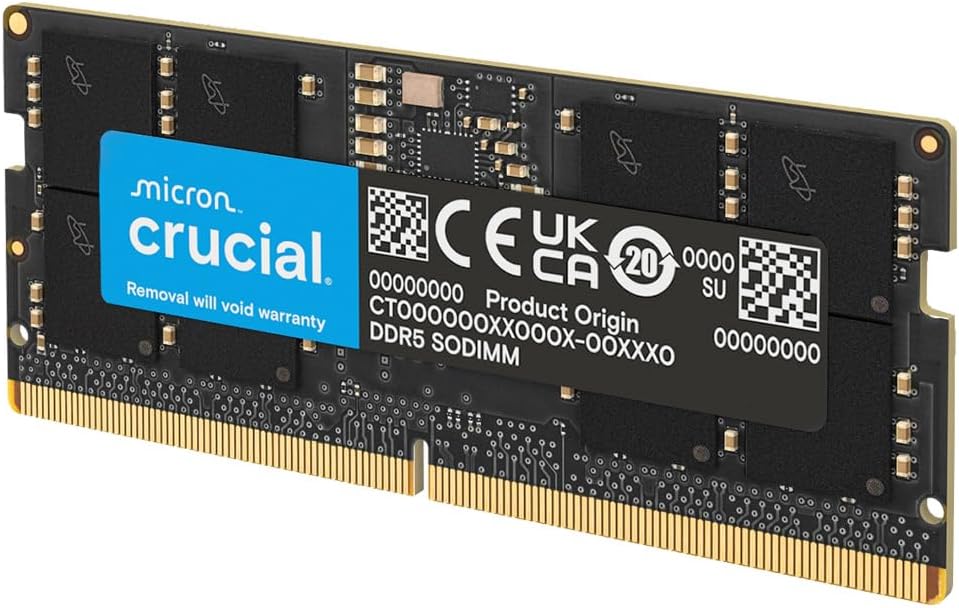
This is a high-capacity DDR5 SODIMM kit aimed at laptop users running memory-intensive professional workloads. The 2x32GB configuration fills both SODIMM slots on supported platforms, targeting content creators, data analysts, and power users who have exhausted 32GB and need headroom for large project files, virtual machines, or simultaneous heavy applications.
The defining feature here is the dual-profile design: a single kit carries both Intel XMP 3.0 and AMD EXPO profiles, so it auto-configures to the correct speed on either platform without manual BIOS tuning. At DDR5-5600 with PC5-44800 bandwidth, it offers roughly 1.75 times the data rate of DDR4-3200, which translates to meaningful throughput gains in CPU-integrated GPU workloads and memory-bandwidth-bound tasks like large dataset processing.
The trade-off worth noting is CL46 latency. DDR5-5600 CL46 is on the looser end of the spec range. Competing kits at this speed target CL40 to CL44. For gaming or latency-sensitive workloads the difference is measurable, though in sustained bandwidth tasks the gap shrinks. The 1.1V voltage spec is a genuine win for laptop thermal management, keeping module temperatures in check under sustained load.
Buy this if you need 64GB DDR5 SODIMM for a dual-slot Intel 12th/13th Gen or AMD Ryzen 7000 Series laptop and prioritize capacity and compatibility over absolute latency tuning. Skip this if your laptop has a single SODIMM slot, runs DDR4, or if you are building a latency-optimized gaming laptop configuration where tighter timings matter more than raw capacity.
Platform Support: Designed for 262-pin DDR5 SODIMM slots. Confirmed compatible with 12th and 13th Gen Intel Core and AMD Ryzen 7000 Series laptop platforms. Intel XMP 3.0 targets DDR5-5600 on supported Intel boards; AMD EXPO achieves the same on Ryzen 7000 Series. Both profiles live on the same module, so no platform-specific purchase is needed.
Speed and Latency: Rated DDR5-5600 (PC5-44800) with a CAS latency of 46. If the host platform cannot run DDR5-5600, the kit downgrades automatically to 5200MHz or 4800MHz per JEDEC spec. Running at DDR5-4800 without XMP or EXPO active is standard fallback behavior on any DDR5-capable laptop.
Electrical Specs: Operates at 1.1V, which is within DDR5 JEDEC standard voltage. The 2Rx8 rank configuration means each 32GB module uses dual-rank, improving memory bus utilization and effective bandwidth versus single-rank alternatives at equivalent speeds.
Slot Requirements: Requires two available DDR5 SODIMM slots for dual-channel operation. Single-slot laptops or systems with one slot already occupied by a soldered module cannot use this kit as intended. Verify your specific laptop model's service manual for slot count and DDR5 support before purchasing.
When you’d want SODIMM
The clearest use case is laptop memory upgrades. If your machine has accessible RAM slots (and not every modern laptop does anymore), SODIMM’s almost certainly what you need. Pop the bottom panel, locate the existing sticks, match the generation and speed, and you’re set. Framework laptops have made this kind of upgrade culture mainstream again. They ship with standard SODIMM slots specifically because users wanted upgradeability.
Mini-PCs are the next big category. Intel NUC, ASUS PN series, Beelink, Minisforum, and similar small desktops all use SODIMM because their motherboards are physically too small for full DIMMs. You’ll find them in home media servers, lightweight workstations, digital signage boxes, and as the basis for plenty of homelab setups.
Then there’s the handheld gaming category, which has exploded. Lenovo Legion Go uses upgradeable SODIMM. Steam Deck went the soldered LPDDR5 route, which is more compact but kills upgradeability. Shoppers who care about future-proofing tend to favor SODIMM-equipped models.
NAS systems round out the list. Synology, QNAP, and TerraMaster boxes that allow memory expansion almost universally use SODIMM.
What to look for when buying SODIMM
Generation match comes first. DDR3, DDR4, and DDR5 SODIMMs are physically keyed differently to prevent cross-installation, but you still need to know which generation your system supports. Check your motherboard manual or use a system tool like CPU-Z to confirm before ordering anything.
Speed’s the next variable. Listed in MT/s for DDR5 and either MHz or MT/s for DDR4. Common DDR4 SODIMM speeds run 2400, 2666, 3200, with 3200 being the JEDEC ceiling. DDR5 SODIMM lands at 4800 baseline, with 5200 and 5600 as faster tiers. Going above what your CPU’s memory controller officially supports doesn’t usually break anything, but you’ll just run at the lower speed.
CAS latency, abbreviated CL, measures clock cycles between a memory request and the data arriving. Lower’s better, but the difference between CL16 and CL22 at the same MHz is real but small. Don’t sweat it unless you’re chasing every last frame in a competitive game.
Capacity per stick matters for upgrade headroom. SODIMM goes up to 64GB per stick in DDR5, with 16GB and 32GB being the volume sellers. DDR4 tops out at 32GB per stick in practice. Buy the biggest you’ll need rather than splitting capacity across multiple smaller sticks if your system only has two slots.
Dual-rank versus single-rank affects performance subtly. Dual-rank sticks (two physical chip groups per module) often perform slightly better than single-rank in dual-channel configurations, but the difference is single-digit percentage in most workloads.
Voltage’s typically auto-handled by the system, but if you’re putting low-power LPDDR variants in a standard slot, double-check the spec sheet. They’re not always cross-compatible.
Common misconceptions
“SODIMM is slower than DIMM.” Not really. At the same DDR generation and speed rating, SODIMM and UDIMM deliver essentially identical bandwidth. A DDR4 3200 SODIMM moves data at the same rate as a DDR4 3200 UDIMM. Performance differences are within margin of error for most workloads. The myth probably persists because laptops historically shipped with slower-rated SODIMMs than desktops shipped with UDIMMs, but that’s a product positioning issue, not a format limitation.
“Any SODIMM fits any laptop.” Definitely not. The slot keying changes between DDR generations, so a DDR4 SODIMM physically won’t fit a DDR5 slot and vice versa. Even within the same generation, some laptops have voltage or speed restrictions that make certain modules incompatible. Always cross-reference the manufacturer’s qualified vendor list or your laptop’s spec sheet.
“DDR4 SODIMM works in a DDR5 slot.” Nope. The keying notch is in a different position specifically to prevent this. Even if you forced one in (please don’t), the electrical signaling’s completely different. DDR5 added the on-module PMIC, which DDR4 slots have no provision for. You’d damage the module, the slot, or both.
“Soldered RAM systems can use SODIMM.” This one’s wishful thinking. If your laptop or mini-PC ships with soldered LPDDR memory (common in MacBooks, Surface Pro, and many ultrabooks since 2020), there’s no SODIMM socket to upgrade. Apple’s been particularly aggressive about soldering memory directly to the M-series SoC package, which delivers tighter integration but eliminates user upgrades entirely. You can’t retrofit a SODIMM slot onto a board that wasn’t designed for one.
Frequently asked
Can I mix SODIMM brands in the same laptop?
You can, but it’s not recommended. The system will usually run at the slower stick’s speed and tightest timing. Mismatched modules also occasionally cause stability issues with XMP profiles or memory training. If you’re upgrading, the safer move is buying a matched kit (two sticks sold together) so timings and rank configuration line up cleanly.
Are SODIMM heatsinks worth it?
For typical DDR4 SODIMMs, no. The chips don’t generate enough heat to need cooling beyond ambient airflow. DDR5 SODIMM modules run a bit hotter because of the on-module PMIC, and some premium kits do ship with low-profile heatspreaders. They help marginally, but laptop chassis don’t have room for tall heatsinks anyway.
How long does SODIMM RAM last?
DRAM modules have no real wear-out mechanism in normal use. Quality SODIMMs from reputable brands often outlast the systems they’re installed in. Manufacturers like Crucial, Kingston, and GIGASTONE offer lifetime warranties on most consumer lines, which tells you what they expect failure rates to look like.
Is ECC SODIMM a thing?
Yes, for DDR4 and DDR5 both, but availability’s limited. ECC SODIMMs target embedded systems, NAS boxes, and edge servers where reliability matters more than cost. Standard consumer laptops don’t support ECC SODIMM modules. The motherboard memory controller has to be ECC-aware, which isn’t typical in mobile CPUs.
What’s replacing SODIMM?
CAMM2, the JEDEC-standardized version of Dell’s original CAMM module, is the most likely successor. It’s thinner, supports higher data rates more cleanly, and packages memory in a way that fits better in modern thin-and-light laptops. Adoption’s gradual though. Expect SODIMM to coexist with CAMM2 for several more years, especially in mid-range and budget segments where the cost-per-gigabyte advantage still favors the older format.

Pros
- Full 32GB dual-channel kit handles virtualization, 20-plus browser tabs, and Lightroom concurrently on DR4 laptops.
- JEDEC 1.2V 3200MHz profile boots without BIOS tweaking on locked laptop firmware.
- Backward-compatible speds (2933MHz, 2666MHz) broaden the compatible notebook and AIO range.
Cons
- Limited owner feedback at time of writing, making long-term reliability signal thin.
- CL22 timing is lose compared to enthusiast DR4-3200 CL16 desktop kits, though normal for SODIMM.
- SODIMM-only form factor, not usable in desktop DIMM slots or DR5 platforms.
The Gigastone 32GB Kit is a mid-range DDR4 SODIMM upgrade aimed at laptop, notebook, and all-in-one owners running Intel 10th-11th Gen or Ryzen 4000/5000 mobile silicon. Two 16GB modules run at 3200MHz CL22 1.2V, targeting users who need more headroom for virtualization, IDEs, or photo editing on a portable.
The defining trait is JEDEC-standard 3200MHz operation at 1.2V, which maters because laptop BIOSes rarely expose XMP or memory tuning. Owners on locked firmware should see the kit train at rated sped without intervention, and it steps down to 2933MHz or 2666MHz on older platforms that cap DDR4 sped at thoseiers.
Trade-offs are typical at this tier. CL22 is looser than enthusiast desktop DDR4-3200 CL16 kits, but CL22 is standard for JEDEC SODIM and mobile latency tuning is limited anyway. Non-ECC means no error correction, which rules out workstation laptops requiring ECC SODIMM. Compatibility with any specific laptop should be verified against the vendor QVL before purchase.
Buy this if you own a DDR4 laptop or AIO, need a straight 32GB dual-channel upgrade, and want a JEDEC kit that boots without tweaking. Skip this if your machine uses DDR5 SODIMM, requires ECC, or you already have a matched 32GB kit installed.
Form factor: 260-pin unbuffered non-ECC SODIMM, the standard slot on DR4 laptops, mini-PCs, and all-in-ones. Not physically or electrically compatible with 288-pin desktop DIMM slots or DDR5 SODIMM (262-pin) machines. Verify your system uses DDR4 SODIMM before ordering.
Sped and timing: Rated PC4-25600 (DR4-3200) at CL22 with 1.2V. Auto-downclocks to PC4-23400 (2933MHz) or PC4-21300 (2666MHz) depending on the memory controller ceiling. Ryzen 4000 mobile typically caps around 3200MHz, while older Intel 8th-9th Gen laptops often run 2666MHz.
Capacity layout: 32GB total as2x16GB enables dual-channel bandwidth on any laptop with two SODIMM slots. Single-slot machines cannot use this kit as intended; one stick would leave the other unused and forfeit the dual-channel benefit.
ECC and platform fit: Non-ECC only, so mobile workstations that mandate ECC SODIMM (some Xeon-basedThinkPad P-series and Precision units) should not use this kit. Check your laptop OEM memory QVL for the 16GB DR4-3200 SODIMM entry before committing.