A laptop battery cycle counts as one full discharge worth of use – not necessarily one charge-and-drain session. If you use 50% of your battery today, charge it back to full, then use another 50% tomorrow, that’s one cycle. Lithium-ion batteries are rated in cycles because each one wears the chemistry down a measurable amount, and after several hundred you’ll feel it.
Here’s what the number actually represents, how to read your own, and what it tells you about how much battery life you’ve got left.
The short answer
One battery cycle equals 100% of the battery’s capacity used cumulatively. Manufacturers rate laptop batteries at 300-1000 cycles before capacity drops below 80% of original. Apple quotes 1000 cycles on most modern MacBooks. Dell and HP usually quote 300-500 on consumer lines. Once you’ve burned through the rated count, the battery still works – it just holds less energy per charge.
The longer explanation
Lithium-ion cells store energy by moving lithium ions between an anode (usually graphite) and a cathode (lithium cobalt oxide or similar). Each move stresses both electrodes slightly. Over many moves, microscopic cracks form, the electrolyte breaks down, and the cell loses the ability to hold as much charge as it once did. That degradation’s slow but cumulative.
The cycle counter sums up partial discharges so the math stays honest. Drain 30% of the battery, plug in, drain another 70% later, and you’ve completed one cycle even though you charged twice. The firmware on the battery’s management board tracks this and reports it through the OS.
After the rated cycle count, capacity usually sits around 80% of original. A laptop that ran 10 hours new now runs 8. Continue using it and capacity keeps falling – slower than the first 20%, but the trend’s downward. By 2x the rated cycles you’re typically at 60-70% of original capacity, and the battery feels noticeably weak.

Pros
- 11.55V, 41.7Wh capacity aligns with OEM HT03XL spec for predictable runtime
- Overcharge and overheat protection confirmed in product specs, standard safety baseline
- Covers HP Pavilion 14-CE, 14-CF, 15-CS, 15-DA, 15-DB, 15-DW, 17-BY, and 17-CA sub-series
- Bundled screwdrivers and 12-month replacement policy reduce out-of-pocket risk for first-time installers
Cons
- Actual cycle count and real-world capacity retention not disclosed; typical third-party Li-ion cells degrade faster than OEM after 300-400 cycles
- No independent cell-grade certification listed; chemistry quality varies widely at this price tier
- HT03XL and HW03XL are not interchangeable despite similar Pavilion 15/17 coverage; verify part number before ordering
The LaptopBatteryandCharger HT03XL is a budget-tier 3-cell Li-ion replacement battery targeting HP Pavilion 14, 15, and 17 series owners whose OEM pack has degraded below usable capacity. At 41.7Wh and 11.55V, it matches the published HP HT03XL specification on paper, making it relevant for cost-conscious users who want functional runtime restored without paying OEM prices.
The standout feature is compatibility breadth. Cross-referencing against HP part numbers HSTNN-UB7J, HSTNN-DB8R, L11119-855, and the L11421 family gives buyers a reliable way to verify fit before purchasing. Owner reports across the review base are generally positive for plug-and-play recognition, though a small subset required a BIOS update or power-button reset cycle before the system acknowledged the new pack.
The honest trade-off here is cell quality transparency. The listing does not disclose cell manufacturer, rated cycle count, or capacity retention curve. At this price tier, third-party Li-ion cells typically show measurable capacity loss between 300 and 500 charge cycles, which is faster than a genuine HP OEM pack. Overcharge and overheat protection are listed, but no third-party certification such as UL or CE is cited in the source data.
Buy this if you own a compatible HP Pavilion 14, 15, or 17 and need a working battery for light to moderate daily use on a tight budget. Skip this if you rely on maximum sustained runtime for travel or field work, where verified OEM or certified-grade cells are a safer long-term investment.
Core Electrical Specs: Rated voltage is 11.55V with a capacity of 41.7Wh across a 3-cell configuration. These values match the HP OEM HT03XL specification, meaning the replacement draws within the same charge controller parameters the laptop expects, reducing firmware compatibility friction.
Protection Circuits: The battery includes both overcharge and overheat protection as stated in the product specs. These are standard safety features for Li-ion packs. No specific cutoff voltage thresholds or temperature ratings are published, which is typical at this tier but limits precise safety comparison.
Part Number Coverage: Compatible with over 30 HP internal codes including TPN-Q207, TPN-Q208, TPN-Q209, TPN-Q210, HSTNN-LB8L, HSTNN-LB8M, and the full L11421 variant range. Cross-checking your existing battery label against this list before ordering is strongly recommended.
Package and Warranty: Includes the battery, two screwdrivers, and a user manual. The seller lists a 12-month replacement policy and 60-day return window. Warranty service routes through the seller directly, not HP, so resolution speed depends on seller responsiveness rather than a manufacturer support chain.
Why it works this way
The chemistry itself imposes the limit. There’s no firmware trick that prevents wear. Every time lithium ions move across the separator and intercalate into the electrode, they cause a small amount of irreversible damage. Heat accelerates it. High voltage accelerates it. Deep discharge accelerates it.
That’s why modern laptops include charge management features. Apple’s “Optimized Battery Charging” learns your routine and holds at 80% until just before you typically unplug. Dell, Lenovo, and HP offer similar profiles. They all share the same goal: keep the cell at moderate state of charge most of the time, since lithium-ion ages fastest at 100% and at 0%.
The rated cycle count assumes typical conditions: charging in a normal-temperature room, discharging to maybe 20% before plugging back in, not leaving the battery at full for weeks on end. Push outside that and you’ll hit the wear threshold sooner. Stay within it and you’ll often exceed the rated count.
When you would want to check this
Buying a used laptop. Cycle count is the single best indicator of battery health on a second-hand machine. A 2-year-old laptop with 80 cycles has been gently used. The same model with 600 cycles has been hammered.
Diagnosing short runtime. If your laptop’s only running 3 hours when it used to do 8, the cycle count tells you whether the battery’s aged out or whether software’s draining it. High cycles plus low runtime equals a tired cell. Low cycles plus low runtime usually points to a background process or a thermal issue.
Deciding whether to replace. Most batteries become annoying around the time capacity drops below 50% of original. If you’re past the rated cycle count and runtime’s painful, a replacement battery’s the cheapest path back to usable life.
Where to find your count depends on the OS. On macOS, hold Option and click the Apple menu, then System Information, Power. On Windows, open a Command Prompt and run powercfg /batteryreport – it spits out an HTML file with cycle count, design capacity, and current full charge capacity. Linux users can read the cycle_count field in /sys/class/power_supply/BAT0/.
Pros
- 42Wh/11.4V/3700mAh spec aligns directly with Dell OEM WDX0R, reducing compatibility guesswork.
- Covers over 30 Inspiron, Latitude, and Vostro models; Ctrl+F compatibility list reduces ordering errors.
- Triple protection circuit (overcharge, overcurrent, short-circuit) is standard but correctly implemented per spec sheet.
- 12-month warranty is a meaningful commitment for a budget third-party cell replacement at this price point.
Cons
- Solid review volume but rating sits just below the top tier; real-world cycle life claims from third-party cells are rarely independently verified.
- No certifications (CE, RoHS, UL) explicitly listed in source data, which matters for Li-ion safety assurance.
- 11.4V three-cell configuration offers no runtime improvement over OEM; degraded Dell laptops may still show battery warnings.
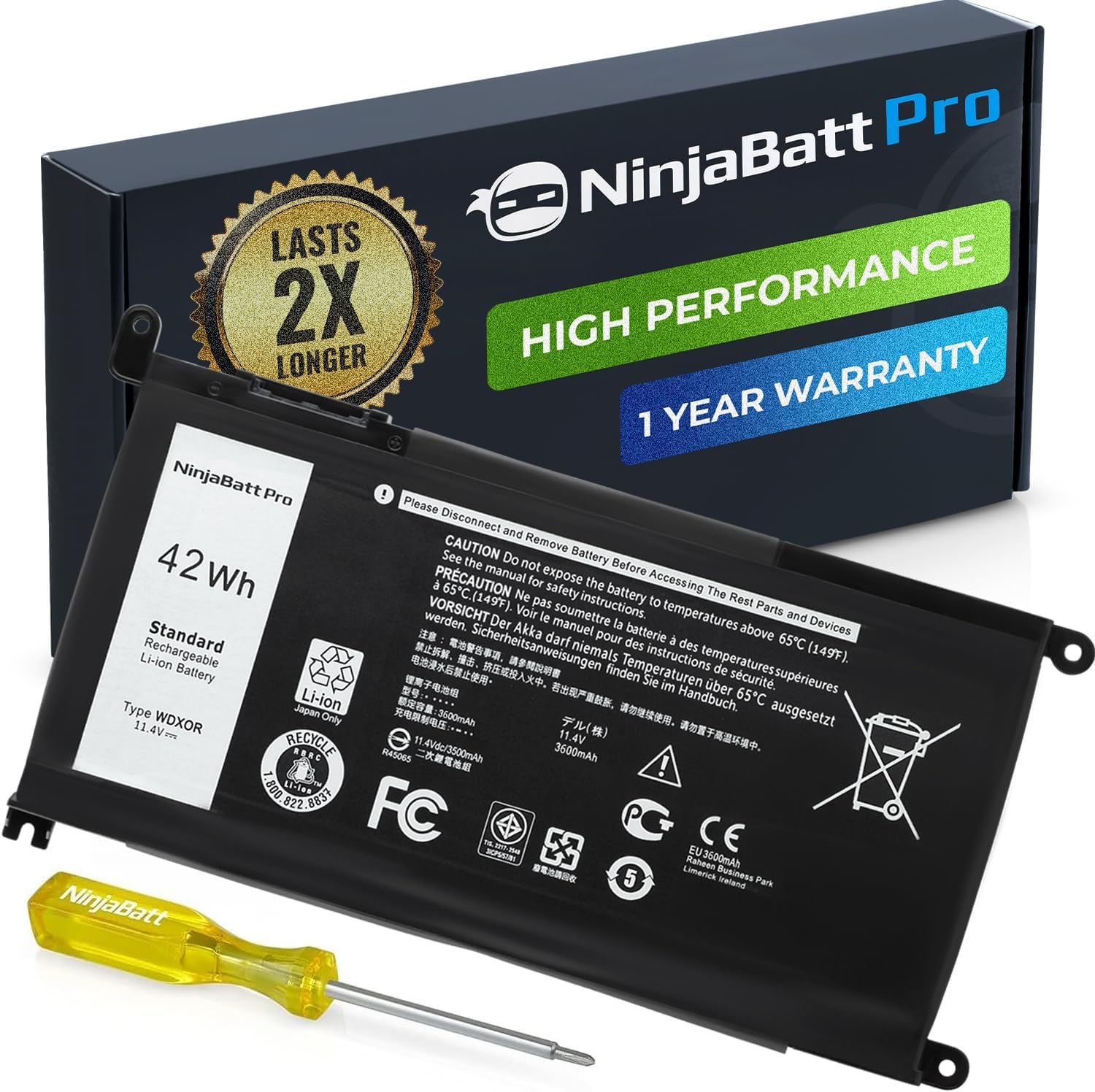
The NinjaBatt WDX0R is a budget-tier third-party Li-ion replacement battery targeting Dell Inspiron 13, 15, 17, Latitude 3000, and Vostro 5000 series owners whose OEM battery has failed or degraded. At 42Wh and 11.4V, it matches the original WDX0R specification, making it a drop-in swap rather than a capacity upgrade.
The standout claim is a 1000-cycle cell life rating using grade-A Li-ion cells. In practice, aftermarket batteries in this category rarely sustain OEM-comparable capacity retention beyond 500 cycles, so treat the 1000-cycle figure as a marketing ceiling rather than a guaranteed floor. Owner reports across a meaningful review sample suggest most buyers see functional runtimes comparable to a mid-life OEM cell.
The triple protection circuit (overcharge, overcurrent, short-circuit) is present but no third-party certification data appears in the source listing. At this tier, that is typical rather than exceptional. Dell's battery health reporting via BIOS may flag the pack as non-genuine, and some Inspiron models display low-battery warnings even with a correctly spec'd aftermarket unit.
Buy this if your Inspiron or Latitude is confirmed WDX0R-compatible and you need a functional replacement without paying OEM pricing. Skip this if you need verified certification documentation for a workplace or warranty-sensitive machine, or if your Dell model is not on the confirmed compatibility list.
Battery Specs: Li-ion chemistry, 42Wh rated capacity, 3700mAh, 11.4V nominal voltage, 4-cell configuration. These figures match the Dell OEM WDX0R part directly. The 11.4V three-series cell string is standard for this Dell platform; no higher-voltage variant is available for these models.
Compatibility Range: Confirmed compatible part numbers include WDX0R, 0WDX0R, 3CRH3, T2JX4, C4HCW, FC92N, P69G, P58F, and CYMGM. Model coverage spans Inspiron 5368 through 7579, Latitude 3180 through 3580, and Vostro 5568D. Verify your exact service tag before ordering.
Protection Features: Three onboard protection circuits cover overcharge, overcurrent, and short-circuit conditions. No explicit cutoff voltage thresholds or BMS chip model are listed in the source data. Certifications are not specified in the listing.
Warranty and Cycle Life: Manufacturer rates the pack at 1000 charge cycles and includes a 12-month warranty. Real-world capacity retention at cycle 500-plus is not independently verified in the source data; treat the cycle rating as a manufacturer ceiling figure.
Common misconceptions
Cycles aren’t charges. Plugging in three times a day doesn’t equal three cycles. The counter only ticks when cumulative discharge hits 100%. Topping off from 80% to 100% over and over barely moves the count.
Leaving the laptop plugged in 24/7 doesn’t preserve cycles forever. The cell ages just sitting at 100% from voltage stress and calendar aging. That’s separate wear that the cycle counter doesn’t capture. A battery left full at high temperature for two years can be in worse shape than one cycled normally for the same time.
You don’t need to fully drain the battery to “calibrate” it. That advice came from nickel-metal-hydride days. Lithium-ion is happy with partial discharges. Deep discharges actually wear it faster.
And replacing the battery doesn’t fix everything. If your laptop’s slow because the CPU’s old or the SSD’s full, a new battery just gives you more time to suffer at the same slow speed. Diagnose first, replace second.
Frequently asked
What’s a good cycle count for a used laptop?
Under 100 is excellent and basically like-new. 100-300 is fine for most buyers. 300-500 means you’ll see some capacity loss but it’s still usable. Over 500 on a consumer laptop usually means the battery’s nearing the point where you’d want to replace it.
Can I reset the cycle count?
No. The count’s stored on the battery’s own controller chip and can’t be reset by the OS or any consumer tool. If a seller claims they “reset” it, they swapped the battery or you’re being scammed.
Does fast charging hurt cycle life?
Marginally, yes. Heat from high charge currents stresses the cell more than a slow charge would. Modern laptops manage this by tapering the rate once the battery’s warm or near full. The wear difference between fast and slow charging on a well-designed laptop is small enough that most users won’t notice.
Should I keep my laptop between 20% and 80%?
If you’re trying to maximize lifespan, yes. The chemistry ages slowest in that range. Modern laptops with charge-limit settings can enforce this automatically. If you’d rather just use the laptop without thinking about it, the built-in optimization features handle most of the work and the difference in long-term cycle count’s usually 10-20%.