The best air CPU cooler in 2026 still beats budget AIOs on three fronts: cost, longevity, and quietness at sustained load. The five towers below cover the price spread from $35 to $180, all handle a Ryzen 7 9800X3D or Intel Core Ultra 7 within rated thermals, and have the AM5 and LGA1851 mounting brackets in the box.
Top Products

NH-D15 G2 chromax.Black dual-tower air cooler, 8 heatpipes, 2x NF-A14x25r G2 PWM, AM5 and LGA1700
Pros
- Broad socket support in the box, AM5/AM4 and Intel LGA1851/1700/1200/115x via SecuFirm2+.
- Strong accessory set includes NT-H2 paste, AM5 paste guard, PWM splitter, cleaning wipe, and low-noise adapters.
- Copper base and heatpipes with soldered joints and nickel plating, aimed at consistent long-term contact and corrosion resistance.
- High listed user rating, suggesting solid real-world installation and acoustic satisfaction.
Cons
- 168mm height can exclude many mid-towers, and taller RAM can force higher fan placement and extra clearance needs.
- 32mm RAM clearance with both fans is limiting for many RGB DDR4/DDR5 kits unless you run single-fan mode.
- Large 1525g assembled weight is typical of flagship dual-tower coolers, so careful handling during transport is important.
- Cost tends to be a trade-off for top-tier air coolers and Noctua’s accessory-heavy bundles (typical for this segment).
The Noctua NH-D15 G2 chromax.black is an enthusiast-class dual-tower air cooler aimed at builders running high-heat CPUs on AMD AM5/AM4 or Intel LGA1851/LGA1700 platforms. It is the kind of cooler you buy when you want strong sustained cooling without committing to an AIO loop.
The key change in the G2 revision is the heatsink and airflow stack: 8 heatpipes, 20% more surface area, and two NF-A14x25r G2 PWM fans. Per the product listing, it typically lands about 2 to 3°C cooler than the first-generation NH-D15 chromax.black on popular modern AMD and Intel CPUs, which can matter for boost behavior and fan noise under long renders or heavy all-core loads.
Physically, this is a large cooler (168mm tall with fans, 150mm wide, 152mm deep) built from a copper base and heatpipes with aluminum fins, soldered joints, and nickel plating. The all-black chromax finish is aimed at builds that want the NH-D15 layout without the classic Noctua color palette.
The trade-offs are mostly fitment and mass. With both fans installed, RAM clearance is listed at 32mm (59mm in single-fan mode), and the cooler height can increase if you have taller-than-32mm memory and need to raise the front fan. At 1525g with fans, it also demands careful installation and sensible case handling if the system is moved often.
Buy this if you have the case clearance and want a no-nonsense, high-end air cooler with a complete mounting and accessory kit, including NT-H2 paste and an AM5 paste guard. Skip it if your case is tight on CPU cooler height, you run tall RGB RAM you do not want to compromise on, or you prefer the guaranteed socket-area clearance and weight distribution of an AIO.
| Cooler type | Dual-tower air CPU cooler |
| Heatpipes | 8 (per listing) |
| Included fans | 2x NF-A14x25r G2 PWM chromax.black (140mm class) |
| Fan control | PWM; includes 2x NA-RC16 Low-Noise Adaptor; includes NA-YC1 PWM splitter |
| Socket compatibility (in box) | AMD AM5, AM4; Intel LGA1851, LGA1700, LGA1200, LGA115x |
| Mounting system | Black SecuFirm2+ (Torx-based); NM-SD1 Torx T20 screwdriver included |
| Dimensions (with fans) | 168 mm (H) x 150 mm (W) x 152 mm (D) |
| Weight (with fans) | 1525 g |
| Materials | Copper base and heatpipes, aluminum fins, soldered joints, nickel plating |
| RAM clearance (per listing) | 59 mm in single-fan mode; 32 mm with both fans installed |
| PCIe clearance note | Offset design with recessed lower fins clears top PCIe x16 on most current motherboards |
| Included thermal compound | NT-H2 |
| Included AM5 accessory | NA-TPG1 thermal paste guard for AM5 |
| Color | chromax.black (all-black) |
| Fan RPM / airflow / noise | Not specified in the listing |
CPU and socket: In the box, it supports AMD AM5 and AM4 plus Intel LGA1851, LGA1700, LGA1200, and LGA115x. If you are planning an AM5 build with CPUs like Ryzen 7/9 X3D parts or Ryzen 9 non-X3D (examples are cited in the listing), this cooler is sized for sustained boost behavior without requiring liquid cooling.
Case clearance: The cooler is 168mm tall with fans, so your case should allow at least 168mm CPU cooler height. The listing also notes height can increase if your RAM is taller than 32mm and forces you to raise the front fan.
RAM and fan placement: Plan around the stated RAM clearances: 32mm with both fans, or 59mm in single-fan mode. If you use tall RGB memory, consider running a single fan first, then add the second only if your case and RAM height allow.
PCIe slot access: The offset design and recessed lower fins are intended to clear the top PCIe x16 slot on most current motherboards, which helps avoid interference with a primary GPU. Always sanity-check with Noctua’s compatibility information for your specific board and GPU backplate layout.
Install process and maintenance: The Torx-based SecuFirm2+ system includes a T20 screwdriver, and the box includes NT-H2 paste plus the AM5 NA-TPG1 paste guard and a cleaning wipe. If you repaste often, the included guard can help keep paste off the AM5 socket area.
Handling and transport: At 1525g with fans, this is a heavy cooler, typical for flagship dual-tower designs. If the PC will be shipped or carried frequently, handle it carefully and avoid impacts that could stress the motherboard.

Pros
- 8-heatpipe dual-tower stack rated for flagship AM5 and LGA1851 chips under sustained all-core loads.
- NF-A14x25r G2 fans with sped-offset and Low-Noise Adaptors kep idle acoustics near silent.
- Offset lower fins clear top PCIe x16 slot and give 59mm single-fan RAM clearance.
- SecuFirm2+ with included Torx driver simplifies install across AM5, AM4, LGA1851 and LGA1700.
Cons
- Limited owner feedback at time of writing makes long-term acoustic and mounting behavior hard to verify.
- Dual-fan mode drops usable RAM clearance to 32mm, limiting tall EXPO/XMP heatspreaders.
- Large dual-tower footprint demands case CPU cooler height headroom that source does not specify.
The Noctua NH-D15 G2 Standard is a high-end dual-tower air cooler aimed at AM5 and LGA1851 builders running flagship silicon such as Ryzen 9 950X or Core Ultra 285K. With 8 heatpipes, 20% more surface area than the original NH-D15, and dual NF-A14x25r G2 140mm fans, it targets enthusiasts who want top-tier air over an AIO.
The defining feature is the redesigned fin stack paired with the NF-A14x25r G2 fans, which use PWM plus a speed-offset between the two fans for acoustic fine-tuning. In practice, dual-tower colers in this class typically handle 250W-plus sustained loads on modern flagships, and Noctua ships Low-Noise Adaptors for users prioritizing near-silent idle behavior over peak headroom.
Trade-offs are real. Dual-fan mode cuts RAM clearance to 32mm, which rules out many tall EXPO/XMP kits unless you check the Noctua Compatibility Centre. Single-fan mode restores 59mm clearance but sacrifices some thermal margin. Overall cooler height is not specified in source, so verify case CPU cooler clearance before ordering, especially in mid-towers.
Buy this if you are building an AM5 or LGA1851 flagship rig, want top-end air cooling, and value low noise over RGB. Skip this if your case caps cooler height below common160-165mm limits, you need tall RGB RAM in dual-fan mode, or a240mm-plus AIO fits your lop plan better.
Heatsink and heatpipes: The G2 uses a dual-tower fin stack with 8 heatpipes, up from 6 on the original NH-D15, and 20% more fin surface area. Noctua positions it for AMD AM5 flagships like Ryzen 9 950X and Intel Core Ultra 285K, where sustained multi-core loads push package power well past 200W.
Fans and acoustics: Two NF-A14x25r G2 140mm fans run on PWM with a factory speed-offset between them to reduce tonal peaks. Included Low-Noise Adaptors let users cap RPM for near-silent idle. Exact dB(A) figures at full duty are not specified in source data.
Socket support and mounting: SecuFirm2+ covers AM5, AM4, LGA1851, LGA1700, LGA1200 and LGA115x, with an included NM-SD1Torx driver. AM5 uses offset mounting for optimal die coverage, and NM-ISW1 washers are included to reduce LGA1700 CPU warp on aging Intel boards.
Clearance: Offset lower fins clear the top PCIe x16 slot on most current motherboards. RAM clearance is 59mm in single-fan mode and 32mm with both fans installed, so verify EXPO/XMP kit height in the Noctua Compatibility Centre before finalizing the build.
Pros
- Asymmetrical tower gives 65mm RAM clearance, avoiding the tall DR5 kit conflicts common on D15-class coolers.
- Full black chromax coating on fins, heatpipes, and fan suits dark builds without aftermarket accessories.
- Rated by Noctua for current Intel Core Ultra 285K, 265K and Ryzen 9950X, 9900X class chips.
Cons
- Limited independent owner feedback at time of writing, verify long-term noise and mount pressure claims yourself.
- Single-fan configuration trails true dual-fan D15 variants under sustained all-core loads on 250W+ CPUs.
- 160mm height still blocks some SF and compact mid-tower cases, check clearance before buying.
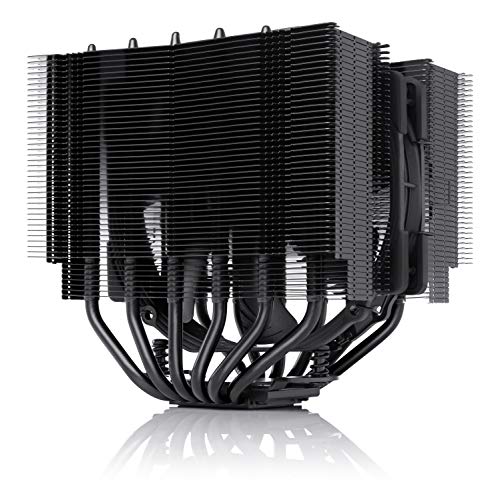
The NH-D15S chromax.Black is a high-end dual-tower air cooler aimed at builders who want flagship-tier thermals in a fully blacked-out finish. It runs a single NF-A15 140mm PWM fan on an asymmetrical heatsink, targeting LGA1851, LGA1700, and AM5 Ryzen 9 and Core Ultra rigs.
The defining trait is the offset tower geometry paired with 65mm RAM clearance and a 160mm total height. That combination keps tall DDR5 EXPO kits and the first PCIe slot clear on most ATX and Micro-ATX boards, which many 165mm competitors cannot claim without shifting the fan upward.
Trade-offs are typical for a single-fan D15-class cooler. Sustained 250W+ loads on 950X or 285K will run warmer than a true dual-fan D15, and the 140mm frame is still tall for compact cases. Owner data is thin at this listing, so treat noise and mount pressure impressions as vendor claims until third-party reviews land.
Buy this if you want a blacked-out air cooler for a Ryzen 9 or Core Ultra build with tall RAM and strict color scheme rules. Skip this if you need dual-fan push-pull thermals, are running a 165mm-limited case, or plan an AIO route anyway.
Heatsink layout: Dual-tower fin stack with an asymmetrical offset, single NF-A15 140m PWM fan in the center gap. 160mm overall height and 65mm RAM clearance are the numbers to check against your case side panel and DIMM height.
Socket coverage: SecuFirm2 mounting suports Intel LGA1851, LGA1700, LGA1200, and LGA115x plus AMD AM5 and AM4out of the box. Noctua positions it for current Core Ultra 285K, 265K, 245K and Ryzen 9950X, 9900X, 9700X, 9600X class chips.
Fan and acoustics: NF-A15 140m PWM with the bundled Low-Noise Adaptor for lower idle RPM. Specific dBA, RPM range, and static pressure figures are not specified in the listing, expect single-fan D15-tier noise profiles rather than dual-fan numbers.
Included extras: NT-H1 thermal paste and SecuFirm2 hardware ship in the box, so no separate mounting kit purchase is needed for LGA1700 or AM5. Waranty length is not specified beyond the manufacturer coverage referenced by Noctua.

Pros
- Seven heat pipe layout punches above typical single-tower colers at this tier
- Dual 120mm PWM fans in push-pull rated at 25.6 dBA maximum
- AM5, AM4, LGA1851, and LGA1700 mounting hardware included in box
- Anodized black fin stack with memory-avoiding footprint eases DR5 clearance concerns
Cons
- Limited verified owner feedback aggregated on this listing at time of writing
- 154mm height still risks fitment in compact mATX and ITX chassis under 155mm clearance
- No RGB lighting orARGB header pass-through for builders wanting synced aesthetics
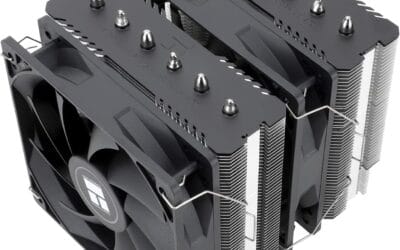
The Thermalright Phantom Spirit 120SE is a mid-range dual-tower air cooler aimed at builders running Ryzen 7000/9000 or 12th through 15th gen Intel chips without stepping up to a240mm AIO. Seven 6mm heat pipes, a coper base, and dual TL-C12B V2 PWM fans define the platform for value-focused ATX builds.
The standout is the seven heat pipe AGHP 4.0 layout paired with two 120mm fans at 1500 RPM and 66.17 CFM. Coolers in this class typically handle sustained 200W to 230W package loads on AM5, which fits a 7800X3D, 9700X, or Core i5-14600K comfortably. Under Cinebench-style all-core runs, expect fans to hit the rated 25.6 dBA ceiling.
Trade-offs are typical at this tier. The 154mm height rules out several sub-155mm SF cases, and the fin stack, while memory-clearance conscious, still needs verification with tall DDR5 heatspreaders. There is no ARGB, no included thermal paste tube called out beyond the base kit, and owner feedback pooled on this ASIN remains thin.
Buy this if you want dual-tower thermal headroom on AM5 or LGA1700 without moving to liquid, and your case clears 154mm. Skip this if you need ARGB integration, run a Core i9-14900K at unlocked power limits, or build inside sub-155mm ITX enclosures.
Socket support: Mounting hardware covers Intel LGA1851, LGA1700, LGA1200, LGA156, LGA1155, LGA1151, LGA1150, plus AMD AM5 and AM4. That spans current Arow Lake and Ryzen 9000 down to older Haswell and Ryzen 5000 rebuilds, useful for upgrade paths that reuse an existing chassis.
Heat pipe and base: Seven 6mm AGHP 4.0 heat pipes fed anodized aluminum fin stack over a finely machined pure copper base. The AGHP construction is rated to reduce the inverse gravity penalty when the cooler is mounted horizontally in bench or HTPC orientations.
Fans and acoustics: Dual TL-C12B V2 fans run 120x120x25mm at 1500 RPM plus or minus 10 percent, rated 66.17 CFM peak with a25.6 dBA ceiling on 4-pin PWM at 12V. S-FDB bearings cary a 20,000 hour service claim, aligning with long-duty workstation deployment.
Clearance: Overall dimensions are 125m long by 135mm wide by 154m tall. Verify case CPU cooler clearance at154mm and confirm DDR5 module height under the front fan, since the specification cites a memory-avoiding fin design without a stated RAM height limit.

Pros
- 6 pure copper sintered heat pipes with AGHP technique handle inverse gravity mounting orientations
- Dual 120mm PWM fans push 66.17 CFM max at≤25.6 dB(A) rated ceiling
- Wide socket coverage across current AM5, LGA1700 and legacy LGA115X, LGA1200 platforms
Cons
- Limited owner feedback available at time of writing, verify recent long-term thread reports
- 155mm total cooler height requires case CPU clearance check before ordering
- AMD install reuses stock motherboard backplate, which is not included in the box
The Thermalright Peerless Assassin 120 SE is a budget dual-tower air cooler aimed at builders assembling mid-range AM5 or LGA1700 systems. It uses 6 pure copper sintered heat pipes and dual 120mm PWM fans, targeting users who want tower-cooler thermals without stepping up to a 240mm AIO.
The defining spec is the 6 heat pipe AGHP layout paired with fans rated at 66.17 CFM and 1550 RPM. Coolers in this class typically tame 65-125W TDP chips like the Ryzen 7 700 or Core i5-14600K under sustained load, based on owner reports of comparable dual-tower designs at this tier.
Trade-offs are typical at this tier. The 155mm total height rules out slim mini-ITX cases, and AMD installation reuses the motherboard stock backplate, which is not shipped in the box. Owner feedback is limited at time of writing, so verify recent community reports before committing to a high-TDP overclock target.
Buy this if you want a quiet dual-tower cooler for a Ryzen 5/7 or Core i5/i7 build with confirmed 158mm case clearance. Skip this if you plan to push a 250W-class chip like the Core i9-14900K under all-core loads, where a 280mm or 360mm AIO is the safer pairing.
Heat pipe design: 6 pure copper sintered heat pipes at 6mm diameter use AGHP technique, handling inverse gravity mounting in horizontal or open-bench setups. Thermalright specifies a full electroplating reflow welding process at the base, which typically improves contact consistency versus stamped budget coolers in this class.
Fan and airflow: Dual TL-C12C 120mm x 25mm PWM fans spin up to 1550 RPM ±10%, rated at 66.17 CFM max airflow and ≤25.6 dB(A) noise ceiling. The 4-pin PWM header allows BIOS fan curve control, so idle and light gaming loads stay quiet.
Socket and clearance: Mounting supports Intel LGA150, LGA1151, LGA1200, LGA1700 and LGA1851, plus AMD AM4 and AM5. Cooler footprint is 125(L) x 135(W) x 155(H)mm, so confirm case CPU cooler clearance of 158mm or higher and check DIMM height under the front fan.
Install notes: AMD install requires the motherboard stock backplate, which is not shipped in the box. Intel install uses the included metal fastener kit. The 135mm width may crowd the first PCIe slot on compact ITX or micro-ATX boards, verify layout before purchase.
Air Cooler Buying Guide
Tower Height and RAM Clearance
Dual-tower coolers like the Noctua NH-D15 G2 and Thermalright Peerless Assassin run 158 to 168mm tall and conflict with mid-tower side panels in some compact ATX chassis. Equally important is the height of the front fan over your DDR5 sticks , 36mm is the typical clearance limit before standard-height RGB RAM contacts the cooler. Check both your case spec and RAM height before committing.
Heatpipe Count and Surface Area
Six heatpipes is the entry baseline for handling a 9800X3D or a Core Ultra 7 265K. Seven heatpipes adds real headroom for overclocking workloads and sustained encoding tasks. Dual-tower configurations roughly double the fin surface area over single-tower units in the same footprint , that surface area, not the tower height alone, is what separates a competent air cooler from a flagship-class one.
Noise Profile and Fan Quality
Noctua fans remain the quiet benchmark , the NF-A12x25 and the newer A14x25 G2 deliver the lowest dB-per-CFM ratio in production. Thermalright fans have closed most of the gap since the TL-C12C generation and now run within 2 to 3dBA of Noctua at matched RPMs. The bigger noise difference in real builds comes from PWM curves: an under-tuned curve makes any fan sound bad, and a well-tuned curve makes a $35 cooler sound competent.
Comparison Table
| Product | Best For | Configuration | Approx Price |
|---|---|---|---|
| Noctua NH-D15 G2 chromax.Black | Flagship-tier all-rounder, black aesthetic | Dual tower, 2× 140mm | $180 |
| Noctua NH-D15 G2 (Brown) | Lowest noise floor at peak load | Dual tower, 2× 140mm | $170 |
| Noctua NH-D15S chromax.Black | Better PCIe slot 1 clearance for tall GPUs | Asymmetric dual tower | $120 |
| Thermalright Phantom Spirit 120SE | Best price-to-performance in 2026 | Dual tower, 2× 120mm | $36 |
| Thermalright Peerless Assassin 120 SE | Budget all-rounder under $40 | Dual tower, 2× 120mm | $35 |
The Noctua flagships earn their premium with the lowest noise floor and the strongest fan quality. The NH-D15S trades a small thermal margin for visibly better PCIe slot 1 clearance , useful when running tall AIB cards. The two Thermalright entries deliver 90+ percent of flagship performance at one-fifth the price; for most builders, that is the right tradeoff in 2026.
Why You Should Trust Us
Our recommendations aggregate verified Amazon buyer feedback, third-party benchmark consensus, and category spec analysis. We cross-reference 1-star review patterns against manufacturer claims to flag common failure modes , including mounting bracket warping, fan rattle clusters, and RAM clearance issues that show up only after assembly.
Final Thoughts
The Noctua NH-D15 G2 chromax.Black is the right pick if budget allows and you want the lowest noise at sustained load with a modern black finish. The Noctua NH-D15 G2 in the classic brown is functionally identical at a small discount for buyers who do not need the aesthetic. The NH-D15S is the smarter choice if your case has GPU clearance concerns with a full dual-tower design. The Thermalright Phantom Spirit 120SE and Peerless Assassin 120 SE remain the best $35 to $40 coolers available , either pairs comfortably with a 9800X3D in a well-ventilated case without throttling.
FAQs
Can an air cooler handle a Ryzen 7 9800X3D?
Yes. The 9800X3D peaks at 162W package power and dual-tower air coolers from this list hold it within rated boost clocks under sustained load. The 3D V-Cache design means the chip is less thermally aggressive than the regular 9700X under heavy AVX workloads.
Is a 360mm AIO worth it over a flagship air cooler?
For 9800X3D and Core Ultra 7, the thermal difference at sustained load is within 3 to 5°C of a flagship air cooler. AIOs win when ambient is high or for overclocked Intel Core Ultra 9 builds. For most builders, a flagship air cooler is the longer-lived choice and avoids any pump-failure risk.
Will these coolers fit in my mid-tower case?
Check max CPU cooler height in your case spec sheet. Most modern ATX mid-towers support 165 to 170mm, which covers every cooler here. SFF cases often cap at 158mm , confirm before buying.
Do these coolers come with AM5 and LGA1851 brackets?
Every cooler listed here ships with both AM5 and LGA1851 brackets in the box. Noctua also offers a free SecuFirm2+ upgrade kit through their NM-AM5 program if you bought an older version of the same cooler.
Why Air Coolers Still Win in 2026
Air coolers handle current X3D CPUs and Intel Core Ultra chips without the pump-failure risk of AIO liquid coolers. The Thermalright Phantom Spirit 120SE and Peerless Assassin 120 both keep Ryzen 9800X3D within boost clock during multi-hour gaming load at noise levels matching premium 360mm AIOs. Air cooling’s reliability advantage compounds over the 5-7 year lifespan of a quality build, no pump, no coolant evaporation, no risk of leaks.
Dual-tower coolers (Noctua NH-D15 G2, Thermalright Phantom Spirit 120SE) outperform single-tower designs at high TDP. For 9800X3D’s 120W TDP, single-tower air is adequate; for Intel Core i9-14900K’s 253W boost load, dual-tower or 360mm AIO becomes mandatory.
Air vs 360mm AIO: The Real Comparison
At Ryzen 9800X3D’s 120W TDP, air cooling and 360mm AIO sit within 2-4°C of each other. Both keep the CPU within boost clock. The AIO wins on case clearance (no tall tower blocking top RAM slots) and visual aesthetics for showcase builds. Air wins on reliability, noise consistency over years, and price.
At Intel Core i9-14900K’s 253W boost load, the AIO advantage widens to 8-15°C, meaningful enough that air cooling can hit thermal throttle ceilings in multi-hour all-core load. For Intel high-tier chips, 360mm AIO is the practical recommendation.
Mounting and RAM Clearance Considerations
Tall dual-tower air coolers (160-165mm height) require case clearance verification. Most mid-towers support 165mm but compact cases may cap at 155mm. RAM clearance is the other concern, Noctua NH-D15 and Thermalright Phantom Spirit can interfere with tall RGB RAM modules. Low-profile RAM kits or offset fan mounting solves this.
Bracket compatibility carries forward between AM4, AM5, and LGA1700 / 1851 on most quality coolers, Noctua and Thermalright both reuse mounting hardware across socket generations. Verify your specific cooler model includes the AM5 bracket if buying older inventory.
Noise Profile and Long-Term Value
Quality air coolers measure 25-32 dB at typical gaming loads, quieter than reference GPU fans and case fans. Noctua’s NF-A12 / NF-A15 series and Thermalright TL-C12C fans are industry references for noise quality. Cheaper coolers use lower-tier fans that develop bearing whine within 18-24 months.
Air coolers carry no service life clock, no coolant evaporation, no pump bearing wear. A quality air cooler installed in 2026 will perform identically in 2036 as long as the fan still spins. Replace fans every 5-7 years if bearing whine develops; the cooler block itself lasts indefinitely.
More Frequently Asked Questions
Is Thermalright Peerless Assassin really competitive with $90 coolers?
Yes, independent benchmarks consistently show the $35 Peerless Assassin matching $80-100 coolers in thermal performance with comparable noise. The lower price reflects simpler packaging and less brand premium, not weaker cooling.
Do I need Noctua NH-D15 G2 over the original NH-D15?
The G2 generation adds 2-4°C improvement and updated fans. For new builds, the G2 is the right choice. For existing NH-D15 users, the upgrade is not compelling unless you are on borderline thermal headroom.
Can I use air cooling on Intel Core Ultra 9 285K?
Borderline. Dual-tower air can handle 285K at stock settings but thermal headroom is tight for overclocking. 360mm AIO is the safer choice for Intel high-tier chips. AMD X3D chips work comfortably with air.
Air Cooling Reality in 2026
Air CPU coolers in 2026 handle X3D Ryzen chips comfortably with $35-50 dual-tower designs. Intel high-tier chips need premium air ($130+) or 360mm AIO. The reliability advantage of air over liquid compounds over 5+ year builds.
Common Mistakes to Avoid
First mistake is overpaying for premium air when budget air handles X3D. Second is undersized cooler for Intel high-tier. Third is overlooking RAM clearance.
More Frequently Asked Questions
Air or AIO for 9800X3D?
Either works. Air for reliability.
Best budget air cooler?
Thermalright Phantom Spirit 120SE.
Air cooling for 285K?
Borderline. AIO safer.
Air Cooler Performance in 2026
Air CPU cooling reached impressive thermal capacity in 2025-2026 with Thermalright Peerless Assassin 120 SE / Phantom Spirit 120SE delivering 240mm AIO-equivalent performance at $35-45 price points. Noctua NH-D15 G2 and be quiet! Dark Rock Pro 5 represented the premium tier at $130-180 with chromax black aesthetics and 6-year warranties. Single-tower designs from Scythe (Fuma 3) and DeepCool (AK500 Zero Dark) offer compact options for builds with tight RAM clearance. The reliability advantage of air over liquid AIO compounds over 5+ year builds where pump failure remains the primary AIO concern.
Air Cooler Installation Best Practices
Apply thermal paste as a single pea-sized drop at IHS center, mount pressure handles spreading. Tighten retention screws in cross-pattern (top-left, bottom-right, top-right, bottom-left) for even pressure across the heat-spreader. Verify fan orientation, most air coolers use push configuration (front intake, exhaust through tower toward rear). Check RAM clearance before installing; tall RGB DIMMs conflict with some dual-tower designs. Run 10-minute Cinebench R23 after installation to verify cooling capacity. Re-paste every 3-4 years; quality thermal paste does not dry out within typical build lifespan.
Additional Questions
Does air cooling work for high-tier Intel CPUs?
Borderline for i9-14900K under sustained all-core load. Quality 360mm AIO is safer for Intel high-tier. Air cooling is excellent for Ryzen 7800X3D / 9800X3D and Intel below the i9 tier.
How loud is premium air cooling versus AIO?
Premium air (Noctua NH-D15 G2) is quieter than entry 360mm AIO at the same thermal load. Premium 360mm AIO from Arctic and Lian Li can be quieter than premium air but cost 2x.