

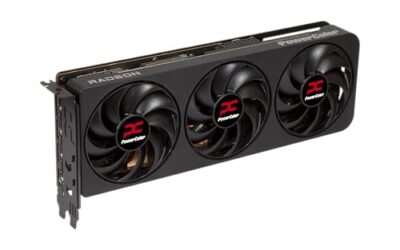
The ASRock Phantom Gaming D 16G OC is the first RX 6900 XT I’d look at if you already know you want this GPU. It had the lowest new price of our five picks at $889. Its main requirements are a case with room for a 330 mm card, three PCIe power plugs, and a power supply that meets ASRock’s 900 W recommendation.
AMD’s Radeon RX 6900 XT gives you 16 GB of GDDR6 on a 256-bit bus. Each card below uses that same desktop GPU, so the model choice comes down to fit, power, display outputs, and price. Two HDMI displays? A case that already has a 360 mm radiator up front? Details like those can settle the decision before you even get to clock speeds.
The new listings we verified ranged from $889 to $1,499 in our November 26, 2026 price snapshot. At those prices, check what a newer graphics card would cost before committing. A good fit for an existing build can make one of these models worth tracking, especially if the listing price drops.
Best RX 6900 XT graphics cards at a glance
| Pick | Model | Defining spec | Best for | Main tradeoff |
|---|---|---|---|---|
| Lowest checked price | ASRock Phantom Gaming D 16G OC | 2,340 MHz rated boost | A roomy build with a suitable PSU | 330 mm long and three 8-pin plugs |
| USB-C display output | XFX Speedster MERC 319 Black | USB-C plus HDMI and two DisplayPorts | A compatible USB-C display setup | 340 mm long |
| Dual HDMI pick | Gigabyte Gaming OC 16G | Two HDMI 2.1 outputs | Two native HDMI connections | 58 mm thick and three 8-pin plugs |
| Dual-BIOS pick | ASRock OC Formula 16GB | 2,475 MHz rated boost in P BIOS | A build with room for a three-slot card | 1,000 W PSU recommendation |
| Factory liquid cooling | Sapphire TOXIC Extreme Edition | 360 mm AIO radiator | A case with a dedicated radiator mount | Radiator assembly is 394 mm long |
ASRock Phantom Gaming D 16G OC for the lowest checked price
At $889, the Phantom Gaming D was $96 below ASRock’s OC Formula in our snapshot. Both give you the same amount of VRAM. If your aim is to get an RX 6900 XT into a case and power supply you already own, keeping that $96 makes sense unless you specifically want the OC Formula’s dual BIOS.

ASRock rates this board for up to 2,340 MHz boost and lists its dimensions at 330 × 140 × 56 mm. It occupies 2.8 slots and needs three 8-pin PCIe power connections. The manufacturer recommends a 900 W PSU. Check the space between the main PCIe slot and any expansion card you need to keep, along with the distance to the front fans. ASRock Phantom Gaming D specifications
I’d also read the seller’s terms before buying this specific listing. Its title includes regional dealer wording, so look up who handles a return from your location and what the seller says about support. If your case is too short or you need to replace your PSU just to install the card, recalculate the total before calling it the cheapest option.
XFX Speedster MERC 319 Black for USB-C video
The MERC 319 Black gives you one USB-C output, one HDMI output, and two DisplayPort outputs. That layout is useful if a compatible display can take video over USB-C and you want to leave HDMI free for another screen. Check your display’s supported resolutions and refresh rates over that input and make sure your cable carries video.

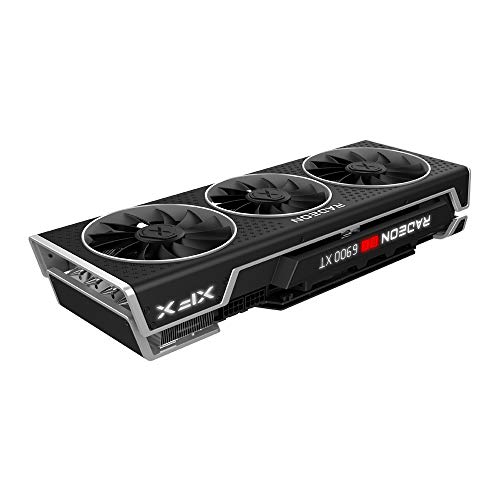
XFX specifies two 8-pin PCIe power inputs, an 850 W minimum PSU, and dimensions of 340 × 139 × 57 mm. That makes it the longest air-cooled pick here. It takes one fewer 8-pin plug than the two ASRock cards, which could be useful in an existing build with the right power supply and enough room at the front. XFX MERC 319 Black specifications
The Black, Ultra, and Limited Black names are easy to mix up in store results. If you want the model covered here, match the listing to XFX model code RX-69XTACBD9. The Black was $1,026.22 when checked, so I’d only pay the premium over the Phantom Gaming D if the connections or PSU requirements solve a problem I already have.
Gigabyte Gaming OC 16G for two HDMI displays
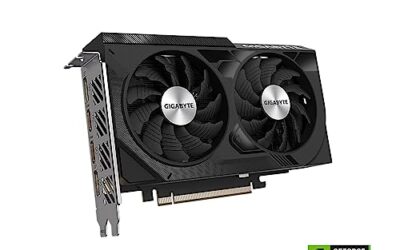
The Gaming OC has two HDMI 2.1 ports and two DisplayPort 1.4a ports. That gives you a straightforward way to connect an HDMI monitor and an HDMI TV directly to one card. Look at which inputs support your preferred refresh rate on each display. Some TVs reserve their highest-bandwidth HDMI inputs for particular ports.

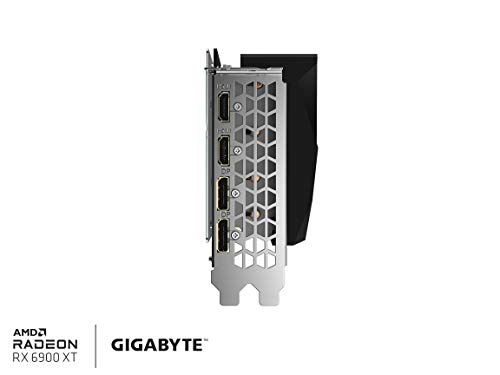
At 286 mm long and 118 mm high, this card is easier to fit lengthwise than the XFX or ASRock air-cooled picks. It still has a 58 mm cooler, needs three 8-pin power connectors, and carries an 850 W PSU recommendation. If you’ve got a short case with a capture card below the GPU slot, check the thickness before ordering. Gigabyte Gaming OC specifications
The catch is the $1,245 price we found. If you’re shopping mainly to connect two displays, see whether either screen already has a usable DisplayPort input. You may be able to get the same display arrangement with a less expensive card. The Gigabyte earns its spot when both of those native HDMI outputs matter or when 286 mm works and a 330 mm board won’t.
ASRock OC Formula 16GB for dual BIOS
The OC Formula is the pick for someone who wants two onboard firmware profiles. ASRock rates its Performance BIOS at up to 2,475 MHz boost and 2,295 MHz game clock. Its Quiet BIOS is rated up to 2,365 MHz boost and 2,165 MHz game clock. Both profiles keep the same 16 GB of GDDR6. ASRock instructs owners to shut the computer down before flipping the BIOS switch.
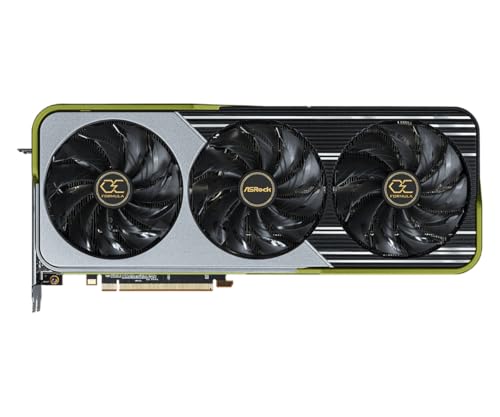
This is a 332 × 137 × 61 mm, three-slot card with three 8-pin sockets and a 1,000 W PSU recommendation. ASRock lists a graphics card holder among the original accessories. If you plan to use the holder, check whether the case floor or PSU shroud gives it a place to sit without getting in the way of intake fans. ASRock OC Formula specifications
It was $985 at the time of our check. I’d pick it over the Phantom Gaming D if I already had room, the right power supply, and a reason to use both profiles. The published clocks are useful for identifying the profiles. To judge what the difference means for your games, look for game-specific benchmarks that name the card and BIOS mode.
Sapphire TOXIC Extreme Edition for factory liquid cooling
The TOXIC Extreme Edition ships with a closed-loop liquid cooler and a 360 mm radiator. The graphics board itself is only 270 mm long. Sapphire lists the radiator assembly at 394 × 120 × 52.5 mm, though, so you’ll need enough room for the entire assembly as well as a clear route for the tubing.

Sapphire specifies two 8-pin connectors plus one 6-pin and recommends at least an 850 W PSU. If your CPU already uses the case’s only 360 mm mount, sketch out where both coolers would go before buying. With a top mount, check motherboard and memory clearance. With a front mount, check the distance left between the radiator and the GPU and the path the tubes would take. Sapphire TOXIC Extreme Edition specifications
At $1,499, this is a specialist choice for a build designed around that cooler. If you’re looking at one secondhand in the future, ask for photos of the full radiator assembly, tubing, and card. A listing that photographs only the board leaves you with an incomplete picture of the cooler you’re buying.
How we evaluated these RX 6900 XT cards
We compared manufacturer specifications for the exact desktop models, then checked U.S. Amazon listings for new stock and prices. We looked at case dimensions, connector layout, PSU recommendations, and any board-specific feature that would change a buying decision. The prices above are a snapshot. Recheck the price, condition, seller, and shipping at checkout.
We favored the lowest-priced listed card for buyers who can fit it and already have the power supply it needs. The remaining picks each solve a specific problem. Rated clocks helped distinguish variants. For a game performance comparison, look for results at your intended resolution with the same settings across cards.
How to choose the right RX 6900 XT
Will the whole card fit?
Start with the case manual’s GPU clearance for your installed fan or radiator layout. Then measure the distance from the rear expansion slots to the nearest obstruction. Check the width around the power connectors, too. A card can fit between the front and back of the case and still leave too little space to close the side panel comfortably with the cables attached.
Can your power supply handle this exact board?
AMD lists 300 W typical board power and an 850 W minimum PSU recommendation for the reference RX 6900 XT. The partner boards have their own requirements. Check the PSU wattage, count the available PCIe plugs, and follow your PSU manufacturer’s cable guidance. If you’re budgeting for a replacement, include it in the upgrade cost. How to choose a gaming PC power supply
Which video ports will you actually use?
Write down the input you’ll use for each screen and what else already occupies it. A TV might have one fast HDMI input open and another in use by a console. A desktop monitor may offer its preferred refresh rate over DisplayPort. Once you’ve mapped the connections, you can tell whether the XFX card’s USB-C or the Gigabyte card’s second HDMI port earns its price.
If you’re moving a monitor from DisplayPort to HDMI, check the monitor manual for the timing and variable refresh support on the new input. If you connect through a dock, adapter, or switch, check that device’s limits too. The whole chain needs to support your chosen mode, including the cable and any hardware between the card and the display.
What does the upgrade cost once it’s installed?
Add shipping, any PSU replacement, and any case or cooling changes. Then compare that total with the price of a newer card that fits the build as it stands. If you’re buying for specific games, check their results at the resolution and quality settings you actually use. If you’re buying for an app, check its GPU requirements as well. Current graphics card buying guide
Frequently asked questions
Does the RX 6900 XT deliver 23 FP32 TFLOPS?
Yes. AMD lists 23.04 TFLOPS of peak single-precision vector performance, where FP32 means 32-bit floating point. That’s a theoretical peak for a specific type of arithmetic. Frame rates also depend on the game engine, graphics settings, memory access, and CPU performance. Use the figure to describe the GPU’s compute capability and game benchmarks to estimate frame rates. AMD RX 6900 XT specifications and drivers
Is the RX 6900 XT still worth buying for 4K?
It can be if you find a price that makes sense and the games you play will run at your target settings. All five models have 16 GB of VRAM, which gives you room for higher-resolution textures where the game can use it. If you care about high-refresh 4K or heavy ray tracing, look up results for those settings before buying. A card that suits your single-player backlog might fall short of what you want in a newer release.
Do all RX 6900 XT cards need the same cables?
They vary by model. The XFX Black uses two 8-pin connections, the Gigabyte Gaming OC uses three, and the Sapphire TOXIC Extreme uses two 8-pin and one 6-pin. Check the exact label on the listing against the board maker’s specifications. If you’re buying for a prebuilt, verify the plugs your particular PSU actually provides.
Bottom line
Start with the ASRock Phantom Gaming D if the 330 mm board fits, you meet ASRock’s power requirements, and it’s still the least expensive option. Move to the XFX for USB-C video or the Gigabyte for two HDMI displays. The OC Formula and TOXIC Extreme suit builds where their BIOS profiles or radiator layout solve a specific need.
At the prices we checked, I’d price a newer GPU before ordering any of them. An RX 6900 XT makes the most sense when the exact board fits your existing build and the total cost leaves enough room below the alternatives you’d also be happy to own.


























Write Your Review
No reviews yet. Be the first to share your experience!