

Seven hundred dollars is enough to get a prebuilt desktop with a dedicated graphics card, but it isn’t enough to ignore the small print. An impressive GPU name can sit beside an unnamed old processor, 8GB of memory, or a tiny SSD. Those details matter more than the number of glowing fans in the product photo.
We checked new-item offers through Amazon Creators API on November 25, 2026, and selected five desktops listed below $700. The CyberPowerPC has the clearest processor specification. The others trade some certainty for a stronger or cheaper graphics configuration. Prices, sellers, and configurations change; verify the exact listing before checkout. If you can spend more, compare the parts with our gaming PCs under $1,000 before settling for an older graphics platform.
Don’t mistake an in-stock “New” offer for proof that every part inside the case is recent. Some machines here advertise graphics cards and CPUs from earlier generations. Ask for the exact CPU model, storage type, power supply, warranty, and return terms. An unanswered question is a reason to keep shopping.
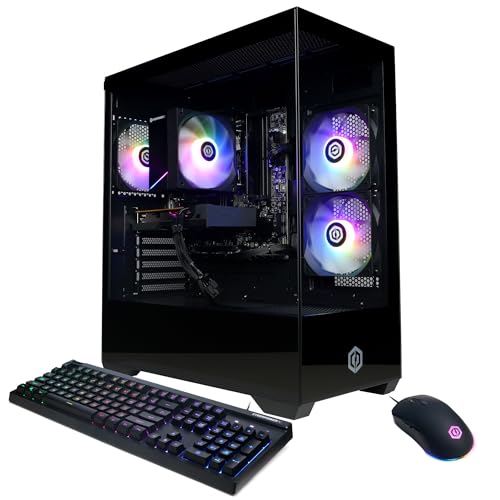
Pros
- Zen 3 six-core CPU still competent for 1080p esports and general use
- PCIe 4.0 NVMe SSD avoids the slow SATA storage common at this tier
- B550 board allows later drop-in upgrade to 5700X3D on AM4
- Windows 11 Home, keyboard, and mouse included for immediate first bot
Cons
- Limited owner feedback at time of writing, quality signal is thin
- 8GB DR4 single stick likely, expect stutter in modern titles until upgraded
- RX 6500 XT 4GB has 4 PCIe lanes and struggles when VRAM spills to system RAM
- Only1 HDMI and 1 DisplayPort on GPU limits multi-monitor flexibility
This is a budget AM4 prebuilt built around the Ryzen 5 5500, a six-core Zen 3 CPU, paired with a Radeon RX 6500 XT 4GB on a B550 chipset. It targets first-time PC buyers and younger gamers moving off console who want 1080p esports without shoping for parts individually.
The defining pairing here is the 5500 and RX 6500 XT. Prebuilts at this tier typically deliver high-refresh 1080p in Fortnite, Valorant, CS2, and Rocket League at medium settings, while modern AAA titles like Cyberpunk 2077 or Alan Wake 2 will require low presets and FSR upscaling to hold60 FPS on 4GB VRAM.
Trade-offs are typical for the price bracket. 8GB DR4 is under-specced for 2025 gaming and should be upgraded to16GB dual-channel early. The RX 6500 XT runs on a PCIe x4 interface, which amplifies performance loss when VRAM overflows. Only 1 HDMI plus 1 DisplayPort limits multi-monitor setups, and the Ryzen 5 5500 lacks integrated graphics for troubleshooting.
Buy this if you want a plug-and-play 1080p esports box on AM4 with a clear upgrade path to a 5700X3D later. Skip this if you plan to play recent AAA releases at high settings, or if you need more than two display outputs from the GPU.
CPU and platform: Ryzen 5 5500 is a six-core, twelve-thread Zen 3 part with a 3.6GHz base clock on the B550 chipset. It lacks the3D V-Cache of X3D chips, but AM4 leaves room to swap in a 5700X3D or 5800X3D later without changing board or RAM.
GPU class and resolution fit: The Radeon RX 6500 XT 4GB is a 1080p entry card with4GB GDDR6 and a PCIe 4.0 x4 interface. Expect high frame rates in esports titles at medium settings, and low-preset 1080p in AAA games where4GB VRAM becomes the primary bottleneck.
Memory and storage: 8GB DDR4 is the notable weak spot, modern titles increasingly expect 16GB, so budget for a second stick to run dual-channel. The 500GB PCIe 4.0 NVMe SSD is a genuine strength at this price tier and holds roughly six to eight modern installs.
Connectivity: WiFi 5 and Bluetooth 5.0 cover wireless basics, while 4 USB-A 3.2 plus 4 USB-A 2.0 handle typical peripherals. Display output is limited to 1 HDMI and 1 DisplayPort from the GPU, and 7.1 channel audio is handled via the board codec.


Quick Look: Best Prebuilt Gaming PCs Under $700
| Pick | Desktop | Listed graphics | Best for | Main drawback |
|---|---|---|---|---|
| Best documented CPU | CyberPowerPC Gamer Master | Radeon RX 6500 XT 4GB | A conventional tower with a named Ryzen CPU | Only 8GB RAM and 4GB VRAM |
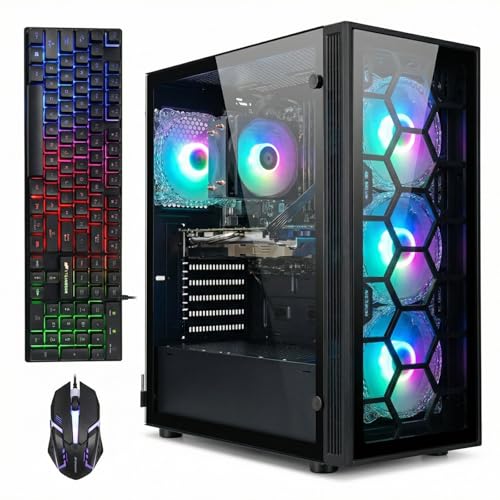
| Most ambitious GPU listing | STGAubron RTX 2060 Super | GeForce RTX 2060 Super 8GB | Buyers willing to verify an older Core i7 | CPU generation is unclear |
| Lower-cost GTX option | DeXwtzfn GTX 1660 Super | GeForce GTX 1660 Super 6GB | Older and lighter games on a tighter budget | Processor model is vague |
| Named older-platform alternative | Volt X3 V1.2 | GeForce GTX 1070 8GB | Buyers who prefer a named CPU and GPU | Ryzen 5 2600 and GTX 1070 are old |
| Defined Core i7 generation | STGAubron 8th Gen GTX 1660 Super | GeForce GTX 1660 Super 6GB | A tower with a specified CPU generation | Exact i7 model and power supply still need confirmation |
1. CyberPowerPC Gamer Master: Best Documented CPU
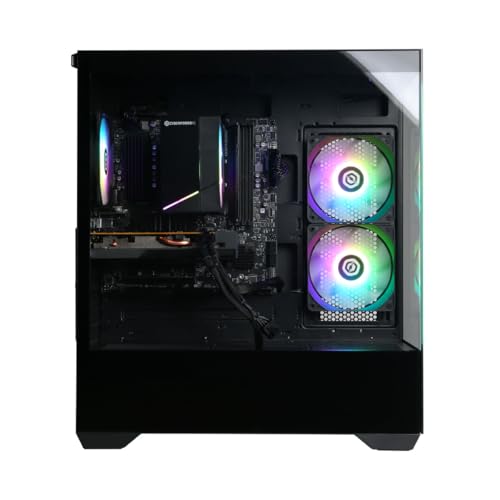
CyberPowerPC names the Ryzen 5 5500 and Radeon RX 6500 XT in this Gamer Master listing. That’s useful. You can look up the processor and graphics card without guessing which generation “Core i7” might mean. The new-item price was $669.99 when checked, leaving a small margin below the $700 cap before tax. If the seller changes, look again at the condition and specification rather than assuming the card will describe the same machine.
The Ryzen 5 5500 is a six-core desktop processor on AMD’s AM4 platform. AMD’s product specification lists six cores, twelve threads, and PCIe 3.0 support. The PCIe detail deserves attention because the RX 6500 XT has a narrow PCIe interface. A buyer should read independent game results for this exact pairing instead of assuming it matches results from a faster PCIe 4.0 platform. We haven’t measured this assembled PC.
Only 8GB of DDR4 memory is listed. That’s a real cost. A modern Windows gaming setup with a launcher, browser, voice chat, and game can strain that capacity. Ask whether the memory is one 8GB stick or another arrangement, how many slots are free, and what a supported 16GB configuration would cost. Budget the upgrade before comparing this tower with a 16GB rival. The listing’s 500GB SSD is workable for a starter machine, but a few large games can fill it quickly.
Four gigabytes of video memory also sets a ceiling. The RX 6500 XT can serve lighter 1080p games, but settings and newer games need realistic expectations. If your priority is a broad modern game library at higher quality, the budget may be too low for any of these five. If you want a clearly identified CPU and a conventional case you may be able to upgrade, this is the easiest listing here to evaluate. Confirm the motherboard, power supply connectors, and case clearance before planning a future GPU change.
2. STGAubron RTX 2060 Super: Most Ambitious GPU Listing
This STGAubron listing advertises an RTX 2060 Super with 8GB of GDDR6 memory, 32GB RAM, and a 1TB SSD. At $699.99 during verification, it sat exactly at the pre-tax ceiling. On paper, those storage and memory figures look generous for the money. The RTX 2060 Super is also more attractive for a buyer who wants an older Nvidia card with more than 4GB of VRAM. But the title says only “Core i7 up to 3.9GHz.” That’s not a processor model.
Core i7 has described many chips across many years. Clock speed alone doesn’t tell you the architecture, core count, motherboard socket, or likely gaming behavior. Ask the seller to identify the exact CPU model and whether its board, power supply, and memory are new. Also ask for the GPU’s manufacturer and condition. The offer being marked “New” applies to the listing condition; it does not identify the manufacture date of every component inside a system built around older hardware.
Choose this STGAubron only if the seller gives you the missing component details and you accept an older Nvidia graphics platform. It could be the strongest graphics value in this group for the right buyer. Without that confirmation, the CyberPowerPC’s known processor is a safer starting point for comparison. Don’t let the “Core i7” label make the decision by itself.
3. DeXwtzfn GTX 1660 Super: Lower-Cost GTX Option
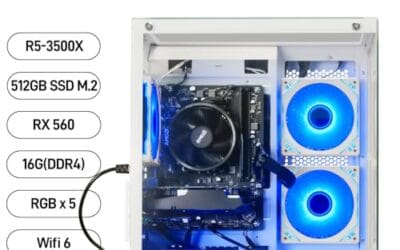
DeXwtzfn’s listing combines a GTX 1660 Super 6GB, 16GB RAM, a 512GB SSD, Wi-Fi 6, and Windows 11. Its verified new-item offer was $569.99, so there is much more room below the cap than with the two systems above. That gap can pay for a larger drive, a better monitor, or simply leave money in your pocket. It doesn’t automatically make the PC a bargain.
The title describes an “i7 CPU up to 4.0GHz” but omits the actual model. An older i7 can fall well behind a newer midrange chip, and the graphics card cannot remove a CPU bottleneck in every game. The GTX 1660 Super is an older 6GB card without the modern feature set of recent Nvidia GPUs. Think of it as a route into older games and lighter 1080p titles, with settings adjusted for each game. Don’t buy it because a listing casually says “gaming PC.”
This is the value pick for someone whose game library is known and modest, who can confirm the parts, and who doesn’t mind an older GPU. If you’re buying for a recent demanding release, check that game’s official requirements first and compare independent performance reports for the GTX 1660 Super. A $570 offer can be sensible. A $570 surprise is not.
4. Volt X3 V1.2: Named Older-Platform Alternative
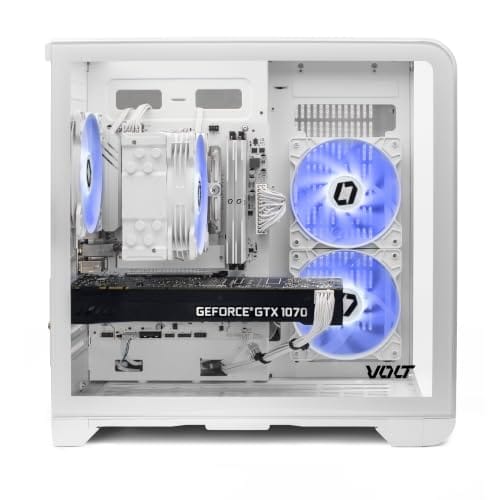
Volt identifies a Ryzen 5 2600 and GTX 1070 8GB in the X3 V1.2 listing, alongside 16GB DDR4 and a 512GB NVMe SSD. The current new-item offer was $599.99. Those named parts give you more to research than an anonymous “i7 up to 4.0GHz.” You can inspect the exact processor generation, graphics card era, and likely upgrade path before placing an order.
AMD lists the Ryzen 5 2600 as a six-core, twelve-thread AM4 processor. It is considerably older than the Ryzen 5 5500 in the CyberPowerPC. The GTX 1070 dates from Nvidia’s Pascal generation. Its 8GB memory does not make it equivalent to a current 8GB GPU. Architecture, supported features, drivers, and the exact games you play all matter. The point of a named configuration is that you can investigate those limits.
For someone playing established esports games or older single-player titles, this may be a more transparent buy than a vague Core i7 tower. For someone aiming at new releases, save up or look for a newer platform. The key question isn’t whether 8GB VRAM sounds good. It’s whether this complete, older system meets your actual game list at a price that leaves enough room for its likely replacement cycle.
5. STGAubron 8th Gen GTX 1660 Super: Defined Generation, More Questions
STGAubron’s second option specifies an eighth-generation Core i7, GTX 1660 Super 6GB, 16GB DDR4, and a 512GB SSD. Its new-item offer was $659.99. Naming the generation is more helpful than saying only “Core i7,” but the exact i7 model is still missing. Several eighth-generation desktop chips exist, and the final system can differ in cooling, memory layout, motherboard, and storage drive.
At this price, the DeXwtzfn GTX 1660 Super costs less, while the CyberPowerPC offers a named Ryzen processor. This STGAubron sits between them: a known Intel generation, but no exact CPU model. Ask the seller for that model and a photo or written specification of the actual motherboard and PSU. You should also confirm whether the unit includes the advertised wireless hardware and what support applies to the graphics card. A product title is only a starting point.
The GTX 1660 Super can still be useful for lighter 1080p games, but its age is a reason to keep expectations measured. If a seller cannot give a complete parts list, the extra money over the DeXwtzfn is difficult to justify. If they can, compare the confirmed CPU and warranty terms directly with the cheaper option. Sometimes the more expensive machine earns its place through clearer support. Sometimes it doesn’t.
How We Evaluated These Desktops
We used the current Amazon Creators API item records to confirm a new, in-stock offer below $700 for each listed configuration on November 25, 2026. We checked the actual product titles and gallery photos, then compared processor identification, graphics model, memory, storage, and the questions left unanswered. AMD’s processor specifications informed our comments about the two named Ryzen CPUs. The reference Tech Guided buying guide helped shape the quick-look format; these evaluations and product choices are our own.
We haven’t used these assembled desktops or measured their frame rates, noise, temperatures, or reliability. A listed configuration can also change by seller. We ranked clarity and buying risk alongside apparent component value. That’s why the first pick isn’t simply the one with the biggest GPU name. An unknown processor, power supply, or component condition can erase the value of a flashy graphics line in a listing.
Prices below a strict cap can move quickly. The five offers were $569.99 to $699.99 at verification, before any tax or shipping. We don’t promise that the same seller will be in stock when you read this. Check the final cart, condition, return policy, and warranty. If one listing has moved beyond the budget, don’t stretch the cap on the strength of this snapshot.
How to Choose a Gaming PC Under $700
Start with the games, not the case lighting
Write down the games you actually play, your monitor’s resolution and refresh rate, and the settings you expect. A basic 1080p esports setup is a different purchase from a machine for current graphically demanding releases. Read the publisher’s requirements and independent results for the named GPU and CPU. If the listing hides the CPU, ask the seller before treating any performance estimate as relevant. A familiar graphics card paired with an unknown old processor is not a complete answer.
Demand exact part numbers
Ask for exact CPU, GPU, motherboard, memory, power supply, and storage models. “Core i7” doesn’t identify a CPU, and “550W” doesn’t identify a power supply. Check Windows licensing and warranty coverage. For upgrades, confirm free memory slots, power connectors, and GPU clearance. Our graphics card guide can help compare cards once you know what fits.
Count upgrade costs before calling a deal cheap
The CyberPowerPC’s 8GB RAM will likely be the first thing many buyers change. A 512GB SSD might be fine for a small library and cramped for a large one. A used or undocumented power supply can make a GPU upgrade more expensive than expected. Add those costs to the computer’s price. If the total approaches $1,000, a newer prebuilt at that level may be a better buy from day one. A tower is useful for upgrades only when the case and components actually support them.
Check the seller and return terms
An Amazon listing can show a “New” offer for a computer built from older-generation parts. Read the seller identity, condition notes, return window, and warranty carefully. Save the product page and written answers to component questions. When the PC arrives, compare the actual CPU, GPU, RAM, and drive with the listing while the return window is still open. If you are uncomfortable making that verification, favor the clearest documented configuration or buy from a builder with a more explicit parts list.
Frequently Asked Questions
Can a $700 prebuilt run modern games?
Some can run selected recent games at 1080p with lower settings, but there is no universal answer. Each game has different CPU, GPU, and memory demands. Four-gigabyte cards in particular can require careful texture settings. Check the official requirements for your games and independent results for the exact hardware. Avoid promises based on the word “gaming” in a product title.
Is a Core i7 better than a Ryzen 5?
Not from the label alone. Core i7 and Ryzen 5 span multiple generations. An older i7 can be slower for your purposes than a newer Ryzen 5. Compare exact model numbers, core counts, platform support, and relevant independent results. If a listing withholds the i7 model, you don’t have enough information for a fair comparison.
Should I buy a cheaper PC and upgrade its graphics card?
Only after confirming the motherboard slot, power supply capacity and connectors, case clearance, processor, and warranty terms. A GPU swap can be straightforward on a well-documented tower. It can also expose a weak PSU or old CPU platform that makes the “cheap” starting price misleading. Calculate the whole upgrade budget before buying.
Bottom Line
The CyberPowerPC Gamer Master is our starting point under $700 because its Ryzen 5 5500 is identified clearly. Plan for a RAM upgrade and respect the limits of its 4GB graphics card. The STGAubron RTX 2060 Super has the most tempting GPU and memory figures, but its unnamed CPU makes seller confirmation essential. DeXwtzfn and Volt offer lower prices with older graphics; the eighth-generation STGAubron is a middle ground only if its missing details are supplied.
No miracle box here. Buy the machine whose components, condition, warranty, and price you can verify. If none passes, waiting or moving to a higher budget is better than purchasing a case full of unknowns.

























Write Your Review
No reviews yet. Be the first to share your experience!