

The best motherboard is the one that fits your processor, case, storage plan, and rear-panel needs without spending money on features you’ll never connect. For most new AMD gaming builds, the MSI MAG B850 Tomahawk MAX WiFi strikes that balance. If you need USB4, the ASUS TUF Gaming X870-PLUS WiFi is the next step. Intel builders with a Core Ultra Series 2 processor have a different socket entirely; the ASUS ProArt Z890-Creator WiFi is the specialist choice here.
Don’t start with the largest chipset number. Start with the CPU you intend to keep, then count the M.2 drives, USB-C devices, expansion cards, and network ports you will actually use. A board can offer four storage slots on a product page but share bandwidth with a PCIe slot or a rear port. Those footnotes matter more than a decorative heatsink.

Pros
- Robust power delivery: 14 duet rail 80A SPS VRM and dual 8-pin CPU power for strong Ryzen 7000/8000/9000 support
- Excellent platform features at this tier: PCIe 5.0 x16 plus 2x M.2 Gen5 x4 and two additional M.2 slots
- High-end networking: WiFi 7, Bluetooth 5.4, and 5G LAN
- Thoughtful DIY ergonomics: tool-less M.2 hardware and a dedicated GPU slot release button noted positively by owners
- Solid build focus: server-grade PCB with 2oz copper and reinforced primary PCIe slot
Cons
- Windows 11-focused platform support is a common pain point for users trying to stay on Windows 10
- No printed manual in the box, setup typically requires downloading documentation
- The Tomahawk styling and green accents are divisive if you are aiming for a strict blacked-out build theme
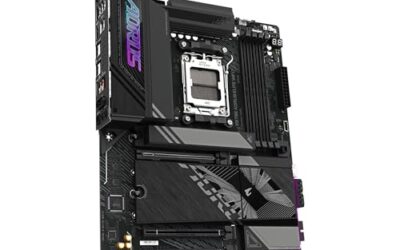
The MSI MAG B850 Tomahawk MAX WiFi is an ATX AMD AM5 motherboard aimed at midrange-to-enthusiast builders who want a modern Ryzen 7000, 8000, or 9000 foundation without paying flagship X-series pricing. It is positioned for high-FPS gamers, streamers, and creators who care about stability, fast storage, and strong rear I/O.
Its standout is the power and thermals package: a 14 duet rail power design using 80A SPS stages, dual 8-pin CPU power, and layered heatsinks with high-conductivity thermal pads. In real builds, that translates to better headroom for sustained boost behavior and fewer VRM temperature worries when running higher-core-count Ryzen CPUs or enabling performance tuning features like PBO.
Platform features are very forward-looking for a B-series board. You get a reinforced PCIe 5.0 x16 slot for modern GPUs, plus four M.2 slots including two PCIe 5.0 x4 connectors for next-gen NVMe drives. MSI also leans into builder convenience with EZ M.2 hardware and a dedicated GPU release button, which is a genuinely useful feature if you upgrade GPUs often or work in tighter cases.
Connectivity is a major plus: WiFi 7 with Bluetooth 5.4, Realtek 5G LAN, USB 20G Type-C, and upgraded USB audio with S/PDIF support cover most gaming and creator desk setups without needing add-in cards. The trade-offs are mostly platform and presentation related, owners note a Windows 11-only stance in practice for some setups, and the board aesthetics are not universally loved.
Verdict: this is an excellent AM5 gaming and productivity backbone if you want PCIe 5.0, multiple fast M.2 slots, and high-end networking, plus a VRM that is built for modern Ryzen boost behavior. Skip it if you must stay on Windows 10 or if you strongly dislike the Tomahawk color accents.
| Chipset | AMD B850 |
|---|---|
| Form Factor | ATX |
| CPU Socket | AM5 |
| CPU Support (per listing) | AMD Ryzen 9000 / 8000 / 7000 |
| Power Delivery | 14 Duet Rail Power System, 80A SPS |
| Memory | 4x DDR5 DIMM, up to 8400+ MT/s (OC, 1DPC 1R) |
| PCIe (GPU) | 1x PCIe 5.0 x16 (Steel Armor II) |
| M.2 Slots | 2x M.2 Gen5 x4, 1x M.2 Gen4 x4, 1x M.2 Gen4 x2 |
| SATA | 6 ports |
| Networking | WiFi 7, Bluetooth 5.4, 5G LAN |
| Rear I/O Highlights (per listing) | USB 20G Type-C, 7.1 USB High Performance Audio, S/PDIF output |
| Warranty | 3-year manufacturer warranty |
CPU and socket: AM5 motherboard for AMD Ryzen 7000, 8000, and 9000 desktop processors (per the listing). Multiple owners report successful out-of-box boot with popular chips such as Ryzen X3D and Ryzen 9000 series, but it is still smart to verify BIOS support and update to the latest stable release once the system is running.
Memory setup tips: It supports DDR5 with overclocking headroom up to 8400+ MT/s (OC). For most gaming builds, prioritize a stable EXPO kit and tune from there rather than chasing maximum frequency, especially if you populate more than two DIMMs.
GPU and storage lanes: The primary GPU slot is PCIe 5.0 x16, and the board offers four M.2 sockets including two Gen5 x4. If you plan to run Gen5 NVMe drives, use the included M.2 shielding and ensure your case has decent airflow to keep sustained write speeds from dropping.
Power supply and connectors: The board uses dual 8-pin CPU power connectors, so choose a quality PSU that includes the required EPS cables, especially for higher-core-count Ryzen CPUs and long render or compile sessions.
OS and drivers: The platform is listed for Windows 11, and some users have had issues attempting Windows 10. If you are building for Linux, use a current distribution and kernel, since brand-new chipsets can need up-to-date firmware and driver stacks even when overall stability is good.

Pros
- 16+2+1 80A power stage handles 170W AM5 CPUs like 9950X without VRM throttling
- Native USB4 20Gbps front header with PD fast charge, uncommon at this tier
- Four M.2 slots including PCIe 5.0 lane for high-end NVMe storage
- WiFi 7 plus dual Ethernet (5Gb Realtek, 2.5Gb Intel) for flexible networking
Cons
- Zero owner reviews at time of writing, real-world reliability data is unavailable
- DDR5-only platform, no DR4 fallback for budget-focused AM5 upgraders
- Full VRM phase behavior and M.2 Gen5 thermals unverified without independent testing
The ASUS TUF GAMING X870-PLUS WIFI is a mid-range ATX motherboard on AMD's X870 chipset, targeting AM5 builders running Ryzen 7000, 8000, or 9000 CPUs. With a 16+2+1 (80A) power stage, four M.2 slots, PCIe 5.0, WiFi 7, and USB4, it aims at mainstream gamers and content creators skipping X870E flagship pricing.
The standout is the I/O and power combo, USB4 at 20Gbps up front with PD fast charging is rare below the high-end tier, and the 16+2+1 80A VRM has clear headroom for a 950X under all-core loads. X870 boards in this tier typically ship with DDR5-6000 to 6400 EXPO support as the sweet spot for Zen 4and Zen 5.
Trade-offs are typical for the chipset. DDR5-only rules out DDR4 kit reuse, PCIe 5.0 M.2 drives will need active airflow to avoid thermal throttling, and running four M.2 populated may share lanes with the second PCIe slot. Independent VRM thermal data and owner fedback are not yet available, so long-term reliability signals are limited.
Buy this if you want a Ryzen 9000 board with WiFi 7, USB4, and PCIe 5.0 storage headroom on a mainstream budget. Skip this if you plan to reuse DDR4, need the extra chipset lanes of X870E, or prefer waiting for owner fedback and third-party VRM testing before committing.
Socket and CPU support: AM5 socket with the X870 chipset, listed as ready for Ryzen 9000, 8000, and 7000 desktop processors. The 16+2+1 (80A) power stage gives clear headroom for 170W parts like the 9950X and 7950X3D, though a BIOS update via BIOS FlashBack may be need on early stock for Ryzen 9000 support.
Memory: DDR5 only, no DDR4 fallback. Specific spedceilings and QVL are not detailed in source, but AM5 boards in this tier typically land at DDR5-6000 CL30 EXPO as the 1:1 FCLK sweet spot for Zen 4 and Zen 5, with higher speeds possible in 2-DIMM configurations.
Storage and expansion: Four M.2 slots and PCIe 5.0 support for next-gen GPUs. Exact Gen5 versus Gen4 M.2 split is not specified in source, but X870 requires at least one PCIe 5.0 M.2. Expect active cooling on Gen5 drives to avoid throttling under sustained sequential loads.
Connectivity: USB4 20Gbps front header with PD fast charge, WiFi 7 (802.11be) with the ASUS WiFi Q antenna, plus dual Ethernet (Intel 2.5Gb and Realtek 5Gb). The 5Gb port is useful for multi-gig home networks and NAS setups without add-in cards.

Pros
- Native USB4 40Gbps on AM5 without add-in card, rare below flagship X870E boards
- PCIe 5.0 graphics slot and Gen5 M.2 both present for RTX 50 and Gen5 NVMe
- WiFi 7 and 5Gbps Ethernet cover current and near-term networking upgrades
- Reinforced VRM cooling with heatpipe suits Ryzen 9950X sustained multicore loads
Cons
- Limited owner feedback at time of writing, long-term reliability signal not yet established
- DDR5-only AM5 platform, no reuse of existing DDR4 kits from AM4 builds
- Sits well above B850 pricing tier without confirmed extras like 10Gbps LAN or PCIe bifurcation in source
- Specification table in listing is sparse, VRM phase count and full M.2 layout not disclosed here
The MSI MPG X870E Carbon WiFi is a high-end AM5 ATX motherboard built around AMD's X870E chipset, supporting Ryzen 9000, 8000, and 7000 series CPUs with DDR5, PCIe 5.0 graphics, and Gen5 M.2. It targets builders pairing a Ryzen 9 7950X, 7800X3D, or 9950X with an RTX 40 or 50-series GPU.
The defining pitch is full next-gen I/O: PCIe 5.0 x16, Gen5 M.2, USB 40Gbps, WiFi 7, and 5Gbps LAN in one board. X870E boards in this tier typically ship with DDR5-6000 to 8000 EXPO profiles as the stability sweet spot on AM5, matching Ryzen X3D memory scaling expectations.
Trade-offs are typical at this tier. The listing does not disclose VRM phase count, exact M.2 slot count, or PCIe lane split, so bifurcation and secondary GPU behavior need confirmation from the manual. AM5 is DDR5-only, and X870E pricing sits above B850 without a clearly itemized feature gap in the source data.
Buy this if you want a Ryzen 9 build with USB4, WiFi 7, and Gen5 SSD support on a well-cooled VRM. Skip this if your CPU is a Ryzen 5 non-X3D or you have no Gen5 or USB4 peripherals, since B850 covers that use case at lower cost.
Socket and chipset: AM5 socket with AMD X870E chipset, validated for Ryzen 9000, 8000, and 7000 series desktop CPUs. X870E mandates USB4 40Gbps and PCIe 5.0 graphics as chipset baselines, so this board hits both. BIOS FlashBack support is typical at this tier for updating without a CPU installed.
Memory: DDR5 only, no DDR4 fallback. Source does not list a maximum data rate, but AM5 boards in this class typically hit DR5-6000 to 6400 EXPO at 1:1 FCLK as the stability sweet spot for Ryzen X3D and non-X3D chips alike. Check the QVL for 64GB and 96GB kits.
Storage and PCIe: PCIe 5.0 x16 graphics slot and at least one Gen5 M.2 slot with M.2 Shield Frozr heatsink, plus SATA 6Gb/s for legacy drives. Exact M.2 count and lane sharing are not specified in the source, so confirm secondary M.2 generation before planing a four-drive NVMe build.
Networking and I/O: WiFi 7 with Bluetooth 5.4and 5Gbps wired LAN, dual-path setup useful for NAS or streaming rigs. Rear I/O includes USB 40Gbps (USB4-class) and HDMI for iGPU output on Ryzen 8000G or7000-series APUs.

Pros
- 16+2+1+2 teamed VRM with ProCool II connectors handles Core Ultra 9 without throttling.
- Dual Thunderbolt 5 plus 10 Gb LAN and WiFi 7 covers pro I/O without add-in cards.
- Five M.2 slots with Q-Release, Q-Slide, and Q-Latch simplify tool-less multi-drive builds.
Cons
- Limited owner feedback at time of writing, so long-term BIOS and stability data is thin.
- DR5-only LGA1851 platform blocks any CPU or memory reuse from LGA1700 systems.
- Four of five M.2 slots are PCIe 4.0, not Gen 5, limiting top-tier NVMe scaling.
The ASUS ProArt Z890-CREATOR WIFI is a high-end LGA1851 ATX motherboard aimed at content creators running Intel Core Ultra Series 2 desktop CPUs. With a 16+2+1+2 teamed VRM, dual Thunderbolt 5, 10 Gb plus 2.5 Gb Ethernet, and WiFi 7, it targets Blender, DaVinci Resolve, and Premiere workstation builds.
The 16+2+1+2 power stage design is the defining feature, giving stable current delivery for higher-core Core Ultra 9 SKUs during sustained render loads. Z890 boards in this tier typically hold VRM temps under 70C with a case fan sweeping the heatsink, based on category norms since owner benchmarks are not yet available.
Trade-offs are typical of the platform: DDR5-only memory rules out cheaper DDR4 kits, Core Ultra Series 2 requires a fresh CPU purchase rather than a drop-in upgrade, and Thunderbolt 5 accessories remain scarce. The five M.2 slots include four PCIe 4.0 rather than all Gen 5, so plan storage tiers accordingly.
Buy this if you need Thunderbolt 5, 10 Gb LAN, and a five-slot M.2 layout for a Core Ultra 9 workstation handling video editing or AI inference. Skip this if you game only on a Core Ultra 5, since a cheaper board covers that workload without paying the ProArt tax.
Socket and chipset: LGA1851 with Z890 chipset, ready for Intel Core Ultra Series 2 desktop CPUs (Core Ultra 9, 7, and 5). No backward compatibility with LGA1700 Raptor Lake or Alder Lake, so a full platform swap is required for upgraders coming from 12th, 13th, or 14th gen builds.
VRM and power: The 16+2+1+2 teamed power stage layout with ProCool II connectors and alloy chokes is overbuilt for Core Ultra 9 sustained loads, giving thermal headroom during Blender or Premiere renders. AI Overclocking and NPU boost are exposed in BIOS for tuning without manual voltage tweaks.
Memory and storage: DDR5 only, no DDR4 fallback. Five M.2 slots total: one PCIe 5.0 plus four PCIe 4.0, all with Q-Release, Q-Slide, and Q-Latch tool-less mounts. This suits creators running scratch, cache, project, and archive drives on separate NVMe volumes rather than a single boot SD.
Expansion and I/O: Two PCIe 5.0 x16 slots with full support for next-gen GPUs, plus one additional PCIe 5.0 slot. Rear I/O includes dual Thunderbolt 5 Type-C, one Thunderbolt 4, 10 Gb and 2.5 Gb Ethernet, WiFi 7, and a USB 20 Gbps front-panel header.

Pros
- Strong power delivery and thermal design for its segment, backed up by user reports of stable operation with high-end Ryzen chips
- Excellent storage and I/O mix: 3x PCIe 4.0 M.2, 6x SATA, plenty of USB, plus 2.5GbE and Wi‑Fi 6E
- Installer-friendly touches like integrated I/O shield and easy M.2 mounting, frequently praised in reviews
- User-friendly MSI Click BIOS experience for CPU and DDR5 tuning
Cons
- PCIe 5.0 NVMe support is not listed for this model, so ultra-fast Gen5 SSD buyers may prefer a higher-tier B650E or X670 board
- Wireless performance feedback is mixed across users, some may still prefer wired 2.5GbE for the lowest and most consistent latency
- ATX form factor needs a mid-tower or larger case, not suitable for compact ITX builds
The MSI MAG B650 Tomahawk WiFi is an ATX AMD B650 motherboard for the AM5 platform, aimed squarely at mainstream to upper-midrange gaming and productivity builds that want DDR5 and modern connectivity without stepping up to premium chipset pricing.
Its biggest real-world advantage is a strong VRM and a heavy thermal solution (extended heatsinks plus MSI M.2 Shield Frozr), which helps maintain stable boost behavior during long gaming sessions, streaming, and CPU-heavy work like compiling or rendering. Pair it with a Ryzen 7 class chip and a modern GPU and you have a platform that is comfortable for high-refresh 1080p esports and 1440p AAA gaming where GPU performance is the main limiter.
Storage and networking are also a highlight: you get three PCIe 4.0 x4 M.2 slots for fast NVMe setups, plus six SATA ports for bulk SSD or HDD storage. For online play and large file transfers, 2.5GbE LAN and Wi-Fi 6E cover both low-latency wired and flexible wireless setups.
Build quality and usability are frequent positives in owner feedback. The integrated I/O shield and easy M.2 install mechanism make first-time builds and future SSD upgrades less annoying, and MSI Click BIOS is commonly described as approachable for tuning and troubleshooting.
The main trade-offs at this tier are platform feature prioritization: PCIe 5.0 NVMe is not specified here, so buyers chasing Gen5 SSD speeds should look at B650E or X670 options. Also, while Wi-Fi 6E is included, some users report wireless performance that may not match a dedicated add-in adapter, so competitive players may still prefer wired Ethernet.
Verdict: The MAG B650 Tomahawk WiFi is an excellent AM5 foundation for gamers and creators who want strong thermals, lots of NVMe capacity, and modern networking. Skip it if Gen5 storage is a must-have or if you require top-tier wireless performance without relying on Ethernet.
| Category | Details |
|---|---|
| Chipset | AMD B650 |
| Socket | AM5 |
| CPU Support (listed) | AMD Ryzen 7000 and 8000 series (title also lists Ryzen 9000 support) |
| Form Factor | ATX |
| Memory | 4x DDR5 DIMM slots, up to 128GB, up to 6400+ (OC) listed |
| Expansion | PCIe x16 slots: 2 (PCIe 4.0 listed in comparison table), total PCIe ports: 3 |
| M.2 | 3x M.2 (PCIe Gen4 x4) |
| SATA | 6x SATA 6Gb/s |
| Networking | 2.5GbE LAN, Wi-Fi 6E, Bluetooth support |
| Display Outputs | HDMI, DisplayPort |
| USB (listed) | 10 total USB ports, includes USB 3.2 Gen 2 and 2x USB 2.0 |
| Audio | 7.1-channel HD audio, optical S/PDIF out |
| Power Connector | 24-pin ATX main power |
| OS Platform (listed) | Windows 11 |
| Warranty | 3 years |
CPU and BIOS: This is an AM5 B650 board intended for Ryzen 7000 and 8000 series CPUs, and the product title also lists Ryzen 9000 support. If you are installing a newer Ryzen generation, you may need a BIOS update depending on the board’s manufacturing date, plan your build accordingly.
RAM: Use DDR5 in matched kits and start with stable settings, then enable memory overclocking in BIOS if desired. Many AM5 builds target DDR5 around the 6000 MT/s range as a practical tuning point, but always verify the memory QVL and your CPU’s memory controller capabilities.
Storage planning: With 3x PCIe 4.0 M.2 slots, a common setup is: 1 NVMe for OS and apps, 1 larger NVMe for games, and 1 NVMe for scratch or project files. Add SATA drives for bulk storage and backups.
GPU and expansion: PCIe 4.0 is ideal for current GPUs, so you can comfortably pair cards like an RTX 4070 Super class or RX 7800 XT class depending on your goals. The additional PCIe slots make it easy to add a capture card, extra USB, or other expansion for streaming and creator workflows.
Case, cooling, and networking: The ATX form factor needs an ATX-compatible case. For the most consistent online gaming latency, use the 2.5GbE LAN when possible, and treat Wi‑Fi 6E as a strong convenience option depending on your router and signal quality.
Quick Look: The Best Motherboards for Each Build
| Pick | Motherboard | Defining feature | Best for | Main tradeoff |
|---|---|---|---|---|
| Best overall AM5 | MSI MAG B850 Tomahawk MAX WiFi | Two CPU-linked PCIe 5.0 M.2 slots; 5GbE | Most Ryzen gaming builds | No rear USB4 |
| Best AM5 with USB4 | ASUS TUF Gaming X870-PLUS WiFi | Two rear 40Gbps USB4 ports | Fast external storage and docks | Lane-sharing rules need attention |
| Best high-end AM5 | MSI MPG X870E Carbon WiFi | USB4; 5GbE plus 2.5GbE | Expansion-heavy gaming and work | Premium price and slot sharing |
| Best Intel creator board | ASUS ProArt Z890-Creator WiFi | Thunderbolt 5; 10GbE; five M.2 slots | Core Ultra media workstations | Expensive for gaming alone |
| Best lower-cost AM5 | MSI MAG B650 Tomahawk WiFi | Three PCIe 4.0 M.2 slots; Wi-Fi 6E | Value Ryzen systems | No PCIe 5.0 storage or GPU slot |
How We Evaluated These Motherboards
We checked the current Amazon Creators API listing for each exact board, then compared its published specifications with the manufacturer page. Socket and CPU support came first. After that we looked at storage slots, USB and network connections, memory support, build conveniences, and the restrictions hidden in footnotes. We considered the total build rather than chasing a headline memory speed that most owners won’t use.
There is no new frame-rate or thermal benchmark behind this ranking. Motherboard performance claims need controlled hardware measurements, and chipset names alone don’t establish a measurable gaming advantage. Our picks instead reflect the features a builder can verify before purchase. The same principle applies to prices: we checked live availability on November 25, 2026, but the article does not lock in a price that could change tomorrow.
Firmware support also matters. A board’s specification page may say it supports Ryzen 9000, for example, while an older unit on a shelf may require an update before a particular CPU boots. Review the vendor’s CPU support list and BIOS version for the exact model. For a focused processor choice, see our gaming CPU guide.
MSI MAG B850 Tomahawk MAX WiFi: Best Overall AM5 Board
The B850 Tomahawk MAX WiFi is the board we’d start with for a new Ryzen gaming PC. It uses socket AM5 and supports Ryzen 7000, 8000, and 9000 desktop processors, subject to the CPU support list and suitable BIOS. MSI gives it four DDR5 slots, a PCIe 5.0 x16 graphics slot with a compatible CPU, four M.2 positions, Wi-Fi 7, and 5Gb Ethernet. That’s a useful set of connections before you pay for a premium chipset.
The storage layout is stronger than the name B850 might suggest. MSI’s specification page lists two CPU-linked PCIe 5.0 x4 M.2 slots, followed by additional slots whose speeds and sharing rules depend on the processor and configuration. A builder installing one fast system SSD and a second drive has room to grow. Read the M.2 notes before filling all four positions: MSI says a lower PCIe slot can drop to x2 when one storage slot is populated, or a BIOS setting can disable that M.2 slot to restore the expansion slot’s x4 mode.
Rear connectivity has a practical shape. You get several USB-A ports, two rear USB 10Gbps Type-C ports, a front-panel USB 20Gbps Type-C header, a Flash BIOS button, and a Clear CMOS button. The 5GbE jack is useful if your network equipment supports it; otherwise it works at slower Ethernet speeds. Wi-Fi 7 is present, though the operating system, router, and regional 6GHz rules decide which wireless capabilities you can use. No magic speed boost from the label alone.
The main omission is USB4 on the rear panel. If you own a 40Gbps external SSD enclosure or a dock that needs that interface, compare the TUF X870 below. If your devices are ordinary USB and your main drive lives inside the PC, this is easier to justify. It is an ATX board, so check your case’s motherboard support and cable space before ordering. Our PC case shortlist is useful when the board and enclosure are being chosen together.
ASUS TUF Gaming X870-PLUS WiFi: Best AM5 Board with USB4
The TUF Gaming X870-PLUS WiFi is the straightforward step up for someone who already knows why they need USB4. ASUS lists two rear 40Gbps USB4 Type-C ports, four M.2 slots, a PCIe 5.0 x16 graphics slot with supported Ryzen processors, and Wi-Fi 7. It is an AM5 board for Ryzen 7000, 8000, and 9000 families. That makes it a good match for a gaming machine that also connects to fast external storage, a high-bandwidth dock, or a display through a supported USB-C path.
There are two CPU-linked PCIe 5.0 M.2 positions with Ryzen 7000 and 9000 desktop processors, plus two chipset-linked PCIe 4.0 slots. The Ryzen 8000 series changes that arrangement: ASUS says the first slot runs at PCIe 4.0 and the second CPU-linked slot is unsupported. This is why a model’s slot count is only a starting point. Check the ASUS technical specifications against the exact CPU you plan to install.
Sharing notes deserve a second look. ASUS says one lower PCIe x16-shaped slot shares bandwidth with an M.2 slot and can be disabled when that drive position is used. If you plan a capture card, high-speed network card, and several SSDs, draw the finished configuration before buying. A board with four drive locations is useful only if the remaining slots still do the work you need. Our B850 versus X870 guide explains where the chipset choice changes the buying decision.
MSI MPG X870E Carbon WiFi: Best High-End AM5 Option
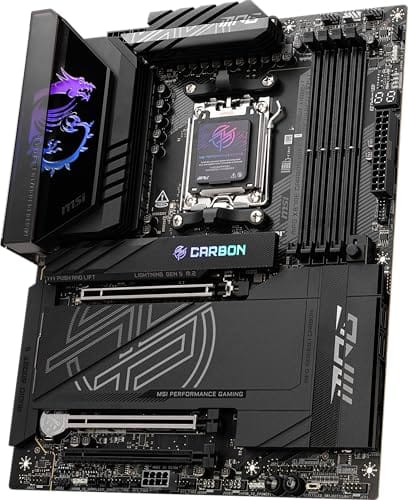
The MPG X870E Carbon WiFi is for an AM5 build with an ambitious expansion plan. MSI lists four M.2 slots, USB4, Wi-Fi 7, and both 5GbE and 2.5GbE wired networking. It also supports Ryzen 7000, 8000, and 9000 desktop processors with the correct firmware. The extra features make more sense in a machine that games and moves large files than in a PC that only launches a few titles from one SSD.
MSI’s current specifications also carry lane-sharing notes. Certain PCIe and M.2 positions draw from the same CPU lanes, so adding a second card or another high-speed drive can change a slot’s operating mode. Read the board diagram with your intended GPU, SSDs, and expansion cards listed beside it. This is the kind of check that prevents an expensive surprise after assembly.
The Carbon is attractive for a high-end Ryzen build because it combines modern external connections with several internal storage positions. It is still a poor value if those connections will be idle. A B850 board can run the same supported Ryzen processor, and the graphics card remains the dominant part of gaming performance. Choose the Carbon when expansion and connectivity are requirements you can name, not when you simply want a top-tier chipset on the invoice.
ASUS ProArt Z890-Creator WiFi: Best Intel Board for Creators
The ProArt Z890-Creator WiFi is the Intel option in this shortlist, and its purpose is specific. It supports Intel Core Ultra Series 2 processors on LGA1851, not AMD Ryzen or older Intel sockets. ASUS includes two Thunderbolt 5 Type-C ports, one Thunderbolt 4 Type-C port, 10GbE and 2.5GbE networking, Wi-Fi 7, and five M.2 storage slots. It is an ATX board built for a workstation that may also be a capable gaming PC.
Those connections have a clear audience. A video editor moving large project files to a 10GbE NAS, or a creator using a Thunderbolt storage array and multiple fast SSDs, can use more of the board than a gaming-only builder. ASUS specifies one PCIe 5.0 M.2 slot and four PCIe 4.0 positions. It also notes that one M.2 slot shares bandwidth with a lower PCIe x16-shaped slot; using the drive disables that expansion position. See the ProArt specification sheet for the exact configuration and supported operating system.
For a Core Ultra gaming PC without heavy external storage, the ProArt’s cost is difficult to defend. An Intel board with fewer workstation ports can be a better fit. If you are choosing between Intel chipsets, our Z890 versus B860 comparison gives the broader platform decision. Buy this particular Z890 board when the creator connections are part of your workflow, and verify that the CPU, cooler, and case are all LGA1851-ready.
MSI MAG B650 Tomahawk WiFi: Best Lower-Cost AM5 Board
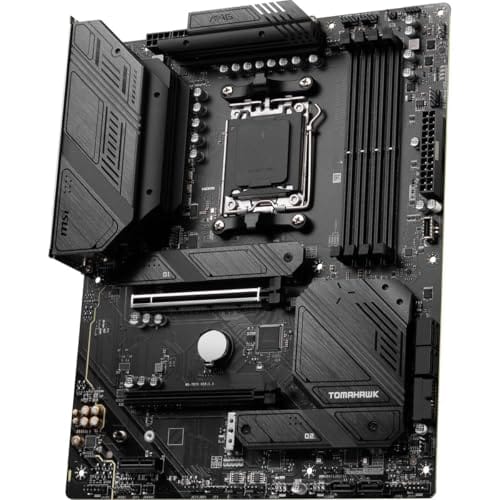
The MAG B650 Tomahawk WiFi is the value option when the current listing is meaningfully cheaper than newer B850 models. It remains an AM5 board with support for Ryzen 7000, 8000, and 9000 desktop processors, subject to the proper BIOS. MSI gives it four DDR5 slots, three PCIe 4.0 M.2 locations, 2.5GbE, Wi-Fi 6E, and a rear 20Gbps USB Type-C port. For a one-GPU, two-SSD gaming PC, that is still a practical specification.
The PCIe 4.0 limit is the key compromise. MSI specifies a PCIe 4.0 x16 primary graphics slot and PCIe 4.0 M.2 storage rather than the PCIe 5.0 paths on the newer boards above. That does not make it incompatible with a newer graphics card, but a buyer who needs Gen5 storage should choose a board that provides it. The MSI specification page also describes how expansion-slot speeds vary with different Ryzen 8000 processors, so check the exact CPU family.
A Flash BIOS button is helpful for a board that may have been packaged before your processor launched. You still need to follow MSI’s update instructions and confirm the correct file for the board. Don’t assume a retailer listing’s broad processor compatibility line tells you which BIOS is installed in the box. If you are buying a Ryzen 9000 CPU and want fewer unknowns, ask the seller about the shipped revision or prepare for a firmware update.
How to Choose a Motherboard Without Overbuying
Choose the CPU and socket first
AM5 and LGA1851 are physically different platforms. The four AMD boards here accept supported Ryzen desktop processors; the ProArt Z890 is for Intel Core Ultra Series 2. Never use a chipset label as a substitute for the exact CPU support list. The vendor’s page can identify the required BIOS version and whether a particular processor changes slot behavior.
Count the devices you will attach
List the GPU, every M.2 drive, any capture or network card, the case’s front USB connector, and rear devices. Then read the manual’s lane-sharing table. A top slot may run at a different width when another CPU-connected slot is occupied. A lower expansion position may disappear when an M.2 slot is used. The board can still be a good purchase; you simply need the right layout for your finished PC.
Match connectivity to a real use
USB4, Thunderbolt 5, 5GbE, and 10GbE are valuable when matching devices and networks are part of your setup. A 10GbE port connected to a 1GbE router does not create a 10GbE network. A Thunderbolt dock connected with a generic cable may also operate below its advertised ceiling. Check the full chain, including storage enclosure, cable, switch, and operating system.
Check the case, memory, and first-boot plan
All five picks here are ATX boards. A compact case that accepts only micro-ATX or mini-ITX will not fit them. Check front USB-C header compatibility and clearance around large air coolers. DDR5 memory support varies with processor, module count, and BIOS version; the maximum speed printed on a box is not a promise for every four-stick configuration. Have the board manual ready for DIMM placement and first boot.
Frequently Asked Questions
Will a more expensive motherboard raise gaming frame rates?
It is usually the wrong reason to spend more. With the same compatible CPU, GPU, memory setup, and sensible firmware settings, higher-tier boards mainly buy additional ports, storage options, power-delivery margin, and build conveniences. Look for the connections and expansion your PC needs rather than treating a premium chipset as a graphics upgrade.
Is B650 still worth buying for a new Ryzen PC?
Yes, when a verified listing is clearly cheaper and its PCIe 4.0 storage and network features meet your plan. Check the BIOS support for your CPU, particularly if the box is older stock. If a B850 alternative is close in price, the newer board’s connectivity and storage options can be worth the difference.
Can an AM5 board run every Ryzen 8000 processor with all slots active?
No. CPU families can expose different PCIe lane counts and generations. ASUS, for example, describes a different M.2 arrangement on the TUF X870-PLUS WiFi with Ryzen 8000 processors. Read the exact board and CPU combination in the manufacturer’s manual before assuming every advertised slot works at its headline speed.
Bottom Line
For most Ryzen gaming builds, start with the MSI MAG B850 Tomahawk MAX WiFi. Choose the ASUS TUF Gaming X870-PLUS WiFi if its USB4 ports will be used, or the MSI MPG X870E Carbon WiFi when you need its extra networking and expansion. The MSI B650 Tomahawk WiFi saves money when PCIe 4.0 is enough. Intel Core Ultra creators with Thunderbolt and 10GbE needs have a clear specialist in the ASUS ProArt Z890-Creator WiFi.
Before you buy, verify the exact CPU support and BIOS, then map every SSD and add-in card to the board’s sharing rules. Do that once and the choice becomes much simpler.


























Write Your Review
No reviews yet. Be the first to share your experience!