

The ASRock B650I Lightning WiFi is the best Mini-ITX motherboard for most new Ryzen builds. It gives you two NVMe slots, 2.5Gb Ethernet, and a header for your case’s front USB-C port. At about $170 when we checked, it leaves more of the budget for the parts that are harder to fit in a small case, like a short graphics card or a low-profile cooler.
Building around an Intel Core Ultra desktop chip? Get the ASRock B860I Lightning WiFi. If you’re moving an older PC into a smaller enclosure, the AM4 and LGA1700 picks let you keep compatible CPUs and DDR4 memory. All five boards fit the 170 × 170 mm Mini-ITX footprint, but they’ll serve very different builds.


Mini-ITX motherboards at a glance
| Pick | Motherboard | Socket and memory | Best reason to buy | Main tradeoff |
|---|---|---|---|---|
| Best overall | ASRock B650I Lightning WiFi | AM5 / DDR5 | Two NVMe slots and 2.5Gb Ethernet at a lower AM5 price | PCIe 4.0 graphics slot |
| AM5 with faster networking | MSI MPG B850I Edge TI WiFi | AM5 / DDR5 | 5Gb Ethernet, Wi-Fi 7, and rear 20Gbps USB-C | Roughly $95 more than the B650I in our price check |
| Best for Intel Core Ultra | ASRock B860I Lightning WiFi | LGA1851 / DDR5 | Rear Thunderbolt 4 and two NVMe slots | One rear USB-C port |
| Best for reusing AM4 | ASRock A520M-ITX/ac | AM4 / DDR4 | Keep compatible Ryzen and DDR4 parts, with four SATA ports | One M.2 slot and PCIe 3.0 graphics |
| Lowest board price | ASUS Prime H610I-Plus D4 | LGA1700 / DDR4 | Low-cost home for a compatible Intel chip and wired Ethernet | Wi-Fi module sold separately |
ASRock B650I Lightning WiFi for most new Ryzen builds
Start here if you’re building a compact Ryzen gaming PC with one graphics card and two drives. The front 2280 M.2 slot can run at PCIe 5.0 x4 with the right CPU, and the rear 2280 slot runs at up to PCIe 4.0 x4. Put the main SSD under the front heatsink and reserve the rear slot for a second drive. If you already own both drives, install the rear one before the board goes into the case. Some trays cover that socket or leave too little space for an SSD with a tall heatsink.
On the back, you get 10Gbps USB-C, three 10Gbps USB-A ports, 2.5Gb Ethernet, and Wi-Fi 6E. That leaves room for a fast portable drive and a few USB-A accessories even if the front of the case is hard to reach. The case’s own USB-C port can run at up to 5Gbps from the internal header. BIOS Flashback is useful if the board ships with older firmware and you’ve bought a newer AM5 processor.
The graphics slot tops out at PCIe 4.0, with the available lane count depending on the CPU. If you’ve picked a card and riser specifically for a PCIe 5.0 connection, move up to the MSI board and check its lane table for your CPU. For a build that needs two SSDs, one GPU, and ordinary desk peripherals, the B650I already covers the essentials.
MSI MPG B850I Edge TI WiFi for 5Gb Ethernet and Wi-Fi 7
The MSI is the better AM5 buy when the extra money gets you a connection you’ll use. Its 5Gb Ethernet port is useful for moving large files to a NAS on a network with compatible gear. It also has Wi-Fi 7 for a matching router and rear 20Gbps USB-C for an enclosure that supports that mode. A little planning here. A faster Ethernet port can’t speed up a transfer if the switch or storage at the other end is the bottleneck.
With Ryzen 7000 or 9000, the GPU slot supports PCIe 5.0 x16, and the CPU-connected 2280 M.2 slot supports up to PCIe 5.0 x4. There’s a second 2280 slot at up to PCIe 4.0 x4. Those are the headline modes, so look at MSI’s CPU-specific entries if you’re buying a Ryzen 8000-series chip. With those chips, the GPU slot drops to PCIe 4.0 and its active lanes depend on the exact processor. The main SSD slot also drops to PCIe 4.0.
For a wired desk with a gigabit switch and a single SSD, the B650I is a better use of the budget. Pay for the MSI when you’re building around 20Gbps external storage, a multigigabit network, or a specific PCIe 5.0 graphics setup. The B650I already offers the same two headline M.2 speeds. If your desk depends on a Thunderbolt dock, check the dock’s host requirements before counting the MSI’s 20Gbps USB-C port as a match.
ASRock B860I Lightning WiFi for Intel Core Ultra desktops
This is the pick for a new compact Intel Core Ultra Series 2 desktop. It uses LGA1851 and DDR5, and its rear Thunderbolt 4 port is rated at up to 40Gbps. One cable to a compatible dock can make a big difference if the case sits behind a display or under a shelf. For an external drive, use the rear port if you need Thunderbolt. The case’s front USB-C header runs at up to 10Gbps.
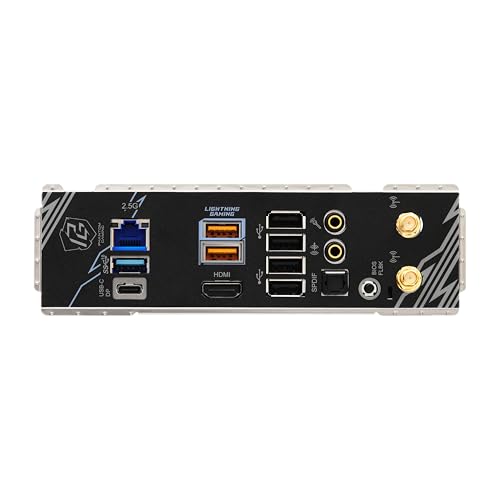
Inside, you get a PCIe 5.0 x16 graphics slot, one PCIe 5.0 x4 M.2 socket, a second M.2 socket at PCIe 4.0 x4, and three SATA connectors. There’s also 2.5Gb Ethernet and Wi-Fi 6E. That’s enough connectivity to keep a small work PC on wired Ethernet while using the single expansion slot for a graphics card.
Count the USB-C devices you’ll leave plugged in. If you have both a dock and a high-speed external drive, check what speed the dock can pass through to its downstream ports. If you’re carrying over a 12th-, 13th-, or 14th-generation Intel Core desktop CPU, shop LGA1700 instead. The socket choice comes before the dock choice.
ASRock A520M-ITX/ac for keeping an AM4 CPU and DDR4
A case swap is a good reason to buy the A520M-ITX/ac. Start by checking your exact Ryzen model against ASRock’s CPU support list and confirming the required BIOS. The board has two DDR4 slots, onboard Wi-Fi 5, Gigabit Ethernet, and a PCIe 3.0 x16 graphics slot. It works for a straightforward small build where you already own the parts that account for most of the platform cost.
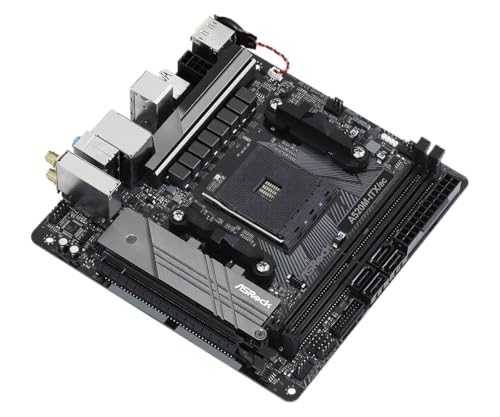
The single 2280 M.2 socket takes a supported SATA M.2 drive or a PCIe SSD at up to PCIe 3.0 x4. That can save you a drive purchase if you own a SATA M.2 stick. There are four cabled SATA ports, but check the case’s drive mounts and PSU cables before planning to fill them. A tiny enclosure may have room for a single 2.5-inch drive even when the board offers several connectors.
At about $148 in our price check, this board makes the most sense when keeping the CPU and RAM saves real money. If you need to buy both anyway, price a B650I system with DDR5 before committing. If you’re simply replacing a failed AM4 board and need a second NVMe slot, look for a compatible B550 ITX model with two M.2 sockets.
ASUS Prime H610I-Plus D4 for a low-cost LGA1700 build
The Prime H610I-Plus D4 was the least expensive board in our shortlist. It’s a sensible way to reuse a compatible Intel Core desktop CPU and two DDR4 sticks in a small wired PC. Check ASUS’s exact CPU list and firmware requirement before ordering, particularly with 13th- and 14th-generation chips. Look for the D4 suffix so you get the board that takes your DDR4 kit.
There’s a PCIe 4.0 x16 graphics slot and one 2260/2280 M.2 storage socket rated at PCIe 3.0 x4, plus four SATA connectors. The rear panel gives you four USB-A ports and Gigabit Ethernet. With a CPU that has integrated graphics, you can use the board’s display outputs and leave the expansion slot free.
For a wired living-room PC, that combination lets you run the system from one NVMe drive and connect an older display if needed. ASUS lists HDMI, DisplayPort, and D-Sub. If you’re moving an existing M.2 drive from another board, check its interface first. A SATA M.2 stick that works in the ASRock A520 won’t work in the ASUS storage socket, which specifies PCIe mode.
The main limitation is connectivity. ASUS provides a Key-E socket for a separate Wi-Fi module, so price the wireless hardware if the PC won’t be near a network jack. Count rear ports while you’re at it. A webcam, keyboard, mouse, and audio interface fill all four USB-A ports. If you’re buying adapters and a hub to cover the basics, compare the full cost with an LGA1700 Mini-ITX board that already has the ports you need.
How We Evaluated
We compared the manufacturers’ board specifications, CPU compatibility notes, and connector layouts. We looked at how each board would fit a small desktop with a discrete GPU or integrated graphics, how many drives it can carry, and which ports remain available once the system is in use. The recommendations reflect those documented features and build tradeoffs.
We checked new US retail offers on November 25, 2026. The five boards ranged from about $113 to $265 before tax and shipping. We treated CPU and memory reuse as a separate buying decision because a cheap board can cost more overall if you also have to replace parts you already own.
How to choose a Mini-ITX motherboard
Which CPU and memory will you use?
Write down the exact desktop CPU model and look it up on the board’s support page. Check the minimum firmware version and whether you can update it without a supported CPU installed. Then check memory type. AM5 and the B860I here use DDR5, while the two older picks use DDR4. With two memory slots, decide your capacity up front if you want to avoid replacing an entire kit later.
Where will the drives, cooler, and graphics card sit?
Start with the case manual and the board layout. Pay attention to rear M.2 clearance, tall heatsinks near the CPU socket, and how the cooler sits over the memory. In a sandwich-style case, check which PCIe generation the supplied riser supports. Finally, look for access to the power and fan headers once the radiator or graphics card is installed. The Mini-ITX build parts guide covers the other components you’ll be fitting around the board.
Plan for the storage you’ll add a year from now, too. A board with two M.2 sockets gives you somewhere to add a larger game library without removing the boot drive. On a single-slot board, your options are to replace the first SSD, find room for a cabled drive, or add external storage. Check which of those options the case and rear ports actually allow.
What needs a dedicated port?
List the things that stay connected all day. Keyboard, mouse, headset dongle. Then add your external storage and dock. A USB-C plug alone tells you very little about the protocol it carries, and the front port’s capabilities depend on the motherboard header as well as the case. If the list includes a capture card as well as a GPU, read our ATX vs. Mini-ITX motherboard comparison before buying a one-slot board.
Frequently asked questions
What size is a Mini-ITX motherboard?
Standard Mini-ITX is nominally 170 × 170 mm. That describes the board footprint. Your case still needs enough room for the cooler, power supply, and graphics card. If your case also takes larger boards, our AMD and Intel motherboard buying guide covers options with more room for expansion.
Can I use an AMD Ryzen 8000G without a graphics card?
Yes, if the exact chip is on the board’s CPU list, the BIOS supports it, and the board has an output that matches your monitor. The B650I has HDMI. Check CPU-dependent PCIe lane limits if you also plan to add a dedicated graphics card later.
Is it worth buying an AM4 Mini-ITX board now?
It can be worth it when a compatible Ryzen CPU and DDR4 kit are already on your shelf. If you’re buying every part, compare the combined price of board, CPU, and memory. That makes it easier to tell whether AM4 saves enough to justify giving up a newer platform and some storage or USB options.
Bottom Line
Buy the ASRock B650I Lightning WiFi for a new compact Ryzen PC unless you can name a port or PCIe mode you need from the MSI. Pick the B860I Lightning WiFi for Core Ultra Series 2, particularly if you already own a Thunderbolt dock. If a compatible AM4 or LGA1700 chip and DDR4 kit are already paid for, the A520 or H610 pick can make a small rebuild cheaper.


























Write Your Review
No reviews yet. Be the first to share your experience!