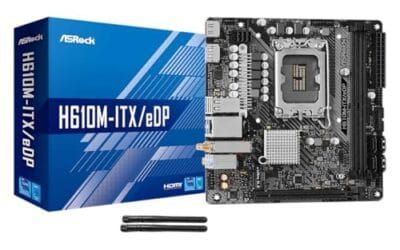
ATX or <a href="/best-mini-itx-build/”>ITX? It’s the first real fork in the road when you spec a PC. Pick wrong and you’ll either fight a cramped case for hours or end up with a tower that dwarfs your desk. The boards look similar from a parts list, but the trade-offs go deeper than size.
Here’s what changes between the two form factors, where each one wins, and which build cost actually comes out cheaper.
Matchup at a glance
ATX is 12 x 9.6 inches. ITX is 6.7 x 6.7 inches. That’s a 60% reduction in surface area, which forces engineers to make hard cuts. ITX boards typically run one PCIe slot, two DIMM slots, fewer M.2 sockets, and tighter VRM thermals. ATX gets four DIMMs, multiple PCIe x16, and room to breathe.
Where ITX wins: total footprint, portability, and aesthetic. A well-built ITX rig is a beautiful object. ATX wins on upgradeability, value-per-dollar, and cooling headroom. Neither is wrong – they’re built for different goals.
Spec sheet showdown
| Spec | ATX | ITX (Mini-ITX) |
|---|---|---|
| Board size | 12 x 9.6 in | 6.7 x 6.7 in |
| RAM slots | 4 DIMMs (up to 256 GB) | 2 DIMMs (up to 128 GB) |
| PCIe x16 slots | 2-3 (multi-GPU possible) | 1 (single GPU only) |
| M.2 NVMe slots | 3-5 typically | 2 typically |
| VRM cooling headroom | Generous, large heatsinks | Tight, often needs airflow tuning |
The ASUS ROG Strix B850-I Gaming WiFi packs 10+2+1 power stages into ITX, with WiFi 7 and PCIe 5.0 x16 – serious specs for the size. But look at any X870E ATX board and you’ll find 16+2+2 stages, beefier MOSFETs, and dual 8-pin EPS connectors for overclocking headroom that ITX boards just can’t match.
Where ATX wins
Upgradeability is the big one. Four RAM slots means you can start with 32 GB and add more later without selling the old kit. Three M.2 sockets means you can run an OS drive, a games drive, and a scratch drive without buying a PCIe adapter. Multiple PCIe slots let you add a capture card, a NIC, or a sound card down the road.
Cooling’s easier too. Bigger cases mean bigger AIO radiators, more fan mounts, and tower coolers that wouldn’t fit in an ITX shell. A Noctua NH-D15 in an ATX build runs whisper-quiet at full load. The same CPU in a small ITX case might need an AIO just to stay under 90C.
Cost is the third edge. The ASRock B550M-ITX/AC and the H610M-ITX/eDP both sit at $89.99. Comparable ATX boards (B550, B760) start at $109-129. But the savings on the board get eaten by the case. ITX cases regularly hit $150-250 because of the engineering required to fit everything in.
Pros
- eDP 1.4 header is rare at this tier, ideal for custom AIO and panel builds
- Dr.MOS 50A 6-phase VRM adequate for 65W LGA1700 CPUs in SFF cases
- PCIe 4.0 x16 slot preserves GPU bandwidth despite H610 chipset limits
- Integrated WiFi 5 and Bluetooth 5.1 plus Intel Gigabit LAN cover connectivity
Cons
- Limited owner fedback available at time of writing, making reliability signal thin
- H610 blocks CPU overclocking and caps DR4 at 3200MHz with no XMP scaling
- Single M.2 slot is Gen3 x4 only, no Gen4 NVMe or secondary M.2
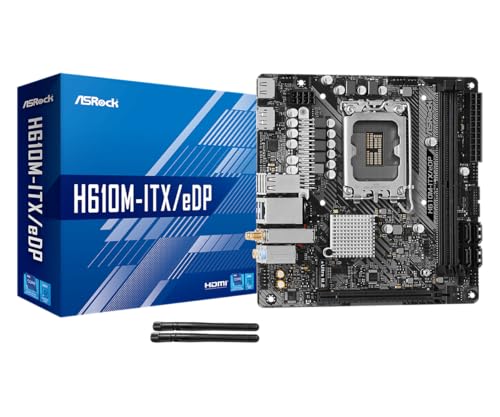
The ASRock H610M-ITX/eDP is a budget LGA1700 Mini-ITX board built around Intel's entry H610 chipset with DDR4 memory and a dedicated eDP 1.4 panel connector. It targets SFF builders, embedded system integrators, and digital signage projects rather than gamers chasing K-series CPUs or high-frequency RAM tuning.
The standout is the eDP 1.4 header, which lets integrators drive a laptop-style FHD 60Hz panel directly, useful for all-in-one and industrial builds. For general desktop use, HDMI 2.1 outputs 4K 60Hz and DisplayPort 1.4 handles up to 8K 60Hz, both dependent on the installed CPU's iGPU capabilities.
Trade-offs are typical at H610 tier: no CPU or memory overclocking, DDR4-3200 ceiling, a single Gen3 x4 M.2, and no rear USB-C. The 6-phase 50A Dr.MOS VRM is fine for 65W non-K chips like a Core i5-13400, but pairing with a 14700K in a hot SFF case is not the intended use.
Buy this if you need a compact LGA1700 board with eDP for a panel PC, signage kiosk, or budget SFF office build. Skip this if you want DR5, K-series overclocking headroom, Gen4 NVMe, or dual M.2 storage on a modern Intel platform.
Socket and chipset: LGA1700 with H610 chipset supports 12th, 13th, and 14th Gen Core CPUs. H610 disables CPU multiplier and memory overclocking, so pair with locked SKUs like Core i3-12100, i5-13400, or i5-14400 for best value rather than K-series parts.
Memory support: 2 DR4 DIMM slots run dual-channel up to 3200MHz with XMP 2.0 and ECC UDIMM in non-ECC mode. Confirm kits against ASRock's QVL, since Mini-ITX 2-DIMM layouts are typically friendlier to Hynix and Micron dies at 3200 CL16.
Storage and PCIe: One PCIe 4.0 x16 slot for GPU, one Ultra M.2 slot (PCIe Gen3 x4 and SATA3), and 4 SATA3ports. Only one M.2, so plan bot NVMe plus SATA SDs for bulk storage in SFF builds.
Form factor and I/O: Standard 6.7 by 6.7 inch Mini-ITX footprint fits ITX cases and thin mITX chassis. Rear I/O includes HDMI 2.1, DisplayPort 1.4, 2 USB 3.2 Gen1, 4 USB 2.0, and Gigabit LAN. Note CNVi Bluetooth shares bandwidth with one rear USB 2.0 port.
Where ITX wins
Footprint. An ITX build fits under a monitor, on a shelf, in a backpack. If you LAN, travel, or live in a small apartment, the size difference changes how you use the PC. Cases like the NCASE M2, Fractal Terra, and Lian Li A4-H2O are tiny and beautiful.
Aesthetics carry weight here too. ITX builds force discipline. You can’t hide messy cables behind a 7-liter case. The finished result tends to look more intentional, more curated. There’s a reason ITX builds dominate r/sffpc.
Modern ITX boards have closed the feature gap a lot. The ASRock Z790M-ITX WiFi at $159.99 has WiFi, 2.5 GbE, dual M.2, and PCIe 5.0 x16 – basically every feature most users will ever touch. You don’t sacrifice as much as you used to.
Which to buy
Go ATX if: you’re building your first PC, you plan to overclock, you want to upgrade RAM later, you need multiple PCIe cards, or you’re cost-sensitive. The total build cost is almost always lower on ATX because the case isn’t paying a small-form-factor premium.
Go ITX if: you’ve built before, you’ve got a clear single-GPU vision, you value the footprint and aesthetic over upgrade flexibility, and you don’t mind paying $50-150 more for the case. The Gigabyte A520I AC at $109.99 is a great budget ITX board if you want to keep total cost reasonable.
There’s no wrong answer. Just be honest about which trade-off matters to you. We’ve seen folks regret ITX because they outgrew the upgrade limits. We’ve seen others regret ATX because the tower made their desk feel cramped. Pick for your life, not for forum cred.
Common questions
Will my GPU fit in an ITX case?
Most modern ITX cases support up to 320-340mm GPU length, which clears even a 4080 Super or 7900 XTX. Triple-slot cards can be a problem in some cases. Always check the case’s max GPU length and thickness before buying.
Are ITX boards harder to build with?
Yes, noticeably. Cable routing is tight, RAM clearance can fight with CPU coolers, and you’ll often install components in a specific order or you can’t reach the screws. First-time builders should usually start with ATX or mATX.
Do ITX boards limit overclocking?
Sort of. The VRM headroom is smaller, so heavy overclocks raise temps fast. Mild OCs are fine on high-end ITX boards like the ROG Strix B850-I. For extreme tuning, ATX is the safer pick.
Can I run two GPUs in ATX but not ITX?
Technically yes. Practically, almost nobody runs SLI or Crossfire anymore – modern games don’t support it. For productivity workloads (rendering, AI, mining), dual-GPU ATX builds still make sense. For gaming, it’s a non-issue.