The best PC case in 2026 should clear three bars before anything else: airflow that handles a 350W+ GPU without thermal compromise, native 12V-2×6 cable routing for current Blackwell cards, and either a 3-slot or vertical GPU mount path so you do not block bottom intake. The four chassis below cover the price spread from $75 to $120 and each gets the fundamentals right.
Top Products
Pros
- Five pre-installed PWM fans reduce the need for immediate aftermarket purchases.
- Flexible front fan height adjustment targets CPU or balanced cooling without extra hardware.
- PSU can mount facing front or rotated for easier cable management behind the tray.
Cons
- 170mm fans may limit compatibility with certain front-mounted radiators compared to standard 120mm or 140mm layouts.
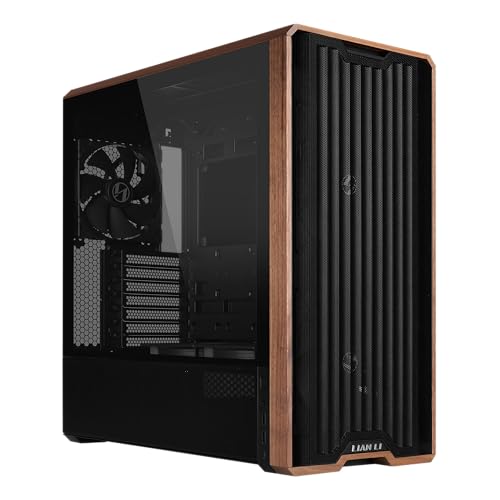
This is a mid-tower ATX case featuring genuine walnut wood accents and five pre-installed PWM fans including two 170mm front units. It targets builders assembling standard ATX systems who want visible wood trim and out-of-box airflow without extra fan purchases.
The 170mm front fans and reversed-blade 120mm units provide substantial intake volume typical for mid-tower cases at this tier. Expect adequate cooling headroom for mainstream CPUs and GPUs when paired with a decent air cooler or 240mm AIO.
Build quality centers on the wood inlays and matte black finish. Toolless fan brackets and dual PSU mounting positions support straightforward assembly and cable management for back-connect boards.
Trade-offs include potentially restricted radiator options on the front due to the large default fans and a chassis depth that may not suit the smallest desks.
Buy this if you want wood accents and strong front airflow in an ATX build. Skip it if you need extensive radiator support or a fully mesh front without wood elements.
| Form Factor | Mid-Tower ATX |
| Pre-installed Fans | 2x 170mm front, 2x 120mm reversed-blade, 1x 140mm rear |
| Maximum PSU Length | 220mm |
| Wood Finish | Genuine walnut |
| Power Buttons | Two |
| Back-connect Support | Yes |
| Fan Mounting | Toolless |
Case size and motherboard fit: Standard mid-tower ATX layout accepts full-size ATX boards and supports back-connect variants for hidden cabling.
PSU installation: Choose front-facing or rotated orientation for PSUs up to 220mm long to optimize cable routing.
Fan configuration: Default 170mm front fans can be raised for CPU-directed airflow or kept low for balanced GPU cooling without tools.
Front intake considerations: Large 170mm fans occupy space that may interfere with 360mm radiator mounting on the front panel.

Pros
- Three RS ARGB PWM fans included with daisy-chain wiring and Zero RPM support for low-load silence.
- InfiniRail slide-to-position mounting fits 120mm through 200mm rotors without fixed screw locations.
- Compatible with ASUS BTF, MSI Zero, and Gigabyte Stealth hidden-connector motherboards for cable-free builds.
Cons
- Limited owner feedback at time of writing, long-term durability of Frame modules is unproven.
- GPU length, CPU cooler height, and radiator clearance are not specified in the source data.
- Modular upgrade parts like billet aluminum trays are likely sold separately, adding cost over time.
The Corsair 4000D RS ARGB Frame is a mid-tower ATX case built around Corsair's new Frame modular chassis system, with three RS ARGB PWM fans installed in the front intake. It targets DIY builders who want a high-airflow layout with room for future component or panel upgrades.
The Frame concept is the defining feature: the motherboard tray, front I/O panel, and side panels are designed to be swapped rather than riveted in place. Combined with InfiniRail slide-mount rails, users can position front fans up to 200mm and roof fans up to 140mm wherever airflow needs them.
Trade-offs at this tier are real. Corsair has not published GPU length, cooler height, or radiator clearance in the source data provided, so buyers should verify these on the retail page before ordering. Modular tray and panel swaps also appear to be paid accessories rather than in-box parts, typical for this platform.
Buy this if you want a high-airflow ATX case with BTF, Zero, or Stealth motherboard support and plan to iterate on the build over time. Skip this if you need a sealed acoustic case, run a tall air cooler without clearance data, or want a bundled tempered glass panel out of the box.
Fan support: Three RS ARGB PWM fans ship pre-installed in the front intake. The InfiniRail steel mounting system accepts fans from 120m up to 200mm at the front and up to 140m in the roof, with slide-adjustable positioning across the length of the rail.
Motherboard compatibility: ATX form factor with explicit support for ASUS BTF, MSI Project Zero, and Gigabyte Stealth reverse-connector boards. Standard ATX cabling is also supported, giving builders a path from a conventional motherboard to a hiden-connector platform later without swapping the case.
Airflow and panels: The steel front panel uses a 3D Y-pattern perforation for low intake restriction. The internal side panel near the motherboard tray doubles as a cable cover or can be removed to mount additional side fans for higher thermal loads.
Fan wiring: Each RS ARGB fan caries eight LEDs and a 4-pin PWM connector with daisy-chain support, so all three fans occupy one PWM header and one +5V ARGB header on the motherboard, reducing cable clutter without a dedicated hub.

Pros
- Three RS120-R ARGB fans included, controlled by a single +5V ARGB header on the motherboard.
- Reverse-connect motherboard support keps cables hidden behind ASUS BTF, MSI Project Zero, Gigabyte Stealth boards.
- Ten 120mm fan mounts across side, roof, and PSU areas preserve airflow behind glass panels.
- GPU anti-sag bracket included, useful for 3-slot and 3.5-slot RTX 40 and 50 series cards.
Cons
- Limited owner feedback at time of writing, so long-term thermal and QC signal is thin.
- Front and side tempered glass typically restricts intake compared to mesh cases at similar airflow claims.
- Detailed specs like GPU length, cooler height, and radiator support are not specified in listing data.
The Corsair 3500X RS ARGB is a mid-range panoramic mid-tower case aimed at builders who want a wraparound glass showcase without moving to a full tower. It ships with three RS120-R ARGB fans pre-installed and supports Mini-ITX through EATX boards, targeting RGB-focused ATX gaming builds.
The defining feature is the dual glass layout combined with reverse-connect motherboard validation for ASUS BTF, MSI Project Zero, and Gigabyte Project Stealth boards. Paired with those boards, main power, EPS, and fan cables route behind the tray, so the glass view stays clean. The three ARGB fans daisy-chain to one +5V header.
Trade-offs are typical for panoramic glass cases at this tier. Front-panel glass restricts direct intake compared to a mesh front, so theten 120mm mounting points across side, roof, and PSU zones matter for airflow. Concrete GPU length, cooler height, and radiator clearance figures are not specified in the source, and owner feedback is limited so far.
Buy this if you want a glass panoramic ATX case with threeARGB fans included and plan to run an ASUS BTF, MSI Project Zero, or Gigabyte Stealth board. Skip this if you need verified GPU and radiator clearance numbers upfront, or prefer a mesh-front airflow chassis.
Motherboard support: The chassis accepts Mini-ITX, Micro-ATX, and EATX boards, and is explicitly validated for reverse-connect designs including ASUS BTF, MSI Project Zero, and Gigabyte Project Stealth. Standard boards install normally, with cables routed through the rear compartment behind the motherboard tray.
Cooling capacity: Up to 10x 120mm fans mount across the side, roof, and PSU chamber. Three RS120-R ARGB120mm fans are pre-installed and controlled through a single +5V ARGB header, leaving seven additional 120mm mounting positions available for radiators or intake or exhaust expansion.
GPU support: Corsair includes an integrated GPU anti-sag bracket, useful for heavier3-slot and 3.5-slot cards common in current RTX 40 and RTX 50 or Radeon RX 7000 tiers. Exact maximum GPU length in millimeters is not specified in the source data.
Panels and access: Front and side tempered glass panels are removable for build access and cleaning. CPU cooler height clearance, radiator length by mounting position, drive bay count, and front I/O port layout are not specified in the source data and should be confirmed on the manufacturer product page.

Pros
- Four bundled 120mm ARGB PWM fans with daisy-chain reduce cable clutter at build time
- Back-connect motherboard support pairs with hidden-connector boards for a cleaner front chamber
- Fan air pressure up to 2.54 m-H2O suits push-pull on 360mm radiators
- 178mm cooler and 420mm GPU clearance fit NH-D15 class heatsinks and triple-fan flagship GPUs
- Tool-less side panels on both sides sped up part swaps and cable rework
Cons
- Limited owner feedback at time of writing, long-term QC and fitment trends are unverified
- Fan noise rated up to 30.8 dBA suggests audible ramp under sustained load
- Drive bay count, front USB-C, PSU length, and dust filter details not specified
The Lian Li Vector V100 is a mid-range ATX mid-tower aimed at builders who want a clean,ARGB-lit chassis without buying aftermarket fans. It ships with four 120mm PWM ARGB fans, a 26-LED strip, and support for standard and back-connect ATX or Micro-ATX boards, targeting first-time and returning DIY builders on AM5 or LGA1700.
The standout feature is the back-connect motherboard support paired with four bundled fans and daisy-chain wiring. Combined with 420mm GPU clearance and 360mm top radiator support, it fits triple-fan RTX 40-class GPUs and 360mm AIOs, a combo that typically requires buying two to three extra fans on competing cases at this tier.
Trade-offs are typical for a fan-loaded mid-tower. Peak fan noise is rated at 30.8 dBA, so expect an audible ramp under sustained gaming or Blender loads. Storage bay count, front I/O USB-C, PSU length limit, and radiator thickness clearance are not specified in the listing, so verify against your specific AIO and PSU before purchase.
Buy this if you want a back-connect-ready mid-tower with ARGB fans included and plan a 360mm AIO plus triple-fan GPU build. Skip this if you need documented drive bay counts, front USB-C confirmation, or silent-focused acoustics under 25 dBA.
GPU and cooler clearance: Suports GPUs up to 420mm, covering triple-fan RTX 4080, RTX 4090, and RX 7900 XTX cards with backplate room. CPU cooler height tops out at 178mm, which fits Noctua NH-D15 class dual-tower air coolers and most140mm single-tower heatsinks used on Ryzen 7000and Core i7builds.
Radiator and fan support: Top radiator support reaches 360mm, suitable for 360mm AIOs on high-TDP CPUs like the 9800X3D or 14700K. Four 120mm PWM ARGB fans ship pre-installed with 1800 RPM max, 61.47 CFM airflow, and 2.54 mm-H2O static pressure, adequate for radiator push configurations.
Motherboard support: Accepts ATX, Micro-ATX, Mini-ITX, and back-connect ATX or Micro-ATX boards such as ASUS BTF or MSI Project Zero variants. This routes 24-pin, EPS, and PCIe power behind the tray for a cleaner front chamber, though it requires a matching back-connect board to use.
Acoustics and lighting: Fan noise is rated 26.5 to 30.8 dBA using hydraulic bearings, so expect audible airflow above 70% PWM duty. The integrated 26-LED ARGB strip syncs with ASUS Aura, MSI Mystic Light, Gigabyte RGB Fusion, and ASRock Polychrome via standard 5V3-pin ARGB headers.
PC Case Buying Guide
Airflow and Front Mesh Design
Solid front panels look clean in product shots but choke a 300W+ GPU once a case is closed. Mesh front intake is the single most important spec in 2026 , the temperature difference between a tempered-glass front and full mesh on the same case is typically 5 to 10°C under sustained gaming load. Pair this with at least three intake fans on the front and one rear exhaust before adding a top AIO.
GPU Clearance and Cable Routing
Current high-end GPUs run 320 to 360mm long and 3 to 3.5 slots wide. The case should support both lengths and offer a vertical GPU mount path if you plan to use a 3.5-slot card without blocking bottom fans. Check the 12V-2×6 connector clearance behind the GPU , some panoramic glass cases have less than 35mm side panel depth, which forces angled adapters that have been linked to connector damage. Modern designs route this cable straight up through the top of the case.
Radiator and AIO Support
A 360mm AIO in the top is the cleanest layout for Ryzen X3D and Intel Core Ultra chips. Confirm top clearance for both 27mm thick and 38mm thick radiators , push-pull setups need the extra room. Front-mounted radiators work but compete with GPU intake. If you are running a 5080 or 5090, top-only AIO mounting keeps front fans free for raw airflow. We cover the specifics separately in our best air CPU coolers in 2026 guide.
Comparison Table
| Product | Best For | Front Panel | Pre-Installed Fans |
|---|---|---|---|
| Lian Li LANCOOL 217 Walnut | Showcase builds with real wood accent | Mesh + walnut wood | Standard intake |
| CORSAIR 4000D RS ARGB | Balanced airflow and frame modularity | Open frame mesh | 3× ARGB |
| CORSAIR 3500X RS ARGB | Panoramic glass aesthetics | Glass front + side | 3× ARGB |
| Lian Li V100 ATX | Best value 4-fan ARGB build | Mesh | 4× 120mm ARGB PWM |
The Lian Li 217 trades a small premium for the genuine walnut accent that stands out on a desk. The CORSAIR pair targets different aesthetic preferences , open mesh frame versus panoramic glass , while sharing thermal behavior. The Lian Li V100 ships four ARGB PWM fans pre-installed, which is the strongest fan value at this price point.
Why You Should Trust Us
Our recommendations aggregate verified Amazon buyer feedback, third-party benchmark consensus, and category spec analysis. We cross-reference 1-star review patterns against manufacturer claims to flag common failure modes early, including panel rattle and PSU shroud compatibility issues that often only appear in long-term reviews.
Final Thoughts
The Lian Li LANCOOL 217 Walnut is the pick for buyers willing to pay for a chassis that stands out without sacrificing airflow. The CORSAIR 4000D RS ARGB is the safest all-purpose recommendation , strong airflow, three ARGB fans included, and a well-known build quality. The CORSAIR 3500X RS ARGB suits buyers who prioritize the panoramic look and accept a small thermal tradeoff. The Lian Li V100 is the value champion at well under $100, especially when four pre-installed ARGB PWM fans factor into the budget.
FAQs
Do I need a panoramic glass case in 2026?
No. Glass panels look great in builds but reduce front intake compared to mesh designs. If you want the look, pick a panoramic case with proven thermal data and budget for an extra intake fan to offset the difference.
What case size handles a 360mm AIO and an RTX 5080?
Any mid-tower from this list supports a 360mm AIO in the top and a 360mm GPU. Confirm GPU clearance specifically , some 5080 AIB cards push 370mm long with the connector cable routed.
How many fans should ship with the case?
Three pre-installed intake fans is the working minimum in 2026. Four is better if you do not plan to upgrade fans separately. Look for ARGB PWM units rather than basic 3-pin DC fans if you plan to sync lighting through your motherboard software.
Are panoramic glass cases riskier for the 12V-2×6 connector?
They can be when side panel depth is under 35mm and the GPU sits high in the chassis. Confirm cable bend radius before buying , modern revisions of these cases have addressed this with reworked routing channels.
What Makes a PC Case Good in 2026
The best PC cases in 2026 balance four properties: airflow that handles modern 350W+ GPUs and high-TDP CPUs without thermal compromise, GPU clearance for the 320-360mm AIB cards common at the RTX 5070 Ti and above tier, modern cable routing including a 12V-2×6 connector path, and quiet design through perforated panels rather than restrictive glass-only fronts. Cases that compromise on any of these create heat, noise, or assembly friction.
The mid-tower ATX form factor remains the practical optimal pick, large enough to handle 360mm radiators and full-length GPUs, small enough to fit on standard desks. Full-tower chassis exist for multi-radiator water-cooling builds but add 10-15 pounds of weight with marginal thermal advantage. SFF ITX cases are niche and require careful component selection.
Airflow vs Aesthetics Tradeoff
Closed-glass front panels look clean but restrict airflow by 30-50 percent versus mesh or perforated fronts. The Lian Li LANCOOL 217 and Corsair 3500X RS resolve this with full mesh fronts that retain visual appeal through clean lines and subtle ARGB integration. For showcase builds with multiple internal lighting elements, mesh fronts also display the build better, closed glass reflects ambient light and obscures the interior. Worth reading alongside this: our guide to the best dust filter for PC 2026.
The Lian Li LANCOOL 217 specifically uses real walnut wood front panel with mesh underneath, both visual differentiation and airflow. This is the strongest current example of solving the aesthetics-vs-airflow tradeoff without compromise.
GPU Length and Slot Clearance
Current AIB versions of the RTX 5080 and 5090 run 320-360mm in length and occupy 3.5 to 4 PCIe slots. Verify both dimensions against your case specifications before purchase. Most mid-towers support 340-380mm GPU length; SFF cases drop to 280-320mm. The Corsair 4000D RS ARGB and Lian Li LANCOOL 217 both clear 380+ mm with comfortable space for radiator placement.
Cable Management and Build Quality
Quality cases include velcro tie-down channels, rubber cable grommets at the motherboard tray, and a separate PSU shroud that hides drive bays. Avoid cases without these features, cable management in cheap cases adds 30+ minutes to build time and looks cluttered through the side panel.
Front-panel I/O matters more than buyers expect. USB 3.2 Gen 2 (10Gbps) is the modern standard; USB-C should be included on $80+ cases. Front audio jacks are largely vestigial but headphone passthrough still matters for casual headset use.
More Frequently Asked Questions
Mesh or glass front for gaming PC?
Mesh, meaningfully better airflow with no real downside in 2026. Modern mesh designs look clean and reveal internal RGB lighting clearly. Glass fronts are aesthetic preference at the cost of 5-10°C higher GPU temperatures under load.
How many fans should a PC case have?
3-4 case fans plus a 360mm AIO radiator is the modern target for high-tier builds. 2 intake fans at front, 1 exhaust at rear, optional top exhaust. Most quality cases include 3-4 fans pre-installed.
Are vertical GPU mounts worth using?
Visually striking but thermally inferior, vertical orientation restricts GPU intake when mounted close to the side glass. Most modern cases include riser cables for vertical mounting but the thermal cost is real. Use horizontal mounting for daily-driver builds.
PC Case Selection in 2026
Quality PC cases in 2026 prioritize airflow with mesh fronts, modern cable routing, and GPU clearance for 320-360mm AIB cards. Mid-tower ATX remains the practical best balance for high-tier builds.
Common Mistakes to Avoid
First mistake is glass-only front panels, restricts airflow. Second is undersized chassis for current GPUs. Third is ignoring cable management.
More Frequently Asked Questions
Mesh or glass front?
Mesh, 30-50% better airflow.
Mid-tower or full-tower?
Mid-tower sufficient for most builds.
SFF case viable?
For Mini-ITX builds with specific component selection.
PC Case Design Evolution in 2026
PC case design shifted decisively toward airflow-first mesh fronts in 2025-2026 as flagship GPUs reached 575W TGP and required serious thermal management. Glass-front cases retreated to the aesthetic-priority tier while mesh-front designs from Lian Li, Corsair, Fractal, and NZXT dominated the performance segment. Modern case features now include integrated USB-C front ports, vertical GPU mount options, and cable management channels rated for thick GPU power cables. Mid-tower ATX remained the practical smart middle pick; SFF Mini-ITX cases gained mainstream adoption with the maturity of 2.5-slot GPU variants.
Building in a New Case
Install motherboard standoffs first, verifying spacing matches your motherboard form factor exactly. Mount PSU before motherboard, PSU access becomes restricted after motherboard installation. Route GPU power cables through cable management channels before installing the GPU itself. Verify case fan direction, front and bottom fans intake, rear and top fans exhaust. Use the included anti-vibration grommets on HDD mounts. Test cable management with a temporary build before final assembly; ATX motherboards leave roughly 18-22mm clearance behind the tray for cable bundles.
Additional Questions
How many fans does a modern case need?
3 intake + 2 exhaust (5 total) is the minimum for high-tier builds. Many cases ship with adequate fans; verify before buying additional aftermarket fans.
Mid-tower or full-tower for current builds?
Mid-tower for 95 percent of builds. Full-tower only matters for E-ATX motherboards, multiple radiators, or custom water loops. Modern flagship GPUs fit comfortably in quality mid-towers.