

AMD’s B850 and X870 chipsets both sit on the AM5 socket and both run the same Ryzen chips, yet they land at noticeably different prices, often a $70 to $150 gap between comparable boards. So the real question isn’t which is faster, since your CPU does the heavy lifting either way. It’s which tier of features actually earns the premium. We researched what X870 adds over B850 and where B850 quietly wins on value. If you’re pairing a board with a chip, our guides to the best motherboards for the 9800X3D and the best Ryzen 9800X3D boards narrow the shortlist.
Matchup at a glance
B850 is the mainstream value chipset. It covers what most builders need: solid power delivery for mid-to-high Ryzen chips, PCIe 5.0 for storage, and enough connectivity for a normal gaming rig, all at a friendlier price. For the average build, B850 leaves little on the table and keeps more budget for the GPU or memory. It’s the sensible default.
X870 is the feature-forward tier. It guarantees USB4 support, tends to ship with beefier VRMs, more rear ports, and better overclocking headroom, and it targets people who want maximum I/O and expansion. You pay for that, and much of it goes unused in a typical setup. The two aren’t a speed contest, they’re a features-versus-price decision, and that framing is the whole ballgame here.
It helps to remember what a chipset even does. It’s the traffic controller for everything hanging off your CPU: USB ports, extra PCIe lanes, storage slots, and networking. It doesn’t touch how fast your processor computes. So the naming, B for mainstream and X for extreme, describes the connectivity and expansion tier, not a performance grade. That’s why two builds with the same Ryzen chip and the same GPU post nearly identical frame rates whether the board says B850 or X870. What changes is how many fast peripherals you can bolt on and how much power headroom the board hands your CPU during a heavy overclock.
Spec sheet showdown
| Spec | B850 (value tier) | X870 (feature tier) | Why it matters | Who needs it |
|---|---|---|---|---|
| Socket / CPU | AM5, all Ryzen | AM5, all Ryzen | Same chips run on both | Everyone (identical) |
| USB4 | Optional | Guaranteed | Fast external devices | Creators, dock users |
| PCIe 5.0 | Storage, often GPU too | Storage and GPU | Future GPU/SSD bandwidth | High-end upgraders |
| VRM / power | Ample for most | Typically stronger | Overclock stability | Overclockers, top CPUs |
| Rear I/O | Generous | More ports | Connectivity headroom | Heavy peripheral users |
| Typical price | Lower | Higher | Budget allocation | Value vs maximalist |
B850 strengths
B850’s biggest strength is that it gives most builders everything they’ll actually use for less money. It runs the same Ryzen CPUs as X870, delivers PCIe 5.0 for a fast NVMe drive, and carries power delivery that comfortably handles mainstream and even high-end chips like a 9800X3D on well-built boards. For a gaming rig, that covers the bases. The savings can go straight into a better graphics card, which affects frame rates far more than the chipset ever will.
It’s also the smarter pick for anyone who doesn’t need USB4 or a wall of rear ports. Most people connect a mouse, keyboard, headset, and maybe one external drive, and B850 handles that without breaking a sweat. The chipset name doesn’t cap your CPU performance, so a Ryzen chip runs at full speed on a good B850 board. Paying more for X870 features you’ll never touch is the definition of overspending. For value-focused builders, B850 is the honest recommendation.
X870 strengths
X870 earns its premium for people who want maximum I/O and headroom. USB4 is guaranteed, which matters if you use fast external SSDs, docks, or high-bandwidth peripherals, and the boards typically pack stronger VRMs that give overclockers more stable power under sustained load. More rear ports and expansion lanes suit heavy multitaskers, streamers with capture hardware, or anyone loading up on drives and add-in cards. It’s the platform for a no-compromises build.
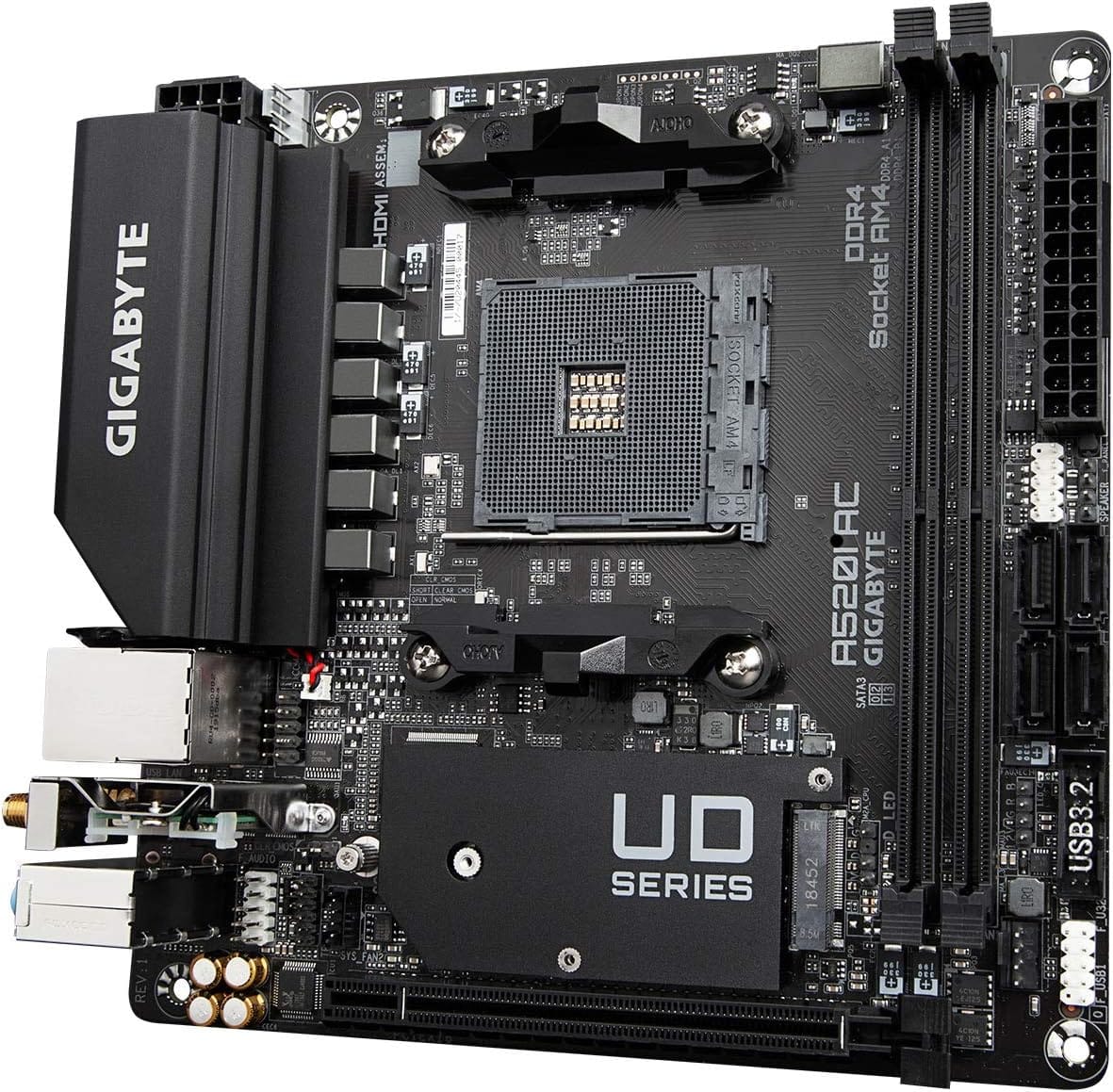
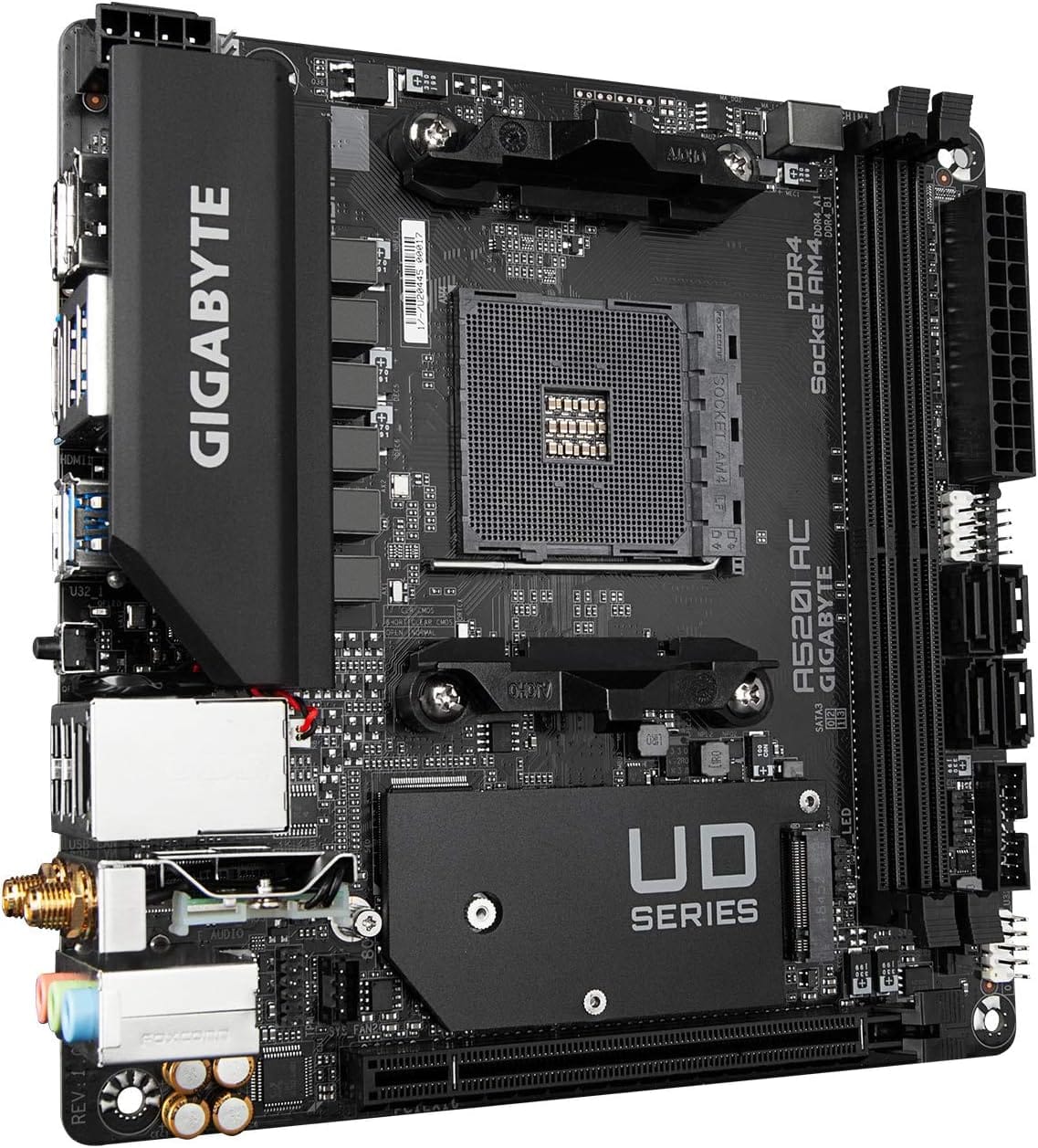
A transparent disclosure before the card below: the products carded in this comparison aren’t B850 or X870 boards. The scraped set for this cluster returned adjacent budget motherboards from other platforms, so we’re using them purely as illustrative examples of compact motherboard design, not as B850 or X870 recommendations. The Gigabyte A520I AC, at $126.61 with a 4.3-star rating, is an AMD AM4 Mini-ITX board with a Direct 6-phase digital PWM using 55A DrMOS, gaming GbE LAN, Intel Wi-Fi and Bluetooth, and an NVMe PCIe 3.0 x4 M.2 slot. It shows what a well-specced small AMD board looks like, though it’s a previous-generation AM4 unit, not an AM5 X870 board.

Pros
- Q-Flash Plus enables BIOS update without CPU installed, essential for Ryzen 5000 out-of-box support.
- 55A DrMOS phases are adequately rated for Ryzen 5 and Ryzen 7 non-X chips at stock settings.
- Intel WiFi AC and Bluetooth onboard saves a PCIe slot in a platform with zero spare slots.
- Three rear display interfaces (DP plus two HDMI) give APU builders real multi-monitor flexibility.
Cons
- A520 chipset lacks PCIe 4.0 and overclocking support, ruling out XFR tuning and fast NVMe Gen4 drives.
- Single M.2 slot at PCIe 3.0 x4 speeds caps sequential reads well below modern Gen4 SSDs.
- Only two DIMM slots with no OC headroom means RAM configuration and speed are locked to JEDEC or limited EXPO profiles.
The Gigabyte A520I AC is a budget-tier Mini-ITX motherboard on the AMD AM4 socket, targeting builders who need a compact, self-contained system around a Ryzen 5000 or 3000 series CPU. It is best suited for home theater PCs, small office machines, or entry-level SFF gaming rigs where size and wireless connectivity matter more than overclocking.
The standout feature is Q-Flash Plus, which allows BIOS updates from a FAT32 USB drive with no CPU or RAM installed. For buyers picking up a Ryzen 5000 CPU with an older BIOS on the shelf, this is a genuine convenience that removes the need to borrow a compatible CPU. The 55A DrMOS 6-phase VRM is adequate for Ryzen 5 5600 and Ryzen 7 5700X at stock, though sustained all-core loads on higher-TDP chips may see thermal limits without active airflow over the heatsink.
The A520 chipset is the real constraint here. There is no CPU overclocking, no PCIe 4.0 support, and the single M.2 slot runs at PCIe 3.0 x4, capping sequential reads around 3,500 MB/s. With only two DIMM slots and no XMP/EXPO tuning above JEDEC defaults on this chipset, RAM flexibility is limited. Case builders should also confirm GPU length clearance in their chosen Mini-ITX enclosure before purchasing.
Buy this if you are building a compact Ryzen 5000 system where integrated WiFi and Q-Flash convenience matter and overclocking is not on the table. Skip this if you plan to run a Ryzen 9 series chip, use a Gen4 NVMe drive at full speed, or need any meaningful CPU tuning headroom.
CPU and Socket: AM4 socket supports 3rd Gen Ryzen (Zen 2) natively and 5th Gen Ryzen 5000 (Zen 3) after a Q-Flash Plus BIOS update. A520 chipset does not support CPU overclocking or manual frequency tuning, so PBO and Curve Optimizer are off the table entirely.
RAM and Memory: Two DIMM slots support dual-channel DDR4 configurations. A520 chipset limits practical RAM tuning, so target DDR4-3200 CL16 kits for the best 1:1 FCLK ratio without pushing outside chipset support. Maximum capacity is not specified in source data; typical AM4 Mini-ITX boards support 64GB across two slots.
Storage and Expansion: One M.2 slot running PCIe 3.0 x4 delivers up to approximately 3,500 MB/s sequential read, sufficient for mid-range NVMe SSDs but incompatible with PCIe 4.0 drives at full rated speed. A single PCIe 3.0 x16 slot handles the discrete GPU, leaving no room for add-in cards in a Mini-ITX build.
Display and Wireless: Rear I/O includes one DisplayPort and two HDMI outputs for APU-based builds, supporting up to three simultaneous displays. Intel dual-band AC WiFi covers 2.4 GHz and 5 GHz bands with Bluetooth included. ALC887 audio codec is functional for basic use but below the ALC1220 found on mid-range and higher boards.
Real-world scenarios
The pure gamer
You want high frame rates and nothing exotic. B850 is the clear call. It runs your Ryzen chip at full speed, supports a PCIe 5.0 SSD, and lets you spend the saved money on a stronger GPU. X870’s extras would sit idle. Save the cash for pixels.
The creator with lots of gear
Capture cards, fast external drives, a dock, multiple monitors. X870’s guaranteed USB4 and extra ports genuinely help here, and the stronger VRMs handle sustained rendering loads. If your workflow leans on high-bandwidth peripherals, the premium pays back. This is X870’s home turf.
The overclocker chasing stability
You’re pushing a top-tier Ryzen chip and want rock-solid power. X870’s typically beefier power delivery gives more thermal and electrical headroom under load. B850 can overclock too on good boards, but if you’re squeezing every megahertz, the higher tier’s VRM margin is reassuring. Worth it for the enthusiast.
The small-form-factor builder
Mini-ITX changes the math, since board choice narrows fast at small sizes. Features matter, but so does what’s available in the format. A compact board with strong VRMs and good connectivity, like the ITX examples in this space, becomes the deciding factor more than the chipset badge. Availability drives the choice here.
Pricing and availability
B850 boards generally start lower and stretch up into feature-rich territory, while X870 boards begin higher and climb toward premium. The gap between two otherwise comparable boards often runs $70 to $150, and that difference is exactly what you’re weighing against features you may or may not use. Both chipsets are current AM5 platforms and widely stocked. Watch for sales, since a well-equipped B850 board on discount can undercut a base X870 by a wide margin, tilting value further toward B850 for most buyers.
Which to buy
For the majority of builders, B850 is the pick. It runs every Ryzen chip at full speed, includes PCIe 5.0, and delivers the connectivity a normal build needs, all while leaving budget for the components that actually raise performance. Unless you have a specific need for USB4 or extreme I/O, the money is better spent on a GPU or faster memory than on a chipset badge you won’t fully use.
Choose X870 only if you know you’ll use its extras: guaranteed USB4, maximum ports, and the strongest power delivery for heavy overclocking. Creators and no-compromise enthusiasts fit that profile. If you’re matching a board to a specific chip, our roundup of the best 7800X3D motherboards weighs these tradeoffs per platform. As a reminder, the compact board carded below is an illustrative AM4 ITX example, not an AM5 B850 or X870 recommendation.
Pros
- eDP 1.4 header is rare at this tier, ideal for custom AIO and panel builds
- Dr.MOS 50A 6-phase VRM adequate for 65W LGA1700 CPUs in SFF cases
- PCIe 4.0 x16 slot preserves GPU bandwidth despite H610 chipset limits
- Integrated WiFi 5 and Bluetooth 5.1 plus Intel Gigabit LAN cover connectivity
Cons
- Limited owner fedback available at time of writing, making reliability signal thin
- H610 blocks CPU overclocking and caps DR4 at 3200MHz with no XMP scaling
- Single M.2 slot is Gen3 x4 only, no Gen4 NVMe or secondary M.2
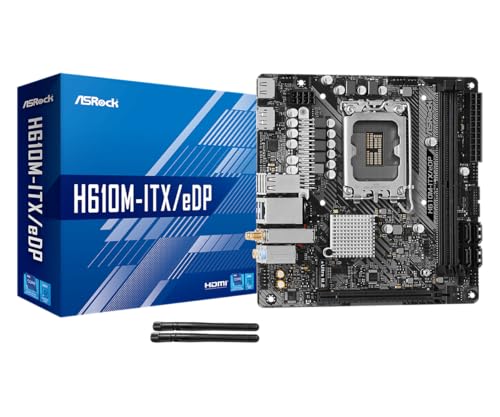
The ASRock H610M-ITX/eDP is a budget LGA1700 Mini-ITX board built around Intel's entry H610 chipset with DDR4 memory and a dedicated eDP 1.4 panel connector. It targets SFF builders, embedded system integrators, and digital signage projects rather than gamers chasing K-series CPUs or high-frequency RAM tuning.
The standout is the eDP 1.4 header, which lets integrators drive a laptop-style FHD 60Hz panel directly, useful for all-in-one and industrial builds. For general desktop use, HDMI 2.1 outputs 4K 60Hz and DisplayPort 1.4 handles up to 8K 60Hz, both dependent on the installed CPU's iGPU capabilities.
Trade-offs are typical at H610 tier: no CPU or memory overclocking, DDR4-3200 ceiling, a single Gen3 x4 M.2, and no rear USB-C. The 6-phase 50A Dr.MOS VRM is fine for 65W non-K chips like a Core i5-13400, but pairing with a 14700K in a hot SFF case is not the intended use.
Buy this if you need a compact LGA1700 board with eDP for a panel PC, signage kiosk, or budget SFF office build. Skip this if you want DR5, K-series overclocking headroom, Gen4 NVMe, or dual M.2 storage on a modern Intel platform.
Socket and chipset: LGA1700 with H610 chipset supports 12th, 13th, and 14th Gen Core CPUs. H610 disables CPU multiplier and memory overclocking, so pair with locked SKUs like Core i3-12100, i5-13400, or i5-14400 for best value rather than K-series parts.
Memory support: 2 DR4 DIMM slots run dual-channel up to 3200MHz with XMP 2.0 and ECC UDIMM in non-ECC mode. Confirm kits against ASRock's QVL, since Mini-ITX 2-DIMM layouts are typically friendlier to Hynix and Micron dies at 3200 CL16.
Storage and PCIe: One PCIe 4.0 x16 slot for GPU, one Ultra M.2 slot (PCIe Gen3 x4 and SATA3), and 4 SATA3ports. Only one M.2, so plan bot NVMe plus SATA SDs for bulk storage in SFF builds.
Form factor and I/O: Standard 6.7 by 6.7 inch Mini-ITX footprint fits ITX cases and thin mITX chassis. Rear I/O includes HDMI 2.1, DisplayPort 1.4, 2 USB 3.2 Gen1, 4 USB 2.0, and Gigabit LAN. Note CNVi Bluetooth shares bandwidth with one rear USB 2.0 port.
Common questions
Does X870 make my CPU faster than B850?
No. Both chipsets run the same Ryzen processors at the same speed, since performance comes from the CPU, not the chipset. X870 adds features like guaranteed USB4 and stronger power delivery, not raw compute. A 9800X3D performs identically on a good B850 and a good X870 board. Pick based on features and price, not speed.
Is USB4 a reason to pay for X870?
Only if you’ll use it. USB4 is guaranteed on X870 and optional on B850, and it matters for fast external SSDs, docks, and high-bandwidth devices. If you connect standard peripherals, you won’t miss it. For creators and dock users, USB4 alone can justify the step up. For everyone else, it’s a feature that sits idle.
Can I overclock on a B850 board?
Yes, on a well-built B850 board. B850 supports CPU and memory overclocking, and many boards have ample power delivery for it. X870 boards tend to carry stronger VRMs that give more headroom under sustained heavy loads, which serious overclockers value. For moderate tuning, B850 is plenty. For extreme, sustained overclocking, X870’s margin helps.
Will a B850 board support future upgrades?
Largely yes. B850 is a current AM5 chipset with PCIe 5.0 for storage and often the GPU, so it’s ready for next-generation drives and cards. AM5 as a platform is set to support future Ryzen releases too. The main things you’d miss are X870’s guaranteed USB4 and extra I/O, not core upgrade capability. It’s a solid long-term base.
Are the carded boards here B850 or X870?
No, and we want to be clear about that. The products shown are adjacent budget motherboards, including an AMD AM4 ITX board, used only to illustrate compact board design. They aren’t B850 or X870 units and aren’t recommendations for this comparison. Treat them as visual context, and shop actual B850 or X870 boards using the criteria in this article.




























Write Your Review
No reviews yet. Be the first to share your experience!