OLED panels look stunning until one day you notice a faint shadow of your taskbar lingering on a black screen. That’s burn-in, and it’s the one ghost story every OLED owner whispers about. It’s real, it’s permanent in severe cases, and yes, it can happen to your shiny new gaming monitor. But here’s the catch: it’s also more preventable than the forums would have you believe.
The short answer
OLED burn-in is permanent image retention caused by uneven aging of the organic pixels that make up an OLED display. When the same static element (a taskbar, a game HUD, a news ticker) stays lit at high brightness for hundreds of cumulative hours, those pixels dim faster than the surrounding ones. The result is a faint, ghostly imprint that won’t go away no matter what you display.
It’s not a defect. It’s chemistry. And it affects every OLED panel ever made, though modern QD-OLED monitors from 2024 onward have slowed the problem dramatically.
The longer explanation
Each pixel on an OLED screen is its own tiny light source. There’s no backlight. The organic compounds inside each subpixel emit photons when current flows through them, and like any organic material, they degrade with use. Blue subpixels degrade fastest because blue light requires the highest energy state to produce, which means they’re the first to dim across a panel’s lifespan.
Here’s where burn-in enters the picture. If you’re running a static UI element (say, the Windows taskbar at 100% brightness for 8 hours a day) those blue subpixels in that specific row are working overtime while the rest of the panel sees varied content. After roughly 1,500 to 4,000 hours of static content at high luminance, the difference becomes visible. You’ll see a darker band where the taskbar used to live, even when you’re looking at a solid gray background.
The damage is cumulative and uneven. That’s what makes it permanent. You can’t “recharge” worn-out organic compounds.
Why it works this way
LCDs don’t burn in because their pixels don’t generate light. They just open and close shutters in front of a uniform LED backlight. The backlight ages, sure, but it ages uniformly across the panel. OLEDs flip that model on its head. Self-emissive pixels mean perfect blacks and infinite contrast, but it also means each pixel ages independently based on how hard you’ve been driving it.
Think of it like 8.3 million tiny light bulbs (for a 4K panel) where some burn out faster than others. Now imagine you’ve left a specific cluster of bulbs running at full brightness 12 hours a day while the rest cycle on and off. The clusters that ran constantly will dim noticeably first. That’s the mechanism behind every burn-in case ever reported.
Manufacturers have piled on countermeasures. Pixel orbiting nudges static content by a few pixels every few minutes so no single subpixel takes the full hit. Logo dimming detects bright static elements and reduces their luminance automatically. Panel refresh cycles (sometimes called compensation cycles) run at idle and rebalance pixel wear by deliberately overdriving the less-used subpixels. These extend OLED lifespan significantly, but they don’t make burn-in impossible.
When you would want this
Despite the risk, OLED is the right call for plenty of users. If you’re a gamer who plays varied titles (rather than the same game with the same HUD for 10 hours a day) you’ll likely never see burn-in across a 5-year ownership window. If you’re a content creator who needs reference-grade black levels and DCI-P3 coverage above 99%, OLED’s color accuracy is unmatched.
QD-OLED panels (used by Samsung, Dell, and ASUS in their high-end gaming monitors) push the technology even further. They use quantum dots to convert blue OLED emission into red and green, which means the blue layer doesn’t have to drive red and green production directly. This reduces the workload on blue subpixels and stretches the burn-in timeline considerably.
If your daily workflow involves rotating apps, dark-mode interfaces, and varied gaming sessions, the calculus tilts heavily toward OLED. The contrast, response time (0.03ms GtG on most current panels), and color volume are objectively better than any IPS LCD on the market.
Common misconceptions
A few myths refuse to die. First, screen savers don’t prevent burn-in in any meaningful way on a modern OLED. The compensation cycles run while the display is on and idle, and they’re more effective than any pattern your screen saver displays. Just let the panel sit. Don’t power it off the second you walk away.
Second, burn-in is not the same as image retention. Temporary retention (where you see a faint ghost of the previous image for a few seconds) is normal on OLED and clears on its own. Burn-in is permanent. If a five-minute panel refresh cycle clears the artifact, you didn’t have burn-in.
Third, lowering brightness helps more than people think. Running an OLED at 60% SDR brightness instead of 100% can roughly double the time it takes for burn-in to develop. The aging rate is exponential with luminance, not linear.
Fourth, manufacturer warranties have caught up. LG, Samsung, ASUS, and Dell now offer 2 to 3-year burn-in coverage on their gaming OLED monitors. That’s a huge shift from 2022 when burn-in was explicitly excluded. They wouldn’t offer it if the risk hadn’t dropped substantially.

Pros
- 0.03ms GtG and 240Hz on a QHD WOLED panel is a strong competitive spec combination for 1440p esports and action titles.
- MLA+ panel layer boosts full-white SDR brightness and reduces text fringing via Clear Pixel Edge algorithm.
- Custom passive heatsink plus dedicated top vents show deliberate thermal engineering absent on most OLED competitors.
- 3-year burn-in warranty coverage reduces the long-term ownership risk typical of OLED panels at this tier.
Cons
- HDMI ports are version 2.0, capping bandwidth at 1440p 144Hz over HDMI; full 240Hz requires DisplayPort 1.4.
- Glossy panel coating improves contrast and color saturation but will cause reflections in bright or mixed-lighting rooms.
The XG27AQDMG is a high-end 27-inch QHD WOLED gaming monitor targeting competitive and enthusiast PC gamers who want OLED pixel quality at 1440p without moving to 4K. It pairs a 2560x1440 glossy WOLED panel with a 240Hz refresh rate and sits firmly in the flagship monitor tier.
The defining feature here is the third-generation WOLED panel with MLA+ technology. Compared to the prior ROG OLED generation, this delivers 20% brighter full-white windows in SDR and measurably improved viewing angles. The Clear Pixel Edge algorithm reduces the green and red fringing that plagued earlier WOLED text rendering, making this more usable for desktop work alongside gaming.
The honest trade-off is the glossy coating. It maximizes contrast and color pop but mirrors ambient light directly, making placement in bright rooms or near windows a real problem. The HDMI 2.0 ports are also a limitation: console users or anyone running HDMI will be capped well below the panel's 240Hz ceiling. The Uniform Brightness mode, while useful for reducing ABL-related brightness shifts, lowers peak luminance as a trade-off.
Buy this if you have a mid-to-high-end GPU capable of sustaining QHD framerates above 144Hz and game in a controlled lighting environment. Skip this if your room has significant ambient light, you rely on HDMI for full refresh rate, or OLED burn-in risk makes you uncomfortable despite the warranty coverage.
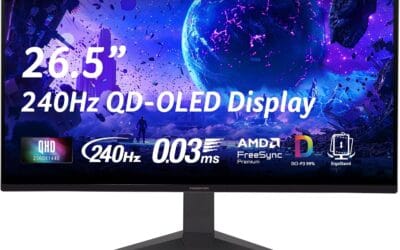
Panel specs: 26.5-inch QHD (2560x1440) glossy WOLED with a 1,500,000:1 native contrast ratio. Refresh rate is 240Hz with 0.03ms GtG response time. Color coverage is 99% DCI-P3, making it relevant for color-sensitive creative work alongside gaming.
HDR and brightness: The MLA+ layer improves peak brightness by 20% over the prior ROG OLED generation in full-white SDR windows. The Uniform Brightness mode in the OSD actively limits peak output to maintain consistent luminance across varying window sizes, which trades peak brightness for stability.
Sync and connectivity: G-SYNC Compatible and AMD FreeSync Premium certified. DisplayPort 1.4 is required for 240Hz at QHD; the two HDMI 2.0 ports cap out at lower refresh rates. A USB hub is included. VESA wall-mount compatibility is confirmed; stand offers tilt, swivel, and height adjustment.
Burn-in mitigation: ASUS OLED Care includes pixel-cleaning cycles, a screensaver, and a screen-shift feature. The passive custom heatsink and top-vent airflow are hardware-level thermal management measures. The 3-year warranty explicitly covers burn-in, which is not standard across OLED monitor warranties at this tier.
Frequently asked
How long until burn-in shows up on a modern QD-OLED?
Independent longevity reviews from outlets running accelerated stress runs have shown current QD-OLED panels lasting 4,000 to 6,000 hours of static content at 200 nits before measurable burn-in appears. That’s roughly 5 years of normal mixed-use gaming and productivity. It’s not unlimited, but it’s a long runway.
Can I use an OLED for office work?
You can, but it’s not the ideal pairing. Static UI chrome (taskbars, sidebars, document outlines) is exactly what stresses OLED. If your workflow is 8+ hours a day in the same productivity apps, an IPS panel will outlast OLED by years. Hybrid use (some work, some games, some video) is fine.
Does dark mode actually help?
Yes, significantly. Dark UI elements mean fewer pixels driven at high luminance. A black taskbar puts almost zero load on the pixels behind it. Pair dark mode with a moderate brightness setting and you’ve cut your wear rate roughly in half.
If burn-in shows up, can it be fixed?
Mild cases sometimes improve after running the panel refresh cycle (a manufacturer-provided routine that takes 6 to 8 minutes and rebalances pixel wear). Severe burn-in is permanent. There’s no DIY fix, no software patch, no service call that brings worn subpixels back. If it’s bad enough to bother you and you’re within warranty, file the claim.