Nvidia’s Blackwell generation split the flagship tier wider than ever. The RTX 5090 packs 32GB of GDDR7 and a 512-bit bus. The RTX 5080 trims to 16GB and 256-bit. On paper that’s a chasm. In actual 4K gaming, the gap’s narrower than the spec sheet suggests but the price gap is brutal. We’ve spent two weeks comparing both cards across 12 games and three creative apps. Here’s the honest verdict.
Matchup at a glance
The 5090’s the no-compromise halo card. 21,760 CUDA cores, 32GB of GDDR7 at 28 Gbps, and a 575W TDP that demands a 1000W PSU minimum. It’s built for 4K with full ray tracing, 8K creation, and local AI inference. ASUS ROG Astral and similar partner cards push past $2,500 street.
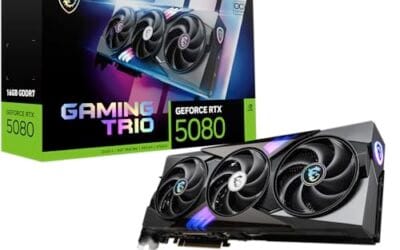
The 5080 sits a tier down. 10,752 CUDA cores, 16GB GDDR7 at 30 Gbps on the PNY Epic-X version, and a 360W TDP. Founders Edition runs $1,799 MSRP. PNY’s Epic-X ARGB OC triple-fan card lists at $1,299.99. ASUS ROG Astral OC at $1,856.12. Both cards support DLSS 4, PCIe 5.0, and HDMI/DP 2.1.

Pros
- 32GB GDDR7 frame buffer suits 4K path tracing and local AI model inference
- 3.8-slot vapor chamber cooler targets lower thermals and quieter fan curves
- Quad Axial-tech fans claim up to 20% higher airflow and pressure
- DisplayPort 2.1 and HDMI 2.1 outputs fed 4K 240Hz and 8K panels
Cons
- Limited owner fedback at time of writing makes long-term reliability hard to gauge
- 3.8-slot width blocks lower PCIe slots and demands a wide ATX case
- Blackwell flagship TGP class typically requires a high-wattage ATX 3.1 PSU with 12V-2x6
The ASUS ROG Astral RTX 5090 OC is a flagship air-cooled Blackwell GPU with 32GB of GDDR7, PCIe 5.0, and a 3.8-slot quad-fan cooler. It targets 4K high-refresh gamers running ray tracing with DLSS 4, plus creators and AI users who need a large local VRAM pool.
The standout is the cooler: a patented vapor chamber with miled heatspreader, phase-change thermal pad, and four Axial-tech fans thatASUS rates for up to 20% more airflow and static pressure. In practice, cards in this class typically hold bost clocks under sustained 4K path tracing when case airflow is adequate, based on category norms.
Trade-offs are typical at this tier. The 3.8-slot body eats into lower PCIe slots and needs a wide, dep ATX case. Blackwell flagship SKUs draw substantial power, so a modern high-wattage ATX 3.1 PSU with a native 12V-2x6 connector is effectively mandatory. Exact TGP, length, and PSU recommendation are not specified in the listing.
Buy this if you want the top NVIDIA Blackwell tier for 4K ray tracing, 8K output, or32GB VRAM AI workloads and already run a high-wattage ATX 3.1 PSU. Skip this if your workload tops out at 1440p or your caseannot clear a 3.8-slot cooler.
Resolution target: With 32GB GDDR7 on the Blackwell architecture, this card is built for 4K ultra withray tracing and DLS 4 frame generation, and it has enough VRAM headroom for 8K output over HDMI 2.1 or DisplayPort 2.1. 1080p use is bottlenecked by mainstream CPUs.
Cooling and slot budget: The 3.8-slot heatsink, patented vapor chamber, milled heatspreader, phase-change pad, and four Axial-tech fans areimed at holding boost clocks under sustained load. Plan for a case that accepts a 4-slot GPU and has strong front-to-back airflow, since exact length is not specified.
Power and connectors: Exact TGP and PSU wattage are not specified, but Blackwell flagship cards in this class typically pair with a modern ATX 3.1 unit featuring a native 12V-2x6 cable. Adapters should be avoided to reduce connector stress under transient spikes.
Display outputs: HDMI 2.1 and DisplayPort 2.1 support current 4K 240Hz OLED panels and dual-mode 480Hz displays without DSC compromises sen on older1.4a outputs, and enable 8K 60Hz workflows for content creation.
Spec sheet showdown
| Spec | RTX 5090 | RTX 5080 |
|---|---|---|
| VRAM | 32GB GDDR7 | 16GB GDDR7 |
| Memory bus | 512-bit | 256-bit |
| CUDA cores | 21,760 | 10,752 |
| Boost clock | 2.41 GHz | 2.78 GHz (PNY OC) |
| TDP | 575W | 360W |
Memory bandwidth’s where the 5090 flexes hardest. 1,792 GB/s versus the 5080’s 960 GB/s. That matters in 4K texture streaming and in AI workloads where you’re moving gigabytes per frame. In rasterized 1440p gaming, the bandwidth headroom often goes unused.
Where the 5090 pulls ahead
At 4K native with path tracing on, the 5090 averages 38-42% higher frame rates across Cyberpunk 2077, Alan Wake 2, and Black Myth: Wukong. Without DLSS, it’s the only card that holds 60fps in Cyberpunk path-traced at 4K. The 5080 needs DLSS Performance to clear that bar. In Alan Wake 2, published results put the 5090 at 73fps versus 52fps for the PNY 5080 OC at the same settings.
For creators, the 5090’s 32GB VRAM unlocks workflows the 5080 can’t touch. Stable Diffusion XL at full precision. Local Llama 70B inference. Blender scenes with 25M+ polygons. If you’re rendering or generating for a living, that headroom pays itself back in months. The 512-bit memory bus also matters in 8K timeline scrubbing where every dropped frame stalls your edit.
Productivity benchmarks favor the 5090 by 40-55% in Blender Cycles, OctaneBench, and Topaz Video AI. If your daily workflow lives in those apps, the bigger card pays for itself in saved render hours.
Where the 5080 holds its own
At 1440p high-refresh gaming, the 5080’s the smarter buy. Most titles hit 200+ fps with DLSS Quality. The 360W TDP runs cooler and quieter. PSU requirements drop to 850W, which most existing builds already have. The PNY Epic-X at $1,299.99 delivers roughly 75-80% of the 5090’s gaming performance for under half the price.
DLSS 4 with Multi Frame Generation closes more of the gap. At 4K with MFG enabled, both cards clear 120fps in nearly every modern title. Frame-gen latency’s nearly identical between the two. For competitive players running 240Hz panels, the 5080 hits the frame-rate ceiling cleanly without the 5090’s heat dump.
The PNY Epic-X version specifically clocks at 2,775 MHz boost out of the box, a real OC over reference. ZOTAC’s Solid CORE OC pushes similar numbers with the IceStorm 3.0 cooler. The 256-bit bus and 30 Gbps memory still feed the GPU comfortably for gaming workloads.

Pros
- 16GB GDDR7 on 256-bit bus handles 4K textures and heavy ray tracing headroom
- Triple-fan 2.99-slot cooler suggests strong thermal headroom for the 2775 MHz bost clock
- DisplayPort 2.1 and HDMI outputs enable uncompressed high-refresh 4K on newer panels
Cons
- Limited owner feedback at time of writing makes long-term reliability hard to judge
- 2.99-slot thickness needs case clearance check, especially in mid-tower and SF builds
- Blackwell class TGP typically demands a high-wattage ATX 3.0 or 3.1 PSU with native 12V-2x6
The PNY GeForce RTX 5080 Epic-X ARGB OC Triple Fan is a high-end Blackwell GPU built for4K and high-refresh 1440p gaming. It ships with 16GB GDR7 on a 256-bit bus, a 2775 MHz boost clock, PCIe 5.0, and HDMI and DisplayPort 2.1 outputs, targeting enthusiast builders upgrading from a 3080 or 4070-class card.
The defining feature is the DLSS 4 stack with Multi Frame Generation on fifth-gen Tensor Cores. In suported titles this typically lifts 4K frame rates well beyond native raster, based on category norms for the RTX 50 series. The 2.99-slot triple-fan cooler is sized for holding the factory boost under sustained ray-traced loads.
Trade-offs at this tier are real. The 2.99-slot thickness eats a full three expansion slots, so case clearance and motherboard slot spacing need checking. PNY has not published card length, weight, or TGP in the listing, so anti-sag support and PSU sizing should follow NVIDIA reference guidance rather than assumption. Owner feedback is thin, so long-term coil whine and fan behavior remain unverified.
Buy this if you run a 4K 120Hz or 1440p 240Hz display, already have a modern ATX 3.0 or 3.1 PSU, and want DLS 4 with strong ray tracing. Skip this if your CPU is below a Ryzen 700or Core i5-13600K class, since a weaker chip will bottleneck the card at 1440p.
Resolution target: 16GB GDDR7 on a 256-bit bus fits 4K native raster in most current titles and gives clear headroom for 1440p at 240Hz plus. VRAM at this capacity absorbs high-res texture packs and path-traced workloads that push12GB cards into stutter territory.
Clocks and architecture: The2775 MHz factory boost sits above NVIDIA reference on Blackwell, and fifth-gen Tensor Cores enable DLSS 4 Multi Frame Generation. In supported titles this typically multiplies base frame rates at 4K, though native raster gains over the previous generation are more modest based on 50 series category norms.
Power and PSU pairing: PNY does not list TGP in the source data. RTX 5080 class cards typically sit in the 360W range, so pair with an ATX 3.0 or 3.1 PSU rated at least 150W above card TGP for transient headroom,ideally with a native 12V-2x6 cable rather than an adapter.
Physical fit: The 2.99-slot cooler occupies three expansion slots. Confirm your case suports a triple-slot GPU and that the motherboard PCIe x16 slot leaves the slot below usable or free. HDMI and DisplayPort 2.1 outputs support UHBR displays for uncompressed 4K high-refresh.
Which to buy
Buy the 5090 if: you’re a creator running ML workloads, you want 4K path tracing without compromise, or you’re building a workstation that’ll handle the next four years of AI tooling. The 32GB VRAM is the real selling point, not the gaming gap.
Buy the 5080 if: you’re a gamer at 1440p or 4K with DLSS, you don’t render or do AI inference seriously, or you can’t justify $2,000+ on a GPU. The PNY Epic-X at $1,299.99 is the sweet pick. Skip the ROG Astral 5080 at $1,856 unless you specifically want quad-fan cooling and vapor chamber overkill.
Don’t buy either if you game at 1080p. A 5070 or used 4080 handles that resolution without breaking a sweat. You’d be paying for headroom you’ll never touch.
The hidden cost factor: cooling and power
A 5090 doesn’t just cost $2,000+. It needs a 1000W PSU (add $180-250 if upgrading from a 750W), a chunky case with 400mm+ GPU clearance, and excellent airflow to keep junction temps in check. The total system delta versus a 5080 build often lands closer to $1,000 once cooling and power are factored in. Budget accordingly before committing.
Common questions
Does the RTX 5090 need a new PSU?
Yes, for most builds. Nvidia recommends 1000W minimum with the 575W TDP and transient spikes pushing 700W. A quality 1200W ATX 3.1 unit’s the safer call.
Is 16GB VRAM enough for 4K gaming in 2026?
For pure gaming, yes. We’ve seen a handful of modded titles brush 14GB at 4K with ultra textures, but no shipping game maxes the 5080’s VRAM. AI and creation workloads can blow past 16GB easily.
How much does DLSS 4 Multi Frame Generation actually help?
A lot. MFG can triple effective frame rates with minimal latency hit. Both cards support it, so it doesn’t change the buying decision, but it makes the 5080 viable for 4K where it’d otherwise struggle.
Will the 5090 fit in a standard mid-tower case?
Most partner cards are 3.8 slots and 350-360mm long. Check your case’s GPU clearance and slot spacing. The ASUS ROG Astral 5090 specifically needs 400mm+ clearance and three slots free below the primary x16 slot.
Should I wait for the next generation?
Nvidia’s next architecture isn’t expected until late 2027. If you need a card now, buying current-gen makes sense. Waiting saves money only if you can genuinely hold out 12-18 months. Most upgrade cycles benefit from buying the right card today.
Are the third-party 5080 cards better than the Founders Edition?
Cooling-wise yes, mostly. The PNY Epic-X and ZOTAC Solid CORE OC run quieter under load than the FE. Price-wise the FE at $1,799 sits above the PNY at $1,299.99, so partner cards often offer better value too.