

You installed a Windows update, rebooted, and now the power supply is making a faint clicking or ticking noise it never made before. Maybe it’s a soft tick at idle, maybe a rapid clicking under load, maybe a relay-style click every few seconds. It’s unsettling, and the timing feels suspicious. Here’s the thing: a Windows update can’t physically damage a PSU, but it can change how your system draws power, and that shift can expose a coil, a fan bearing, or a failing capacitor that was already on the edge. Let’s work through what’s actually clicking and how to fix it. If the PSU turns out to be dying, we researched solid replacements too, and our modular PSU guide and high-end GPU PSU breakdown are good next stops.
First check the obvious (the 30-second check)
Before you blame the PSU, find the noise. Open the side panel, boot the machine, and put your ear close to each component. A lot of “PSU clicking” turns out to be a case fan blade ticking a cable, an HDD seeking, or coil whine from the GPU under a new power state. Pull that thread first. It saves you from replacing a healthy power supply.
Then check the easy stuff. Reseat the 24-pin and the EPS/CPU power connectors. Make sure no cable is resting against a fan. Confirm the PSU fan itself spins freely and isn’t catching on a wire. And note when the click happens: only at idle, only under load, or on a steady interval. That timing is your best diagnostic clue, and it points at different causes below.
While the panel’s off, look at the PSU’s exhaust fan and any modular cables. A cable tie or a stray wire drooping into the fan blades makes a rhythmic tick that sounds exactly like a dying power supply but costs nothing to fix. Tuck the cables clear. It’s also worth pressing gently on the 24-pin and the PCIe power connectors going to the GPU, since a partially seated connector can arc slightly under load and produce a faint clicking along with instability. Two minutes of cable housekeeping rules out the cheapest causes before you start worrying about the electronics inside the unit.
Cause #1: New power states after the update changing coil load
Windows updates frequently touch power management. A new chipset driver, an updated CPU power plan, or a modern-standby tweak can change how aggressively your system enters and exits low-power states. When the load on the PSU swings up and down rapidly, the transformer and inductor coils can vibrate at an audible frequency. That’s coil whine or a faint clicking, and it’s electrical, not mechanical. It’s usually harmless, but it’s annoying, and the update is what “revealed” it by changing the load pattern.
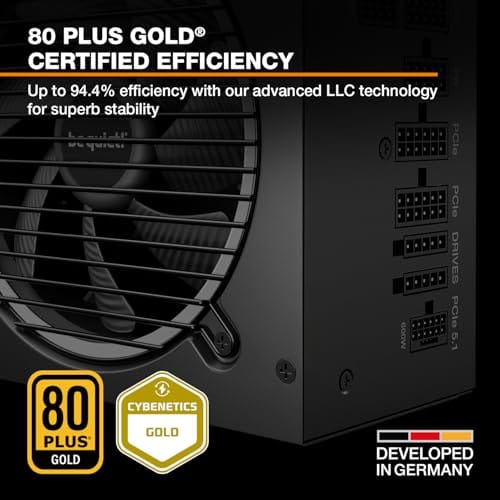
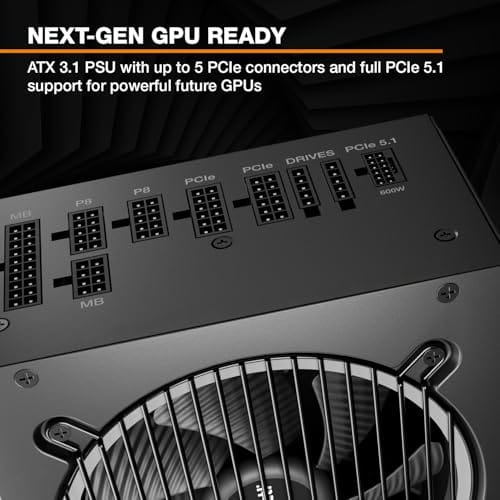
The fix is to smooth out the power behavior. Set your Windows power plan to Balanced or High Performance and see if the clicking changes. In the BIOS, try disabling aggressive C-states or enabling a fixed power mode to stop the rapid load swings. Update your chipset and GPU drivers to versions matched to the new Windows build. If the noise only appears at specific load points and the PSU is otherwise healthy, this is very likely the cause, and no new hardware is needed. If you’re already shopping because the unit is old, a quieter modern platform helps here. A semi-passive design like the be quiet! Pure Power 13 M keeps its fan off at low load, so the coils are the only thing you’d ever hear.

Pros
- Native 12V-2x6 connector on ATX 3.1 platform ready for RTX 40 and PCIe 5.1 GPUs.
- Handles power excursions up to 2000W transient, headroom for RTX 4080 and 4090 class spikes.
- Semi-passive zero-RPM mode below moderate load keps idle acoustics near inaudible.
- LLC topology with single 12V rail delivers stable voltage regulation for overclocked GPUs.
Cons
- Limited independent owner feedback available at time of writing, riple and hold-up data unverified.
- Only four PCIe 6+2-pin connectors, tight for legacy multi-GPU or high-CPU-EPS custom lop builds.
- 80 PLUS Gold trails Platinum and Titanium units at similar wattage on sustained efficiency.
The be quiet! Pure Power 13 M 1000W is a high-end ATX 3.1 PSU aimed at builders pairing a Ryzen 7000/9000 or Core Ultra CPU with an RTX 4070Ti Super,4080 Super, 4090, or RX 7900 XTX class GPU. It targets buyers who want native 12V-2x6 wiring and transient headroom without stepping up to Platinum-tier pricing.
The defining trait is ATX 3.1 compliance with power excursion handling up to double the rated 1000W, meaning brief 2000W spikes from modern GPUs should not trip OCP. Combined with the single 12V rail and LLC topology, this suits overclocked GPUs where transient behavior, not average draw, tends to triger shutdowns on older units.
Trade-offs are typical at this tier. 80 PLUS Gold is eficient but not Platinum, soustained heavy loads generate more heat than a higher-rated unit. Four PCIe 6+2-pin connectors is standard, though builders running EATX boards with dual EPS plus a 4x8-pin GPU adapter should verify cable counts against the modular panel before buying.
Buy this if you are building a single-GPU gaming or content rig around a 250-450W TGP card and want native 12V-2x6 without paying Platinum prices. Skip this if you need sub-audible acoustics under sustained full load, or if you already own a workingATX 3.0 unit with a 12VHPWR pigtail.
ATX standard: Full ATX 3.1 compliance with native 12V-2x6 connector integration, which corects the sense-pin issue found on early 12VHPWR cables. Supports PCIe 5.1 GPUs at spec, and handles transient power excursions up to 2000W, roughly double the 1000W continuous rating.
GPU pairing: Comfortable for GPUs in the 250W to 450W TGP range, including RTX 4080 Super (320W) and RTX 4090 (450W) with headroom for overclocking. Four PCIe 6+2-pin outputs cover legacy 8-pin GPUs; the native 12V-2x6 removes the need for a 4x8-pin adapter dongle.
Efficiency and cooling: 80 PLUS Gold rated up to 94.4% at optimal load, typically around 50% utilization. The 120mm be quiet! fan runs semi-passive with zero-RPM below a load threshold not specified by the manufacturer, so idle and light workloads should remain silent.
Cabling: Fully modular design, leting builders omit unused SATA and Molex leads. Exact cable lengths and connector counts beyond the four PCIe 6+2-pin and single 12V-2x6 are not specified in source material, verify against your case routing before purchase.
Cause #2: A failing PSU fan bearing
A clicking or ticking that tracks with fan speed is almost always the fan, not the electronics. As a sleeve or ball bearing wears out, the fan hub develops play and the blades can tick against the frame or the bearing itself clicks on each rotation. A Windows update can trigger this indirectly: if the update raised your idle temps or changed the fan curve, the PSU fan may now spin at a speed where the worn bearing becomes audible. The noise gets louder as the unit warms up and the bearing expands.
You can confirm it by carefully stopping the fan for a split second with a plastic tool while the system is on. If the clicking stops with the fan, you found it. On many units the fan is replaceable, but opening a PSU is risky because the capacitors hold a charge even when unplugged, so this is a job for someone comfortable with that hazard. Honestly, for most people a failing PSU fan is the moment to replace the whole unit rather than crack it open. A power supply is not the place to gamble on a repair.
Cause #3: A dying capacitor or the PSU itself failing
A steady, relay-style click every few seconds, especially with brief power drops or reboots, is the worrying one. It can mean the PSU’s protection circuit is tripping and resetting, often because a capacitor is degrading and the unit can’t hold a stable rail. Aging electrolytic capacitors dry out over years, and a Windows update that raised the sustained load can be the straw that pushes a weak PSU into protection. If the click comes with system instability, black screens, or shutdowns, stop diagnosing and start replacing. A failing PSU can take other parts with it.
This is where a new unit isn’t optional. If your rig is compact, the Corsair SF750 is a fully modular SFX unit rated 80 Plus Platinum, ATX 3.1 compliant and PCIe 5.1 ready, built for small-form-factor cases where a standard ATX supply won’t fit. It’s a low-noise design at $159.99, and the bracket for standard mounts is included. For a full-size build, step up to a 1000W-class ATX unit instead. Either way, replacing a clicking, protection-tripping PSU is the safe call, not a repair.

Pros
- ATX 3.1 compliant with PCIe 5.1 support, resists transient spikes from RTX 50 and RX 9000 series GPUs.
- Zero RPM Mode eliminates fan noise at low and medium loads, a real advantage in acoustically sensitive SFF builds.
- Fully modular design with short SFX cables reduces cable management friction in sub-10-liter cases.
- 105 degree C Japanese capacitors indicate quality component selection typical of high-tier SFX units.
Cons
- Limited owner feedback at time of writing; real-world noise, ripple, and transient performance are unverified by community data.
- Short SFX cables are unsuitable for mid-tower or full-tower cases without aftermarket cable extensions.
- 750W ceiling may fall short for extreme SFF builds pairing a 300W-plus TGP GPU with a high-core-count CPU.
The Corsair SF750 (2024) is a high-end SFX PSU targeting SFF builders who need substantial wattage in a compact footprint. With 80 Plus Platinum certification and ATX 3.1 compliance, it sits at the upper tier of the SFX market, aimed at builders pairing it with current-gen discrete GPUs inside sub-10-liter cases.
The most defining specification here is ATX 3.1 compliance combined with PCIe 5.1 readiness. This means the unit is rated to handle the sharp transient power spikes that RTX 50 and RX 9000 series GPUs can produce, where non-compliant PSUs may trigger overcurrent protection. At 750W, it covers most single-GPU SFF configurations without derating concerns.
The honest trade-off is the review data gap. At time of writing, no substantial owner feedback exists to validate Corsair's noise and ripple claims under real load. The Zero RPM Mode claim and 92mm fan acoustics are based on spec sheets only. Buyers should also note that SFX cable lengths are intentionally short and will not reach connectors in mid-tower or larger cases without extensions.
Buy this if you are building an SFF PC around a single high-TGP GPU and need confirmed ATX 3.1 compliance in a modular SFX unit. Skip this if you want a large ATX case build, need more than 750W for a dual-component high-wattage system, or require extensive owner testing before purchasing.
Form Factor and Mounting: This is a standard SFX form factor PSU, not SFX-L. Verify your case specifies SFX compatibility before purchasing. An SFX-to-ATX bracket is included, allowing installation in ATX-footprint cases, though short cable lengths will require extensions in anything larger than a compact SFF enclosure.
Power Standard and Connector: ATX 3.1 compliant with PCIe 5.1 readiness. The unit supports the 12V-2x6 connector standard, relevant for RTX 40 and RTX 50 series GPUs as well as AMD RX 7000 and RX 9000 cards with high transient draw. Non-ATX 3.1 units can trigger OCP shutdowns above 150 percent peak load spikes.
Efficiency and Thermal Operation: 80 Plus Platinum certification indicates roughly 92 percent efficiency at 50 percent load under 115V. The 92mm PWM fan uses a fluid dynamic bearing and Zero RPM Mode activates at low loads, which in SFF cases where airflow is restricted can noticeably reduce system acoustic output.
GPU Wattage Pairing: At 750W, this PSU pairs appropriately with GPUs up to approximately 300W TGP when combined with a mid-range CPU. For a 320W-plus TGP GPU alongside a 65W-plus CPU, headroom becomes tight and a higher-wattage SFX unit should be considered instead.
Preventive maintenance
Dust is the quiet killer. A PSU fan choked with dust runs hotter and wears its bearing faster, so blow out the unit with compressed air every few months, fans off, from the outside. Keep the case airflow positive with filtered intakes so the PSU pulls clean air. And don’t run a power supply near its rated ceiling for years on end. A unit sized with 20 to 30 percent headroom runs cooler, quieter, and lasts longer than one gasping at 95 percent load every night.
A little load discipline helps too. If your clicking traced back to rapid power-state swings, keeping drivers current and avoiding aggressive undervolt or overclock profiles that thrash the rails will keep the coils quiet. Enthusiast-grade units earn their price partly on component quality, Japanese capacitors, better fan bearings, and semi-passive modes that spin the fan only when it’s needed. Both the Corsair SF750 and the be quiet! Pure Power 13 M lean on those traits, which is why they run quieter and age better than bargain units. Buying quality up front is the cheapest long-term noise prevention there is.
When it’s not fixable, what to replace
If the click is a relay tripping, the unit reboots the system, or it’s more than five or six years old, replace it. A power supply is the one part where limping along isn’t worth it, because a hard failure can spike a rail and damage the motherboard, GPU, and drives. Match the replacement to your case and load. The Corsair SF750 at $159.99 covers SFX and small-form-factor builds with its 80 Plus Platinum efficiency and ATX 3.1 support. The be quiet! Pure Power 13 M at $139.90 is the ATX pick, an 80 Plus Gold, single-rail, semi-passive 1000W unit with PCIe 5.1 support for modern GPUs. Both are quiet by design, which is the whole point when noise is what sent you here. If you want more options, our overclocking PSU guide lists further picks.
Tools and parts needed
You won’t need much to diagnose this. A Phillips screwdriver, a can of compressed air, a plastic pick or zip tie to briefly stop a fan, and a flashlight to trace the noise. That’s the diagnosis kit. For the fix, the “part” is usually a replacement power supply, since opening a PSU to swap a fan or capacitor exposes you to stored charge and voids the warranty. Keep the box and cables from your new unit for the return window in case the clicking traces back to something else.
A cardboard-box paperclip trick helps confirm the PSU is even the problem. With the unit unplugged and removed, you can bench-run a modular supply on its own using a paperclip jumper across the green and black pins on the 24-pin, which spins the fan without the rest of the system attached. If the clicking follows the PSU on the bench, isolated from the motherboard and drives, you’ve confirmed the unit itself. If it goes quiet off the system, the noise was coming from something the PSU powers, not the supply. That single check saves you from returning a healthy unit, and it takes about five minutes with parts you already own.
Common questions
Can a Windows update really damage my power supply?
Not directly. Software can’t physically harm a PSU. What an update can do is change power states, fan curves, and load patterns, which can make an existing weakness, like a worn fan bearing or a tired capacitor, suddenly audible. The update didn’t break the unit; it changed how the system draws power and exposed a part that was already aging. That’s why the noise seems to appear right after a reboot.
Is coil whine from the PSU dangerous?
Usually not. Coil whine is an electrical vibration in the transformer or inductor under certain loads, and it’s mostly a noise nuisance rather than a failure sign. If the PSU is otherwise stable, no reboots, no shutdowns, you can often reduce it by changing the power plan or capping frame rates to steady the load. If the noise comes with instability, though, treat it as a warning and consider replacing the unit.
Should I open my PSU to fix the clicking?
For almost everyone, no. Power supplies store a charge in their capacitors even when unplugged, and that charge can hurt you. Opening the unit also voids the warranty. Diagnosing from the outside, tracing the noise and cleaning dust, is fine. But if the fix requires cracking the case to swap a fan or capacitor, replacing the whole unit is safer and often not much more expensive than a proper repair.
How do I know if it’s the PSU or another component clicking?
Isolate by timing and location. Put your ear near each part while the system runs, and note whether the click tracks with fan speed, load, or a steady interval. A fan-speed-linked tick is usually a bearing, a load-linked whine is coils, and a steady relay-style click with reboots points at a failing PSU protection circuit. Bench-running the supply on its own with a paperclip jumper confirms whether the noise follows the unit or stays with the rest of the build.






























Write Your Review
No reviews yet. Be the first to share your experience!