

Your PC was fine last week. Then Windows pushed an update, and now the whole thing just cuts out mid-game, no blue screen, no warning, black screen and a dead fan. If that’s you, take a breath. A hard power-off right after an update almost always points at the power delivery chain, not a dying motherboard. Sometimes the update changed a power setting. Sometimes it exposed a PSU that was already on the edge. We researched the common causes and the real fixes, and we’ll walk them in order so you don’t replace parts you don’t need to. If you’re shopping a replacement anyway, our modular PSU guide and the 1000W roundup cover solid units.
First check the obvious
Before you crack the case, run the 30-second check. Is the wall outlet solid? Swap the PSU’s power cable and try a different socket, ideally not on the same overloaded power strip as a space heater. Loose plugs cause exactly this kind of dead-drop shutdown. Next, open Windows power settings and confirm the update didn’t flip your plan to something aggressive. Updates sometimes reset “high performance” to “balanced” and re-enable fast startup, which can interact badly with a marginal PSU.
Then check the temps and the event log. Open Event Viewer, look under Windows Logs then System, and find the entry right before the shutdown. A Kernel-Power 41 error is the classic fingerprint of an unexpected power loss, and it confirms the machine lost power rather than crashed to a stop. It won’t tell you the exact part, but it rules out a clean software crash. If you see Kernel-Power 41, you’re on the right track reading this. Keep going.

While you’re at it, rule out overheating as the trigger. A CPU or GPU hitting its thermal limit can force a protective shutdown that looks identical to a PSU trip. Pull up a monitoring tool like HWiNFO and watch your temps during the load that causes the crash. If nothing’s crossing 90C, heat isn’t your problem and the power chain is the likely suspect. If temps are spiking, clean your fans and reseat your cooler before you go buying a power supply. Two different failures, same black screen, so it pays to separate them early.
Cause #1: The update changed power and driver settings
This is the one people miss, and it’s the cheapest to fix. A Windows update can install a new chipset or GPU driver, re-enable fast startup, or change how the system handles power states. Any of those can trigger a shutdown that feels like a hardware failure but isn’t. Fast startup, in particular, puts the system into a hybrid hibernation that some boards and PSUs don’t wake from cleanly, and a fresh update loves to switch it back on.
Start by disabling fast startup. Control Panel, Power Options, “Choose what the power buttons do,” then uncheck “Turn on fast startup.” Reboot fully. Next, roll back or reinstall the GPU driver the update touched, using a clean install through the vendor’s tool so no half-updated files linger. Set your power plan back to high performance. If the shutdowns stop here, you’ve saved yourself a PSU purchase. Give it a day of normal use before you declare victory, because these faults are intermittent by nature and one clean session doesn’t prove much.
Cause #2: A marginal or aging PSU that the update pushed over the edge
Here’s where hardware enters. A power supply that was already running near its limit can pass for months, then a driver update raises the GPU’s power draw or changes its boost behavior, and suddenly the PSU’s protection circuit trips under a transient spike. Modern GPUs pull brutal, millisecond load spikes far above their rated average, and an older or undersized unit hits over-current protection and cuts power to protect itself. That’s your instant black-screen shutdown, no BSOD, because the PSU pulled the plug on purpose.
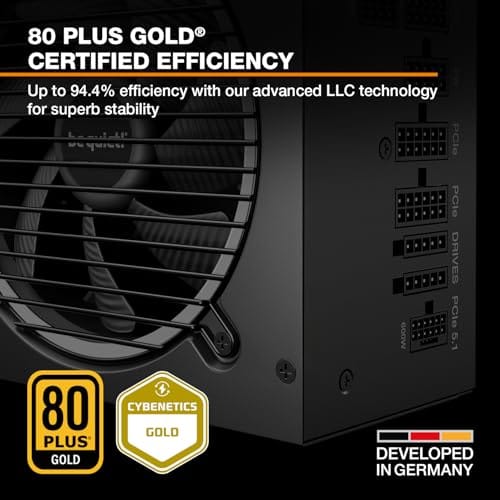
The symptom pattern is telling. It shuts down under load, gaming, rendering, a benchmark, not at the desktop. It happens more once the system’s warm. And it started around the update because the update changed the load profile. If your PSU is several years old, lacks the ATX 3.1 transient handling, or sits below the wattage a modern GPU wants, it’s the prime suspect. A quality modern unit like the be quiet! Pure Power 13 M 1000W is built for exactly this problem: 80 Plus Gold, ATX 3.1, PCIe 5.1 ready, single rail, and rated to handle overclocked GPU spikes without tripping.

Pros
- Native 12V-2x6 connector on ATX 3.1 platform ready for RTX 40 and PCIe 5.1 GPUs.
- Handles power excursions up to 2000W transient, headroom for RTX 4080 and 4090 class spikes.
- Semi-passive zero-RPM mode below moderate load keps idle acoustics near inaudible.
- LLC topology with single 12V rail delivers stable voltage regulation for overclocked GPUs.
Cons
- Limited independent owner feedback available at time of writing, riple and hold-up data unverified.
- Only four PCIe 6+2-pin connectors, tight for legacy multi-GPU or high-CPU-EPS custom lop builds.
- 80 PLUS Gold trails Platinum and Titanium units at similar wattage on sustained efficiency.
The be quiet! Pure Power 13 M 1000W is a high-end ATX 3.1 PSU aimed at builders pairing a Ryzen 7000/9000 or Core Ultra CPU with an RTX 4070Ti Super,4080 Super, 4090, or RX 7900 XTX class GPU. It targets buyers who want native 12V-2x6 wiring and transient headroom without stepping up to Platinum-tier pricing.
The defining trait is ATX 3.1 compliance with power excursion handling up to double the rated 1000W, meaning brief 2000W spikes from modern GPUs should not trip OCP. Combined with the single 12V rail and LLC topology, this suits overclocked GPUs where transient behavior, not average draw, tends to triger shutdowns on older units.
Trade-offs are typical at this tier. 80 PLUS Gold is eficient but not Platinum, soustained heavy loads generate more heat than a higher-rated unit. Four PCIe 6+2-pin connectors is standard, though builders running EATX boards with dual EPS plus a 4x8-pin GPU adapter should verify cable counts against the modular panel before buying.
Buy this if you are building a single-GPU gaming or content rig around a 250-450W TGP card and want native 12V-2x6 without paying Platinum prices. Skip this if you need sub-audible acoustics under sustained full load, or if you already own a workingATX 3.0 unit with a 12VHPWR pigtail.
ATX standard: Full ATX 3.1 compliance with native 12V-2x6 connector integration, which corects the sense-pin issue found on early 12VHPWR cables. Supports PCIe 5.1 GPUs at spec, and handles transient power excursions up to 2000W, roughly double the 1000W continuous rating.
GPU pairing: Comfortable for GPUs in the 250W to 450W TGP range, including RTX 4080 Super (320W) and RTX 4090 (450W) with headroom for overclocking. Four PCIe 6+2-pin outputs cover legacy 8-pin GPUs; the native 12V-2x6 removes the need for a 4x8-pin adapter dongle.
Efficiency and cooling: 80 PLUS Gold rated up to 94.4% at optimal load, typically around 50% utilization. The 120mm be quiet! fan runs semi-passive with zero-RPM below a load threshold not specified by the manufacturer, so idle and light workloads should remain silent.
Cabling: Fully modular design, leting builders omit unused SATA and Molex leads. Exact cable lengths and connector counts beyond the four PCIe 6+2-pin and single 12V-2x6 are not specified in source material, verify against your case routing before purchase.
Cause #3: Small-form-factor and SFX supply limits
If your shutdown is happening in a compact or small-form-factor build, the PSU story gets tighter. SFX units pack the same job into a smaller shell, so thermal headroom is slimmer and a marginal unit tips over faster once an update bumps the load. The same transient-spike problem from Cause #2 hits harder in a small case where heat builds and airflow is limited. A warm SFX supply near its ceiling is a classic random-shutdown source after a load-changing update.
For these builds, a high-grade SFX unit matters more, not less. The Corsair SF750 (2024) at $159.99, 4.1 rating, is a fully modular SFX supply, 80 Plus Platinum, ATX 3.1 compliant, PCIe 5.1 ready, with a low-noise design and mounting bracket included. Platinum efficiency means less waste heat in a tight case, and ATX 3.1 compliance means it’s built to ride out the GPU power transients that trip lesser units. If your compact rig started cutting out after an update, and the software fixes above didn’t hold, a proper SFX supply is the fix. Our small-form-factor PSU guide digs deeper into SFX sizing.

Pros
- ATX 3.1 compliant with PCIe 5.1 support, resists transient spikes from RTX 50 and RX 9000 series GPUs.
- Zero RPM Mode eliminates fan noise at low and medium loads, a real advantage in acoustically sensitive SFF builds.
- Fully modular design with short SFX cables reduces cable management friction in sub-10-liter cases.
- 105 degree C Japanese capacitors indicate quality component selection typical of high-tier SFX units.
Cons
- Limited owner feedback at time of writing; real-world noise, ripple, and transient performance are unverified by community data.
- Short SFX cables are unsuitable for mid-tower or full-tower cases without aftermarket cable extensions.
- 750W ceiling may fall short for extreme SFF builds pairing a 300W-plus TGP GPU with a high-core-count CPU.
The Corsair SF750 (2024) is a high-end SFX PSU targeting SFF builders who need substantial wattage in a compact footprint. With 80 Plus Platinum certification and ATX 3.1 compliance, it sits at the upper tier of the SFX market, aimed at builders pairing it with current-gen discrete GPUs inside sub-10-liter cases.
The most defining specification here is ATX 3.1 compliance combined with PCIe 5.1 readiness. This means the unit is rated to handle the sharp transient power spikes that RTX 50 and RX 9000 series GPUs can produce, where non-compliant PSUs may trigger overcurrent protection. At 750W, it covers most single-GPU SFF configurations without derating concerns.
The honest trade-off is the review data gap. At time of writing, no substantial owner feedback exists to validate Corsair's noise and ripple claims under real load. The Zero RPM Mode claim and 92mm fan acoustics are based on spec sheets only. Buyers should also note that SFX cable lengths are intentionally short and will not reach connectors in mid-tower or larger cases without extensions.
Buy this if you are building an SFF PC around a single high-TGP GPU and need confirmed ATX 3.1 compliance in a modular SFX unit. Skip this if you want a large ATX case build, need more than 750W for a dual-component high-wattage system, or require extensive owner testing before purchasing.
Form Factor and Mounting: This is a standard SFX form factor PSU, not SFX-L. Verify your case specifies SFX compatibility before purchasing. An SFX-to-ATX bracket is included, allowing installation in ATX-footprint cases, though short cable lengths will require extensions in anything larger than a compact SFF enclosure.
Power Standard and Connector: ATX 3.1 compliant with PCIe 5.1 readiness. The unit supports the 12V-2x6 connector standard, relevant for RTX 40 and RTX 50 series GPUs as well as AMD RX 7000 and RX 9000 cards with high transient draw. Non-ATX 3.1 units can trigger OCP shutdowns above 150 percent peak load spikes.
Efficiency and Thermal Operation: 80 Plus Platinum certification indicates roughly 92 percent efficiency at 50 percent load under 115V. The 92mm PWM fan uses a fluid dynamic bearing and Zero RPM Mode activates at low loads, which in SFF cases where airflow is restricted can noticeably reduce system acoustic output.
GPU Wattage Pairing: At 750W, this PSU pairs appropriately with GPUs up to approximately 300W TGP when combined with a mid-range CPU. For a 320W-plus TGP GPU alongside a 65W-plus CPU, headroom becomes tight and a higher-wattage SFX unit should be considered instead.
Preventive maintenance
Once it’s stable, keep it that way. Dust chokes airflow and cooks a PSU’s internals, so blow out the supply and case filters a couple times a year. Don’t run your PSU pinned near its rated max; leaving 30 to 40 percent headroom keeps efficiency up and protection circuits calm during spikes. When you do major Windows updates, take a minute afterward to recheck your power plan and confirm fast startup didn’t sneak back on. That one habit heads off a surprising number of these shutdowns before they start.
It also pays to size the supply right from the start. When people ask why a build keeps tripping, the answer is often a PSU chosen to exactly match the system’s average draw with no cushion for spikes. A modern GPU can momentarily pull double its rated power for a few milliseconds, and a supply with no headroom trips on those transients. Picking a unit rated 30 to 40 percent above your measured load isn’t overkill, it’s insurance against exactly this failure. That headroom also keeps the fan quieter and the unit cooler, since it’s never straining. Cheap peace of mind for a part that, when it fails, takes the whole system down with it.
When it’s not fixable: what to replace
If you’ve disabled fast startup, cleaned the drivers, confirmed the power plan, and the machine still black-screens under load, the PSU is the part to replace. A supply that trips its own protection under normal gaming load is done, no firmware fix brings it back. For a standard ATX build, size up to a quality 1000W-class unit like the be quiet! Pure Power 13 M, which at $139.90 with a 4.8 rating and ATX 3.1 support is built for modern GPU spikes. For a compact rig, the Corsair SF750 SFX covers the same job in a small shell.
Match the wattage to your GPU’s transient behavior, not just its average draw, and favor ATX 3.1 and PCIe 5.1 support so the unit handles the millisecond spikes cleanly. A single-rail design simplifies load distribution for a high-end card. If you’re pairing it with a hungry chip, our high-end GPU PSU picks line up wattage against real cards. Replace the supply, and the random shutdowns almost always vanish for good.
Tools and parts needed
You don’t need much. A Phillips screwdriver, a can of compressed air, and ten minutes to swap the supply. If you’re replacing the PSU, grab the modular cables that ship with the new unit and don’t reuse old modular cables from a different brand, since pinouts differ and a mismatched cable can damage components. That’s the one part where you can’t improvise. Everything else is standard build gear you probably already own.
A basic multimeter is a nice extra if you want to confirm the wall voltage is steady, though it’s optional for most people. More useful is a monitoring utility like HWiNFO to log the 12V rail while you push the system, since a rail sagging under load is a strong sign the supply is failing rather than the software. If you’re not comfortable opening the case at all, none of this requires soldering or advanced skill, a PSU swap is one of the simplest hardware jobs in a build. Unplug, unscrew, reconnect, done.
Common questions
Why did my PC only start shutting down after a Windows update?
The update usually didn’t break your hardware, it changed the load or a power setting. A new GPU driver can raise power draw, and updates often re-enable fast startup or reset your power plan. On a PSU that was already marginal, that extra load is enough to trip its protection. Fix the software settings first, and if shutdowns persist under load, suspect the supply.
How do I know it’s the PSU and not the motherboard?
Look at the pattern. PSU-related shutdowns hit under load, gaming or benchmarking, come with no blue screen, and often log a Kernel-Power 41 event. Motherboard or RAM faults tend to throw actual crash codes or fail to post. An instant black screen under heavy GPU load, with the fixes above ruled out, points squarely at the power supply.
Do I need an ATX 3.1 power supply?
If you run a modern high-end GPU, it’s a real advantage. ATX 3.1 units are built to handle the large millisecond power transients current cards produce, the exact spikes that trip older supplies into shutdown. Both the be quiet! Pure Power 13 M and the Corsair SF750 are ATX 3.1 compliant and PCIe 5.1 ready, which is why they hold up where an aging unit fails.
Can dust really cause random shutdowns?
Indirectly, yes. A dust-clogged PSU or case runs hotter, and heat lowers a supply’s effective capacity and pushes its protection circuits closer to tripping. It won’t be the whole story on its own, but a filthy PSU on the edge of its limit will fail sooner and more often. Clean it out a couple times a year as cheap insurance, and keep the case intake filters clear so the supply isn’t pulling warm, dusty air in the first place.






























Write Your Review
No reviews yet. Be the first to share your experience!